 March 13, 2008 at 05:04
Little secrets about: config, manual configuration
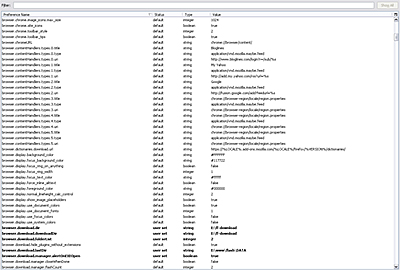
After reading a post about reducing RAM consumption in FF, I decided to go deeper into the about: config settings page and find something interesting there. Looking ahead, I’ll say that my searches were successful.
To begin with, you can make all the changes in the file .. \ Mozilla Firefox \ greprefs \ all.js or in the folder with your configuration settings stored in C: \ Document and Settings \ or ~ / .mozilla / firefox in Windows and Linux accordingly. As you already noticed, Lys stores settings in js, and for each setting it calls a special function pref (prefName, value), and the function itself is in the file .. \ Mozilla Firefox \ defaults \ autoconfig \ prefcalls.js ! There you go.
Table of contents:
- Dom
- Miscellaneous
- Acceleration
- References
- Footnote
Dom
For the most part, this group stores settings for working with scripts with windows (popups), such as whether to allow scripts to open windows or not, whether to allow the address bar to be hidden, etc. now in order:
dom.allow_scripts_to_close_windows
Whether to allow scripts to close windows.dom.disable_image_src_set
disable the ability to change the path to the image, I think, a completely useless setting.dom.disable_open_click_delay
time after which the possibility of opening new popups after one click is canceled.dom.disable_open_during_load
disable the ability to open a pop-up window with a script when the page loads, by default true, you need a pain in the box - set to false, look at the Internet through the eyes of the user of the beginning of the first decade of the twenty-first century))dom.disable_window_flip
prevent scripts from minimizing / maximizing windows.dom.disable_move_resize
Prevent scripts from resizing or moving windows.dom.disable_window_open_feature.close
prevent scripts from disabling the close button on windows.dom.disable_window_open_feature.directories
prevent scripts from opening / closing the bookmarks bar.dom.disable_window_open_feature.location *
prevent scripts from turning off the address bar. True and only true, for knowing where you are will not hurt.dom.disable_window_open_feature.menubar
prevent scripts from hiding the menu bar.dom.disable_window_open_feature.minimizable
prevent scripts from disabling the minimize button on windows.dom.disable_window_open_feature.personalbar **
prohibiting scripts from hiding personal window toolbars is a pretty useful thing if extensions like skype delicios, etc. are used.dom.disable_window_open_feature.resizable *
to prohibit scripts from disabling the ability to resize the window, we unambiguously set it to true so that no more wise guy could lock the triliste's application into the 200x200 window, thank God they are slowly dying out.dom.disable_window_open_feature.scrollbars **
Prevent scripts from hiding scrollbars. You can set it to true if there is no mouse wheel.dom.disable_window_open_feature.status **
to prohibit scripts from hiding the status bar, I forbid, because neh. )))dom.disable_window_open_feature.titlebar
prohibit scripts from hiding the window title, I wonder how is it?dom.disable_window_status_change
prohibit changing the text in the status bar, although this has gone out of fashion, but I decided to leave, you never know what))) **dom.event.contextmenu.enabled
allow scripts access to the context menu event, why not?dom.max_chrome_script_run_time
maximum execution time of a chrome script, i.e. scripts of your extensions, they are also mostly written in js.dom.max_script_run_time
the maximum execution time of the script in milliseconds, it seems.dom.popup_allowed_events
events that can open a popup window, by default “change click dblclick mouseup reset submit”, you can add your own or remove something from the list.dom.popup_maximum *
the maximum number of popups opened with one script, of course we set 2, but what for more?Miscellaneous
In addition to everything, the following settings have been found regarding various js applications
dom.disable_cookie_get
prevent scripts from reading cookies.dom.disable_cookie_set
prevent scripts from setting cookies.dom.disable_location.hostname.set **
prohibit changing scripts host name in the address bar, controversial setting, because Now many flash sites use this function to navigate the site. Disable it if you really understand the previous sentence and therefore decided to disable it. )))network.cookie.prefsMigrated
allows you to save cookies when changing versions of Fox, set to true.intl.charset.default
default encoding, set to utf-8 or windows-1251view_source.editor.external **
use an external program to view page code?view_source.editor.path **
path to an external viewer.layout.word_select.eat_space_to_next_word **
literally: eat a space for the next word; determines whether the space following the word is captured by double-clicking on the word. Why didn’t I know about this before!layout.word_select.stop_at_punctuation
when highlighting, stop at the signs of foaming and other punctuation))Acceleration
Here are a few settings to help you speed up your little fox.
network.http.pipelining *
establishes the possibility of tunneling (correct me, someone), i.e. sending multiple requests. We set true.network.http.proxy.pipelining *
the same as the previous one, but only for the proxy, and also true.network.http.pipelining.maxrequest *
the maximum number of simultaneous requests, put thirty, this is enough.nglayout.initialpaint.delay **
sets the delay in seconds before starting to render the page. I set 0 for myself.network.prefetching_next
request of the next document specified in , set to true.network.http.redirection-limit **
limiting the number of possible redirects, I set 5, the default is 20.network.http.max-connections **
the maximum number of connections, set thirty, with a good channel, you can put more, the main thing is that there is enough RAM.network.http.max-connections-per-server **
the maximum number of connections to the server can be set higher.network.http.max-persistent-connections-per-server **
maximum number of permanent connections to the server.network.http.max-persistent-connections-per-proxy **
same as previous only with proxy.References
1. Network settings , etc.
2. Cookies settings .
3. Note on setting up multi-connections .
4. Some settings in English
5. Translation of some settings into Russian
6. List of settings on Mozilazin.org with important notes and possible settings.
Footnote
* - recommendations marked with one asterisk are mandatory (according to the opinion of the author, ed.).
** - such recommendations remain at your discretion.
PS Thanks k48 , va1en0k and kodx for the correction!









