Benchmarking PostgreSQL with large Linux pages
- Transfer
 The Linux kernel provides a wide range of configuration options that can affect performance. It's all about getting the right configuration for your application and workload. Like any other database, PostgreSQL uses the Linux kernel for optimal configuration. Poorly tuned settings can result in poor performance. Therefore, it is important that you measure database performance after each tuning session to avoid performance degradation. In one of my previous publications, “Tuning Linux Kernel Parameters for PostgreSQL Optimization,” I described some of the most useful Linux kernel parameters and how they can help you improve database performance. Now I'm going to share my test results after setting up large Linux pages with a different PostgreSQL workload. I performed an exhaustive set of tests for different PostgreSQL load sizes and the simultaneous number of clients.
Testing machine
- Supermicro server:
- Intel® Xeon® CPU E5-2683 v3 @ 2.00GHz
- 2 sockets / 28 cores / 56 threads
- Memory: 256GB of RAM
- Storage: SAMSUNG SM863 1.9TB Enterprise SSD
- Filesystem: ext4 / xfs
- OS: Ubuntu 16.04.4, kernel 4.13.0-36-generic
- PostgreSQL: version 11
Linux kernel settings
I used the default kernel settings without any optimization / tuning other than disabling transparent large pages (Transparent HugePages). Transparent large pages are enabled by default and highlight the page size, which may not be recommended for use by the database. Databases typically require large, fixed-size pages that are not covered by transparent large pages. Therefore, it is always recommended that you disable this feature and use classic large pages by default.
PostgreSQL Settings
I used the uniform PostgreSQL settings for all tests to record different PostgreSQL workloads with different settings for large Linux pages. Here is the PostgreSQL setting used for all tests:
postgresql.conf
shared_buffers = '64GB'
work_mem = '1GB'
random_page_cost = '1'
maintenance_work_mem = '2GB'
synchronous_commit = 'on'
seq_page_cost = '1'
max_wal_size = '100GB'
checkpoint_timeout = '10min'
synchronous_commit = 'on'
checkpoint_completion_target = '0.9'
autovacuum_vacuum_scale_factor = '0.4'
effective_cache_size = '200GB'
min_wal_size = '1GB'
wal_compression = 'ON'
Testing scheme
In testing, the testing scheme plays an important role. All tests are performed three times for 30 minutes for each run. I took the average of these three indicators. Tests were conducted using the PostgreSQL pgbench performance testing tool . pgbench works with a scale factor, with one scale factor of approximately 16 MB of workload.
Large Pages (HugePages)
Linux, by default, uses 4K pages of memory along with large pages. BSD has Super Pages, while Windows has Large Pages. PostgreSQL only supports large pages (Linux). In cases of high memory usage, small pages reduce performance. By installing large pages, you increase the allocated memory for the application and, consequently, reduce the operational costs that arise during the allocation / swapping; that is, you increase productivity using large pages.
Here is the setup for large pages when using a large page size of 1 GB. You can always get this information from / proc.
$ cat / proc / meminfo | grep -i huge
AnonHugePages:         0 kB
ShmemHugePages:        0 kB
HugePages_Total:     100
HugePages_Free:       97
HugePages_Rsvd:       63
HugePages_Surp:        0
Hugepagesize:    1048576 kB
For more information on large pages, please read my previous blog post.
https://www.percona.com/blog/2018/08/29/tune-linux-kernel-parameters-for-postgresql-optimization/
Usually large page sizes are 2 MB and 1 GB, so it makes sense to use a size of 1 GB instead of a much smaller size of 2 MB.
https://access.redhat.com/documentation/en-us/red_hat_enterprise_linux/6/html/performance_tuning_guide/s-memory-transhuge
https://kerneltalks.com/services/what-is-huge-pages-in-linux /
Test results
This test shows the overall effect of various sizes of large pages. The first test suite was created with the default page size on Linux 4K without including large pages. Note that transparent huge pages were also disabled and remained disabled throughout all of these tests.
Then the second set of tests was performed on large pages of 2 MB. Finally, the third set of tests runs with large pages of 1 GB.
All of these tests were performed in PostgreSQL version 11. The sets include a combination of different sizes of the database and clients. The graph below shows the comparative performance results for these tests with TPS (transactions per second) on the Y axis, database size and number of clients per database size on the X axis.

It can be seen from the above graph that the performance gain with large pages increases with the number of clients and the size of the database, if the size remains in the previously allocated buffer in shared memory.
This test shows TPS compared to the number of clients. In this case, the database size is 48 GB. On the Y-axis, we have TPS, and on the X-axis, we have the number of connected clients. The database size is small enough to fit in a shared buffer that is set to 64 GB.
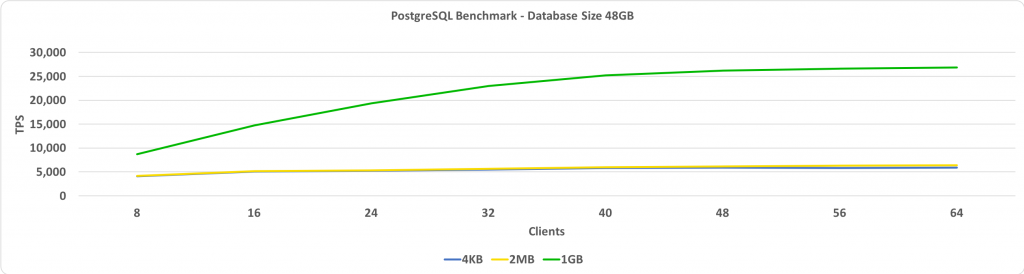
If large pages are set to 1 GB, then the more clients, the higher the relative performance gain.
The following graph is the same as the one above, except for the 96 GB database size. This exceeds the size of the shared buffer, which is set to 64 GB.
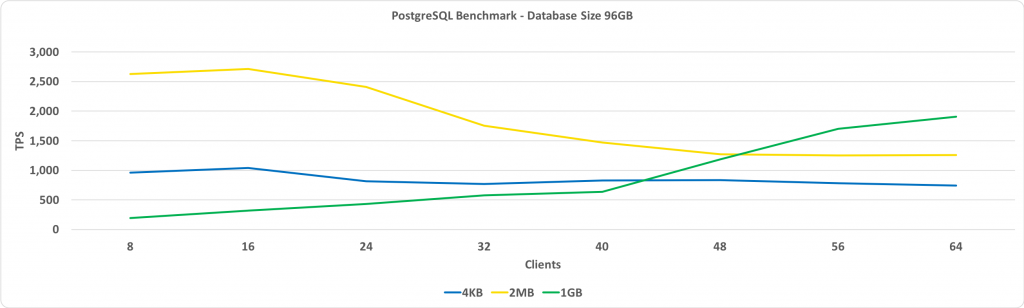
The key observation here is that performance with large pages of 1 GB increases as the number of clients increases, and ultimately it gives more performance than large pages of 2 MB or the standard page size of 4 KB.
This test shows TPS depending on the size of the database. In this case, the number of connected clients is 32. On the Y-axis, we have TPS, and on the X-axis - database sizes.
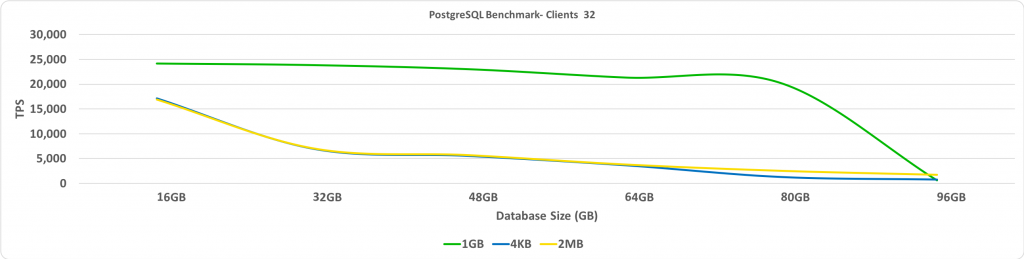
As expected, when the database goes beyond the pre-allocated large pages, performance is significantly reduced.
Summary
One of my key recommendations is that we should disable Transparent HugePages. You will see the greatest performance gain when the database is placed in a shared buffer with large pages enabled. Choosing the size of large pages requires a small amount of trial and error, but this can potentially lead to a significant increase in TPS when the database size is large, but remains small enough to fit in a shared buffer.