 March 13, 2019 at 11:49
Game save history: from passwords on paper to clouds
- Transfer
Earlier this year, a Twitter user named Paul Hubans shared a screenshot taken by his 87-year-old grandmother at Animal Crossing: after four years of daily games, she accumulated 3,580 hours - almost 150 days of total playing time. The ability to save progress and return to the game has created an amazingly deep gameplay. But it was not always so. How did we come to this? Let's figure it out by studying the history of saving games.
But before we begin, a small remark: it is worth saying that home computers compared to video game consoles had to make completely different compromises, and they had the ability to save almost in the very first games. In this article we will look at the history of saving games on game consoles, and it will be much more interesting.
It doesn’t look very good, but the game allowed to continue the gameplay.
Magic words: why passwords became fashionable, and why they were soon forgotten
In the beginning it was ... not so much. Video games were simple and abstract - you insert a quarter into a Pong machine, play until you lose, and then continue with your next life. The very first commercial games were built on discrete logic components, and not on more functional microprocessors, and this imposed restrictions on the complexity of the game process. Fortunately, for the people who lived during the dawn of video games in the mid-1970s, it was more than enough.
Everything began to change in the late 1970s, when the cost of microprocessors fell, and home computers became more accessible to the average consumer. This led to the first serious gap in the video game industry: on the one hand, the exclusively game process of arcade machines and home video consoles, on the other, a completely different set of games available on multifunctional home computers. Typically, home computers lagged behind specialized game consoles in terms of graphics and sound, but had the advantage of storing data: first, thanks to floppy disks, and later to voluminous hard disks. Game consoles took a long time to catch up with computers in this regard, but for now they preferred fast-paced arcade games and avoided deep gameplay research.
Home video game system games, such as the Atari 2600 and Nintendo Entertainment System, were stored on cartridges with ROM chips - read-only memory. Even if game developers wanted to offer something more than simple arcade games, they did not have a device on which to save progress.
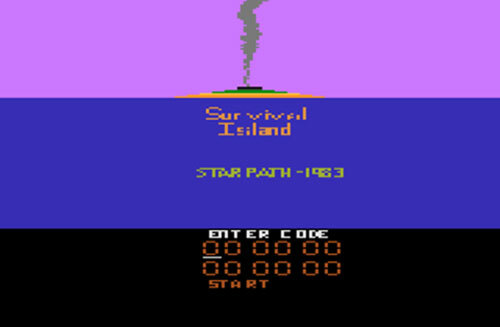
What kind of solution did they come up with? Passwords Survival Island
became the first home video game with a password system1983 for the Atari 2600. Primitive by modern standards, Survival Island had a technical advantage - it had a huge world for research, the ability to collect items and manage inventory, 3D mazes and, of course, passwords that allowed you to continue the game from the place where you finished last time. This is one of the few games for the 2600 that had a password system.
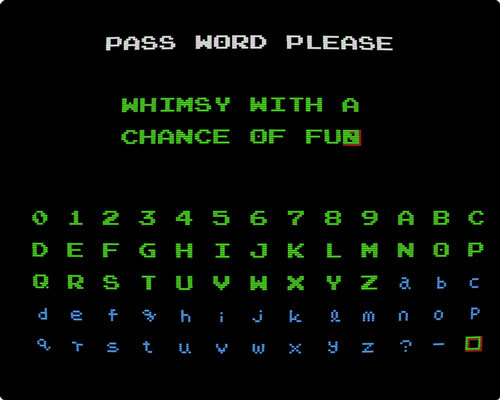
Metroid Password Set Screen.
Truly passwords gained popularity a few years later on the Nintendo Entertainment System. NES was a technological leap compared to 2600 and could provide a much richer gameplay. Password-enabled games began to appear a year after the advent of NES in North America, and Konami Castlevania , released in May 1987, was the first of them . By June of that year, Nintendo herself had begun at the CES summer exhibition to advertise the Password Pak line of games. The first two Nintendo games with password support were Kid Icarus and Metroid .
Passwords opened up a new level of possibilities in games, but they still limited. Only a fairly small amount of information could be stored in passwords, otherwise they would become too long. In addition, writing down even the shortest passwords distracted users from the gameplay. In Japan, both of Nintendo's first Password Pak were released for console floppy drives, which were distributed only in the Japanese market. Thanks to the use of floppy disks, progress could be saved directly to the game disc, which eliminated the need for boring players to rewrite passwords on paper.
The world needed another technological breakthrough. How can I record progress on game cartridges if they are read-only?
Batteries are supplied: how memory got into the cartridges themselves
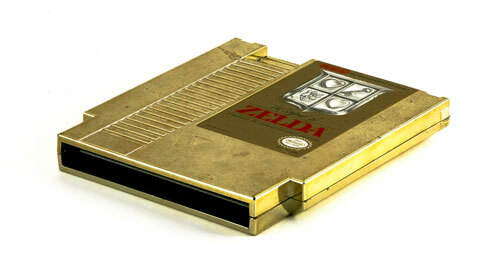
Nintendo announced the next breakthrough on the same show, where it announced the release of Password Pak. The Legend of Zelda , already released in Japan on a floppy disk, will be delivered to North America on cartridges. Instead of passwords, it will use a real save system, as in the Japanese version. Nintendo managed to achieve this with a cunning engineering trick: inside the cartridge, she placed a small long-lived battery called a button cell, which essentially deceived the game: it believed that it would never be turned off, and this allowed to keep the progress of three different game sessions.
The gameplay of the game Pop & Chips, with which you are most likely not familiar.
The Legend of Zelda was not the first cartridge with battery (for the first time Nintendo has used this concept in a programming environment for its Japanese console in 1984 ), nor was the first game with a battery (that honor belongs to 1985 playing the Pop & Chips Sheet , issued on forgotten console called Super Cassette Vision). However, she was a huge step forward. In previous battery-supported cartridges, players themselves had to insert their own AA batteries, which made the cartridges clumsy and heavy. The Legend of Zelda , on the other hand, seemed like a regular game.
Nintendo originally planned to distribute its optional floppy drive around the world, but the hit Zelda , released just a year before in Japan, was the last nail in the coffin of the disk system. The Nintendo Disk System was designed to provide a large drive for large games and the ability to save player progress, but advances in cartridge technology in just a year turned it into an outdated technology. The volume of cartridges even exceeded the memory of floppy disks, and with the advent of battery savers, both advantages of disks reached ordinary consoles.
Over the next few years, both passwords and batteries grew in popularity. At first, passwords were a standard solution for recording simple progress, and batteries were used for more complex adventure and role-playing games. But with the beginning of the 1990s, battery-powered storage has become ubiquitous. Of the five games released for the second Nintendo console in the North American market, two had battery savers.
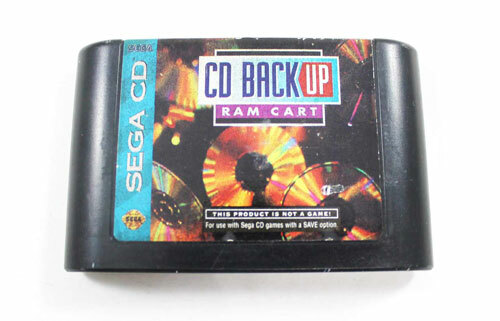
Sega once sold cartridges that did nothing but save games.
Why did a CD-ROM drive need a memory card
Cartridges have successfully overcome the threat of obsolescence, but with the advent of the new decade, they are faced with a new competitor: CD-ROM. First made available to Japanese console gamers in 1988 on an NEC add-on for its PC Engine console (known in North America as TurboGrafx-16), the technology began to gain popularity in the West after the addition of its much more popular Genesis console in 1992 by Sega . Games on CD-ROM provided a huge leap in capacity, hundreds of times more than any cartridge of the time, but they had an “Achilles heel” - players could not keep their progress. Unlike cartridges, which were quite versatile and allowed to incorporate innovations into plastic cases (for example, battery-powered storage), CDs remained CDs.
What was the solution? Continue to use cartridges. Both NEC and Sega added memory to save games to their CD-ROM consoles, but Sega went a little further by inventing their own CD Back Up RAM Cart , which not only increased the storage space for saved games, but also allowed players to transfer saved games to other consoles visiting friends. Essentially, the Back Up RAM Cart took battery-powered storage technology from Zelda and put it in a separate cartridge without playing. So the memory card was born.
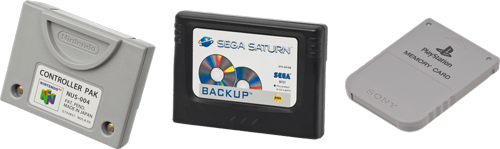
By the mid-90s, each console had a slot for memory cards, even those that did not need it.
The following disc games consoles happily adopted the concept of memory cards. The new Sega Saturn console used the same “internal memory plus memory cartridge” system as the Sega CD, but it showed its fallacy. Sony PlayStation and all other subsequent disk systems used exclusively memory cards. Even the Nintendo 64, known for being a fan of cartridges in the era of optical discs, had memory cards (however, many of its games still used cartridges with batteries).
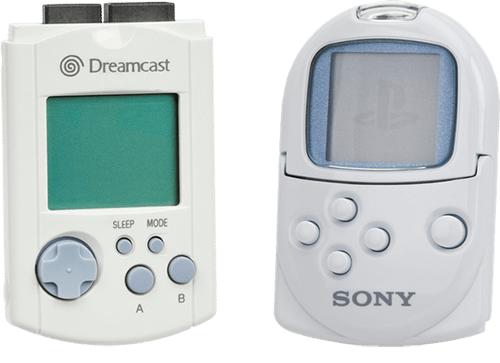
Sega Dreamcast VMU and Sony PocketStation.
Probably the peak of the development of memory cards was the release of Sega Dreamcast, in which the so-called Visual Memory Units appeared, replacing conventional memory cards. These memory cards themselves were small gaming systems capable of not only storing saved games, but also downloading software from the main console.
Japanese Godzilla game ad for VMU.
VMU provided completely new features. For example, Sonic Adventure allowed you to transfer the “Chao” similar to Tamagotchi to VMU, where you could increase their characteristics without a game console. Sony tried to compete with this functionality by releasing the PocketStation line of peripherals for its PlayStation, but the idea did not take off. Therefore, smart memory cards have remained more likely a historical curiosity than a reflection of a new step forward.
“With the launch of its Visual Memory Unit (VMU), Sega gave birth to the concept of a two-dimensional memory card. Instead of just storing games in a boring gray piece of plastic, players can interact with it. Explore the dungeons of your favorite RPG or tune the just-won race car - and all this can be done right on the go. ”
A quote from a 1999 article from the first issue of Official Dreamcast Magazine that talks about the benefits of VMU , which has become a truly unique device in game history (even though Sony tried to steal its success), and its ingenuity is highly appreciated today. (And yes, someone managed to stick the Raspberry Pi inside that device .)

Nintendo's Arcade Machine F-Zero AX had a slot for a Gamecube memory card.
One of the advantages of memory cards: they can be taken to arcade halls
Gamers quickly got used to the fact that you can take your saved games with you. In addition to the opportunity to share their progress and collaborate, memory cards allowed players to exchange competitive information and records of their playing skills. Arcade game developers saw this as an opportunity to increase the attractiveness of their projects, which led to the creation of several compatible arcade machines with memory cards.
A very popular example of this was Dance Dance Revolution.Konami Some DDR arcade machines were equipped with slots for Sony PlayStation memory cards, which allowed players to save settings and records. DDR even provided a certain degree of interaction between home consoles and machines: some settings from the game console could be transferred to an arcade game using a memory card.
Nintendo borrowed this idea from the 2003 F-Zero AX , an arcade game of the F-Zero GX released the same year on the GameCube. The F-Zero AX had a slot for GameCube memory cards , and it, like DDR, allowed players to transfer settings from the home console to arcade machines.
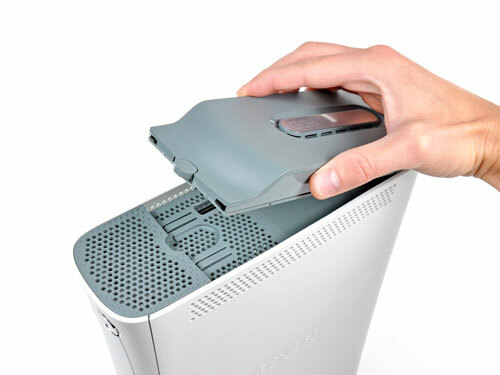
Xbox 360 Hard Drive
Goodbye, memory cards, hi, hard drives: save games to mass storage devices
Despite its convenience, memory cards had one serious drawback: the small storage capacity. At the turn of the century, the industry shifted from battery-powered memory to non-volatile flash memory, the same as that used by USB flash drives or camera memory cards. Unfortunately, flash was extremely expensive at the time, so memory card sizes were small. Upset gamers had to delve into the contents of their memory cards, trying to find a place for one game by deleting the save of another.
An alternative to memory cards appeared on the sixth generation of consoles. Microsoft's Xbox made history as the first console to ship with a hard drive as standard, while the PlayStation 2 supported hard drives as optional equipment. Hard disks opened up many new opportunities for gamers, including almost unlimited storage to save progress in games. The Xbox also had traditional memory cards, but their 8 MB capacity was incomparable with 4 or 8 GB hard drives inside the console. The days of the memory card were numbered.
In 2011, cloud storage mechanisms became the standard for consoles . By the time the seventh generation of consoles was released in 2005, both hard drives and network connectivity had become standard. At first, the network was used only for online multiplayer, but over time, more and more network functions appeared in the consoles. For several months of 2011, Sony and Microsoft added the ability to save to the cloud in their consoles, untying the save from physical equipment and allowing players to not even think about them.
Over the past three decades, saved games have moved from paper to cartridges, then to memory cards, then to hard drives, and then ... somewhere on the Internet. Having moved to the cloud, the conservation most likely reached its final form. Cloud storage and network connectivity have become so standard that many games simply continue to keep progress in the background.
At the same time, we lost something special. Children in the 80s exchanged passwords on pieces of paper. Children in the 90s carried memory cards in backpacks to visit friends. Children in the 2000s got an amazing opportunity to compete with each other anywhere, but lost this small piece of magic that arose when interacting with a precious physical object .
No one would want to go back to where we started, but this is worth remembering. The next time you see the animation "save ..." in the corner of the screen, think about how far we went. This is really surprising.









