 February 21, 2019 at 10:57
KubeSail and its free Kubernetes cluster for developers
At the beginning of the year, a new KubeSail web service was created, created by two American Kubernetes enthusiasts, who were set to “make the benefits of Kubernetes more accessible to all developers.” To achieve it, they proposed a K8s cluster in the form of a managed service, within which there is a free tariff plan.
The authors of KubeSail, claiming that Kubernetes has already become the standard for building infrastructure, admit a high threshold for entry, which "raises doubts about whether the benefits of this technology will cover the costs [of training and start]." In order to mitigate this drawback, they offer an easy-to-use service, the free version of which should be “useful for learning Kubernetes or hobby projects that are not worth the cost of 140 USD / month, as in [Amazon] EKS”.
The current KubeSail tariff plans are as follows:
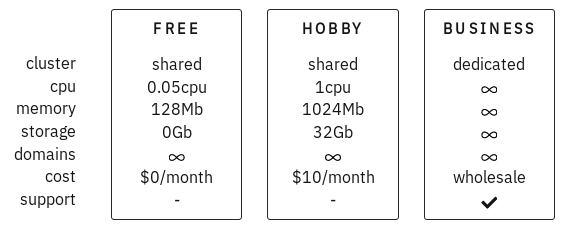
... and prices with flexible restrictions on CPU / memory and storage are promised soon.
What is better than other options?
That's what the developers themselves (and not only them) say , answering questions from Reddit readers about the differences between their offer and what they already have.
Compared to running Minikube locally:
“More than one master node, which allows you to work with this highly accessible configuration. You should be able to drop one node and not suffer from broken functions. Minikube, I am sure, only one master is possible with many workers. ”
“... you can also run production installations in the cluster and make them available on the Internet. This is not only cool for learning, but also a really high-availability K8s cluster that will not turn off when the laptop cover is closed. ”
Compared to other managed Kubernetes vendors (examples include GKE and Digital Ocean):
“DO is really cheaper than AWS [which comparison with EKS is given above] , but I must say that we support HA configurations at a free rate (you can run three small pods on three nodes) and use very powerful machines with fast SSD- drives and network connections, so I’m ready to bet that the pod on KubeSail will be faster than the 2-gigabyte instance in DO! Although competing with DO will be really difficult, so we are going to focus on training and user interface / utilities. ”
More than managed K8s
Although the service is primarily focused on developers, it can also be useful for DevOps engineers. In addition to the simple web interface itself (details about it will follow below) , the authors promise to release development tools for Kubernetes and tutorials that will simplify deploying and running applications in clusters. "The first sign" here was the tool The deploy-to-kube , designed to deploy Node.js applications in-Kubernetes single command (and even without the need to create for this configuration - all the necessary data is requested online):

But back to the actual controlled K8s to the cluster that KubeSail offers us.
Work with KubeSail
The web interface of the service serves the purpose of the project: it is very simple and allows you to get the cluster at your disposal in just a few clicks.
After logging in via a GitHub account, the web interface prompts you to get down to business immediately, i.e. roll out the first deployments to the created Kubernetes cluster:
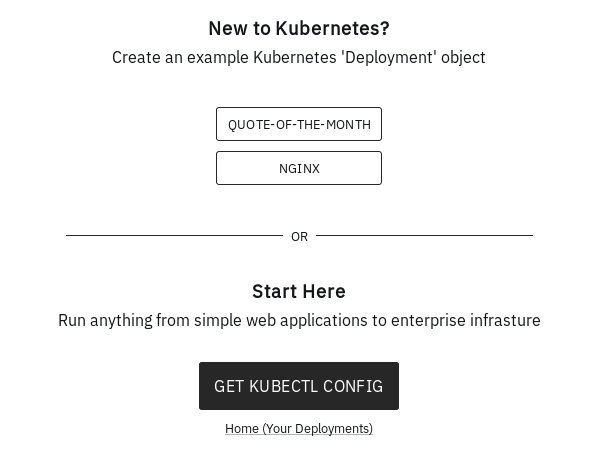
Let's choose one of the ready-made examples for this -
QUOTE-OF-THE-MONTH. This is a random JSON quote service. The deployment is fast (<10 seconds): 
Check the result by accessing an externally accessible endpoint:
$ curl https://qotm-2d7ab6efca.kubesail.io/
{
    "hostname": "qotm-5d9f776595-6qfmv",
    "ok": true,
    "quote": "A small mercy is nothing at all?",
    "time": "2019-02-21T02:54:15Z",
    "version": "2.0"
}
Works! And here is what the interface looks like to deployments already uploaded to the cluster:
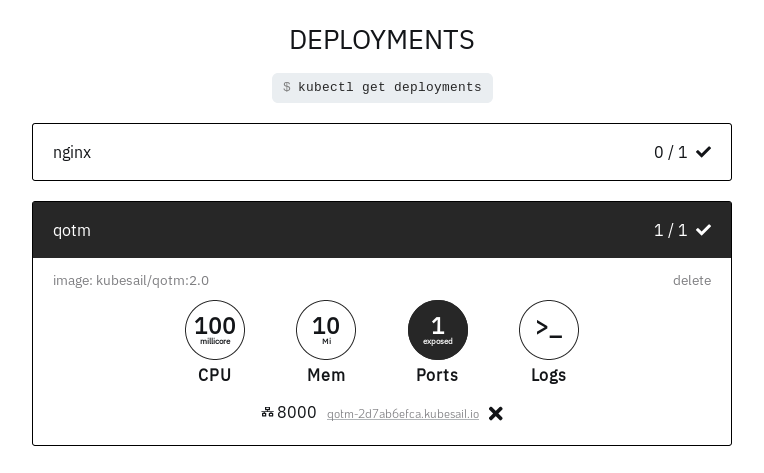
As you can see, you can see basic information about each of them: resource limits, forwarded ports, log output (data from
kubectl logs). If you click on the ACCOUNT link (in the upper right corner of the interface), you can roll out an additional deployment from ready-made examples (and there are only two of them now: the already mentioned quote service and nginx) or you can pick up a ready-made config (
~/.kube/config) to be able to work with the cluster through the familiar one kubectl: 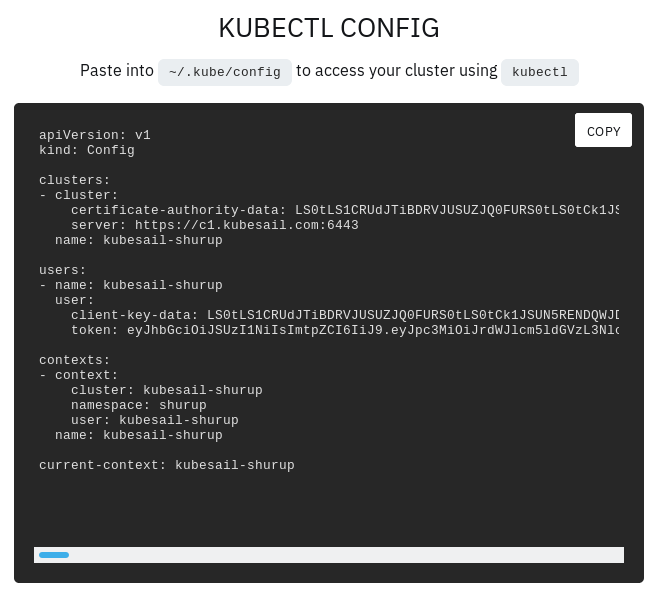
For completeness of experiments, we will use this config and deploy our deployment - for example, from the Kubernetes documentation :
$ kubectl create -f https://k8s.io/examples/controllers/nginx-deployment.yaml
deployment.apps/nginx-deployment created
$ kubectl get deployments
NAME               READY   UP-TO-DATE   AVAILABLE   AGE
nginx              1/1     1            1           4h14m
nginx-deployment   0/3     0            0           64s
qotm               1/1     1            1           4h17m
It turned out to expand, but something went wrong? The KubeSail interface is happy to help:
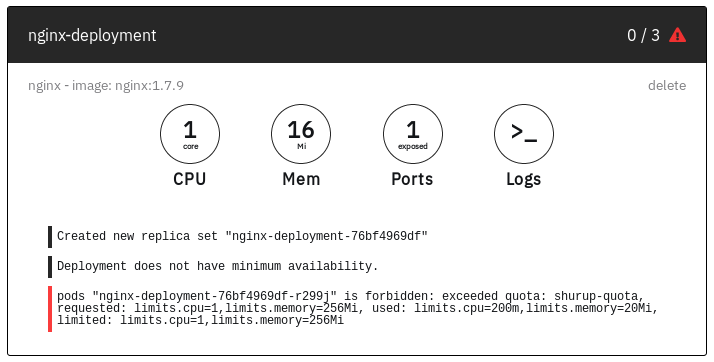
That's it - it's all about limited resources. The problem will go away if you bring deployment, for example, to this form (see last lines - block
resources):apiVersion: apps/v1
kind: Deployment
metadata:
name: nginx-deployment
labels:
app: nginx
spec:
replicas: 3
selector:
matchLabels:
app: nginx
template:
metadata:
labels:
app: nginx
spec:
containers:
- name: nginx
image: nginx:1.7.9
ports:
- containerPort: 80
resources:
limits:
cpu: "100m"
memory: "20Mi"
requests:
cpu: "10m"
memory: "10Mi"
... however, the artificiality of such a “correction” of this problem will quickly make itself felt:
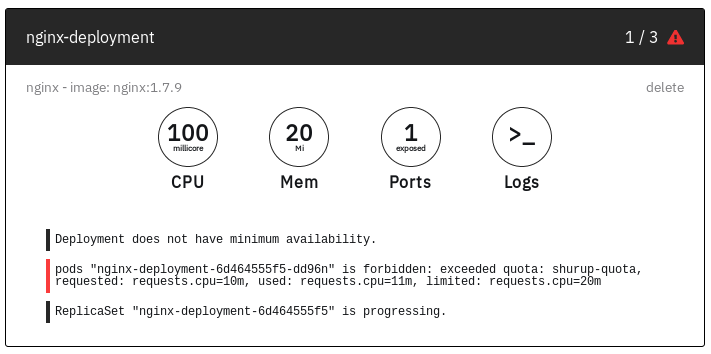
Pay attention to “1/3” in the upper right corner - it symbolizes the launch of one of the replicas. However, after this, the resources ceased to be enough again ... However, I will leave such “games” outside the scope of the experiment: its essence still boiled down to checking interaction with the cluster through
kubectl- and with this, as we see, everything is really in order. The official current status of KubeSail is a beta version, and the authors are really looking forward to feedback from any users of their service: both developers and DevOps engineers.
Alternatives
Finally, let me remind you that there are other free services for experimenting with Kubernetes and studying it online. About one of them - Play with Kubernetes , using Docker-in-Docker (DIND) technology and offering a console in a browser - we already wrote a review .
In addition to him, Katacoda created a very similar Kubernetes Playground .
And in the Kubernetes documentation, you can find large lists for both local methods of installing / using Kubernetes, and for hosted solutions , the variety of which today far exceeds the familiar options from Amazon, Azure, Digital Ocean and Google (by the way, KubeSail also made to this list).
PS
Read also in our blog:
- “ Play with Kubernetes - a service for practical acquaintance with K8s ”;
- “ Play with Docker - an online service for practical acquaintance with Docker ”;
- " CNCF has offered a free cloud to Open Source projects for DevOps / microservices ";
- “ Getting Started at Kubernetes with Minikube ”;
- “ How We Passed the Certified Kubernetes Administrator Exam ”;
- “The Linux Foundation has introduced a free introductory online course on Kubernetes .”









