 March 10, 2016 at 01:14
How to make sim900a work in our networks
For starters, background information:
sim900 is a representative of a new generation of low-cost GSM / GPRS modules from SIMCom.
Sim900a - an analog of sim900, intended for use in the Asian market, does not work with Russian operators.
So, I got the sim900a mini v3.8.2 module, based on the very sim900a. A visual inspection showed that there is a MAX232 signal converter on the module, which makes it possible to quickly connect the module to the computer's com port for a detailed study. Also, the module has outputs with a TTL level, which makes it possible to use it with arduino. Also, from the features of the circuit, it was noticed that there is no software control on / off of the module, but this is not difficult to fix, which is most likely to be done. There are no microphone and headphone outputs, you also have to unsolder.

Next, we study the datasheet, everything is very rosy painted there on 47 pages. The first thing we need is to power up the module. VCC 5 is written on the board, 3.2V - 4.8V is written in the datasheet, however, in the two paragraphs below, a connection diagram with a voltage of 4.1V is provided. Actually, both sim900 and sim900a will be very picky about food. Also, it becomes clear that the old 5V SIM cards will not work in it ... For them, you need to fence the converter based on Max1686.
Following the instructions of the datasheet, we take a Li-ion battery of the form factor 18650 at 3.7V, it will serve us as a feeding element.

Now we deal with the com port, be sure to put 2 jumpers, as shown in the photo. On which port we need 2, 3 and 5 legs, on the module it is 1, 2 and 3, respectively.
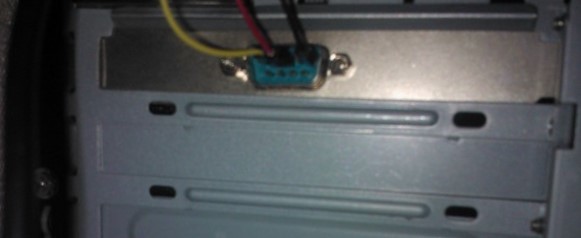
We insert a SIM card (it is advisable to check its operability in the phone first), connect the com port, apply power to the module. To communicate with the module, we need a terminal. Under Windows, I use either the terminal program or putty.
In the factory settings of the module, automatic speed selection is set, but for its correct operation it is necessary when writing the first AT command, write AT in one register.
I visually observe that the “status” LED blinks, we look at the datasheet, there are 3 modes:
In my case, this is 1 option.
We’re going to figure out why we couldn’t register. Launch your favorite terminal, connect to the desired port.
We check if the SIM requires a PIN code:
AT + CPIN?
If the SIM requires a PIN or PUK code, you will receive a SIM PIN or SIM PUK response, respectively.
After entering the PIN code:
AT + CPIN = 0000 We
check the status repeatedly. In my case, I saw:
+ CPIN: PH-NET PIN
This means that the module is locked to certain SIM cards and it will not work with your SIM card.
In this case, we either use the card of the Asian operator, or we reflash the module. However, in order not to do unnecessary work, for a start we will check whether the network module sees at all. This can be done with the command:
AT + COPS =?
After waiting for a range scan in search of a network, we see something like this:
+ COPS: (2, "MGTS", "", "25001"), (1, "MegaFon RUS", "MegaFon", "25002"), ( 1, “Beeline”, “Beeline”, “25099”) ,, (0,1,4), (0,1,2)
Each bracket is a network. The first digit is the status of this network. 0 - unknown, 1 - available for registration, 2 - network corresponding to the SIM card operator, 3 - blocked network. The remaining network parameters are their identifiers.
If you saw your network (first digit = 2). Then there is hope that you can reanimate the module and make it work.
This is a separate big story, but I will describe the main points of the flashing.
After searching the Internet for possible firmware options, I came across the fact that these modules come in 32 and 64 megabytes of flash memory. There is a special program for flashing them. And many options for firmware for different versions of modules. For example, here
I was not lucky, I got a 32-megabyte module, and there are very few firmware for them. Instructions for flashing the module read as follows. Run the program for flashing, select the necessary version, click on the fill start button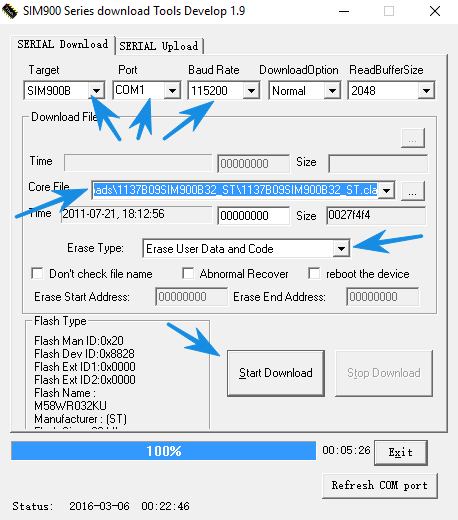 ,
,
after that, hold down the power button of the module and hold it pressed until the start of the firmware upload. But as we found out earlier, we do not have a power on / off button for the module, this mini-version turns on at the moment of power supply and remains on for the whole time. Therefore, in our version, we de-energize the module completely, start the filling program, select the necessary version, and all the settings, click on the button to start filling the firmware into the module, then apply power to the module.
However, before you start to do something, prepare the module:
So that I don’t drag the cat by the tail for a long time, I’ll immediately open the cards and say that if you have a 32-megabyte version, you can only make sim900b working in our regions using the firmware version 1137B09SIM900B32_ST from your module. If you got a 64-bit module, then you have the opportunity to get a full-fledged sim900 with the help of firmware: 1137B02SIM900M64_ST_ENHANCE
So, we reshuffled , rebooted the module. We start all over again. Check the status of the SIM card:
AT + CPIN?
+ CPIN: SIM PIN
If so, then enter the pin:
AT + CPIN = 0000
OK
Check that the card has accepted the code and the module is ready to work with it:
AT + CPIN?
+ CPIN: READY
Checking the status of registration on the network:
AT + CREG?
+ CREG: 0.1
The first digit - auto-registration is on, the second - registration is completed. We look at the diode displaying the status, the indication corresponds to the documentation on successful registration in the network.
Let's check in which network the module is registered:
AT + COPS?
+ COPS: 0.0, “MTS-RUS”
Check the balance:
AT + CUSD = 1, “* 100 #”
OK
+ CUSD: 0, “041C0438043D04430441003A003400360032002C003700310440002C041B0438043C04380442003A003300300030003002000 460.72,
460,
Undec, Min .: 4602 , Limit: 3000r
We haven’t reached the limit yet, you can try to send SMS (make sure that your terminal can send service characters, to indicate the end of the SMS you need to use the character with code 26)
AT + CMGF = 1
AT + CMGS = "+ 790 ........"
> Privet! Davay posmotrim film!
> (Alt +26)
+ CMGS: 3
SMS sent!
Now let's try to call:
ATD + 790 .........;
+ COLP: "+790 .........", 145, "", 0, ""
We hang up:
ATH
OK
I draw attention to the fact that the ATD command has a semicolon ";" obligatory at the end!
If you see “NO CARRIER”, the phone number is not dialed correctly.
The module is working! Which should have been achieved. In the following articles, the iron finalization of the module and its use with Arduino.
Useful links:
Official website of the manufacturer
Official representative of simcom in Russia A
page with links to docks modulo sim900
Module specification
Signal converter for SIM cards
Collection of firmware for sim800 and sim900 modules
Specification of AT module commands
Article on sim900 flashing
sim900 is a representative of a new generation of low-cost GSM / GPRS modules from SIMCom.
Sim900a - an analog of sim900, intended for use in the Asian market, does not work with Russian operators.
Visual inspection
So, I got the sim900a mini v3.8.2 module, based on the very sim900a. A visual inspection showed that there is a MAX232 signal converter on the module, which makes it possible to quickly connect the module to the computer's com port for a detailed study. Also, the module has outputs with a TTL level, which makes it possible to use it with arduino. Also, from the features of the circuit, it was noticed that there is no software control on / off of the module, but this is not difficult to fix, which is most likely to be done. There are no microphone and headphone outputs, you also have to unsolder.
Next, we study the datasheet, everything is very rosy painted there on 47 pages. The first thing we need is to power up the module. VCC 5 is written on the board, 3.2V - 4.8V is written in the datasheet, however, in the two paragraphs below, a connection diagram with a voltage of 4.1V is provided. Actually, both sim900 and sim900a will be very picky about food. Also, it becomes clear that the old 5V SIM cards will not work in it ... For them, you need to fence the converter based on Max1686.
Following the instructions of the datasheet, we take a Li-ion battery of the form factor 18650 at 3.7V, it will serve us as a feeding element.
Connection
Now we deal with the com port, be sure to put 2 jumpers, as shown in the photo. On which port we need 2, 3 and 5 legs, on the module it is 1, 2 and 3, respectively.
We insert a SIM card (it is advisable to check its operability in the phone first), connect the com port, apply power to the module. To communicate with the module, we need a terminal. Under Windows, I use either the terminal program or putty.
In the factory settings of the module, automatic speed selection is set, but for its correct operation it is necessary when writing the first AT command, write AT in one register.
I visually observe that the “status” LED blinks, we look at the datasheet, there are 3 modes:
- 64ms / 800ms - not registered in the network,
- 64ms / 3000ms- is registered in the network,
- 64ms / 300ms - data is transmitted via GPRS.
In my case, this is 1 option.
We’re going to figure out why we couldn’t register. Launch your favorite terminal, connect to the desired port.
We check if the SIM requires a PIN code:
AT + CPIN?
If the SIM requires a PIN or PUK code, you will receive a SIM PIN or SIM PUK response, respectively.
After entering the PIN code:
AT + CPIN = 0000 We
check the status repeatedly. In my case, I saw:
+ CPIN: PH-NET PIN
This means that the module is locked to certain SIM cards and it will not work with your SIM card.
In this case, we either use the card of the Asian operator, or we reflash the module. However, in order not to do unnecessary work, for a start we will check whether the network module sees at all. This can be done with the command:
AT + COPS =?
After waiting for a range scan in search of a network, we see something like this:
+ COPS: (2, "MGTS", "", "25001"), (1, "MegaFon RUS", "MegaFon", "25002"), ( 1, “Beeline”, “Beeline”, “25099”) ,, (0,1,4), (0,1,2)
Each bracket is a network. The first digit is the status of this network. 0 - unknown, 1 - available for registration, 2 - network corresponding to the SIM card operator, 3 - blocked network. The remaining network parameters are their identifiers.
If you saw your network (first digit = 2). Then there is hope that you can reanimate the module and make it work.
Re-flashing!
This is a separate big story, but I will describe the main points of the flashing.
After searching the Internet for possible firmware options, I came across the fact that these modules come in 32 and 64 megabytes of flash memory. There is a special program for flashing them. And many options for firmware for different versions of modules. For example, here
I was not lucky, I got a 32-megabyte module, and there are very few firmware for them. Instructions for flashing the module read as follows. Run the program for flashing, select the necessary version, click on the fill start button
,after that, hold down the power button of the module and hold it pressed until the start of the firmware upload. But as we found out earlier, we do not have a power on / off button for the module, this mini-version turns on at the moment of power supply and remains on for the whole time. Therefore, in our version, we de-energize the module completely, start the filling program, select the necessary version, and all the settings, click on the button to start filling the firmware into the module, then apply power to the module.
However, before you start to do something, prepare the module:
- the module is very demanding on the supply voltage and with a voltage of more than 4V it starts up and works, but refuses to reflash at all!
- remove the automatic speed selection, set the speed to 115200 (AT + IPR = 115200) in order to save yourself from problems with the firmware. (at a speed of 9600, the firmware takes about 2 hours);
- Before starting the firmware, de-energize the module for at least 5-10 seconds;
So that I don’t drag the cat by the tail for a long time, I’ll immediately open the cards and say that if you have a 32-megabyte version, you can only make sim900b working in our regions using the firmware version 1137B09SIM900B32_ST from your module. If you got a 64-bit module, then you have the opportunity to get a full-fledged sim900 with the help of firmware: 1137B02SIM900M64_ST_ENHANCE
So, we reshuffled , rebooted the module. We start all over again. Check the status of the SIM card:
AT + CPIN?
+ CPIN: SIM PIN
If so, then enter the pin:
AT + CPIN = 0000
OK
Check that the card has accepted the code and the module is ready to work with it:
AT + CPIN?
+ CPIN: READY
Checking the status of registration on the network:
AT + CREG?
+ CREG: 0.1
The first digit - auto-registration is on, the second - registration is completed. We look at the diode displaying the status, the indication corresponds to the documentation on successful registration in the network.
Let's check in which network the module is registered:
AT + COPS?
+ COPS: 0.0, “MTS-RUS”
Check the balance:
AT + CUSD = 1, “* 100 #”
OK
+ CUSD: 0, “041C0438043D04430441003A003400360032002C003700310440002C041B0438043C04380442003A003300300030003002000 460.72,
460,
Undec, Min .: 4602 , Limit: 3000r
We haven’t reached the limit yet, you can try to send SMS (make sure that your terminal can send service characters, to indicate the end of the SMS you need to use the character with code 26)
AT + CMGF = 1
AT + CMGS = "+ 790 ........"
> Privet! Davay posmotrim film!
> (Alt +26)
+ CMGS: 3
SMS sent!
Now let's try to call:
ATD + 790 .........;
+ COLP: "+790 .........", 145, "", 0, ""
We hang up:
ATH
OK
I draw attention to the fact that the ATD command has a semicolon ";" obligatory at the end!
If you see “NO CARRIER”, the phone number is not dialed correctly.
The module is working! Which should have been achieved. In the following articles, the iron finalization of the module and its use with Arduino.
Useful links:
Official website of the manufacturer
Official representative of simcom in Russia A
page with links to docks modulo sim900
Module specification
Signal converter for SIM cards
Collection of firmware for sim800 and sim900 modules
Specification of AT module commands
Article on sim900 flashing









