August 25, 2015 at 17:13
We are testing PostgreSQL on an SSD RAID-0 array with a table of 10 billion entries. (Part 2)

So, we continue to investigate the performance characteristics of PostgreSQL on SSDs and HDDs in order to improve system performance. The first part can be read here .
During the development of the service for optimizing the cost of cellular communications Dr. Tariff ( iOS , Android ) for a joint pilot with one of the partners we needed a large and productive relational database.
This time we tested PostgreSQL on a RAID-0 array of two SSD drives. The RAID array was built using mdadm . The size of the stripe (block of information that is distributed to all disks in the array) is 512k.
Disk load was monitored using the iostat command (sysstat package). When testing on one ssd disk, disk utilization was 95-100%. When testing on a RAID array, the utilization of each drive was on average 90%. CPU load was measured using htop. During most tests, unless otherwise stated, the load was 30-50%. The Python client with which the database was loaded was launched from the same machine and up to 20% of the processor was consumed by it. Thus, system performance depends on the speed of the disk.
Benchmark
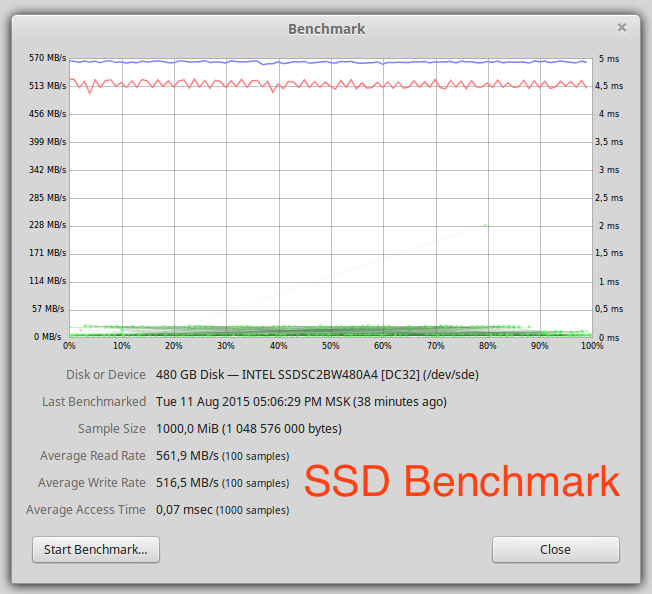
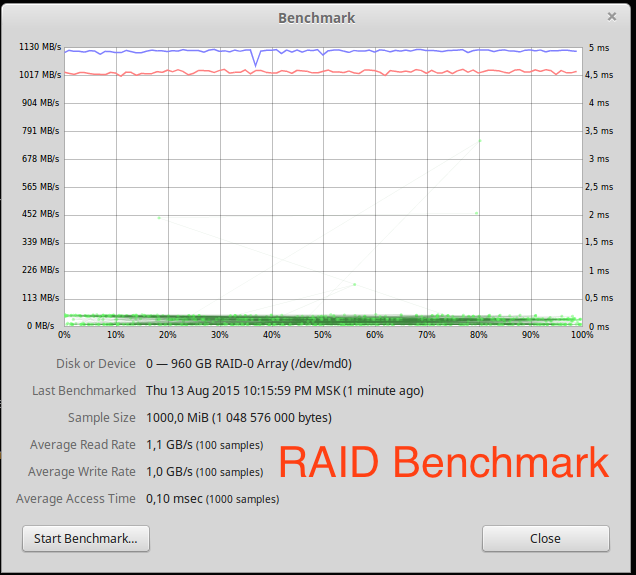
The linear read speed is almost two times higher than that of a single disk. Scaling is almost linear for two drives.
PostgreSQL performance on a RAID array
The size and settings of the database are exactly the same as in the first part.
Read performance

On average, read performance is 15% higher than for a single drive. This is due to a different delay when reading random blocks. The utilization of each disk by iostat reached 90%, although when testing a single disk it almost always amounted to 100%. On a habr there is an excellent article on this subject.
Write performance Write
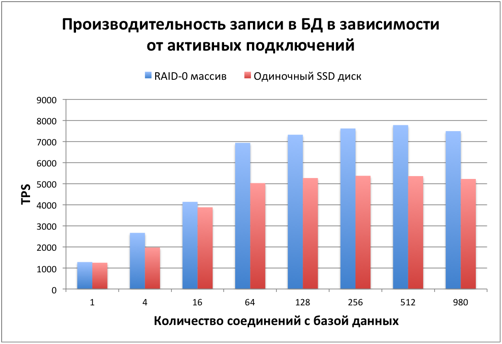
speed is already 40% higher than that of a single disc. This is much better than reading, but still far from linear scaling, at which the speed should be 2 times higher.
We load disks. 10 billion records
Time to load disks and database. The test table size is 10 billion records. On the disk, immediately after filling, 423 GB was occupied by the table and 212 GB per index. The process of filling the database took about 14 hours.
The first issue of interest was a drop in performance with an increase in the number of records by 10 times.
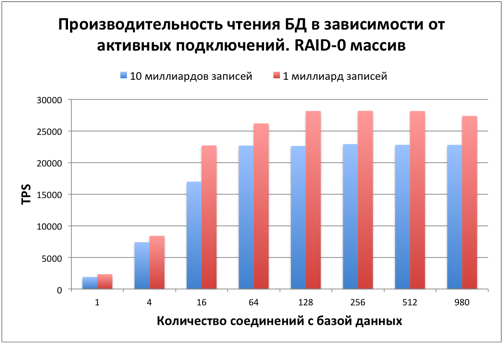
Reading speed decreased by about 20% compared to a database with 1 billion records.
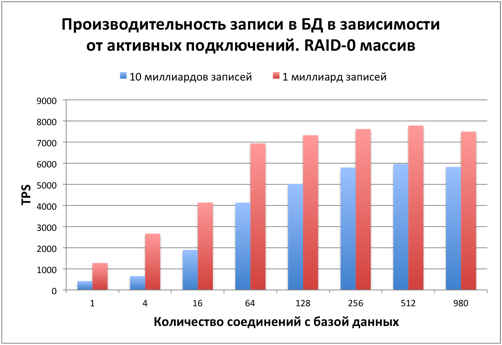
The write speed decreased by 20-40%.
The performance drop is due to:
- B of lshim size indices
- A smaller share of RAM from the entire database size
With a table size of 10 billion rows, almost any reading takes place from disk.
We vary the number of records in the table
After the tests, it became interesting at what size of the database the disk system becomes a determining factor. Based on previous tests, the number of simultaneous connections was chosen equal to 64. Shared_buffers = 2048mb.
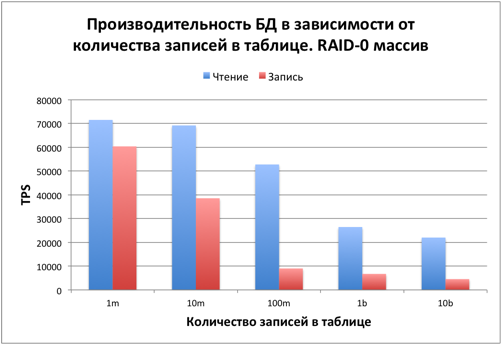
With the number of entries in the table up to 10 million, the data is completely fit into RAM. Reading and writing are fast. In this case, the bottleneck is the processor. The load on htop reached 100%. During testing, about 20% of the processor was consumed by the Python client. If the client is transferred to another machine, then the performance will be proportionally higher.
With 100 million records, the database size is about 6-7 GB. It is no longer possible to put the database in shared_buffers, but the disk cache in the remaining RAM plays an important role. From about this size, the role of the processor becomes less significant and the disk affects performance.
At 1 and 10 billion records, only a small part of the data and index are placed in RAM. The bottleneck is the disk subsystem.
It is worth noting that this test is synthetic. The probability of reading each entry is the same. In most real cases, the database is working with a small fraction of the records of the total data volume, so there will be a greater gain due to their caching.
Summary
Database performance on the SSD RAID-0 array turned out to be higher than on a single disk, but far from linear scaling. If this hardware requires even greater speed, then it is better to divide the data into several databases and place them separately on each of the disks.
In the comments to the first part, MikeGav mentioned that SSD performance drops when the disk is full. For a number of other SSD tests, this problem occurs when it is 85-90% full. In all our tests, the total space occupied by the database did not exceed 75%. In the next part, we will test the database performance on a RAID-0 SSD depending on the settings of PostgreSQL.
And the most favorable rate will tell the Dr. application Tariff on Android and iOS.
Other articles about Dr. Tariff and cellular analytics from our blog
Dr. Tariff calculated which mobile operator has more than 4G Internet (part 2)
Dr. Tariff counted which mobile operator has more than 4G Internet (part 1)
Caution! Hidden revenues of operators - follow the options “They called you!”, “Who called +”, “Be in the know +” (now paid)
The story of how a mobile operator deducted money from the developer Dr. Tariff (grab popcorn)
Dr. Tariff 2.0: new opportunities for Beeline, MegaFon and MTS subscribers
Decided to change the operator? Do not forget to choose the best rate with Dr. Tariff
dr Tariff (3 months later) - you can choose a tariff in 80 regions of Russia on Android and iOS
Dr. Tariff (tariffs and balance): How I began to help people save on mobile costs
Dr. Tariff counted which mobile operator has more than 4G Internet (part 1)
Caution! Hidden revenues of operators - follow the options “They called you!”, “Who called +”, “Be in the know +” (now paid)
The story of how a mobile operator deducted money from the developer Dr. Tariff (grab popcorn)
Dr. Tariff 2.0: new opportunities for Beeline, MegaFon and MTS subscribers
Decided to change the operator? Do not forget to choose the best rate with Dr. Tariff
dr Tariff (3 months later) - you can choose a tariff in 80 regions of Russia on Android and iOS
Dr. Tariff (tariffs and balance): How I began to help people save on mobile costs
Subscribe to our news and share information with your friends on Vkontakte and Facebook .