May 5, 2015 at 13:43
2133 MHz DDR4 HyperX Fury RAM Kit Overview
Hello Giktayms! DDR4 RAM will be massively distributed only with the release of the sixth generation of Intel Core processors, code-named SkyLake , but it's better to start dating now. The base frequency of this standard will be the 2133 MHz mark, and it is from this value that the frequencies of the HyperX Fury modules , the budget game memory from Kingston, start . Under the cut - information about performance, prices and modest attempts to disperse the four-channel memory kit.
The box is standard for Kingston / HyperX modules, black plastic with the ability to install both DIMM and SO-DIMM strips. Versatility allows you to use a single type of box and save money for customers who do not need to pay the whims of designers.

Outside, the box is pasted with stickers with a lot of useful information. In particular, it is proposed to read about certification for a four-channel operation mode, about the availability of a lifetime warranty, and also about the fact that the box with the modules is sealed at the factory and has not been opened by anyone since then. Our blog has repeatedly mentioned the testing process in the factory, so everything written on the packaging is true.

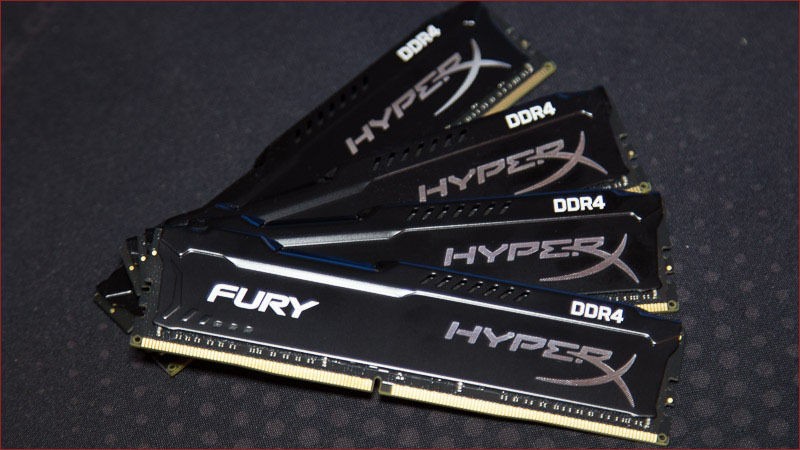
In a black box there are 4 modules in black radiators on a black textolite. Something like a children's horror story, but I assure you that there is nothing to fear. The fact that the heatsinks are very low, which means there will be no compatibility problem with large tower coolers, is encouraging. The aggressive look gives out the gaming orientation of the modules and will look good in cases with a transparent wall. Many gaming motherboards have a black and some color, which means that HyperX Fure modules with high probability will organically fit into the overall system design.

The sticker on the module tells about the following facts: the standard voltage of the modules is 1.2 V, the module is assembled in Taiwan, and HyperX is a division of Kingston.
Without resorting to removing thin metal radiators using the AIDA64 program (screenshot below), you can find out more information about the chips that are installed on the slats: these are SK Hynix chips. The modules are completely fresh - they were produced at the 4th week of 2015. There are plenty of work profiles, but we are only interested in one - XMP at 1067 MHz (aka 2133 MHz) with timings of 14-14-14-35.

The network has a lot of positive feedback on modules of the same series, but with a standard frequency of 2400 MHz - they say that it is very easy to overclock to 3000 MHz, a super choice for your money and so on. Naturally, you need to check the younger modules for overclocking, suddenly the same sweet life awaits buyers HyperX Fury DDR4-2133 MHz.
A frontal attack in the form of a change in the multiplier without changing additional settings brought an increase to a frequency of 2400 MHz and the same voltage. I played a little with the timings, relaxed tRCD, tRP, but I tightened up tRAS and tRFC. Ok, save a little - the system is stable.
In the future (apparently the chips are not the same as in the 2400 MHz sets), it did not work to increase the frequency of RAM operation, that is, neither a change in the strap, nor an increase in voltage, nor a decrease in timings could bring stable operation at frequencies arbitrarily different from 2400 MHz. Of course, these are the features of my RAM kit, on other systems in other conditions the results can be much better.
It is always useful to compare performance with something, so that there is some kind of reference point. In this case, we take two states of the same memory: DDR4-2133 MHz and 2400 MHz. Nominal and overclocked modes allow the user to evaluate the gain from the actions that he performs on his system.

A set of test software is offered generally accepted:


The results are very good in absolute value, low timings from the factory affect the starting high performance (for some other sets, such results can be obtained only after overclocking). The write speed has not changed much, and the read speed has become significantly higher after increasing the clock frequency.

Cinebench R15 was indifferent to my efforts and did not appreciate the slight overclocking of RAM. The test responds well to the frequency of the central processor or to a very significant increase in the frequency of RAM.

Video encoding prefers a slightly overclocked system, but with a slight advantage. Most of the data is also processed on the central processor, but the difference between different generations of memory will be better visible than a little overclocking.
Given the market situation and the relatively high total cost of the system, DDR4 is chosen by users especially carefully. Thanks to Yandex.Market, you can find out that out of the entire range of 32 gigabyte sets with a frequency of 2133 MHz - HyperX Fury DDR4-2133 is in second place in terms of availability, but given that the standard CAS is 14, not 15, like the cheapest kit, it becomes obvious - what to buy. In addition, there is always the opportunity to slightly increase performance due to overclocking.
The appearance and characteristics of RAM
The box is standard for Kingston / HyperX modules, black plastic with the ability to install both DIMM and SO-DIMM strips. Versatility allows you to use a single type of box and save money for customers who do not need to pay the whims of designers.
Outside, the box is pasted with stickers with a lot of useful information. In particular, it is proposed to read about certification for a four-channel operation mode, about the availability of a lifetime warranty, and also about the fact that the box with the modules is sealed at the factory and has not been opened by anyone since then. Our blog has repeatedly mentioned the testing process in the factory, so everything written on the packaging is true.
In a black box there are 4 modules in black radiators on a black textolite. Something like a children's horror story, but I assure you that there is nothing to fear. The fact that the heatsinks are very low, which means there will be no compatibility problem with large tower coolers, is encouraging. The aggressive look gives out the gaming orientation of the modules and will look good in cases with a transparent wall. Many gaming motherboards have a black and some color, which means that HyperX Fure modules with high probability will organically fit into the overall system design.
The sticker on the module tells about the following facts: the standard voltage of the modules is 1.2 V, the module is assembled in Taiwan, and HyperX is a division of Kingston.
Without resorting to removing thin metal radiators using the AIDA64 program (screenshot below), you can find out more information about the chips that are installed on the slats: these are SK Hynix chips. The modules are completely fresh - they were produced at the 4th week of 2015. There are plenty of work profiles, but we are only interested in one - XMP at 1067 MHz (aka 2133 MHz) with timings of 14-14-14-35.
Test bench and testing methodology
- Processor: Intel Core i7-5960X
- Motherboard: ASUS Rampage V Extreme
- RAM: HyperX Fury DDR4-2133 32 Gb (4 * 8 Gb)
- System SSD: HyperX Predator PCI-E 480 Gb
- Video card: ASUS Radeon R9 290X Matrix
- Power Supply: Corsair AX1200i, 1200W
- Operating System: Windows 8.1 Professional (64-bit)
The network has a lot of positive feedback on modules of the same series, but with a standard frequency of 2400 MHz - they say that it is very easy to overclock to 3000 MHz, a super choice for your money and so on. Naturally, you need to check the younger modules for overclocking, suddenly the same sweet life awaits buyers HyperX Fury DDR4-2133 MHz.
A frontal attack in the form of a change in the multiplier without changing additional settings brought an increase to a frequency of 2400 MHz and the same voltage. I played a little with the timings, relaxed tRCD, tRP, but I tightened up tRAS and tRFC. Ok, save a little - the system is stable.
In the future (apparently the chips are not the same as in the 2400 MHz sets), it did not work to increase the frequency of RAM operation, that is, neither a change in the strap, nor an increase in voltage, nor a decrease in timings could bring stable operation at frequencies arbitrarily different from 2400 MHz. Of course, these are the features of my RAM kit, on other systems in other conditions the results can be much better.
It is always useful to compare performance with something, so that there is some kind of reference point. In this case, we take two states of the same memory: DDR4-2133 MHz and 2400 MHz. Nominal and overclocked modes allow the user to evaluate the gain from the actions that he performs on his system.
Test results
A set of test software is offered generally accepted:
- AIDA 64 5.20.3400
- Cinebench r15
- x.264 HD benchmark 5.0.1
AIDA 64
The results are very good in absolute value, low timings from the factory affect the starting high performance (for some other sets, such results can be obtained only after overclocking). The write speed has not changed much, and the read speed has become significantly higher after increasing the clock frequency.
Cinebench r15
Cinebench R15 was indifferent to my efforts and did not appreciate the slight overclocking of RAM. The test responds well to the frequency of the central processor or to a very significant increase in the frequency of RAM.
x.264 HD benchmark
Video encoding prefers a slightly overclocked system, but with a slight advantage. Most of the data is also processed on the central processor, but the difference between different generations of memory will be better visible than a little overclocking.
Conclusion and Conclusions
Given the market situation and the relatively high total cost of the system, DDR4 is chosen by users especially carefully. Thanks to Yandex.Market, you can find out that out of the entire range of 32 gigabyte sets with a frequency of 2133 MHz - HyperX Fury DDR4-2133 is in second place in terms of availability, but given that the standard CAS is 14, not 15, like the cheapest kit, it becomes obvious - what to buy. In addition, there is always the opportunity to slightly increase performance due to overclocking.