 March 12, 2015 at 09:16
Axgio Windows Mini PC. Hello from China - Atomic Baby Review
The appearance of this article was facilitated by the coincidence of two factors: 1) my toys suddenly ran out; 2) Intel announced the release of its own micro-computer in the HDMI-stick form factor, called (suddenly) - Intel Compute Stick, which was already mentioned at geektimes . I could not get a quick test sample of this baby from Intel, so I decided to look towards the Chinese border, and not in vain.
It turned out that in the Celestial Empire such glands are already on sale for all comers. They were represented by two types of devices - “Meegopad T01” and “Axgio Windows Mini PC”, and if you could find a few words about the first one, at least in the bourgeois reviews, then nothing could be found about the second. I settled on the second. Chinese friends from the TinyDeal storethey quickly and easily agreed to provide the device, which at that time sold for $ 109, for which many human thanks to them.
Specification of the ordered device:
- processor: Intel Atom Z3735F
- RAM: 2 GB
- built-in 32GB drive
- two microUSB 2.0 ports (one of which is intended only to power the device)
- one full-sized USB 2.0 port;
- Wi-Fi 802.11b / g / n;
- Bluetooth 4.0;
- microSD slot
- HDMI connector
OS: Windows 8.1 on board
size: 9.9 x 3.8 x 1 cm
weight: 45 grams.
What came in fact is quite consistent.


I often order small gadgets on the Chinese Internet, and I have already developed the habit of simply forgetting about it in the first two weeks after ordering to reduce the waiting time. I don’t know what went wrong this time, but the notification of the arrival of the parcel came to me after 9 (nine) calendar days, despite the fact that the delivery was ordered by regular mail at no extra charge.
Inside the yellow mail package was a decent box of cardboard.
It turned out in the box
- the device itself
- power adapter 5V 2A
- microUSB cable
- case for the device, black in genuine leather of young dermantine.
Slides


Connecting the device to the monitor and power is an absolutely straightforward process.
During the first launch, I found out that my device from meegopad is no different than the inscription on the box and the case
greeting whistle at boot.

On board was preinstalled Win 8.1 (not activated, and without any trace of a license key in the kit). As far as I understand, this is “normal practice” for sellers of such goods, and this fact did not surprise me very much.
In fairness, I want to note that the seller’s site now has the same device, $ 10 more expensive, but (as they say) with activated windows. What part of the truth in this is not known to me.
That's how the inside of the whistle sees Aida
Motherboard:
CPU Type QuadCore Intel Atom Z3735F, 1333 MHz (16 x 83)
Motherboard Name AMI Corporation Aptio CRB
Motherboard Chipset Intel Bay Trail-T
System Memory [TRIAL VERSION]
BIOS Type AMI (01/19/2015)
Communication Port Communications Port ( COM1)
Display:
Video Adapter Intel® HD Graphics (1052230 KB)
Video Adapter Intel® HD Graphics (1052230 KB)
3D Accelerator Intel HD Graphics
Monitor Intel Imaging Signal Processor 2400
Monitor Philips 243V5 [24 "LCD] (ZV01433000567)
Storage:
Disk Drive JetFlash Transcend 32GB USB Device (29 GB, USB)
Disk Drive Kingston S10032 (28 GB)
SMART Hard Disks Status Unknown
CPU Type QuadCore Intel Atom Z3735F, 1333 MHz (16 x 83)
Motherboard Name AMI Corporation Aptio CRB
Motherboard Chipset Intel Bay Trail-T
System Memory [TRIAL VERSION]
BIOS Type AMI (01/19/2015)
Communication Port Communications Port ( COM1)
Display:
Video Adapter Intel® HD Graphics (1052230 KB)
Video Adapter Intel® HD Graphics (1052230 KB)
3D Accelerator Intel HD Graphics
Monitor Intel Imaging Signal Processor 2400
Monitor Philips 243V5 [24 "LCD] (ZV01433000567)
Storage:
Disk Drive JetFlash Transcend 32GB USB Device (29 GB, USB)
Disk Drive Kingston S10032 (28 GB)
SMART Hard Disks Status Unknown
The internal drive of the device turned out to be divided into 4 sections - boot, service, Win 8.1 itself, and a partition for restoring windows from scratch.
The Chinese brothers added some of their applications to the OS assembly, the purpose of which, without knowledge of the Chinese language, I could only guess.
First of all, I decided to rearrange windows to a clean official distribution.
To do this, I needed ISO Win 8.1 and a program for recording the image to a flash drive (under Windows, Rufus is the easiest to use for this )
Everything was done right on the device, from under Chinese Windows. In Rufus, when recording an image, it is important not to forget to set the “GPT partition scheme for UEFI computer” mode, otherwise nothing will work.
Only a 32-bit version of Windows can be installed on a device. Rather, all the components of the device work fine with 64-bit OS. Everything except the UEFI bootloader, it understands exclusively the 32-bit loader. Manufacturers clearly saved on firmware.
Windows rises to the device without any problems and immediately after installation is ready to work. True, sound will not work, Wi-Fi, Bluetooth well, and almost everything else will not work either. The problem is easily solved by the drivers , which took half an evening to find.
After installing the drivers, the whistle becomes a normal, full-fledged (conditionally of course) computer.
Next, I installed utorrent and, for educational purposes, downloaded several video files with different bitrates. While downloading files, the speed confidently kept at the level of full download of 100Mbps Eth. (this is the limit of my internet connection). Neither the Wi-Fi path nor the drive turned out to be a narrow link.
Playing videos via VLC also left the most positive impression. Even a 1080p video stream with a bitrate of 25 Mbps was played without friezes and frame skipping.
The first conclusion: for its intended purpose, the device can and should be used. The whistle coped with the role of the media center hidden behind the TV and communicating with the network via Wi-Fi and with the keyboard and mouse via Bluetooth.
The only thing is the temperature. With a dense load, the device is very warm, and the built-in temperature sensors show 65 ° C (although it has never risen higher).
Further, given that for many years now, neither I nor my family members have been using the Windows OS family in everyday life (and do not suffer from this at all), I decided to try putting the Ubuntu on the whistle.
And here it was, I was faced with a number of problems, which probably will not be in the official Intel whistle, and in his younger Chinese brother they are present in a large assortment.
So:
The whistle can only boot through UEFI, while it only understands the 32-bit loader, and the 32-bit Ubuntu image cannot boot in this way.
However, there is a way out. In short, you need to take a 64-bit image of Ubuntu, write it to a flash drive with the same Rufus (do not forget to set the “GPT partition scheme for UEFI computer” mode), then take the bootloader and put it in the / BOOT / EFI / directory on the flash drive . After that - you can boot from the flash drive in live mode.
Looking ahead, I want to say that installing Ubuntu on an internal drive without dancing with a tambourine still does not work (I'm not saying that it won’t work out at all).
In short, the keyword is:
$ apt-get -y remove grub-efi-amd64
$ apt-get -y install grub-efi-ia32
For inquisitive, but lazy owners of the atomic whistle, there is a simpler solution:
you can download a ready-made image , which is built on the basis of Ubuntu 14.04 with the mate shell, which can be used in live mode, and installed on the internal drive using the built-in System Back utility.
From this link, the author of the image describes the process of installing ubuntu on a whistle.
Important:
1. before any actions with the internal drive - backup it using your usual tools (dd will do)
2. during the installation of Ubuntu do not format the / boot partition You
can neglect both warnings, just in this case you will have to look for the initial whistle image, or to remain without the ability to download windows from it.
Under Ubuntu, the whistle is still more modest. Drivers for Wi-Fi Bluetooth chip RTL8723 are very raw, so Wi-Fi works, but stability is poor, and Bluetooth does not work at all.
At the same time, the video files from the first test are just as accurate, without friezes and frame skips (although, unlike windows, even without sound), they are played in both VLC and XBMC.
The second conclusion: in the current situation with drivers, you can use the whistle as a workstation under Ubuntu, but as a media center it is inconvenient.
The third conclusion:At the moment, for me, this device has become the only windows carrier on the farm. It works as a media content player and is used in cases when “windows are really needed” to open those rare MS Office files that open crookedly in Libre. In other words, $ 109 is a reasonable price for such features.
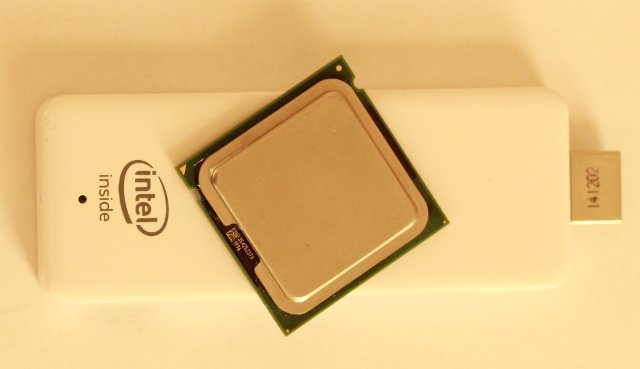
PS On the KDPV, an atomic whistle is shown next to his great-grandfather Intel Pentium 4, solely for understanding the size of the device.
PPS I will be glad to constructive proposals on the topic of what else to put on the whistle, or what else to experience on it.









