Building seamless DECT IP telephony on Gigaset equipment
A little less than a year ago, we wrote about the principles of building a seamless DECT IP system on RTX equipment. For those who are interested in the issue of building such systems, this material can be very useful and worth reading. Moreover, today we will talk about a similar system from the well-known German manufacturer of telephony equipment - Gigaset N720 Pro. Similar - in its purpose, but completely unlike the RTX system in its architecture. Everyone who is interested in this topic - welcome to the cut!
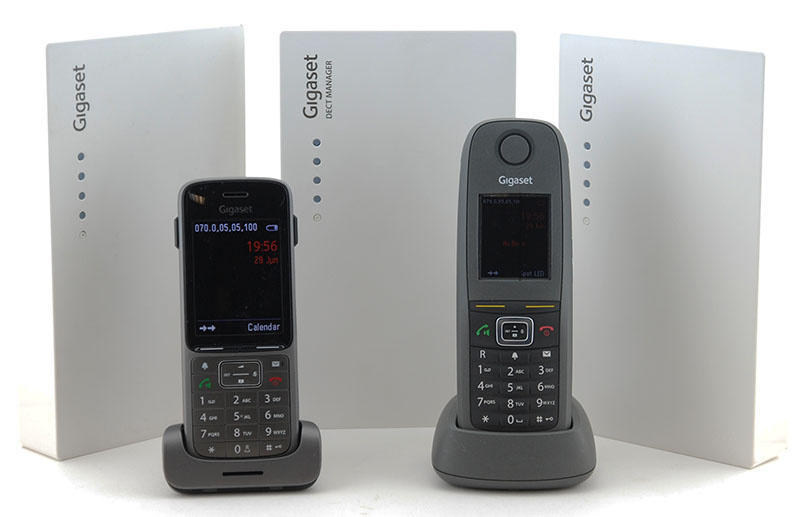
Generally speaking, the Gigaset N720 Pro is a microcellular DECT IP system designed to organize a wireless continuous telephone system in small and medium enterprises. Now we will examine in more detail each of these terms. Microcellular - means that the system can use not one but several base stations, the coverage area of each of which forms a kind of cell or cell, following the example of how it works in familiar to all mobile communication networks. Similarly, the subscriber of the system can freely register at any of its base stations, as well as conduct continuous telephone conversation, moving between them.
The interaction between base stations and wireless handsets of subscribers is carried out using DECT technology. And the interaction of the Gigaset N720 Pro system with the telephone exchange, which is the center of any corporate communication system, is through the SIP protocol. Accordingly, both hardware solutions (for example, Gigaset, Yeastar, Grandstream) and software solutions (Asterisk, 3CX, FreePBX) can act as IP-PBXs.
The Gigaset N720 Pro system supports up to 30 base stations, up to 100 subscribers and up to 30 simultaneous calls and consists of several components, each of which should be discussed separately.
Gigaset N720 DM PRO is a device that acts as a centralized control of the entire DECT system, that is, control of all base stations and telephones. And for an IP PBX, the Gigaset N720 DM PRO dispatcher is a single interface for interacting with the entire DECT system as a whole: no matter how many phones are used in the system, for an IP PBX they will all be available through the IP address of the DECT dispatcher.
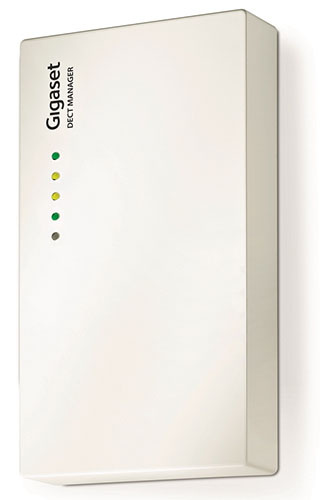
The Gigaset N720 DM PRO controller itself does not have a DECT radio module and is in no way connected to other components of the DECT network via a radio channel. All communication between the dispatcher and base stations is via Ethernet. Therefore, the dispatcher can be located in any convenient place where there is a connection to the local network, for example, in the server.
Only one Gigaset N720 DM PRO controller is required for the entire DECT system, but its presence is required. The controller is powered by IEEE 802.3af PoE technology <3.8 W (class 1) or using an external power adapter, which, however, is not included in the package. A convenient Web interface is provided for controlling the controller and the entire system as a whole.
The Gigaset N720 IP Pro base station , on the one hand, interacts with wireless handsets using DECT technology, and on the other hand, with the Gigaset N720 DM PRO controller over a wired Ethernet network. The system, as already mentioned, can consist of a maximum of 30 base stations. Power is also supplied using IEEE 802.3af PoE technology <6.4 W (class 2) or using a power supply, which again is not included in the package.
The claimed coverage radius of one base station is up to 300 meters on the street and up to 50 meters indoors - however, these are very conditional numbers, which should be guided with great care, which we will write in more detail about. Another limitation of base stations is the number of simultaneous supported calls in their coverage area - up to 8 calls in narrowband mode (G.726, G.711, G.729ab codecs) or half as much when using the G.722 codec. Base stations and controllers are made in exactly the same cases of white plastic with the possibility of mounting on the wall (dowels and screws are included in the package).
For its professional solutions, Gigaset also produces special handsets and recommends using them with the N720 Pro microcellular system. Three current models of the Pro series tubes are currently available: the ultra-compact Gigaset SL750H Pro , the shockproof, dustproof, waterproof Gigaset R650H Pro and its analogue in a simpler case, but with Bluetooth support, the Gigaset S650H Pro . Previously, SL610H Pro and S810H Pro models were also released, which currently still work with the Gigaset N720 Pro microcellular system.

Professional series ducts are not the cheapest fun, so you might be tempted to use more affordable Gigaset or third-party devices. Gigaset's official position on this issue is summarized in the following table:
As you can see, the full functionality of the system is guaranteed only when working with the "native" tubes of the Pro series. When using other GAP-compatible Gigaset handsets, support for many functions simply disappears, the most delicious of which are, of course, roaming and handover. When using third-party GAP-tubes, in general, no guarantees are given even for the basic functionality - they are offered to be used only at your own peril and risk.
If we move from an official position to a real situation, we can state the following: firstly, handsets without declared GAP support, such as, for example, Yealink W56H , Grandstream DP720 or Panasonic KX-TPA60, really will not work with the system. As for the Gigaset GAP-handsets, the situation is more optimistic in comparison with the table: for example, the Gigaset A540H handset (not related to the Pro series) fully worked with the system, except for the support of the general phone book. One of the cheapest GAP-tubes Gigaset A120H showed results close to the table - registered, called, but without the support of handover. Out of third-party GAP tubes, we managed to test the operation of the old Panasonic KX-TPA50 tubing and the test results pleasantly surprised: the handset was successfully registered at different base stations and supported a soft call transfer.
Based on what was said in the previous paragraph, it’s worth highlighting two important points: firstly, to be sure that this or that handset with the Gigaset N720 Pro system works, you need to conduct testing, there is simply no other option. Secondly, even if the handset is working successfully at the moment, this in no way guarantees its operation in the future. For example, in the old documentation for the N720 Pro in the list of compatible handsets you can find such items as the E49H, SL400H and S810H. Now, instead of them, only three models of the professional series are indicated. That is, the final price of this solution will be calculated more correctly and more honestly, taking into account the purchase of Pro series tubes, the manufacturer guarantees support for them.
Looking ahead, it is worth noting that system planning is a fairly non-trivial process and there are enough places where you can make a mistake. Understanding at least the general principles of the system can help in solving potential problems. Therefore, we will devote some time to this issue and begin with the features of the controller’s interaction with base stations and IP-PBX.
As mentioned above, this interaction is carried out over a wired network, which in general is rather a plus, since a wired infrastructure usually has a higher level of reliability compared to a wireless one. Between the dispatcher and base stations, the SCP (Satellite Control Protocol) protocol operates: each base station generates a broadcast request when connected, informing the controller of its presence. SCP is a protocol of level 2, for this reason all devices of the same DECT system must be in the same local network or, more precisely, in the same broadcast domain. When connecting base stations to different subnets, you will need to have your own N720 DM Pro controller in each of these subnets, but then these systems will work independently of each other.
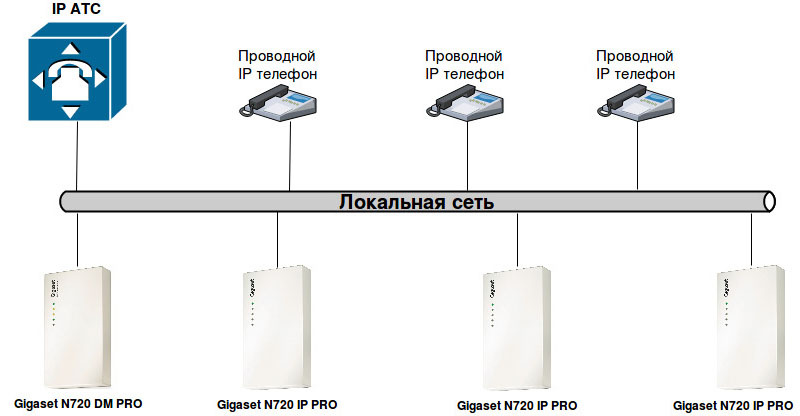
In addition to the interaction of the dispatcher with the base stations, the Gigaset N720 DM PRO dispatcher is connected using the SIP protocol to the IP-PBX and acts as a SIP client for all accounts used by the DECT handsets of the system. There are no features here - everything happens according to the standards of packet transmission in IP networks and SIP RFC 3261 signaling.
The interaction of base stations with the handset and with each other is carried out using DECT wireless technology. DECT - Digital Enhanced Cordless Telecommunications - wireless technology at frequencies of 1880-1900 MHz. The entire frequency range is divided into 10 working radio channels, approximately 2 MHz each. Each radio channel, in turn, is divided into 12 duplex channels. Total, we get 10 x 12 - 120 bidirectional communication channels. All channels can be distributed simultaneously between several base stations. In practice, however, due to the interference of adjacent channels without the use of special measurement procedures, only a quarter of the 120 channels are guaranteed to be used. That is why, the Gigaset N720 IP PRO system, as mentioned earlier, allows no more than 30 simultaneous conversations.
A microcellular DECT system has two important advantages over simple, single-base DECT systems. Firstly, the handset is not rigidly attached to any base station - it can easily move from the coverage area of one base station to the coverage area of another, without losing the ability to make or receive calls. This feature of automatic re-registration of the handset is called roaming . Secondly, the Gigaset N720 IP PRO system allows handsets to move between the coverage areas of base stations right during a call, without losing communication. This is called a handover or handover .
The mechanism of roaming and handover is fundamentally different. For roaming to work, it is enough that the Gigaset N720 IP Pro base stations, in the coverage area of which the handset can be located, are controlled by one DECT manager of the N720 DM Pro. At the same time, neither the relative position of the base stations, nor the coverage area of them play any role, since information about the re-registration of a subscriber from one base station to another is transmitted over a cable network.

Roaming Scheme
Things are completely different with handover. Firstly, the process of transferring a subscriber from one base station to another during a conversation does not occur instantly. This means that between the base stations there must be adjacent areas in which the handset can confidently receive a signal from both of them simultaneously. The size of these adjacent zones should be at least 5-10 meters, and the signal power of both base stations in them should not be lower than -65 dBm. Secondly, during the implementation of handover, the base stations no longer communicate with the controller, but with each other directly - this interaction is called synchronization. They can only be synchronized via a DECT radio channel, which means that base stations must not only form adjacent areas of coverage areas, but also fall into each other's area of effect. True, the requirements for signal level are somewhat lower here - for synchronization it is enough that the signal power from a neighboring base station is not lower than -70 dBm. Thus, we get two overlap zones: a handover zone and a synchronization zone.

Handover operation scheme
However, the description of the synchronization process would be incomplete without mentioning such a concept as the synchronization levelbase station. The fact is that synchronization in the Gigaset N720 Pro system is carried out in Master-Slave mode. That is, a base station with a higher synchronization level (Master) initiates a synchronization process for one or more stations with a lower level (Slave). The highest - first - synchronization level can be only at one base station per cluster (about clusters - below). If the topology of the DECT system is a star or full-mesh, then all other base stations can have a second synchronization level. But such a situation is rare, therefore, in real life, three, four, and more synchronization levels can be used.
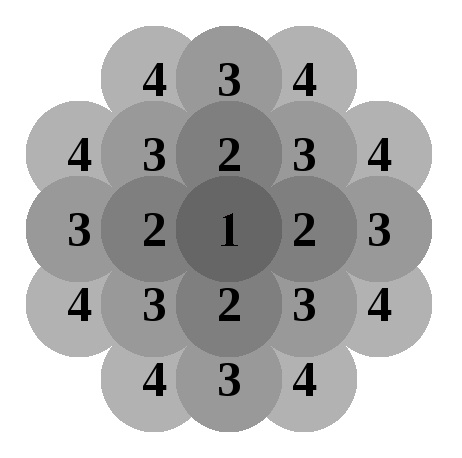
If the slave base station (Slave) can synchronize with several master stations (Master) at once, the station with the best signal quality will be selected as the synchronization source. If no base station with a higher synchronization level is available, then synchronization will not be carried out, even if several stations with excellent signal quality but lower or similar synchronization level are located nearby. This means that such a base station will not be able to participate in the handover process. Thus, it is required not only to correctly position the base stations physically, but also to correctly configure the synchronization hierarchy. In addition, you should try to use as few hierarchy levels as possible, which will optimize the synchronization process.
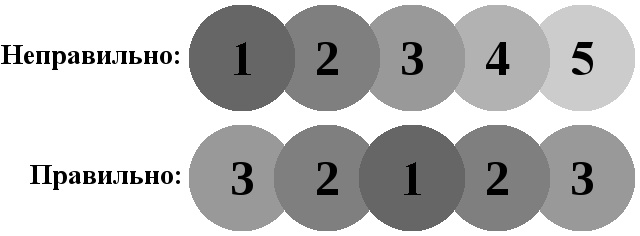
When building a DECT system, there may be situations when roaming support is required for the entire network, but handover is not. The simplest case is that the company is located on two different floors or in two neighboring buildings. Employees of one location may be located in another, and their phones should work, but support for transferring a conversation at the very moment of transition is not required (if two locations are far from each other it is technically difficult and economically impractical). For these cases, the Gigaset N720 IP Pro system supports the so-called clusters .
Base stations are synchronized within a single cluster, but not between clusters. But, since all base stations are still controlled by one N720 DM Pro controller, roaming between base stations is possible. Each cluster can and should have one base station with the highest synchronization level 1. Without the support of clusters, taking into account the features of the synchronization process of base stations, the construction of disconnected DECT networks would be impossible!
In conclusion, we note that roaming and handover functions should be supported not only by base stations, but also by the handset itself, which must constantly scan the DECT network and measure the quality of the received signal from each base station. When the handset moves from one base station to another, the handset notices changes in signal strength and switches to the base station with the best level.
Planning a wireless communication system is perhaps the most difficult and crucial task. In any case, she will need to devote enough time and spend enough effort, but using the recommended sequence of actions recommended by Gigaset, this task can be facilitated as much as possible.
First of all, we need a floor plan with the dimensions printed. Bold on the plan the walls and partitions with the maximum attenuation coefficient of the DECT signal in accordance with the table:
If it is planned to install a large amount of high furniture in the rooms (cabinets, sideboards, sideboards), then it makes sense to put it on the plan, for example, with a dashed line. Indicate for each room the number of employees who will be in this room. Also mark on the plan the so-called “hotspot” - places of spontaneous increase in employees, for example, canteens or meeting rooms.

It is with hotspot that one should start arranging base stations on a plan. Keep in mind - one base station supports up to 8 simultaneous calls, and the entire system as a whole - 30, so the installation of four base stations will provide the maximum coverage area. At the same time, the distance between two neighboring base stations should not be less than 5-10 meters in open space or 1-2 meters through a partition. A denser arrangement of base stations can lead to such unpleasant consequences as an unexpected termination of a conversation, loss of handset connection with a base station, and deterioration in communication quality.
From the installed base stations, sketch out the signal propagation zones in various directions, guided by the table above and the fact that in the absence of walls, the propagation radius is about 40-50 meters. This will reveal the approximate location of the following base stations. At the same time, it should be remembered that base stations must form coverage areas of 5-10 meters for roaming and be at least one (or better several) base stations for synchronization in the coverage area. Also, do not forget that the maximum number of base stations in one system is limited to 30 pieces, and the maximum number of simultaneous calls in the coverage area of one base station cannot exceed eight. An increase in the number of simultaneous connections in one cell can be achieved in two ways:

After the base stations are arranged, you can estimate the synchronization hierarchy by indicating the synchronization level next to each base station. The main rule is that each base station should be located in the coverage area of at least one (or rather several) base stations with a higher synchronization level. It is also advisable to use as few synchronization levels as possible. The achievement of this goal is often facilitated by the location of the base station with the highest synchronization level in the center of the planned DECT network.
Having an approximate plan for the future DECT network on hand, you can start a radio survey that will show how accurate the assumptions about the locations of the base stations turned out to be. In the vast majority of cases, conducting a radio survey corrects the original plan, and in some situations you even have to re-plan and, as a result, re-examine.
To conduct a radio survey at facilities with a large number of base stations, you will need to use a special Gigaset N720 SPK Pro measuring kit, which can be rented from Gigaset dealers. This kit includes the following equipment:

The handsets are already registered at the base station and in measurement mode display the following information on the screen:
Signal measurements can be started in the same sequence as planning — from base stations located at spontaneous congestion points. However, if there are hard-to-reach spots (for example, a stairwell) that allow only one or two possible installation locations, then it is best to start signal measurements with them. For large DECT systems, it is often advisable to start surveys from the base station with the highest level of synchronization.
The test base station should be placed at the same height level as the installation of the working base station. In this case, the following requirements for the installation of base stations should be guided by:
Now, moving with the handset and making measurements of the signal level, we can determine the real coverage area of the base station. When conducting test measurements, you need to make sure that the signal strength is sufficient in three places
Signal Strength Rating:
In addition to the signal power, you should pay attention to the quality indicator of the received signal - Frame quality, which indicates the percentage of all received packets to packets received without errors. The fact is that even with a large signal power, its quality may be unsatisfactory, for example, due to the influence of other radio devices, the proximity of another base station or partitions, causing multiple reflections of the signal.
Assessment of signal quality at a signal power of -60 dBm:
It is worth noting the following caveat: when measuring the quality of the signal for voice transmission, the handset should be held at the height of the ear, and when measuring the signal for synchronization - at the height of the base stations. It is better to conduct a radio survey together - in this case, in addition to measuring objective parameters, you can evaluate the quality of communication subjectively by calling another phone (therefore, there are two handsets in the measuring kit).
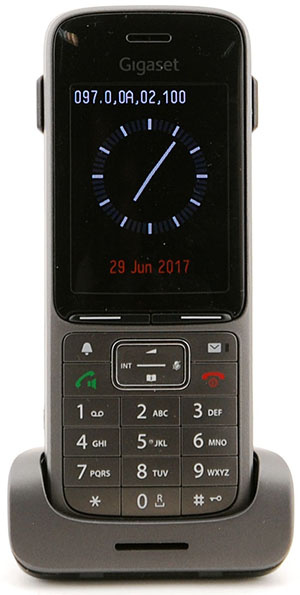
It is worth noting that when introducing small DECT IP systems to a small number of base stations, you can do without using a special kit. Any DECT Gigaset handset also supports signal measurement mode. To activate it, you must perform the following steps:
The line with the measurement parameters can, for example, look like this: 98.7, 00, 04, 100 , where 98 is the signal level in percent, .7 is the number of the radio channel, 00 is the number of the pair of time slots, 04 is the identifier of the base station, 100 - percentage of packets received without errors. The measurement interval is set in the service menu, in the Measure Time option. Valid values are from 06 to 16, which corresponds to a time interval of 1 to 2.5 seconds. The recommended value is 16. The main disadvantage of using conventional measuring tubes is that the signal power is indicated not in absolute values, but in relative values. Therefore, in order to accurately determine the coverage area in this case, it is often necessary to use the subjective method of assessing the quality of reception by making a call.
After planning and radio surveys, you can install base stations, connect them to the local network and power. Recall that the Gigaset N720 IP Pro base stations and the Gigaset N720 DM Pro controller must be in the same broadcast domain. All system configuration is carried out using the controller’s Web interface, although base stations have their own network address, they do not provide any user interface.
To connect to the controller, simply enter its IP address in the address bar of the browser - by default, the controller receives the address via DHCP. You can do even easier - go to www.gigaset-config.comand after some time a list of all the controllers found in your network appears on the screen and, if it is one, then after some time a redirect to its Web interface will work. The default password for accessing the Web-based manager interface is admin.
The entire interface is divided into two global sections - Settings and Status . In the Status section, you can see such basic system parameters as network settings, software version, connected base stations, system time, and boot status. We are more interested in the Settings section . First of all, you need to assign a static IP address to the controller, which is done in the section Network and Connectors → IP Configuration.
Connecting the base stations Gigaset N720 IP Pro to the controller is carried out in two stages. First, you need to register them: the controller automatically finds all unregistered base stations connected to the network and lists them in the Network and Connectors → Register base station section . Now just click "Confirm" opposite the desired station and enter its name in the next step. The name is recommended to be chosen so that it reflects the location of the base station. Also at this stage of the base station, it will be necessary to assign two IP addresses - one for each DECT radio module, or you can provide this work to a DHCP server.
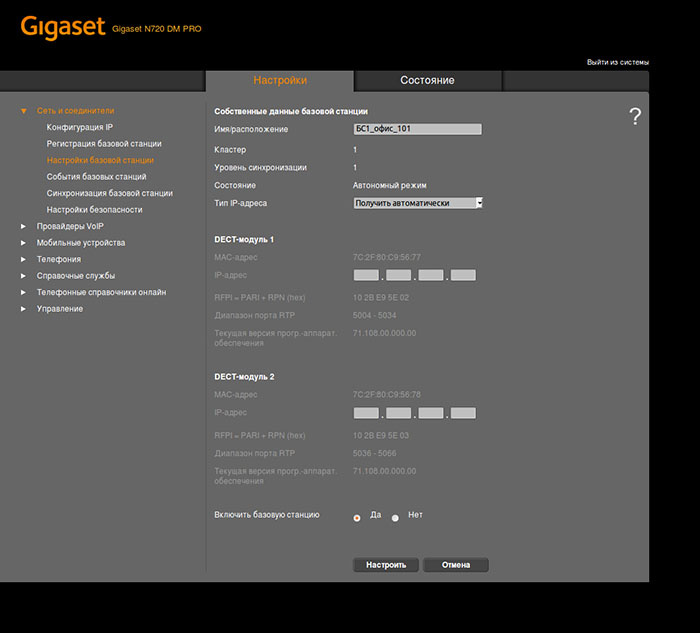
At the second stage, it is necessary to assign a synchronization level to each base station and assign it to a specific cluster. This is done in the section Network and Connectors → Synchronization of the base station . Remember that synchronization is carried out only between stations belonging to the same cluster and that in each cluster there can be only one base station with synchronization level 1.
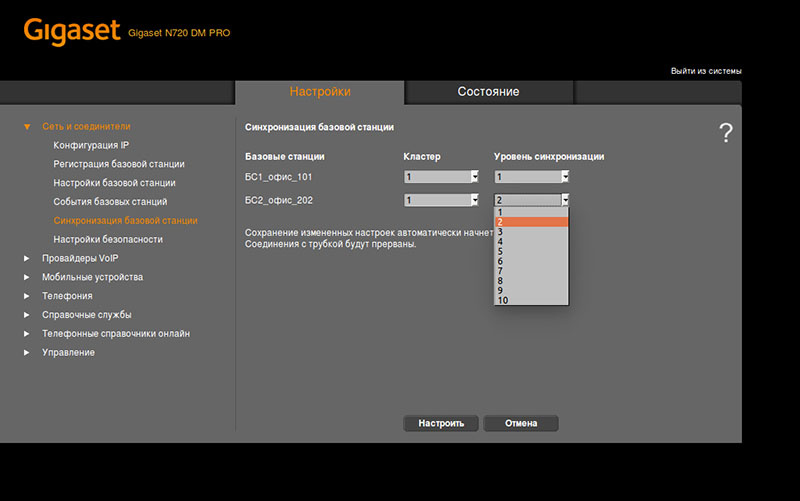
After connecting the base stations, synchronization will start automatically. If the synchronization is successful, then all indicators will light on the base station. You can verify that the base station has successfully passed synchronization in the Network and Connectors → Base Station Settings. In the window that opens, all connected base stations, their identifiers in the DECT system, as well as the status of operation and synchronization, will be displayed.
For the handset to make incoming and outgoing calls, it must be registered with the dispatcher. Upon registration, each handset is assigned its own SIP account. Therefore, before registering the handsets on the dispatcher, all necessary SIP accounts must already be established. This, in turn, requires the creation of a so-called IP PBX connection profile.
A connection profile contains the most basic parameters of working with a telephone exchange — its IP address, SIP port, type of transport protocol, and, if necessary, the address and port of the proxy server. When using your own IP-PBX, these parameters must be filled in manually in the VoIP Providers section. If you use a telephone exchange of a telecom operator, then you can try to download the VoIP profile automatically. To do this, click Select VoIP provider , select a country from the drop-down list, as a result of which a list of the most popular telecom operators in this country will be offered. For Russia, 22 telecom operators were loaded, we did not check the relevance of the data, since in the vast majority of cases professional DECT IP solutions are still used in conjunction with our own IP-PBX. Gigaset N720 IP Pro supports up to 10 VoIP profiles.
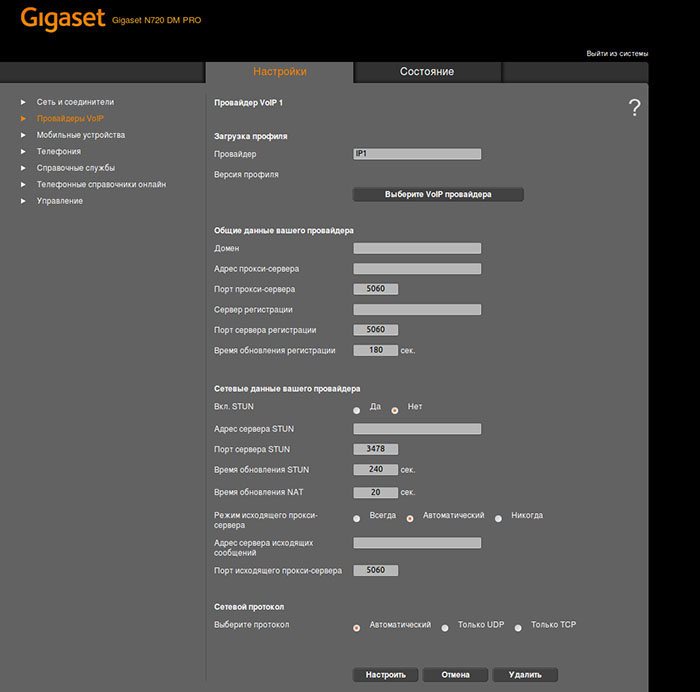
To create SIP accounts, go to the Mobile devices section . Here we can create a new account from scratch or copy an existing one. When creating an account, you will need to select one of the created VoIP profiles, as well as the extension number, username, password and display name. Advanced settings are available by clicking the Show additional button . settings . Here you can select the codecs used, connect the telephone directory, set up an email account and more.
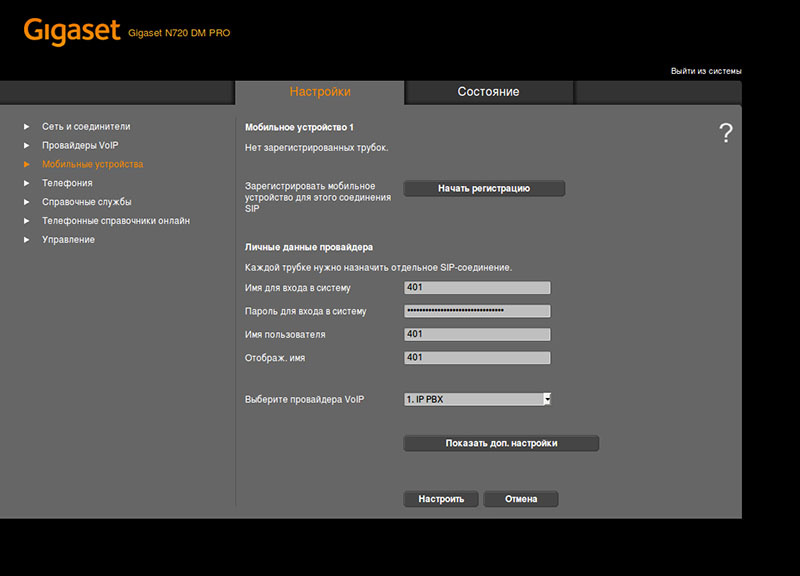
When you click Configure , the system simply saves the entered parameters. When using the Start Registration buttonin addition to this, the process of registering the handset is activated. It looks like this: on the web-interface screen, the PIN-code for registration will be displayed and the time allowed for the procedure of registering the handset will be indicated.
Go to the handset and start the registration procedure through the phone menu. A message appears on the display to search for the base station. If the base station is detected, a PIN code will be requested for the connection. Enter the PIN code to connect to the DECT system. If everything goes well, the message "Registration is completed" will appear in the web interface of the dispatcher. As soon as the registration of the handset is completed, the handset enters the standby state and the name of the handset is displayed on the screen in accordance with the account assigned to it.
On this, the basic setup of the Gigaset N720 Pro system can be considered complete.
In addition to the basic functionality, the DECT Gigaset N720 Pro system does not support so many additional features. Nevertheless, some of them are worth telling separately.
The system supports two types of phone books - local and centralized. Local phone books are stored on the handsets themselves in vCard format. However, they can also be controlled directly from the controller. In the Mobile Devices section , you can download the local address book from any phone, make changes if necessary, and upload it back to the same phone or any other in the same way. The size of local phone books is limited by the size of the handset directory - modern Pro series handsets support up to 500 contacts.
A centralized phone book can be of two types - LDAP or XML. In principle, the situation is clear with both the first and second. In the case of LDAP - the system accesses the LDAP database specified in the settings, in the case of XML - the HTTP server specified in the settings, which gives the contact list in XML format. For handsets, this process is absolutely transparent - in the settings of the account, the administrator indicates which address book should be opened by the subscriber when pressing the corresponding key - local or centralized.
There is one remark: not all handsets support Cyrillic. For example, the Gigaset SL750H PRO displays Russian characters wonderfully, while the Gigaset R650H PRO and Gigaset A540H handsets display krakozyabry.
The Gigaset N720 PRO system allows its subscribers to receive notifications of new electronic messages received by corporate email.
All settings are made in the interface of the Gigaset N720 DM PRO manager. In the settings of the corresponding phone account, you need to add the parameters for receiving e-mail: POP3 server address, login and password. And in the general section Mobile devices, you can specify the frequency of checking the box for new messages.

Mail messages are downloaded completely, but they are not deleted from the server and are not marked as read. Again, there are some problems with displaying the Cyrillic alphabet. Some messages are displayed correctly, some do not even want to open.
After setting up the system, it is highly recommended that you keep its full configuration, including information about registered handsets. You should also do this before any, even the smallest, configuration changes - in the event of any failure, it can be restored in just a few minutes. The Gigaset N720 DM PRO controller saves the current configuration in binary format - therefore, there is no way to make changes to it in manual mode.
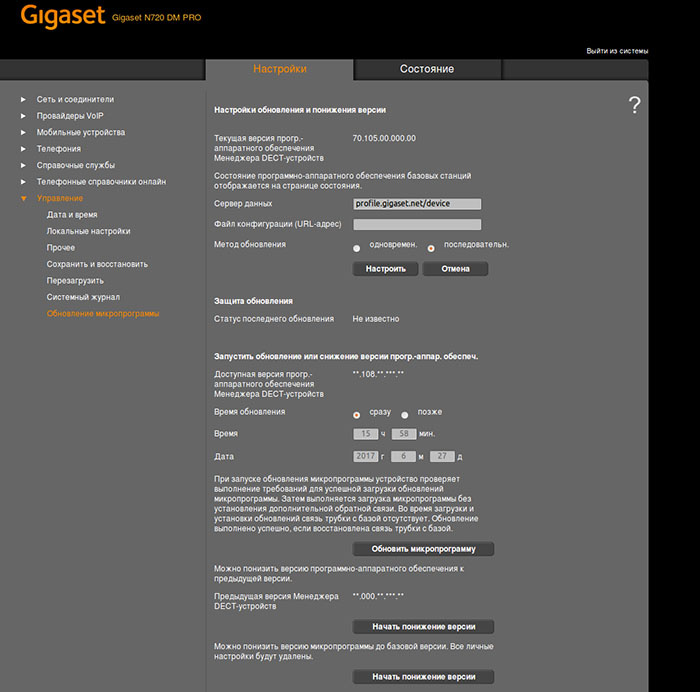
Updating all components of the Gigaset N720 IP PRO system is also centralized, using the Gigaset N720 DM PRO dispatcher under Management → Firmware Update. In the proposed menu, it is possible to switch to a more recent version of the software or vice versa, return to the previous version (the system saves it automatically, it is not required to search and download a file with the previous firmware). It is also possible at any time to switch to the software version with which the system was originally supplied, which in some cases can be extremely useful.
DECT IP systems that allow you to organize a zone of seamless radio coverage in the enterprise - the goods are, in fact, piece. Such systems, in addition to Gigaset, are produced by only a few companies, including therefore the price of such systems cannot be low. If we ignore the economic issue, then it is worth noting that the Gigaset N720 Pro seems to be a high-quality product, with good functionality and easy customization. Those companies that are thinking of introducing seamless DECT or want to upgrade their existing system to switch to IP telephony should definitely consider the Gigaset N720 Pro as one of the options.
Generally speaking, the Gigaset N720 Pro is a microcellular DECT IP system designed to organize a wireless continuous telephone system in small and medium enterprises. Now we will examine in more detail each of these terms. Microcellular - means that the system can use not one but several base stations, the coverage area of each of which forms a kind of cell or cell, following the example of how it works in familiar to all mobile communication networks. Similarly, the subscriber of the system can freely register at any of its base stations, as well as conduct continuous telephone conversation, moving between them.
The interaction between base stations and wireless handsets of subscribers is carried out using DECT technology. And the interaction of the Gigaset N720 Pro system with the telephone exchange, which is the center of any corporate communication system, is through the SIP protocol. Accordingly, both hardware solutions (for example, Gigaset, Yeastar, Grandstream) and software solutions (Asterisk, 3CX, FreePBX) can act as IP-PBXs.
The Gigaset N720 Pro system supports up to 30 base stations, up to 100 subscribers and up to 30 simultaneous calls and consists of several components, each of which should be discussed separately.
DECT dispatcher Gigaset N720 DM Pro
Gigaset N720 DM PRO is a device that acts as a centralized control of the entire DECT system, that is, control of all base stations and telephones. And for an IP PBX, the Gigaset N720 DM PRO dispatcher is a single interface for interacting with the entire DECT system as a whole: no matter how many phones are used in the system, for an IP PBX they will all be available through the IP address of the DECT dispatcher.
The Gigaset N720 DM PRO controller itself does not have a DECT radio module and is in no way connected to other components of the DECT network via a radio channel. All communication between the dispatcher and base stations is via Ethernet. Therefore, the dispatcher can be located in any convenient place where there is a connection to the local network, for example, in the server.
Only one Gigaset N720 DM PRO controller is required for the entire DECT system, but its presence is required. The controller is powered by IEEE 802.3af PoE technology <3.8 W (class 1) or using an external power adapter, which, however, is not included in the package. A convenient Web interface is provided for controlling the controller and the entire system as a whole.
Gigaset N720 IP Pro Base Stations
The Gigaset N720 IP Pro base station , on the one hand, interacts with wireless handsets using DECT technology, and on the other hand, with the Gigaset N720 DM PRO controller over a wired Ethernet network. The system, as already mentioned, can consist of a maximum of 30 base stations. Power is also supplied using IEEE 802.3af PoE technology <6.4 W (class 2) or using a power supply, which again is not included in the package.
The claimed coverage radius of one base station is up to 300 meters on the street and up to 50 meters indoors - however, these are very conditional numbers, which should be guided with great care, which we will write in more detail about. Another limitation of base stations is the number of simultaneous supported calls in their coverage area - up to 8 calls in narrowband mode (G.726, G.711, G.729ab codecs) or half as much when using the G.722 codec. Base stations and controllers are made in exactly the same cases of white plastic with the possibility of mounting on the wall (dowels and screws are included in the package).
Gigaset Pro Series Handsets
For its professional solutions, Gigaset also produces special handsets and recommends using them with the N720 Pro microcellular system. Three current models of the Pro series tubes are currently available: the ultra-compact Gigaset SL750H Pro , the shockproof, dustproof, waterproof Gigaset R650H Pro and its analogue in a simpler case, but with Bluetooth support, the Gigaset S650H Pro . Previously, SL610H Pro and S810H Pro models were also released, which currently still work with the Gigaset N720 Pro microcellular system.
Professional series ducts are not the cheapest fun, so you might be tempted to use more affordable Gigaset or third-party devices. Gigaset's official position on this issue is summarized in the following table:
| Functions | Gigaset Pro Handsets | Gigaset handsets with GAP support | Third party GAP enabled handsets |
|---|---|---|---|
| Incoming calls | Yes | Yes | possible (not guaranteed) |
| Outgoing calls | Yes | Yes | possible (not guaranteed) |
| Call transfer | Yes | Yes | possible (not guaranteed) |
| CLIP mapping | Yes | Yes | possible (not guaranteed) |
| Anonymous calls | Yes | not | not |
| Call forwarding | Yes | not | not |
| Call waiting | Yes | not | not |
| Message Waiting | Yes | not | not |
| Call list | Yes | not | not |
| General phone book | Yes | not | not |
| Information Center | Yes | not | not |
| Handover | Yes | not | not |
| Roaming | Yes | not | not |
| Gigaset Support | Full | Warranty only | not |
As you can see, the full functionality of the system is guaranteed only when working with the "native" tubes of the Pro series. When using other GAP-compatible Gigaset handsets, support for many functions simply disappears, the most delicious of which are, of course, roaming and handover. When using third-party GAP-tubes, in general, no guarantees are given even for the basic functionality - they are offered to be used only at your own peril and risk.
If we move from an official position to a real situation, we can state the following: firstly, handsets without declared GAP support, such as, for example, Yealink W56H , Grandstream DP720 or Panasonic KX-TPA60, really will not work with the system. As for the Gigaset GAP-handsets, the situation is more optimistic in comparison with the table: for example, the Gigaset A540H handset (not related to the Pro series) fully worked with the system, except for the support of the general phone book. One of the cheapest GAP-tubes Gigaset A120H showed results close to the table - registered, called, but without the support of handover. Out of third-party GAP tubes, we managed to test the operation of the old Panasonic KX-TPA50 tubing and the test results pleasantly surprised: the handset was successfully registered at different base stations and supported a soft call transfer.
Based on what was said in the previous paragraph, it’s worth highlighting two important points: firstly, to be sure that this or that handset with the Gigaset N720 Pro system works, you need to conduct testing, there is simply no other option. Secondly, even if the handset is working successfully at the moment, this in no way guarantees its operation in the future. For example, in the old documentation for the N720 Pro in the list of compatible handsets you can find such items as the E49H, SL400H and S810H. Now, instead of them, only three models of the professional series are indicated. That is, the final price of this solution will be calculated more correctly and more honestly, taking into account the purchase of Pro series tubes, the manufacturer guarantees support for them.
The general mechanism of the system
Looking ahead, it is worth noting that system planning is a fairly non-trivial process and there are enough places where you can make a mistake. Understanding at least the general principles of the system can help in solving potential problems. Therefore, we will devote some time to this issue and begin with the features of the controller’s interaction with base stations and IP-PBX.
IP network
As mentioned above, this interaction is carried out over a wired network, which in general is rather a plus, since a wired infrastructure usually has a higher level of reliability compared to a wireless one. Between the dispatcher and base stations, the SCP (Satellite Control Protocol) protocol operates: each base station generates a broadcast request when connected, informing the controller of its presence. SCP is a protocol of level 2, for this reason all devices of the same DECT system must be in the same local network or, more precisely, in the same broadcast domain. When connecting base stations to different subnets, you will need to have your own N720 DM Pro controller in each of these subnets, but then these systems will work independently of each other.
Scenario of the SCP protocol:
- The base station is plugged in.
- The base station generates a broadcast request: src: 0.0.0.0 port 4712, dst: 255.255.255.255 port 4711, UDP
- Базовая станция отобразится в списке доступных в интерфейсе станции управления
- При подтвержеднии подключения базовой станции к вашей DECT системе, станция управления генерирует широковещательное сообщение: src: <IP станции управления> port 4711, dst: 255.255.255.255 port 4712, UDP
- Станция управления запускает процедуру получений IP через DHCP: src: 0.0.0.0, dst: 255.255.255.255, DHCP — Discover Transaction ID 0x54ae9c78
- Базовая станция получает настройки и включается в работу в общую DECT сеть
In addition to the interaction of the dispatcher with the base stations, the Gigaset N720 DM PRO dispatcher is connected using the SIP protocol to the IP-PBX and acts as a SIP client for all accounts used by the DECT handsets of the system. There are no features here - everything happens according to the standards of packet transmission in IP networks and SIP RFC 3261 signaling.
DECT network
The interaction of base stations with the handset and with each other is carried out using DECT wireless technology. DECT - Digital Enhanced Cordless Telecommunications - wireless technology at frequencies of 1880-1900 MHz. The entire frequency range is divided into 10 working radio channels, approximately 2 MHz each. Each radio channel, in turn, is divided into 12 duplex channels. Total, we get 10 x 12 - 120 bidirectional communication channels. All channels can be distributed simultaneously between several base stations. In practice, however, due to the interference of adjacent channels without the use of special measurement procedures, only a quarter of the 120 channels are guaranteed to be used. That is why, the Gigaset N720 IP PRO system, as mentioned earlier, allows no more than 30 simultaneous conversations.
A microcellular DECT system has two important advantages over simple, single-base DECT systems. Firstly, the handset is not rigidly attached to any base station - it can easily move from the coverage area of one base station to the coverage area of another, without losing the ability to make or receive calls. This feature of automatic re-registration of the handset is called roaming . Secondly, the Gigaset N720 IP PRO system allows handsets to move between the coverage areas of base stations right during a call, without losing communication. This is called a handover or handover .
The mechanism of roaming and handover is fundamentally different. For roaming to work, it is enough that the Gigaset N720 IP Pro base stations, in the coverage area of which the handset can be located, are controlled by one DECT manager of the N720 DM Pro. At the same time, neither the relative position of the base stations, nor the coverage area of them play any role, since information about the re-registration of a subscriber from one base station to another is transmitted over a cable network.
Roaming Scheme
Things are completely different with handover. Firstly, the process of transferring a subscriber from one base station to another during a conversation does not occur instantly. This means that between the base stations there must be adjacent areas in which the handset can confidently receive a signal from both of them simultaneously. The size of these adjacent zones should be at least 5-10 meters, and the signal power of both base stations in them should not be lower than -65 dBm. Secondly, during the implementation of handover, the base stations no longer communicate with the controller, but with each other directly - this interaction is called synchronization. They can only be synchronized via a DECT radio channel, which means that base stations must not only form adjacent areas of coverage areas, but also fall into each other's area of effect. True, the requirements for signal level are somewhat lower here - for synchronization it is enough that the signal power from a neighboring base station is not lower than -70 dBm. Thus, we get two overlap zones: a handover zone and a synchronization zone.
Handover operation scheme
However, the description of the synchronization process would be incomplete without mentioning such a concept as the synchronization levelbase station. The fact is that synchronization in the Gigaset N720 Pro system is carried out in Master-Slave mode. That is, a base station with a higher synchronization level (Master) initiates a synchronization process for one or more stations with a lower level (Slave). The highest - first - synchronization level can be only at one base station per cluster (about clusters - below). If the topology of the DECT system is a star or full-mesh, then all other base stations can have a second synchronization level. But such a situation is rare, therefore, in real life, three, four, and more synchronization levels can be used.
If the slave base station (Slave) can synchronize with several master stations (Master) at once, the station with the best signal quality will be selected as the synchronization source. If no base station with a higher synchronization level is available, then synchronization will not be carried out, even if several stations with excellent signal quality but lower or similar synchronization level are located nearby. This means that such a base station will not be able to participate in the handover process. Thus, it is required not only to correctly position the base stations physically, but also to correctly configure the synchronization hierarchy. In addition, you should try to use as few hierarchy levels as possible, which will optimize the synchronization process.
When building a DECT system, there may be situations when roaming support is required for the entire network, but handover is not. The simplest case is that the company is located on two different floors or in two neighboring buildings. Employees of one location may be located in another, and their phones should work, but support for transferring a conversation at the very moment of transition is not required (if two locations are far from each other it is technically difficult and economically impractical). For these cases, the Gigaset N720 IP Pro system supports the so-called clusters .
Base stations are synchronized within a single cluster, but not between clusters. But, since all base stations are still controlled by one N720 DM Pro controller, roaming between base stations is possible. Each cluster can and should have one base station with the highest synchronization level 1. Without the support of clusters, taking into account the features of the synchronization process of base stations, the construction of disconnected DECT networks would be impossible!
In conclusion, we note that roaming and handover functions should be supported not only by base stations, but also by the handset itself, which must constantly scan the DECT network and measure the quality of the received signal from each base station. When the handset moves from one base station to another, the handset notices changes in signal strength and switches to the base station with the best level.
Gigaset N720 IP Pro DECT IP Planning
Planning a wireless communication system is perhaps the most difficult and crucial task. In any case, she will need to devote enough time and spend enough effort, but using the recommended sequence of actions recommended by Gigaset, this task can be facilitated as much as possible.
First of all, we need a floor plan with the dimensions printed. Bold on the plan the walls and partitions with the maximum attenuation coefficient of the DECT signal in accordance with the table:
| Material | Reduced coverage |
|---|---|
| Raw wood and glass | ten% |
| Processed wood | 25% |
| Drywall | 27-41% |
| Brick wall from 10 to 12 cm. | 44% |
| Brick wall 24 cm. | 60% |
| Aerated concrete wall | 78% |
| Reinforced glass | 84% |
| Reinforced concrete floor | 75-87% |
If it is planned to install a large amount of high furniture in the rooms (cabinets, sideboards, sideboards), then it makes sense to put it on the plan, for example, with a dashed line. Indicate for each room the number of employees who will be in this room. Also mark on the plan the so-called “hotspot” - places of spontaneous increase in employees, for example, canteens or meeting rooms.
It is with hotspot that one should start arranging base stations on a plan. Keep in mind - one base station supports up to 8 simultaneous calls, and the entire system as a whole - 30, so the installation of four base stations will provide the maximum coverage area. At the same time, the distance between two neighboring base stations should not be less than 5-10 meters in open space or 1-2 meters through a partition. A denser arrangement of base stations can lead to such unpleasant consequences as an unexpected termination of a conversation, loss of handset connection with a base station, and deterioration in communication quality.
From the installed base stations, sketch out the signal propagation zones in various directions, guided by the table above and the fact that in the absence of walls, the propagation radius is about 40-50 meters. This will reveal the approximate location of the following base stations. At the same time, it should be remembered that base stations must form coverage areas of 5-10 meters for roaming and be at least one (or better several) base stations for synchronization in the coverage area. Also, do not forget that the maximum number of base stations in one system is limited to 30 pieces, and the maximum number of simultaneous calls in the coverage area of one base station cannot exceed eight. An increase in the number of simultaneous connections in one cell can be achieved in two ways:
After the base stations are arranged, you can estimate the synchronization hierarchy by indicating the synchronization level next to each base station. The main rule is that each base station should be located in the coverage area of at least one (or rather several) base stations with a higher synchronization level. It is also advisable to use as few synchronization levels as possible. The achievement of this goal is often facilitated by the location of the base station with the highest synchronization level in the center of the planned DECT network.
Carrying out a radio survey
Having an approximate plan for the future DECT network on hand, you can start a radio survey that will show how accurate the assumptions about the locations of the base stations turned out to be. In the vast majority of cases, conducting a radio survey corrects the original plan, and in some situations you even have to re-plan and, as a result, re-examine.
To conduct a radio survey at facilities with a large number of base stations, you will need to use a special Gigaset N720 SPK Pro measuring kit, which can be rented from Gigaset dealers. This kit includes the following equipment:
- The measuring base station in a special case with the possibility of mounting on a tripod and powered by a battery, which allows you to install it in any place without reference to the mains and LAN;
- Two Gigaset S810H handsets with a special firmware version for performing a radio survey;
- Two wired headsets;
- Battery, charger, convenient carrying case.
The handsets are already registered at the base station and in measurement mode display the following information on the screen:
- RSSI value - power level of the received signal from the base station. Valid values are from -20 to -70 dBm
- Fr quality (Frame quality) - percentage ratio of all received packets to packets with errors. Valid values are from 95% to 100%
- Frequency - number of the radio channel on which measurements are made. Allowed values are from 0 to 9.
- Slot pair - a used pair of time slots. Allowed values are from 0 to 11.About time slotsСтандарт DECT применяет технологию доступа к радиоканалу с разделением по времени (Time-Division Multiple Acces, TDMA). Для обмена данными используются кадры, каждый из которых разделен на 24 тайм-слота (24 временных промежутка). При этом первые 12 слотов, с номерами от 0 до 11, используются только для передачи в направлении от базовой станции к телефонной трубке, вторые 12 слотов с номерами от 12 до 23, используются для передачи в направлении от телефонной трубки к базовой станции. Это дает в сумме 12 дуплексных каналов в каждом радиоканале. Для обеспечения одного разговора используется пара слотов, которая нумеруется от 0 до 11, что соответствует номеру слота из первой группы и номеру слота плюс двенадцать из второй группы. Например, если на дисплее указан параметр Slot pair: 05 — это означает, что используются слоты под номерами 5 и 17.
- RPN (Radio Fixed Part Number) - identifier of the connected base station. The number is displayed in hexadecimal format. It is worth noting that base stations have two DECT radio modules, so each of them corresponds to two adjacent RPN values.
Signal measurements can be started in the same sequence as planning — from base stations located at spontaneous congestion points. However, if there are hard-to-reach spots (for example, a stairwell) that allow only one or two possible installation locations, then it is best to start signal measurements with them. For large DECT systems, it is often advisable to start surveys from the base station with the highest level of synchronization.
The test base station should be placed at the same height level as the installation of the working base station. In this case, the following requirements for the installation of base stations should be guided by:
- The optimal height for installing the base station in the room is between 1.8 and 3 meters;
- The minimum clearance to the ceiling is 0.5 meters
- Base stations are recommended to be installed at the same height, in a vertical position
Now, moving with the handset and making measurements of the signal level, we can determine the real coverage area of the base station. When conducting test measurements, you need to make sure that the signal strength is sufficient in three places
- Over the entire proposed coverage area, the signal level should not be lower than -65 dBm for guaranteed high-quality communication
- The signal level at the extreme point of the handover overlap area should not be lower than -65 dBm
- The signal level at the installation sites of neighboring base stations should not be lower than -70 dBm. Required to perform synchronization between base stations.
Signal Strength Rating:
| Signal strength | Rating |
|---|---|
| -50 dBm | Great |
| -60 dBm | Good |
| -65 dBm | Satisfactory |
| -70 dBm | Minimum required |
| -73 dBm | Weak (not applicable) |
In addition to the signal power, you should pay attention to the quality indicator of the received signal - Frame quality, which indicates the percentage of all received packets to packets received without errors. The fact is that even with a large signal power, its quality may be unsatisfactory, for example, due to the influence of other radio devices, the proximity of another base station or partitions, causing multiple reflections of the signal.
Assessment of signal quality at a signal power of -60 dBm:
| Frame quality | Signal Quality Assessment |
|---|---|
| 100% | Great |
| 99% | Satisfactory |
| 98% | Minimum required |
| 97% | Weak (not applicable) |
It is worth noting the following caveat: when measuring the quality of the signal for voice transmission, the handset should be held at the height of the ear, and when measuring the signal for synchronization - at the height of the base stations. It is better to conduct a radio survey together - in this case, in addition to measuring objective parameters, you can evaluate the quality of communication subjectively by calling another phone (therefore, there are two handsets in the measuring kit).
It is worth noting that when introducing small DECT IP systems to a small number of base stations, you can do without using a special kit. Any DECT Gigaset handset also supports signal measurement mode. To activate it, you must perform the following steps:
- Turn off the phone
- Hold the keys 1 + 4 + 7 and press the power key (red handset)
- Wait until the phone boots in service mode, the message “Service” should appear on the screen
- Dial the sequence of digits 76200, not paying attention to what is happening on the screen, as a result of which the Service menu will be displayed
- Select Metering Mode, press the Change soft button and then Back. The phone will turn off
- Turn on the phone in the usual way - the phone will boot in operating mode, but instead of displaying the battery level and signal power level, a line with the measurement parameters will be displayed at the top of the screen
The line with the measurement parameters can, for example, look like this: 98.7, 00, 04, 100 , where 98 is the signal level in percent, .7 is the number of the radio channel, 00 is the number of the pair of time slots, 04 is the identifier of the base station, 100 - percentage of packets received without errors. The measurement interval is set in the service menu, in the Measure Time option. Valid values are from 06 to 16, which corresponds to a time interval of 1 to 2.5 seconds. The recommended value is 16. The main disadvantage of using conventional measuring tubes is that the signal power is indicated not in absolute values, but in relative values. Therefore, in order to accurately determine the coverage area in this case, it is often necessary to use the subjective method of assessing the quality of reception by making a call.
Basic system setup
After planning and radio surveys, you can install base stations, connect them to the local network and power. Recall that the Gigaset N720 IP Pro base stations and the Gigaset N720 DM Pro controller must be in the same broadcast domain. All system configuration is carried out using the controller’s Web interface, although base stations have their own network address, they do not provide any user interface.
To connect to the controller, simply enter its IP address in the address bar of the browser - by default, the controller receives the address via DHCP. You can do even easier - go to www.gigaset-config.comand after some time a list of all the controllers found in your network appears on the screen and, if it is one, then after some time a redirect to its Web interface will work. The default password for accessing the Web-based manager interface is admin.
IP address assignment
The entire interface is divided into two global sections - Settings and Status . In the Status section, you can see such basic system parameters as network settings, software version, connected base stations, system time, and boot status. We are more interested in the Settings section . First of all, you need to assign a static IP address to the controller, which is done in the section Network and Connectors → IP Configuration.
Connecting base stations
Connecting the base stations Gigaset N720 IP Pro to the controller is carried out in two stages. First, you need to register them: the controller automatically finds all unregistered base stations connected to the network and lists them in the Network and Connectors → Register base station section . Now just click "Confirm" opposite the desired station and enter its name in the next step. The name is recommended to be chosen so that it reflects the location of the base station. Also at this stage of the base station, it will be necessary to assign two IP addresses - one for each DECT radio module, or you can provide this work to a DHCP server.
At the second stage, it is necessary to assign a synchronization level to each base station and assign it to a specific cluster. This is done in the section Network and Connectors → Synchronization of the base station . Remember that synchronization is carried out only between stations belonging to the same cluster and that in each cluster there can be only one base station with synchronization level 1.
After connecting the base stations, synchronization will start automatically. If the synchronization is successful, then all indicators will light on the base station. You can verify that the base station has successfully passed synchronization in the Network and Connectors → Base Station Settings. In the window that opens, all connected base stations, their identifiers in the DECT system, as well as the status of operation and synchronization, will be displayed.
Handset connection
For the handset to make incoming and outgoing calls, it must be registered with the dispatcher. Upon registration, each handset is assigned its own SIP account. Therefore, before registering the handsets on the dispatcher, all necessary SIP accounts must already be established. This, in turn, requires the creation of a so-called IP PBX connection profile.
A connection profile contains the most basic parameters of working with a telephone exchange — its IP address, SIP port, type of transport protocol, and, if necessary, the address and port of the proxy server. When using your own IP-PBX, these parameters must be filled in manually in the VoIP Providers section. If you use a telephone exchange of a telecom operator, then you can try to download the VoIP profile automatically. To do this, click Select VoIP provider , select a country from the drop-down list, as a result of which a list of the most popular telecom operators in this country will be offered. For Russia, 22 telecom operators were loaded, we did not check the relevance of the data, since in the vast majority of cases professional DECT IP solutions are still used in conjunction with our own IP-PBX. Gigaset N720 IP Pro supports up to 10 VoIP profiles.
To create SIP accounts, go to the Mobile devices section . Here we can create a new account from scratch or copy an existing one. When creating an account, you will need to select one of the created VoIP profiles, as well as the extension number, username, password and display name. Advanced settings are available by clicking the Show additional button . settings . Here you can select the codecs used, connect the telephone directory, set up an email account and more.
When you click Configure , the system simply saves the entered parameters. When using the Start Registration buttonin addition to this, the process of registering the handset is activated. It looks like this: on the web-interface screen, the PIN-code for registration will be displayed and the time allowed for the procedure of registering the handset will be indicated.
Go to the handset and start the registration procedure through the phone menu. A message appears on the display to search for the base station. If the base station is detected, a PIN code will be requested for the connection. Enter the PIN code to connect to the DECT system. If everything goes well, the message "Registration is completed" will appear in the web interface of the dispatcher. As soon as the registration of the handset is completed, the handset enters the standby state and the name of the handset is displayed on the screen in accordance with the account assigned to it.
On this, the basic setup of the Gigaset N720 Pro system can be considered complete.
Additional system features
In addition to the basic functionality, the DECT Gigaset N720 Pro system does not support so many additional features. Nevertheless, some of them are worth telling separately.
Address books
The system supports two types of phone books - local and centralized. Local phone books are stored on the handsets themselves in vCard format. However, they can also be controlled directly from the controller. In the Mobile Devices section , you can download the local address book from any phone, make changes if necessary, and upload it back to the same phone or any other in the same way. The size of local phone books is limited by the size of the handset directory - modern Pro series handsets support up to 500 contacts.
A centralized phone book can be of two types - LDAP or XML. In principle, the situation is clear with both the first and second. In the case of LDAP - the system accesses the LDAP database specified in the settings, in the case of XML - the HTTP server specified in the settings, which gives the contact list in XML format. For handsets, this process is absolutely transparent - in the settings of the account, the administrator indicates which address book should be opened by the subscriber when pressing the corresponding key - local or centralized.
There is one remark: not all handsets support Cyrillic. For example, the Gigaset SL750H PRO displays Russian characters wonderfully, while the Gigaset R650H PRO and Gigaset A540H handsets display krakozyabry.
Receive Email on Phone
The Gigaset N720 PRO system allows its subscribers to receive notifications of new electronic messages received by corporate email.
All settings are made in the interface of the Gigaset N720 DM PRO manager. In the settings of the corresponding phone account, you need to add the parameters for receiving e-mail: POP3 server address, login and password. And in the general section Mobile devices, you can specify the frequency of checking the box for new messages.
Mail messages are downloaded completely, but they are not deleted from the server and are not marked as read. Again, there are some problems with displaying the Cyrillic alphabet. Some messages are displayed correctly, some do not even want to open.
Configuration Management, Firmware Upgrade
After setting up the system, it is highly recommended that you keep its full configuration, including information about registered handsets. You should also do this before any, even the smallest, configuration changes - in the event of any failure, it can be restored in just a few minutes. The Gigaset N720 DM PRO controller saves the current configuration in binary format - therefore, there is no way to make changes to it in manual mode.
Updating all components of the Gigaset N720 IP PRO system is also centralized, using the Gigaset N720 DM PRO dispatcher under Management → Firmware Update. In the proposed menu, it is possible to switch to a more recent version of the software or vice versa, return to the previous version (the system saves it automatically, it is not required to search and download a file with the previous firmware). It is also possible at any time to switch to the software version with which the system was originally supplied, which in some cases can be extremely useful.
Conclusion
DECT IP systems that allow you to organize a zone of seamless radio coverage in the enterprise - the goods are, in fact, piece. Such systems, in addition to Gigaset, are produced by only a few companies, including therefore the price of such systems cannot be low. If we ignore the economic issue, then it is worth noting that the Gigaset N720 Pro seems to be a high-quality product, with good functionality and easy customization. Those companies that are thinking of introducing seamless DECT or want to upgrade their existing system to switch to IP telephony should definitely consider the Gigaset N720 Pro as one of the options.