 January 25, 2015 at 20:27
Pebble watch emulator is now available
There was a long-awaited joy in the camp of application developers and watch faces for Pebble: a clock emulator has become available in the cloud for developing PebbleCloud, which now allows you to debug what was written without constantly loading the clock!
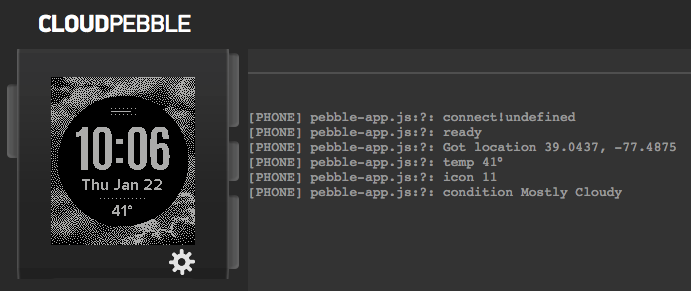
What is especially nice, you don’t need to do any special television movements to access it: just go to CloudPebble and start your project. By default, the project will be launched in the emulator, and to start it, as usual, on the watch you will need to go to the “Compilation” tab and select the “Phone” option (since it is through the phone that the application is downloaded to the watch).

The emulator allows you to run applications both native and those created using JS frameworks (both PebbleKit JS and Pebble.js). The emulator itself works, by the way, in the QEMU environment, so we can talk about full-fledged emulation, and not about displaying the behavior of the clock similar to the truth when running some clear code - the code will actually be executed in the firmware and on the virtual hardware of the clock.
Interaction with the emulator is possible either with the mouse, or you can click on the screen, and then press the cursor keys on the keyboard to emulate pressing the clock buttons. In addition, with the keyboard active, you can press X, Y, or Z to virtually “move” the clock in a positive direction on the specified axis, or shift-X, shift-Y, or shift-Z to “move” in the negative direction.
You can also set the state of the watch using the pop-up settings dialog:

As you can see, here you can not only change the “current state” of the watch to check how your code reacts to it (you can, as you can see, change the battery level of the watch, set whether it is connected to charging , indicate whether bluetooth communication is active), but also call the setup dialog of your application (if one is provided), and also completely turn off the emulator.
To work out the display of the settings panel correctly, however, you need to make changes to the project code: when you call the panel, the request parameter will be passed to it
Honestly, it's interesting to follow the evolution of Pebble services. The watch emulator directly asked for a good cloud development environment, which turned out to be PebbleCloud, and finally, after a rather long development process, it appeared in the public version of the cloud. Will we try?
PS It was written on information from the Pebble blog , from the newsletter, from communicating with Pebble images on the QEMU Advent Calendar website , therefore it was decided not to mark the post with a “translation”.
What is especially nice, you don’t need to do any special television movements to access it: just go to CloudPebble and start your project. By default, the project will be launched in the emulator, and to start it, as usual, on the watch you will need to go to the “Compilation” tab and select the “Phone” option (since it is through the phone that the application is downloaded to the watch).
The emulator allows you to run applications both native and those created using JS frameworks (both PebbleKit JS and Pebble.js). The emulator itself works, by the way, in the QEMU environment, so we can talk about full-fledged emulation, and not about displaying the behavior of the clock similar to the truth when running some clear code - the code will actually be executed in the firmware and on the virtual hardware of the clock.
Interaction with the emulator is possible either with the mouse, or you can click on the screen, and then press the cursor keys on the keyboard to emulate pressing the clock buttons. In addition, with the keyboard active, you can press X, Y, or Z to virtually “move” the clock in a positive direction on the specified axis, or shift-X, shift-Y, or shift-Z to “move” in the negative direction.
You can also set the state of the watch using the pop-up settings dialog:
As you can see, here you can not only change the “current state” of the watch to check how your code reacts to it (you can, as you can see, change the battery level of the watch, set whether it is connected to charging , indicate whether bluetooth communication is active), but also call the setup dialog of your application (if one is provided), and also completely turn off the emulator.
To work out the display of the settings panel correctly, however, you need to make changes to the project code: when you call the panel, the request parameter will be passed to it
return_to- if it is passed, you should use the value specified in it instead pebblejs://close#. Let's say you can do something like this:// Получаем переменные запроса
function getQueryParam(variable, default_) {
var query = location.search.substring(1);
var vars = query.split('&');
for (var i = 0; i < vars.length; i++) {
var pair = vars[i].split('=');
if (pair[0] == variable)
return decodeURIComponent(pair[1]);
}
return default_ || false;
}
var return_to = getQueryParam('return_to', 'pebblejs://close#');
document.location = return_to + encodeURIComponent(JSON.stringify(some_settings));
Honestly, it's interesting to follow the evolution of Pebble services. The watch emulator directly asked for a good cloud development environment, which turned out to be PebbleCloud, and finally, after a rather long development process, it appeared in the public version of the cloud. Will we try?
PS It was written on information from the Pebble blog , from the newsletter, from communicating with Pebble images on the QEMU Advent Calendar website , therefore it was decided not to mark the post with a “translation”.
Only registered users can participate in the survey. Please come in.
Would it be convenient for you to develop applications for your gadget (s) in the cloud, while having the opportunity to check the code in the emulator?
- 80.7% Yes, a good function that there is no binding to physical devices in either the IDE or the platform for running code 84
- 2.8% Yes, although I do not really need an emulator - they will continue to test on the watch 3
- 12.5% No, I don’t see the point in cloud development 13
- 3.8% Other 4









