May 16, 2018 at 14:16
We update Angular to version 6 in the project without using the CLI
In this article, I will talk about the thorny way of updating Angular with a custom Webpack config that our team had to go through a week ago. Perhaps our experience will be useful to those who use Angular with their Webpack config, and the rest is interesting as an illustration of where the modern frontend can lead and how to live with it.
Our team is working on the BILLmanager 6 interface. So that you had a general idea of the project before the update, I’ll inform you that the number of files in it has already exceeded 67 thousand. Architecturally, two subprojects can be distinguished: the registration module and the main user interface. For technology, Angular components, directives, and modules written in TypeScript are the foundation. There are several components on Web components. For styling, we use SASS / SCSS and use CSS variables to darken the application without recompiling.
There are reasons for everything, and our current difficulties began a year and a half ago. Then beta Angular 2 just appeared. The programmers at the company had experience creating applications on Angular 1, ReactJS and their own small framework. Angular 2 at that time incorporated advantages from the first version and ReactJS. Therefore, it was chosen because of its promise (after all, Google), the success of Angular 1 and the formalization that TypeScript provides. We do not write small SPA sites that you can give to the customer and forget, our applications live for a long time and they need constant support and development. BILLmanager is used by providers to sell hosting and work with clients. Therefore, both him and other ISPsystem products, you need to constantly maintain and develop. In principle, the Angular 2 team already then everywhere wrote that now it will be just Angular and the development of the framework will occur evolutionarily, which is suitable for our internal processes.
As I already wrote, our projects are large and long-lived. They have complex configs with flexible settings for individual assemblies. And Webpack has long been a kind of standard for building large and small projects in the frontend world, so the choice here was clear.
As a result, the general part of the config in the project looked as follows:
This is very similar to what is now described in the Angular documentation angular.io/guide/webpack . The most interesting of this is the part about compiling .ts files.
As you can see, we use the angular2-template-loader and angular2-router-loader loader to build our Angular components. The official documentation says so. And this is extremely strange, since both loaders are not written by the Angular team and are in user repositories on GitHub. One of the reasons for choosing Angular as the main framework was just that it works as a harvester - everything comes out of the box, unlike the same ReactJS. But here we see that the tool with which our project will be assembled does not come out of the box.
Well, okay, such a config worked from the second to the fifth version, and there was no reason for concern. Although no, there was one. At ng-conf 2017, Brad Green talked about trying to build an Angular application using Bazeland closure. Those who worked with large projects on Angular will understand me - builds take a very long time. Our first build of development mode on the fifth version of Angular with the second webpack takes more than 4 minutes. And the desire of the framework developers to make assemblies faster is completely justified. Although there is another view of this situation. As my colleague said:
Our company understands well what happens when you do not update tools. We know what this may ultimately lead to. Revolutions do not take place painlessly, and it is better to foresee them, moving in an evolutionary way. Therefore, when there was news about the release of a stable version of Angular 6, we decided to update our project. But it didn’t work out painlessly.
As with updating the previous version, we went to the site with the update.angular.io update guide . Here we were waiting for the first surprise.
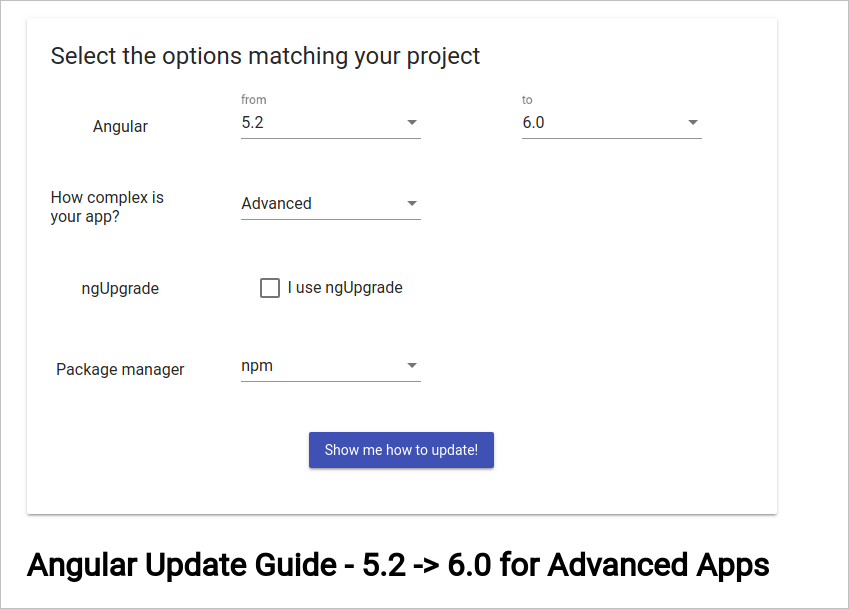
If you do not specify the item “I use ngUpgrade”, then the manual will still offer to execute the command
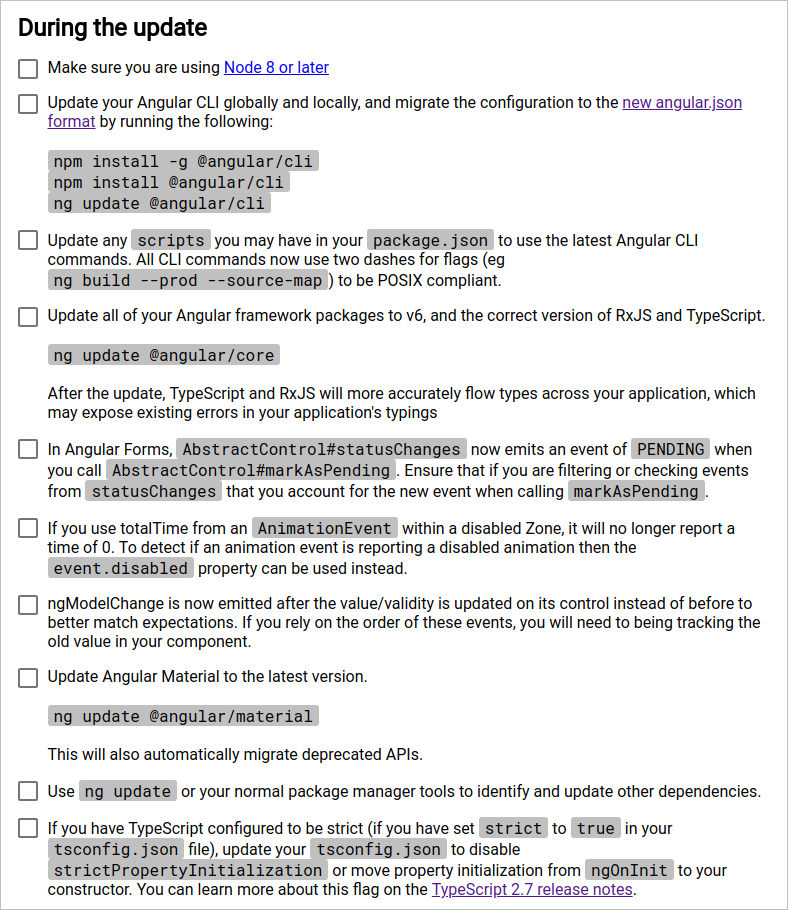
This was not the case in updating previous versions, but now, it turns out that it is impossible to upgrade without a CLI? Perhaps this is a bug and it will be fixed, but today, like a week ago, it was not possible to get clear update instructions without the CLI.
If, like us, you still want to continue updating the project, then this is where our thorny path begins. First you need to decide on the direction:
The first seemed to us easier and we went along it.
But after installing, updating the CLI and running the command,
In issues on GitHub you can find github.com/angular/angular-cli/issues/10621 . To date, this error seems to have been fixed (judging by github.com/angular/devkit/pull/901 ), but at that time we decided not to go into the jungle of the update utility and updated the packages manually.
After updating the packages, the project stopped starting, which, in fact, was expected. Angular 6 uses Webpack 4 (this can be seen if you install it through the CLI). Therefore, in the next step, we updated Webpack and related packages to the latest versions. The story about updating Webpack draws to a separate article, so here I will only write that if you use extract-text-webpack-plugin , replace it with mini-css-extract-plugin, and it will save you nerves and strength. You can read about how good the fourth webpack is here , and, actually, an article on migration .
In addition to updating Angular and Webpack, you need to upgrade RxJS to the sixth version, otherwise the project simply will not start. This is a prerequisite and it is not difficult to fulfill it, you just need to follow the migration documentation . Significant difficulties should not arise, RxJS provides a utility that independently makes the necessary changes to the project.
In the meantime, we are returning to upgrading to Angular 6. The project is still not building, and throws a lot of obscure errors. Here is the time to pay attention to the loader that processes .ts files. We use a bunchangular2-template-loader and angular2-router-loader . If you go into the angular2-template-loader repository , you can see that it has not been updated for a year already (it is strange that in the official documentation we are still offered to use it).

It seems that the problem is how this loader processes our code. We started looking for a replacement and found a plug-in for Ahead-of-Time (AoT) compilation @ ngtools / webpack . This is not an equivalent replacement, since before that we only used JIT compilation. But, on the other hand, the Angular team has long been talking about plans to make AoT compilation by default. @ ngtools / webpack - official tool from Angular DevKitIt is constantly updated and has been redesigned for the sixth version of the framework. To be fair, I note that you can build an Angular 6 project with the angular2-template-loader and angular2-router-loader plugins. A bunch of these plugins may be suitable for development, but for production assemblies it is better not to use them due to the lack of additional checks of the executable code. That is what did not allow us to immediately immediately catch all the necessary corrections for the transition to the sixth version.
AOT compilation by and large differs in that the templates are compiled at the time of application assembly, and not after launching in the user's browser. On the one hand, this speeds up the application and allows you to reduce its size, on the other hand, it incurs additional costs during compilation and requires more stringent writing of components.
Switching to an AOT compilation of a project is a separate big task. For its implementation, you will have to redo the bulk of the project, because AOT has very strict code requirements and if you did not immediately comply with them, it will be difficult. But there is a way out. You can use the @ ngtools / webpack plugin with JIT compilation. To do this, add the parameter
I will outline the main points that had to be fixed when switching to the @ ngtools / webpack plugin:
In the logs, we see something like the following:
I still recommend that you follow rule two, but if for some reason this doesn’t work out, you can make a small hack https://stackoverflow.com/a/48748942/4778628 , replacing the code above with:
Unfortunately, the errors did not end there, and we got it in the Angular compiler plugin itself :
At first we thought that we were giving the compiler packages from node_modules, and he could not process them, but adding exceptions did not affect the error. There was nowhere to go and turn late, so a small PR appeared in @ ngtools / webpack. These changes are included in version 6.0.1 of the package. After that, the assembly was successful and the project started!
BUT! It turned out that all the modules except the main one did not pull up. Let's take a look at setting up the @ ngtools / webpack plugin.
At first glance, everything is as in the documentation . Note that the entryModule parameter is marked as optional. By trial and error, we found out that if the parameter was not specified, then the assembly did not go further than the main module, which is why we got an inoperative application. It is easy to fix the problem, you need to add
If you remember, in the beginning I wrote that we have two subprojects in the project, but only one can be specified in the entryModule. We are lucky here, as the second application does not contain nested modules. If you have a different situation: several complex projects inside one, then you will have to make separate configs for each or wait for this PR to pass in the Angular DevKit repository.
As a result, the general part of the config in the project was as follows:
After all the above manipulations, we got a working application with Angular 6 and our own Webpack config. During the work 180 project files were adjusted, and it took about one week.
Angular is a monolithic framework, and with the advent of the sixth version, this becomes even more visible. Now, not only additional tools in the form of a router or a library of HTTP requests, but also assembly tools come out of the box. And it’s better not to touch them, not to make changes that were not intended by the developers of Angular. Only in this case you will be able to easily update the project and, perhaps, you will not face the need to change hundreds of files after the updates. Otherwise, a difficult path awaits you and you will have to like negative reviews on the new version in the sea of positive and general joy of others.
This does not mean that Angular is bad or good, it just requires special treatment and is not suitable for everyone. If you work with it through the CLI, assemble the ng project with a utility, and test and create modules and components for it, you will be happy. In our team, we would also like that, but, alas and ah, too much is already tied to our Webpack config. As the good Russian proverb says: “If I knew where you would fall, I would lay straws.” A year ago, the CLI was not such a mandatory tool in Angular projects, but today even in the documentation for updating there is no guide on how to update without it.
Our team is working on the BILLmanager 6 interface. So that you had a general idea of the project before the update, I’ll inform you that the number of files in it has already exceeded 67 thousand. Architecturally, two subprojects can be distinguished: the registration module and the main user interface. For technology, Angular components, directives, and modules written in TypeScript are the foundation. There are several components on Web components. For styling, we use SASS / SCSS and use CSS variables to darken the application without recompiling.
Background
There are reasons for everything, and our current difficulties began a year and a half ago. Then beta Angular 2 just appeared. The programmers at the company had experience creating applications on Angular 1, ReactJS and their own small framework. Angular 2 at that time incorporated advantages from the first version and ReactJS. Therefore, it was chosen because of its promise (after all, Google), the success of Angular 1 and the formalization that TypeScript provides. We do not write small SPA sites that you can give to the customer and forget, our applications live for a long time and they need constant support and development. BILLmanager is used by providers to sell hosting and work with clients. Therefore, both him and other ISPsystem products, you need to constantly maintain and develop. In principle, the Angular 2 team already then everywhere wrote that now it will be just Angular and the development of the framework will occur evolutionarily, which is suitable for our internal processes.
As I already wrote, our projects are large and long-lived. They have complex configs with flexible settings for individual assemblies. And Webpack has long been a kind of standard for building large and small projects in the frontend world, so the choice here was clear.
As a result, the general part of the config in the project looked as follows:
contents of webpack.config.common.js file before updating
module.exports = {
  context: PATHS.root,
  target: 'web',
  entry,
  resolve: {
    extensions: ['.ts', '.js', '.json'],
    modules: [PATHS.src, PATHS.node_modules],
  },
  module: {
    rules: [{
        test: /\.ts$/,
        loaders: [{
            loader: 'awesome-typescript-loader',
            options: {
              transpileOnly: process.env.NODE_ENV !== 'production'
            }
          },
          'angular2-template-loader',
          'angular2-router-loader'
        ],
        exclude: [/\.(spec|e2e)\.ts$/],
      },
      {
        test: /\.ts$/,
        include: [/\.(spec|e2e)\.ts$/],
        loaders: ['awesome-typescript-loader', 'angular2-template-loader']
      },
      {
        test: /\.json$/,
        use: 'json-loader'
      },
      {
        test: /\.html$/,
        use: [{
          loader: 'html-loader',
        }],
      },
      {
        test: /\.(eot|woff|woff2|ttf|png|jpg|gif|svg|ico)(\?v=\d+\.\d+\.\d+)?$/,
        loader: 'file-loader',
        options: {
          context: PATHS.assets,
          name: '[path][name].[ext]'
        },
      },
      {
        test: /\.css$/,
        loader: extractSASS.extract({
          fallback: 'style-loader',
          use: 'css-loader?sourceMap'
        }),
        exclude: [path.join(PATHS.projectPath), path.join(PATHS.src, 'common'), path.join(PATHS.src, 'common-bill')],
      },
      {
        test: /\.css$/,
        include: [path.join(PATHS.projectPath), path.join(PATHS.src, 'common'), path.join(PATHS.src, 'common-bill')],
        use: [{
          loader: "raw-loader" // creates style nodes from JS strings
        }],
      },
      {
        test: /\.(scss|sass)$/,
        loader: extractSASS.extract({
          use: [{
              loader: "css-loader",
            },
            {
              loader: "sass-loader",
              options: {
                sourceMap: true,
              }
            }
          ],
          // use style-loader in development
          fallback: "style-loader"
        }),
        exclude: [path.join(PATHS.projectPath), path.join(PATHS.src, 'common'), path.join(PATHS.src, 'common-bill')],
      },
      {
        test: /\.(scss|sass)$/,
        use: [{
            loader: "raw-loader" // creates style nodes from JS strings
          },
          {
            loader: "sass-loader", // compiles Sass to CSS
            options: {
              sourceMap: true
            }
          }
        ],
        include: [path.join(PATHS.projectPath), path.join(PATHS.src, 'common'), path.join(PATHS.src, 'common-bill')],
      }
    ]
  },
  plugins: [
    extractSASS,
    new webpack.IgnorePlugin(/vertx/),
    new webpack.ContextReplacementPlugin(
      // The (\\|\/) piece accounts for path separators in *nix and Windows
      /\@angular(\\|\/)core(\\|\/)esm5/,
      PATHS.projectPath, // location of your src
      {} // a map of your routes
    ),
    new webpack.optimize.CommonsChunkPlugin({
      name: ['vendor', 'polyfills'],
      // minChunks: Infinity
    }),
  ]
};
This is very similar to what is now described in the Angular documentation angular.io/guide/webpack . The most interesting of this is the part about compiling .ts files.
{
  test: /\.ts$/,
  loaders: [{
      loader: 'awesome-typescript-loader',
      options: {
        transpileOnly: process.env.NODE_ENV !== 'production'
      }
    },
    'angular2-template-loader',
    'angular2-router-loader'
  ],
  exclude: [/\.(spec|e2e)\.ts$/],
},
{
  test: /\.ts$/,
  include: [/\.(spec|e2e)\.ts$/],
  loaders: ['awesome-typescript-loader', 'angular2-template-loader']
},
As you can see, we use the angular2-template-loader and angular2-router-loader loader to build our Angular components. The official documentation says so. And this is extremely strange, since both loaders are not written by the Angular team and are in user repositories on GitHub. One of the reasons for choosing Angular as the main framework was just that it works as a harvester - everything comes out of the box, unlike the same ReactJS. But here we see that the tool with which our project will be assembled does not come out of the box.
Well, okay, such a config worked from the second to the fifth version, and there was no reason for concern. Although no, there was one. At ng-conf 2017, Brad Green talked about trying to build an Angular application using Bazeland closure. Those who worked with large projects on Angular will understand me - builds take a very long time. Our first build of development mode on the fifth version of Angular with the second webpack takes more than 4 minutes. And the desire of the framework developers to make assemblies faster is completely justified. Although there is another view of this situation. As my colleague said:
“We had to make a slowly assembled framework, and then start accelerating it.”
Upgrading Angular to Version 6
Our company understands well what happens when you do not update tools. We know what this may ultimately lead to. Revolutions do not take place painlessly, and it is better to foresee them, moving in an evolutionary way. Therefore, when there was news about the release of a stable version of Angular 6, we decided to update our project. But it didn’t work out painlessly.
As with updating the previous version, we went to the site with the update.angular.io update guide . Here we were waiting for the first surprise.
If you do not specify the item “I use ngUpgrade”, then the manual will still offer to execute the command
ng update @angular/core.This was not the case in updating previous versions, but now, it turns out that it is impossible to upgrade without a CLI? Perhaps this is a bug and it will be fixed, but today, like a week ago, it was not possible to get clear update instructions without the CLI.
If, like us, you still want to continue updating the project, then this is where our thorny path begins. First you need to decide on the direction:
- Install the CLI and update the steps in the official guide.
- Update packages separately and edit configs yourself.
The first seemed to us easier and we went along it.
But after installing, updating the CLI and running the command,
ng update @angular/corewe were disappointed.$ ng update @angular/core
Package "@angular/compiler-cli" has an incompatible peer dependency to "typescript" (requires ">=2.7.2 <2.8", would install "2.8.3")
Invalid range: ">=2.3.0 <3.0.0||>=4.0.0"In issues on GitHub you can find github.com/angular/angular-cli/issues/10621 . To date, this error seems to have been fixed (judging by github.com/angular/devkit/pull/901 ), but at that time we decided not to go into the jungle of the update utility and updated the packages manually.
After updating the packages, the project stopped starting, which, in fact, was expected. Angular 6 uses Webpack 4 (this can be seen if you install it through the CLI). Therefore, in the next step, we updated Webpack and related packages to the latest versions. The story about updating Webpack draws to a separate article, so here I will only write that if you use extract-text-webpack-plugin , replace it with mini-css-extract-plugin, and it will save you nerves and strength. You can read about how good the fourth webpack is here , and, actually, an article on migration .
In addition to updating Angular and Webpack, you need to upgrade RxJS to the sixth version, otherwise the project simply will not start. This is a prerequisite and it is not difficult to fulfill it, you just need to follow the migration documentation . Significant difficulties should not arise, RxJS provides a utility that independently makes the necessary changes to the project.
In the meantime, we are returning to upgrading to Angular 6. The project is still not building, and throws a lot of obscure errors. Here is the time to pay attention to the loader that processes .ts files. We use a bunchangular2-template-loader and angular2-router-loader . If you go into the angular2-template-loader repository , you can see that it has not been updated for a year already (it is strange that in the official documentation we are still offered to use it).
It seems that the problem is how this loader processes our code. We started looking for a replacement and found a plug-in for Ahead-of-Time (AoT) compilation @ ngtools / webpack . This is not an equivalent replacement, since before that we only used JIT compilation. But, on the other hand, the Angular team has long been talking about plans to make AoT compilation by default. @ ngtools / webpack - official tool from Angular DevKitIt is constantly updated and has been redesigned for the sixth version of the framework. To be fair, I note that you can build an Angular 6 project with the angular2-template-loader and angular2-router-loader plugins. A bunch of these plugins may be suitable for development, but for production assemblies it is better not to use them due to the lack of additional checks of the executable code. That is what did not allow us to immediately immediately catch all the necessary corrections for the transition to the sixth version.
AOT compilation by and large differs in that the templates are compiled at the time of application assembly, and not after launching in the user's browser. On the one hand, this speeds up the application and allows you to reduce its size, on the other hand, it incurs additional costs during compilation and requires more stringent writing of components.
Switching to an AOT compilation of a project is a separate big task. For its implementation, you will have to redo the bulk of the project, because AOT has very strict code requirements and if you did not immediately comply with them, it will be difficult. But there is a way out. You can use the @ ngtools / webpack plugin with JIT compilation. To do this, add the parameter
skipCodeGeneration=trueto the plugin settings. I will outline the main points that had to be fixed when switching to the @ ngtools / webpack plugin:
- In templates, all
privatevariables are replaced bypublic. - When inheriting, it is undesirable to inherit one component from another (with directives the same thing). In principle, this is logical, but angular2-template-loader skipped, and @ ngtools / webpack began to swear at incorrectly created modules.
- If you neglect the recommendation above, you can get an error when using simple type variables in the component constructor. This is the strangest mistake. The component is as follows:
@Component({
 selector: '[form-component]',
 template: ''
})
export class FormComponent extends BaseComponent implements OnInit {
 constructor(
   public formService: FormService,
   public formFunc: string,
   public formParams: Array = []
 ) {
   super();
 }
...
In the logs, we see something like the following:
ERROR in : Can't resolve all parameters for FormComponent in form.component.ts: ( [object Object], ?, ?)I still recommend that you follow rule two, but if for some reason this doesn’t work out, you can make a small hack https://stackoverflow.com/a/48748942/4778628 , replacing the code above with:
@Component({
 selector: '[form-component]',
 template: ''
})
export class FormComponent extends BaseComponent implements OnInit {
 constructor(
   public formService: FormService,
   @Inject('') public formFunc: string,
   @Inject('') public formParams: Array = []
 ) {
   super();
 }
...
Unfortunately, the errors did not end there, and we got it in the Angular compiler plugin itself :
error text
 [0] building modules 「wds」: Project is running at http://localhost:8080/
 「wds」: webpack output is served from /
 「wds」: Content not from webpack is served from /home/dsumbaev/DEVELOPMENT/bill-client-front/dist
 「wds」: 404s will fallback to /index.html
[0] building modules/home/dsumbaev/DEVELOPMENT/bill-client-front/node_modules/@ngtools/webpack/src/angular_compiler_plugin.js:509
                    if (this.done && (request.request.endsWith('.ts')
                                              ^
TypeError: Cannot read property 'request' of null
    at nmf.hooks.beforeResolve.tapAsync (/home/dsumbaev/DEVELOPMENT/bill-client-front/node_modules/@ngtools/webpack/src/angular_compiler_plugin.js:509:47)
    at _fn1 (eval at create (/home/dsumbaev/DEVELOPMENT/bill-client-front/node_modules/webpack/node_modules/tapable/lib/HookCodeFactory.js:24:12), :27:1)
    at Object.resolveWithPaths (/home/dsumbaev/DEVELOPMENT/bill-client-front/node_modules/@ngtools/webpack/src/paths-plugin.js:14:9)
    at nmf.hooks.beforeResolve.tapAsync (/home/dsumbaev/DEVELOPMENT/bill-client-front/node_modules/@ngtools/webpack/src/angular_compiler_plugin.js:521:32)
    at AsyncSeriesWaterfallHook.eval [as callAsync] (eval at create (/home/dsumbaev/DEVELOPMENT/bill-client-front/node_modules/webpack/node_modules/tapable/lib/HookCodeFactory.js:24:12), :19:1)
    at NormalModuleFactory.create (/home/dsumbaev/DEVELOPMENT/bill-client-front/node_modules/webpack/lib/NormalModuleFactory.js:338:28)
    at semaphore.acquire (/home/dsumbaev/DEVELOPMENT/bill-client-front/node_modules/webpack/lib/Compilation.js:494:14)
    at Semaphore.acquire (/home/dsumbaev/DEVELOPMENT/bill-client-front/node_modules/webpack/lib/util/Semaphore.js:17:4)
    at asyncLib.forEach (/home/dsumbaev/DEVELOPMENT/bill-client-front/node_modules/webpack/lib/Compilation.js:492:15)
    at arrayEach (/home/dsumbaev/DEVELOPMENT/bill-client-front/node_modules/neo-async/async.js:2400:9)
    at Object.each (/home/dsumbaev/DEVELOPMENT/bill-client-front/node_modules/neo-async/async.js:2835:9)
    at Compilation.addModuleDependencies (/home/dsumbaev/DEVELOPMENT/bill-client-front/node_modules/webpack/lib/Compilation.js:471:12)
    at Compilation.processModuleDependencies (/home/dsumbaev/DEVELOPMENT/bill-client-front/node_modules/webpack/lib/Compilation.js:450:8)
    at afterBuild (/home/dsumbaev/DEVELOPMENT/bill-client-front/node_modules/webpack/lib/Compilation.js:556:15)
    at buildModule.err (/home/dsumbaev/DEVELOPMENT/bill-client-front/node_modules/webpack/lib/Compilation.js:600:11)
    at callback (/home/dsumbaev/DEVELOPMENT/bill-client-front/node_modules/webpack/lib/Compilation.js:358:35)
At first we thought that we were giving the compiler packages from node_modules, and he could not process them, but adding exceptions did not affect the error. There was nowhere to go and turn late, so a small PR appeared in @ ngtools / webpack. These changes are included in version 6.0.1 of the package. After that, the assembly was successful and the project started!
BUT! It turned out that all the modules except the main one did not pull up. Let's take a look at setting up the @ ngtools / webpack plugin.
   new AngularCompilerPlugin({
     platform: 0,
     sourceMap: true,
     tsConfigPath: path.join(PATHS.root, 'tsconfig.json'),
     skipCodeGeneration: true,
   })
At first glance, everything is as in the documentation . Note that the entryModule parameter is marked as optional. By trial and error, we found out that if the parameter was not specified, then the assembly did not go further than the main module, which is why we got an inoperative application. It is easy to fix the problem, you need to add
entryModule. new AngularCompilerPlugin({
platform: 0,
entryModule: path.join(PATHS.src, 'apps/client/app/app.module#AppModule'),
sourceMap: true,
tsConfigPath: path.join(PATHS.root, 'tsconfig.json'),
skipCodeGeneration: true,
})If you remember, in the beginning I wrote that we have two subprojects in the project, but only one can be specified in the entryModule. We are lucky here, as the second application does not contain nested modules. If you have a different situation: several complex projects inside one, then you will have to make separate configs for each or wait for this PR to pass in the Angular DevKit repository.
As a result, the general part of the config in the project was as follows:
final contents of webpack.config.common.js file
const path = require('path');
const merge = require('webpack-merge');
const webpack = require('webpack');
const ProgressPlugin = require('webpack/lib/ProgressPlugin');
const MiniCssExtractPlugin = require("mini-css-extract-plugin");
const {AngularCompilerPlugin} = require('@ngtools/webpack');
const {
PATHS,
PARAMS
} = require('./helpers.js');
const devMode = process.env.NODE_ENV === 'development';
let entry = {
'polyfills': path.join(PATHS.src, 'polyfills.browser.ts'),
'main': path.join(PATHS.projectPath, 'main.ts'),
'extform': path.join(PATHS.apps, 'extform/main.ts'),
'style': path.join(PATHS.assets, 'sass', 'app.sass')
};
PARAMS.themes.forEach(theme => {
entry['themes/' + theme + '/theme'] = path.join(PATHS.themes, theme, 'theme.scss')
});
module.exports = {
context: PATHS.root,
target: 'web',
entry,
resolve: {
extensions: ['.ts', '.js', '.json'],
modules: [PATHS.src, PATHS.node_modules],
},
mode: process.env.NODE_ENV,
stats: 'errors-only',
module: {
rules: [{
test: /\.ts$/,
loader: '@ngtools/webpack',
exclude: [/\.(spec|e2e)\.ts$/, /node_modules/],
},
{
test: /\.ts$/,
loader: 'null-loader',
include: [/\.(spec|e2e)\.ts$/],
},
{
test: /\.json$/,
use: 'json-loader'
},
{
test: /\.html$/,
use: [{
loader: 'html-loader',
}],
},
{
test: /\.(eot|woff|woff2|ttf|png|jpg|gif|svg|ico)(\?v=\d+\.\d+\.\d+)?$/,
loader: 'file-loader',
options: {
context: PATHS.assets,
name: '[path][name].[ext]'
},
},
{
test: /\.css$/,
use: [
MiniCssExtractPlugin.loader,
"css-loader"
],
exclude: [path.join(PATHS.projectPath), path.join(PATHS.src, 'common'), path.join(PATHS.src, 'common-bill')],
},
{
test: /\.css$/,
include: [path.join(PATHS.projectPath), path.join(PATHS.src, 'common'), path.join(PATHS.src, 'common-bill')],
use: [{
loader: "raw-loader" // creates style nodes from JS strings
}],
},
{
test: /\.(scss|sass)$/,
use: [
devMode ? 'style-loader' : MiniCssExtractPlugin.loader,
'css-loader',
'sass-loader',
],
exclude: [path.join(PATHS.projectPath), path.join(PATHS.src, 'common'), path.join(PATHS.src, 'common-bill')],
},
{
test: /\.(scss|sass)$/,
use: [{
loader: "raw-loader" // creates style nodes from JS strings
},
{
loader: "sass-loader", // compiles Sass to CSS
options: {
sourceMap: true
}
}
],
include: [path.join(PATHS.projectPath), path.join(PATHS.src, 'common'), path.join(PATHS.src, 'common-bill')],
}
]
},
optimization: {
splitChunks: {
cacheGroups: {
commons: {
test: /[\\/]node_modules[\\/]/,
name: "vendors",
chunks: "all"
}
}
}
},
plugins: [
new MiniCssExtractPlugin({
filename: '[name].[hash].css',
}),
new webpack.IgnorePlugin(/vertx/),
new ProgressPlugin(),
   new AngularCompilerPlugin({
     platform: 0,
     entryModule: path.join(PATHS.src, 'apps/client/app/app.module#AppModule'),
     sourceMap: true,
     tsConfigPath: path.join(PATHS.root, 'tsconfig.json'),
     skipCodeGeneration: true,
   })
]
};
Conclusion
After all the above manipulations, we got a working application with Angular 6 and our own Webpack config. During the work 180 project files were adjusted, and it took about one week.
Angular is a monolithic framework, and with the advent of the sixth version, this becomes even more visible. Now, not only additional tools in the form of a router or a library of HTTP requests, but also assembly tools come out of the box. And it’s better not to touch them, not to make changes that were not intended by the developers of Angular. Only in this case you will be able to easily update the project and, perhaps, you will not face the need to change hundreds of files after the updates. Otherwise, a difficult path awaits you and you will have to like negative reviews on the new version in the sea of positive and general joy of others.
This does not mean that Angular is bad or good, it just requires special treatment and is not suitable for everyone. If you work with it through the CLI, assemble the ng project with a utility, and test and create modules and components for it, you will be happy. In our team, we would also like that, but, alas and ah, too much is already tied to our Webpack config. As the good Russian proverb says: “If I knew where you would fall, I would lay straws.” A year ago, the CLI was not such a mandatory tool in Angular projects, but today even in the documentation for updating there is no guide on how to update without it.