May 14, 2018 at 11:17
Tester tools
What tools do testers need? We will discuss this today in this article, which is based on a report by Yulia Atlygin from the past Heisenbug. Video recording of the report is available here .

The brain is the most important tool, probably for any profession, not only for a tester. Eyes come in handy too, especially if you're testing the UI. Of course, ears: sometimes you launch the application, and your computer starts to hum like an airplane on the runway. Nose, because sometimes it smells from applications. Legs are also needed: sometimes something happens to you, some questions arise, you have to run to someone, ask something, and communicate with someone. Hands are also useful, especially for manual testers, not everything can be automated (and we write autotests with our hands). And, of course, the heart, because testing should be your passion!
On this, in principle, one could already finish the article, all the most important tools have already been listed. But as a joke, let's talk about tools that will help us to be more effective, regardless of your position, whether you are a manual tester or an automated programmer, analyst or programmer.

Each tester has their favorite screenshot tools. When in your application there are some problems on the UI (if, of course, there is a UI at all, and even if not, you may need to take a screenshot of both the console answers and the results of the database queries), you need to take a screenshot, and these screenshots must be taken right.
My personal favorite is Jing, looks like such a beautiful, positive sun on your screen. Why is it good: it knows how to take screenshots, knows how to save these screenshots both locally and in its cloud, knows how to record video. Unfortunately, it is recorded only in Flash, and here a problem arose: in our company most of the developers work on Macs, and my flash videos are not easy to open there. I had to look for another tool and say goodbye to my beloved positive sun. Now I use the Recordit tool the most, it allows you to immediately record a video and turn it into a gif in one motion, but there’s also a little misunderstanding with it: everything that he recorded, he immediately uploads to his cloud, i.e. if you have something local or you don’t want to share with anyone what your application looks like, you will have to look for something else. For example, Monosnap also knows how to make video, it can immediately save it locally and make it from a gif video.
Actual Result: Doesn't work
Expected Result: Works as Expected
Once upon a time, when I was a little young tester, I found an excellent sequence of steps that led me to a 500 error on the page. \

Of course, I recorded a bug report with playback steps and the actual result, and the expected one decided not to write - and so it is clear that we expect no error. After the correction, I tried to test the same steps, and you know what I saw? Just a white page. You can’t argue, there is no 500 error.
After that, I made two conclusions for myself:
How can I help myself?

There are tools that help you make prototypes, i.e. Draw your application no matter how you expect to see it. I like Balsamiq the most - it’s such a tool that allows you to visualize the interface in a couple of clicks. It immediately has containers, elements from which you can draw a web page, mobile application or anything, literally dragging and dropping “pictures”. There is an analogue - the Pencil browser plugin , it is not so cool, but free.
On one of the projects, we practiced QDD, “QA driven development”. Our testers themselves wrote acceptance criteria for the tasks, i.e. this was not done by some product owner or manager, but by the QA-team, but after the task they were confirmed by the product owner. For the design of tasks, they also used Balsamiq to show how everything will look, where which buttons should be, and give it all to the developer. Some time passes, a new build comes to us, and, horror, the page (except for the browser part) looks like this:

Our developer really picked up the styles, buttons, and he was not even embarrassed that this upper part, where the address bar, also does not look like a browser. Moral: when you show prototypes to your developers, it would be nice to talk to them that this is just a prototype, you don’t have to do exactly the same. It’s normal that in a particular case there will be other styles, and everything will look a little different, the mocap is only needed to determine where what is and how it should look like.
Admit, do you have text files with your favorite test data? Down with the files with the texts! There are special tools that can generate these texts:
With their help, you can get rid of the effect of the pesticide when bugs get used to your tests, and the tests no longer find these bugs. Among these applications there is Mockaroo - it allows you to not just pick up some data, for example, card numbers or user name. He also knows how to generate SQL queries, for example, you specify the name of the database you want to go to, as well as what parameters are there, and he creates insert from this. And I draw your attention from this list to the last plugin, bugmagnet. This is a plugin for Chrome and Firefox with a pre-saved set of test data. When you have some kind of text field on the screen, you just right-click on it and select bugmagnet from the menu, inside you are already waiting for a bunch of any predefined, predetermined test data, divided into groups: by length, by format, by language , even the simplest scripts for testing XSS. An indispensable product for exploratory testing. Even if you have a field with an e-mail and you forgot which e-mail is valid and which not, Gojko Adzic , the author of this tool has already done everything for you, you just need to find the desired item in this list. What is important - it is also customizable, i.e. You can add your sections to the menu.
Sometimes it happens that you do not need texts at all, but pictures. You can google, search for something, then try to select which of this is the right size. And there is a special service, LoremPixel , which allows you to generate these pictures: you can set the picture size, color and even the subject: cat, city, food, transport, etc. Recently, he often gets sick, but there is no less interesting analogue - picsum.photos

Does anyone have an application with large molds and a bunch of different data? I understand your pain. It happens that your form has a lot of fields, some of which are quite specific: somewhere you need to enter only e-mail, somewhere just a phone or something else, and every time it is tedious to enter everything. There is a plugin for Chrome called Form Filler, which can help solve the problem: you will add a small button next to the address bar, by clicking on which your form magically turns into a completed form:
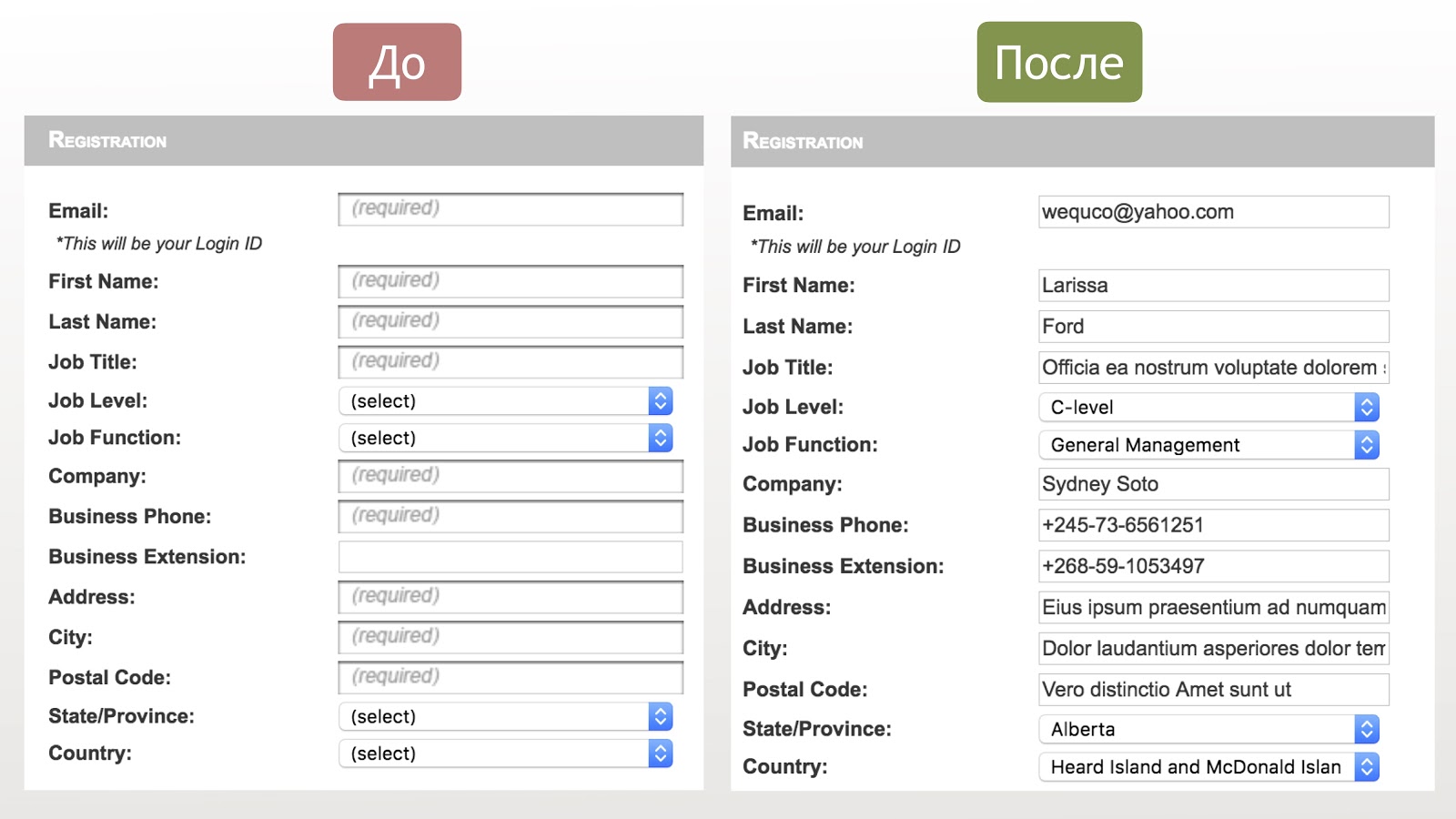
Note: the data in the e-mail format is really entered in the e-mail field, and where the phone is entered, the phone format is entered, one of the list data is selected in the drop-down menus, which saves a lot of time. I draw your attention to the fact that in this plugin you can also configure everything, i.e. add your own masks, your data.
Does anyone use pairing techniques? I can’t say that I use it every day, but, nevertheless, sometimes it comes in handy. Why is it needed? When you have many parameters, for example, the same huge form, according to statistics, from 65 to 97% of errors are found in pairwise search (as you can see, here the statistics are very blurry in numbers), i.e. we can save a lot of time and almost no loss in coverage if we sort through pairs of values.
I use the Pairwiser online tool (unfortunately, the online version is no longer available, but the local version remains):
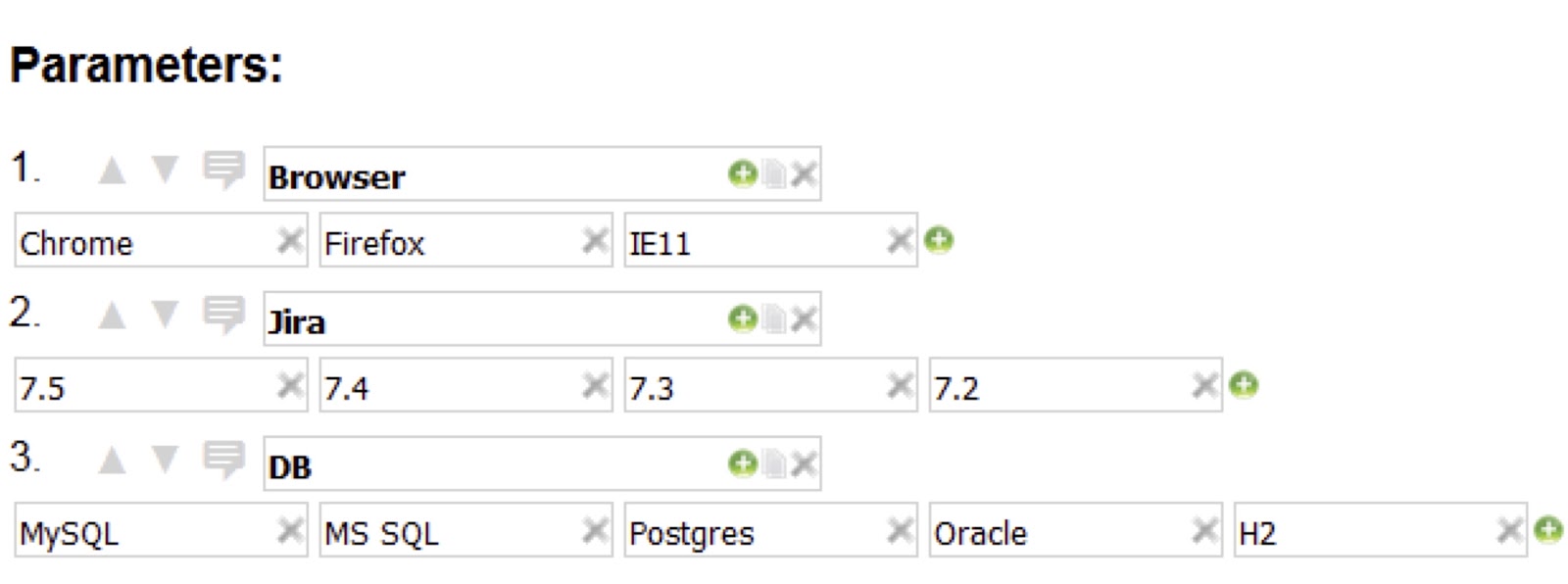
There are many other tools, but most of them are console, not so visual, so I use Pairwiser. In our company (we are doing plugins for Jira), testers have to constantly combine browsers, different versions of Jira and Confluence, different databases (depending on the version of Jira), versions of other plugins. I enter the parameters in Pairwiser,
click “generate test” and get a list of tests, a table that shows what and with what you need to test, which instances you need to create. What magic happened: if I went through all the values with each other (see the picture), I would get 60 tests. With Pairwiser, I reduced that number to 21, three times.
Here is an example that the creators of the tool made:
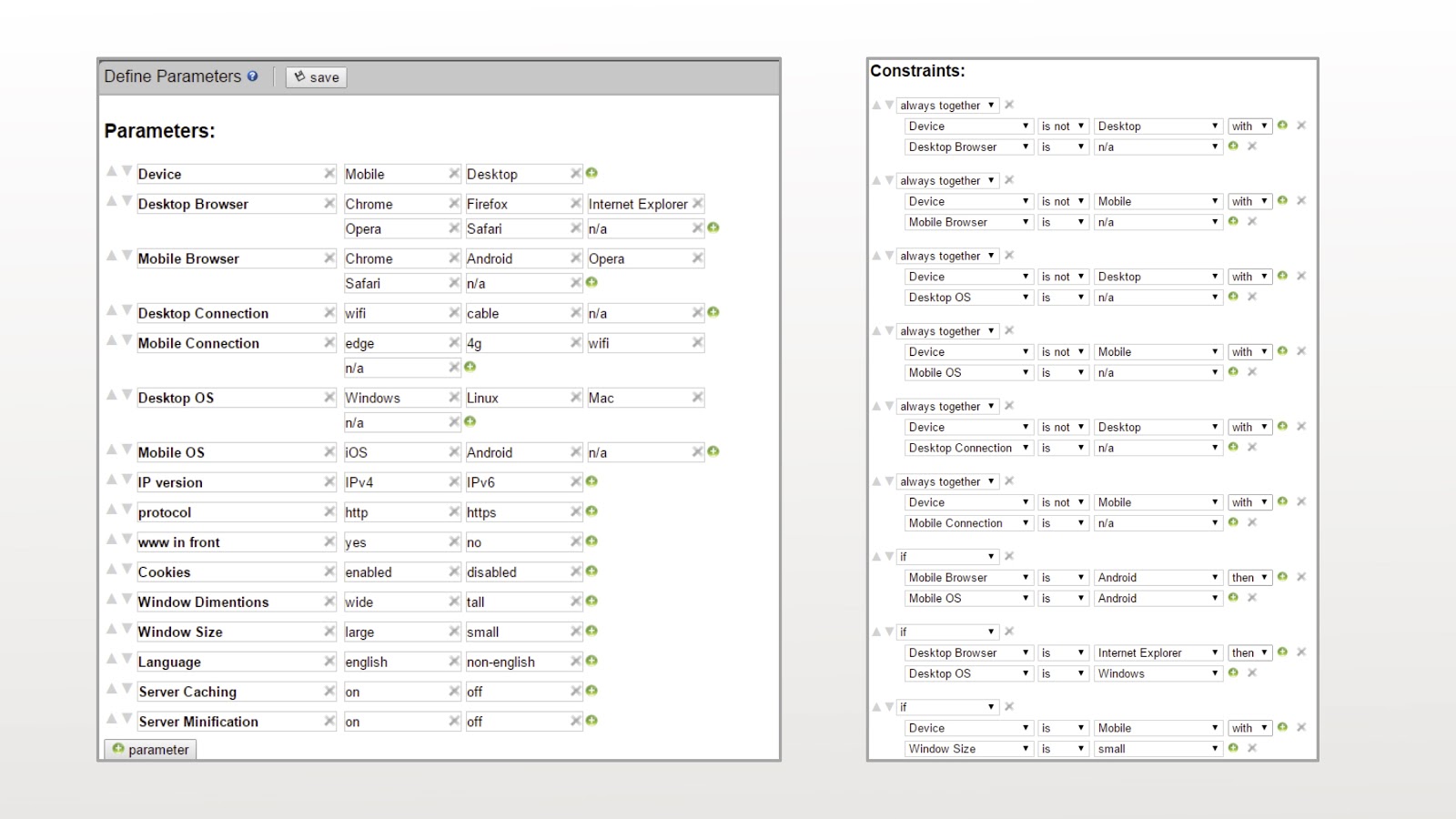
It happens that you have a lot more options. In my example, there were only three, here there are much more: operating systems, types of connection, some conditions between your parameters (for example, it’s silly to test a mobile browser with a desktop), some additional parameters, you can mark the tests as mandatory ( something like sanity when you say that I definitely need to test this combination of parameters). And magic happens, 32 tests instead of 18688:

Just think about it, 32 instead of almost 19,000! You can save a lot of time.
UPD : so far I have found for myself another free web tool, pairwise.teremokgames.com .
Let's talk a little about the specifics of the web. There is a World Wide Web Consortium community, the guys are standardizing HTML and CSS. They created validators , i.e. static analyzers, where you set the URL of your application and it gives you a set of errors. There are the same things that check how compatible you are with mobile, or check links. You can set some URL for these validators , you can directly download the file with your HTML. There are browser plugins, at least for Chrome for sure, that can do this locally.
The answers will look like this:
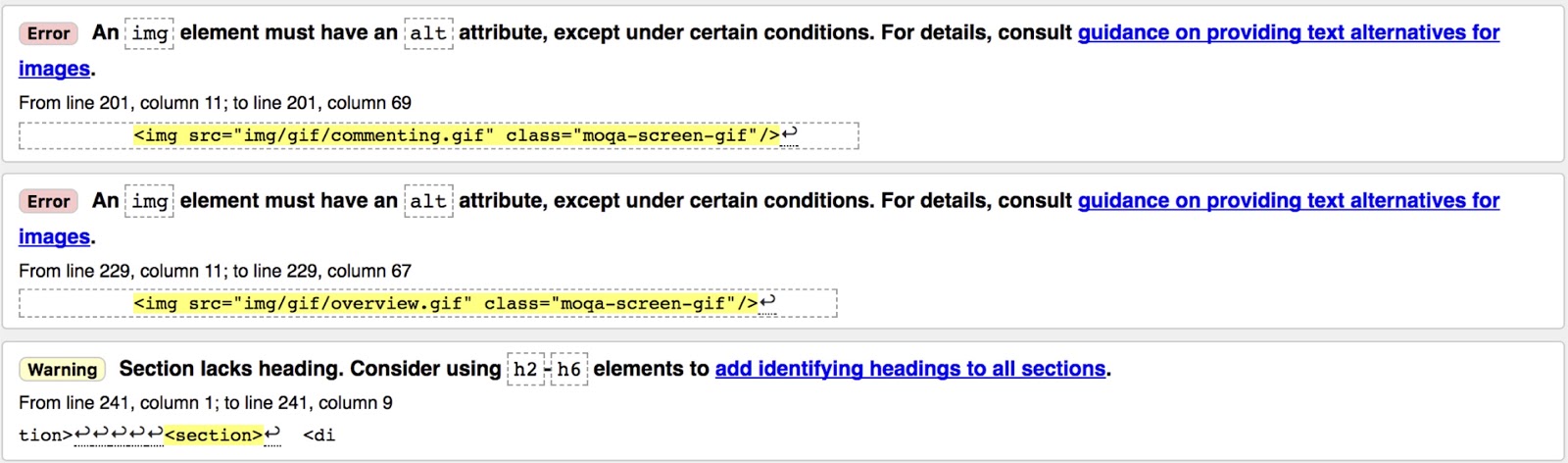
I want to save you right away. A lot of what this validator will tell you does not need to be edited, maybe it will not find anything scary, but it is very important to at least think about these things, take and sort out, is there something useful there or not. Take a look at the first example - the img tag does not have an alt attribute. Alt is a parameter that says which text will be written if, for example, your pictures are turned off, or the picture did not load, say, due to slow Internet. It would seem that in our century everyone has the Internet more or less, what is the problem? Well, not indicated, so what? Here is a small nuance: for example, there are people with vision problems who use special screen readers. If the screen reader is reading across the screen, what do you think he sees instead of the picture? This alt text. And if this text is not given, then the person will never know that there was anything at all.
In general, no one is sinless. If you drive Google.com into this beautiful validator, it will produce 21 errors, most of them about outdated elements. Even Google has errors! On the other hand, you are not Google, so this should somehow encourage you to make your products better. Probably, you don’t have so many resources, and such a validator will give you more confidence that the pages will work in different browsers, since you are compatible directly with the standard.
Usually, when you ask about performance tests, you get something like: “Performance is a matter of seriousness, this should be done by special people.” And it's true, this is a huge area, but at least a few surface tests can be done very easily. There are several tools that can show what problems there are on your site, and even put down “ratings” and give tips on how to fix them. If your service is already available somewhere, you can simply enter the URL, but there are also plugins that can do tests locally. The first PageSpeed service from Google, it has a Chrome plugin that can locally check how good everything is and give you advice - there’s something to talk about with your developers right away.
Another of the performance testing products has such a cool service.WebPageTest also gives ratings, which are displayed in the upper right corner:
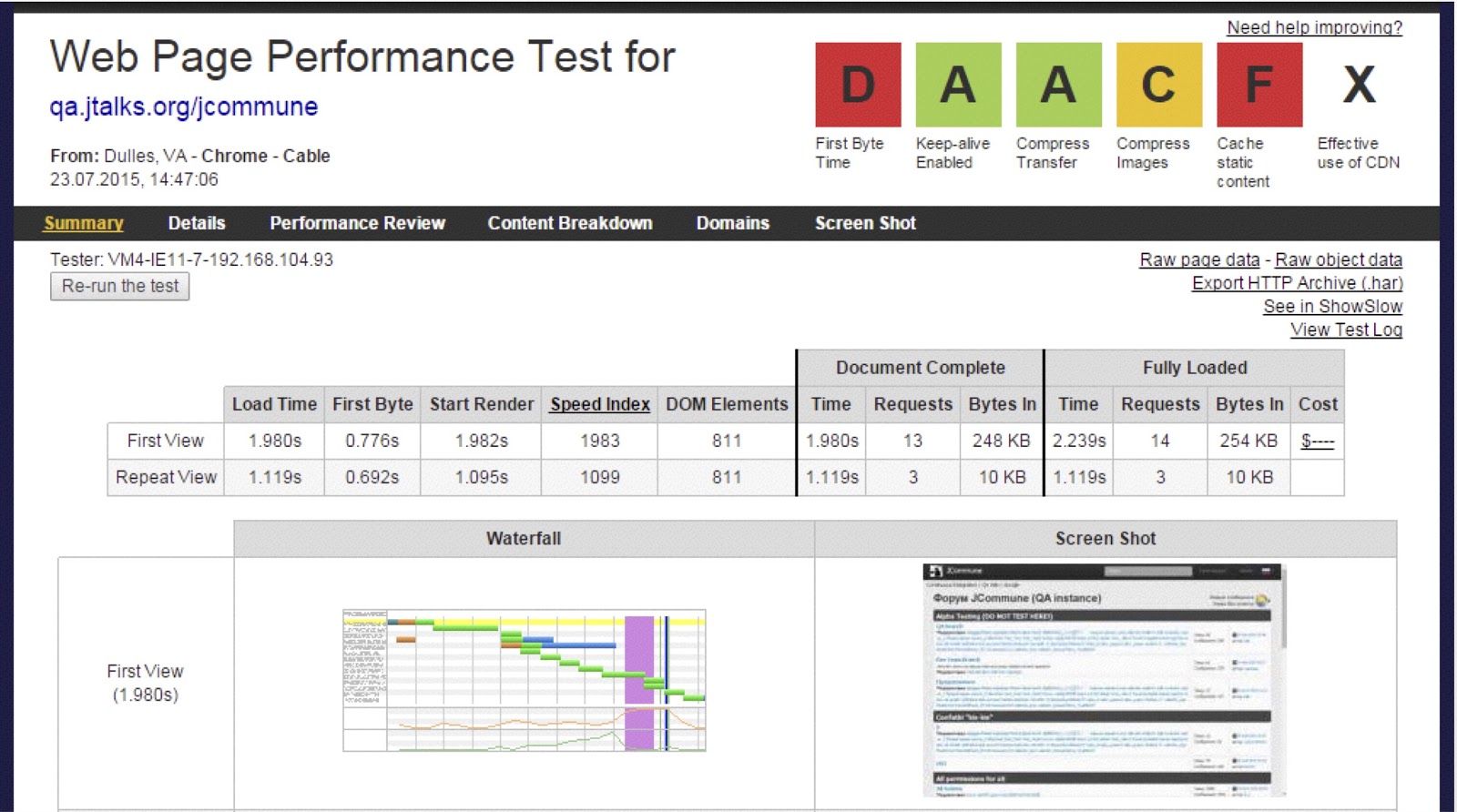
One of the FirstByteTime parameters is the time from the beginning of the transition to the page until the first bit of the server response appears on your site. There is also a cache rating, beautiful graphs that will tell you what exactly takes the most time on your page, whether it is pictures, scripts or HTML. You get beautiful pictures with specific numbers with which you can approach your developer.
Another feature of this tool is that you can specify where this test comes from, in which browser and even at what Internet speed. In principle, it can be used to draw conclusions on where to place the data center, where to go, is it so bad that now we do not have a center somewhere in Australia. By the way, they have an API , you can try to use it for automated runs.
Another browser plugin (there is definitely Chrome) is called Lighthouse - a beacon that evaluates your application from different angles, i.e. as an application in general, and performance, accessibility, accessibility for people with disabilities.
This is what the performance testing test report might look like:

The picture shows how my application looked after a different number of seconds. Not so cool, actually. As you can see, there are 56 points, i.e. this is so, the site is average. With this plugin, we also get some numbers with which you can go to your developer and talk.
Of course, JMeter is worth mentioning. It is very popular, but, unlike the tools that we talked about above, on JMeter we usually evaluate the speed of the server side. And users often complain that the record doesn’t work very well in it, and people buy some special products in order to record the script and then upload it to JMeter. There is a simple way - the tab is called network in the browser, where all requests are visible. You just right-click and you can save all these requests as a HAR, HTTP archive. There is also BlazeMeter Converter- a special converter that can turn these HAR files into a test plan for JMeter, i.e. you just did some actions in your browser, went to the converter’s special website and got your test plan for JMeter ready. BlazeMeter Converter positions itself as a converter not only from HAR files to JMeter test plans, but also XML, Selenium and JSON. To be honest, except for HAR, I have not tried anything, if someone tries, it would be cool to know the results.
Let's talk about cross-browser compatibility compatibility checks. Many people come across this, especially those who test the web, and especially if you need to support Internet Explorer: especially unusual problems come up here, for example, IE has a limited number of lines that fit into the screen, you cannot display more than 46424 lines at all.
How to test different versions? If with Chrome and Firefox it’s more or less clear, you can easily install them with older versions, with IE it’s not so simple: it’s not always installed and 2 versions can’t be installed in parallel. Microsoft unexpectedly met and made a free service where you can download ready-made virtual machines with Windows and certain versions of IE installed.
Officially, this virtual machine will tell you about two months later that it is expired, but do not give in - an easy reboot of this virtual machine will allow you to work with it for many years to come.
There are, of course, other services, such as Browserstack or Saucelabs , for sure many of you once used or tried them, they are paid, but also cool.
As for mobile, I used Test Object : here you can test on real devices.
Security testing, as well as performance testing, is also bypassed by many, although the simplest tests are not so difficult. There are plugins, however, only for Firefox, called XSS Me / SQL Inject Me, by the name of the most popular vulnerabilities in web applications. They work on the principle of a black box, that is, you put yourself plug-ins, they find text fields on the page and paste the scripts that they have in the database there. This database is just XML, you can expand it with your data. The result is a ready-made report which specific test scenarios passed, which ones didn’t, which specific test data didn’t work, for which character some kind of problem occurred, i.e. I can take the same symbol with my hands, try to do it on my resource and see what exactly went wrong. Here I draw your attention to the fact that these plugins colorize poorly or well depending on the HTTP status. Accordingly, the status of 200 - all is well and the answer will be green, if you get 400-500 - red, if 302 comes - also red. In the report, these will be red cells,
There are also tools that allow you to intercept requests or write your own from scratch. I often use Fiddler or Charles (there was even a separate post about him, habr.com/company/redmadrobot/blog/269109 ) - I track requests and reuse with changed parameters. These tests can be downloaded to a file and given to the automation team, or simply reused later. You can also quickly send a bunch of identical requests using Fiddler: the Shift + R hotkey will allow you to repeat the selected request as many times as you like.
There is an analogue for the browser - the tamper data plugin(available for both Firefox and Chrome): it’s not so functional, you can’t emulate a long network or something else, but the simplest requests, namely to intercept and send it yourself, correcting them on the fly, are also possible there. I want to draw your attention to the fact that if you work on Windows, I would prefer Fiddler in your place, it is always free. On Mac, Fiddler works so-so, i.e. officially it is supported, but there are problems, it is better to use Charles, just keep in mind that officially they have only 30 days of free use.
I also want to talk about one plugin, Web Developer. This is a hand-held tool, it can also be used to check HTML locally, change cookies, disable JavaScript or pictures - you don’t need to rummage through your browser settings, everything is always in one place on the colorful and not very noticeable panel at the top of your browser.
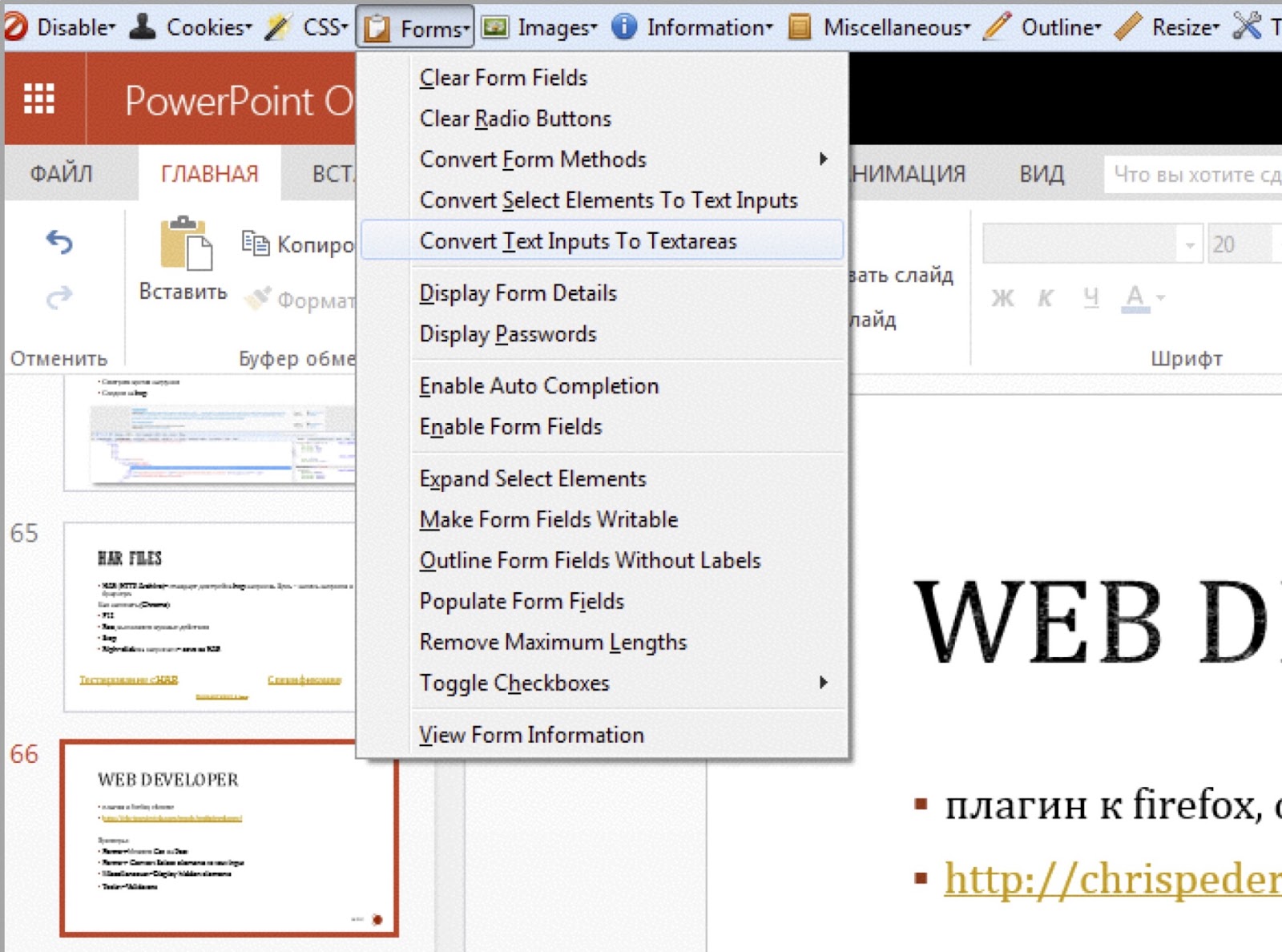
It can also be used for security testing: for example, you can turn drop-down menus into text fields, thereby removing client validation, and checking if the server part is ready for strange data.
Typically, the first association with “testing tools” is tools where tests can be written and run. There is a wide variety of tools: there are large tools like HP QC, MS Test Manager, Test Rail . There are free tools like Leantesting , for example - if someone is choosing where to write their tests right now, pay attention to him. There is a Test Link, it is very difficult to work with it out of the box, but it has an open code and can be "finished" for yourself. There are also special tools for checklists and mind maps.
For those who use Test Rail: there is a special small Moqa application ,with which you can take tests or follow the results of passing directly from your mobile. Available for both iOS and Android.
A few words about mind-cards. They are everywhere. Mind cards are a cool tool to visualize the tests that you are going to conduct, to show the connections between them.

A bit of best practices: you can pre-make a mind-map (or a checklist, as you like best), a top-level one, and describe in it what kind of tests you need to remember to think about each functionality: testers often focus only on acceptance criteria and they forget to think in general: both about compatibility, and about performance, and about security and other types of tests. I try to start from the top level and gradually go into details. And yes, there is an error in the picture. For those who will be at Heisenbug this Thursday: if you find a mistake, come to me at the BoF session and get a small prize :)
After we looked at the functionality in general, we delve into the details: paint what objects there are, what scripts you need to see (CRUD - create-read-update-delete, for example), what data you can enter, equivalence classes, boundaries, etc. , i.e. we are more and more detailing our “test plan”.
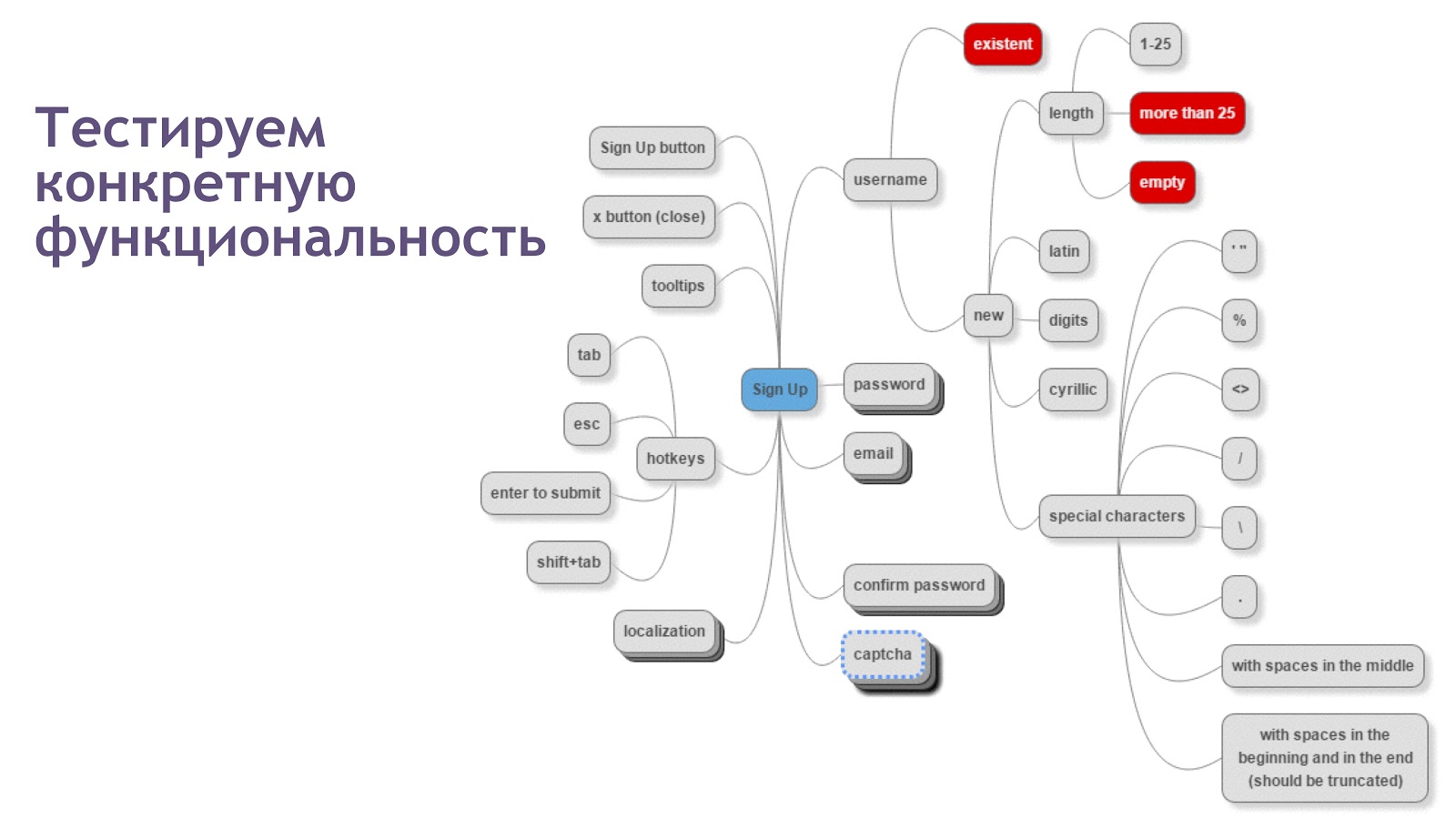
An important tip: do not start maps with details, your map becomes very large and inapplicable, try to move from general to particular, not vice versa.
There are countless tools for mind cards. Recently, more and more often I draw them simply on paper, but such a card, of course, is difficult to maintain. Among software solutions, I have a favorite, MindMup: A free online tool from which you can save maps to googledisk and share them with your colleagues. Among others, there is, for example, Coggle , it looks very beautiful, but if you created the circle in the wrong place where you originally wanted to, you will have to make a lot of clicks to fix it. As an Atlassian expert, I cannot help but say that there are solutions inside Jira and Confluence: there is a plug-in connector from Mindmeister , Yoikee , but it is only for Confluence, and in both systems the connector is available in LucidChart .
Our mind-map, in fact, looks like a checklist: this is a list of checks that we would like to go through. If we just do simplified documentation, getting a special application is somehow expensive and unreasonable. Therefore, there are special tools that allow you to keep precisely checklists: lightweight and tailored precisely to the fact that your test is one line. For example, Checkvist - but specifically it is not sharpened for testing, and visually to me, as a tester, it is not very good when someone crossed out my test, I want to explicitly affix the statuses.
In further searches, I found a special testing tool - TestPad .
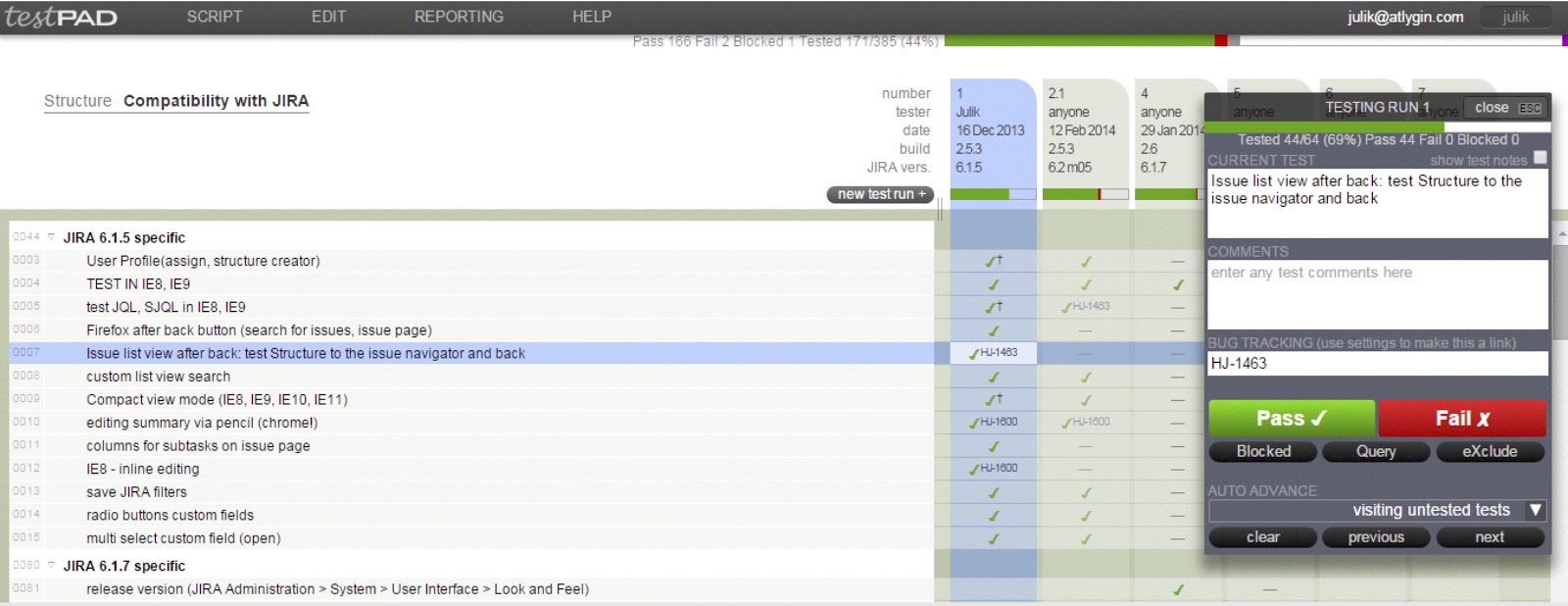
Do you have any list of checks, i.e. some hierarchical structure, and your test run is an additional column in this structure. You just add a column, you can enter some of your parameters if you need, for example, the version of the operating system or browsers, and one after the other to put down the status, passed the test or not, were there any questions. You can leave comments, links to the bugtracker, there is integration with the same Jira. The only negative: this product is available only in the clouds, i.e. this is a service, you can’t install it locally.
If there is an analogue inside the Jira bug tracker developed by our company, Structure.Testy
The tester must understand that some documentation sooner or later will have to be written anyway if you test your product more than once. Many times I heard excuses like "I'm still the only tester, I know everything here, why do I need these checklists?" Even if you are completely alone, this does not mean that the documentation is not useful. You all the same will have to test your product again and again, and you can facilitate your work in advance.
Small tips for those who don’t have anything at all, or who don’t know at all where to start. There are a bunch of services with ready-made checklists that you can simply adapt to your product. For example, there are several services specifically for testing usability, the first of which is usability checklist, a service that lists some checks that it’s good to think about, right up to the way the first page is designed, how navigation works, whether all links work, etc. There are special services that check only colors, for example, checkmycolors checks the contrast of colors.
And especially for you, I have a superlink by which you can find a whole database of ready-made check lists: if you have absolutely nothing, you can start with them, if you already have your documents - you can be inspired by new tests! Take and adapt for your needs, and write, if you have ideas, what else is worth adding!
Remember that testing is not only functional, and even if you are a manual tester, this does not mean that you should not engage in other types of tests: using suitable tools, this can be done quite quickly, easily and efficiently. There is nothing wrong with either testing the performance or security - there are "helpers" that can be used in the first stages. Do not forget to document your tests - this is important, you will thank yourself from the future.
Here are listed all the tools used in the paper, where you can also leave comments and ask questions. Save time and use tools!
What tools do testers need?
The brain is the most important tool, probably for any profession, not only for a tester. Eyes come in handy too, especially if you're testing the UI. Of course, ears: sometimes you launch the application, and your computer starts to hum like an airplane on the runway. Nose, because sometimes it smells from applications. Legs are also needed: sometimes something happens to you, some questions arise, you have to run to someone, ask something, and communicate with someone. Hands are also useful, especially for manual testers, not everything can be automated (and we write autotests with our hands). And, of course, the heart, because testing should be your passion!
On this, in principle, one could already finish the article, all the most important tools have already been listed. But as a joke, let's talk about tools that will help us to be more effective, regardless of your position, whether you are a manual tester or an automated programmer, analyst or programmer.
Screenshots
Each tester has their favorite screenshot tools. When in your application there are some problems on the UI (if, of course, there is a UI at all, and even if not, you may need to take a screenshot of both the console answers and the results of the database queries), you need to take a screenshot, and these screenshots must be taken right.
My personal favorite is Jing, looks like such a beautiful, positive sun on your screen. Why is it good: it knows how to take screenshots, knows how to save these screenshots both locally and in its cloud, knows how to record video. Unfortunately, it is recorded only in Flash, and here a problem arose: in our company most of the developers work on Macs, and my flash videos are not easy to open there. I had to look for another tool and say goodbye to my beloved positive sun. Now I use the Recordit tool the most, it allows you to immediately record a video and turn it into a gif in one motion, but there’s also a little misunderstanding with it: everything that he recorded, he immediately uploads to his cloud, i.e. if you have something local or you don’t want to share with anyone what your application looks like, you will have to look for something else. For example, Monosnap also knows how to make video, it can immediately save it locally and make it from a gif video.
Actual Result: Doesn't work
Expected Result: Works as Expected
Once upon a time, when I was a little young tester, I found an excellent sequence of steps that led me to a 500 error on the page. \
Of course, I recorded a bug report with playback steps and the actual result, and the expected one decided not to write - and so it is clear that we expect no error. After the correction, I tried to test the same steps, and you know what I saw? Just a white page. You can’t argue, there is no 500 error.
After that, I made two conclusions for myself:
- Do not believe the developers;
- The expected result is a very important part of your bug report.
How can I help myself?
There are tools that help you make prototypes, i.e. Draw your application no matter how you expect to see it. I like Balsamiq the most - it’s such a tool that allows you to visualize the interface in a couple of clicks. It immediately has containers, elements from which you can draw a web page, mobile application or anything, literally dragging and dropping “pictures”. There is an analogue - the Pencil browser plugin , it is not so cool, but free.
QDD
On one of the projects, we practiced QDD, “QA driven development”. Our testers themselves wrote acceptance criteria for the tasks, i.e. this was not done by some product owner or manager, but by the QA-team, but after the task they were confirmed by the product owner. For the design of tasks, they also used Balsamiq to show how everything will look, where which buttons should be, and give it all to the developer. Some time passes, a new build comes to us, and, horror, the page (except for the browser part) looks like this:
Our developer really picked up the styles, buttons, and he was not even embarrassed that this upper part, where the address bar, also does not look like a browser. Moral: when you show prototypes to your developers, it would be nice to talk to them that this is just a prototype, you don’t have to do exactly the same. It’s normal that in a particular case there will be other styles, and everything will look a little different, the mocap is only needed to determine where what is and how it should look like.
Test data
Admit, do you have text files with your favorite test data? Down with the files with the texts! There are special tools that can generate these texts:
With their help, you can get rid of the effect of the pesticide when bugs get used to your tests, and the tests no longer find these bugs. Among these applications there is Mockaroo - it allows you to not just pick up some data, for example, card numbers or user name. He also knows how to generate SQL queries, for example, you specify the name of the database you want to go to, as well as what parameters are there, and he creates insert from this. And I draw your attention from this list to the last plugin, bugmagnet. This is a plugin for Chrome and Firefox with a pre-saved set of test data. When you have some kind of text field on the screen, you just right-click on it and select bugmagnet from the menu, inside you are already waiting for a bunch of any predefined, predetermined test data, divided into groups: by length, by format, by language , even the simplest scripts for testing XSS. An indispensable product for exploratory testing. Even if you have a field with an e-mail and you forgot which e-mail is valid and which not, Gojko Adzic , the author of this tool has already done everything for you, you just need to find the desired item in this list. What is important - it is also customizable, i.e. You can add your sections to the menu.
Images
Sometimes it happens that you do not need texts at all, but pictures. You can google, search for something, then try to select which of this is the right size. And there is a special service, LoremPixel , which allows you to generate these pictures: you can set the picture size, color and even the subject: cat, city, food, transport, etc. Recently, he often gets sick, but there is no less interesting analogue - picsum.photos
Does anyone have an application with large molds and a bunch of different data? I understand your pain. It happens that your form has a lot of fields, some of which are quite specific: somewhere you need to enter only e-mail, somewhere just a phone or something else, and every time it is tedious to enter everything. There is a plugin for Chrome called Form Filler, which can help solve the problem: you will add a small button next to the address bar, by clicking on which your form magically turns into a completed form:
Note: the data in the e-mail format is really entered in the e-mail field, and where the phone is entered, the phone format is entered, one of the list data is selected in the drop-down menus, which saves a lot of time. I draw your attention to the fact that in this plugin you can also configure everything, i.e. add your own masks, your data.
Pairwise testing
Does anyone use pairing techniques? I can’t say that I use it every day, but, nevertheless, sometimes it comes in handy. Why is it needed? When you have many parameters, for example, the same huge form, according to statistics, from 65 to 97% of errors are found in pairwise search (as you can see, here the statistics are very blurry in numbers), i.e. we can save a lot of time and almost no loss in coverage if we sort through pairs of values.
I use the Pairwiser online tool (unfortunately, the online version is no longer available, but the local version remains):
There are many other tools, but most of them are console, not so visual, so I use Pairwiser. In our company (we are doing plugins for Jira), testers have to constantly combine browsers, different versions of Jira and Confluence, different databases (depending on the version of Jira), versions of other plugins. I enter the parameters in Pairwiser,
click “generate test” and get a list of tests, a table that shows what and with what you need to test, which instances you need to create. What magic happened: if I went through all the values with each other (see the picture), I would get 60 tests. With Pairwiser, I reduced that number to 21, three times.
Here is an example that the creators of the tool made:
It happens that you have a lot more options. In my example, there were only three, here there are much more: operating systems, types of connection, some conditions between your parameters (for example, it’s silly to test a mobile browser with a desktop), some additional parameters, you can mark the tests as mandatory ( something like sanity when you say that I definitely need to test this combination of parameters). And magic happens, 32 tests instead of 18688:
Just think about it, 32 instead of almost 19,000! You can save a lot of time.
UPD : so far I have found for myself another free web tool, pairwise.teremokgames.com .
HTML / CSS validators
Let's talk a little about the specifics of the web. There is a World Wide Web Consortium community, the guys are standardizing HTML and CSS. They created validators , i.e. static analyzers, where you set the URL of your application and it gives you a set of errors. There are the same things that check how compatible you are with mobile, or check links. You can set some URL for these validators , you can directly download the file with your HTML. There are browser plugins, at least for Chrome for sure, that can do this locally.
The answers will look like this:
I want to save you right away. A lot of what this validator will tell you does not need to be edited, maybe it will not find anything scary, but it is very important to at least think about these things, take and sort out, is there something useful there or not. Take a look at the first example - the img tag does not have an alt attribute. Alt is a parameter that says which text will be written if, for example, your pictures are turned off, or the picture did not load, say, due to slow Internet. It would seem that in our century everyone has the Internet more or less, what is the problem? Well, not indicated, so what? Here is a small nuance: for example, there are people with vision problems who use special screen readers. If the screen reader is reading across the screen, what do you think he sees instead of the picture? This alt text. And if this text is not given, then the person will never know that there was anything at all.
In general, no one is sinless. If you drive Google.com into this beautiful validator, it will produce 21 errors, most of them about outdated elements. Even Google has errors! On the other hand, you are not Google, so this should somehow encourage you to make your products better. Probably, you don’t have so many resources, and such a validator will give you more confidence that the pages will work in different browsers, since you are compatible directly with the standard.
Performance
Usually, when you ask about performance tests, you get something like: “Performance is a matter of seriousness, this should be done by special people.” And it's true, this is a huge area, but at least a few surface tests can be done very easily. There are several tools that can show what problems there are on your site, and even put down “ratings” and give tips on how to fix them. If your service is already available somewhere, you can simply enter the URL, but there are also plugins that can do tests locally. The first PageSpeed service from Google, it has a Chrome plugin that can locally check how good everything is and give you advice - there’s something to talk about with your developers right away.
Another of the performance testing products has such a cool service.WebPageTest also gives ratings, which are displayed in the upper right corner:
One of the FirstByteTime parameters is the time from the beginning of the transition to the page until the first bit of the server response appears on your site. There is also a cache rating, beautiful graphs that will tell you what exactly takes the most time on your page, whether it is pictures, scripts or HTML. You get beautiful pictures with specific numbers with which you can approach your developer.
Another feature of this tool is that you can specify where this test comes from, in which browser and even at what Internet speed. In principle, it can be used to draw conclusions on where to place the data center, where to go, is it so bad that now we do not have a center somewhere in Australia. By the way, they have an API , you can try to use it for automated runs.
Another browser plugin (there is definitely Chrome) is called Lighthouse - a beacon that evaluates your application from different angles, i.e. as an application in general, and performance, accessibility, accessibility for people with disabilities.
This is what the performance testing test report might look like:
The picture shows how my application looked after a different number of seconds. Not so cool, actually. As you can see, there are 56 points, i.e. this is so, the site is average. With this plugin, we also get some numbers with which you can go to your developer and talk.
Of course, JMeter is worth mentioning. It is very popular, but, unlike the tools that we talked about above, on JMeter we usually evaluate the speed of the server side. And users often complain that the record doesn’t work very well in it, and people buy some special products in order to record the script and then upload it to JMeter. There is a simple way - the tab is called network in the browser, where all requests are visible. You just right-click and you can save all these requests as a HAR, HTTP archive. There is also BlazeMeter Converter- a special converter that can turn these HAR files into a test plan for JMeter, i.e. you just did some actions in your browser, went to the converter’s special website and got your test plan for JMeter ready. BlazeMeter Converter positions itself as a converter not only from HAR files to JMeter test plans, but also XML, Selenium and JSON. To be honest, except for HAR, I have not tried anything, if someone tries, it would be cool to know the results.
Emulators
Let's talk about cross-browser compatibility compatibility checks. Many people come across this, especially those who test the web, and especially if you need to support Internet Explorer: especially unusual problems come up here, for example, IE has a limited number of lines that fit into the screen, you cannot display more than 46424 lines at all.
How to test different versions? If with Chrome and Firefox it’s more or less clear, you can easily install them with older versions, with IE it’s not so simple: it’s not always installed and 2 versions can’t be installed in parallel. Microsoft unexpectedly met and made a free service where you can download ready-made virtual machines with Windows and certain versions of IE installed.
Officially, this virtual machine will tell you about two months later that it is expired, but do not give in - an easy reboot of this virtual machine will allow you to work with it for many years to come.
There are, of course, other services, such as Browserstack or Saucelabs , for sure many of you once used or tried them, they are paid, but also cool.
As for mobile, I used Test Object : here you can test on real devices.
Testing security
Security testing, as well as performance testing, is also bypassed by many, although the simplest tests are not so difficult. There are plugins, however, only for Firefox, called XSS Me / SQL Inject Me, by the name of the most popular vulnerabilities in web applications. They work on the principle of a black box, that is, you put yourself plug-ins, they find text fields on the page and paste the scripts that they have in the database there. This database is just XML, you can expand it with your data. The result is a ready-made report which specific test scenarios passed, which ones didn’t, which specific test data didn’t work, for which character some kind of problem occurred, i.e. I can take the same symbol with my hands, try to do it on my resource and see what exactly went wrong. Here I draw your attention to the fact that these plugins colorize poorly or well depending on the HTTP status. Accordingly, the status of 200 - all is well and the answer will be green, if you get 400-500 - red, if 302 comes - also red. In the report, these will be red cells,
There are also tools that allow you to intercept requests or write your own from scratch. I often use Fiddler or Charles (there was even a separate post about him, habr.com/company/redmadrobot/blog/269109 ) - I track requests and reuse with changed parameters. These tests can be downloaded to a file and given to the automation team, or simply reused later. You can also quickly send a bunch of identical requests using Fiddler: the Shift + R hotkey will allow you to repeat the selected request as many times as you like.
There is an analogue for the browser - the tamper data plugin(available for both Firefox and Chrome): it’s not so functional, you can’t emulate a long network or something else, but the simplest requests, namely to intercept and send it yourself, correcting them on the fly, are also possible there. I want to draw your attention to the fact that if you work on Windows, I would prefer Fiddler in your place, it is always free. On Mac, Fiddler works so-so, i.e. officially it is supported, but there are problems, it is better to use Charles, just keep in mind that officially they have only 30 days of free use.
I also want to talk about one plugin, Web Developer. This is a hand-held tool, it can also be used to check HTML locally, change cookies, disable JavaScript or pictures - you don’t need to rummage through your browser settings, everything is always in one place on the colorful and not very noticeable panel at the top of your browser.
It can also be used for security testing: for example, you can turn drop-down menus into text fields, thereby removing client validation, and checking if the server part is ready for strange data.
Writing tests
Typically, the first association with “testing tools” is tools where tests can be written and run. There is a wide variety of tools: there are large tools like HP QC, MS Test Manager, Test Rail . There are free tools like Leantesting , for example - if someone is choosing where to write their tests right now, pay attention to him. There is a Test Link, it is very difficult to work with it out of the box, but it has an open code and can be "finished" for yourself. There are also special tools for checklists and mind maps.
For those who use Test Rail: there is a special small Moqa application ,with which you can take tests or follow the results of passing directly from your mobile. Available for both iOS and Android.
Mind Maps. Mind maps everywhere
A few words about mind-cards. They are everywhere. Mind cards are a cool tool to visualize the tests that you are going to conduct, to show the connections between them.
A bit of best practices: you can pre-make a mind-map (or a checklist, as you like best), a top-level one, and describe in it what kind of tests you need to remember to think about each functionality: testers often focus only on acceptance criteria and they forget to think in general: both about compatibility, and about performance, and about security and other types of tests. I try to start from the top level and gradually go into details. And yes, there is an error in the picture. For those who will be at Heisenbug this Thursday: if you find a mistake, come to me at the BoF session and get a small prize :)
After we looked at the functionality in general, we delve into the details: paint what objects there are, what scripts you need to see (CRUD - create-read-update-delete, for example), what data you can enter, equivalence classes, boundaries, etc. , i.e. we are more and more detailing our “test plan”.
An important tip: do not start maps with details, your map becomes very large and inapplicable, try to move from general to particular, not vice versa.
There are countless tools for mind cards. Recently, more and more often I draw them simply on paper, but such a card, of course, is difficult to maintain. Among software solutions, I have a favorite, MindMup: A free online tool from which you can save maps to googledisk and share them with your colleagues. Among others, there is, for example, Coggle , it looks very beautiful, but if you created the circle in the wrong place where you originally wanted to, you will have to make a lot of clicks to fix it. As an Atlassian expert, I cannot help but say that there are solutions inside Jira and Confluence: there is a plug-in connector from Mindmeister , Yoikee , but it is only for Confluence, and in both systems the connector is available in LucidChart .
Our mind-map, in fact, looks like a checklist: this is a list of checks that we would like to go through. If we just do simplified documentation, getting a special application is somehow expensive and unreasonable. Therefore, there are special tools that allow you to keep precisely checklists: lightweight and tailored precisely to the fact that your test is one line. For example, Checkvist - but specifically it is not sharpened for testing, and visually to me, as a tester, it is not very good when someone crossed out my test, I want to explicitly affix the statuses.
In further searches, I found a special testing tool - TestPad .
Do you have any list of checks, i.e. some hierarchical structure, and your test run is an additional column in this structure. You just add a column, you can enter some of your parameters if you need, for example, the version of the operating system or browsers, and one after the other to put down the status, passed the test or not, were there any questions. You can leave comments, links to the bugtracker, there is integration with the same Jira. The only negative: this product is available only in the clouds, i.e. this is a service, you can’t install it locally.
If there is an analogue inside the Jira bug tracker developed by our company, Structure.Testy
Ready checklists
The tester must understand that some documentation sooner or later will have to be written anyway if you test your product more than once. Many times I heard excuses like "I'm still the only tester, I know everything here, why do I need these checklists?" Even if you are completely alone, this does not mean that the documentation is not useful. You all the same will have to test your product again and again, and you can facilitate your work in advance.
Small tips for those who don’t have anything at all, or who don’t know at all where to start. There are a bunch of services with ready-made checklists that you can simply adapt to your product. For example, there are several services specifically for testing usability, the first of which is usability checklist, a service that lists some checks that it’s good to think about, right up to the way the first page is designed, how navigation works, whether all links work, etc. There are special services that check only colors, for example, checkmycolors checks the contrast of colors.
And especially for you, I have a superlink by which you can find a whole database of ready-made check lists: if you have absolutely nothing, you can start with them, if you already have your documents - you can be inspired by new tests! Take and adapt for your needs, and write, if you have ideas, what else is worth adding!
conclusions
Remember that testing is not only functional, and even if you are a manual tester, this does not mean that you should not engage in other types of tests: using suitable tools, this can be done quite quickly, easily and efficiently. There is nothing wrong with either testing the performance or security - there are "helpers" that can be used in the first stages. Do not forget to document your tests - this is important, you will thank yourself from the future.
Here are listed all the tools used in the paper, where you can also leave comments and ask questions. Save time and use tools!
Minute of advertising. If you liked this report from the Heisenbug conference - note that the new Heisenbug (May 17-18, St. Petersburg) is already approaching, its program also has a lot of interesting things . We hope to see many of you there!