January 11, 2018 at 09:56
Disabling Meltdown and Specter Fix on Windows
- Tutorial
The Microsoft website contains information on how to check whether the OS is susceptible to meltdown attacks. There is also information on how to disable the latest fix.
Considering that rumors about a catastrophic drop in performance do not cease on the Internet, and even comparative tests “before” and “after” appear, information on disabling this patch can be useful.
Right to the point: you can disable by making or adjusting two parameters in the registry.
From the Microsoft website:
It is assumed that the ExecutionPolicy in powershell is configured to the desired level (Bypass or Unrestricted).
Install PowerShell module:
We answer “Y” to both questions.
Further:
Run check:
The result in the case of complete "security" PC:
After applying the settings change and rebooting:
But the questions need to be done or not, is there any sense or not and remain open.
Source Protect against speculative execution side-channel vulnerabilities in Windows client
Official update disabling the CVE 2017-5715 patch for all supported windows
www.catalog.update.microsoft.com/Search.aspx?q=KB4078130
PPS: If anyone has the opportunity to test if there are any changes in terms of performance, it would be very wonderful.
Considering that rumors about a catastrophic drop in performance do not cease on the Internet, and even comparative tests “before” and “after” appear, information on disabling this patch can be useful.
Right to the point: you can disable by making or adjusting two parameters in the registry.
From the Microsoft website:
Enabling or disabling the fix separately for CVE-2017-5715 and CVE-2017-5754 (Specter and Meltdown)
How to enable the fix CVE-2017-5715 and CVE-2017-5754reg add "HKEY_LOCAL_MACHINE\SYSTEM\CurrentControlSet\Control\Session Manager\Memory Management" /v FeatureSettingsOverride /t REG_DWORD /d 0 /f reg add "HKEY_LOCAL_MACHINE\SYSTEM\CurrentControlSet\Control\Session Manager\Memory Management" /v FeatureSettingsOverrideMask /t REG_DWORD /d 3 /f
How to disable CVE-2017-5715 and CVE-2017-5754 fixreg add "HKEY_LOCAL_MACHINE\SYSTEM\CurrentControlSet\Control\Session Manager\Memory Management" /v FeatureSettingsOverride /t REG_DWORD /d 3 /f reg add "HKEY_LOCAL_MACHINE\SYSTEM\CurrentControlSet\Control\Session Manager\Memory Management" /v FeatureSettingsOverrideMask /t REG_DWORD /d 3 /f
Enabling or disabling fix separately for CVE 2017-5715 (Specter)
How to enable fix CVE-2017-5715reg add "HKEY_LOCAL_MACHINE\SYSTEM\CurrentControlSet\Control\Session Manager\Memory Management" /v FeatureSettingsOverride /t REG_DWORD /d 0 /f reg add "HKEY_LOCAL_MACHINE\SYSTEM\CurrentControlSet\Control\Session Manager\Memory Management" /v FeatureSettingsOverrideMask /t REG_DWORD /d 1 /f
How to disable CVE-2017-5715 fixreg add "HKEY_LOCAL_MACHINE\SYSTEM\CurrentControlSet\Control\Session Manager\Memory Management" /v FeatureSettingsOverride /t REG_DWORD /d 1 /f reg add "HKEY_LOCAL_MACHINE\SYSTEM\CurrentControlSet\Control\Session Manager\Memory Management" /v FeatureSettingsOverrideMask /t REG_DWORD /d 1 /f
Note * Setting a value of 3 for FeatureSettingsOverrideMask is the same for both cases.
Note: * Disabling and enabling by changing registry settings will require a restart of the computer and administrator rights.
Note: * There is no need to change MinVmVersionForCpuBasedMitigations.
Checking for vulnerabilities in the system using the powershell module SpeculationControl
It is assumed that the ExecutionPolicy in powershell is configured to the desired level (Bypass or Unrestricted).
Install PowerShell module:
Install-Module SpeculationControlWe answer “Y” to both questions.
Further:
Import-Module SpeculationControlRun check:
Get-SpeculationControlSettingsThe result in the case of complete "security" PC:
BTIHardwarePresent             : True
BTIWindowsSupportPresent       : True
BTIWindowsSupportEnabled       : True
BTIDisabledBySystemPolicy      : True
BTIDisabledByNoHardwareSupport : True
KVAShadowRequired              : True
KVAShadowWindowsSupportPresent : True
KVAShadowWindowsSupportEnabled : True
KVAShadowPcidEnabled           : True
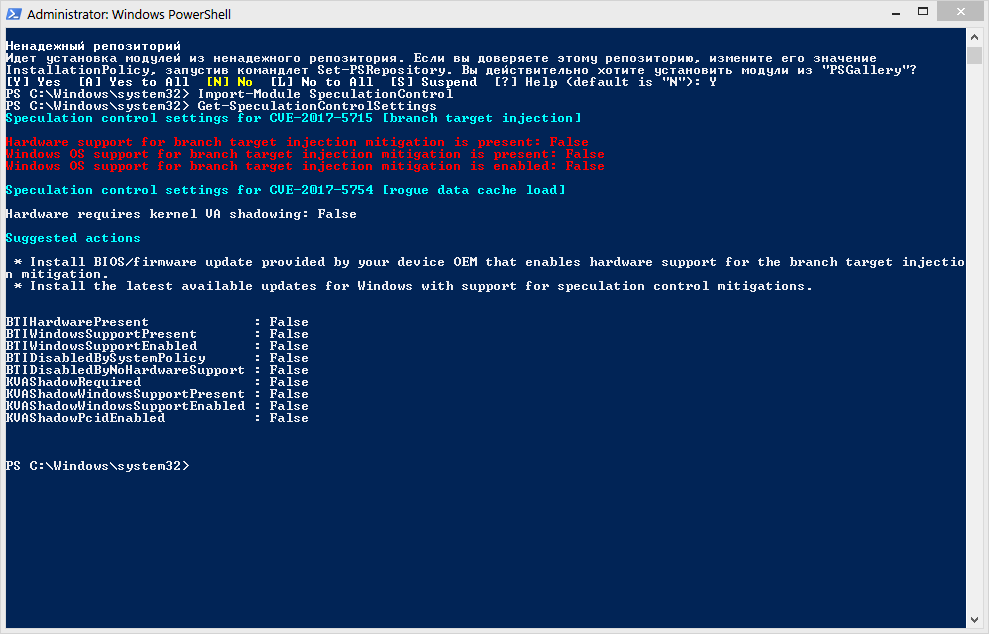
After applying the settings change and rebooting:
BTIHardwarePresent             : False
BTIWindowsSupportPresent       : False
BTIWindowsSupportEnabled       : False
BTIDisabledBySystemPolicy      : False
BTIDisabledByNoHardwareSupport : False
KVAShadowRequired              : False
KVAShadowWindowsSupportPresent : False
KVAShadowWindowsSupportEnabled : False
KVAShadowPcidEnabled           : False
But the questions need to be done or not, is there any sense or not and remain open.
Source Protect against speculative execution side-channel vulnerabilities in Windows client
Official update disabling the CVE 2017-5715 patch for all supported windows
www.catalog.update.microsoft.com/Search.aspx?q=KB4078130
PPS: If anyone has the opportunity to test if there are any changes in terms of performance, it would be very wonderful.