ReactiveValidation: data validation in WPF
Hello, Habr!
I would like to talk about the Open Source library for WPF - ReactiveValidation, in the process of writing which I tried to focus on FluentValidation and Reactive UI. Its task is to validate the form every time the user changes the data inside it.
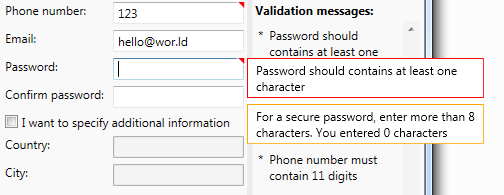
An example of working with a library. The good news is that you can use the template with your
main library features:
During the development process, I tried to focus on FluentValidation, so the syntax is easily recognizable. However, there are differences: something was adapted to the task, something was not implemented, but about everything in order.
All information about the state of the object is stored in the Validator property, which is generated using the rules. Consider its creation using machine properties as an example:
This example is very similar to the one that FluentValidation offers, so I hope that it does not need comments. I focus on the fact that the validator is an internal object with respect to the ViewModel, and is finally built no earlier than in the constructor.
In order to be able to display errors in the user interface, you must connect the resource dictionary from the library (containing the ControlTemplate by default) and, preferably, create a style (you have to do this for each type of control) and redefine the attached properties (ReachedValidation.AutoRefreshErrorTemplate and ReactiveValidation.ErrorTemplate, as shown in the example:
This code is most conveniently placed in App.xaml, where it will be available to the entire application.
I think the reasons for adding a ControlTemplate are obvious. But the properties can be bewildering. Unfortunately, the standard Validation from WPF contains many problems that lead to an incorrect display of the error pattern (used when the property is valid and vice versa). To avoid this, a handful of crutches were written that work through attached properties.
It remains only to apply the style to the controls and everything will work:
If we collect everything, we get the following simple application:
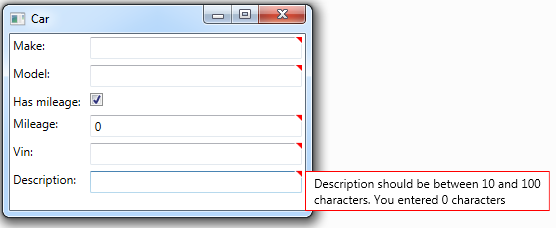
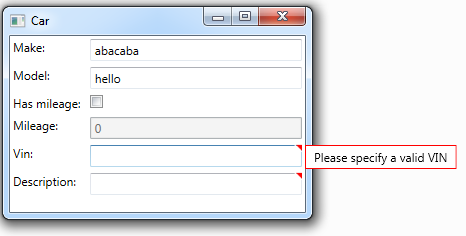
As the fields are filled, the red triangle disappears, indicating an error:
Message text and localization
In applications where there is no need to use localization, you can use ordinary static lines. The following is an example for changing the entire message text for a property validator:
You can use the DisplayName attribute (from the ReactiveValidation.Attributes namespace) to indicate the display name of the property.
To localize messages, the ResourceManager class is used, which is created along with resources. By creating two files Default.resx and Default.ru.resx, you can provide support for two languages.
For convenience, using the static class, you can set the default resource manager - just assign its value in ValidationOptions.LanguageManager.DefaultResourceManager. However, it is possible to use another resource manager. All of the above is demonstrated in this example:
If the Email or PhoneNumber value is empty, a message will be displayed from the default resource with the key PhoneNumberOrEmailRequired. In addition, mail must satisfy the regular expression, and if it does not match, a message will already be displayed from the Additional resource with the NotValidEmail key.
To localize the displayed names, you need to use the attribute and pass DisplayNameKey and ResourceType to override the resource (for attributes it is impossible to use the ResourceManager itself, therefore its type is used):
For localization, a culture from CultureInfo.CurrentUICulture is taken. In addition, it is possible to redefine it using ValidationOptions.LanguageManager.CurrentCulture. By default, the message text does not change when the culture changes, however, this behavior can be enabled using the ValidationOptions.LanguageManager.TrackCultureChanged option, and a number of features should be taken into account:
In addition, it makes no sense to enable this behavior if changing the localization in the interface is not supported.
Additional features:
What I would like to say:
The source code is available on GitHub, the MIT license.
In addition, you can download from Nuget the
Projects mentioned in the article:
I would like to thank my colleagues adeptuss and @baisel
for their help in developing the first version of the project.
And also truetan4ik for patience and bug fixes
I would like to talk about the Open Source library for WPF - ReactiveValidation, in the process of writing which I tried to focus on FluentValidation and Reactive UI. Its task is to validate the form every time the user changes the data inside it.
An example of working with a library. The good news is that you can use the template with your
main library features:
- Rules are created through the fluent interface
- Full internal control over property changes
- Localization support (including on the fly)
- Displaying Messages in the GUI
Reasons for creating
There is an application on WPF that accepts data from the user and transfers it to the server. The server, in turn, calls the database stored procedures. A complete check of the validity of the input data is implemented in the stored procedure code, so the user, passing incorrect parameters, is guaranteed to receive an exception with a message (it will return to the application and be displayed). Obviously, we can predict some of the exceptions on the client, and there we must handle them. In the beginning we used the following constructions:
The disadvantages of this option include:
The next step was the implementation of validation through the annotation attributes (DataAnnotations) and the use of IDataErrorInfo. The result is the following code:
BaseViewModel implements a mechanism that through reflection (reflection) receives a list of properties and their validating attributes. When a property is changed, a check of all attributes is called, and the results are written to the dictionary. When the indexer is called
This approach greatly simplified the most common cases of using validation - checking mandatory values, comparing with constants, and more. The implementation of the IDataErrorInfo interface allows the display of invalid fields in the GUI. It is also possible to lock the run button until the user fills in all the fields correctly. In this form, the work of the library completely suited us, but then we came across properties dependent on each other ...
Just the example I cited above illustrates this problem. If two values are used for verification, which can change, then when one is changed, the other must be revalidated. The mechanism described by me above did not support this, from which in some places the code began to crack from crutches that supported all this in a healthy state (I did not give them in the example, but they are based on calls to PropertyChanged of another property with loop control). Listening to the advice of my colleagues, I wrote a new mechanism that corrected the aforementioned shortcomings, after which there was a desire to use it without a twinge of conscience in other projects not related to work. That is why I wanted to rewrite all the code from scratch, taking into account the errors of the original designand adding new ones .
private override void Execute()
{
    if(string.IsNullOrEmpty(Property1) == true)
    {
        MessageBox.Show("Необходимо указать Property1");
        return;
    }
    if(Property2 < Property3)
    {
        MessageBox.Show("Property2 должно быть не меньше Property3");
        return;
    }
    ...
    //отправка данных серверу
    do();
}
The disadvantages of this option include:
- Excess code
- User interaction only through pop-ups
The next step was the implementation of validation through the annotation attributes (DataAnnotations) and the use of IDataErrorInfo. The result is the following code:
public class ViewModel : BaseViewModel
{
    [IsRequired]
    public string Property1 { get {...} set {...} }
    [CustomValidation(typeof(ViewModel), nameof(ValidateProperty2))]
    public int? Property2 { get {...} set {...} }
    public int? Property3 { get {...} set {...} }
    [UsedImplicitly]
    public static ValidationResult ValidateProperty2(int? property2, ValidationContext validationContext)
    {
        var viewModel = (ViewModel)validationContext.ObjectInstance;
        if (viewModel.Property2 < viewModel.Property3)
        {
            return new ValidationResult("Property2 должно быть не меньше Property3");
        }
        return ValidationResult.Success;
    }
}
BaseViewModel implements a mechanism that through reflection (reflection) receives a list of properties and their validating attributes. When a property is changed, a check of all attributes is called, and the results are written to the dictionary. When the indexer is called
string this[string columnName]from the IDataErrorInfo interface, these values are returned (message concatenation). This approach greatly simplified the most common cases of using validation - checking mandatory values, comparing with constants, and more. The implementation of the IDataErrorInfo interface allows the display of invalid fields in the GUI. It is also possible to lock the run button until the user fills in all the fields correctly. In this form, the work of the library completely suited us, but then we came across properties dependent on each other ...
Just the example I cited above illustrates this problem. If two values are used for verification, which can change, then when one is changed, the other must be revalidated. The mechanism described by me above did not support this, from which in some places the code began to crack from crutches that supported all this in a healthy state (I did not give them in the example, but they are based on calls to PropertyChanged of another property with loop control). Listening to the advice of my colleagues, I wrote a new mechanism that corrected the aforementioned shortcomings, after which there was a desire to use it without a twinge of conscience in other projects not related to work. That is why I wanted to rewrite all the code from scratch, taking into account the errors of the original design
During the development process, I tried to focus on FluentValidation, so the syntax is easily recognizable. However, there are differences: something was adapted to the task, something was not implemented, but about everything in order.
All information about the state of the object is stored in the Validator property, which is generated using the rules. Consider its creation using machine properties as an example:
public class CarViewModel : ValidatableObject
{
    public CarViewModel()
    {
        Validator = GetValidator();
    }
    private IObjectValidator GetValidator()
    {
        var builder = new ValidationBuilder();
        builder.RuleFor(vm => vm.Make).NotEmpty();
        builder.RuleFor(vm => vm.Model).NotEmpty().WithMessage("Please specify a car model");
        builder.RuleFor(vm => vm.Mileage).GreaterThan(0).When(model => model.HasMileage);
        builder.RuleFor(vm => vm.Vin).Must(BeAValidVin).WithMessage("Please specify a valid VIN");
        builder.RuleFor(vm => vm.Description).Length(10, 100);
        return builder.Build(this);
    }
    private bool BeAValidVin(string vin)
    {
        //Здесь проверяем VIN номер на корректность
    }
    //Далее следуют свойства с реализацией INotifyPropertyChanged
}
This example is very similar to the one that FluentValidation offers, so I hope that it does not need comments. I focus on the fact that the validator is an internal object with respect to the ViewModel, and is finally built no earlier than in the constructor.
In order to be able to display errors in the user interface, you must connect the resource dictionary from the library (containing the ControlTemplate by default) and, preferably, create a style (you have to do this for each type of control) and redefine the attached properties (ReachedValidation.AutoRefreshErrorTemplate and ReactiveValidation.ErrorTemplate, as shown in the example:
xmlns:b="clr-namespace:ReactiveValidation.WPF.Behaviors;assembly=ReactiveValidation"
...
This code is most conveniently placed in App.xaml, where it will be available to the entire application.
I think the reasons for adding a ControlTemplate are obvious. But the properties can be bewildering. Unfortunately, the standard Validation from WPF contains many problems that lead to an incorrect display of the error pattern (used when the property is valid and vice versa). To avoid this, a handful of crutches were written that work through attached properties.
It remains only to apply the style to the controls and everything will work:
If we collect everything, we get the following simple application:
As the fields are filled, the red triangle disappears, indicating an error:
Message text and localization
In applications where there is no need to use localization, you can use ordinary static lines. The following is an example for changing the entire message text for a property validator:
builder.RuleFor(vm => vm.PhoneNumber)
    .NotEmpty()
        .When(vm => Email, email => string.IsNullOrEmpty(email) == true)
        .WithMessage("You need to specify a phone or email")
    .Matches(@"^\d{11}$")
        .WithMessage("Phone number must contain 11 digits");
You can use the DisplayName attribute (from the ReactiveValidation.Attributes namespace) to indicate the display name of the property.
[DisplayName(DisplayName = "Minimal amount")]
public int MinAmount { get; set; }
To localize messages, the ResourceManager class is used, which is created along with resources. By creating two files Default.resx and Default.ru.resx, you can provide support for two languages.
For convenience, using the static class, you can set the default resource manager - just assign its value in ValidationOptions.LanguageManager.DefaultResourceManager. However, it is possible to use another resource manager. All of the above is demonstrated in this example:
builder.RuleFor(vm => vm.Email)
    .NotEmpty()
        .When(vm => PhoneNumber, phoneNumber => string.IsNullOrEmpty(phoneNumber) == true)
        .WithLocalizedMessage(nameof(Resources.Default.PhoneNumberOrEmailRequired))
    .Matches(@"^\w+@\w+.\w+$")
        .WithLocalizedMessage(Resources.Additional.ResourceManager, nameof(Resources.Additional.NotValidEmail));
If the Email or PhoneNumber value is empty, a message will be displayed from the default resource with the key PhoneNumberOrEmailRequired. In addition, mail must satisfy the regular expression, and if it does not match, a message will already be displayed from the Additional resource with the NotValidEmail key.
To localize the displayed names, you need to use the attribute and pass DisplayNameKey and ResourceType to override the resource (for attributes it is impossible to use the ResourceManager itself, therefore its type is used):
[DisplayName(DisplayNameKey = nameof(Resources.Default.PhoneNumber))]
public string PhoneNumber { get; set; }
[DisplayName(ResourceType = typeof(Resources.Additional), DisplayNameKey = nameof(Resources.Additional.Email))]
public string Email { get; set; }
For localization, a culture from CultureInfo.CurrentUICulture is taken. In addition, it is possible to redefine it using ValidationOptions.LanguageManager.CurrentCulture. By default, the message text does not change when the culture changes, however, this behavior can be enabled using the ValidationOptions.LanguageManager.TrackCultureChanged option, and a number of features should be taken into account:
- Changing localization on the fly is based on the fact that inside the ValidationMessage class, a subscription to the event of the LanguageManager class occurs
- Subscription occurs only if the TrackCultureChanged property is true. Therefore, it should be set only once - at the start of the application and no longer change.
- If the culture is changed using CultureInfo.CurrentUICulture, after changing it, call the ValidationOptions.LanguageManager.OnCultureChanged () method
In addition, it makes no sense to enable this behavior if changing the localization in the interface is not supported.
Additional features:
- There are 2 main types of messages: Error (error) and warning (Warining). Warnings are also displayed on the GUI (only in orange), but the model is considered valid. In addition, there is a gradation of ordinary / simple (Simple). Regular messages are displayed when focusing or hovering over the control, while simple messages only when hovering
- The rules are based on extensions methods, so you can easily extend them with your own validators
- The basic interface required for a validated object is IValidatableObject. There is an INPC based ValidatableObject implementation in the library. You can easily define your own base class with this interface, since its implementation contains a bit of code (the project shows examples with an override from ReactiveObject from Reactive UI)
- If a property inherited from INotifyPropertyChanged or INotifyCollectionChanged is validated, special adapter classes monitor their invocation, initiating revalidation. You can expand your subscriptions with your classes, for example, add IReactiveNotifyCollectionItemChanged <> from the Reactive UI
What I would like to say:
- There is no asynchronous validation. I think we can debate about whether it is needed or not, but nevertheless, now it is not supported.
- I am ashamed, but errors are possible. I hope that they will be quickly found and fixed.
- This is my first development experience for Open Source. I am very worried that the opportunities that I invested initially will not be enough. Hope this is also easily fixable.
The source code is available on GitHub, the MIT license.
In addition, you can download from Nuget the
Projects mentioned in the article:
- FluentValidation , which I often see in applications like Web API
- Reactive UI , in addition I recommend this series of articles ( first , second and third parts)
I would like to thank my colleagues adeptuss and @baisel
for their help in developing the first version of the project.
And also truetan4ik for patience and bug fixes









