Inventory this, inventory that: SAM
Not everyone can get pleasure from cleaning, but it is also impossible to live in a mess. So CIO has to take an inventory of equipment and software acquired over the years, so as not to run into Error Code: 418 I'm a teapot.
Yes, there are probably companies that keep their land in perfect order, because they have long taken care of this issue, studied the asset management methodology and took control of the entire life cycle of IT infrastructure and all software (cout << “UTOPIA!” << endl;). We will not talk about these workers now. If you are not one of them, we suggest dealing with ways to optimize IT asset management processes. Let's talk about SAM Services and various inventory methods, and we would like to round off on a pivot table with the most commonly used tools and their features.
 What the Kovacs torture scene should have looked like. Shot from the series Altered Carbon / “Modified Carbon”
SAM Services program has recently undergone changes (now not like before, folks). Optimization of infrastructure and workloads, risk and security risk assessment - now projects have become more customized, with or without licensed optimization. At the exit, the customer will receive an exhaustive personalized report containing recommendations and suggestions for improving the existing infrastructure, and as a bonus, a licensed analysis that saves time and effort in bringing the assets to perfect condition.
Projects take place in several stages. As you call a ship, it will sail, therefore, it is paramount to determine the goals and objectives, for which it is vital to identify all the “Wishlist” and “sores” in order to proceed with the knowledge to the next step - data collection and analysis (this also applies mapping for an optimized environment based on business tasks). And now we have come to the final stage, when the customer receives recommendations for optimizing the infrastructure with legal, economic and, of course, technical justification.
It is recommended that you use the tools listed below for infrastructure surveys - if you are pro, you can do several at once, since they complement each other perfectly:
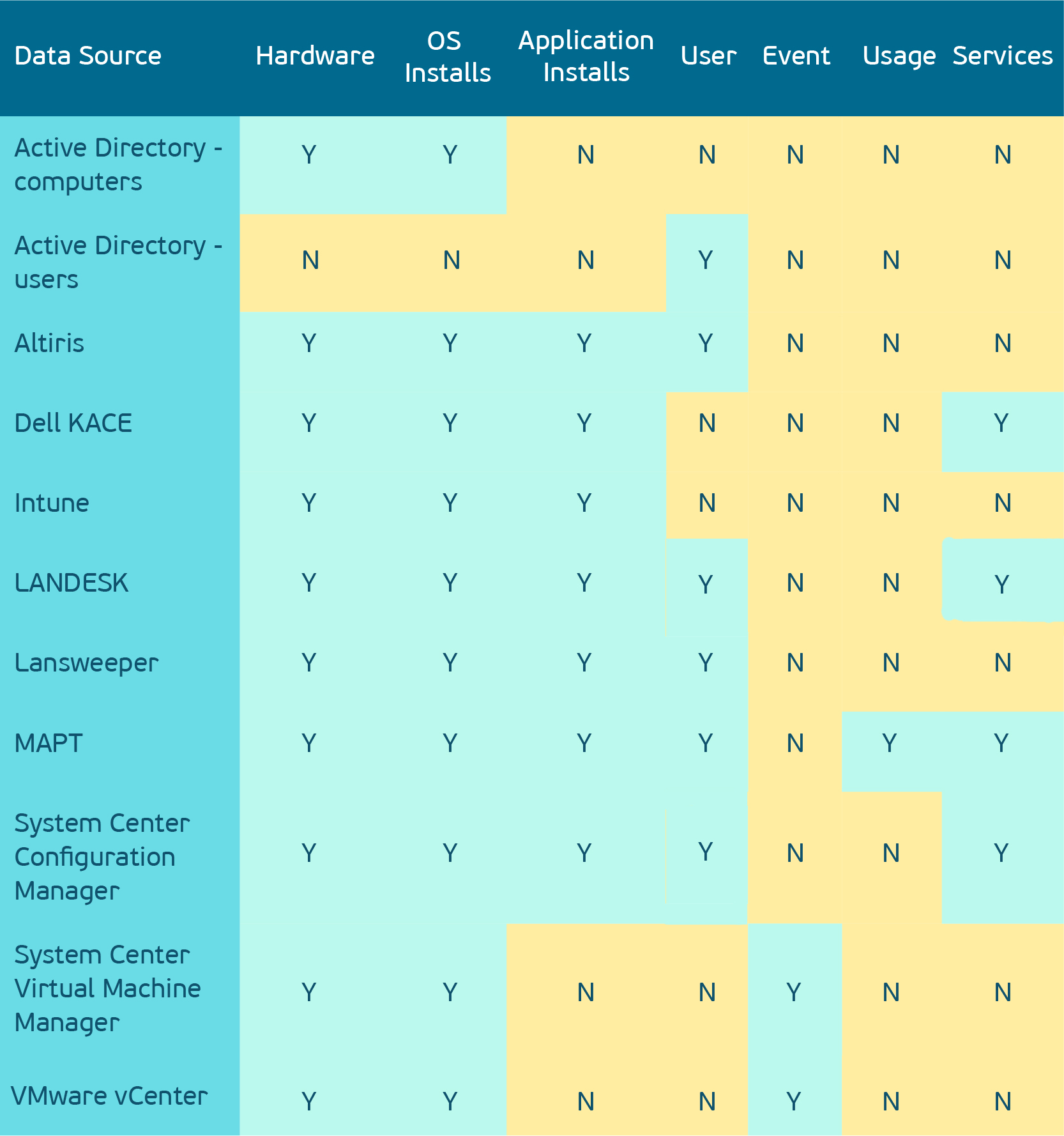
All these tools are aimed at one key task - to find a resource, track its life cycle from the moment of acquisition to the end of the scrap. You don’t have to recalculate everything with your own hands, accordingly, the number of errors due to the human factor is minimized, the labor costs for conducting an inventory are reduced, in general, it is very convenient.
One of the most affordable tools (completely free of charge) for infrastructure research is MAPT. First of all, we will consider this particular of our pet - we regularly use it in the LANIT-Integration projects. When it is necessary to quickly find and minimize risks in the field of information security in the infrastructure, transfer customer business processes to the cloud and optimize the existing infrastructure, it is with this solution that we always start work. It is freely distributed and, unlike the others, does not require the preparation of infrastructure before use. Unfortunately, the MAPT functionality allows you to only detect and collect data, so it requires the installation of additional tools.
 Frame from the series Altered Carbon / "Modified carbon"
Complete with MART installed SQL 2008 R2 edition Express. The Express edition has a limitation in database size: 10 GB maximum. So if we are aimed at researching a large-scale customer infrastructure, before starting the installation of MART, it is also necessary to install the SQL Server edition of Standard.
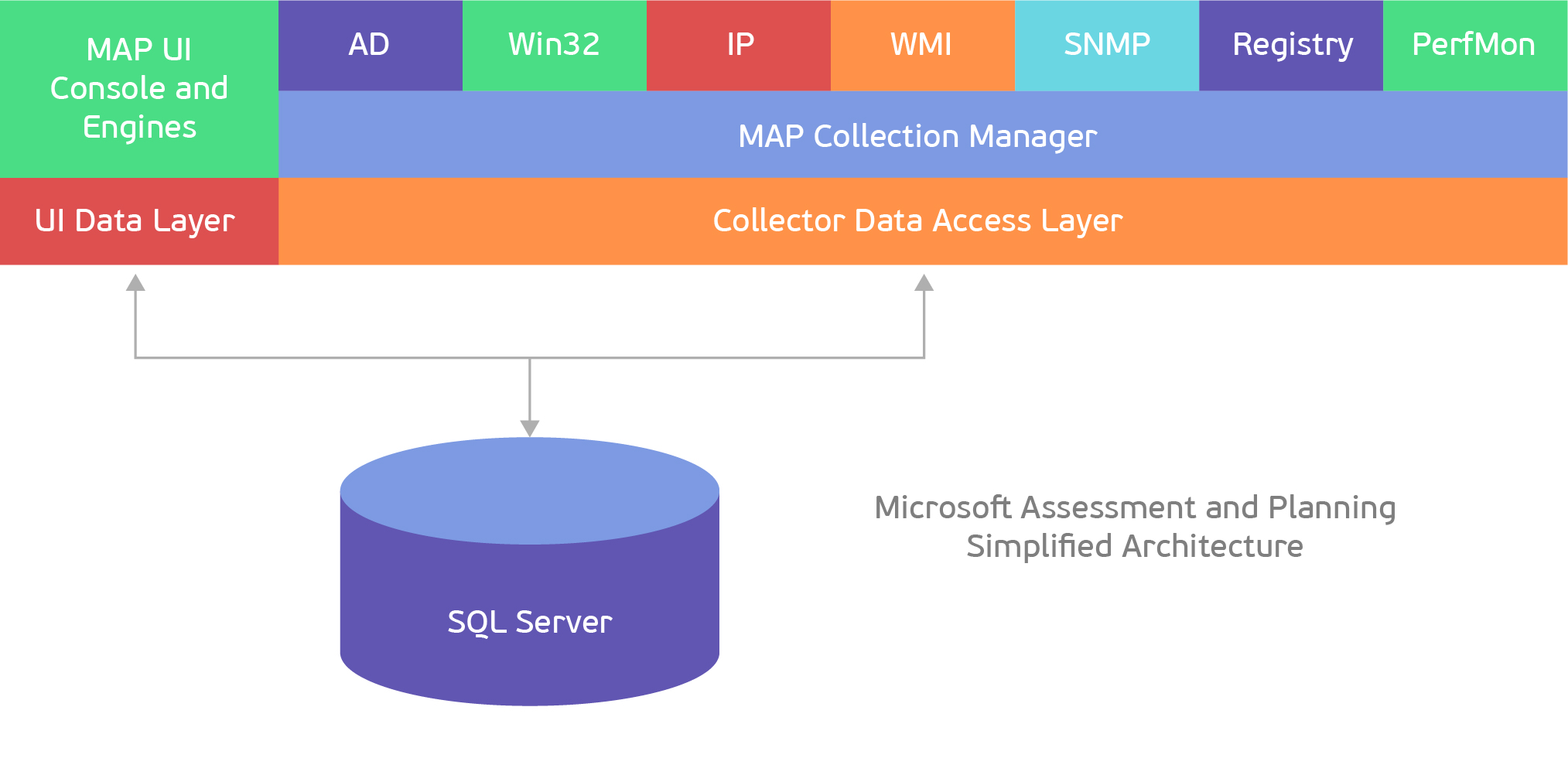
MART helps us in collecting information about the device and its performance, supports Windows and some versions of Unix \ Linux systems. It works like a scanner, you can specify a subnet of IP addresses as search ranges, import device names from a file, use Active Directory, SCCM. More clearly:
At the exit, MART allows us to generate reports on the current infrastructure, which can also be used for licensing analysis. However, the latter is more difficult to do since MAPT generates many different reports with scattered information and it takes time to bring them together in something digestible. To automate the process, you can use a script (in the application) or execute an SQL query.
In the tables AllDevices_Assessment.HardwareInventoryCore, AllDevices_Assessment.HardwareInventoryEx, Core_Inventory.AdDiscoveredDevices, Core_Inventory.Devices, SqlServer_Assessment.SqlInstances and the views of the MAP_External_Access.InstalledProductView, the main part of theProductView is collected.
The second place in terms of accessibility and functionality is shared by SCCM, Altiris, LANDESK, which we decided not so much to analyze by bones as how to demonstrate the variety of tools, so we look forward to your changes and comments:
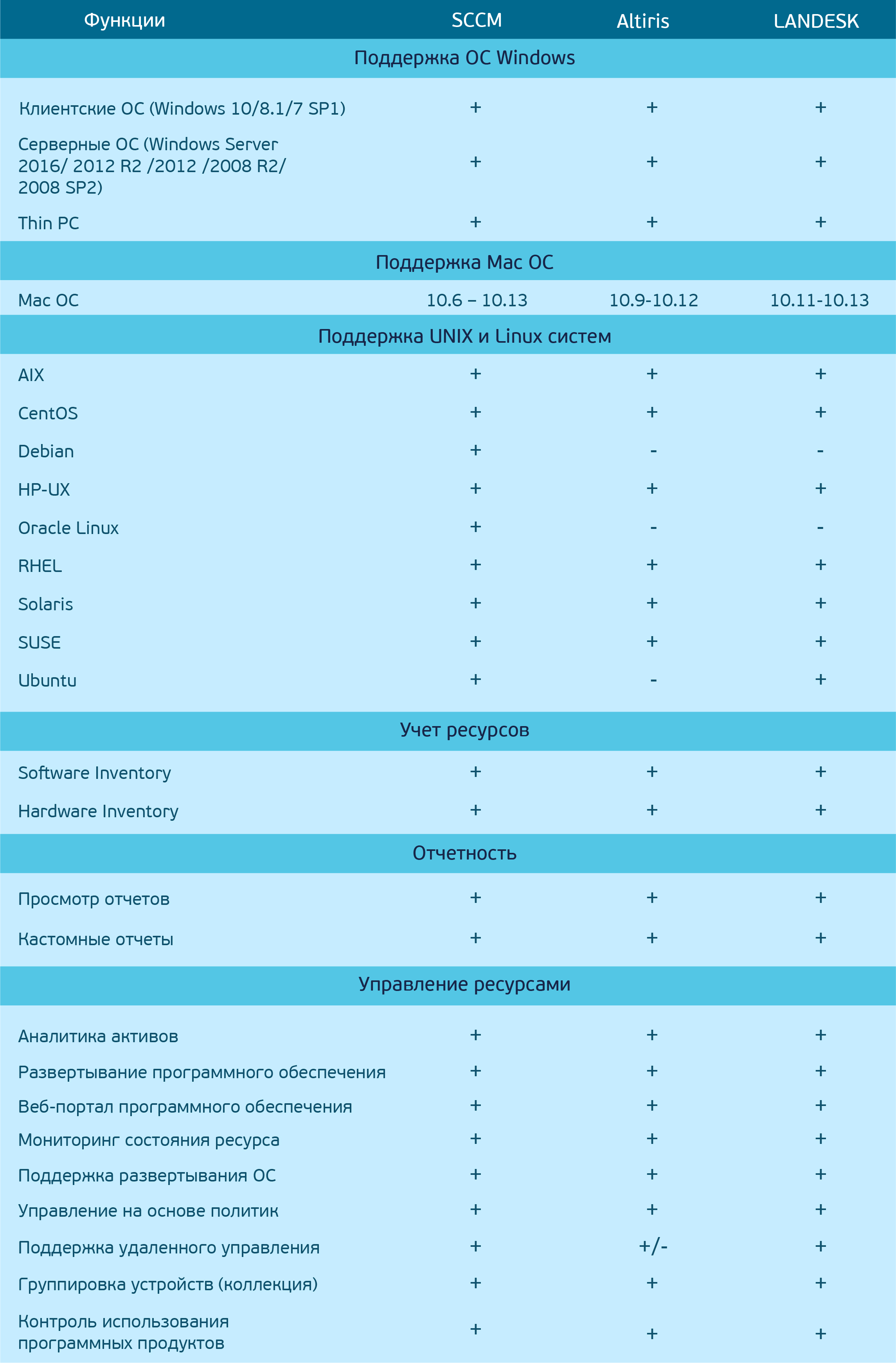
As you can see, there are a number of tools with a huge variety of features, but there are plenty of nuances: some do not work on Debian or Oracle, others do not fully support remote control, etc. But, if we take the average temperature in the hospital, then the coverage is mostly the same, and the manufacturers themselves try to keep up with the times, permanently refining their decisions.
 Shot from the Altered Carbon series / “Modified Carbon”
SAM projects have acquired a completely different scope over time, approaching in concept to comprehensive consulting on optimization and support of infrastructure, improving information security. Compiling the ratio of all used software with actually purchased (licensed analysis) is a bonus of the project. The main goal is to ensure that the customer at the end of the project can himself maintain the perfect order. Ultimately, nothing can be compared with a sense of satisfaction at the sight of perfectly tidy and managed land, where risks of all kinds of threats are minimized and support for the customer’s infrastructure is optimized. Welcome to the Brave New World with customization and closed IT gestalt.
KARMA to all, and we with my dear co-authordnmnk while we wait for your comments and remarks.
Yes, there are probably companies that keep their land in perfect order, because they have long taken care of this issue, studied the asset management methodology and took control of the entire life cycle of IT infrastructure and all software (cout << “UTOPIA!” << endl;). We will not talk about these workers now. If you are not one of them, we suggest dealing with ways to optimize IT asset management processes. Let's talk about SAM Services and various inventory methods, and we would like to round off on a pivot table with the most commonly used tools and their features.
SAM Services program has recently undergone changes (now not like before, folks). Optimization of infrastructure and workloads, risk and security risk assessment - now projects have become more customized, with or without licensed optimization. At the exit, the customer will receive an exhaustive personalized report containing recommendations and suggestions for improving the existing infrastructure, and as a bonus, a licensed analysis that saves time and effort in bringing the assets to perfect condition.
Projects take place in several stages. As you call a ship, it will sail, therefore, it is paramount to determine the goals and objectives, for which it is vital to identify all the “Wishlist” and “sores” in order to proceed with the knowledge to the next step - data collection and analysis (this also applies mapping for an optimized environment based on business tasks). And now we have come to the final stage, when the customer receives recommendations for optimizing the infrastructure with legal, economic and, of course, technical justification.
It is recommended that you use the tools listed below for infrastructure surveys - if you are pro, you can do several at once, since they complement each other perfectly:
- Active Directory is standardly used for centralized management and stores data about objects (resources, services, user accounts and computers).
- Altiris is a complete solution for the secure management of workstations, laptops and servers throughout their life cycle, including deployment, resource management, patching and troubleshooting tasks.
- Dell KACE - a device for managing highly loaded corporate systems, provides wide functionality, maintenance of equipment throughout the entire life cycle and scalability in the range from 100 to 20,000 end nodes.
- Intune is a cloud-based service for managing mobile devices, mobile applications and computers in the cloud.
- LANDESK - a tool for managing the life cycle of hardware and software: from procurement to disposal; analyzes hardware and software inventory information based on data from new hardware and software manufacturers on new purchases, monitors software usage.
- Lansweeper is an automated inventory, reporting and fleet management system.
- Microsoft Assessment and Planning Toolkit (MAPT) is a utility for inventorying, evaluating and reporting server infrastructure and workstations.
- System Center Configuration Manager (SCCM) - A product for managing IT infrastructure based on Microsoft Windows and related devices.
- System Center Virtual Machine Manager - Centralized management of virtual infrastructure.
- VMware vCenter - Centralized management of VMware virtual infrastructure.
All these tools are aimed at one key task - to find a resource, track its life cycle from the moment of acquisition to the end of the scrap. You don’t have to recalculate everything with your own hands, accordingly, the number of errors due to the human factor is minimized, the labor costs for conducting an inventory are reduced, in general, it is very convenient.
One of the most affordable tools (completely free of charge) for infrastructure research is MAPT. First of all, we will consider this particular of our pet - we regularly use it in the LANIT-Integration projects. When it is necessary to quickly find and minimize risks in the field of information security in the infrastructure, transfer customer business processes to the cloud and optimize the existing infrastructure, it is with this solution that we always start work. It is freely distributed and, unlike the others, does not require the preparation of infrastructure before use. Unfortunately, the MAPT functionality allows you to only detect and collect data, so it requires the installation of additional tools.
Frame from the series Altered Carbon / "Modified carbon"Complete with MART installed SQL 2008 R2 edition Express. The Express edition has a limitation in database size: 10 GB maximum. So if we are aimed at researching a large-scale customer infrastructure, before starting the installation of MART, it is also necessary to install the SQL Server edition of Standard.
MART helps us in collecting information about the device and its performance, supports Windows and some versions of Unix \ Linux systems. It works like a scanner, you can specify a subnet of IP addresses as search ranges, import device names from a file, use Active Directory, SCCM. More clearly:
At the exit, MART allows us to generate reports on the current infrastructure, which can also be used for licensing analysis. However, the latter is more difficult to do since MAPT generates many different reports with scattered information and it takes time to bring them together in something digestible. To automate the process, you can use a script (in the application) or execute an SQL query.
application
This script was created to solve the following tasks:
Input data (reports from MART xlsx format):
The output file contains the following tables:
Listing:
- Calculation of the percentage of inventory devices;
- Counting the number of deployments of client OS and office products;
- Formation of a table with the received data in a csv file.
Input data (reports from MART xlsx format):
- By AD devices (ActiveDevicesUsageTracker);
- By Office Products (Office)
The output file contains the following tables:
- Client Operating Systems (OS);
- Microsoft Office
- Microsoft Visio
- Microsoft Project
Listing:
$path = "C:\Users\Administrator\Desktop"
################# Общее  #######################
$i = $null
$j = $null
$k = $null
[array]$OutputInfoAboutInventMAPT = "Computer Name" + "`t" +	"Operating System"  + "`t" +	"Type"  + "`t" +	"WMI Status" + "`t" + "Virtual (Y/N)" + "`t" +	"Days Since Last Activity" #активные устройства собран МАРТ
[array]$AllActive = "Computer Name" + "`t" +	"Operating System"  + "`t" +	"Type"  + "`t" +	"WMI Status" + "`t" + "Virtual (Y/N)" + "`t" +	"Days Since Last Activity" #активные устройства со всеми ОС
[array]$AllActiveClient = $null #активные устройства с клиентской ОС
[array]$InventPC_NoStatistik = $null
$objExcel = New-Object -ComObject Excel.Application
$WorkBook = $objExcel.Workbooks.Open($path + "\AD.xlsx")
$objExcel.visible = $false
$WorkSheetMapt = $WorkBook.sheets.item("Device Details")
$MaptInventPC = $WorkSheetMapt.Range("A:A").value2 -ne $null
$OS = $WorkSheetMapt.Range("C:C").value2 -ne $null
$Type = $WorkSheetMapt.Range("D:D").value2 -ne $null
$WMIStatus = $WorkSheetMapt.Range("F:F").value2 -ne $null
$ActiveDay = $WorkSheetMapt.Range("J:J").value2 -ne $null
    for ($i = 0; $i -le $MaptInventPC.count; $i++)
    {
        if (($ActiveDay[$i] -le 90)  -and ($WMIStatus[$i] -eq "Success"))
        {
        $OutputInfoAboutInventMAPT += $MaptInventPC[$i] + "`t" + $OS[$i] + "`t" +	$Type[$i]  + "`t" + $WMIStatus[$i] + "`t" + $ActiveDay[$i]
        }
    }
    $AllSuccess = $OutputInfoAboutInventMAPT[1..$OutputInfoAboutInventMAPT.Count]
     for ($i = 0; $i -le $MaptInventPC.count; $i++)
    {
        if ($ActiveDay[$i] -le 90)
        {
        $AllActive += $MaptInventPC[$i] + "`t" + $OS[$i] + "`t" +	$Type[$i]  + "`t" + $WMIStatus[$i] + "`t" + $ActiveDay[$i]
        }
    }
    $ProcentInventPC = $AllSuccess.count * 100 / $AllActive.count
    "Всего обнаружено активных устройст" + "`t" + $AllActive.count >> "C:\Users\Administrator\Desktop\Info.csv"
    "Всего инвентаризировано активных устройств" + "`t" + $AllSuccess.Count  >> "C:\Users\Administrator\Desktop\Info.csv"
    "% инвентаризации" + "`t" + $ProcentInventPC  >> "C:\Users\Administrator\Desktop\Info.csv"
    ################### Таблица с клиентскими ОС ###################################
     for ($i = 0; $i -le $MaptInventPC.count; $i++)
    {
        if (($ActiveDay[$i] -le 90) -and ($Type[$i] -eq "Client"))
        {
        $AllActiveClient += $OS[$i]
        }
    }
    $CountActiveClient = $AllActiveClient | Group-Object | Select-Object -Property Name, Count
    "Семейство продуктов" + "`t" + "Всего развертываний ПО" >> "C:\Users\Administrator\Desktop\Info.csv"
    for ($i=0; $i -le $CountActiveClient.count; $i++)
    {
    $CountActiveClient[$i].name + "`t" + $CountActiveClient[$i].count >> "C:\Users\Administrator\Desktop\Info.csv"
    }
    $WorkBook.Close()
    ################## MS Office  ###########################
    [array]$visio = $null
    [array]$project = $null
    $WorkBookOffice = $objExcel.Workbooks.Open($path + "\Office.xlsx")
    $objExcel.visible = $false # на экране не отображается
    $WorkSheetOffice = $WorkBookOffice.sheets.item("Office2016Assessment")
    $WorkSheetApp = $WorkBookOffice.sheets.item("OfficeAppSummary")
    $NameOfficeSuite = $WorkSheetOffice.Range("G:G").value2 -ne $null
    $AppName = $WorkSheetApp.Range("A:A").value2 -ne $null
    $AppNumInstallCopie = $WorkSheetApp.Range("D:D").value2 -ne $null
    "`n" + "`n" + "`n" + "`n" + "MS Office" + "`n" + "Название" + "`t" + "Количество" >> "C:\Users\Administrator\Desktop\Info.csv"
    $CountOfficeSuite  = $NameOfficeSuite| Group-Object | Select-Object -Property Name, Count
    for ($i=0; $i -le $CountOfficeSuite.count; $i++)
    {
    $CountOfficeSuite[$i].name + "`t" + $CountOfficeSuite[$i].count >> "C:\Users\Administrator\Desktop\Info.csv"
    }
    ################# Visio #############################
     for ($i = 0; $i -le $AppName.count; $i++)
     {
        if (($AppName[$i] -like "*visio*" ) -and ($AppName[$i] -notlike "*viewer*"))
        {
        $visio += $AppName[$i] + "`t" + $AppNumInstallCopie[$i-1]
        }
     }
     "`n" + "`n" + "Visio" + "`n" + "Семейство продуктов" + "`t" + "Всего развертываний ПО"  >> "C:\Users\Administrator\Desktop\Info.csv"
     for ($i=0; $i -le $visio.count; $i++)
    {
    $visio[$i] >> "C:\Users\Administrator\Desktop\Info.csv"
    }
     ###################### Project ######################
     for ($i = 0; $i -le $AppName.count; $i++)
     {
        if (($AppName[$i] -like "*project*" ) -and ($AppName[$i] -notlike "*viewer*"))
        {
        $project += $AppName[$i] + "`t" + $AppNumInstallCopie[$i-1]
        }
     }
     "`n" + "`n" + "Project" + "`n" + "Семейство продуктов" + "`t" + "Всего развертываний ПО" >> "C:\Users\Administrator\Desktop\Info.csv"
    for ($i=0; $i -le $project.count; $i++)
    {
    $project[$i] >> "C:\Users\Administrator\Desktop\Info.csv"
    }
In the tables AllDevices_Assessment.HardwareInventoryCore, AllDevices_Assessment.HardwareInventoryEx, Core_Inventory.AdDiscoveredDevices, Core_Inventory.Devices, SqlServer_Assessment.SqlInstances and the views of the MAP_External_Access.InstalledProductView, the main part of theProductView is collected.
The second place in terms of accessibility and functionality is shared by SCCM, Altiris, LANDESK, which we decided not so much to analyze by bones as how to demonstrate the variety of tools, so we look forward to your changes and comments:
As you can see, there are a number of tools with a huge variety of features, but there are plenty of nuances: some do not work on Debian or Oracle, others do not fully support remote control, etc. But, if we take the average temperature in the hospital, then the coverage is mostly the same, and the manufacturers themselves try to keep up with the times, permanently refining their decisions.
SAM projects have acquired a completely different scope over time, approaching in concept to comprehensive consulting on optimization and support of infrastructure, improving information security. Compiling the ratio of all used software with actually purchased (licensed analysis) is a bonus of the project. The main goal is to ensure that the customer at the end of the project can himself maintain the perfect order. Ultimately, nothing can be compared with a sense of satisfaction at the sight of perfectly tidy and managed land, where risks of all kinds of threats are minimized and support for the customer’s infrastructure is optimized. Welcome to the Brave New World with customization and closed IT gestalt.
KARMA to all, and we with my dear co-authordnmnk while we wait for your comments and remarks.









