New features for managing application performance in hybrid cloud environments, or what Citrix NetScaler MAS 12.0 can do
According to Cisco forecasts, by 2021, in the world, 94% of tasks and virtual computing will be performed in cloud data centers, and in traditional data centers - 6%. At the same time, not only applications are transferred to the cloud, but also the components necessary for their work, the number of which is constantly growing. Application infrastructure is increasingly deployed between on-premises data centers, private and public clouds. Citrix has developed NetScaler MAS to monitor and manage the application infrastructure. We will talk about the specifics of this solution and its main functions.

Moving applications to public clouds can result in a number of new challenges:
To solve the tasks, Citrix developed the NetScaler MAS product. First of all, this software interacts with the network elements from Citrix - solutions of the Citrix NetScaler family and analyzes their status. Citrix NetScaler MAS manages all NetScaler network products except the Standard Edition SD-WAN.
NetScaler MAS provides the following features:
In 2017, NetScaler MAS 12.0 was released, which implements the following features:
1. Functions for real-time data analysis, machine learning and troubleshooting. They help administrators locate and quickly resolve application and security issues across the entire application infrastructure.
Anomalies in applications can be very different, for example, server response delay. Here it is possible to use machine learning mechanisms to eliminate anomalies. The system then shows a graph of which services contribute to the change in server performance and their activity spikes. Thus, a more detailed picture of the load distribution can be seen.
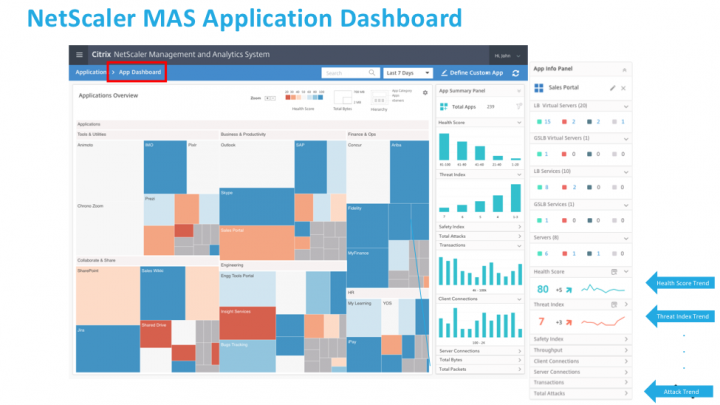
With standard balancing, requests are distributed across servers in an average form, providing approximately the same load of available computing power. If a non-standard situation arises when one server is clearly unloaded or even drops out of the pool, this anomaly will be displayed on the dashboard and the administrator will see a description of the causes of the problem. So you can eliminate the problem "at the start" of the level of interaction with the infrastructure. When up to 50 thousand Virtual IPs are analyzed at a time, it is much more convenient to see the full “health” picture in the general panel, where all changes and errors are immediately displayed with the possibility of their prompt settlement.
2. Another important innovation is the use of declarative templates Stylebook.This is a configuration template that simplifies the configuration of certain standardized applications, for example, Microsoft Skype for Business applications. Using the template, you can deploy the configuration for this application on one or another controller (NetScaler). It is enough to drive the addresses into the necessary fields and the application will work correctly. That is, Stylebook is a kind of software template that, through the API interface, configures application delivery controllers. Stylebook can also be edited to the needs of the application developer and, if necessary, distributed to any number of devices controlled by NetScaler.
Due to this, NetScaler is becoming interesting not only for network engineers, Citrix is moving in the direction of SDN (Software-defined network) so that developers who are responsible for applications can configure some network parameters of applications themselves without the help of network administrators. In addition, developers can be sure that their actions will not adversely affect the network infrastructure.
You can create a Stylebook to configure a specific NetScaler feature or use it to create configurations for enterprise application deployments, including Microsoft Exchange and Skype for Business. Once the application plan is developed, an even larger set of tools for managing the application environment opens.
3. Assessment of the "health" of the application,which collects information about the performance of the application based on the industry standard APDEX. The assessment takes into account the level of user satisfaction and other indicators.
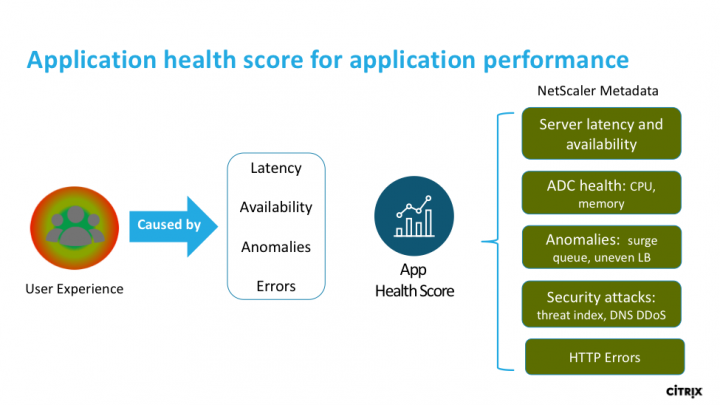
Citrix has its own traditional algorithms, and the Application Health function reflects the health of the application as an abstract value to remove negative factors such as loading NetScaler resources by this application, loading the user queue, or errors on network cards. As a result, a certain integral indicator of the importance of these errors is collected, and a parameterized indicator of the health of the application is displayed.
Since there are about a thousand NetScaler MAS deployments in the world today, it is not yet clear how useful this feature has been for network administrators. Information about its use by customers falls into the category of advanced analytics. However, having received a customized dashboard of all network applications that the administrator is dealing with (MS Exchange, Skype, various web services), you can immediately see how an application is popular with users, as well as the health index of each application.
3. Management software and SDN.
If the customer has an SDN built using Cisco ACI, either with VMware NSX or OpenStack, NetScaler MAS can be integrated with them. NetScaler collects statistics and distributes control to its devices, including transferring some of the information to the control modules that the customer selected.
When NetScaler MAS integrates with a certain orchestrator, then when there are not enough resources, MAS recommends the need to add a new VPX or CPX. That is, the need arises to add the necessary services to the balancing or to increase the number of virtual balancers in order to unload the current overloaded service and increase the comfort of the user. Thus, although problems arise, their impact on infrastructure and usability at this stage is minimal or not felt at all. Correction of the state of applications occurs in an automated mode. In this case, NetScaler MAS knows what to “pick up” or “receive” from the orchestra and can manage its infrastructure independently. Of course, from a hardware point of view, everything looks a little more complicated.
Now NetScaler MAS can also be a license server for virtual machines: you can raise VPX, issue a license to it, and as soon as the need for it disappears, turn it off. On the one hand, one or another balancer can be raised or turned off automatically on the basis of analytical data. On the other hand, if it becomes necessary to raise the balancer after some time elsewhere, you can always transfer the license without forcing the customer to pay for dozens of unnecessary VPX, which he uses at different times.
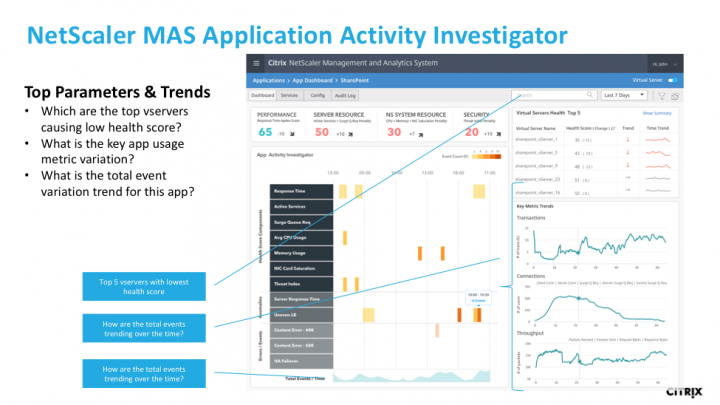
4. App Activity Investigator Application Activity Control Functionallows you to perform advanced analysis of application performance indicators. To create normal traffic patterns, transaction monitoring is performed and machine learning techniques are also used. These models allow us to determine anomalies, which together with other MAS tools guarantees optimal application performance and allows you to more quickly solve problems.
Among other things, NetScaler MAS enables precise access control based on applications and roles, allowing you to safely and securely control access to applications for various user groups.
NetScaler MAS is licensed in two ways. A free license includes up to 30 virtual IP: up to 30 virtual servers will be delivered free of charge, with full functionality. 30 virtual servers can work together with a thousand devices - they remain free.
If you need the functionality of more virtual servers or require Advanced analytics, you need to purchase a license. In fact, only analytics is licensed for a certain number of applications, licensing does not depend on the number of devices. Everything related to inventory management, log collection, configuration audit is delivered free of charge, regardless of the number of software or devices.
Moving applications to public clouds can result in a number of new challenges:
- Initialization, configuration, and management tasks must be automated. Adaptation to application loads must scale up and down, not only in one particular cloud, but across the entire hybrid infrastructure.
- The application delivery environment can contain a large amount of data about applications, users, and devices. In this regard, as well as the great complexity of the structure of this environment, powerful analytical tools are required to use the data to control the operation of applications, eliminate problems and threats to security breaches.
- Comparison of application requirements with network infrastructure resources must be implemented throughout the life cycle so that applications can be managed continuously, wherever they are deployed.
To solve the tasks, Citrix developed the NetScaler MAS product. First of all, this software interacts with the network elements from Citrix - solutions of the Citrix NetScaler family and analyzes their status. Citrix NetScaler MAS manages all NetScaler network products except the Standard Edition SD-WAN.
NetScaler MAS provides the following features:
- Centralized management for high performance: NetScaler MAS automates administrative tasks, including managing Citrix NetScaler firmware and certificate configurations, saving time and eliminating human error. NetScaler MAS also integrates seamlessly with cloud and SDN management software - Cisco ACI, VMware NSX, Alcatel Nuage.
- Monitoring and analysis: NetScaler MAS uses data from application delivery controllers and web services to proactively identify and detect security threats.
- Application Lifecycle Management: NetScaler MAS manages NetScaler application delivery controllers across the entire application delivery infrastructure. This means that NetScaler MAS can audit the configuration of application delivery controllers - which models of equipment with which software versions are currently working in the infrastructure. In addition, it analyzes how the application now meets the requirements for processing the loads that are assigned to it.
In 2017, NetScaler MAS 12.0 was released, which implements the following features:
1. Functions for real-time data analysis, machine learning and troubleshooting. They help administrators locate and quickly resolve application and security issues across the entire application infrastructure.
Anomalies in applications can be very different, for example, server response delay. Here it is possible to use machine learning mechanisms to eliminate anomalies. The system then shows a graph of which services contribute to the change in server performance and their activity spikes. Thus, a more detailed picture of the load distribution can be seen.
With standard balancing, requests are distributed across servers in an average form, providing approximately the same load of available computing power. If a non-standard situation arises when one server is clearly unloaded or even drops out of the pool, this anomaly will be displayed on the dashboard and the administrator will see a description of the causes of the problem. So you can eliminate the problem "at the start" of the level of interaction with the infrastructure. When up to 50 thousand Virtual IPs are analyzed at a time, it is much more convenient to see the full “health” picture in the general panel, where all changes and errors are immediately displayed with the possibility of their prompt settlement.
2. Another important innovation is the use of declarative templates Stylebook.This is a configuration template that simplifies the configuration of certain standardized applications, for example, Microsoft Skype for Business applications. Using the template, you can deploy the configuration for this application on one or another controller (NetScaler). It is enough to drive the addresses into the necessary fields and the application will work correctly. That is, Stylebook is a kind of software template that, through the API interface, configures application delivery controllers. Stylebook can also be edited to the needs of the application developer and, if necessary, distributed to any number of devices controlled by NetScaler.
Due to this, NetScaler is becoming interesting not only for network engineers, Citrix is moving in the direction of SDN (Software-defined network) so that developers who are responsible for applications can configure some network parameters of applications themselves without the help of network administrators. In addition, developers can be sure that their actions will not adversely affect the network infrastructure.
You can create a Stylebook to configure a specific NetScaler feature or use it to create configurations for enterprise application deployments, including Microsoft Exchange and Skype for Business. Once the application plan is developed, an even larger set of tools for managing the application environment opens.
3. Assessment of the "health" of the application,which collects information about the performance of the application based on the industry standard APDEX. The assessment takes into account the level of user satisfaction and other indicators.
Citrix has its own traditional algorithms, and the Application Health function reflects the health of the application as an abstract value to remove negative factors such as loading NetScaler resources by this application, loading the user queue, or errors on network cards. As a result, a certain integral indicator of the importance of these errors is collected, and a parameterized indicator of the health of the application is displayed.
Since there are about a thousand NetScaler MAS deployments in the world today, it is not yet clear how useful this feature has been for network administrators. Information about its use by customers falls into the category of advanced analytics. However, having received a customized dashboard of all network applications that the administrator is dealing with (MS Exchange, Skype, various web services), you can immediately see how an application is popular with users, as well as the health index of each application.
3. Management software and SDN.
If the customer has an SDN built using Cisco ACI, either with VMware NSX or OpenStack, NetScaler MAS can be integrated with them. NetScaler collects statistics and distributes control to its devices, including transferring some of the information to the control modules that the customer selected.
When NetScaler MAS integrates with a certain orchestrator, then when there are not enough resources, MAS recommends the need to add a new VPX or CPX. That is, the need arises to add the necessary services to the balancing or to increase the number of virtual balancers in order to unload the current overloaded service and increase the comfort of the user. Thus, although problems arise, their impact on infrastructure and usability at this stage is minimal or not felt at all. Correction of the state of applications occurs in an automated mode. In this case, NetScaler MAS knows what to “pick up” or “receive” from the orchestra and can manage its infrastructure independently. Of course, from a hardware point of view, everything looks a little more complicated.
Now NetScaler MAS can also be a license server for virtual machines: you can raise VPX, issue a license to it, and as soon as the need for it disappears, turn it off. On the one hand, one or another balancer can be raised or turned off automatically on the basis of analytical data. On the other hand, if it becomes necessary to raise the balancer after some time elsewhere, you can always transfer the license without forcing the customer to pay for dozens of unnecessary VPX, which he uses at different times.
4. App Activity Investigator Application Activity Control Functionallows you to perform advanced analysis of application performance indicators. To create normal traffic patterns, transaction monitoring is performed and machine learning techniques are also used. These models allow us to determine anomalies, which together with other MAS tools guarantees optimal application performance and allows you to more quickly solve problems.
Among other things, NetScaler MAS enables precise access control based on applications and roles, allowing you to safely and securely control access to applications for various user groups.
NetScaler MAS is licensed in two ways. A free license includes up to 30 virtual IP: up to 30 virtual servers will be delivered free of charge, with full functionality. 30 virtual servers can work together with a thousand devices - they remain free.
If you need the functionality of more virtual servers or require Advanced analytics, you need to purchase a license. In fact, only analytics is licensed for a certain number of applications, licensing does not depend on the number of devices. Everything related to inventory management, log collection, configuration audit is delivered free of charge, regardless of the number of software or devices.