Waited: support for YAML and Ansible (without cows) in dapp
At the beginning of this year, we decided that our Open Source utility for supporting CI / CD processes - dapp version 0.25 - has a sufficient set of functions and work on innovations has been started. In version 0.26, the YAML syntax appeared, and Ruby DSL was declared classic (it will no longer be supported at all). In the next version, 0.27, the main innovation can be considered the appearance of a collector with Ansible. It's time to talk about these new products in more detail.
Updated August 13, 2019: the dapp project has now been renamed werf , its code has been rewritten to Go, and the documentation has been greatly improved.
Background
We have been developing dapp for more than 2 years and are actively using many projects of various sizes in the daily maintenance. The first versions of the utility were conceived with the goal of using Chef to build images. When we added to this the fact that Ruby was familiar to almost all of our engineers and developers, we made the logical decision to implement dapp as a Ruby gem. They considered it appropriate to make a Dappfile config in the form of Ruby DSL - all the more so because a successful example from a close field, Vagrant, is known.
As the utility developed, it became clear that dapp needed a second specialization - application delivery to Kubernetes . So there was a mode of work with Helm chartsand engineers mastered the YAML syntax and patterns on Go while the developers started sending patches to Helm. On the one hand, delivery to Kubernetes has become an integral part of dapp, and on the other hand, Go is the de facto standard in the Docker and Kubernetes ecosystem. Our dapp, being written in Ruby, is now out of the picture: if it is difficult for us to reuse Docker code, then users often just don’t want to put Ruby on assembly machines - it’s much easier and more familiar to download the binary ... As a result, the main goals of dapp development have become : a) translation of the code base into Go, b) implementation of the YAML syntax.
In addition, over the past time, Chef has ceased to suit us for a number of reasons, both for controlling machines and for assembly. As it turned out, switching to Ansible solves some of the problems of not only our DevOps engineers: the most common issue at conferences was support for Ansible in dapp . Thus, the third goal was the implementation of Ansible-collector.
Syntax YAML
Earlier, I already introduced myself to the YAML syntax in this article , but now I will consider it in more detail.
Assembly configuration can be described in the file
dappfile.yaml(or dappfile.yml). The configuration processing steps are as follows:- dapp reads
dappfile.y[a]ml; - Go-template engine is launched, the final YAML is rendered;
- the rendered config is split into YAML documents (
---with line feed); - it is verified that each YAML document contains a dimg or artifact attribute at the top level;
- the composition of the remaining attributes is checked;
- if everything is in order - the final config is made from the specified dimg'ey and artifact'ov.
The classic Dappfile is Ruby DSL, so some programming was possible: accessing the dictionary
ENVfor environment variables, defining dimg in loops, defining general build instructions using context inheritance. In order not to take away such opportunities from developers, it was decided to add Hel-chart dappfile.ymlsupport to Go-templates . However, we refused to inherit context through nesting and through dimg_groups, because this added more confusion than convenience. Therefore
dappfile.yml, it is a linear array of YAML documents, each of which is a description of dimg or artifact. As before, dimg can be one and it can be nameless:
dimg: ~
from: alpine:latest
shell:
  beforeInstall:
    - apk update
Artifacts must have a name, as now it is described not the export of files from an artifact image, but the import (similar to the multi-stage capability from Dockerfile). Therefore, you need to specify from which artifact you want to get the files:
artifact: application-assets
...
---
dimg: ~
...
import:
- artifact: application-assets
  add: /app/public/assets
  after: install
- artifact: application-assets
  add: /vendor
  to: /app/vendor
  after: install
Directive
git, git remote, shellswitched from DSL in YAML almost "as is", but there are two points: instead of underscores used camelCase (in Kubernetes) and need not be repeated directives and combine parameters, indicating an array:git:
- add: /
to: /app
owner: app
group: app
excludePaths:
- public/assets
- vendor
- .helm
stageDependencies:
install:
- package.json
- Bowerfile
- Gemfile.lock
- app/assets/*
- url: https://github.com/kr/beanstalkd.git
add: /
to: /build
shell:
beforeInstall:
- useradd -d /app -u 7000 -s /bin/bash app
- rm -rf /usr/share/doc/* /usr/share/man/*
- apt-get update
- apt-get -y install apt-transport-https git curl gettext-base locales tzdata
setup:
- locale-gen en_US.UTF-8A basic description of all available attributes is available in the documentation .
docker ENV and LABEL
In
dappfile.ymlenvironment variables and labels, you can add this:docker:
ENV:
:
...
LABELS:
:
... In YAML, you won’t be able to repeat
ENVeither LABELS, as it was in the Dappfile and Dockerfile.Template Engine
Templates can be used to determine the overall build configuration for different dimg or artifacts. This can be, for example, a simple indication of a common base image using a variable:
{{ $base_image := "alpine:3.6" }}
dimg: app
from: {{ $base_image }}
...
---
dimg: worker
from: {{ $base_image }}
... or something more complicated using defined patterns:
{{ $base_image := "alpine:3.6" }}
{{- define "base beforeInstall" }}
  - apt: name=php update_cache=yes
  - get_url:
      url: https://getcomposer.org/download/1.5.6/composer.phar
      dest: /usr/local/bin/composer
      mode: 0755
{{- end}}
dimg: app
from: {{ $base_image }}
ansible:
  beforeInstall:
  {{- include "base beforeInstall" .}}
  - user:
    name: app
    uid: 48
...
---
dimg: worker
from: {{ $base_image }}
ansible:
  beforeInstall:
  {{- include "base beforeInstall" .}}
...
In this example, part of the instructions for the stage are
beforeInstalldefined as the general part and are further connected in each dimg. You can read more about the capabilities of Go-templates in the documentation for the text / template module and in the documentation for the sprig module, the functions of which complement the standard features.
Ansible Support
Ansible-collector consists of three parts:
- The dappdeps / ansible image , which contains Python 2.7, built with its glibc and other libraries to work in any distribution (especially relevant for Alpine). Ansible is immediately installed.
- Ansible's stage assembly description syntax support
dappfile.yaml. - Builder in dapp launching containers for stages. In these containers, the tasks specified in
dappfile.yml. Builder creates a playbook and generates a command to launch it.
Ansible is being developed as a management system for a large number of remote hosts, and therefore things that are relevant for local startup can be ignored by developers. For example, there is no real-time output from running commands, as it was in Chef: an assembly may include a long command, the output of which would be nice to see in real time, but Ansible will only show the output after completion. When launched through GitLab CI, this can be regarded as a hang of the build.
The second nuisance was stdout callbacksthat are part of Ansible. Among them was not "moderately informative." This is either too verbose output with the full result in the form of JSON, or minimalism with the host name, module name and status. Of course, I'm exaggerating, but there really is no suitable module for assembling images.
The third thing we encountered was the dependence of some Ansible modules on external utilities (not scary), Python modules (even less scary) and on Python binary modules (a nightmare!). Again, the authors of Ansible did not take into account that their creation will be launched separately from the system binaries and that, for example, it
userdelwill not be located in /sbin, but somewhere in another directory ...The problem with binary modules is a feature of the apt module. It uses the python-apt module as an SO library. Another feature of the apt module turned out to be that during execution of the task, in the case of unsuccessful python-apt loading, an attempt is made to install a package with this module on the system.
To solve the above problems, a "live" output was implemented for the raw and script tasks, because they can be started without the Ansiballz mechanism. Also had to realize its stdout callback, add dappdeps / ansible assembly
useradd, userdel, usermod, getentand similar utilities and copy modules python-apt. As a result, the Ansible builder in dapp works with Linux distributions of Ubuntu, Debian, CentOS, Alpine, but not all modulesstill tested and therefore in dapp there is a list of modules that are precisely supported. If in the configuration to use a module not from the list, the assembly will not start - this is a temporary measure. A list of supported modules can be seen here .
Ansible's build configuration is
dappfile.ymlsimilar to configuration shell. The key ansiblelists the required stages and for each of them an array of tasks is defined - almost like in a regular playbook, only the tasksstage name is indicated instead of the attribute :ansible:
beforeInstall:
- name: "Create non-root main application user"
user:
name: app
comment: "Non-root main application user"
uid: 7000
shell: /bin/bash
home: /app
  - name: "Disable docs and man files installation in dpkg"
    copy:
      content: |
        path-exclude=/usr/share/man/*
        path-exclude=/usr/share/doc/*
      dest: /etc/dpkg/dpkg.cfg.d/01_nodoc
install:
- name: "Precompile assets"
shell: |
set -e
export RAILS_ENV=production
source /etc/profile.d/rvm.sh
cd /app
bundle exec rake assets:precompile
args:
executable: /bin/bashAn example is taken from the documentation .
Now the question arises: if
dappfile.ymlthere is only a list of tasks, then where is everything else (top level playbook, inventory), how to turn it on becomeand where are the talking cows (or how to turn them off)? It's time to describe how Ansible is launched. The builder is responsible for the launch - this is not a very complicated piece of code that determines the launch parameters of the Docker container with the stage: environment variables, the ansible-playbook launch command, the necessary mounts. The builder also creates a directory in the application’s temporary directory where several files are generated:
hosts- inventory for Ansible. There is only one localhost host with the path to Python inside the dappdeps / ansible mounted image;ansible.cfg- Ansible configuration. The type of connection is specified in the configlocal, the path to inventory, the path to callback stdout, the path to temporary directories and settingsbecome: all tasks are launched from the root user; if usedbecome_user, then the user process will have access to all environment variables and will be correctly set$HOME(sudo -E -H);playbook.yml- this file is generated from the list of tasks for the stage being performed. The filter is specified in the filehosts: alland the implicit fact collection is disabled by the settinggather_facts: no. The setup and set_fact modules are in the list of supported modules, so you can use them to explicitly collect facts.
The list of tasks for the stage
beforeInstallfrom the example previously turns into this playbook.yml:---
hosts: all
gather_facts: no
tasks:
- name: "Create non-root main application user"
user:
name: app
...
- name: "Disable docs and man files installation in dpkg"
copy:
content: |
path-exclude=/usr/share/man/*
path-exclude=/usr/share/doc/*
dest: /etc/dpkg/dpkg.cfg.d/01_nodocAnsible Assembly Application Features
Become
Settings
becomein ansible.cfgsuch:[become]
become = yes
become_method = sudo
become_flags = -E -H
become_exe = path_to_sudo_insdie_dappdeps/ansible_imageTherefore, in taskbar it is enough to specify only
become_user: usernameto run the script or copy from the user.Command modules
In Ansible there are 4 modules to run commands and scripts:
raw, script, shelland command. rawand scriptrun without the Ansiballz mechanism, which is slightly faster, and there is live output for them. Using rawcan run multi-line ad-hoc scripts:- raw: |
mvn -B -f pom.xml -s /usr/share/maven/ref/settings-docker.xml dependency:resolve
mvn -B -s /usr/share/maven/ref/settings-docker.xml package -DskipTestsTrue, the attribute is not supported
environment, but this can be circumvented as follows:- raw: |
mvn -B -f pom.xml -s $SETTINGS dependency:resolve
mvn -B -s $SETTINGS package -DskipTests
args:
executable: SETTINGS=/usr/share/maven/ref/settings-docker.xml /bin/ash -eFiles
At this stage, there is no mechanism for forwarding files from the repository to containers, except for the directive
git. To add various kinds of configs, scripts and other small files to the image, you can use the copy module: - name: "Disable docs and man files installation in dpkg"
copy:
content: |
path-exclude=/usr/share/man/*
path-exclude=/usr/share/doc/*
dest: /etc/dpkg/dpkg.cfg.d/01_nodocIf the file is large, then in order not to store it inside
dappfile.yml, you can use the Go-template and function .Files.Get: - name: "Disable docs and man files installation in dpkg"
copy:
content: |
{{.Files.Get ".dappfiles/01_nodoc" | indent 6}}
dest: /etc/dpkg/dpkg.cfg.d/01_nodocIn the future, a mechanism for connecting files to the assembly container will be implemented to make it easier to copy large and binary files, as well as use
include*or import*.Templating
About Go-templates
dappfile.yamlhave already been said. Ansible, for its part, supports jinja2 templates, and the separators of these two systems are the same, so the jinja call needs to be escaped from the Go-template engine: - name: "create temp file for archive"
tempfile:
state: directory
register: tmpdir
- name: Download archive
get_url:
url: https://cdn.example.com/files/archive.tgz
dest: '{{`{{ tmpdir.path }}`}}/archive.tgz'Debug build problems
When executing the task, some kind of error may occur, but sometimes the messages on the screen are not enough for understanding. In this case, you can start by specifying an environment variable
ANSIBLE_ARGS="-vvv"- then in the output there will be all arguments for tasks and all arguments of the results (similar to using json stdout callback). If the situation does not clear up, you can start the assembly in introspect: mode
dapp dimg bulid --introspect-error. Then the assembly will stop after an error and the shell will be launched in the container. The command that caused the error will be visible, and in the neighboring terminal you can go into the temporary directory and edit playbook.yml: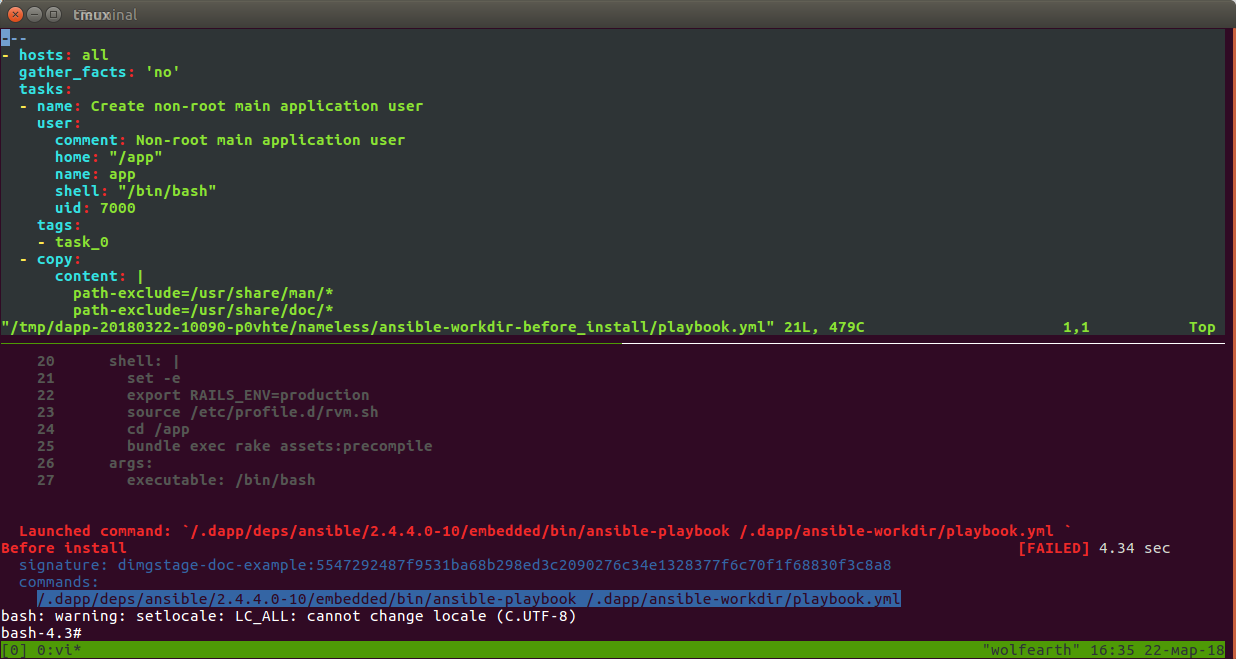
Go Go
This is our third goal in the development of dapp, however, from the point of view of the user, little changes, except for simplifying the installation. For release 0.26 on Go, a parser was implemented
dappfile.yaml. Now the work on translating the main dapp functionality to Go is ongoing: launching assembly containers, builders, working with Git. Therefore, your help in testing, including Ansible modules, will not be superfluous. We are waiting for issue on GitHub or go to our group in Telegram: dapp_ru . Updated August 13, 2019: the dapp project has now been renamed werf , its code has been rewritten to Go, and the documentation has been greatly improved.
PS
So what about the cows? The cowsay program is not in dappdeps / ansible, and the callback stdout used does not call those methods where cowsay is included. Unfortunately, Ansible in a dapp without cows (but no one will stop you from creating an issue).
PPS
Read also in our blog:
- “ Werf is our CI / CD tool in Kubernetes (review and video report) ” (Dmitry Stolyarov; May 27, 2019 at DevOpsConf) ;
- “We officially represent dapp - DevOps-utility for supporting CI / CD ”;
- “ Build projects with dapp. Part 1: Java ";
- “ Build and install applications in Kubernetes using dapp and GitLab CI ”;
- “ Practice with dapp. Part 1: Building simple applications ";
- “ Practice with dapp. Part 2. Deployment of Docker images in Kubernetes using Helm ";
- “ We assemble Docker images for CI / CD quickly and conveniently with dapp (review and video report) .”