Real-time email alert. Really? Or how to make Alert in Splunk - Part 1
- Tutorial
How much time passes from the moment of the occurrence of some important event to reactionary actions? Often a lot! One of the factors influencing the reaction time is the late informing of the personnel responsible for making decisions.
Today we will tell you about how to receive notifications about the occurrence of important security incidents, the critical state of IT systems, significant deviations from the norm of various indicators or other interesting events for you in real time and in a convenient format, in particular by e-mail.
We will implement alerts, or in other words alerts, in Splunk, a product specializing in machine data analysis, which we wrote about earlier .

Company X wants to receive email notifications of unsuccessful authentication attempts at Splunk, as well as cases where the brandmauer identifies high-risk events related to applications or sites. The messages should contain basic data about the event in a record convenient for the recipient.
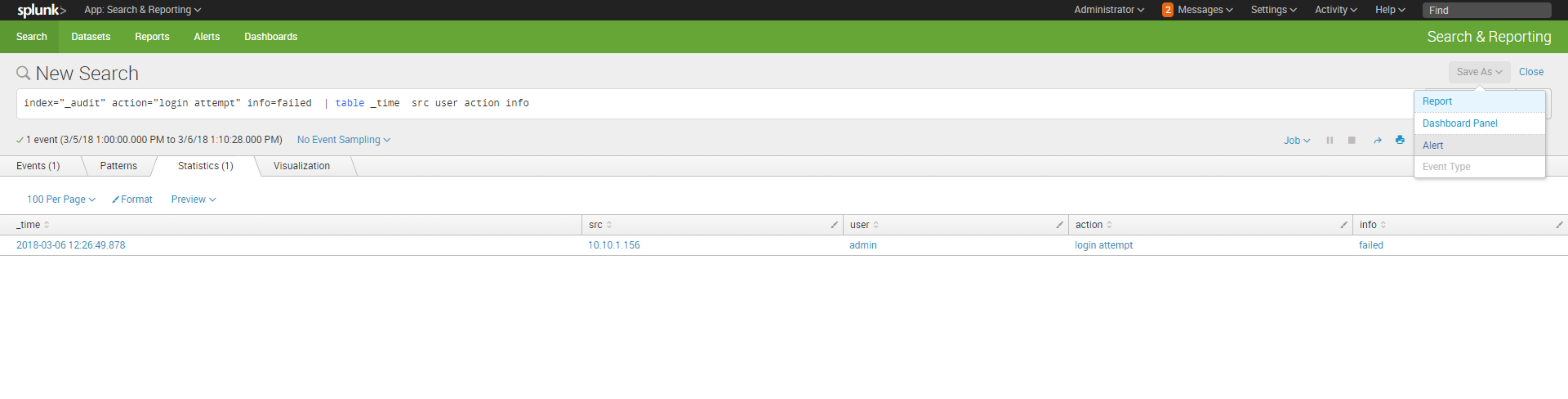
We form a query identifying the event of interest to us and present it in the form of a table with columns that should appear in the message (we wrote about how to write search queries in Splunk earlier here ). Save: “Save As” - “Alert”
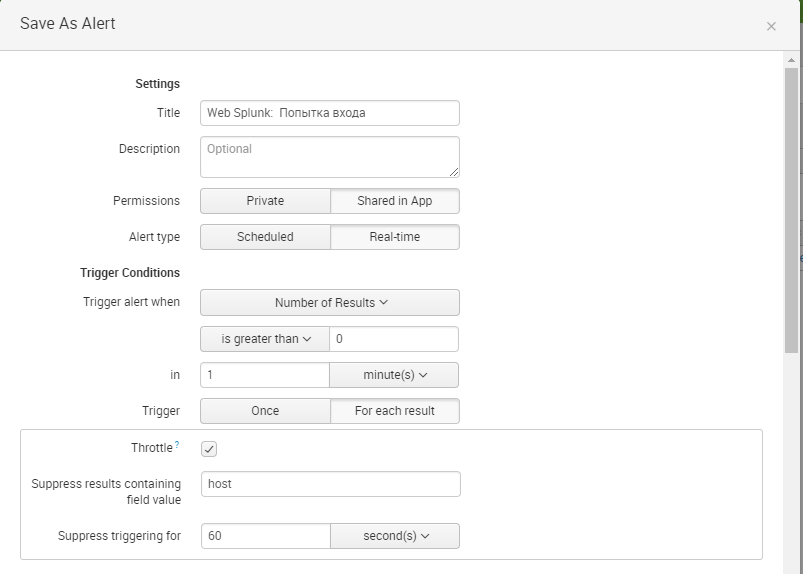
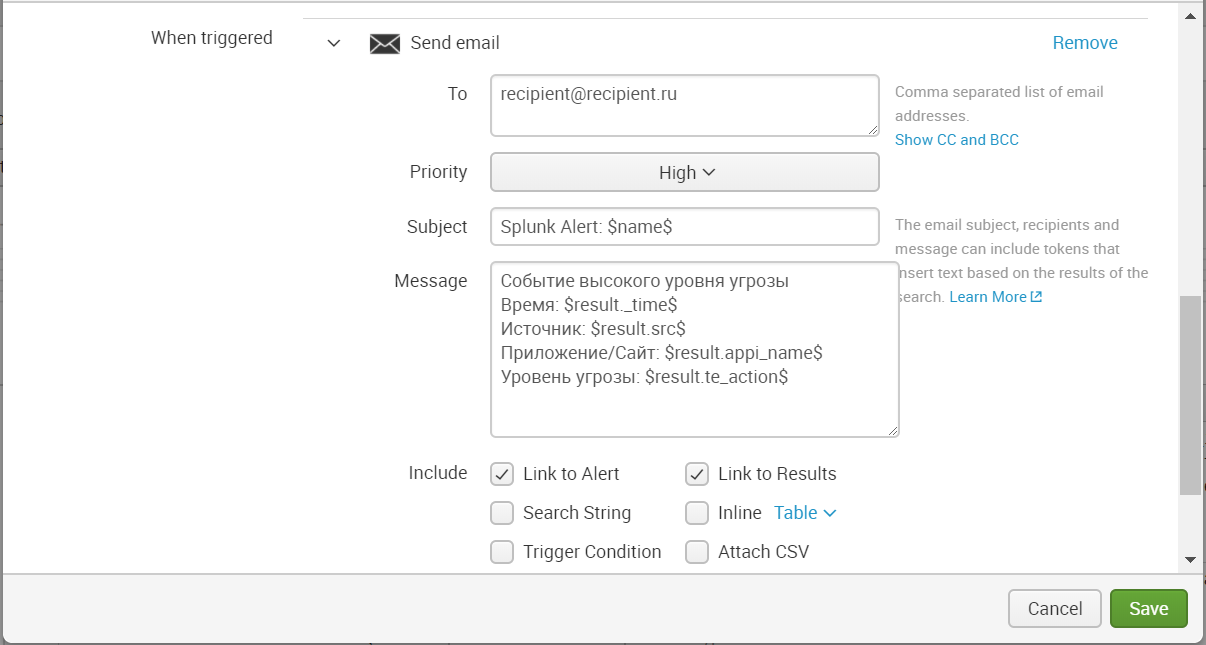
Set up alert : Set alert type - Real-time. To trigger, we indicate the condition that the number of events in 1 minute should be greater than zero. Add action when the alert is triggered. In the messages, you can use tokens that access the search information, including field values. All tokens can be found at the following link .

To send messages you still need to configure your mail serverin Splunk and set from what mail messages will be sent. “Settings” - “Server settings” - “Email settings” .

When this event occurs, we receive a message in the mail.

Similarly, you configure the sending of alerts about incidents identified by the firewall.
Thus, using Splunk, we quickly and easily set up alerts that will help us to respond in a timely manner to the implementation of problematic events.
We are happy to answer all your questions and comments on this topic. Also, if you are interested in something specifically in this area, or in the field of machine data analysis in general, we are ready to modify the existing solutions for you, for your specific task. To do this, you can write about it in the comments or simply send us a request through the form on our website .
Task
Company X wants to receive email notifications of unsuccessful authentication attempts at Splunk, as well as cases where the brandmauer identifies high-risk events related to applications or sites. The messages should contain basic data about the event in a record convenient for the recipient.
Implementation
Authentication control
We form a query identifying the event of interest to us and present it in the form of a table with columns that should appear in the message (we wrote about how to write search queries in Splunk earlier here ). Save: “Save As” - “Alert”
Set up alert : Set alert type - Real-time. To trigger, we indicate the condition that the number of events in 1 minute should be greater than zero. Add action when the alert is triggered. In the messages, you can use tokens that access the search information, including field values. All tokens can be found at the following link .
To send messages you still need to configure your mail serverin Splunk and set from what mail messages will be sent. “Settings” - “Server settings” - “Email settings” .
When this event occurs, we receive a message in the mail.
Similarly, you configure the sending of alerts about incidents identified by the firewall.
High Risk Event Identification

Conclusion
Thus, using Splunk, we quickly and easily set up alerts that will help us to respond in a timely manner to the implementation of problematic events.
We are happy to answer all your questions and comments on this topic. Also, if you are interested in something specifically in this area, or in the field of machine data analysis in general, we are ready to modify the existing solutions for you, for your specific task. To do this, you can write about it in the comments or simply send us a request through the form on our website .









