Unit testing react components withRouter (jest, enzyme)
When developing unit tests for a react component wrapped in a call withRouter (Component), I encountered an error message that such a component can exist only in the context of the router. The solution to this problem is very simple and should not in principle cause questions. Although for some reason, links to the documentation https://reacttraining.com/react-router/web/guides/testing persistently refused to give out. This does not surprise me at all, because the documentation is written as a pure SPA application without any SSR there and from the point of view of a search engine it looks like this:
Anyone with enough documentation can end up reading this. And for myself, I will make a few notes under the cut.
The tested component (paginator) takes as parameters the number of lines - total, on the page and the current page number. It is necessary to form a component with links of the form:
This component uses the match property, which is only available for components wrapped in a call
MemoryRouter contains an “imaginary” history of the component, along which you can then move back and forth. The starting index is set by the property
Tests use the popular library from airbnb - enzyme and run the jest command.
The jest framework at the first start forms a snapshot of the component, with which it then compares the document resulting from the rendering:
The enzyme library commands for finding and analyzing DOM elements do not look as concise as jquery for example. Nevertheless, everything is very convenient.
[email protected]
March 5, 2018.
Show image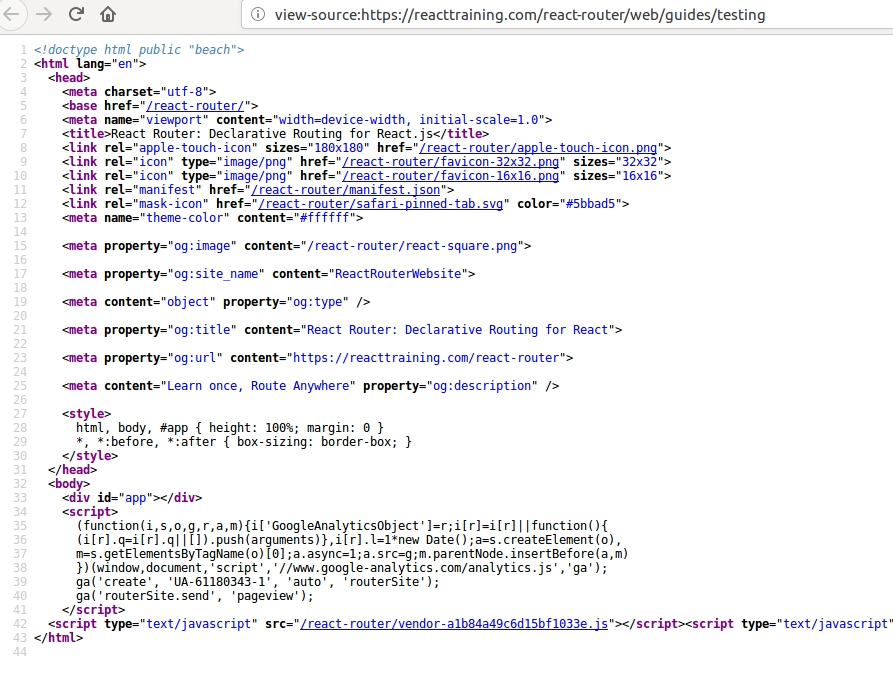
Anyone with enough documentation can end up reading this. And for myself, I will make a few notes under the cut.
The tested component (paginator) takes as parameters the number of lines - total, on the page and the current page number. It is necessary to form a component with links of the form:
- / or / my / base / url - for the first page
- / page / {n} or / my / base / url / page / {n} - for other pages
- for single-page documents, do not form a component
import React from 'react';
import _ from 'lodash';
import { withRouter } from 'react-router-dom';
import Link from '../asyncLink'; // eslint-disable-line
function prepareLink(match, page) {
const { url } = match;
const basePath = url.replace(/\/(page\/[0-9]+)?$/, '');
if (page === 1) {
return basePath || '/';
}
return `${basePath}/page/${page}`;
}
const Pagination = ({ count, pageLength, page, match }) => ( // eslint-disable-line react/prop-types, max-len
count && pageLength && count > pageLength
?
: null
);
export default withRouter(Pagination);
This component uses the match property, which is only available for components wrapped in a call
withRouter(Pagination). When testing, you need to create a context using a special router for testing - MemoryRouter. And also place the component in the appropriate Route route to form matches:/* eslint-disable no-undef, function-paren-newline */
import React from 'react';
import { MemoryRouter, Route } from 'react-router-dom';
import { configure, mount } from 'enzyme';
import renderer from 'react-test-renderer';
import Adapter from 'enzyme-adapter-react-16';
import Pagination from '../../../src/react/components/pagination';
configure({ adapter: new Adapter() });
test('Paginator snapshot', () => {
const props = {
count: 101,
pageLength: 10,
page: 10,
};
const component = renderer.create(
MemoryRouter contains an “imaginary” history of the component, along which you can then move back and forth. The starting index is set by the property
initialIndex. Tests use the popular library from airbnb - enzyme and run the jest command.
The jest framework at the first start forms a snapshot of the component, with which it then compares the document resulting from the rendering:
  const tree = component.toJSON();
  expect(tree).toMatchSnapshot();
The enzyme library commands for finding and analyzing DOM elements do not look as concise as jquery for example. Nevertheless, everything is very convenient.
[email protected]
March 5, 2018.









