 February 19, 2018 at 11:38
Using Hi / Lo Algorithm to Generate Keys in Entity Framework Core

The Hi / Lo algorithm is useful when you need unique keys. In short, the Hi / Lo algorithm describes the mechanism for generating secure identifiers on the client side, and not in the database ( safe in this context means no collisions ). It sets unique identifiers for the rows of the table, not depending on whether the row is immediately stored in the database or not. This allows identifiers to be used immediately, like regular sequential database identifiers.
Sequences ( sequences) Databases are cached, scaled and solve concurrency problems. But for each new sequence value, we constantly need to go to the database. And when we have a large number of inserts, it becomes a little overhead. Therefore, to optimize the work with sequences, the Hi / Lo algorithm is used. EntityFramework Core Supports Hi / Lo Out of the Box Using Method
ForSqlServerUseSequenceHiLoHow does Hi / Lo work?
To begin with, what is Hi / Lo . The basic idea is that you have two numbers to make up the primary key - a “high” ( high ) number and a “low” ( low ) number. The client can basically increase the “high” sequence, knowing that he can safely generate keys from the entire range of the previous “high” value with many “low” values.
For example, suppose you have a “high” sequence with a current value of 35, and a “low” number is in the range 0-1023. Then the client can increase the sequence to 36 (for other clients to be able to generate keys when using 35) and know that the keys 35/0, 35/1, 35/2, 35/3 ... 35/1023 are all available.
It can be very useful (especially with ORM) to be able to set primary keys on the client side instead of inserting values without primary keys and then retrieving them back to the client. Among other things, this means that you can easily create relationships between parents and children and have all the keys in place before doing any inserts, which makes batching easier .
Use Hi / Lo to generate keys in Entity Framework Core
Let's see how to use Hi / Lo to generate keys using the Entity Framework Core. Let's say we have a simple model of Categories:
public class Category
{
   public int Id { get; set; }
   public string Name { get; set; }
}
Remember that EF configures the property
Ideither <имя типа>Idas a key. Now we need to create a DBContext:public class SampleDBContext : DbContext
{
public SampleDBContext()
{
Database.EnsureDeleted();
Database.EnsureCreated();
}
protected override void OnConfiguring(DbContextOptionsBuilder optionBuilder)
{
string сonnString = @"Server=localhost\SQLEXPRESS01;Database=EFSampleDB;Trusted_Connection=true;";
optionBuilder.UseSqlServer(сonnString);
}
protected override void OnModelCreating(ModelBuilder modelBuilder)
{
var entityTypeBuilder = modelBuilder.Entity();
entityTypeBuilder.ToTable("Category");
entityTypeBuilder.HasKey(t => t.Id);
entityTypeBuilder.Property(t => t.Id).ForSqlServerUseSequenceHiLo();
entityTypeBuilder.Property(t => t.Name).HasMaxLength(128).IsRequired();
}
public DbSet Category { get; set; }
} DbContext consists of:
- a constructor
SampleDBContextwhich is an implementation of a database initializerDropCreateDatabaseAlways; - method
OnConfiguringfor setting DBContext; - Method
OnModelCreatingis the place where you can determine the configuration of the model. To determine the Hi / Lo sequence, use the extension methodForSqlServerUseSequenceHiLo.
We launch the application. As a result, the EFSampleDB database should be created with the Category table and the sequence EntityFrameworkHiLoSequence. Name and sequence diagram in which it is established can be passed as a parameter:
ForSqlServerUseSequenceHiLo(string name, string schema).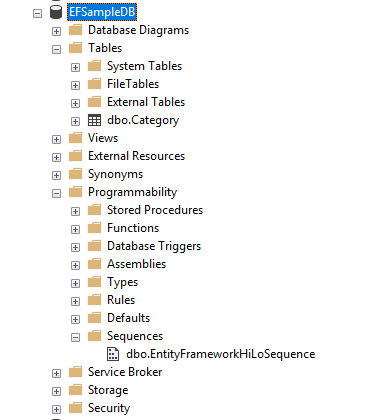
The script for creating "EntityFrameworkHiLoSequence" looks as follows
CREATE SEQUENCE [dbo].[EntityFrameworkHiLoSequence]
 AS [bigint]
 START WITH 1
 INCREMENT BY 10
 MINVALUE -9223372036854775808
 MAXVALUE 9223372036854775807
 CACHE
GO
This sequence starts with 1 and increases by 10. There is a difference between Sequence and Hi / Lo Sequence relative to the option
INCREMENT BY. In Sequence,INCREMENT BY adds a value to the previous value of a sequence to generate a new value. Thus, in this case, if your previous sequence value is 11, then the next sequence value will be 11 + 10 = 21. In the case of Hi / Lo Sequence, the parameter INCREMENT BYindicates the block value, this means that the next sequence value will be selected after using the first 10. Let's add some data to the database:
using (var dataContext = new SampleDBContext())
{
   dataContext.Category.Add(new Category { Name = "Name-1" });
   dataContext.Category.Add(new Category { Name = "Name-2" });
   dataContext.Category.Add(new Category { Name = "Name-3" });
   dataContext.SaveChanges();
}
As soon as this code hits the line where the category is added to DBContext, the database is called to get the value of the sequence. You can verify it using SQL Server Profiler.
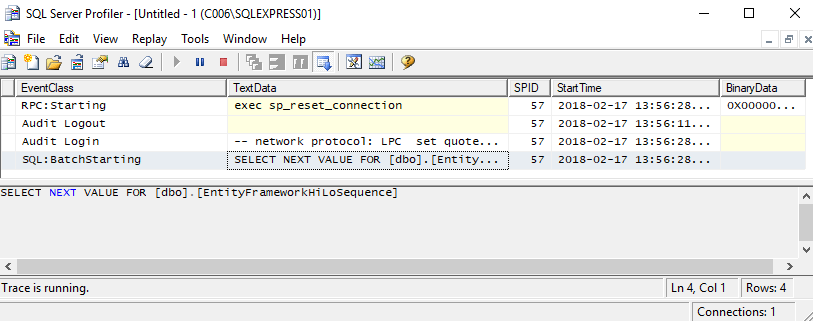
When
dataContext.SaveChanges();all 3 categories are called, they will be saved with primary key values that are already generated and are selected only once. 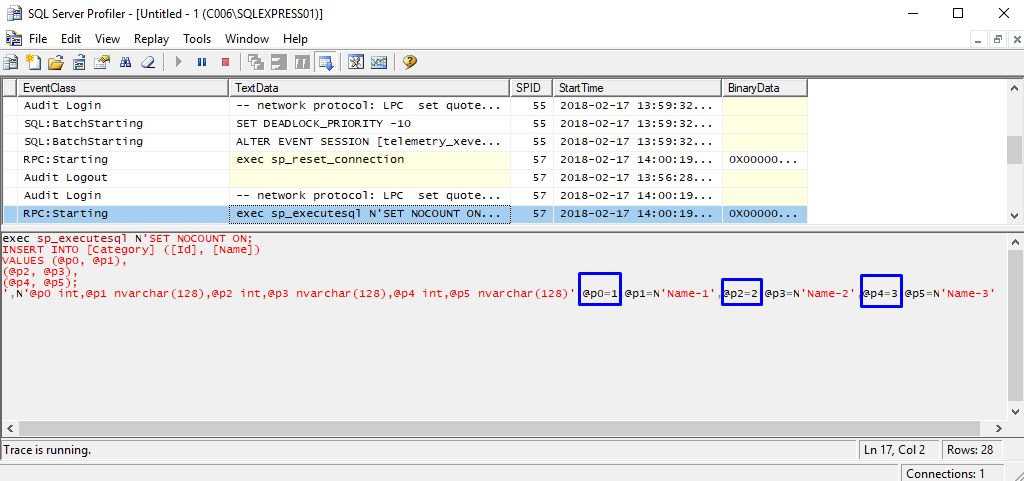
The sequence value will not be selected from the database until the Lo part has been exhausted (10 records in our case), only when adding the 11th record the database will be called to get the next sequence value (Hi).
You can create one sequence of several tables:
protected override void OnModelCreating(ModelBuilder modelBuilder)
{
   modelBuilder.ForSqlServerUseSequenceHiLo("DBSequenceHiLo");
}
Hi / Lo sequence setting
There
ForSqlServerHasSequenceare no parameters in the method for changing the initial value and increment value. But you can specify these values as follows, first we determine the sequence with the parameters StartAtand then IncrementByuse the same extension method ForSqlServerUseSequenceHiLo.modelBuilder.HasSequence("DBSequenceHiLo").StartsAt(1000).IncrementsBy(5);
modelBuilder.ForSqlServerUseSequenceHiLo("DBSequenceHiLo"); In this case, the sql script for DBSequenceHiLo will look like this
CREATE SEQUENCE [dbo].[DBSequenceHiLo]
 AS [int]
 START WITH 1000
 INCREMENT BY 5
 MINVALUE -2147483648
 MAXVALUE 2147483647
 CACHE
GO
Now, when we add three categories, the key value begins with 1000. And since the parameter is
IncrementByset to “5”, when the sixth record is added to the context, a request will be made to the database to get the next value of the sequence. If you change the code and add 3 more categories, then on the screen you can see the second database call. 
Thanks for attention!









