 January 19, 2018 at 11:13
Learn OpenGL. Lesson 4.4 - Clipping Faces
- Transfer
- Tutorial

Clipping faces
Try to imagine a cube and calculate the maximum number of faces that you can see from any direction. If your imagination is not too vivid, then most likely you will come to the conclusion that this is number 3. From whatever point or from whatever direction you look at the cube, you can never see more than three faces. So why waste computing power on rendering the remaining three faces if they are not visible? If we could discard their processing in some way, we saved more than half the execution of the fragment shader!
Content
Part 1. Getting Started
Part 2. Basic lighting
Part 3. Download 3D models
Part 4. Advanced OpenGL Features
Part 5. Advanced Lighting
Part 6. PBR
- Opengl
- Window creation
- Hello window
- Hello triangle
- Shaders
- Textures
- Transformations
- Coordinate systems
- Camera
Part 2. Basic lighting
Part 3. Download 3D models
Part 4. Advanced OpenGL Features
- Depth test
- Stencil test
- Color mixing
- Clipping faces
- Frame buffer
- Cubic cards
- Advanced data handling
- Advanced GLSL
- Geometric shader
- Instancing
- Smoothing
Part 5. Advanced Lighting
- Advanced lighting. Blinn-Fong model.
- Gamma correction
- Shadow cards
- Omnidirectional shadow maps
- Normal mapping
- Parallax mapping
- HDR
- Bloom
- Deferred rendering
- SSAO
Part 6. PBR
It says “more than half” because in certain situations only two or even one face of the cube is visible. In such cases, more than 50% will be saved .
The idea is good, but a new task appears: it is necessary to determine which face is not visible from the position of the observer.
Imagine any closed volumetric figure: each of its faces has two sides. And one of these sides will be facing the observer, and the other from him. What if we only draw faces facing the observer?
It is in this process that the essence of the process of cutting off the faces lies. OpenGL checks all faces for orientation, allowing only those facing the observer to the render, while cutting off those facing away from it, which ultimately saves a lot of calls to the fragment shader (which is very expensive to complete!). We just need to somehow convey to OpenGL information about which faces are considered facial and which are not. OpenGL uses an ingenious solution for determining the orientation of faces: analysis of the traversal order in the vertex data list.
Workaround
When we define a set of vertices for a triangle, we define them in a specific traversal order: either clockwise (clockwise, CW) or counterclockwise (counter-clockwise, CCW). Each triangle consists of three vertices and we define them in a traversal order defined relative to the center of the triangle.

As you can see from the diagram, first vertex 1 is set, and then we have a choice: set vertex 2 or 3, thereby determining the order of traversal of the triangle. Here is the code for clarity:
float vertices[] = {
    // обход по часовой
    vertices[0], // вершина 1
    vertices[1], // вершина 2
    vertices[2], // вершина 3
    // обход против часовой
    vertices[0], // вершина 1
    vertices[2], // вершина 3
    vertices[1]  // вершина 2
};
Each set of three vertices that defines the triangle, in the end, contains data on the order of its traversal. When rendering the primitives you prepared, OpenGL uses this information to determine if the next triangle is facial or not. By default, triangles with counterclockwise traversal are considered facial.
When defining a traversal in your vertex set, you must present the triangle as if you were looking directly at it, and you set the vertices in it in a counterclockwise order. The most interesting thing in this imaginary process is that the direct processing of the bypass order occurs at the stage of rasterization, i.e. after executing the vertex shader. This means that the vertices are indeed transformed to the point of view of the observer.
It turns out that all the vertices of the triangles that the observer is looking at are really given in the same order of traversal as we asked them. But at the same time, the vertices of the triangles on the other side of the cube are now displayed in such a way that their bypass order has become inverted. As a result, the triangles in front of the observer are considered facial, and the distant triangles are considered non-facial. Look at the image for greater clarity of what has been said:
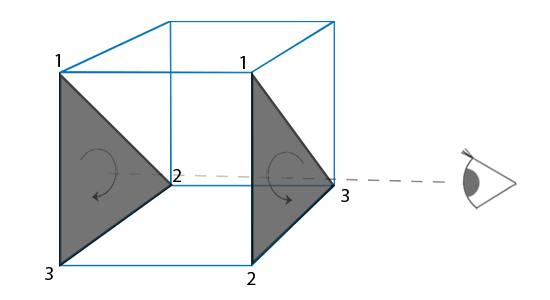
In the list of vertices, we identified both triangles in counterclockwise order (the near triangle is defined as 1-2-3, and the rear triangle is also defined as 1-2-3 (if the observer looked at his front side)). However, from the indicated position, the description order of the distant triangle 1-2-3 is observed given clockwise. Despite the fact that the vertices of the far triangle were set with a counterclockwise traversal order, when rendered, it became a clockwise order. And such behavior is just necessary for the successful completion of the clipping of invisible faces.
Edge rejection
At the beginning of the lesson, it was noted that OpenGL can cut off triangles if they are displayed as non-face. And now, knowing the way to set the bypass order, we can start using the clipping function, which is disabled by default in the library.
The vertex data for the cube from past lessons was not generated taking into account the requirements for the counterclockwise traversal order, so you need a new array of vertices that lies here . Practice - try mentally checking the order of traversal of each triangle.
You can enable the clipping function as follows:
glEnable(GL_CULL_FACE);From now on, all non-faceted faces will be discarded (try looking inside the cube and make sure that the surfaces of the inner faces are discarded). As a result, we save more than 50% of passes for processing fragments, but only for such closed figures as a cube. In the previous lesson, we would have to turn off the clipping of faces for objects depicting grass, since they should draw both facial and non-facial faces.
OpenGL allows us to configure which side of the face we would like to discard. Suddenly, we need to discard the face line? To do this, you can use the following call:
glCullFace(GL_FRONT); The function has three possible parameters:
• GL_BACK : Discards only non-faceted faces.
• GL_FRONT : Discards only face faces.
• GL_FRONT_AND_BACK : Drops both faces.
The default value is GL_BACK .
In addition to selecting a face for discarding, it would be nice to be able to specify which bypass order in the triangle will determine the front face. To do this, use the following function:
glFrontFace(GL_CCW); The default value is GL_CCW , implying counterclockwise bypass. The second possible value is GL_CW , which sets the clockwise bypass.
As a simple experiment, you can set the clipping of non-facial faces and the clockwise traverse as specifying the front faces, instead of the standard counterclockwise traversal:
glEnable(GL_CULL_FACE);
glCullFace(GL_BACK);
glFrontFace(GL_CW);
As a result, only the back faces of the cube remain visible:

Conversely, this effect can be achieved by cutting off the facial faces, but when using the counterclockwise bypass as defining the facial faces:
glEnable(GL_CULL_FACE);
glCullFace(GL_FRONT);
glFrontFace(GL_СCW);
Summing up, we can say that the mechanism of cutting off faces is an excellent tool for increasing productivity, which requires little effort to work. Additionally, you only need to keep track of which objects in the scene are beneficial to use clipping, and for which clipping is unacceptable.
Exercises
Try redefining the data in the vertex list so that each triangle is now defined in clockwise order? Display the scene when defining the face triangles as described clockwise.
The solution is here .
PPS : We have a telegram conf for coordinating transfers. If you want to fit into the cycle, then you are welcome!









