December 21, 2017 at 00:10
How to deal with cryptocurrency miners in a corporate network
The problem of using corporate IT resources for cryptocurrency mining appears more often ( Transneft recently mentioned them ). And the other day, the FSB cameto Vnukovo airport and detained the administrator, who mined cryptocurrency on the computing power of the aviation harbor. I will immediately answer the frequently asked question: “And where does the FSB?” Everything is very simple. Vnukovo is not only an airport for ordinary passengers; the President of Russia and members of the Government fly from Vnukovo-2, which makes this air harbor a critical object for national security. And when for some reason voltage surges occur in it, which may entail the shutdown of individual air transport control systems, the FSB is the one who takes the matter. But back to mining. Recently, we have received several requests from customers with a request to explain how it is possible to detect the fact of the use of miners in a corporate or departmental network? Given the growing number of such issues,
To begin with, mining is not a typical threat to information security. Cryptocurrency mining software does not directly harm your information assets. No data theft or modification (usually). Interception of control of technological or production processes, too. Accessibility Violations? Probably too. But there is a braking computer, a load on the power grid (and the company pays for electricity), Internet traffic costs (which can be an actual problem with limited traffic) and a laptop battery running down to zero, which you can try to translate into financial damage to the company (although this and not easy). The most unpleasant thing is that someone at your expense can profit and get fabulous profits (just look at the cryptocurrency rate to nervously bite your elbows and feel sorry, that conscience does not allow mining on corporate resources). But ... it also happens that mining accompanies malicious software, which makes it already a more serious problem for information security specialists. In any case, one of the tasks of information security (and IT, too) is to know what is happening in its economy and have the tools to control any activity, legal or not. Therefore, the issue of detecting and, often, blocking miners, is becoming increasingly relevant. legal or not. Therefore, the issue of detecting and, often, blocking miners, is becoming increasingly relevant. legal or not. Therefore, the issue of detecting and, often, blocking miners, is becoming increasingly relevant.
If you read a lot of notes on the Internet about how to find a miner on your computer, then usually all the recommendations come down to one main one - pay attention to the slowdown of your PC, which is determined by the sensations or by visual analysis of the task scheduler (Task manager in Windows or Activity monitor on MacOS), which displays CPU usage for different applications and processes. However, this recommendation is more suitable for home users than for corporate users who are not able to track the processor load of hundreds and thousands of computers. Therefore, we will try to look at the mining problem from a slightly different perspective, and more precisely from the point of view of the so-called kill chain, which displays the set of steps that the intruder takes (his user installing the miner on his PC, is also such) in the process of launching mining software on your site. If this is your user, then usually the sequence will be like this:
Unauthorized installation of a miner on an unsuspecting user’s computer looks a bit different in the first and last stages of the kill chain:
In addition to the usual download of the miner or the inclusion of mining functionality, for example, in a torrent client, various multi-pass schemes are possible. For example, malicious software (and therefore it can not be detected by antivirus or protection tools) first gets onto the user's computer, which is loaded by a special installer (downloader), which downloads from the Internet miner and covertly installs it on the computer of an unsuspecting user. Please note that instead of the downloaded file, it may also be a script on the site you are visiting (the Coin Hive script is very popular).
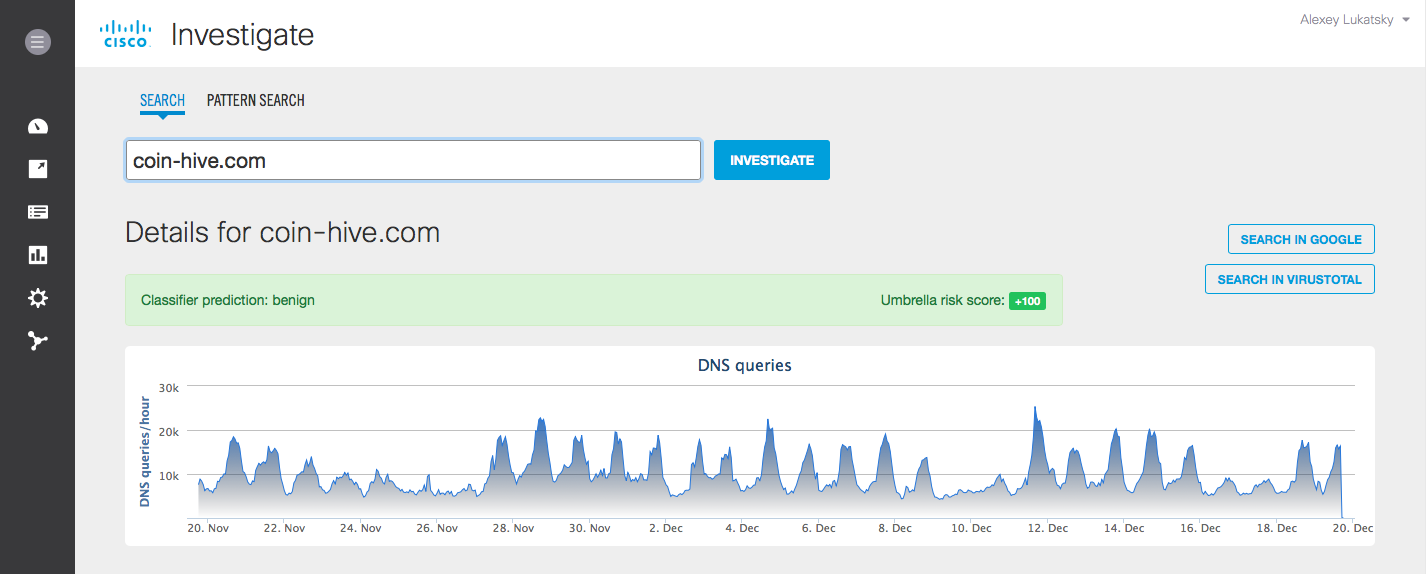
A less popular, but also possible way is to get the miner to the computer through an attachment to an e-mail or link in an email, as well as through an advertising banner or a fake button on the site, clicking on which leads to the miner downloading to the computer. I would like to draw your attention again that the miner itself does not have malicious functions. Moreover, the user himself could legally install it for himself. For this reason, in traditional antiviruses this type of software is not blocked by default, but can only be detected (if the antivirus has an appropriate set of signatures).
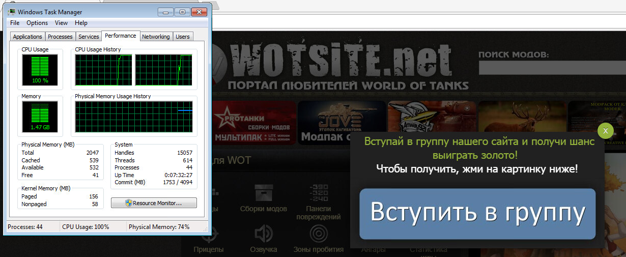
Another important point is that the miner does not work alone. It is usually part of an entire botnet (miner pool), with the command center of which it interacts - receiving commands or sending the results of its work. Therefore, the miner can be detected not only by its activity on the node, but also in the process of network interaction - after sending hashes or receiving new commands or data for calculations.
How does Cisco offer to deal with mining software? We, following our classic strategy “ BEFORE - TIME - AFTER ", taking into account the life cycle of an attack or other controlled activity, propose to divide all control and defense measures into three parts:
At the first stage, in addition to standard recommendations on protecting terminal devices from malware, we advise you to configure network equipment, firewalls or Internet access controls to block access to mining website addresses. For example, to coin-hive.com or minergate.com. This can be done using Cisco ISR , Cisco Firepower , Cisco Web Security Appliance , Cisco Umbrella , Cisco ASAetc. I will not give a ready list of such domains, since today there are already more than a thousand pools for mining and, given the increasing complexity of computing tasks, there will be more and more of them. Therefore, I would recommend regularly monitoring the ratings of mining pools, which can be freely found on the Internet. I will name only a few names:
You can track pool lists at btc [.] Com and blockchain [.] Info. By the way, the access control of workers to the last two domains (can be implemented through Firepower, Umbrella or the Web Security Appliance with reference to user accounts) will allow you to understand which of your users is interested in mining and is willing to try his hand at cryptocurrencies, and this is important information to strengthen future control.
Blocking access to the domains described above will not only prevent the download of mining software (stage “BEFORE”), but also block interaction with pools in the event that the corresponding software somehow somehow got to the user's computer (via an attachment to e-mail , through a USB flash drive, with the help of malware or functionality in shareware, in which mining is an imperceptible “load” or “price” for free) and tries to interact with them (the “TIME” stage).
Unfortunately, we must admit that we can’t exclude the complete blocking of access to pools for mining - they appear constantly and tracking them can be difficult (do not forget that these are not malicious resources, the control of which is a priority for the Cisco Talos division) In addition, the user or malware may use tunneling (e.g., SSH) or other communication methods (e.g., Tor) with their respective pools. Therefore, we must be able to track the work of miners in real time (the “ON TIME” stage). This can be done both by using the aforementioned tracking of interaction with the corresponding domains, and by monitoring the ports that mining software uses to interact with pools and command centers. These ports include:
Please note that this is a complete and non-final list. Firstly, miners often use standard ports 8080 and 8081 and therefore monitoring only ports is not enough - you need to use network traffic analysis technologies ( Cisco Stealthwatch ), HTTP inspection technologies (within Cisco Firepower, Cisco Cognitive Threat Analytics , Cisco AVC) or DNS (within Cisco Umbrella). Secondly, these ports can be changed in the mining software. Thirdly, interaction on these ports can mean not only the presence of miners in your network. For example, the same Zotob Trojan used communications on port 3333, which, as we see above, is also used by bitcoin miners. The triggering of Cisco Firepower, Cisco ASA, Cisco Stealthwatch, and Cisco ISR on the ports in this list is rather some signal that needs to be compared with other indicators, for example, with the list of domains that are interacting with from the internal network of the enterprise.

In addition to port control, Cisco Firepower has the ability to detect protocols used by miners, for example, the popular Bitcoin and Litecoin. It’s enough to create a rule to control the interaction according to these protocols and you will always know who is mining in your network (knowingly or not even knowing that his computer is involved in the mining pool), regardless of which nodes and ports are used interaction. A similar feature is present in the Cisco ISR with the AVC (Application Visibility and Control) function, which allows you to recognize and classify more than a thousand applications, including mining.
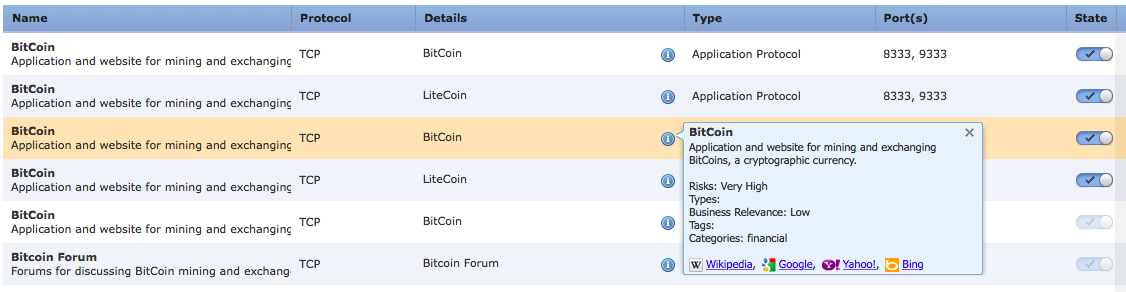
Intrusion Detection System Cisco NGIPSalso has a number of signatures to detect the work of both legal miners and malicious code that uses mining functions. For example, signatures with the SID number 1-40840, 1-40841, 1-40842, which allow you to track the use of the Stratum protocol for mining bitcoins. And signatures with SID 1-31273 or 1-20057 allow, for example, to catch interaction with the command servers of malware (CoinMiner or Win.Trojan.Vestecoin) involved in illegal mining on an infected computer. In the end, no one bothers to write the signatures for the search for mining software themselves. For example, it might look like this:
or
By the way, the examples of using tunneling or other communication methods for miners mentioned above should themselves become triggers for a security specialist. “Does this site use an encrypted connection to an external Internet site? What for? Is it really necessary? ” The fact of hiding communications alone should raise suspicion and lead to an investigation.
To detect miners working in a script, you can use Cisco Cognitive Threat Analytics, Cisco Umbrella or Cisco Web Security Appliance, which are able to control the interaction of the user computer with the outside world. Cisco Umbrellathis will be done even if the user is outside the corporate / departmental network and is not controlled by ITU, IPS and other perimeter security equipment. In the Umbrella settings, work with the domains mentioned above is implemented in the Potentially Harmful Domains category.
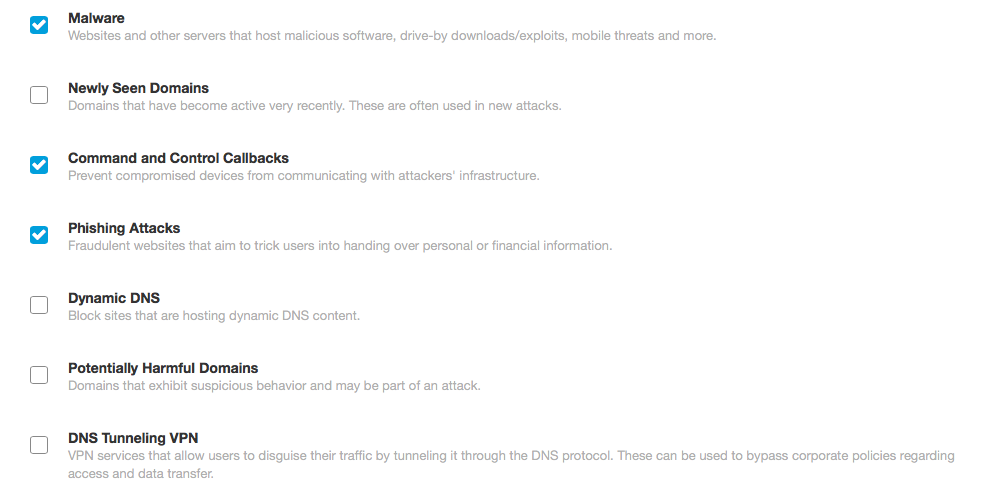
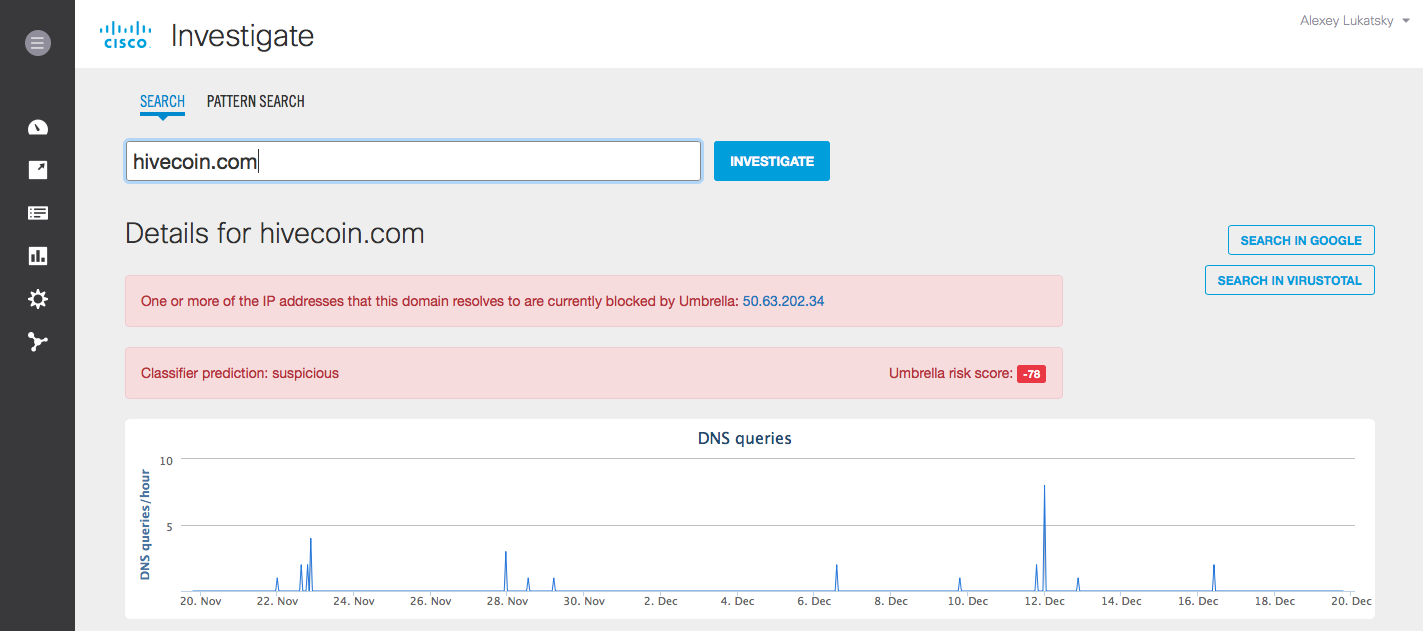
By the way, when I wrote this article, I noticed that there are intruders who exploit the interest of users in “easy” earnings. For example, using Cisco Umbrella Investigate, I discovered on the network a domain similar to coin-hive, but which is clearly malicious and if mistakenly entered into it, it can infect a user:
You can track the operation of the miner not only at the network level, but also at the host level protected by AMP for Endpointsalthough it’s not so simple. This software, especially if it got to the computer illegally and tries to go unnoticed, can be disguised as various legal processes - svchost.exe, chrome.exe or even steam.exe (for gamers). But that’s what AMP4E’s task is to tell which processes are suspicious and which are not.
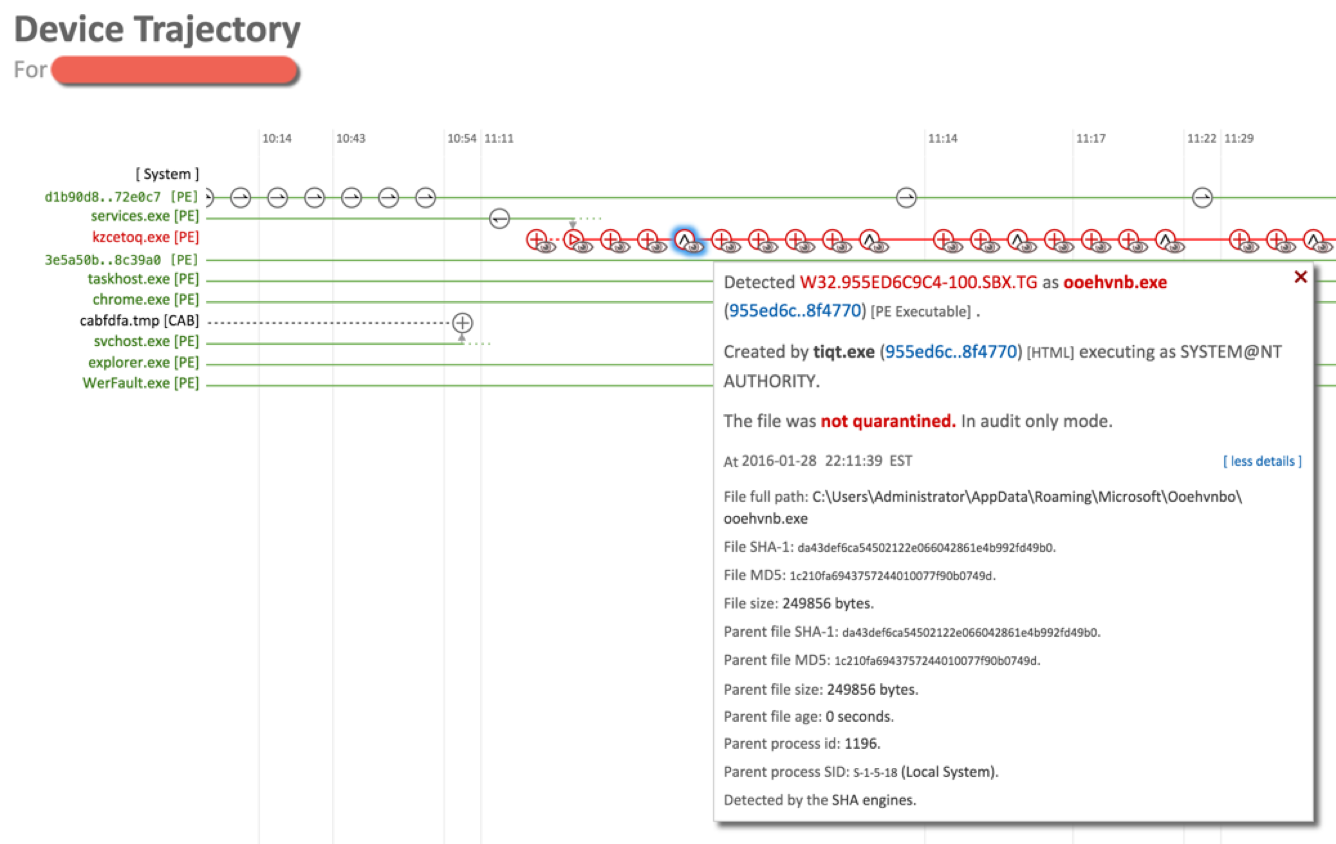
In addition, there is a W32.Cryptocurrencyminer indicator in its database, which allows you to track a wide range of miners. In cases where there are suspicions about a file that is possibly involved in mining, you can check it using the external Virus Total service, simply by sending the corresponding hash and promptly receiving a verdict on the “status of the suspect”. In addition to detecting abnormal behavior, AMP4E can be configured to detect new software not previously seen on the user's computer. This will be a lightweight version of the “white list of applications” (application white listening, AWL) or “closed software environment”, a mechanism that allows you to control the software downloaded and used on the PC. AMP4E can be configured to detect well-known mining software, but this is not the most effective way.
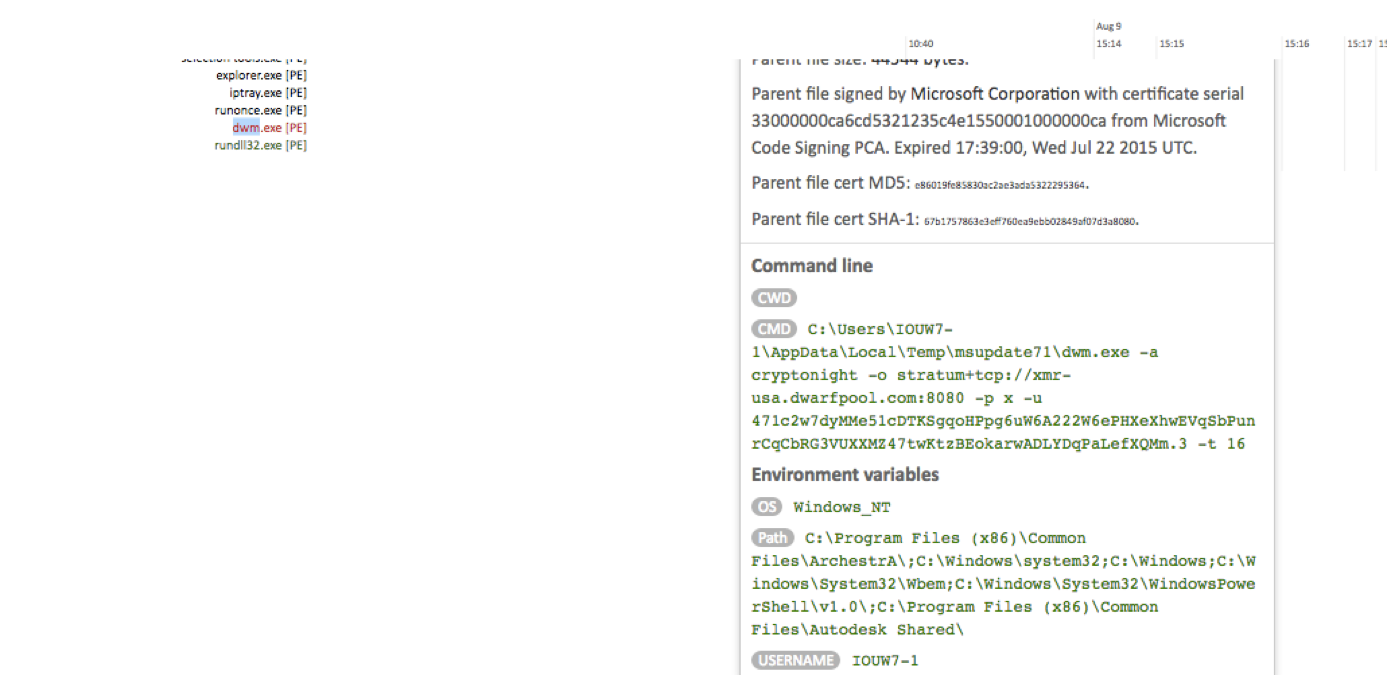
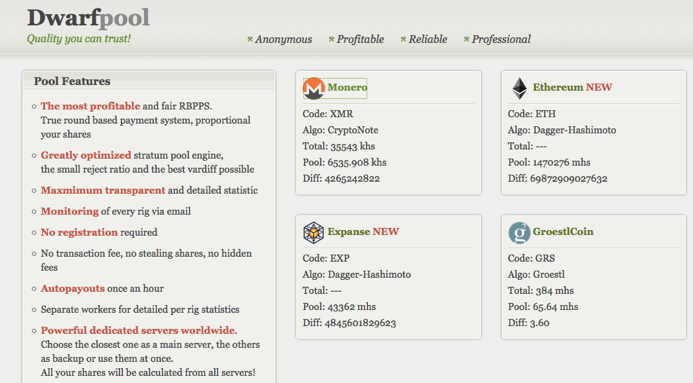
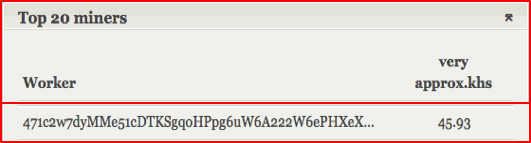
The last line of defense is the “AFTER” stage, which allows us to discover something that somehow still managed to get into our network and onto our computers and began its activity. In addition to detecting miners that are already working, using the methods described above, we can use the Cisco AMP Threat Grid sandbox , which allows you to analyze all files that get inside the network (via mail, via the Web, via flash drives, via file shares, via FTP, etc.), and analyzing their behavior with more than 700 behavioral indicators to detect malicious or abnormal activity. In addition to specialized indicators cryptominer-detected, cryptominer-network-detected and cryptominer-pool-contacted, the AMP Threat Grid has the ability to recognize miners by other signs:
All this is cool, of course, you say. But is it possible to press one magic button in your decisions and forget about this problem once and for all? Alas. I repeat what I wrote above. Mining software is not malicious - it can be completely allowed in a particular company and therefore it is never entered by default into blacklists or malware signature databases. Moreover, this is an actively developing market, which leads to the fact that new cryptocurrencies, new protocols and new programs for mining, new ports and new pool addresses are constantly appearing. You can’t make such a list once and for all. This is a constant work on manual or automated tracking of such information, which is then entered into the indicators of compromise and distributed by means of protection.
And, of course, in conclusion, I must say that no one cancels the basic recommendations for dealing with miners (legal and part of malware or shareware) - configure your browser to block scripts on unknown sites, install the necessary plug-ins (for example, NoScript for Firefox, minerBlock or No Coin for Chrome), enable ad blocker (for example, AdBlock), control access to server and other rooms where you can discreetly install mining devices that will use your power supply.
To begin with, mining is not a typical threat to information security. Cryptocurrency mining software does not directly harm your information assets. No data theft or modification (usually). Interception of control of technological or production processes, too. Accessibility Violations? Probably too. But there is a braking computer, a load on the power grid (and the company pays for electricity), Internet traffic costs (which can be an actual problem with limited traffic) and a laptop battery running down to zero, which you can try to translate into financial damage to the company (although this and not easy). The most unpleasant thing is that someone at your expense can profit and get fabulous profits (just look at the cryptocurrency rate to nervously bite your elbows and feel sorry, that conscience does not allow mining on corporate resources). But ... it also happens that mining accompanies malicious software, which makes it already a more serious problem for information security specialists. In any case, one of the tasks of information security (and IT, too) is to know what is happening in its economy and have the tools to control any activity, legal or not. Therefore, the issue of detecting and, often, blocking miners, is becoming increasingly relevant. legal or not. Therefore, the issue of detecting and, often, blocking miners, is becoming increasingly relevant. legal or not. Therefore, the issue of detecting and, often, blocking miners, is becoming increasingly relevant.
If you read a lot of notes on the Internet about how to find a miner on your computer, then usually all the recommendations come down to one main one - pay attention to the slowdown of your PC, which is determined by the sensations or by visual analysis of the task scheduler (Task manager in Windows or Activity monitor on MacOS), which displays CPU usage for different applications and processes. However, this recommendation is more suitable for home users than for corporate users who are not able to track the processor load of hundreds and thousands of computers. Therefore, we will try to look at the mining problem from a slightly different perspective, and more precisely from the point of view of the so-called kill chain, which displays the set of steps that the intruder takes (his user installing the miner on his PC, is also such) in the process of launching mining software on your site. If this is your user, then usually the sequence will be like this:
- visiting sites for mining
- mining software download
- mining software installation
- mining software launch
- mining
- interaction with miner pools to exchange information about received blocks and hashes
- receiving remuneration.
Unauthorized installation of a miner on an unsuspecting user’s computer looks a bit different in the first and last stages of the kill chain:
- victim search
- preparation of a bridgehead (the introduction of a mining script on a site, the creation of mining software, the introduction of mining software in some free or shareware or pirated software, the introduction of mining functionality in malware)
- “Infection” of the user with mining software (through a script on the site, by downloading it from the Internet, by receiving it as an attachment in mail or on a USB flash drive)
- miner launch
- mining
- interaction with miner pools or with a command center to transmit information obtained as a result of calculations.
In addition to the usual download of the miner or the inclusion of mining functionality, for example, in a torrent client, various multi-pass schemes are possible. For example, malicious software (and therefore it can not be detected by antivirus or protection tools) first gets onto the user's computer, which is loaded by a special installer (downloader), which downloads from the Internet miner and covertly installs it on the computer of an unsuspecting user. Please note that instead of the downloaded file, it may also be a script on the site you are visiting (the Coin Hive script is very popular).
A less popular, but also possible way is to get the miner to the computer through an attachment to an e-mail or link in an email, as well as through an advertising banner or a fake button on the site, clicking on which leads to the miner downloading to the computer. I would like to draw your attention again that the miner itself does not have malicious functions. Moreover, the user himself could legally install it for himself. For this reason, in traditional antiviruses this type of software is not blocked by default, but can only be detected (if the antivirus has an appropriate set of signatures).
Another important point is that the miner does not work alone. It is usually part of an entire botnet (miner pool), with the command center of which it interacts - receiving commands or sending the results of its work. Therefore, the miner can be detected not only by its activity on the node, but also in the process of network interaction - after sending hashes or receiving new commands or data for calculations.
How does Cisco offer to deal with mining software? We, following our classic strategy “ BEFORE - TIME - AFTER ", taking into account the life cycle of an attack or other controlled activity, propose to divide all control and defense measures into three parts:
- BEFORE - preventing interaction with sites for mining or getting miners into the network through various channels
- IN TIME - detection of installation and operation of mining software
- AFTER - conducting a retrospective analysis of the behavior of files falling inside a corporate or departmental network.
At the first stage, in addition to standard recommendations on protecting terminal devices from malware, we advise you to configure network equipment, firewalls or Internet access controls to block access to mining website addresses. For example, to coin-hive.com or minergate.com. This can be done using Cisco ISR , Cisco Firepower , Cisco Web Security Appliance , Cisco Umbrella , Cisco ASAetc. I will not give a ready list of such domains, since today there are already more than a thousand pools for mining and, given the increasing complexity of computing tasks, there will be more and more of them. Therefore, I would recommend regularly monitoring the ratings of mining pools, which can be freely found on the Internet. I will name only a few names:
- suprnova [.] cc,
- nanopool [.] org,
- zpool [.] ca,
- coinmime [.] pl,
- eth.pp [.] ua,
- zcash.flypool [.] org,
- dwarfpool [.] org,
- p2pool [.] org,
- bitclubnetwork [.] com,
- miningrigrentals [.] com,
- minergate [.] com,
- nicecash [.] com,
- hashing24 [.] com,
- hashcoin [.] io,
- hashflare [.] io,
- eobot [.] com,
- antpool [.] com,
- pool.btcchina [.] com,
- bw [.] com,
- mining.bitcoin [.] cz,
- eligius [.] st,
- ghash [.] io,
- bitminter [.] com,
- bitfury [.] org,
- kncminer [.] com,
- 21 [.] Co,
- slushpool [.] com, etc.
You can track pool lists at btc [.] Com and blockchain [.] Info. By the way, the access control of workers to the last two domains (can be implemented through Firepower, Umbrella or the Web Security Appliance with reference to user accounts) will allow you to understand which of your users is interested in mining and is willing to try his hand at cryptocurrencies, and this is important information to strengthen future control.
Blocking access to the domains described above will not only prevent the download of mining software (stage “BEFORE”), but also block interaction with pools in the event that the corresponding software somehow somehow got to the user's computer (via an attachment to e-mail , through a USB flash drive, with the help of malware or functionality in shareware, in which mining is an imperceptible “load” or “price” for free) and tries to interact with them (the “TIME” stage).
Unfortunately, we must admit that we can’t exclude the complete blocking of access to pools for mining - they appear constantly and tracking them can be difficult (do not forget that these are not malicious resources, the control of which is a priority for the Cisco Talos division) In addition, the user or malware may use tunneling (e.g., SSH) or other communication methods (e.g., Tor) with their respective pools. Therefore, we must be able to track the work of miners in real time (the “ON TIME” stage). This can be done both by using the aforementioned tracking of interaction with the corresponding domains, and by monitoring the ports that mining software uses to interact with pools and command centers. These ports include:
- 3333 (bitcoin)
- 3336 (litecoin)
- 8333 (bitcoin)
- 8545 (Ethereum),
- 9333 (litecoin)
- 9999 (Dashcoin),
- 10034 (ypool.net)
- 22556 (Dogecoin),
- 30301 (Ethereum),
- 30303 (Ethereum),
- 45550 (bytecoin),
- 45560 (monero),
- 45620 (DigitalNote),
- 45570 (QuazarCoin),
- 45610 (Fantomcoin),
- 45640 (MonetaVerde),
- 45690 (Aeoncoin),
- 45720 (Dashcoin),
- 45750 (Infinium-8).
Please note that this is a complete and non-final list. Firstly, miners often use standard ports 8080 and 8081 and therefore monitoring only ports is not enough - you need to use network traffic analysis technologies ( Cisco Stealthwatch ), HTTP inspection technologies (within Cisco Firepower, Cisco Cognitive Threat Analytics , Cisco AVC) or DNS (within Cisco Umbrella). Secondly, these ports can be changed in the mining software. Thirdly, interaction on these ports can mean not only the presence of miners in your network. For example, the same Zotob Trojan used communications on port 3333, which, as we see above, is also used by bitcoin miners. The triggering of Cisco Firepower, Cisco ASA, Cisco Stealthwatch, and Cisco ISR on the ports in this list is rather some signal that needs to be compared with other indicators, for example, with the list of domains that are interacting with from the internal network of the enterprise.
In addition to port control, Cisco Firepower has the ability to detect protocols used by miners, for example, the popular Bitcoin and Litecoin. It’s enough to create a rule to control the interaction according to these protocols and you will always know who is mining in your network (knowingly or not even knowing that his computer is involved in the mining pool), regardless of which nodes and ports are used interaction. A similar feature is present in the Cisco ISR with the AVC (Application Visibility and Control) function, which allows you to recognize and classify more than a thousand applications, including mining.
Intrusion Detection System Cisco NGIPSalso has a number of signatures to detect the work of both legal miners and malicious code that uses mining functions. For example, signatures with the SID number 1-40840, 1-40841, 1-40842, which allow you to track the use of the Stratum protocol for mining bitcoins. And signatures with SID 1-31273 or 1-20057 allow, for example, to catch interaction with the command servers of malware (CoinMiner or Win.Trojan.Vestecoin) involved in illegal mining on an infected computer. In the end, no one bothers to write the signatures for the search for mining software themselves. For example, it might look like this:
alert tcp $EXTERNAL_NET any -> $HOME_NET any (msg:"Possible Bitcoin/LiteCoin Mining"; flow:established; content:"|7B 22 70 61 72 61 6D 73 22 3A 20 5B 22|"; Depth:15; classtype:bad-unknown; reference:url,mining.bitcoin.cz/stratum-mining; sid:1000500; rev:1;)or
alert tcp $HOME_NET any -> $EXTERNAL_NET any (msg:"ET TROJAN W32/BitCoinMiner.MultiThreat Subscribe/Authorize Stratum Protocol Message"; flow:established,to_server; content:"{|22|id|22|"; depth:10; content:"|22|method|22 3A| |22|mining."; within:100; content:"|22|params|22|"; within:50; pcre:"/\x22mining\x2E(subscribe|authorize)\x22/"; classtype:trojan-activity; reference:url,talosintelligence.com/; reference:url,www.btcguild.com/new_protocol.php; reference:url,mining.bitcoin.cz/stratum-mining; sid:1000501; rev:1;)By the way, the examples of using tunneling or other communication methods for miners mentioned above should themselves become triggers for a security specialist. “Does this site use an encrypted connection to an external Internet site? What for? Is it really necessary? ” The fact of hiding communications alone should raise suspicion and lead to an investigation.
To detect miners working in a script, you can use Cisco Cognitive Threat Analytics, Cisco Umbrella or Cisco Web Security Appliance, which are able to control the interaction of the user computer with the outside world. Cisco Umbrellathis will be done even if the user is outside the corporate / departmental network and is not controlled by ITU, IPS and other perimeter security equipment. In the Umbrella settings, work with the domains mentioned above is implemented in the Potentially Harmful Domains category.
By the way, when I wrote this article, I noticed that there are intruders who exploit the interest of users in “easy” earnings. For example, using Cisco Umbrella Investigate, I discovered on the network a domain similar to coin-hive, but which is clearly malicious and if mistakenly entered into it, it can infect a user:
You can track the operation of the miner not only at the network level, but also at the host level protected by AMP for Endpointsalthough it’s not so simple. This software, especially if it got to the computer illegally and tries to go unnoticed, can be disguised as various legal processes - svchost.exe, chrome.exe or even steam.exe (for gamers). But that’s what AMP4E’s task is to tell which processes are suspicious and which are not.
In addition, there is a W32.Cryptocurrencyminer indicator in its database, which allows you to track a wide range of miners. In cases where there are suspicions about a file that is possibly involved in mining, you can check it using the external Virus Total service, simply by sending the corresponding hash and promptly receiving a verdict on the “status of the suspect”. In addition to detecting abnormal behavior, AMP4E can be configured to detect new software not previously seen on the user's computer. This will be a lightweight version of the “white list of applications” (application white listening, AWL) or “closed software environment”, a mechanism that allows you to control the software downloaded and used on the PC. AMP4E can be configured to detect well-known mining software, but this is not the most effective way.
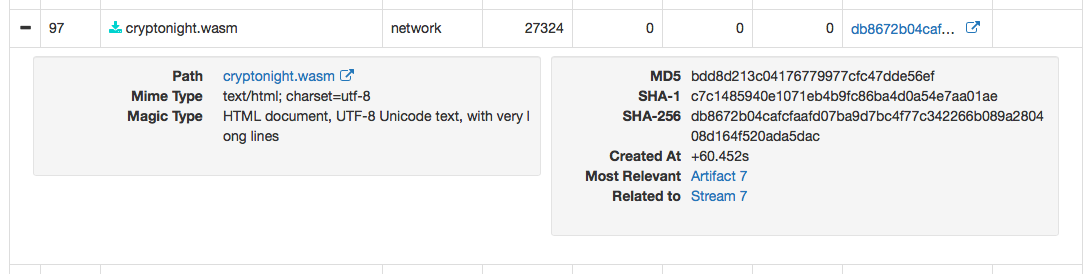
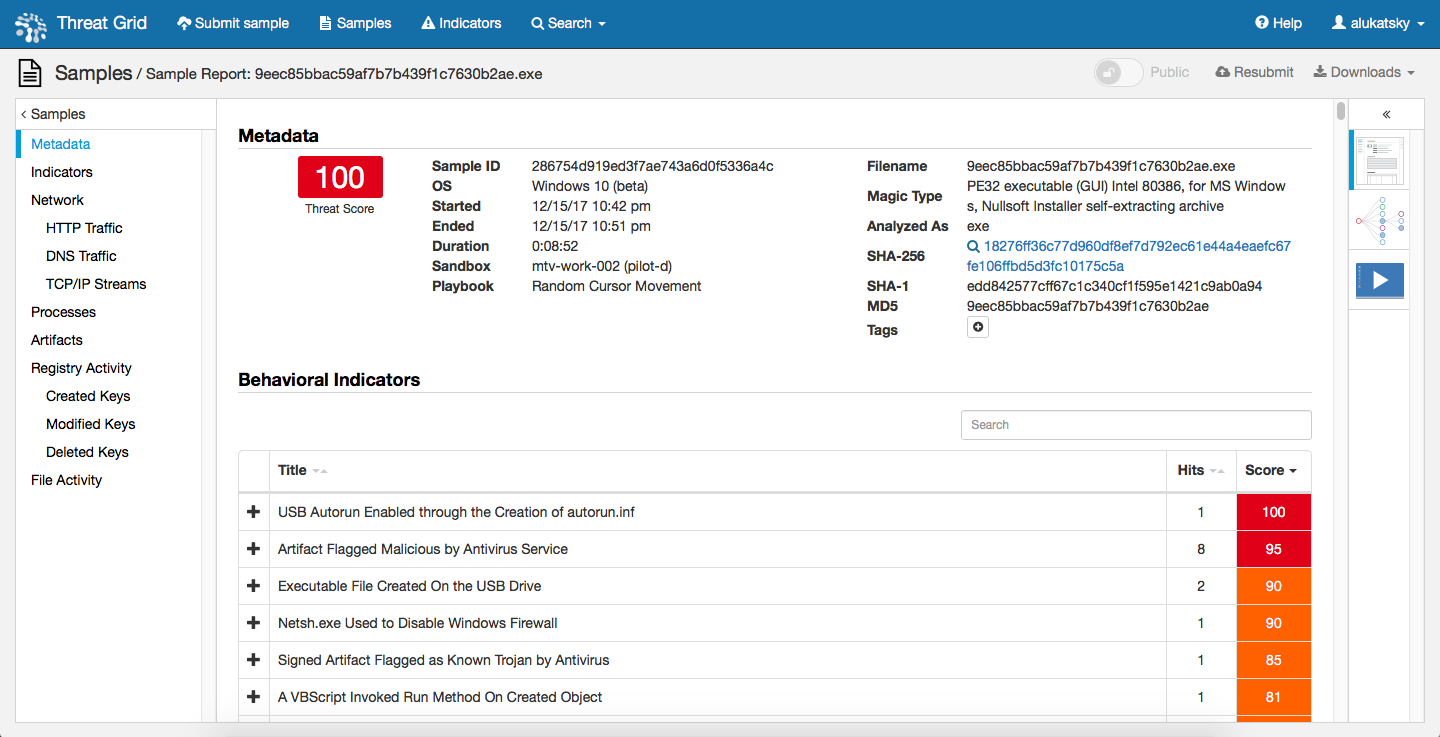
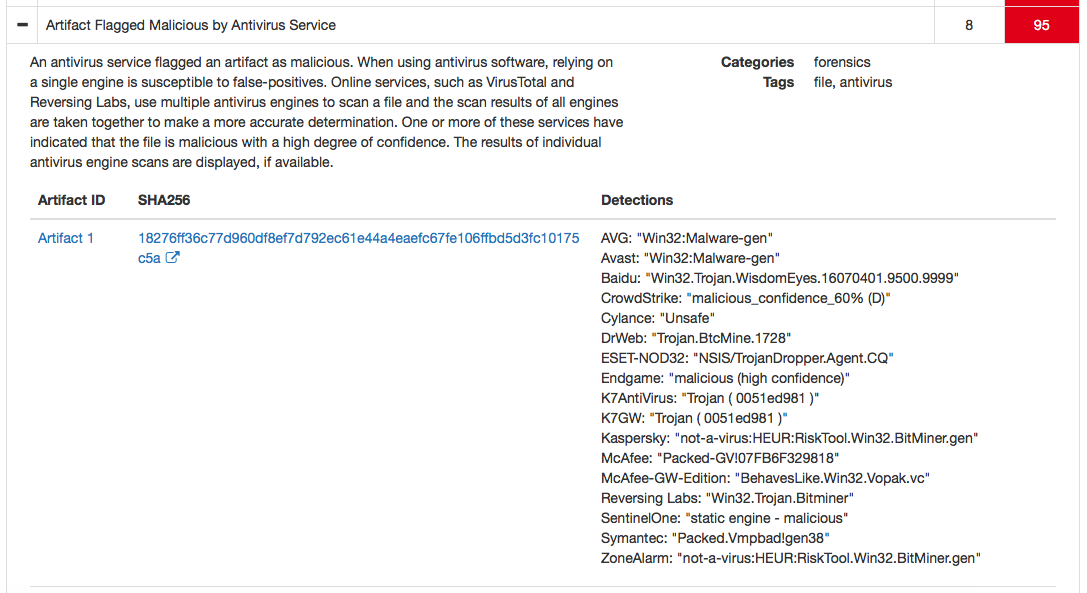
The last line of defense is the “AFTER” stage, which allows us to discover something that somehow still managed to get into our network and onto our computers and began its activity. In addition to detecting miners that are already working, using the methods described above, we can use the Cisco AMP Threat Grid sandbox , which allows you to analyze all files that get inside the network (via mail, via the Web, via flash drives, via file shares, via FTP, etc.), and analyzing their behavior with more than 700 behavioral indicators to detect malicious or abnormal activity. In addition to specialized indicators cryptominer-detected, cryptominer-network-detected and cryptominer-pool-contacted, the AMP Threat Grid has the ability to recognize miners by other signs:
- interaction with external Internet resources
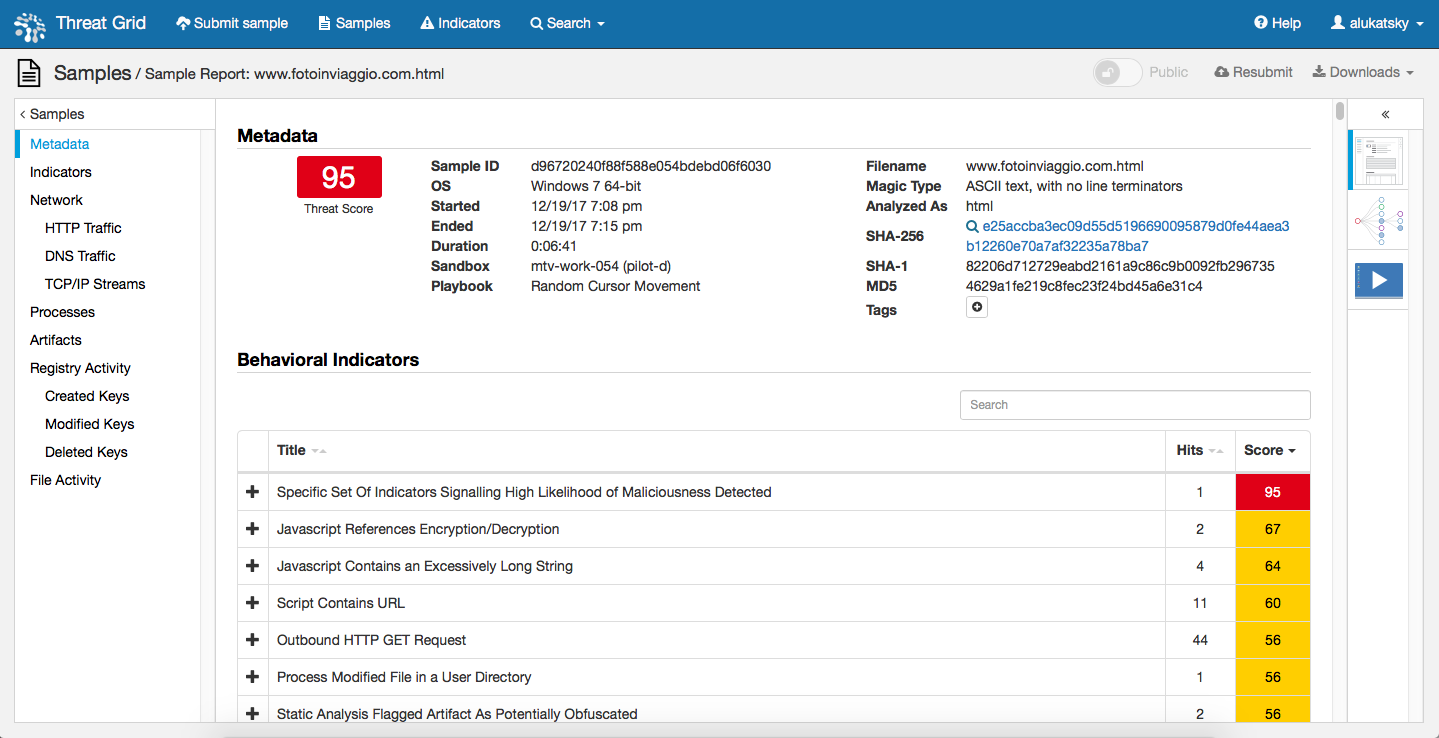

- artifacts left on the node


- triggering of known signatures in antiviruses.
All this is cool, of course, you say. But is it possible to press one magic button in your decisions and forget about this problem once and for all? Alas. I repeat what I wrote above. Mining software is not malicious - it can be completely allowed in a particular company and therefore it is never entered by default into blacklists or malware signature databases. Moreover, this is an actively developing market, which leads to the fact that new cryptocurrencies, new protocols and new programs for mining, new ports and new pool addresses are constantly appearing. You can’t make such a list once and for all. This is a constant work on manual or automated tracking of such information, which is then entered into the indicators of compromise and distributed by means of protection.
And, of course, in conclusion, I must say that no one cancels the basic recommendations for dealing with miners (legal and part of malware or shareware) - configure your browser to block scripts on unknown sites, install the necessary plug-ins (for example, NoScript for Firefox, minerBlock or No Coin for Chrome), enable ad blocker (for example, AdBlock), control access to server and other rooms where you can discreetly install mining devices that will use your power supply.