August 18, 2017 at 13:31
Linux History (1993–2003): Testing Distributions
- Transfer
A unique feature of open source projects is that their life never really ends. Disk images, for the most part, are available for download from the Internet; their licenses do not expire. Therefore, it is quite simple to jump into the past by installing Linux from the 90s on a virtual machine.

How it was? How are ancient Linux distributions perceived today? What has changed over the years of development? Find out this. The first point of our journey will be the Slackware 1.01 OS, sent to the comp.os.linux.announce news group 20 years ago.
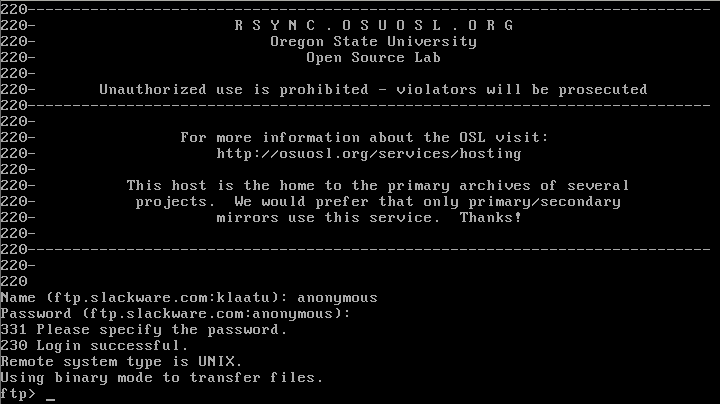
Slackware 1.01
Perhaps, of the distributions considered today, Slackware 1.01 is the easiest to try. The fact is that in the 2014 Qemu series of free images there is a ready-to-use image, so you won’t have to install the system manually (however, it’s better not to get used to this luxury).
A lot of Linux 1993 looks exactly as you might expect. All basic commands, such as
What is missing here is at least some kind of package management tool. All installations and uninstallations are performed completely manually, there are no auxiliary mechanisms.
In general, Slackware 1.01 is perceived as a fairly modern UNIX system, or, more precisely, as a modern UNIX system can be perceived by a Linux user. Almost everything is familiar in it, but here and there there are differences. Moreover, there are not so many of them as one would expect from an operating system released in 1993.
In order to test Debian 0.91, I used the floppy disk images that appeared in 1994 from the Ibiblio digital archive . Here are the commands that were needed to boot the system.
The boot disk for Debian 0.91 launches a simple shell containing clear instructions.
The installation process was surprisingly smooth. It provides for the use of a menu system aimed at performing seven steps - from partitioning a hard disk and formatting it in the ext2 file system, to copying images
Today, Debian is famous for its package management system, but in this early release there were only weak hints of this system. The command is
Even in this situation, in how the system is designed, you can feel the concern for user convenience. In order to become the owner of a working OS, you only need to download three floppy disk images, and then, using a simple text menu, install additional programs. I definitely see the reason for the strong influence of Debian on the Linux industry.

Installing Jurix
Jurix, the predecessor of SUSE, came with binary
Since I didn’t do any special searches for the earliest release, the Jurix distribution turned out to be the first distribution found that was designed to work in a graphical environment. XFree86 is installed by default, so if you were not going to use it, you had to remove it.
There was a file with an example of settings
Installing new packages on Jurix is easy. You need to find the file
The package will be ready for use after unzipping to the root partition. I installed several packages that were not installed after the installation of the system, and I found this way of working with packages simple, fast and reliable.

FVWM window manager running on SuSE 5.1
I installed SUSE 5.1 from the InfoMagic CD-ROM, purchased at a computer store in Maryland in 1998.
The installation process was not so simple in comparison with what I have already encountered. YaST scattered configuration files and settings between a floppy disk and a bootable CD, which required several reboots. It took me several times to start all over again, while I was trying to understand what sequence of actions the system expects from me. After I ruined everything a couple of times, I understood the principle of YaST and the third time went well. This was a hint of what the Linux user had to do in later years.
In SUSE 5.1, my main goal was the graphical environment. The setup process was familiar, carried out using several nice graphical tools (including a good tool
Among the window managers were
In general, working with SUSE 5.1 left a positive impression; I especially liked the convenience and speed of setting up the graphical work environment.
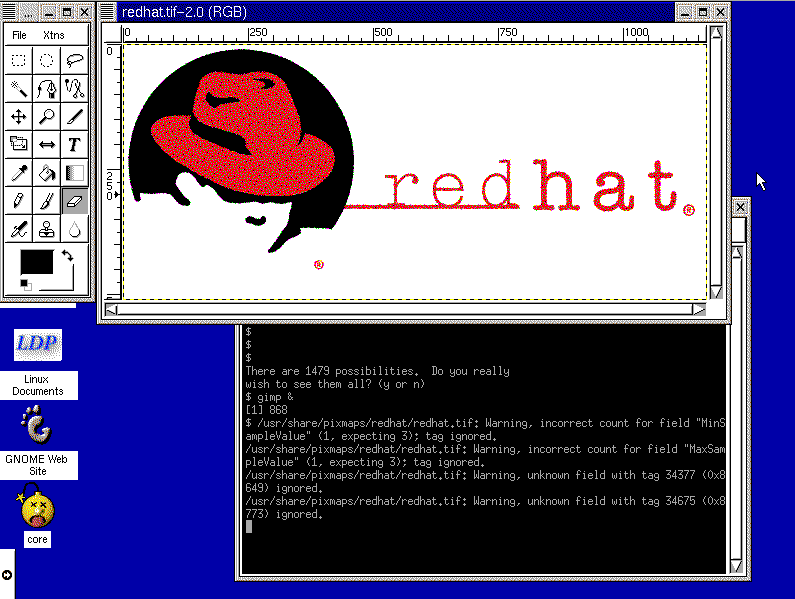
GIMP 1.x running on Red Hat
The next installation disk I was lucky to find was Red Hat 6.0. Please note - not RHEL 6.0, but just Red Hat 6.0. It was a desktop distribution that was sold in stores before RHEL or Fedora appeared. The disc I used was purchased in 1999.
The installation process was well organized and fast. It was not necessary to interrupt or when choosing packages to install (they are gathered in groups
Red Hat 6 included an application
The Red Hat 6 desktop environment was, as it is, even now, GNOME, but the window manager was an early Enlightenment, from which the main demon of sound was taken. As the login managers, they were offered
It should be noted that the distribution did not have some important applications. So, then it didn’t exist yet
In general, however, the desktop is intuitive. Unlike later GNOME implementations, this earlier version had a panel at the bottom of the screen containing the application menu and launcher icons, there was also a tool for managing the virtual desktop. I can’t imagine the average user of those times who would get lost in this graphic environment.
Red Hat 6 was a strong Linux player. Obviously, this seriously advanced it on the path to becoming a good desktop OS.
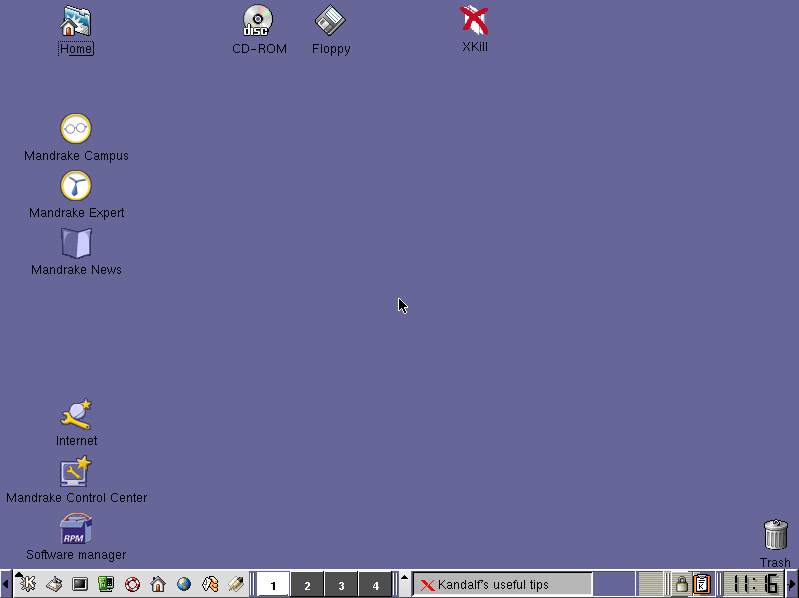
Mandrake: A turning point in the Linux world
Mandrake 8.0 was released in 2001, so it could be compared, for example, with Apple OS 9.2 and Windows ME.
In order for the installation to proceed normally, I decided to use fairly old hardware in the emulator.
I thought the Red Hat installation process was good enough, but with Mandrake, everything went just fine. The installer was friendly, simple and fast, giving the user the opportunity to verify the configuration before proceeding. I didn’t even have to import my configuration file
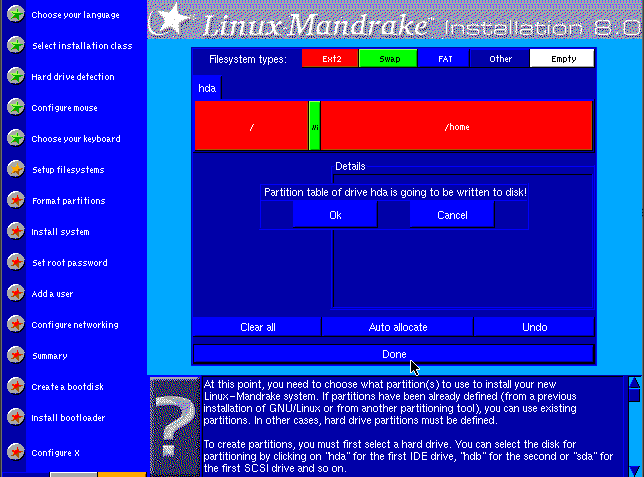
Mandrake 8.0 installer
Using the Mandrake desktop, in fact, is very similar to what was on other similar systems. I was slightly surprised at how similar everything turned out. I felt confident that if I had tried Mandrake Linux at that time, I would have been able to work in it, even considering my age, and the fact that I was not a particularly good user.
A clear interface, adequate documentation, a good package manager, given that in those days downloading installation files of programs from sites was not yet a common habit.
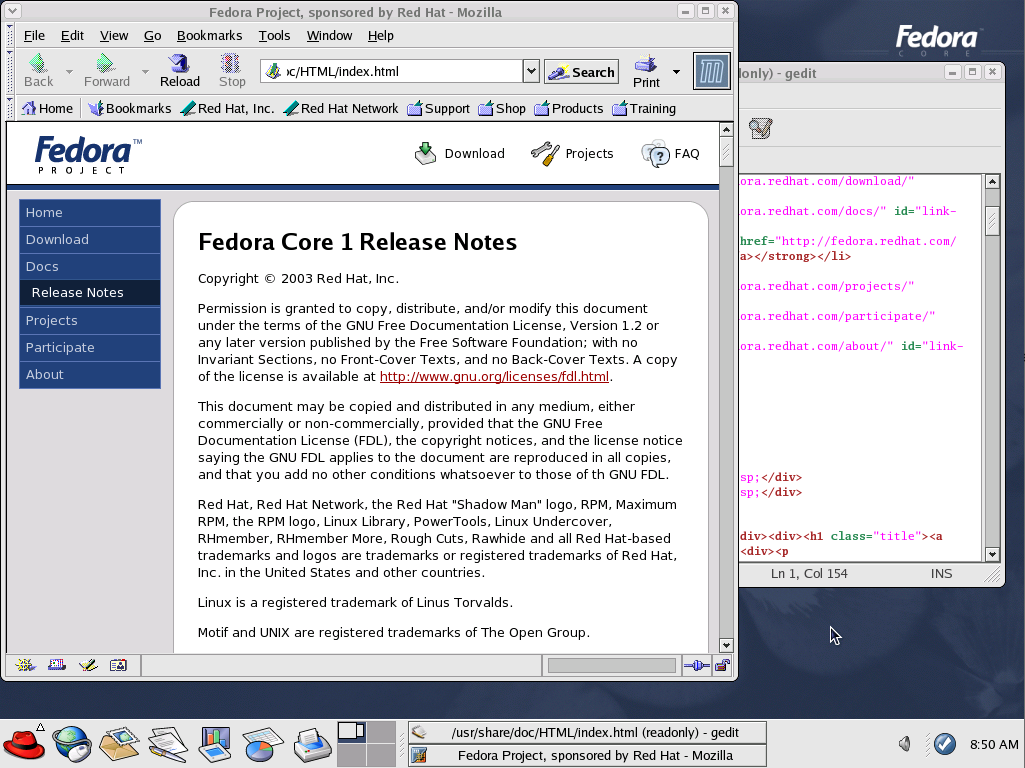
Blue Fedora, Red Hat
In 2003, the new Fedora Core distribution was released. It was based on Red Hat, and after Red Hat Enterprise Linux (RHEL) became the flagship product of the company, it was assigned the role of desktop Linux.
Nothing special was required to boot the old Fedora Core 1 drive.
Installing Fedora 1 was simple and familiar. Here was the same installer that Fedora and Red Hat used for the next 9 years. It is a clear, easy-to-use graphical interface.
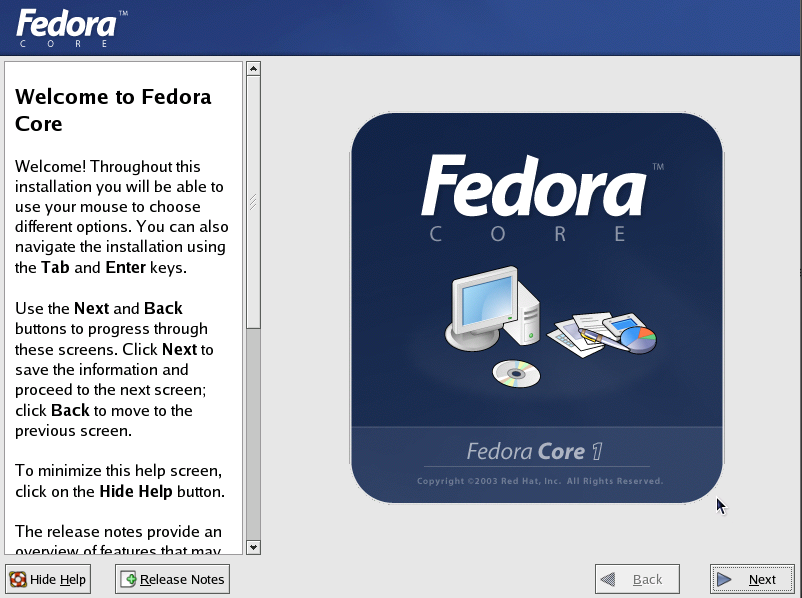
Anaconda graphical user interface The
operating experience in Fedora Core is very different from Red Hat 6 or 7. The GNOME desktop has been perfected, there are all the main supporting applications, all this is concise and professionally presented.
The icon
In the early 2000s, it was clear that Linux-based OSs were already pretty good and moving in the right direction. The desktops looked better than ever, had all the necessary applications, the installation was simpler and more efficient than other operating systems. In fact, since the 2000s, a way of interaction has been established between the user and the operating system that has remained virtually unchanged to this day. Of course, something has changed and improved, some innovations have appeared.
Here's what to say about the development of some Linux distributions.
I think the opportunity to take a look at how the largest open source project in the world has developed will be useful for both beginners and those who have screenshots from this article not associated with the “Linux history”, but with their own computer biography. Linux continues to evolve, so a look into the past allows each of us to better see the direction of the Linux movement, and, just amazingly, to become part of this movement.
Dear readers! What distribution kit started your introduction to Linux?
How it was? How are ancient Linux distributions perceived today? What has changed over the years of development? Find out this. The first point of our journey will be the Slackware 1.01 OS, sent to the comp.os.linux.announce news group 20 years ago.
Slackware 1.01 (1993)
Slackware 1.01
Perhaps, of the distributions considered today, Slackware 1.01 is the easiest to try. The fact is that in the 2014 Qemu series of free images there is a ready-to-use image, so you won’t have to install the system manually (however, it’s better not to get used to this luxury).
 $ qemu-kvm -m 16M -drive if=ide,format=qcow2,file=slackware.qcow2 \
 -netdev user,id=slirp -device ne2k_isa,netdev=slirp \
 -serial stdio -redir tcp:22122::22
A lot of Linux 1993 looks exactly as you might expect. All basic commands, such as
lsand cd, working all the basic tools ( gawk, cut, diff, perland of course elvis- a favorite of Patrick Volkerding ) are present and functioning, however, some small things surprised me. For example, the way BASH behaves during autocomplete, and the fact that the distribution kit already has tools for examining compressed files (such as zless, zmoreand zcat). The system, in many ways, looks surprisingly modern. In fact, this is what I expected.What is missing here is at least some kind of package management tool. All installations and uninstallations are performed completely manually, there are no auxiliary mechanisms.
In general, Slackware 1.01 is perceived as a fairly modern UNIX system, or, more precisely, as a modern UNIX system can be perceived by a Linux user. Almost everything is familiar in it, but here and there there are differences. Moreover, there are not so many of them as one would expect from an operating system released in 1993.
Debian 0.91 (1994)
In order to test Debian 0.91, I used the floppy disk images that appeared in 1994 from the Ibiblio digital archive . Here are the commands that were needed to boot the system.
 $ gunzip bootdsk.gz basedsk1.gz basedsk2.gz
 $ qemu-system-i386 -M pc -m 64 -boot order=ac,menu=on \
   -drive file=bootdisk,if=floppy,format=raw \
   -drive file=debian.raw,if=ide,format=raw \
   -device ne2k_isa,netdev=slirp \
   -serial msmouse -vga std \
   -redir tcp:22122::22 \
   -netdev user,id=slirp
The boot disk for Debian 0.91 launches a simple shell containing clear instructions.
The installation process was surprisingly smooth. It provides for the use of a menu system aimed at performing seven steps - from partitioning a hard disk and formatting it in the ext2 file system, to copying images
basedsk. After that, we have at our disposal a minimal Debian installation, corresponding to the many familiar conventions that any modern Linux user can expect from their OS. Today, Debian is famous for its package management system, but in this early release there were only weak hints of this system. The command is
dpkgpresent, but it is an interactive menu-based system - something like a clumsyaptitudewith several menu levels, and, not surprisingly, with only a fraction of the packages available. Even in this situation, in how the system is designed, you can feel the concern for user convenience. In order to become the owner of a working OS, you only need to download three floppy disk images, and then, using a simple text menu, install additional programs. I definitely see the reason for the strong influence of Debian on the Linux industry.
Jurix / SuSE (1996)
Installing Jurix
Jurix, the predecessor of SUSE, came with binary
.tgzpackages organized in directories, which resembled the structure of Slackware installation packages. And the installer itself resembles the Slackware installer. $ qemu-system-i386 -M pc -m 1024 \
-boot order=ac,menu=on \
-drive \
file=jurix/install,if=floppy,format=raw \
-drive file=jurix.img,if=ide \
-drive file=pkg.raw,if=ide,format=raw \
-device ne2k_isa,netdev=slirp \
-serial msmouse -vga std \
-redir tcp:22122::22 \
-netdev user,id=slirpSince I didn’t do any special searches for the earliest release, the Jurix distribution turned out to be the first distribution found that was designed to work in a graphical environment. XFree86 is installed by default, so if you were not going to use it, you had to remove it.
There was a file with an example of settings
/usr/lib/X11/XF86Config, later it became known as Xorg.conf. 90% of graphics settings I performed through the file, however, fine-tuning vsync, hsyncand remapping color map ramdactaken from me the whole weekend, and then I gave up. Installing new packages on Jurix is easy. You need to find the file
.tgzon the package disk and run the following command:$ su -c 'tar xzvf foo.tgz -C /'The package will be ready for use after unzipping to the root partition. I installed several packages that were not installed after the installation of the system, and I found this way of working with packages simple, fast and reliable.
SUSE 5.1 (1998)
FVWM window manager running on SuSE 5.1
I installed SUSE 5.1 from the InfoMagic CD-ROM, purchased at a computer store in Maryland in 1998.
 $ qemu-system-i386 -M pc-0.10 -m 64 \
   -boot order=ad,menu=on \
   -drive file=floppy.raw,if=floppy,format=raw \
   -cdrom /dev/sr0 \
   -drive file=suse5.raw,if=ide,format=raw \
   -vga cirrus -serial msmouse
The installation process was not so simple in comparison with what I have already encountered. YaST scattered configuration files and settings between a floppy disk and a bootable CD, which required several reboots. It took me several times to start all over again, while I was trying to understand what sequence of actions the system expects from me. After I ruined everything a couple of times, I understood the principle of YaST and the third time went well. This was a hint of what the Linux user had to do in later years.
In SUSE 5.1, my main goal was the graphical environment. The setup process was familiar, carried out using several nice graphical tools (including a good tool
X86Setup) designed to check the mouse and monitor and troubleshoot. In order for the graphical interface to work properly, it took less than an hour, and most of the time was spent on my own research aimed at figuring out what resolution and color depth the Qemu virtual graphics card supports. Among the window managers were
fvwm, fvwm2and ctwm. I took advantage fvwmand it worked as expected. I even found tkDeska multifunctional package that implements the functions of a file manager, which turned out to be very similar to the shell Unityfrom Ubuntu. In general, working with SUSE 5.1 left a positive impression; I especially liked the convenience and speed of setting up the graphical work environment.
Red Hat 6.0 (1999)
GIMP 1.x running on Red Hat
The next installation disk I was lucky to find was Red Hat 6.0. Please note - not RHEL 6.0, but just Red Hat 6.0. It was a desktop distribution that was sold in stores before RHEL or Fedora appeared. The disc I used was purchased in 1999.
 $ qemu-system-i386 -M pc-0.10 -m 512 \
   -boot order=ad,menu=on \
   -drive file=redhat6.raw,if=ide,format=raw \
   -serial msmouse -netdev user,id=slirp \
   -vga cirrus -cdrom /dev/sr0
The installation process was well organized and fast. It was not necessary to interrupt or when choosing packages to install (they are gathered in groups
Workstation, Serverand Custom), nothing to do with partitioning, or after the installation. Red Hat 6 included an application
xf86configdesigned to organize the step-by-step process of setting up the X window system, although, which is not very clear, it made it possible to turn on some mouse emulation parameters, which X later complained about. The problem was solved by editing the file X86Config, but X was correctly configured still could not be called a simple task. The Red Hat 6 desktop environment was, as it is, even now, GNOME, but the window manager was an early Enlightenment, from which the main demon of sound was taken. As the login managers, they were offered
xdm, and gdm, as a result, an ordinary user could enter the system without having permission to start or stop X itself, which is especially important in multi-user systems. It should be noted that the distribution did not have some important applications. So, then it didn’t exist yet
gedit, there was no multifunctional office application, there was no package manager to talk about. GnoRPM, the graphical interface for installing, viewing, and uninstalling RPM packages was closest to what yumor provide PackageKit. There was a text editor with which it was possible to work in the graphical interface gnotepad+(and without Emacs, of course, it could not do).In general, however, the desktop is intuitive. Unlike later GNOME implementations, this earlier version had a panel at the bottom of the screen containing the application menu and launcher icons, there was also a tool for managing the virtual desktop. I can’t imagine the average user of those times who would get lost in this graphic environment.
Red Hat 6 was a strong Linux player. Obviously, this seriously advanced it on the path to becoming a good desktop OS.
Mandrake 8.0 (2001)
Mandrake: A turning point in the Linux world
Mandrake 8.0 was released in 2001, so it could be compared, for example, with Apple OS 9.2 and Windows ME.
In order for the installation to proceed normally, I decided to use fairly old hardware in the emulator.
 $ qemu-system-i386 \
   -M pc-0.10 -m 2048 \
   -boot order=ad,menu=on \
   -drive file=mandrake8.qcow2 \
   -usb -net nic,model=rtl8139 \
   -netdev user,id=slirp \
   -vga cirrus \
   -cdrom mandrake-8.0-i386.iso
I thought the Red Hat installation process was good enough, but with Mandrake, everything went just fine. The installer was friendly, simple and fast, giving the user the opportunity to verify the configuration before proceeding. I didn’t even have to import my configuration file
XF86Config, since the Mandrake installer did everything right. Mandrake 8.0 installer
Using the Mandrake desktop, in fact, is very similar to what was on other similar systems. I was slightly surprised at how similar everything turned out. I felt confident that if I had tried Mandrake Linux at that time, I would have been able to work in it, even considering my age, and the fact that I was not a particularly good user.
A clear interface, adequate documentation, a good package manager, given that in those days downloading installation files of programs from sites was not yet a common habit.
Fedora 1 (2003)
Blue Fedora, Red Hat
In 2003, the new Fedora Core distribution was released. It was based on Red Hat, and after Red Hat Enterprise Linux (RHEL) became the flagship product of the company, it was assigned the role of desktop Linux.
Nothing special was required to boot the old Fedora Core 1 drive.
 $ qemu-system-i386 -M pc \
   -m 2048 -boot order=ac,menu=on \
   -drive file=fedora1.qcow2 -usb \
   -net nic,model='rtl8139' -netdev user \
   -vga cirrus -cdrom fedora-1-i386-cd1.iso
Installing Fedora 1 was simple and familiar. Here was the same installer that Fedora and Red Hat used for the next 9 years. It is a clear, easy-to-use graphical interface.
Anaconda graphical user interface The
operating experience in Fedora Core is very different from Red Hat 6 or 7. The GNOME desktop has been perfected, there are all the main supporting applications, all this is concise and professionally presented.
The icon
Start Hereleads the user to three places. This is the folder Applications, panel Preferencesand settings System Settings. The red hat icon points to the application menu, and the GNOME panel allows you to launch applications, including the OpenOffice office suite and the Mozilla browser.Summary: Past and Future
In the early 2000s, it was clear that Linux-based OSs were already pretty good and moving in the right direction. The desktops looked better than ever, had all the necessary applications, the installation was simpler and more efficient than other operating systems. In fact, since the 2000s, a way of interaction has been established between the user and the operating system that has remained virtually unchanged to this day. Of course, something has changed and improved, some innovations have appeared.
Here's what to say about the development of some Linux distributions.
- OS Mandrake turned into Mandriva, and then became Mageia .
- The Fedora Core distribution was simply called Fedora .
- From Debian , Ubuntu emerged , which helped push Linux to the masses.
- Valve has made SteamOS the official basis for its gaming platform.
- Slackware lives quietly to this day.
I think the opportunity to take a look at how the largest open source project in the world has developed will be useful for both beginners and those who have screenshots from this article not associated with the “Linux history”, but with their own computer biography. Linux continues to evolve, so a look into the past allows each of us to better see the direction of the Linux movement, and, just amazingly, to become part of this movement.
Dear readers! What distribution kit started your introduction to Linux?