
Microsoft Office Automation: Another Macro Loophole
The Microsoft Office software package is not only the actual standard of office software, but also a very complex and multifunctional environment that allows you to create solutions that are primarily designed to use the capabilities of Microsoft Office and automate the user's routine when working with documents. This software platform, called the Microsoft Office Object Model, or the Microsoft Office Automation (Microsoft Office Automation) is based on the COM Object Model and contains an extensive set of classes that provide access to almost any element or action that a user can access while working with Microsoft Office via a graphical interface.
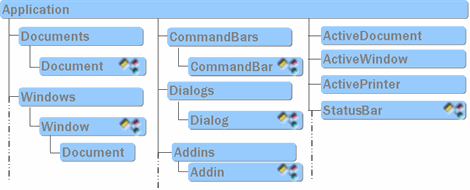
Microsoft Word Object Model (partially)
Speaking about programming for Microsoft Office, they often mean “internal” programs - macros written in VBA (Visual Basic for Applications, implementation of Visual Basic in Microsoft Office) and embedded directly into documents.
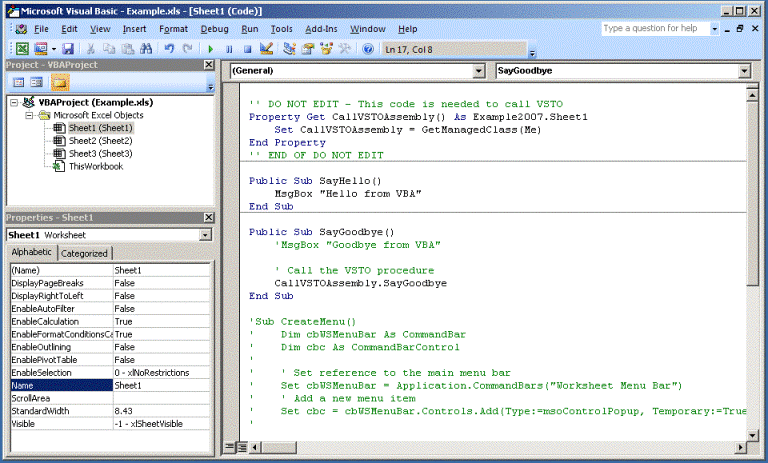
Creating Macros for Microsoft Excel
Due to the wide possibilities of the language (due to access to external dlls and components that are almost unlimited) and a convenient distribution model (with document files), Microsoft Office macros have been used to create malicious software since VBA and got their own name - macro viruses. Despite some toughening of macros-related settings (current versions of Microsoft Office currently prohibit automatic macros execution by default, notifying the user about this), macro viruses are still actively used by cybercriminals. To effectively use this technology with a twenty-year history, it turned out to be sufficient to supplement it with elements of social engineering.

Offer user to allow macros in document containing malicious code
Microsoft Office objects are accessible not only from macros, but also from "external" programs in any languages that support COM. The latter can be compiled programs in languages like C ++ or Delphi, managed applications in Java or .Net, or scripts in VBScript and PowerShell - COM technology is available for almost anything that can run under Windows.

Access the Microsoft Office Object Model from PowerShell
The Microsoft Office Object Model represents Microsoft Office applications as COM objects. But there is also the ability to add other COM objects to documents - ActiveX controls that are not related to Microsoft Office, but are present in the operating system. Being included in the document, these elements can interact with the macro code or execute their own code based on the “properties” added to the document - the properties of the object. In skilled hands, embedding ActiveX controls can also lead to the execution of arbitrary code, therefore, in recent versions of Microsoft Office, the default launch of built-in ActiveX is prohibited except for some "white list" of controls. However, the user in this case, if desired, can explicitly allow execution.
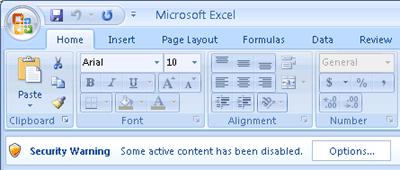
Embedded ActiveX Warning
The offer to allow (or deny) the launch of active content will be received by the user when the document is opened in the normal way in the corresponding application. What happens if you open the same document using the Microsoft Office Object Model?
There are a great many examples of such programs in a variety of languages and for a variety of tasks:
When studying such examples, only once we came across an interesting line in the code :
What does it mean, the official documentation will tell :
It turns out that if the Microsoft Office application is launched as an automation element, then the macro code in the opened documents will be executed by default. Unless, of course, specifically changing the security level of the control program. This default is independent of the settings set by the user or administrator. In addition to macros, the code of any ActiveX elements added to the document will also be downloaded and executed.

Running a macro when opening a document through Automation.
This non-obvious feature, apparently, is rarely taken into account. For example, office programs from other manufacturers use the Microsoft Office object model to import and export data into Word and Excel documents. Quite often there are examples for 1C:
programs, called “processors,” can also use COM in general and the Microsoft Office object model in particular. Some useful processing is provided by the manufacturer to users, for example, the processing of “Loading Data from a Tabular Document.epf ” allows loading data from external tabular documents into the database.
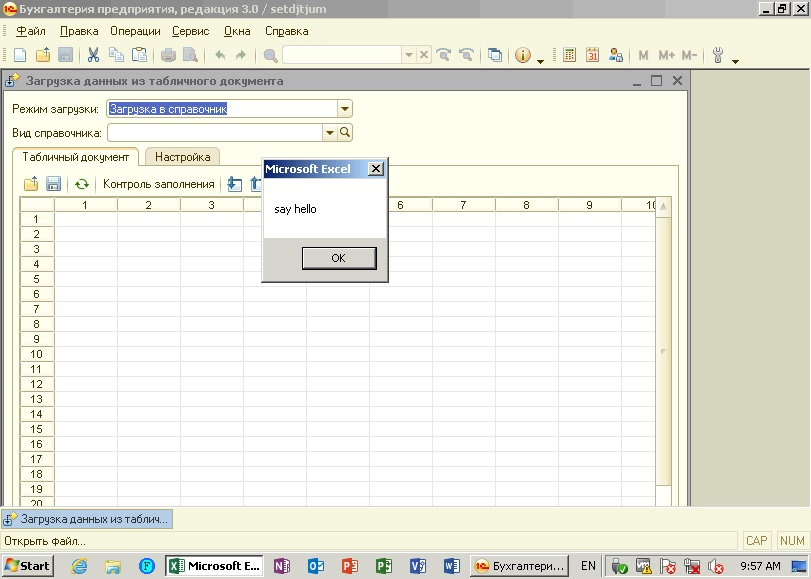
Macro execution when opening a document through 1C processing
As you can see, the AutomationSecurity property has been forgotten by 1C programmers as well.
On the one hand, this is a classic example of what you need to think about security in the programming process, whatever language is used. On the other hand, what was the reason Microsoft was forced to leave the object model unprotected when tightening the security settings of Microsoft Office?
A short video demonstrating how an attacker can take control of an accounting computer using the Metasploit Framework and price list for dumplings. The macro contained in the Excel document runs the script for PowerShell, which gives the attacker access to the command line on the attacked system.
Microsoft Word Object Model (partially)
Speaking about programming for Microsoft Office, they often mean “internal” programs - macros written in VBA (Visual Basic for Applications, implementation of Visual Basic in Microsoft Office) and embedded directly into documents.
Creating Macros for Microsoft Excel
Due to the wide possibilities of the language (due to access to external dlls and components that are almost unlimited) and a convenient distribution model (with document files), Microsoft Office macros have been used to create malicious software since VBA and got their own name - macro viruses. Despite some toughening of macros-related settings (current versions of Microsoft Office currently prohibit automatic macros execution by default, notifying the user about this), macro viruses are still actively used by cybercriminals. To effectively use this technology with a twenty-year history, it turned out to be sufficient to supplement it with elements of social engineering.
Offer user to allow macros in document containing malicious code
Microsoft Office objects are accessible not only from macros, but also from "external" programs in any languages that support COM. The latter can be compiled programs in languages like C ++ or Delphi, managed applications in Java or .Net, or scripts in VBScript and PowerShell - COM technology is available for almost anything that can run under Windows.
Access the Microsoft Office Object Model from PowerShell
The Microsoft Office Object Model represents Microsoft Office applications as COM objects. But there is also the ability to add other COM objects to documents - ActiveX controls that are not related to Microsoft Office, but are present in the operating system. Being included in the document, these elements can interact with the macro code or execute their own code based on the “properties” added to the document - the properties of the object. In skilled hands, embedding ActiveX controls can also lead to the execution of arbitrary code, therefore, in recent versions of Microsoft Office, the default launch of built-in ActiveX is prohibited except for some "white list" of controls. However, the user in this case, if desired, can explicitly allow execution.
Embedded ActiveX Warning
The offer to allow (or deny) the launch of active content will be received by the user when the document is opened in the normal way in the corresponding application. What happens if you open the same document using the Microsoft Office Object Model?
There are a great many examples of such programs in a variety of languages and for a variety of tasks:
Set objWord = CreateObject("Word.Application")
Set objDoc = objWord.Documents.Add("e:\test\fax.dotx")
objDoc.SaveAs("e:\test\temp.docx")
objDoc.Close
objWord.Quitapplication = new Word.Application();
Object templatePathObj = "путь к файлу шаблона";;
try
{
document = application.Documents.Add(ref templatePathObj, ref missingObj, ref missingObj, ref missingObj);
}
catch (Exception error)
{
document.Close(ref falseObj, ref missingObj, ref missingObj);
application.Quit(ref missingObj, ref missingObj, ref missingObj);
document = null;
application = null;
throw error;
}
_application.Visible = true;try {
using namespace Word;
_ApplicationPtr word(L"Word.Application");
word->Visible = true;
word->Activate();
_DocumentPtr wdoc1 = word->Documents->Add();
RangePtr range = wdoc1->Content;
range->LanguageID = wdRussian;
range->Tables->Add(range,5,5);
wdoc1->SaveAs(&_variant_t("C:\\1test.doc"));
wdoc1->Close();
} catch (_com_error& er) {}$word = New-Object -ComObject Word.Application
$word.Visible = $True
$doc = $word.Documents.Add()When studying such examples, only once we came across an interesting line in the code :
app.AutomationSecurity = 3What does it mean, the official documentation will tell :
Application.AutomationSecurity Property (Excel)
...
Returns or sets an MsoAutomationSecurity constant that represents the security mode Microsoft Excel uses when programmatically opening files.
...
MsoAutomationSecurity constants.
msoAutomationSecurityByUI. Uses the security setting specified in the Security dialog box. |
msoAutomationSecurityForceDisable. Disables all macros in all files opened programmatically without showing any security alerts.
msoAutomationSecurityLow. Enables all macros. This is the default value when the application is started .
It turns out that if the Microsoft Office application is launched as an automation element, then the macro code in the opened documents will be executed by default. Unless, of course, specifically changing the security level of the control program. This default is independent of the settings set by the user or administrator. In addition to macros, the code of any ActiveX elements added to the document will also be downloaded and executed.
Running a macro when opening a document through Automation.
This non-obvious feature, apparently, is rarely taken into account. For example, office programs from other manufacturers use the Microsoft Office object model to import and export data into Word and Excel documents. Quite often there are examples for 1C:
MSWord = Новый COMОбъект("Word.Application");
    MSWord.Documents.Add(ИмяФайла);
    ActiveDocument = MSWord.ActiveDocument;
    Content = ActiveDocument.Content;
    //Добавляем строки в конец документа
    Content.InsertParagraphAfter();
    Content.InsertAfter("Добавляемая строка 1");
    Content.InsertParagraphAfter();
    Content.InsertAfter("Добавляемая строка 2");
    Content.InsertParagraphAfter();
    //Добавляем в конец текущего документа содержимое другого файла без ссылки на исходный
    //Вставим дополнительный абзац
    Content.InsertParagraphAfter();
    //На его место вставляем файл
    ActiveDocument.Range(Content.End - 1, Content.End).InsertFile(ИмяФайлаДляВставки, "", Ложь, Ложь);
Content.InsertParagraphAfter();programs, called “processors,” can also use COM in general and the Microsoft Office object model in particular. Some useful processing is provided by the manufacturer to users, for example, the processing of “Loading Data from a Tabular Document.epf ” allows loading data from external tabular documents into the database.
Macro execution when opening a document through 1C processing
As you can see, the AutomationSecurity property has been forgotten by 1C programmers as well.
On the one hand, this is a classic example of what you need to think about security in the programming process, whatever language is used. On the other hand, what was the reason Microsoft was forced to leave the object model unprotected when tightening the security settings of Microsoft Office?
A short video demonstrating how an attacker can take control of an accounting computer using the Metasploit Framework and price list for dumplings. The macro contained in the Excel document runs the script for PowerShell, which gives the attacker access to the command line on the attacked system.