
 July 31, 2017 at 12:41
How Chrome and Firefox agree to transfer two video streams
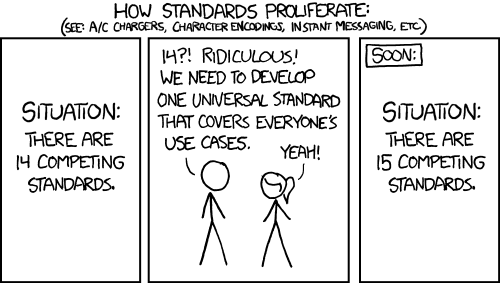
Among the pitfalls of WebRTC, one is special. This is how browsers agree on the transfer of media streams. Codecs, bitrates, video resolution - this is the whole story. There is only one media stream code - everything is fine. But when there are two of them (and a video with sound, for a second, it is two media streams: one for video, the other for sound), then the opinions of browsers on the format for describing the situation are sharply divided. Making a video call from Chrome in Firefox is pretty easy. But the video call with sound is no longer there. Under the cut, there’s a little story why it happened so that they sawed it in the new Safari and what a special way Microsoft Edge has.
Harvester on the field of voice and video calls
WebRTC is a harvester. A lot of protocols and different JavaScript APIs under one name, which does different things:
- Capture video from the camera and / or voice from the microphone.
- Encoding and decoding by different codecs supported by the browser.
- Establish Peer-to-Peer connections between browsers using the ICE approach and the specified servers. STUN servers for studying network topology and TURN servers, if it was not possible to break through NAT and you need to connect through an external server.
- Transfer video and audio over the network. In addition, the analysis of the channel width and fine-tuning the codec bit rate for it.
- Playback received.
- Data transfer in UDP or TCP style.
- Screen Sharing.
The hardest part of this story is to establish a Peer-to-Peer connection. If this is not local communication between the tabs, the devices are not on the same network, or they do not have real IP addresses with open ports, then some intermediate servers are needed to "negotiate". Typically, these servers are raised by a developer who wants to use WebRTC. With the exception of STUN, echo servers that answer the question “what is my public IP” are public from Google.
Depending on what the developer is going to transmit: voice, video or arbitrary data, a Peer-to-Peer connection is established. WebRTC forms the text packages “offer”, “answer” and “ice candidate”, which the developer must somehow transmit between browsers connecting to each other (usually through his own signaling server). In these packages, both browsers describe their capabilities and what will happen, and WebRTC is trying to choose the best connection method.
Telephony SDP Legacy
Packages that WebRTC exchanges with the developer’s hands use the SDP format. It is very old, textual, came from telephony (WebRTC tries to minimize the efforts of the developer when calling from the browser to telephone networks and vice versa) and is similar to HTTP. This is what the SDP package looks like "this browser wants to establish a Peer-to-Peer connection to another browser, but does not yet know what it will transmit over the network."
If a developer wants to start / stop transferring data, voice or video, WebRTC immediately requires “renegotiation” from him - restarting the Peer-to-Peer connection in order to check the optimality of the network route for the transmitted data and negotiate about codecs. This is what the SDP package looks like in which WebRTC announces the desire to transmit video:
Hidden text
Fast changing standard
WebRTC has been with us for many years and is still in beta status. Recently, the JavaScript API has been completely rewritten from callbacks to promises, the work with voice and video streams has changed, Microsoft has crafted an alternative API “oRTC”. A lot of interesting things happened. And the format for describing media streams in the SDP package has changed. For many years, used “Plan B” with a hierarchical structure was deprecated and replaced with “Unified Plan”, in which each stream was defined by a separate section in the SDP package. Compare.
It was:
Hidden text
It became:
Hidden text
Chrome vs Firefox vs Edge vs Safari
When it comes to beta versions of web technologies, their implementation in browsers sometimes varies greatly and can be years behind the current version of the standard. This happened with WebRTC. Many years ago, Google Chrome made support for several media tracks in the “Plan B” format and still have not changed the implementation to “Unified Plan”. The corresponding ticket was opened a couple of years ago, the developers discuss how important this is and reassign the ticket to each other, but things are still there. In Firefox, which is typical, only Unified Plan is implemented, so without problems you can communicate only one media track: voice or video without sound. Need more? Welcome to the world of adapters and polyfills!
Microsoft Edge, which initially only supports its own implementation of the oRTC API, has added support for the WebRTC API and Unified Plan in recent versions. Safari will only support WebRTC in the next version, which beta is already available for developers . And, sadly, Plan B. Because it was made on the basis of Chromium.
How to make cross-browser calls?
As we can see, Chrome, the most popular browser, is left with the outdated “Plan B” format. There is Safari, the mobile version of which lives on the iPhone. Firefox and the new Microsoft Edge with the new Unified Plan.
For the transfer of voice or video without audio, this does not play any role, but in the case of several media tracks, you will have to manually modify the SDP or use an adapter . I really hope that sooner or later all browsers will switch to Unified Plan. But for now, the harsh reality is that most Desktop and the vast majority of Mobile browsers support “Plan B”, and code will have to be added for compatibility with Firefox and Edge. And a lot of debugging.
The picture before kata is taken from here.
