July 31, 2017 at 09:28
Play with Docker - an online service for practical acquaintance with Docker

At the end of last year, two Docker captains presented their development under the name Play with Docker (PWD) - "a playground for Docker." Users are invited to work for free with the assembly and launch of Docker containers directly in a web browser, as well as perform laboratory work to get to know Docker from scratch and improve their skills.
Playground
The main site of the service is play-with-docker.com , which after passing CAPTCHA sends to one of the cloud hosts, where the 4-hour session of the “playground” starts. In it you can create new entities (instances), i.e. nodes of the test docker cluster. Each of them is an installation of the lightweight Alpine Linux distribution (currently version 3.6.2 with the Linux kernel 4.4.0) with an editable local IP address. They have Docker installed in the current version 17.06 Community Edition .
All work takes place directly in the web browser:
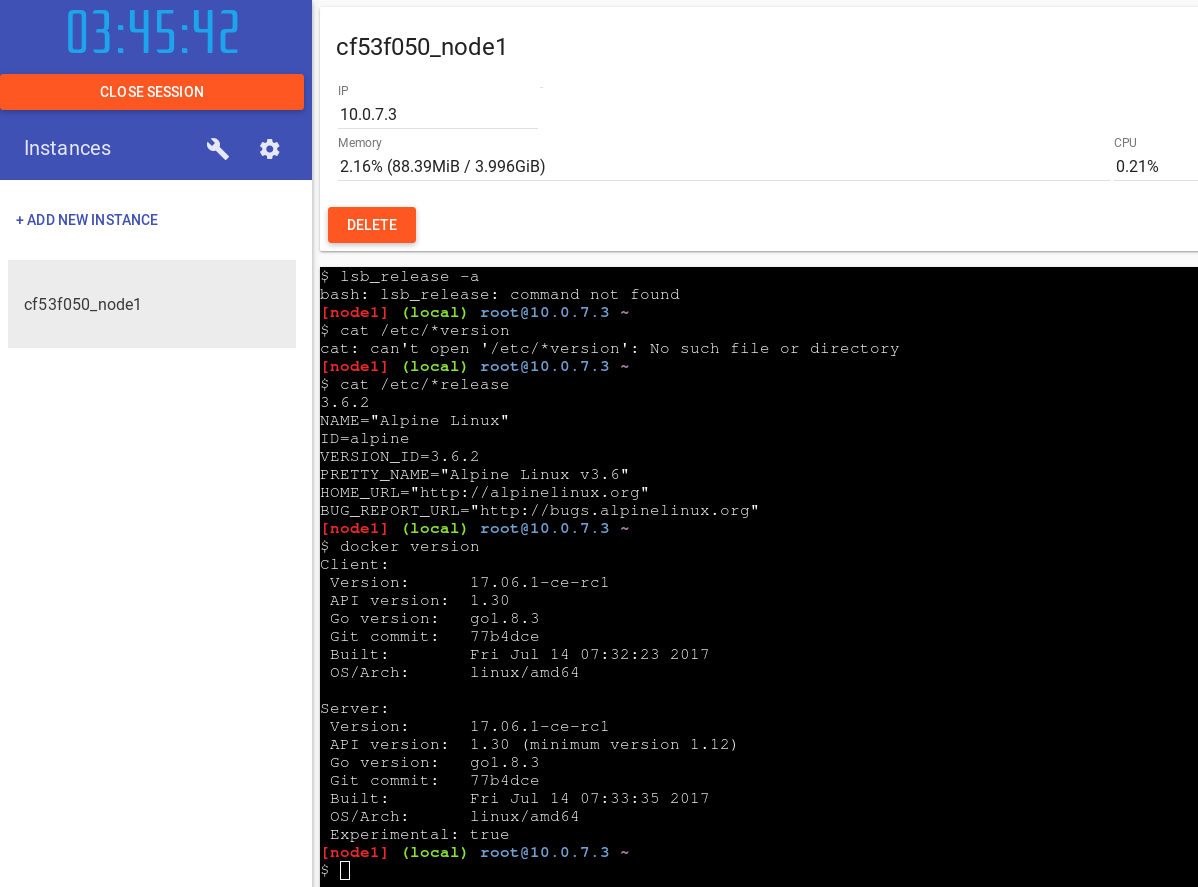
The JavaScript implementation of xterm.js is used to emulate the terminalfrom SourceLair, which supports many modern browsers (Chrome 48+, Edge 13+, Firefox 44+, Internet Explorer 11+, Opera 35+, Safari 8+). The terminal is very convenient in operation, supports standard keyboard combinations, auto-completion by
docker. The number of created entities is limited to five. And you can choose and dev-version (now on the basis of Docker 17.07.0 CE RC1), and a special way with a solution for managing clusters of the UCP (in addition to the standard system image with a stable Docker Universal the Control Plane ), which means that the availability of relevant images (
docker/ucp, docker/ucp-agent, docker/ucp-auth, docker/ucp-swarm...) to run in containers:[node4] (local) [email protected] ~
$ docker run --privileged docker/ucp
docker/ucp docker/ucp-controller:2.1.5
docker/ucp-agent docker/ucp-dsinfo
docker/ucp-agent:2.1.5 docker/ucp-dsinfo:2.1.5
docker/ucp-auth docker/ucp-etcd
docker/ucp-auth-store docker/ucp-etcd:2.1.5
docker/ucp-auth-store:2.1.5 docker/ucp-hrm
docker/ucp-auth:2.1.5 docker/ucp-hrm:2.1.5
docker/ucp-cfssl docker/ucp-metrics
docker/ucp-cfssl:2.1.5 docker/ucp-metrics:2.1.5
docker/ucp-compose docker/ucp-swarm
docker/ucp-compose:2.1.5 docker/ucp-swarm:2.1.5
docker/ucp-controller docker/ucp:2.1.5
Speaking of clusters: as part of your test installation on Play with Docker, you can also make a cluster with Docker Swarm. The sequence of actions for this will look something like this:
# На первом узле кластера, который станет менеджером:
[node1] (local) [email protected] ~
$ docker swarm init --advertise-addr 10.0.7.3
Swarm initialized: current node (txh3ffph72xarxjeg9gmpra2s) is now a manager.
To add a worker to this swarm, run the following command:
    docker swarm join --token SWMTKN-1-698vpn9u804ik4xdc9by60ytdabx3kuzyxj3vzhtr74qvkdlja-7xa6pwit58xzun989tao2nis7 10.0.7.3:2377
To add a manager to this swarm, run 'docker swarm join-token manager' and follow the instructions.
[node1] (local) [email protected] ~
$ docker node ls
ID                            HOSTNAME            STATUS              AVAILABILITY        MANAGER STATUS
txh3ffph72xarxjeg9gmpra2s *   node1               Ready               Active              Leader
# Теперь перейдите к консоли другого узла (например, node2)
[node2] (local) [email protected] ~
$ docker swarm join --token SWMTKN-1-698vpn9u804ik4xdc9by60ytdabx3kuzyxj3vzhtr74qvkdlja-7xa6pwit58xzun989tao2nis7 10.0.7.3:2377
This node joined a swarm as a worker.
# Вернитесь к консоли первого узла (он является менеджером кластера)
[node1] (local) [email protected] ~
$ docker node ls
ID                            HOSTNAME            STATUS              AVAILABILITY        MANAGER STATUS
szx0qqvj5zwt6a4nho9an54yx     node2               Ready               Active
txh3ffph72xarxjeg9gmpra2s *   node1               Ready               Active              Leader
More detailed step-by-step instructions for working with Docker Swarm in the framework of Play with Docker can be found in this video (in English).
And to make it easier for novice users of Docker to understand what is generally possible (and useful) to do in the Docker playground, the authors of Play with Docker supplemented their service with a convenient learning resource.
PWD Training
Learning to work with Docker is offered in the format of laboratory works, which are published at training.play-with-docker.com .
They are made as step-by-step instructions with explanations + a terminal emulator launched in the Play with Docker service, where you can execute the suggested instructions (you do not even need to completely enter the commands - just click on the listings from the description on the left and they are copied / executed on the terminal on the right):

Main page Laboratory Play with Docker offers two guides:
- Operation (Ops) - the beginning of work with Docker for IT professionals and system administrators: the first acquaintance with Docker, its basic concepts and capabilities; a deeper study of the features of Docker (architecture, integration with existing infrastructure); use in production;
- Development (Dev) - the beginning of work with Docker for developers: the basic concepts of Docker and how to build / deploy simple applications in it; work with image registries and application in continuous integration; deployment in staging, management of Docker Swarm, application security.
In total, there are more ready-made laboratory works, and a complete list of them with a breakdown by level of complexity is given on a separate page .
PWD as Open Source
A wonderful fact about Play with Docker is the publication of its source codes on GitHub under a free MIT license and the authors are open to community modifications. The description of the project repository says: “You know PWD, you use it - time to improve!”
It also means that you can run the local version of Play with Docker to carry out all the necessary experiments on your resources. Installation requires Docker 1.13+ and Go 1.7.1+. Technically, to start the service, the DIND (Docker-in-Docker) feature is used, which allows you to run Docker inside Docker. To do this, the default image from the developers (
franela/dind) is used, but if you wish, you can modify it (use your base image).Development
At the April DockerCon, as part of the Moby Cool Hack session, the authors of Play with Docker presented their brainchild ( video is available ).
There they talked about some of the new features of PWD:
- A driver for the Docker Machine, which allows you to manage PWD hosts through the terminal and connect to them via SSH.
- The function of downloading files from the local computer with a simple drag-n-drop to the open PWD terminal in a web browser (designed for
Dockerfile). - Templates for sessions, allowing you to deploy a Swarm cluster of 5 nodes in just a few seconds.
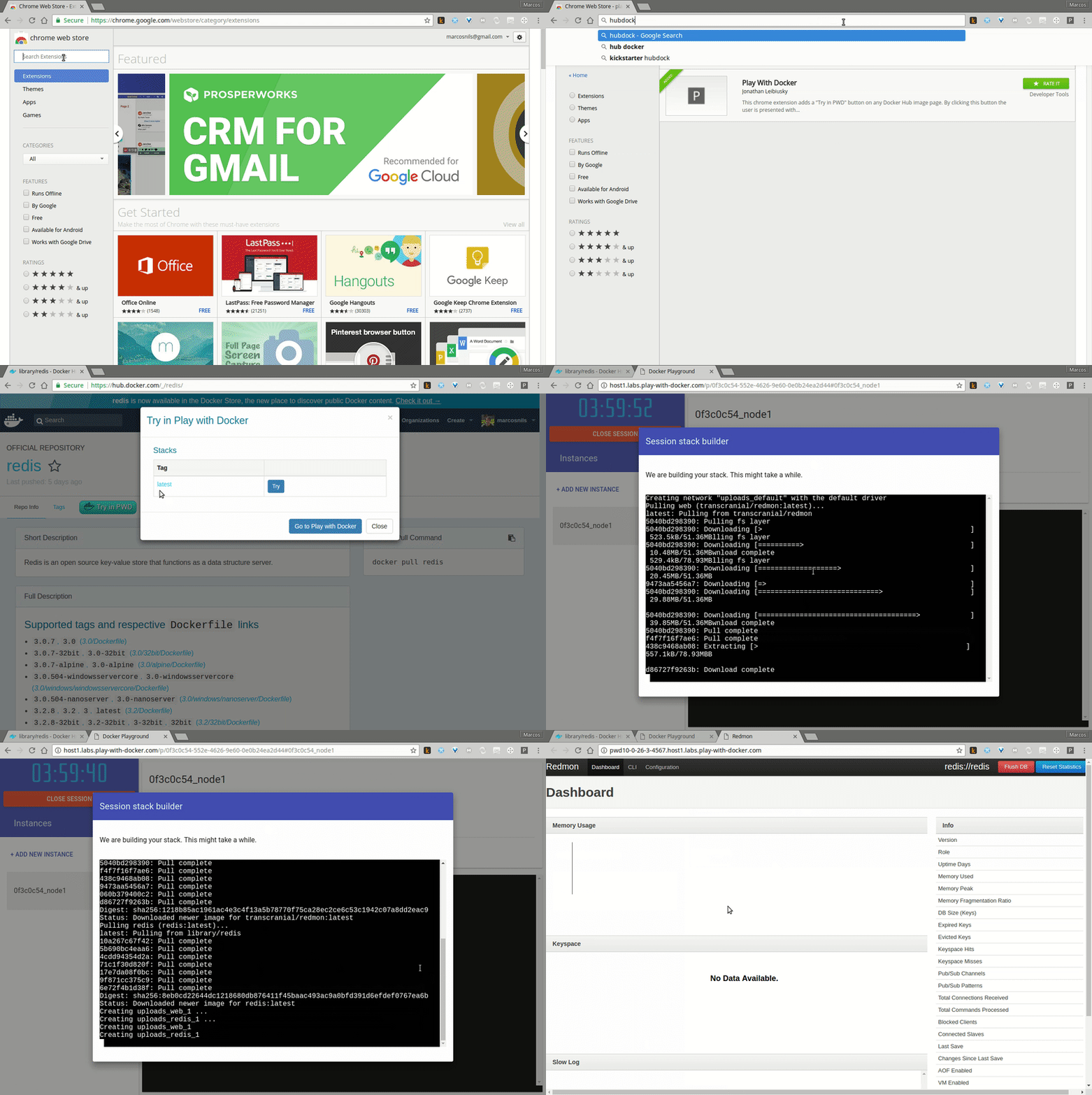
- Chrome extension “ Play with Docker ”, adding a “Try in PWD” button to launch popular images from DockerHub in this online environment, as well as the ability to embed a similar button on their sites (for their images):
- New laboratory work on the training resource (including working with multi-stage builds , which appeared in Docker 17.06 ).