July 10, 2017 at 14:14
MicroFocus-Serena Releases SBM Version 11.3
- Transfer
In late June, MicroFocus-Serena released version 11.3 of its business process automation platform. The release is minor, but it has a number of very popular and useful changes. Let's go through the list of the most significant of them.
Tools for organizing your workspace, known as Folders and Quick Links since TeamTrack 6.2, were undeservedly forgotten and excluded from the new WorkCenter user interface layout. Quick links made it possible to quickly “attach” a link to the desktop or to a constantly needed report, or the current release, or a sprint backlog chart, or a saved defect form template in the UI of the current version, or a link to TK. And Folders allowed all this wealth to be conveniently stored and quickly found. Moreover, the contents of folders can also be shared with colleagues. For example, I collected all useful KPI reports into a folder and gave everyone access - use it to your health ... Of course, many new tools were invented in WorkCenter, for example, report search filters, but Folders and Links will definitely not be superfluous.
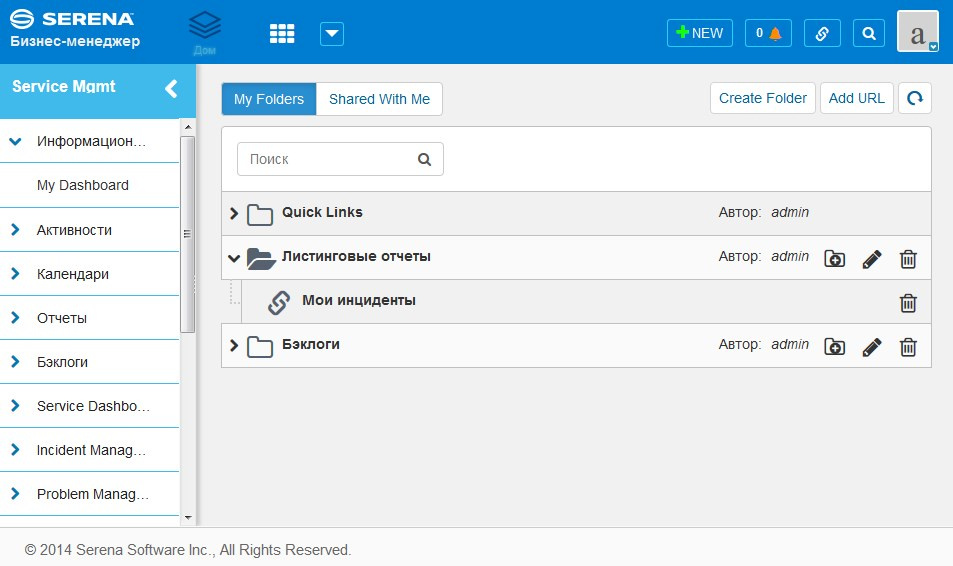
In this version, the following roles for the Folders are added: Owner, co-owner, Participant (collaborators), Add (contributors), View (viewers).
Programmers can now use SBM ModScript to implement business logic scripts that run on the SBM application server. SBM ModScript is a descendant of ChaiScript, and contains extensions for working with SBM objects. Details can be found in the documentation - SBM ModScript Reference Guide. You can understand the main differences from previous SBM AppScript technology in another document - SBM ModScript Transition Guide.

Recall that at the heart of SBM AppScript was VB Script. This engine is definitely more than 20 years old. It works very quickly, and copes with its tasks well. The disadvantages include the lack of powerful ready-made libraries for working with strings or XML, as well as the lack of some familiar amenities in debugging.
For a long time SBM was isolated from users who do not have their profile in the system. Some time ago, it became possible from the system to send emails to arbitrary email addresses. Now there are much more of these possibilities:
Anonymous creation of records by E-mail
So, external users (who do not have their own SBM profile) can now send an email to the mailbox that is processed by SBM, and if the Administrator sets up the ability to create records in the respective projects from unknown senders, then a record will be created. Additionally, you can configure blocking of attachments to letters, spam filters, rules for routing incoming messages from unknown users. See the SBM Application Administrator Guide documentation for configuration details.
It is difficult to overestimate the importance of this feature for companies where SBM is used to automate the processes of technical support for users or ServiceDesk. Now there is a normal communication channel with all your customers!
Managing external user profiles
It is clear that if we received a request from a previously unknown client, we need to interact with him somehow. To do this, a new widget was added (accessible through the Actions menu on the form of the object), allowing you to look at the email address from which the call was received, enter the client’s name, and also add additional external users.
After configuration, the system will automatically substitute the addresses and names of external users in the form of sending letters.
Note: A new External Communication privilege has been added to manage external user profiles. Remember to include her in the appropriate role.
E-mail Recorder and Communications
The E-mail Recorder module allows you to automatically attach electronic correspondence between users to the discussion object. The module will also process correspondence with external users. In SBM, you can configure automatic transition rules (state transitions) upon receipt of a response from an external user.
Email templates for external users
Additional email message templates have been added to the system for sending notifications to external users of emails by the notification server. In addition, the built-in email editor automatically substitutes the addresses of external users associated with this entry in the To field of email. Letter templates can be edited in the settings of each project.
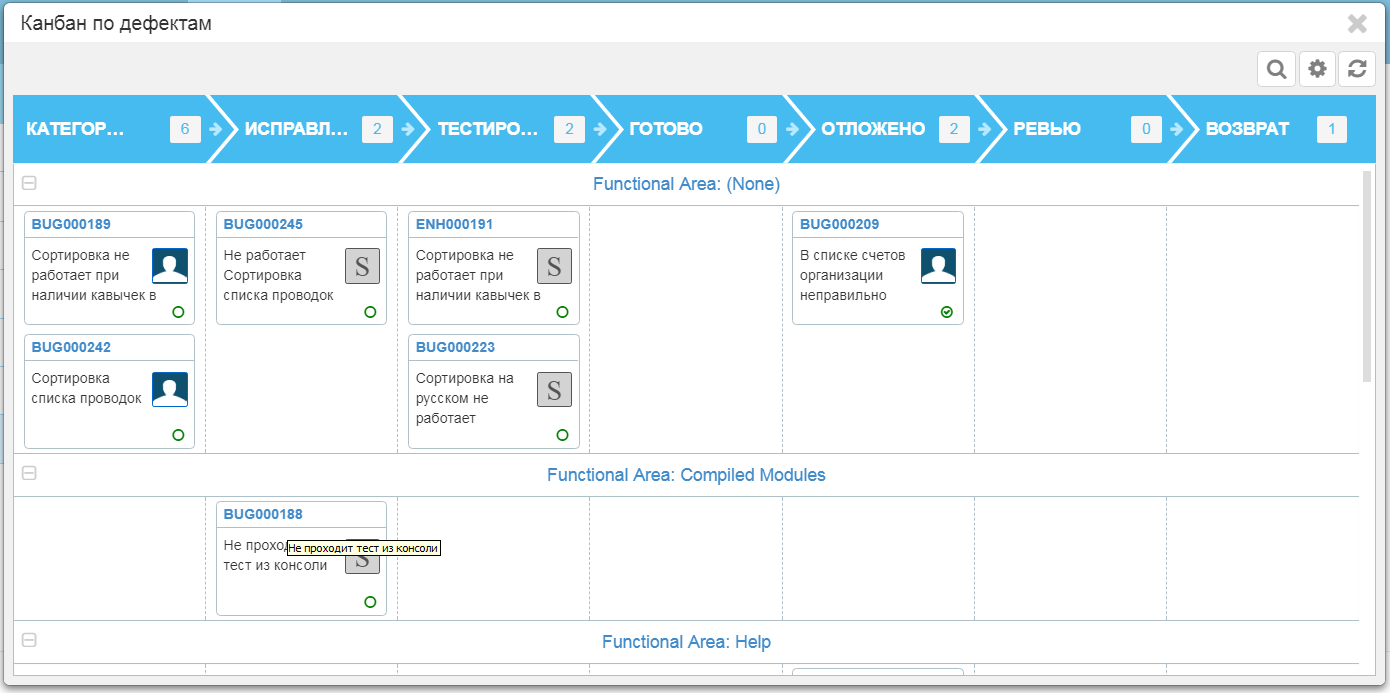
Kanban boards, widely popular in narrow circles, appeared in the 11th version of SBM and are available in WorkCenter. What's new:
Calendar reports and presentations appeared by Work Center a long time ago. As the name implies, this tool allows you to "project" entries on the calendar day / week / month, dynamically apply the system of coloring / attaching icons by field values, and it is also dynamically convenient to filter the display of entries on the calendar according to the selected coloring system / icons. On a single calendar, you can combine data from multiple data streams at the same time. What's new here:
Users with the Global Administration privilege now have access to Deleted Items and Change History reports, which will show a list of deleted reports and the history of changes in SBM reports, respectively.
In the settings menu, users with the Remote Administration privilege can access new analytical reports on the performance of SBM components, utilization of system resources, etc. SBM System Analytics includes Real-Time Monitoring and Run-Time Statistics.
Reuse nested Workflows models for Orchestration scripts. Scripts and orchestration models in the BPEL language are widely used to implement scenarios of the interaction of processes both inside SBM and with external systems. Both synchronous and asynchronous models are possible. In this version, it became possible to highlight frequently occurring steps or actions in separate models, and then include them through the palette of elements of orchestration. In general, the change is useful for large projects where the orchestration engine is widely used, where there is a need to simplify scenarios and reduce the cost of supporting the solution.
In the SBM configurator, you can enable additional means of protection against attacks - Secure Response Headers. Details in the documentation - SBM Installation and Configuration Guide.
SBM Work Center
New system reports
Query At Runtime Improvements for Text Fields
Data selection filters in reports allow the option of specifying filter values at the time the report is executed - this is Query At Runtime. However, to work with test fields, often one conditional operator is not enough. Therefore, the logical operators “AND”, “OR”, “contains”, “like”, “not contains”, “not like” appeared. Very useful, I must say.
SBM System Administrator
Open Custom Popup Now a Modal Dialog Box
Added a new powerful tool for user interface forms - Open Custom Popup. The new item works simply. When a user clicks on a button, link or picture, an additional menu of possible options appears, which opens up a wide palette of implementations of new convenient scripts for working with the system. You can use your code in Javascript or CSS.
This is the release. Ask questions. Follow our news.
Folders and Quick Links appeared in WorkCenter
Tools for organizing your workspace, known as Folders and Quick Links since TeamTrack 6.2, were undeservedly forgotten and excluded from the new WorkCenter user interface layout. Quick links made it possible to quickly “attach” a link to the desktop or to a constantly needed report, or the current release, or a sprint backlog chart, or a saved defect form template in the UI of the current version, or a link to TK. And Folders allowed all this wealth to be conveniently stored and quickly found. Moreover, the contents of folders can also be shared with colleagues. For example, I collected all useful KPI reports into a folder and gave everyone access - use it to your health ... Of course, many new tools were invented in WorkCenter, for example, report search filters, but Folders and Links will definitely not be superfluous.
In this version, the following roles for the Folders are added: Owner, co-owner, Participant (collaborators), Add (contributors), View (viewers).
New scripting engine
Programmers can now use SBM ModScript to implement business logic scripts that run on the SBM application server. SBM ModScript is a descendant of ChaiScript, and contains extensions for working with SBM objects. Details can be found in the documentation - SBM ModScript Reference Guide. You can understand the main differences from previous SBM AppScript technology in another document - SBM ModScript Transition Guide.
Recall that at the heart of SBM AppScript was VB Script. This engine is definitely more than 20 years old. It works very quickly, and copes with its tasks well. The disadvantages include the lack of powerful ready-made libraries for working with strings or XML, as well as the lack of some familiar amenities in debugging.
Improving communications with the outside world
For a long time SBM was isolated from users who do not have their profile in the system. Some time ago, it became possible from the system to send emails to arbitrary email addresses. Now there are much more of these possibilities:
Anonymous creation of records by E-mail
So, external users (who do not have their own SBM profile) can now send an email to the mailbox that is processed by SBM, and if the Administrator sets up the ability to create records in the respective projects from unknown senders, then a record will be created. Additionally, you can configure blocking of attachments to letters, spam filters, rules for routing incoming messages from unknown users. See the SBM Application Administrator Guide documentation for configuration details.
It is difficult to overestimate the importance of this feature for companies where SBM is used to automate the processes of technical support for users or ServiceDesk. Now there is a normal communication channel with all your customers!
Managing external user profiles
It is clear that if we received a request from a previously unknown client, we need to interact with him somehow. To do this, a new widget was added (accessible through the Actions menu on the form of the object), allowing you to look at the email address from which the call was received, enter the client’s name, and also add additional external users.
After configuration, the system will automatically substitute the addresses and names of external users in the form of sending letters.
Note: A new External Communication privilege has been added to manage external user profiles. Remember to include her in the appropriate role.
E-mail Recorder and Communications
The E-mail Recorder module allows you to automatically attach electronic correspondence between users to the discussion object. The module will also process correspondence with external users. In SBM, you can configure automatic transition rules (state transitions) upon receipt of a response from an external user.
Email templates for external users
Additional email message templates have been added to the system for sending notifications to external users of emails by the notification server. In addition, the built-in email editor automatically substitutes the addresses of external users associated with this entry in the To field of email. Letter templates can be edited in the settings of each project.
Improvements in the presentation of the Kanban board
Kanban boards, widely popular in narrow circles, appeared in the 11th version of SBM and are available in WorkCenter. What's new:
- You can now select a backlog as the data source for the Kanban board. What is the beauty? The backlog has a sign of inclusion / exclusion of the task to / from the backlog of the sprint or product. Accordingly, not all tasks will be shown on the Kanban board, but only those that were included in the backlog for implementation. See the SBM Work Center Guide documentation for details.
- Now, on the Kanban board, you can display data from relational tables associated with the main object (only through the relationship - Single Relational). For example, you can additionally display a scrum command or a link to the environment, or a link to a global project, or a link to a Client’s card, etc. Moreover, entries on the Kanban board can be visually grouped and highlighted on this basis in separate bands (swimlanes).
- The drag-n-drop function on the Kanban board now correctly fulfills branching of the process model (decision points rhombuses).
- Sorting of entries in the columns of the Kanban board by system attributes or attributes of the Kanban card Card ID, Card Title or Card Status has been added. You can also use priority from the backlog.
Calendar Improvements
Calendar reports and presentations appeared by Work Center a long time ago. As the name implies, this tool allows you to "project" entries on the calendar day / week / month, dynamically apply the system of coloring / attaching icons by field values, and it is also dynamically convenient to filter the display of entries on the calendar according to the selected coloring system / icons. On a single calendar, you can combine data from multiple data streams at the same time. What's new here:
- Work Center taught how to take calendar events from external sources through JSON / REST services. This can be useful for finding conflicts / intersections when planning.
- Now you can export information about the event in ICS format, then import it into another calendar application such as Microsoft Outlook or any other compatible format.
Track changes in reports. Report deletion control
Users with the Global Administration privilege now have access to Deleted Items and Change History reports, which will show a list of deleted reports and the history of changes in SBM reports, respectively.
SBM System Analytics
In the settings menu, users with the Remote Administration privilege can access new analytical reports on the performance of SBM components, utilization of system resources, etc. SBM System Analytics includes Real-Time Monitoring and Run-Time Statistics.
Reuse nested Workflows models for Orchestration scripts. Scripts and orchestration models in the BPEL language are widely used to implement scenarios of the interaction of processes both inside SBM and with external systems. Both synchronous and asynchronous models are possible. In this version, it became possible to highlight frequently occurring steps or actions in separate models, and then include them through the palette of elements of orchestration. In general, the change is useful for large projects where the orchestration engine is widely used, where there is a need to simplify scenarios and reduce the cost of supporting the solution.
Secure Response Headers
In the SBM configurator, you can enable additional means of protection against attacks - Secure Response Headers. Details in the documentation - SBM Installation and Configuration Guide.
User Interface Changes
SBM Work Center
- New actions with widgets: Copy and Save As
- In backlogs there is an opportunity of independent sorting of lists - accepted in backlog and candidates for backlog.
- In the backlog change history section, information was added about the user who made the backlog changes, the time of these changes, the blog entry itself.
New system reports
- SLA Items Panel. Predicted report after the inclusion of the SLA module in the base delivery of SBM.
- Requests Monitor. This report is more curious. It shows a list of currently running SBM reports. You can stop reports from this view if you have the appropriate rights. In general, the report will be in demand in highly loaded configurations.
Query At Runtime Improvements for Text Fields
Data selection filters in reports allow the option of specifying filter values at the time the report is executed - this is Query At Runtime. However, to work with test fields, often one conditional operator is not enough. Therefore, the logical operators “AND”, “OR”, “contains”, “like”, “not contains”, “not like” appeared. Very useful, I must say.
Administration Changes
SBM System Administrator
- Import data from ODBC sources
- The ability to specify the user on whose behalf the data will be imported
- Ability to execute scripts pre- and post-data processing (AppScript / ModScript)
- Option to update data only if any changes were detected.
But what is especially interesting is that the command-line utility ttadmin.exe is included in this release. Thus, you can write an operating system script and run this script on a schedule. As a result, we get a completely autonomous download of data from external sources by regular means!
SBM Composer Changes
Open Custom Popup Now a Modal Dialog Box
Added a new powerful tool for user interface forms - Open Custom Popup. The new item works simply. When a user clicks on a button, link or picture, an additional menu of possible options appears, which opens up a wide palette of implementations of new convenient scripts for working with the system. You can use your code in Javascript or CSS.
This is the release. Ask questions. Follow our news.