 July 7, 2017 at 16:50
5 tricks to help develop on vue.js + vuex
- Tutorial
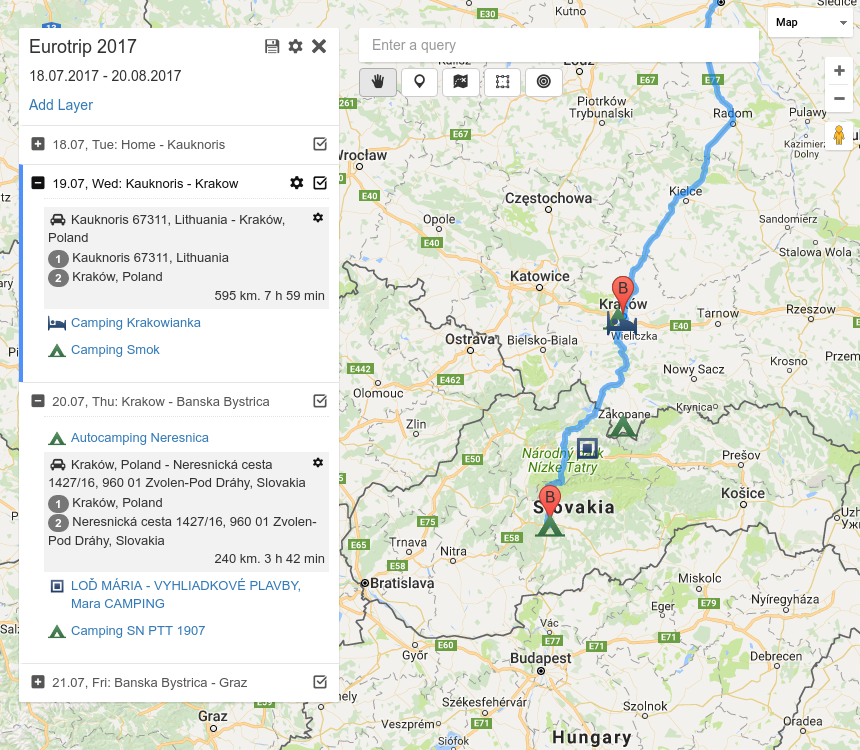
Recently I decided to deal with vue.js . The best way to learn technology is to write something on it. For this purpose, my old route planner was rewritten , and such a project turned out here . The code turned out to be large enough to face the task of scaling.
In this article I will give a number of techniques that, in my opinion, will help in the development of any major project. This material is for you if you have already written your todo sheet on vue.js + vuex, but have not yet buried in large-scale bicycle construction.
Any project on vue.js consists of nested components. The basic principle is props down, events up. The subcomponent receives data from the parent that it cannot change, and a list of parent events that it can trigger.
The principle is valid, but creates a strong connectivity. If the target component is deeply embedded, you have to drag the data and events through all the wrappers.
We will deal with events. It is often useful to have a global event emitter that any component can communicate with, regardless of hierarchy. It is very easy to do, no additional libraries are needed:
After that, access to this. $ Bus appears in any component, you can subscribe to events through this. $ Bus. $ On () and call them through this. $ Bus. $ Emit (). Here is an example .
It is very important to understand that this. $ Bus is a global object for the entire application. If you forget to unsubscribe, the components remain in the memory of this object. Therefore, for every this. $ Bus. $ On in mounted there must be a corresponding this. $ Bus. $ Off in beforeDestroy. For example, like this:
Sometimes in a component you need to initialize some kind of asynchronous thing (for example, google maps instance), which you want to access from other components. To do this, you can organize an object that will store promises. For example, such . As in the event bus, do not forget to delete when the component is uninitialized. In general, in the above way, you can attach any external object with any logic to vue.
In a complex project, data is often heavily nested. Working with such data is inconvenient both in vuex and in redux. It is recommended to reduce nesting, for example, using the normalizr utility . A utility is good, but it’s even better to understand what it does. I did not immediately come to understand the flat structure, for the same type of myself I will consider a detailed example.
We have projects, in each - an array of layers, in each layer - an array of pages: projects> layers> pages. How to organize storage?
The first thing that comes to mind is the usual nested structure:
This structure is easy to read, easy to run the foreach cycle on projects, render subcomponents with lists of layers and so on. But suppose you want to change the name of the page with id: 1. Inside some small component that renders the page, $ store.dispatch is called ("changePageName", {id: 1, name: "new name"}). How to find a place where in this deeply nested structure lies the desired page with id: 1? Run through the entire store? Not the best solution.
You can specify the full path, such as
But this means that in every small component of the page rendering, you need to drag the entire hierarchy, both projectId and layerId. Inconveniently.
Second attempt, from sql:
Now the data is easy to change. But it's hard to run. To display all pages in one layer, you need to run through all pages in general. This can be hidden in the getter, or in the rendering of the template, but there will still be a run.
Third attempt, normalizr approach:
Now all the pages of the layer can be obtained through a trivial getter
Note that the getter does not run through the list of all pages. Data is easy to change. The order of the pages in the layer is specified in the layer object, and this is also correct, since the re-sorting procedure is usually in the component that displays the list of objects, in our case it is the component that renders the layer.
According to vuex rules, changes to storage data should occur only in mutation functions, mutations should be synchronous. Vuex contains the main application logic. Therefore, the data validation block will also be logical to include in the repository.
But validation is far from always synchronous. Therefore, at least part of the validation logic will not be in mutations, but in actions.
I suggest not to break the logic, and to store all validation in actions in general. Mutations become primitive, composed of elementary assignments. But then they cannot be accessed directly from the application. Those. mutations are a kind of utilitarian thing inside the repository that is only useful for a vuex debugger. The application communicates with the repository through exclusively actions. In my application, any action, even synchronous, always returns a promise. It seems to me that it is obvious to consider all actions asynchronous (and work with them as promises) easier than remembering what is what.
Sometimes it happens that the data in the storage does not change. For example, it can be the search results for objects on the map, requested from an external api. Each result is a complex object with many fields and methods. You need to display a list of results. Need reactivity list. But the data inside the objects themselves is constant, and there is no need to track the change in each property. To limit reactivity, you can use Object.freeze.
But I prefer a more stupid method: let the state store only the list of id-shniks, and the results themselves lie side by side in the array. Type:
Something I did not get as beautiful as I wanted. Here are my questions for the community:
- How to beat css animations more difficult than changing opacity? Often you want to animate the appearance of a block of unknown sizes, i.e. change its height from height: 0 to height: auto.
This is easily solved with javascript - just wrap it in a container with overflow: hidden, look at the height of the wrapped element and animate the height of the container. Can this be solved via css?
- I am looking for a normal way to work with icons in webpack, so far unsuccessfully (therefore I continue to use fontello). Like whhg icons . Pulled out svg, broke into files. I want to select several files and automatically assemble in font inline + classes based on file names. How can this be done?
In this article I will give a number of techniques that, in my opinion, will help in the development of any major project. This material is for you if you have already written your todo sheet on vue.js + vuex, but have not yet buried in large-scale bicycle construction.
1. Centralized event bus
Any project on vue.js consists of nested components. The basic principle is props down, events up. The subcomponent receives data from the parent that it cannot change, and a list of parent events that it can trigger.
The principle is valid, but creates a strong connectivity. If the target component is deeply embedded, you have to drag the data and events through all the wrappers.
We will deal with events. It is often useful to have a global event emitter that any component can communicate with, regardless of hierarchy. It is very easy to do, no additional libraries are needed:
Object.defineProperty(Vue.prototype,"$bus",{
	get: function() {
		return this.$root.bus;
	}
});
new Vue({
	el: '#app',
	data: {
		bus: new Vue({}) // Here we bind our event bus to our $root Vue model.
	}
});
After that, access to this. $ Bus appears in any component, you can subscribe to events through this. $ Bus. $ On () and call them through this. $ Bus. $ Emit (). Here is an example .
It is very important to understand that this. $ Bus is a global object for the entire application. If you forget to unsubscribe, the components remain in the memory of this object. Therefore, for every this. $ Bus. $ On in mounted there must be a corresponding this. $ Bus. $ Off in beforeDestroy. For example, like this:
mounted: function() {
	this._someEvent = (..) => {
		..
	}
	this._otherEvent = (..) => {
		..
	}
	this.$bus.$on("someEvent",this._someEvent);
	this.$bus.$on("otherEvent",this._otherEvent);
},
beforeDestroy: function() {
	this._someEvent && this.$bus.$off("someEvent",this._someEvent);
	this._otherEvent && this.$bus.$off("otherEvent",this._otherEvent);
}
2. Centralized Promises Bus
Sometimes in a component you need to initialize some kind of asynchronous thing (for example, google maps instance), which you want to access from other components. To do this, you can organize an object that will store promises. For example, such . As in the event bus, do not forget to delete when the component is uninitialized. In general, in the above way, you can attach any external object with any logic to vue.
3. Flat structures (flatten store)
In a complex project, data is often heavily nested. Working with such data is inconvenient both in vuex and in redux. It is recommended to reduce nesting, for example, using the normalizr utility . A utility is good, but it’s even better to understand what it does. I did not immediately come to understand the flat structure, for the same type of myself I will consider a detailed example.
We have projects, in each - an array of layers, in each layer - an array of pages: projects> layers> pages. How to organize storage?
The first thing that comes to mind is the usual nested structure:
projects: [{
	id: 1,
	layers: [{
		id: 1,
		pages: [{
			id: 1,
			name: "page1"
		},{
			id: 2,
			name: "page2"
		}]
	}]
}];
This structure is easy to read, easy to run the foreach cycle on projects, render subcomponents with lists of layers and so on. But suppose you want to change the name of the page with id: 1. Inside some small component that renders the page, $ store.dispatch is called ("changePageName", {id: 1, name: "new name"}). How to find a place where in this deeply nested structure lies the desired page with id: 1? Run through the entire store? Not the best solution.
You can specify the full path, such as
$store.dispatch("changePageName",{projectId:1,layerId:1,id:1,name:"new name"})But this means that in every small component of the page rendering, you need to drag the entire hierarchy, both projectId and layerId. Inconveniently.
Second attempt, from sql:
projects: [{id:1}],
layers: [{id:1,projectId:1}],
pages: [{
	id: 1,
	name: "page1",
	layerId: 1,
	projectId: 1
},{
	id: 2,
	name: "page2",
	layerId: 1,
	projectId: 1
}]
Now the data is easy to change. But it's hard to run. To display all pages in one layer, you need to run through all pages in general. This can be hidden in the getter, or in the rendering of the template, but there will still be a run.
Third attempt, normalizr approach:
projects: [{
	id: 1,
	layersIds: [1]
}],
layers: {
	1: {
		pagesIds: [1,2]
	}
},
pages: {
	1: {name:"page1"},
	2: {name:"page2"}
}
Now all the pages of the layer can be obtained through a trivial getter
layerPages: (state,getters) => (layerId) => {
	const layer = state.layers[layerId];
	if (!layer || !layer.pagesIds || layer.pagesIds.length==0) return [];
	return layer.pagesIds.map(pageId => state.pages[pageId]);
}
Note that the getter does not run through the list of all pages. Data is easy to change. The order of the pages in the layer is specified in the layer object, and this is also correct, since the re-sorting procedure is usually in the component that displays the list of objects, in our case it is the component that renders the layer.
4. Mutations are not needed
According to vuex rules, changes to storage data should occur only in mutation functions, mutations should be synchronous. Vuex contains the main application logic. Therefore, the data validation block will also be logical to include in the repository.
But validation is far from always synchronous. Therefore, at least part of the validation logic will not be in mutations, but in actions.
I suggest not to break the logic, and to store all validation in actions in general. Mutations become primitive, composed of elementary assignments. But then they cannot be accessed directly from the application. Those. mutations are a kind of utilitarian thing inside the repository that is only useful for a vuex debugger. The application communicates with the repository through exclusively actions. In my application, any action, even synchronous, always returns a promise. It seems to me that it is obvious to consider all actions asynchronous (and work with them as promises) easier than remembering what is what.
5. Limitation of reactivity
Sometimes it happens that the data in the storage does not change. For example, it can be the search results for objects on the map, requested from an external api. Each result is a complex object with many fields and methods. You need to display a list of results. Need reactivity list. But the data inside the objects themselves is constant, and there is no need to track the change in each property. To limit reactivity, you can use Object.freeze.
But I prefer a more stupid method: let the state store only the list of id-shniks, and the results themselves lie side by side in the array. Type:
const results = {};
const state = {resultIds:[]};
const getters = {
	results: function(state) {
		return _.map(state.resultsIds,id => results[id]);
	}
}
const mutations = {
	updateResults: function(state,data) {
		const new = {};
		const newIds = [];
		data.forEach(r => {
			new[r.id] = r;
			newIds.push(r.id);
		});
		results = new;
		state.resultsIds = newIds;
	}
}
Questions
Something I did not get as beautiful as I wanted. Here are my questions for the community:
- How to beat css animations more difficult than changing opacity? Often you want to animate the appearance of a block of unknown sizes, i.e. change its height from height: 0 to height: auto.
This is easily solved with javascript - just wrap it in a container with overflow: hidden, look at the height of the wrapped element and animate the height of the container. Can this be solved via css?
- I am looking for a normal way to work with icons in webpack, so far unsuccessfully (therefore I continue to use fontello). Like whhg icons . Pulled out svg, broke into files. I want to select several files and automatically assemble in font inline + classes based on file names. How can this be done?









