June 27, 2017 at 10:49
Static analysis as part of the Unreal Engine development process

The Unreal Engine project is developing - new code is added and the already written one will change. An inevitable consequence of the development of the project is the appearance of new errors in the code, which are desirable to detect as early as possible. One way to reduce the number of errors is to use the PVS-Studio static code analyzer. Moreover, the analyzer is also rapidly developing and learning to find new error patterns, some of which will be discussed in this article. If you care about the quality of the code for your projects, then this article is for you.
The publication was prepared by Andrey Karpov, code examples were provided by Ilya Ivanov and Sergey Vasiliev from the PVS-Studio team. The original source is the Unreal Engine Blog: " Static Analysis as Part of the Development Process in Unreal Engine ."
Static code analysis, theory
Static code analysis is the process of identifying errors and shortcomings in the source code of programs. Static analysis can be considered as an automated code review process. Let's dwell on the code review in a bit more detail.
Code review is one of the oldest and most useful defect detection methods. It consists in carefully reading the source code together and making recommendations for improving it. While reading the code, errors or sections of code that may become erroneous in the future are revealed. It is also believed that the author of the code during the review should not give an explanation of how this or that part of the program works. The algorithm should be understood directly from the program text and comments. If this condition is not met, then the code should be finalized.
As a rule, a code review works well, as programmers notice errors in someone else’s code much easier. You can learn more about code review techniques in Steve McConnell's excellent book, “Perfect Code” (Steve McConnell, “Code Complete”).
The code review methodology has two drawbacks:
- Extremely high price. It is necessary to regularly distract several programmers from their main work to review the new code or re-review the code after making recommendations. In this case, programmers should regularly take breaks to relax. If you try to look at large fragments of code at once, then your attention dulls quickly, and the benefits of reviewing the code quickly fade away.
- People find it difficult to detect errors that are not directly related to the new / changed code. Considering the freshly written fragment, it is difficult to assume that the malloc function does not work correctly in it because the stdlib.h header file is not connected . This situation is described in more detail in the article " Beautiful 64-bit error in the C language ". Another example: changing the type of a function or variable in the header file. In theory, after such changes, you need to look at all the code in which this function or variable is used. In practice, this is too time-consuming and, as a rule, the review is limited only to those places where the programmer changed something.
On the one hand, I want to regularly review the code. On the other hand, it’s too expensive. The tradeoff is static code analysis tools. They process the source code of the programs and give the programmer recommendations to pay increased attention to certain sections of the code. At the same time, the analyzers do not get tired and check all the code that is affected by edits in the header files. Of course, the program does not replace a full review of the code executed by a team of programmers. However, the benefit / price ratio makes using static analysis a very useful practice for many companies.
Like any other error detection methodology, static analysis has its own strengths and weaknesses. There is no one ideal method for testing programs. The best result can be obtained using a combination of different approaches, such as: good coding style, static code analysis, dynamic code analysis, unit testing, regression testing, and so on.
An important advantage of static analysis is the ability to find many errors immediately after they appear in the code, which means that fixing them will be very cheap.
The fact is that the earlier the error is detected, the lower the cost of fixing it. So, according to the data provided in McConnell’s book “Perfect Code”, error correction at the testing stage will cost ten times more than at the coding (writing code) stage:
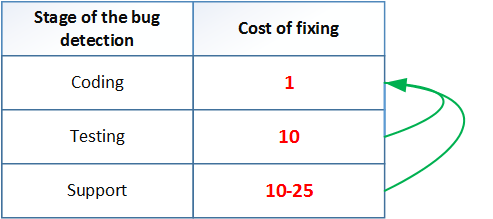
Table 1. The average cost of fixing defects depending on the time of their detection (the data for the table are taken from the book by S. McConnell "Perfect Code").
Static analysis tools allow you to identify a large number of errors specific to the stage of writing code, which significantly reduces the development cost of the entire project.
The relevance of using static analyzers will only grow over time. This is due to the gradual increase in the code size of modern applications. Programs are getting bigger, harder. Moreover, the error density in the code depends on its size nonlinearly.
The larger the project, the more errors per 1000 lines of code it contains. Take a look at this interesting table:
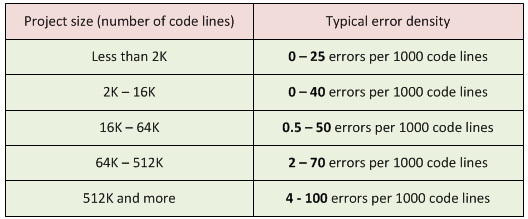
Table 2. Project size and typical error density. Data sources: “Program Quality and Programmer Productivity” (Jones, 1977), “Estimating Software Costs” (Jones, 1998).
To make it easier to perceive the data, we will build graphs.
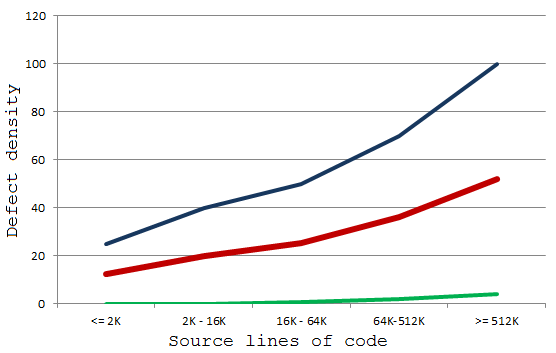
Chart 1. Typical error density in the project. Blue is the maximum amount. Red is the average amount. Green is the smallest amount.
From the graph it follows that with the growth of the project, programmers are forced to use more and more means that will allow them to maintain the required quality of the project. You can’t do the same thing to create high-quality code, which was done, say, 8 years ago. This can be an unpleasant discovery for the team: they seem to be writing code as always, and the quality situation is getting worse.
It is necessary to master new methodologies and tools, otherwise, with the growth of the project, old technologies will not be enough. And one of the extremely useful techniques that you should use is the static code analysis that we examined.
If the reader was not yet familiar with the methodology for static code analysis, I hope I managed to interest him. For a more detailed acquaintance with her, I offer several links:
- John Carmack. Static code analysis .
- Wikipedia Static code analysis .
- Wikipedia List of tools for static code analysis .
- Al Bessey, Ken Block, Ben Chelf, Andy Chou, Bryan Fulton, Seth Hallem, Charles Henri-Gros, Asya Kamsky, Scott McPeak, Dawson Engler. A Few Billion Lines of Code Later: Using Static Analysis to Find Bugs in the Real World .
- Ekaterina Milovidova. A selection of videos about static code analysis .
- PVS-Studio team blog .
Now is the time to move from theory to practice and see how static analysis helps a project like the Unreal Engine game engine.
Unreal engine
Our team was once again honored to work with the Unreal Engine code!
Although we already did this two years ago, but over the past time we have accumulated more work on editing and improving the code. It is always useful and interesting to look at the code base of such a project after a two-year break. There are several reasons for this.
First of all, we are interested in looking at the false positives of the analyzer. Something can be fixed in our tool, and this will reduce the number of unnecessary messages. Fighting false positives is an ongoing task for developers of any code analyzer. Those who are interested in this topic, I propose to read the article " How and why static analyzers fight false positives ."
For two years, the Unreal Engine code base has changed quite a lot. Some fragments disappeared, some were added. Sometimes even entire folders. Therefore, not all parts of the code received enough attention, which means that there is also work for PVS-Studio there.
I would like to praise Epic Games for paying great attention to the quality of the code and using tools like PVS-Studio. The reader, of course, can grin: “Of course, your team should praise Epic Games, because it is your client.” I must admit, we have a motive to leave positive feedback about developers from Epic Games. However, I praised the company quite sincerely. The fact that static code analysis tools are used indicates the maturity of the project development cycle and the company's concern for the reliability and security of the code.
Why am I sure that using PVS-Studio can significantly improve code quality? Because it is one of the most powerful static analyzers that easily detects errors even in projects such as:
- GCC ( errors )
- Clang ( errors , errors , errors )
- Valgrind ( errors )
- GDB ( errors )
- FreeBSD ( errors , errors )
- and so on .
Using PVS-Studio raises the quality of the code by one additional step. Epic Games takes care of everyone who uses the Unreal Engine in their projects. Each corrected mistake will reduce someone's headache.
Interesting bugs
I will not talk about all the errors that we found and corrected in Unreal Engine, but I will highlight only a few that, in my opinion, deserve attention. Those interested can familiarize themselves with other errors by looking at the pull request on GitHub. To access the source code and the specified pull request, you must have access to the Unreal Engine repository on GitHub. To do this, you must have GitHub and EpicGames accounts, which must be linked to unrealengine.com . After that, you need to accept the invitation to join the Epic Games community on GitHub. Instructions .
The development of the PVS-Studio analyzer is associated not only with the advent of new diagnostics, but also with the improvement of existing ones. For example, algorithms for calculating the possible values of variables are improved. Thanks to this, about a year ago, the analyzer began to detect errors of this kind:
uint8* Data = (uint8*)PointerVal;
if (Data != nullptr || DataLen == 0)
{
  NUTDebug::LogHexDump(Data, DataLen);
}
else if (Data == nullptr)
{
  Ar.Logf(TEXT("Invalid Data parameter."));
}
else // if (DataLen == 0)
{
  Ar.Logf(TEXT("Invalid DataLen parameter."));
}
PVS-Studio analyzer warning: V547 Expression 'Data == nullptr' is always true. unittestmanager.cpp 1924
If the condition (Data! = nullptr || DataLen == 0) is not met, then this means that the Data pointer is exactly nullptr . Therefore, further verification (Data == nullptr) does not make sense.
The correct code is:
if (Data != nullptr && DataLen > 0)Diagnostics V547 exists in the analyzer since 2010. However, the imperfection of the mechanism for calculating the values of variables did not allow finding this error. The analyzer saw the presence in the first condition of checking the value of the DataLen variable , and could not figure out what the values of the variables are in different conditions. For a person, the analysis of the given code is not a problem, but from the point of view of writing algorithms for finding such errors, it is not so simple.
I demonstrated an improvement in the internal mechanisms of PVS-Studio, which allowed me to identify a new error. Figuratively speaking, these improvements were made "deep", i.e. the analyzer began to work more accurately.
We are making improvements in breadth, supporting the new constructs that appear in new versions of the C ++ language. It’s not enough to learn how to parse C ++ 11, C ++ 14 code, and so on. It is equally important to improve old diagnostics and implement new ones to identify errors in new language constructs. As an example, let me give you a V714 diagnostic that looks for the wrong range-based loops. In Unreal Engine, V714 diagnostics point to the following cycle:
for (TSharedPtr SlateWidget : SlateWidgets)
{
  SlateWidget = nullptr;
}
PVS-Studio Warning: V714 Variable is not passed into foreach loop by a reference, but its value is changed inside of the loop. vreditorradialfloatingui.cpp 170
The programmer wanted to assign nullptr to all elements in the SlateWidgets container . The error is that SlateWidget is an ordinary local variable, created again at each iteration of the loop. Writing a value to this variable does not change the item in the container. For the code to work correctly , you need to create a link:
for (TSharedPtr &SlateWidget : SlateWidgets)
{
  SlateWidget = nullptr;
}
Of course, we are gradually adding diagnostics to the analyzer, which are little related to the language. For example, V767 diagnostics did not exist in 2015 when our team wrote a previous article about testing the Unreal Engine project. Diagnostics appeared in PVS-Studio version 6.07 (August 8, 2016). Thanks to her appearance, such an error was revealed:
for(int i = 0; i < SelectedObjects.Num(); ++i)
{
  UObject* Obj = SelectedObjects[0].Get();
  EdObj = Cast(Obj);
  if(EdObj)
  {
    break;
  }
}
PVS-Studio Warning: V767 Suspicious access to element of 'SelectedObjects' array by a constant index inside a loop. skeletonnotifydetails.cpp 38
The loop should search for an element that is of type UEditorSkeletonNotifyObj . Due to a random typo when choosing an element, a numerical literal 0 is written instead of the variable i . The correct version of the code:
UObject* Obj = SelectedObjects[i].Get();Let's look at one of the recently created V763 diagnostics, which, like V767, appeared in PVS-Studio version 6.07. The error is interesting, but in order to show it, I have to cite a fairly long body of the RunTest function in the article :
bool FCreateBPTemplateProjectAutomationTests::RunTest(
  const FString& Parameters)
{
  TSharedPtr NewProjectWizard;
  NewProjectWizard = SNew(SNewProjectWizard);
  TMap> >& Templates =
    NewProjectWizard->FindTemplateProjects();
  int32 OutMatchedProjectsDesk = 0;
  int32 OutCreatedProjectsDesk = 0;
  GameProjectAutomationUtils::CreateProjectSet(Templates,
    EHardwareClass::Desktop,
    EGraphicsPreset::Maximum,
    EContentSourceCategory::BlueprintFeature,
    false,
    OutMatchedProjectsDesk,
    OutCreatedProjectsDesk);
  int32 OutMatchedProjectsMob = 0;
  int32 OutCreatedProjectsMob = 0;
  GameProjectAutomationUtils::CreateProjectSet(Templates,
    EHardwareClass::Mobile,
    EGraphicsPreset::Maximum,
    EContentSourceCategory::BlueprintFeature,
    false,
    OutMatchedProjectsMob,
    OutCreatedProjectsMob);
  return ( OutMatchedProjectsDesk == OutCreatedProjectsDesk ) &&
         ( OutMatchedProjectsMob  == OutCreatedProjectsMob  );
}
From the above code, the following is important to us:
- Using the first call to the CreateProjectSet function, they try to initialize the OutMatchedProjectsDesk and OutCreatedProjectsDesk variables .
- Using the second call to the CreateProjectSet function, they try to initialize the OutMatchedProjectsMob and OutCreatedProjectsMob variables .
The following is a check that the values of these variables satisfy the condition:
return ( OutMatchedProjectsDesk == OutCreatedProjectsDesk ) &&
       ( OutMatchedProjectsMob  == OutCreatedProjectsMob  );
Do not look for errors in the body of the considered function, they are not there. I cited this code to show that the CreateProjectSet function is expected to write values to two variables passed to it as the last two actual arguments.
The error lies in wait just in the CreateProjectSet function :
static void CreateProjectSet(.... int32 OutCreatedProjects,
                                  int32 OutMatchedProjects)
{
  ....
  OutCreatedProjects = 0;
  OutMatchedProjects = 0;
  ....
  OutMatchedProjects++;
  ....
  OutCreatedProjects++;
  ....
}
PVS-Studio tool will give two warnings here:
- V763 Parameter 'OutCreatedProjects' is always rewritten in function body before being used. gameprojectautomationtests.cpp 88
- V763 Parameter 'OutMatchedProjects' is always rewritten in function body before being used. gameprojectautomationtests.cpp 89
The analyzer is absolutely right when it warns that the values of the OutCreatedProjects and OutMatchedProjects arguments are not used in any way, but are immediately overwritten with the value 0 .
The error is simple: forgot to make the variables links. The correct code is:
static void CreateProjectSet(.... int32 &OutCreatedProjects,
                                  int32 &OutMatchedProjects)
Above, I have cited errors that require at least some care to detect. But there are a lot more very simple errors. For example, missing break statements :
{
  case EWidgetBlendMode::Opaque:
    ActualBackgroundColor.A = 1.0f;
  case EWidgetBlendMode::Masked:
    ActualBackgroundColor.A = 0.0f;
}
Or incorrect comparison of several variables for equality:
checkf(GPixelFormats[PixelFormat].BlockSizeX
    == GPixelFormats[PixelFormat].BlockSizeY
    == GPixelFormats[PixelFormat].BlockSizeZ
    == 1,
  TEXT("Tried to use compressed format?"));
If someone is new to C ++ and does not understand what is wrong with this comparison, I suggest that you look into the description of the V709 diagnostic .
Most of these errors are among the detected by PVS-Studio. But since they look so simple, why go unnoticed?
These errors are simple when they are highlighted in this article for the reader. In the code of real applications, it is extremely difficult to notice them. Even with code reviews, the gaze can slide across the block
{
  case EWidgetBlendMode::Opaque:
    ActualBackgroundColor.A = 1.0f;
  case EWidgetBlendMode::Masked:
    ActualBackgroundColor.A = 0.0f;
}
and not notice errors in it. The code seems so simple that the programmer does not even read it, considering it to be completely correct.
Let's now discuss the question a bit: is it possible to somehow reduce the number of such errors?
Recommendation
The errors described in the article were found using PVS-Studio, and most likely the reader expects me to recommend using static code analysis tools. Yes, I recommend integrating PVS-Studio static code analyzer into the development process. There is no need to deny yourself the opportunity to find a number of errors immediately after writing the code.
However, in this section I wanted to discuss a very important point, which, as a rule, is not mentioned in the articles devoted to the quality of the code.
It is impossible to achieve a high quality project until a team of programmers recognizes for itself that it makes mistakes, including simple ones.
This phrase sounds corny, but it is very important. Until the programmer realizes that this statement does not apply to the abstract programmer, but to himself, no tool or methodology will benefit. In other words, programmers are often too proud to admit that they need supporting tools and techniques for writing quality code.
All programmers know that there are errors in the programs. However, they believe that the rules, recommendations and tools do not exist for them, since they are professional developers and write good code.
This is the problem of a person reevaluating his level. About her well written in the article " Programmers 'above average' " ( en ). To quote a passage:
How do you rate your level as a programmer (below average, average, above average)?
According to psychological surveys among different groups , about 90% of programmers answer “Above average”.
Obviously, this cannot be true. In a group of 100 people, 50 will always be higher and 50 will be below average. This effect is known as the illusion of superiority . It is described in many areas, but even if you heard about it, you will probably still answer “above average”.
This is a problem that prevents programmers from mastering new technologies and methodologies. And my main recommendation is to try to rethink my attitude to my own work and the work of the team as a whole. The position “I / we write excellent code” is counterproductive. People tend to make mistakes, and programmers too.
Having understood all this, you can take the biggest step towards quality software.
Note. I further suggest to project managers a peek into this article .
I wanted to warn against one mistake of reasoning. Static and dynamic analyzers mainly find fairly simple errors and typos. Yes, they will not find a high-level error in the algorithm, since artificial intelligence has not yet been invented. However, a simple mistake can do a lot of damage and take a lot of time / effort / money. More details: " A simple error in coding does not mean a non-fearful error ."
And again: do not look for a silver bullet. Use a combination of various elements, such as:
- To overlook “our team is above average”;
- The coding standard that all developers on the team adhere to;
- Code reviews (at least the most important sections and sections written by new employees);
- Static code analysis;
- Dynamic code analysis;
- Regression testing, smoke testing;
- Use of unit tests, TDD;
- etc.
I do not urge to start using all of the above immediately. In different projects, something will be more useful, something less. The main thing is not to hope for one thing, but to use a reasonable combination of techniques. Only this will improve the quality and reliability of the code.
Conclusion
Unreal Engine developers care about the quality of their code, and the PVS-Studio team, to the best of their ability, helps them with this.
PVS-Studio team is ready to work with the code and your projects. In addition to selling the PVS-Studio analyzer and its maintenance, we conduct code audits, code migration, etc.
I wish everyone as few bugs in the programs as possible.