May 23, 2017 at 15:29
Smart bypass of locks in Ukraine
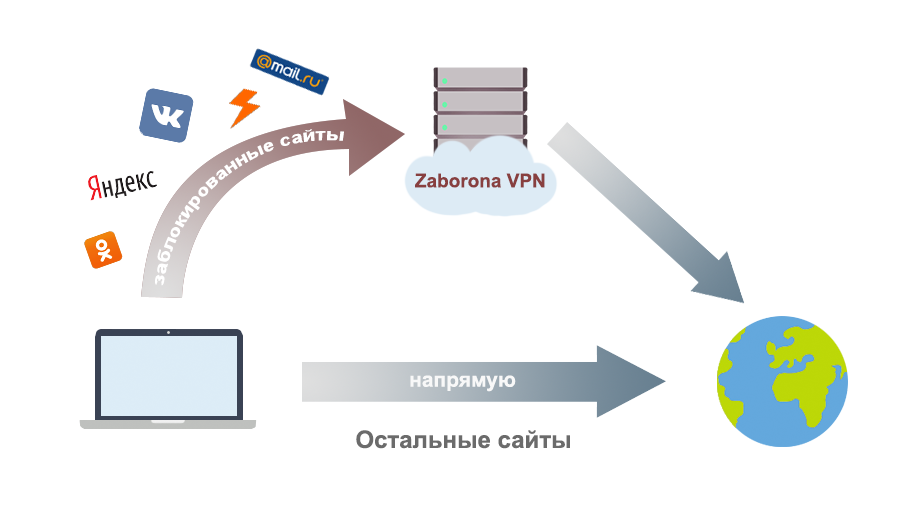
The article describes how to configure the free Zaborona.Help service to bypass site blocking in Ukraine.
The configuration feature is that through VPN only traffic to blocked networks is routed , other sites work directly . It works on all major platforms: Windows, Linux, iOS, MacOS, Android.
VPN does not affect the speed of the Internet, does not replace IP for other sites and does not interfere with the operation of online games, voice traffic, etc.
Challenges of Popular Lock-Bypass Tools
- Browser plugins - do not work for mobile applications, proxy all traffic through their servers. They have access to the contents of the page and threaten security.
- Ordinary VPNs - route all traffic through their servers. It affects the speed of the Internet, increase delays, replaces IP for all sites.
- Proxy browsers - do not allow to bypass the blocking of mobile applications.
The configuration process is described using the OpenVPN example and can be easily repeated in a few minutes.
Settings on the client side are performed using a single configuration file and do not require manual entry of addresses and passwords.
Server selection
The server for the VPN should have good connectivity at the network level with your provider so that the delays are minimal, as well as with the resources that you plan to visit through this VPN. Data centers in the USA, China, Japan are not the best choice.
Here are a few options that I chose for the Zaborona.help service:
Linode.com is a cool and reliable hosting with good channels.
Pros:
- Gigabit channel, good connectivity in Europe
- Routable block of / 64 IPv6 addresses. You can give VPN clients real IP directly.
Minuses:
- Minimum cost $ 5
- 1TB of outgoing traffic at a minimum rate
- $ 20 per terabyte for exceeding the limit
Scaleway.com - cheap hosting with unlimited traffic.
Pros:
- Min price for server € 3
- Unlimited traffic, 200Mbit / s
- Data center in Poland (close to Ukraine)
Minuses:
- One IPv6 address per server (what a stupid thing!)
- Not the best connectivity with locked resources
For reliability, several servers from both providers are used at once. Balancing is done primitively, at the DNS level.
The service domain, to which vpn.zaborona.help clients connect , has several A-records directed to all servers at once. This allows you to evenly smudge clients across servers. Minimum TTL records allows you to quickly remove the problem server from the general list and redirect clients.
Blocked Services List
From the decree of the President of Ukraine No. 133/2017 , a list of companies subject to blocking is known. Knowing this list, you can make a list of all IP ranges belonging to these companies.
For this, you can use the bgp.he.net service .
Here is how BGP-announcements of Yandex look like bgp.he.net/AS13238#_prefixes
We collect all the necessary ranges. Combine neighboring networks in one band to reduce the total number of routes on the client.
At the output, we get the following list without taking into account IPv6 ranges:
Network list routed through Zaborona VPN servers
# Vkontakte
- 87.240.128.0/18
93.186.224.0/20
95.142.192.0/20
95.213.0.0/18
185.29.130.0/24
185.32.248.0/22
2a00: bdc0 :: / 36
2a00: bdc0: e003 :: / 48
2a00 : bdc0: e004 :: / 46
2a00: bdc0: e008 :: / 48
2a00: bdc0: f000 :: / 36
# Yandex
- 5.45.192.0/18
5.255.192.0/18
37.9.64.0/18
37.140.128.0/18
77.75 .152.0 / 22
77.75.159.0/24
77.88.0.0/18
84.201.128.0/18
87.250.224.0/19
93.158.128.0/18
95.108.128.0/17
100.43.64.0/19
109.235.160.0/21
130.193.32.0/19
141.8 .128.0 / 18
178.154.128.0/17
185.32.185.0/24
185.32.186.0/24
185.71.76.0/22
199.21.96.0/22
199.36.240.0/22
213.180.192.0/19
2001: 678: 384 :: / 48
2620: 10f: d000 :: / 44
2a02: 6b8 :: / 32
2a02: 5180 :: / 32
# Mail.ru
- 5.61.16.0/21
5.61.232.0/21
79.137.157.0/24
79.137.183.0/24
94.100.176.0/20
95.163.32.0/19
95.163.248.0 / 21
128.140.168.0/21
178.22.88.0/21
178.237.16.0/20
185.5.136.0/22
185.16.148.0/22
185.16.244.0/22
188.93.56.0/21
194.186.63.0/24
195.211.20.0/22
195.218.168.0 / 24
217.20.144.0/20
217.69.128.0/20
178.22.91.0/24
178.22.92.0/23
185.16.244.0/23
195.211.128.0/22
208.87.94.0/24
2a00: 1148 :: / 32
2a00: b4c0 :: / 32
# Kaspersky Lab
- 77.74. 176.0 / 22
77.74.181.0/24
77.74.183.0/24
93.159.228.0/22
185.54.220.0/23
185.85.12.0/24
185.85.14.0/23
77.74.176.0/21
91.103.64.0/21
93.159.224.0/21
2a03: 2480 :: / 33
- 87.240.128.0/18
93.186.224.0/20
95.142.192.0/20
95.213.0.0/18
185.29.130.0/24
185.32.248.0/22
2a00: bdc0 :: / 36
2a00: bdc0: e003 :: / 48
2a00 : bdc0: e004 :: / 46
2a00: bdc0: e008 :: / 48
2a00: bdc0: f000 :: / 36
# Yandex
- 5.45.192.0/18
5.255.192.0/18
37.9.64.0/18
37.140.128.0/18
77.75 .152.0 / 22
77.75.159.0/24
77.88.0.0/18
84.201.128.0/18
87.250.224.0/19
93.158.128.0/18
95.108.128.0/17
100.43.64.0/19
109.235.160.0/21
130.193.32.0/19
141.8 .128.0 / 18
178.154.128.0/17
185.32.185.0/24
185.32.186.0/24
185.71.76.0/22
199.21.96.0/22
199.36.240.0/22
213.180.192.0/19
2001: 678: 384 :: / 48
2620: 10f: d000 :: / 44
2a02: 6b8 :: / 32
2a02: 5180 :: / 32
# Mail.ru
- 5.61.16.0/21
5.61.232.0/21
79.137.157.0/24
79.137.183.0/24
94.100.176.0/20
95.163.32.0/19
95.163.248.0 / 21
128.140.168.0/21
178.22.88.0/21
178.237.16.0/20
185.5.136.0/22
185.16.148.0/22
185.16.244.0/22
188.93.56.0/21
194.186.63.0/24
195.211.20.0/22
195.218.168.0 / 24
217.20.144.0/20
217.69.128.0/20
178.22.91.0/24
178.22.92.0/23
185.16.244.0/23
195.211.128.0/22
208.87.94.0/24
2a00: 1148 :: / 32
2a00: b4c0 :: / 32
# Kaspersky Lab
- 77.74. 176.0 / 22
77.74.181.0/24
77.74.183.0/24
93.159.228.0/22
185.54.220.0/23
185.85.12.0/24
185.85.14.0/23
77.74.176.0/21
91.103.64.0/21
93.159.224.0/21
2a03: 2480 :: / 33
This list is changed extremely rarely, so it will not be difficult to update it if necessary.
Configure OpenVPN
The server will use OpenVPN 2.4. It is recommended that you use this version. The Ubuntu LTS repositories have OpenVPN version 2.3, so you can install the required version by connecting the official openvpn repository .
Certificate Issue
The easiest way to generate certificates is to use the easy-rsa utility . This fork from ValdikSS allows you to generate certificates that are suitable for both OpenVPN and Ipsec at the same time.
Key generation with easy-rsa
$ git clone https://github.com/ValdikSS/easy-rsa-ipsec.git
$ cd easy-rsa-ipsec/easyrsa3
$ ./easyrsa init-pki
init-pki complete; you may now create a CA or requests.
$ ./easyrsa build-ca nopass
Generating a 2048 bit RSA private key
…
Common Name (eg: your user, host, or server name) [Easy-RSA CA]:Cool VPN Server
…
$ ./easyrsa build-server-full zaborona.help nopass
Generating a 2048 bit RSA private key
…
Write out database with 1 new entries
Data Base Updated
# В данном случае public это имя клиента. Оно может быть любым.
$ ./easyrsa build-client-full public nopass
Generating a 2048 bit RSA private key
…
Write out database with 1 new entries
Data Base Updated
After generating the certificates, we have the following list of necessary files:
For the server:
easyrsa3 / pki / ca.crt - root certificate
easyrsa3 / pki / issued / zaborona.help.crt - server certificate
easyrsa3 / pki / private / zaborona.help.key - key to server certificate
For the client:
easyrsa3 / pki / ca.crt - root certificate
easyrsa3 / pki / issued / public.crt - client certificate
easyrsa3 / pki / private / public.key - client key
Server config
The list of networks obtained in the previous step is added to the server config. Thus, when connecting to the client, routes to blocked networks through the VPN server will be established. The default route 0.0.0.0 will not be changed.
Since many providers in Ukraine block DNS queries to prohibited sites, it is important to set our resolvers to the client and make sure that access to them is via VPN.
OpenVPN server config
mode server
proto tcp
dev-type tun # Тип драйвера tun, так как нам не нужен L2 уровен
dev zaborona # Имя tun интерфейса на сервере
topology subnet
server 192.168.224.0 255.255.252.0 # Диапазон IP выдаваемых клиентам. Выбираем маску побольше, так как клиентов планируется много
server-ipv6 2a01:7e01:e001:77:8000::/65 # Диапазон IPv6 адресов. Удалите, если у вас нет отдельной маршрутизируемой ipv6 сети на сервере
push "dhcp-option DNS 8.8.8.8" #Устанавливаем DNS резолверы
push "route 8.8.8.8"  # Маршрут до этого адреса через VPN
push "dhcp-option DNS 74.82.42.42" # HE.net DNS в качестве вторичных
push "route 74.82.42.42" # Route to HE.net DNS
txqueuelen 250
keepalive 300 900
persist-tun
persist-key
cipher AES-128-CBC
ncp-ciphers AES-128-GCM
user nobody
duplicate-cn
# log logs/openvpn.log
#status logs/status.log 30
ca ca.crt
cert zaborona.help.crt
key zaborona.help.key
dh dh2048.pem
# Routes
# Yandex network
push "route 5.45.192.0 255.255.192.0"
push "route 5.255.192.0 255.255.192.0"
push "route 37.9.64.0 255.255.192.0"
push "route 37.140.128.0 255.255.192.0"
push "route 77.88.0.0 255.255.192.0"
push "route 84.201.128.0 255.255.192.0"
push "route 87.250.224.0 255.255.224.0"
push "route 93.158.128.0 255.255.192.0"
push "route 95.108.128.0 255.255.128.0"
push "route 100.43.64.0 255.255.224.0"
push "route 130.193.32.0 255.255.224.0"
push "route 141.8.128.0 255.255.192.0"
push "route 178.154.128.0 255.255.128.0"
push "route 199.21.96.0 255.255.252.0"
push "route 199.36.240.0 255.255.252.0"
push "route 213.180.192.0 255.255.224.0"
push "route-ipv6 2620:10f:d000::/44"
push "route-ipv6 2a02:6b8::/32"
# Mail.ru network
push "route 5.61.16.0 255.255.248.0"
push "route 5.61.232.0 255.255.248.0"
push "route 79.137.157.0 255.255.255.0"
push "route 79.137.183.0 255.255.255.0"
push "route 94.100.176.0 255.255.240.0"
push "route 95.163.32.0 255.255.224.0"
push "route 95.163.248.0 255.255.248.0"
push "route 128.140.168.0 255.255.248.0"
push "route 178.22.88.0 255.255.248.0"
push "route 178.237.16.0 255.255.240.0"
push "route 185.5.136.0 255.255.252.0"
push "route 185.16.148.0 255.255.252.0"
push "route 185.16.244.0 255.255.252.0"
push "route 188.93.56.0 255.255.248.0"
push "route 194.186.63.0 255.255.255.0"
push "route 195.211.20.0 255.255.252.0"
push "route 195.218.168.0 255.255.255.0"
push "route 217.20.144.0 255.255.240.0"
push "route 217.69.128.0 255.255.240.0"
push "route-ipv6 2a00:1148::/32"
push "route-ipv6 2a00:a300::/32"
push "route-ipv6 2a00:b4c0::/32"
# VK.com network
push "route 87.240.128.0 255.255.192.0"
push "route 93.186.224.0 255.255.240.0"
push "route 95.142.192.0 255.255.240.0"
push "route 95.213.0.0 255.255.192.0"
push "route 185.32.248.0 255.255.252.0"
push "route-ipv6 2a00:bdc0::/36"
push "route-ipv6 2a00:bdc0:e006::/48"
# Kaspersky network
push "route 77.74.176.0 255.255.252.0"
push "route 77.74.181.0 255.255.255.0"
push "route 77.74.183.0 255.255.255.0"
push "route 93.159.228.0 255.255.252.0"
push "route 185.54.220.0 255.255.254.0"
push "route 185.85.12.0 255.255.255.0"
push "route 185.85.14.0 255.255.254.0"
We put all the files on the server in the / etc / openvpn folder
zaborona.conf — конфиг сервер

ca.crt — корневой сертификат

zaborona.help.crt — сертификат сервера

zaborona.help.key — ключ сервера
Client config
To configure the connection on the client side, you need to generate a configuration file in which settings and authentication keys will be entered.
Client .ovpn configuration file
nobind
client
# Адрес сервера. Используем имя домена для балансировки через DNS.
remote vpn.zaborona.help
remote-cert-tls server
cipher AES-128-CBC
setenv opt ncp-ciphers AES-128-GCM
setenv opt block-outside-dns
dev tun
proto tcp

содержимое файла easyrsa3/pki/ca.crt

Содержимое файла easyrsa3/pki/issued/public.crt

содержимое файла easyrsa3/pki/private/public.key
Connection
The connection setup process on the client consists of two steps: install the OpenVPN client and import the settings file.
We wrote instructions with pictures for all popular operating systems:
Windows
MacOS
iOS
Android
Sources of the entire project, including the site, are available on Github . If any information on the site is missing, I would be grateful for pull requests.
Those who want to configure their own VPN server to bypass the locks will be happy to help. You can ask any questions here or in the comments on the site.