
 April 18, 2017 at 23:30
We go to your personal account on zakupki.gov.ru without Internet Explorer and other useful tips when working with CryptoPro

In this article I will try to summarize the experience of using the cryptographic provider CryptoPro to access the closed part of the official website of the unified information system in the field of procurement (zakupki.gov.ru) and the public services website (gosuslugi.ru). The crypto provider itself has already become the de facto standard for government agencies, in its format it provides an EDS, for example, a certification center (CA) of the Federal Treasury or a CA of the Ministry of Health.
First of all, it will be about the site zakupki.gov.ru. The personal account of this site is available only through HTTPS using GOST encryption algorithms. For a long time, HTTPS through GOST worked only in Internet Explorer, which relied entirely on the cryptographic provider. The denouement came not so long ago, when the site zakupki.gov.ru was discontinued support for older versions of IE, including IE8. The trouble is that IE8 is the latest version of this browser supported in Windows XP, and government agencies are generally very conservative in terms of licensing. Thus, a fairly large part of users overnight turned out to be “overboard”.
Fortunately, the company CryptoPro releases a special assembly of the Firefox browser called CryptoPro Fox (CryptoFox), which supports GOST algorithms and works, of course, only in conjunction with the corresponding cryptographic provider. There was a time when the development of the assembly almost completely stopped, but now new versions are released regularly. The latest build is based on Firefox 45. You can download builds here , versions for Windows, Linux and even Apple OS X are
available. The English version of the browser is available via the link. To localize it, you need to download a package with a translation of the interface. Please note that the package version must match the version of the browser itself.
After installing the package, you need to open a new tab, type about: config there, and in the opened list of parameters enter general.useragent.locale and change its value from en-US to ru-RU. After restarting the browser, the interface will be in Russian.
Now you can put the root certificate of the Federal Treasury CA in the Trusted Root Certification Authorities repository, the personal certificate of the user in the Personal repository, restart the browser and go to personal account zakupki.gov.ru under 44-ФЗ.
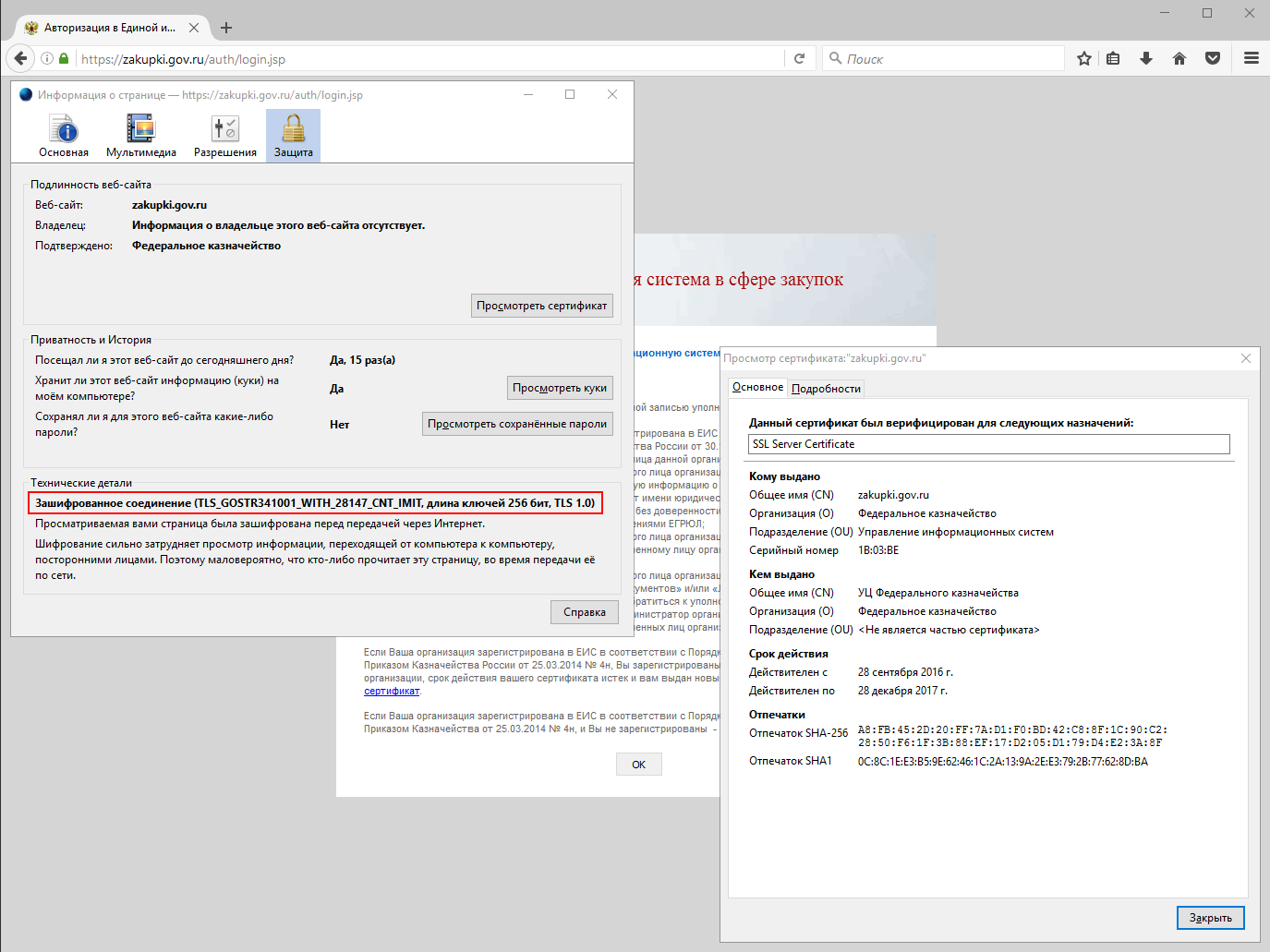
There are no valid certificates of authorized persons installed at my workplace, therefore access to my personal account is prohibited. However, the encryption of the connection in any case is carried out by the algorithm of the GOST family.
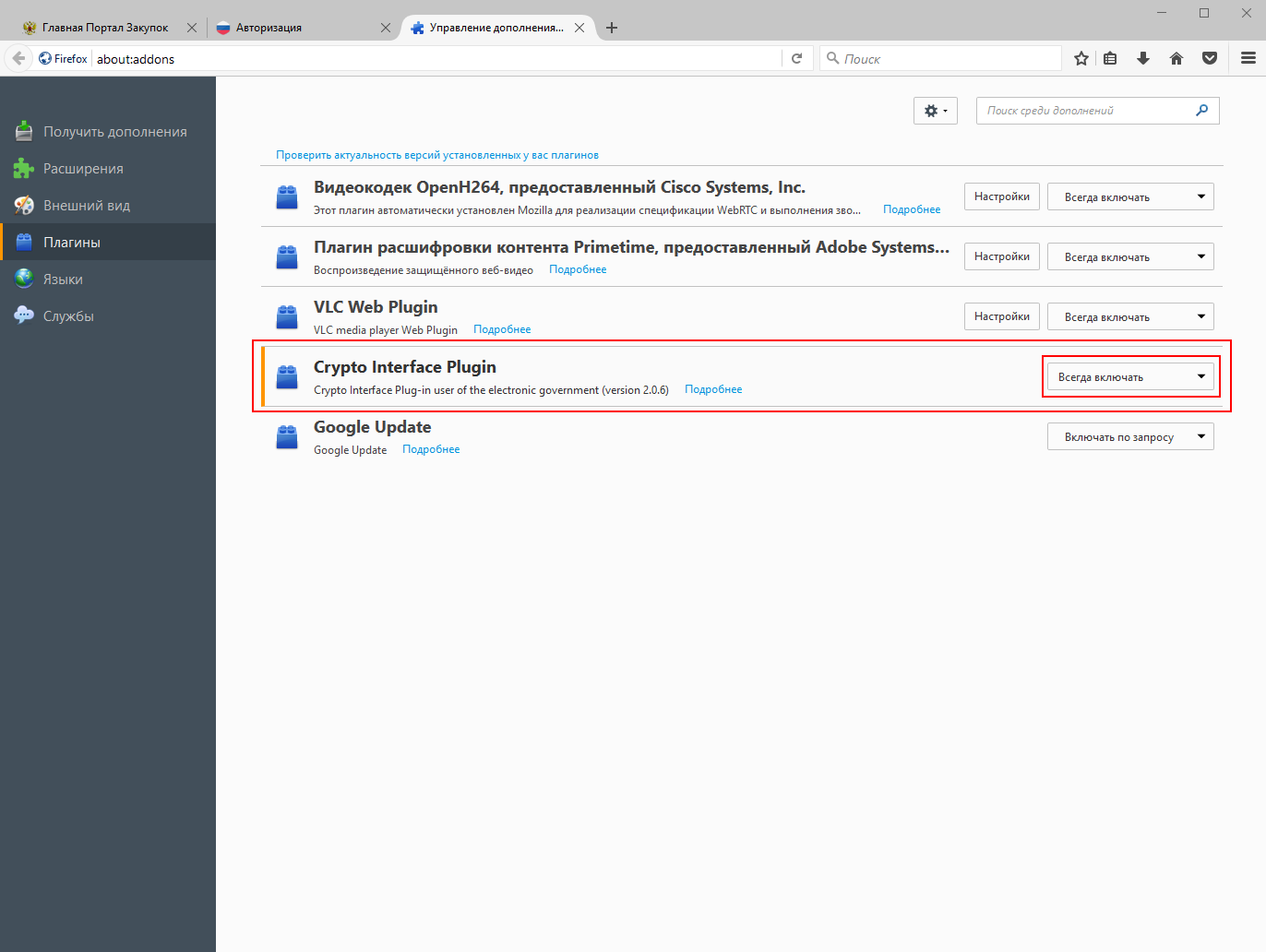
In case of access to the closed part of the site under 223-FZ, authorization will pass through the ESIA (that is, through the site gosuslugi.ru). Here the situation is simplified, because the Firefox plug-in for this site has existed for a long time and is being developed by Rostelecom. At the first visit to the site we will be asked to download the plugin. After installation, the plugin should be switched to the “Always On” mode in the CryptoFox settings, otherwise a window asking for a certificate will not appear on the public services website.
Unfortunately, the signing of documents on the site zakupki.gov.ru is implemented through a specific component sing.cab, which uses ActiveX technology. Naturally, this component will not work in CryptoPro, so we will wait for the transition to a more common technology. Fortunately, signing a document is only a small part of what the operator should do while working on zakupki.gov.ru, so CryptoFox can be used for everyday operations.
Sometimes it is necessary to save a copy of the private key on the local computer. This can be done if the key, when created in the CA, is marked as unloaded. Copying is performed using the “Copy” button (what a surprise) in the interface of the CryptoPro applet
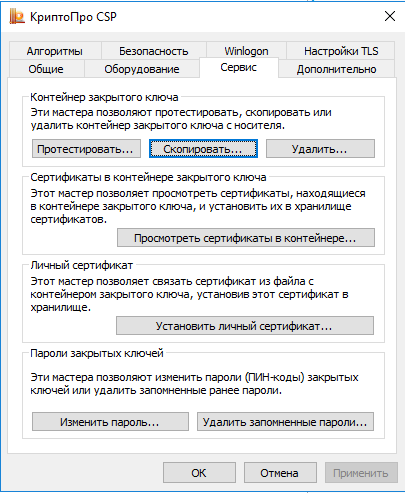
If there are two options for storing the key on the local machine - in the Reader reader and on the virtual removable disk. In principle, the security of storing the key in both cases is approximately the same, so the choice of the tool is left to the reader.
In the Reader reader, keys are stored in the branch
HKLM\SOFTWARE\Crypto Pro\Settings\Users\[SID пользователя]\Keysfor the user and in the branch
HKLM\SOFTWARE\Crypto Pro\Settings\Keysfor the computer as a whole.
In the case of a 64-bit OS, the paths will be slightly different:
HKLM\SOFTWARE\Wow6432Node\Crypto Pro\Settings\Users\[SID пользователя]\Keysand
HKLM\SOFTWARE\Wow6432Node\Crypto Pro\Settings\KeysWhen CryptoPro runs on a terminal server, the user may not have enough rights to write the key to these branches, since they are not in the user profile. This situation can be corrected by assigning the appropriate rights to the branches through the Regedit utility.
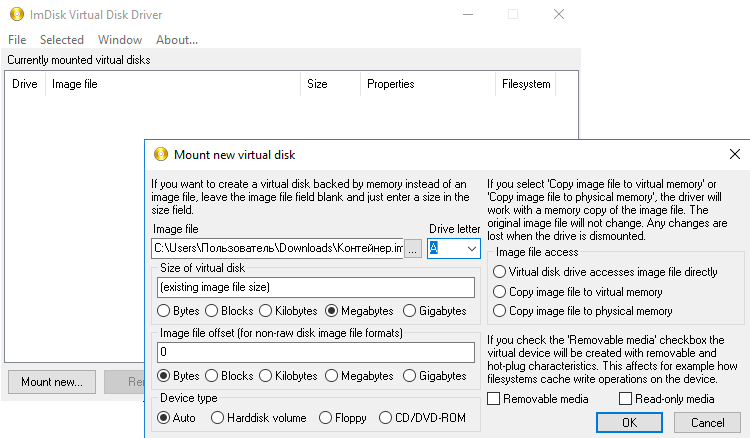
CryptoPro is looking for key containers on disks that have the “removable” attribute, that is, a flash disk or, God forbid, a disk will be considered key containers, but a network drive or a drive thrown through RDP will not. This allows you to store keys on floppy disk images according to the principle of one key - one diskette and thereby increase security. To create a virtual drive, you can use the ImDisk utility , which has a version for 64-bit operating systems. Declared compatibility with Windows up to 8.1, it works fine in Windows 10.
There is also a utility Virtual Floppy Drive (VFD) , in which you can create a drive that is visible only to a specific user. Unfortunately, it has not been developed for a long time, and it seems it will not work on 64-bit OS due to an unsigned driver.
Applying these tips and not forgetting the Regulation PKZ-2005 , which, however, is advisory in nature, it is possible to somewhat ease the life of both operators working on procurement sites and themselves.