DroidScript is a simple and functional tool for developing mobile applications for Android

Some time ago, I was given the following task: to develop a prototype Android application for real-time wireless communication with Arduino. Immersing yourself for the sake of this in Java, Qt or C # was impractical, so I decided to look for a ready-made solution on the script engine. Phonegap? Interesting, but not for working with Bluetooth. Something from mobile development environments? Perhaps, but I wanted to work in a familiar desktop environment, and not on a tablet with a small screen. Soon, the desired thing was found - the mobile development environment DroidScript with the ability to connect to it from the browser WiFi IDE, which can be installed on Windows, Mac and Linux.
What is DroidScript?
DroidScript is an Android application that includes a development and execution environment for program code on an Android device. It allows you to create two types of applications - JavaScript (with a native interface) and HTML (hybrid).
To create a native UI and access to Android hardware and software resources, JavaScript is used in conjunction with the DroidScript API, which allows you to work with WebView, SQLite, email, SMS, WebGL, sensors, Web servers, sockets, sprite animation and much more, as well as interact with external devices via Bluetooth, WiFi, USB and LAN.
Out-of-the-box impressive functionality is one of the features of DroidScript. Another feature is the ease of use. What does it consist of? First of all, in coding. The following is sample code for a simple application:
// функция инициализации
function OnStart()
{
  // создаём линейный компоновщик во всю область экрана
  var lay = app.CreateLayout( "linear", "FillXY" );
  // создаём кнопку с шириной 30% и высотой 10% относительно размеров экрана
  var btn = app.CreateButton( "Кнопка", 0.3, 0.1 );
  // задаём размер надписи на кнопке
  btn.SetTextSize( 18 );
  // задаём обработчик нажатия на кнопку
  btn.SetOnTouch( function(){
    app.ShowPopup( "Привет, Андроид!" ); // всплывающее сообщение
    app.Vibrate( "0,100,30,100,50,300" ); // вибросигнал
  });
  // добавляем кнопку компоновщику
  lay.AddChild( btn );
  // добавляем компоновку объекту приложения для её отображения на экране
  app.AddLayout( lay );
}
Everything is encoded in JavaScript and the DroidScript API without using xml markup, connecting libraries, creating classes, etc.
In DroidScript there are no visual interface design tools, as in Android Studio, AIDE or MIT App Inventor, but you can implement LivePreview on Android for more more rapid development of interactive prototypes, as well as expanding functionality with plug-ins written in JavaScript or Java.
The simplicity of working with DroidScript is not only in coding. It was originally designed to give novice Android developers a quick and easy immersion in this process.
Installation and setup
If you don’t have an Android phone or tablet on hand, you can use its emulator, for example, BlueStacks or Nox APP Player .
Install DroidScript from Google Play and open it. An interface appears with the only Hello World application in the application area.

A short touch of the application icon will launch it. To edit the code, you need to make a long touch on the icon and select the Edit option in the list of actions that appears.
The control panel includes buttons for accessing documentation, connecting to a WiFi IDE, general commands and examples.
Setting up a remote development environment WiFi IDE is as follows:
- We launch DroidScript and go to the settings by the command ... / Settings to change the access password or reset it.
- In the control panel, press the button with the up arrow. A dialog with the DroidScript address appears.
- On a desktop computer or laptop, open a browser and enter the address obtained in the previous paragraph. A password request dialog appears if it has not been reset. We enter the password, and after successfully gaining access, the interface of the development environment will be displayed on the screen.
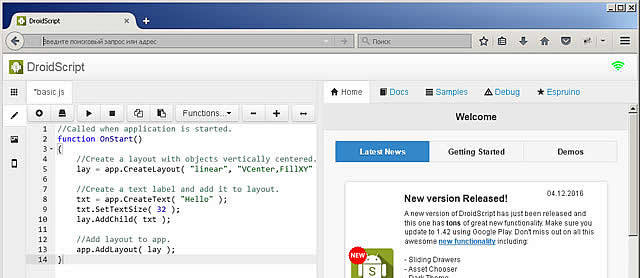
On the left side of the window are tabs with the application area, editor, resource files, and on the right are tabs with news, help, examples and a debugger.
The WiFi IDE has the ability to expand its functionality by adding tabs. The “Espruino” tab is an example of this extension.
In the simplest case, an application can consist of a single file with the js extension, in which the code is stored in its original form. To exchange a project in the source code, it can be packaged in a spk archive. It is also possible to build the project into an apk file, but for this you need to buy and install the ApkBuilder plugin.
When you first see such simple interfaces DroidScript and WiFi IDE, after working in a desktop or web-based environment, a logical question arises, is it possible to do something serious with this? Of course! As you know, with simple tools you can create impressive things!
Documentation
- Official page
- DroidScript Official Forum
- Wiki DroidScript
- Russian DroidScript Reference Guide
Also, individual enthusiasts post tutorials on YouTube.