Mobile platform. ReactNative hybrid application architecture
Probably, you have already heard about mobile development on ReactNative in the Unified Frontal System (EFS) of Sberbank more than once. We already wrote why we use the ReactNative technology itself in our developments, and also told how not to be afraid to do it.
Today we take a bird's eye view on building a mobile application architecture using ReactNative, Objective-C, Typhoon, VIP, SOA, TypeScript, React, and Redux.

Let's start from afar and first formulate the main tasks that architecture solves when it is necessary and appropriate, as well as what requirements it should satisfy.
When work takes place in a startup where 6 people are sitting in one room, communication is built on a short leg, the only product is created around which the whole team is concentrated, usually developers in the first iterations (until the understanding of the product is aligned) do not really care about the solution architecture, flexibility, the cost of its changes, reliability, scalability and much more.
Typically, in such teams and companies decisions are made quickly and are built by sorting out various hypotheses and experiments.
The cost of change is small enough, and the speed is high enough. At the same time, integrated performance remains small, but this is not required in companies of this scale.
The issue of formalized rules and approaches to the design and construction of complex automated systems usually appears in large companies with a large number of separate systems requiring integration, as well as a large number of developers distributed among various teams.
Each of us associatively understands what the term "architecture" means. However, in addition to the definition itself, the architecture must solve certain problems and fulfill the requirements for it.
The requirements for the architecture may be different, but in most cases there is a fairly general list of characteristics that is suitable for most systems at the same time:
and others.
One of the main tasks of architecture is precisely the satisfaction of the requirements. Also, do not forget that technical requirements are born of business requirements: a good architecture should allow you to quickly find and fix problems, quickly update the system, ensure process uptime, quickly deliver new products and features to the user, and much more.
Let's solve the architectural problem:
It is required to design and build a city. The city is Sberbank.

There are houses in the city where people live and various organizations / institutions in which people buy goods or receive services. People are customers of Sberbank.
The houses in which people live and the institutions they visit are the interfaces from Sberbank that they use.
The houses have gas, electricity, water, which are supplied and delivered to the client, in the stores - food, clothing, household appliances - all these are Sberbank services / products that people use.

Water, gas, electricity, as well as products and other goods are somehow delivered to people in houses and shops - and this is done thanks to the powerful back-end infrastructure that is hidden from the client (water stations, hydroelectric power stations, nuclear power plants, factories, warehouses and etc.)
And now to the requirements of the city architecture:
We are architects - specialists who build this city and solve all the problems and challenges that arise. The task is not easy, but extremely interesting.
Her decision cannot be fully covered in one article, so first let's talk about how we build houses in practice!
So. We need to build houses. Build quickly, but at the same time the quality of houses should be at the highest level. Homes should be modern and comfortable (i.e. meet UX requirements). We must provide the ability to quickly withdraw new services even to old houses.
At home, as we said, these are ESF interfaces. Interfaces are channel-specific, for example, there are mobile and web interfaces, a contact center, branches, ATMs, etc.
One of the key objectives of the ESF program is to create the ability to quickly output services to all channels (omnichannel output), to provide recognition and a single visual style of interfaces for interacting with a client.
We will devote this article to the construction of mobile interfaces, and we also prepared some interesting steps for the future for dessert.
Let's get back to our comparison with urban planning and architecture.
So, classic houses are similar in their designs and appearance and are divided into certain classes (templates): panel house, brick, high-rise, cottage, cottage, etc.
In addition, houses have similar designs or typical elements inside themselves, for example: a wall, a window, a door, a roof, a lightning rod, etc.
Each of these structures is built from atomic elements - building materials: brick, board, nail, glass.
As a result, we get 3 main levels:
In our world of mobile PL architecture (Presentation Layer), there are also 3 levels:
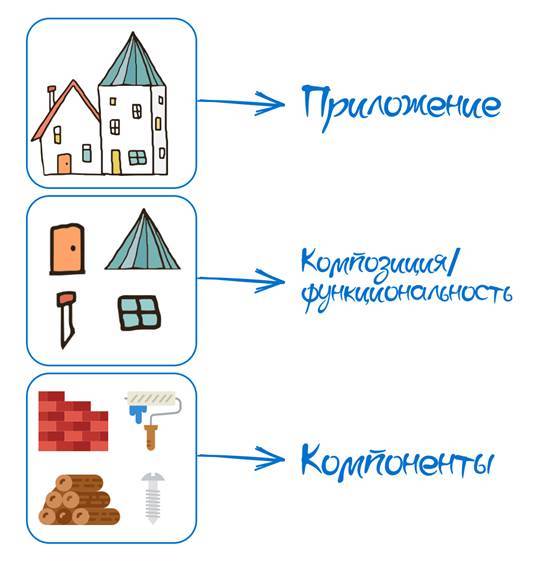
Our mobile interfaces are built from atomic (indivisible) entities, which we call components.
Some of our basic rules when designing components:
Examples of the simplest visual components for building screen forms are buttons, text input fields, radio buttons, checkboxes, switches, etc.

Each component is a fully functional, complete, independent of the other module. To implement modules on native Objective-C code, we use the VIP architecture (View, Interactor, Presenter).
As a basis, we took the VIPER-architecture, which is well designed to create separate modules and their further reuse. We removed Router, because transitions between modules are carried out at the level of application code, i.e. TypeScript
It turned out that an application developer using the React approach methodology can develop a mobile application by importing our components and not even knowing how they are organized at the native level.
Let's look at a small example of how the entire chain is based on the TextInput component.
TextInput is a simple component designed to enter text into it.
The component is visual, therefore, to display it on the screen, you need to insert the JSX tag in the render () method of the parent component.
Currently, the component has 14 properties:
Our attention should be focused on two: text and onChange. These properties are important for demonstrating one of the basic principles adopted in React and, accordingly, in the Mobile Library: the component does not store states, i.e. is stateless.
For our team, the term seemed to not exactly describe the actual state of affairs, and we added another important term: the component does not store values, i.e. is valueless .
In other words, if we enter text in the TextInput component, the text property does not change. For correct behavior, we need to save the return value of newText from the onChange in the Redux-store and reassign it to the text property of the TextInput component. Read the previous phrase again, and then look at the picture below, which demonstrates this.

.TS - component interface on TypeScript
RN - ReactNative
VM - View Manager (class for working ReactNative)
A - Typhoon Assembly, used to build the native VIP module
P - Presenter
I - Interactor
V - View
Components for building front-end forms are not the only components. In order to implement full-fledged mobile applications, and not just simply made-up screens, we need to be able to work with the network, databases, files, notifications, etc.
To do this, there is a special type of component called Viewless - components that do not have a View, i.e. visual part and the ability to display on the screen.
An example of a component of this type is the Log component.
The Log component provides a convenient API for the application developer to work with logging: the ability to record events in the log file in a specific format, as well as further uploading by command to the server.
When building Viewless components, we adhere to the standard principles of mobile SOA architecture: i.e. we create a number of service classes and a number of core classes. Service classes can use core classes, but cannot use service classes. By the way, these same classes of services can be used by the interactors of VIP-modules of visual components.
Below is a diagram of how the chain of calls hiding inside the Log component at the native level looks like.

.TS - component interface on TypeScript
RN - ReactNative
B - Bridge (class for ReactNative operation, inherits RCTBridgeProtocol protocol)
A - Typhoon Assembly, used to build native Viewless module
S - class service
C - core class
We talked about two fundamentally different types of components that we have: visual and non-visual (component services). It's time to talk about how the components are organized and where they are stored.
Components do not live in chaos - there is a centralized repository that unites them, provides access to them and ensures their comprehensive performance. And this repository is a component library.
A component library is a native compiled framework that is statically included in the final application. As mentioned earlier, each component of the library that is available for use has an interface in TypeScript.
The library is located in the corporate Nexus repository and is connected to the project as an npm package. To make life easier for JavaScript developers who did not have (and most importantly should not) experience working with native Objective-C code, the Xcode environment, and many others, we implemented a number of scripts that automatically link the framework and configure in the npm install post-phase. xcodeproj and collect the basic binding for the implementation of application code.
A library is not only a set of visual and non-visual components, but also a set of auxiliary files containing a common part (base classes, decorators, helper classes, macros).
The library is divided into 3 levels, which we call PL (Presentation Layer), BL (Bridge Level), SL (Service Layer).
PL are full-fledged VIP modules, i.e. components for building interfaces.
BL is an intermediate layer that serves as an adapter for using components from the application layer to TypeScript. This level includes application interfaces (.tsx), the classes necessary for executing ReactNative (ViewManager, ShadowView, etc.)
SL is an SOA layer consisting of service classes and core classes. Services can be used from the application level, for this there are Viewless components that through BL provide access to native calls within service classes. Services can also be used by VIP-modules at the native level through their interactors.
The diagram shows the interaction of all three levels with each other:

Of the unfamiliar letters in the diagram, only W. is present. W is a Wireframe, a class that connects VIP modules at the native level. The topic is quite interesting and large, so be sure to talk about it next time.
You can talk about the component library endlessly and we will certainly do it more than once - leave comments in the comments that primarily look interesting or seem incomprehensible.
We will assume that we have acquired building materials and even an excellent orderly warehouse, in which it is always clear where what lies and it is impossible to get lost. Now let's go one level higher and talk about building houses and highlighting their common parts.
Having a library of ready-made components, you can easily assemble mobile applications that implement typical business tasks. Mobile applications can now be assembled by developers with competencies in TypeScript, and the library “protects” them from the nuances of development for mobile devices.
All projects use the same components, which allows interfaces to look recognizable within different applications. If a defect is detected inside the components, all applications will receive updates, and if the appearance changes, all applications will receive a new component view.
We have provided application developers and designers with a set of LEGO cubes from which you can build interface forms and applications.
But we, of course, thought this was not enough and we wanted to reuse even more.
Currently, applications that use the library are applications for internal employees of the bank (transaction officers, field specialists, collectors, financial advisers, etc.). Each of the employees has a mobile workplace (MRM) in which he works. Those. MRM is a set of some implemented functionalities that solve a number of tasks of a certain role of an employee.
The example shows the possible tasks that an employee in the MRM can solve and the processes that he faces.

The number of roles of employees within Sberbank exceeds all possible representations of humanity about the concepts of finiteness, therefore, looking broadly, we noticed that most of the roles have intersections in a series of tasks and activities.
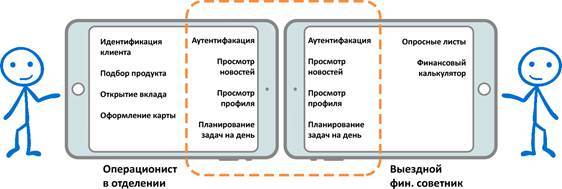
Those. we see that there are whole chains or sections that should be present in all MRMs irrespective of the role of the employee. In our understanding, these are the very general structures from which the final house (in our case, MRM) is quickly built.
As we said earlier, the final application is developed on the TypeScript stack, React + Redux, therefore the "cut" part from the application is developed on the same stack.
It turns out that the general sections inside the MPM are part of the code written in TypeScript using our library of mobile components.
Excellent! It remains to arrange this part of the code in the form of something complete, give it a name and draw a diagram. The name appeared very quickly, as it has long existed in the world of JavaScript - JS Bundle.
A new layer appears - reusable JS Bundle, which are also stored in the corporate repository of Nexus. The application developer of the already final MPM application in package.json indicates the dependencies on the JS Bundle and at the compilation stage includes them in his final code.
This approach allows you to reuse the JS Bundle, but introduces one significant inconvenience for business: due to the static inclusion of the JS Bundle, the number of MPMs that are designed to work with various roles of employees is growing.
It turns out the following reuse scheme:
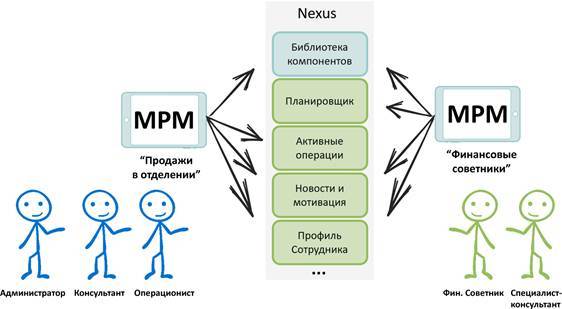
In addition, each JS Bundle (orange color) must use the Component Library (yellow color) in its implementation.
We do not stop. We always understand that we can do better, therefore we strive to simultaneously create both an innovative technical system and a convenient tool for solving business problems.
In the near future we will deal with two monstrous tasks:
About the last task I want to add a few thoughts. In essence, the task is to solve the problem of many mobile applications assembled by role.
The idea is simple - the mobile application is one and all the required functionality is dynamically loaded depending on the role.
The task is feasible precisely because of the use of hybrid technology ReactNative. Right now in the Release build, JavaScriptCore is interpreting input JS files located in the local NSBundle.
Our idea is to manage file sources for interpretation. In other words, we want to develop our own framework that allows us to determine the necessary dependencies by the user's role, download them, cache, update and roll back. The code name is Launch Manager (SM).
The tasks to be implemented in this new system are much broader. In addition to dependency management and the actual assembly of MPMs on the fly, the SM should solve SSO tasks between all JS Bundles, use a single API, “deliver” help requests to MRMs and much more.
So! Our plans are ambitious and ambitious, and the scope of work is great. The ESF Mobile Platform team needs help in the form of cool mobile specialists in various fields.
A new team is being created right now to implement the architecture of the future and we need:
Join our team!
In order to do this, send your resume to our email addresses and a couple of suggestions about how you would like to help the ESF Mobile platform:
Evgeny Rtischev [email protected]
Anastasia Ostrovskaya [email protected]

About architecture and its premises
Let's start from afar and first formulate the main tasks that architecture solves when it is necessary and appropriate, as well as what requirements it should satisfy.
When work takes place in a startup where 6 people are sitting in one room, communication is built on a short leg, the only product is created around which the whole team is concentrated, usually developers in the first iterations (until the understanding of the product is aligned) do not really care about the solution architecture, flexibility, the cost of its changes, reliability, scalability and much more.
Typically, in such teams and companies decisions are made quickly and are built by sorting out various hypotheses and experiments.
The cost of change is small enough, and the speed is high enough. At the same time, integrated performance remains small, but this is not required in companies of this scale.
The issue of formalized rules and approaches to the design and construction of complex automated systems usually appears in large companies with a large number of separate systems requiring integration, as well as a large number of developers distributed among various teams.
Each of us associatively understands what the term "architecture" means. However, in addition to the definition itself, the architecture must solve certain problems and fulfill the requirements for it.
The requirements for the architecture may be different, but in most cases there is a fairly general list of characteristics that is suitable for most systems at the same time:
- openness
- scalability
- flexibility,
- reliability,
- fault tolerance,
- testability
- diagnosability
- maintainability
- poor connectivity
- security,
- ease of maintenance
- profitability
and others.
One of the main tasks of architecture is precisely the satisfaction of the requirements. Also, do not forget that technical requirements are born of business requirements: a good architecture should allow you to quickly find and fix problems, quickly update the system, ensure process uptime, quickly deliver new products and features to the user, and much more.
Task: “Building a city”
Let's solve the architectural problem:
It is required to design and build a city. The city is Sberbank.
There are houses in the city where people live and various organizations / institutions in which people buy goods or receive services. People are customers of Sberbank.
The houses in which people live and the institutions they visit are the interfaces from Sberbank that they use.
The houses have gas, electricity, water, which are supplied and delivered to the client, in the stores - food, clothing, household appliances - all these are Sberbank services / products that people use.
Water, gas, electricity, as well as products and other goods are somehow delivered to people in houses and shops - and this is done thanks to the powerful back-end infrastructure that is hidden from the client (water stations, hydroelectric power stations, nuclear power plants, factories, warehouses and etc.)
And now to the requirements of the city architecture:
- The number of people is constantly growing and people need new houses to live in;
- Your homes must be durable and stand for many decades;
- One must not forget to make updates and repairs;
- Residents of even the oldest house want to be able to use new services;
- As the number of people increases, so does the overall need for products and services;
- People do not want to wait - they want to receive products and services as quickly as possible;
- Customers are fickle: they want new products and services.
We are architects - specialists who build this city and solve all the problems and challenges that arise. The task is not easy, but extremely interesting.
Her decision cannot be fully covered in one article, so first let's talk about how we build houses in practice!
How we build houses or 3 levels of architecture
So. We need to build houses. Build quickly, but at the same time the quality of houses should be at the highest level. Homes should be modern and comfortable (i.e. meet UX requirements). We must provide the ability to quickly withdraw new services even to old houses.
At home, as we said, these are ESF interfaces. Interfaces are channel-specific, for example, there are mobile and web interfaces, a contact center, branches, ATMs, etc.
One of the key objectives of the ESF program is to create the ability to quickly output services to all channels (omnichannel output), to provide recognition and a single visual style of interfaces for interacting with a client.
We will devote this article to the construction of mobile interfaces, and we also prepared some interesting steps for the future for dessert.
Let's get back to our comparison with urban planning and architecture.
So, classic houses are similar in their designs and appearance and are divided into certain classes (templates): panel house, brick, high-rise, cottage, cottage, etc.
In addition, houses have similar designs or typical elements inside themselves, for example: a wall, a window, a door, a roof, a lightning rod, etc.
Each of these structures is built from atomic elements - building materials: brick, board, nail, glass.
As a result, we get 3 main levels:
- house
- design
- material
In our world of mobile PL architecture (Presentation Layer), there are also 3 levels:
Components are Building Materials
Our mobile interfaces are built from atomic (indivisible) entities, which we call components.
Some of our basic rules when designing components:
- Reusable components
- Components do not support styling,
- Components do not store states and values,
- The components are easy to use,
- The components are self-contained and logically complete,
- Components do not reuse components
- Components within themselves are made up of elements.
Examples of the simplest visual components for building screen forms are buttons, text input fields, radio buttons, checkboxes, switches, etc.
Each component is a fully functional, complete, independent of the other module. To implement modules on native Objective-C code, we use the VIP architecture (View, Interactor, Presenter).
As a basis, we took the VIPER-architecture, which is well designed to create separate modules and their further reuse. We removed Router, because transitions between modules are carried out at the level of application code, i.e. TypeScript
It turned out that an application developer using the React approach methodology can develop a mobile application by importing our components and not even knowing how they are organized at the native level.
Let's look at a small example of how the entire chain is based on the TextInput component.
TextInput is a simple component designed to enter text into it.
The component is visual, therefore, to display it on the screen, you need to insert the JSX tag in the render () method of the parent component.
Currently, the component has 14 properties:
| Property | A type | Description |
| maxLength | number | Maximum number of characters |
| value | string | The value displayed in the field. It can be used both for setting the initial value and for subsequent control over the contents. |
| label | string | The specified text will be displayed as a signature above the input field |
| placeholder | string | Placeholder displayed in Input if no value is specified. |
| disabled | bool | This attribute disables the element and does not allow the user to edit it. |
| keyboardType | UFSLibrary.KeyboardType | Type of keyboard from the KeyboardType dictionary. |
| onChange | function | Called every time a user changes a value in a field. |
| underlined | bool | Sets the horizontal line below the component. By default, the property value is set to true. |
| onFocus | function | Called every time a field becomes active. |
| onblur | function | Called every time a field exits an active state. |
| hasError | bool | Sets the component to an error state (title and underline are colored red). |
| errorText | string | The message displayed in the component error state. |
| hasWarning | bool | Sets the component to a warning state provided that hasError = false (title and underline are yellow). |
| warningText | string | The message displayed in the warning state of the component. |
Our attention should be focused on two: text and onChange. These properties are important for demonstrating one of the basic principles adopted in React and, accordingly, in the Mobile Library: the component does not store states, i.e. is stateless.
For our team, the term seemed to not exactly describe the actual state of affairs, and we added another important term: the component does not store values, i.e. is valueless .
In other words, if we enter text in the TextInput component, the text property does not change. For correct behavior, we need to save the return value of newText from the onChange in the Redux-store and reassign it to the text property of the TextInput component. Read the previous phrase again, and then look at the picture below, which demonstrates this.
.TS - component interface on TypeScript
RN - ReactNative
VM - View Manager (class for working ReactNative)
A - Typhoon Assembly, used to build the native VIP module
P - Presenter
I - Interactor
V - View
Viewless components or services
Components for building front-end forms are not the only components. In order to implement full-fledged mobile applications, and not just simply made-up screens, we need to be able to work with the network, databases, files, notifications, etc.
To do this, there is a special type of component called Viewless - components that do not have a View, i.e. visual part and the ability to display on the screen.
An example of a component of this type is the Log component.
The Log component provides a convenient API for the application developer to work with logging: the ability to record events in the log file in a specific format, as well as further uploading by command to the server.
When building Viewless components, we adhere to the standard principles of mobile SOA architecture: i.e. we create a number of service classes and a number of core classes. Service classes can use core classes, but cannot use service classes. By the way, these same classes of services can be used by the interactors of VIP-modules of visual components.
Below is a diagram of how the chain of calls hiding inside the Log component at the native level looks like.
.TS - component interface on TypeScript
RN - ReactNative
B - Bridge (class for ReactNative operation, inherits RCTBridgeProtocol protocol)
A - Typhoon Assembly, used to build native Viewless module
S - class service
C - core class
We talked about two fundamentally different types of components that we have: visual and non-visual (component services). It's time to talk about how the components are organized and where they are stored.
Where Components Live - Component Library
Components do not live in chaos - there is a centralized repository that unites them, provides access to them and ensures their comprehensive performance. And this repository is a component library.
A component library is a native compiled framework that is statically included in the final application. As mentioned earlier, each component of the library that is available for use has an interface in TypeScript.
The library is located in the corporate Nexus repository and is connected to the project as an npm package. To make life easier for JavaScript developers who did not have (and most importantly should not) experience working with native Objective-C code, the Xcode environment, and many others, we implemented a number of scripts that automatically link the framework and configure in the npm install post-phase. xcodeproj and collect the basic binding for the implementation of application code.
A library is not only a set of visual and non-visual components, but also a set of auxiliary files containing a common part (base classes, decorators, helper classes, macros).
The library is divided into 3 levels, which we call PL (Presentation Layer), BL (Bridge Level), SL (Service Layer).
PL are full-fledged VIP modules, i.e. components for building interfaces.
BL is an intermediate layer that serves as an adapter for using components from the application layer to TypeScript. This level includes application interfaces (.tsx), the classes necessary for executing ReactNative (ViewManager, ShadowView, etc.)
SL is an SOA layer consisting of service classes and core classes. Services can be used from the application level, for this there are Viewless components that through BL provide access to native calls within service classes. Services can also be used by VIP-modules at the native level through their interactors.
The diagram shows the interaction of all three levels with each other:
Of the unfamiliar letters in the diagram, only W. is present. W is a Wireframe, a class that connects VIP modules at the native level. The topic is quite interesting and large, so be sure to talk about it next time.
You can talk about the component library endlessly and we will certainly do it more than once - leave comments in the comments that primarily look interesting or seem incomprehensible.
We will assume that we have acquired building materials and even an excellent orderly warehouse, in which it is always clear where what lies and it is impossible to get lost. Now let's go one level higher and talk about building houses and highlighting their common parts.
Learning to build applications
Having a library of ready-made components, you can easily assemble mobile applications that implement typical business tasks. Mobile applications can now be assembled by developers with competencies in TypeScript, and the library “protects” them from the nuances of development for mobile devices.
All projects use the same components, which allows interfaces to look recognizable within different applications. If a defect is detected inside the components, all applications will receive updates, and if the appearance changes, all applications will receive a new component view.
We have provided application developers and designers with a set of LEGO cubes from which you can build interface forms and applications.
But we, of course, thought this was not enough and we wanted to reuse even more.
Currently, applications that use the library are applications for internal employees of the bank (transaction officers, field specialists, collectors, financial advisers, etc.). Each of the employees has a mobile workplace (MRM) in which he works. Those. MRM is a set of some implemented functionalities that solve a number of tasks of a certain role of an employee.
The example shows the possible tasks that an employee in the MRM can solve and the processes that he faces.
The number of roles of employees within Sberbank exceeds all possible representations of humanity about the concepts of finiteness, therefore, looking broadly, we noticed that most of the roles have intersections in a series of tasks and activities.
Those. we see that there are whole chains or sections that should be present in all MRMs irrespective of the role of the employee. In our understanding, these are the very general structures from which the final house (in our case, MRM) is quickly built.
As we said earlier, the final application is developed on the TypeScript stack, React + Redux, therefore the "cut" part from the application is developed on the same stack.
It turns out that the general sections inside the MPM are part of the code written in TypeScript using our library of mobile components.
Excellent! It remains to arrange this part of the code in the form of something complete, give it a name and draw a diagram. The name appeared very quickly, as it has long existed in the world of JavaScript - JS Bundle.
A new layer appears - reusable JS Bundle, which are also stored in the corporate repository of Nexus. The application developer of the already final MPM application in package.json indicates the dependencies on the JS Bundle and at the compilation stage includes them in his final code.
This approach allows you to reuse the JS Bundle, but introduces one significant inconvenience for business: due to the static inclusion of the JS Bundle, the number of MPMs that are designed to work with various roles of employees is growing.
It turns out the following reuse scheme:
In addition, each JS Bundle (orange color) must use the Component Library (yellow color) in its implementation.
What's next?
We do not stop. We always understand that we can do better, therefore we strive to simultaneously create both an innovative technical system and a convenient tool for solving business problems.
In the near future we will deal with two monstrous tasks:
- Cross-platform library (mobile and web) components;
- Dynamic mobile workplace.
About the last task I want to add a few thoughts. In essence, the task is to solve the problem of many mobile applications assembled by role.
The idea is simple - the mobile application is one and all the required functionality is dynamically loaded depending on the role.
The task is feasible precisely because of the use of hybrid technology ReactNative. Right now in the Release build, JavaScriptCore is interpreting input JS files located in the local NSBundle.
Our idea is to manage file sources for interpretation. In other words, we want to develop our own framework that allows us to determine the necessary dependencies by the user's role, download them, cache, update and roll back. The code name is Launch Manager (SM).
The tasks to be implemented in this new system are much broader. In addition to dependency management and the actual assembly of MPMs on the fly, the SM should solve SSO tasks between all JS Bundles, use a single API, “deliver” help requests to MRMs and much more.
Waiting for you!
So! Our plans are ambitious and ambitious, and the scope of work is great. The ESF Mobile Platform team needs help in the form of cool mobile specialists in various fields.
A new team is being created right now to implement the architecture of the future and we need:
- Native iOS developers with good knowledge of Objective-C and a desire to develop horizontally and learn new front-end technologies like React, ReactNative, Redux;
- a mobile tester with the desire to write automated UI and load tests, as well as breaking the component library with all sorts of sophisticated methods;
- back-end developer with strong knowledge of Java to implement platform services for all mobile ESF applications.
Join our team!
In order to do this, send your resume to our email addresses and a couple of suggestions about how you would like to help the ESF Mobile platform:
Evgeny Rtischev [email protected]
Anastasia Ostrovskaya [email protected]