March 30, 2017 at 12:25
Fake promises, aggressive ads, downloaders and other Google Play surprises
ESET experts found on the Google Play service another batch of malicious and unwanted applications. They disguise themselves as legitimate programs and / or use social engineering methods to increase their ranking. The total number of downloads of the “heroes” of this review exceeds one and a half million, and in most situations, studying user reviews on the Google Play service would avoid installing potentially dangerous software.
Fake promises as a business model The
vast category of these advertising applications on Google Play used social engineering methods, asking users for high marks - this increased the number of subsequent downloads.
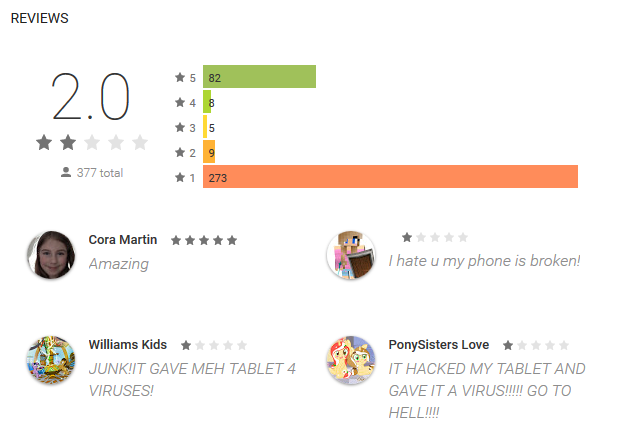
As a rule, non-existent functions were listed in the application description. After installation, a pop-up message was displayed on the device’s screen, promising to continue the installation or unlock the full version for a high rating on Google Play. As a result, applications had an unbelievably high rating, they were issued only by reviews of disappointed users.
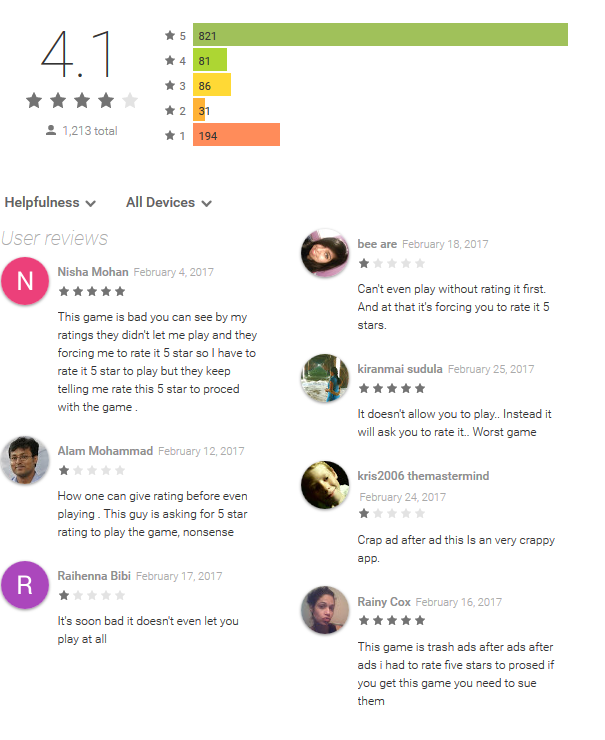
A classic example is the fake Subway Sonic Surf Jump game, which requested a 5 * rating, promising to open full access to functions, and in fact showed one banner ad after another. The application was installed by more than 500 thousand users, the average rating was 4.1 points, high ratings were accompanied by outraged comments.
Other popular (rated) applications acted in approximately the same way - Anime Wallpapers HD and Latest online movies. They "sold" the missing features for 5 *, attracting users who did not read reviews.
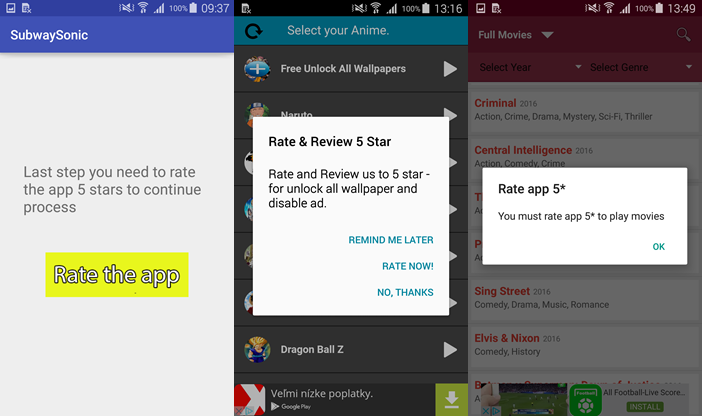
Another way to get high marks is with annoying ads. Some apps displayed pop-up advertisements and promised to remove them in exchange for a five-point rating.
It’s clear that these are empty promises, but the authors have no other way to improve the rating. They are not stopped even by the direct prohibition of markups provided by the Google Play Developer Policy .
Android / Hiddad.BZ: an advertising trojan that winds up a rating
Among applications that wind up a rating, a mobile trojan stands out to display Android / Hiddad.BZ ads.
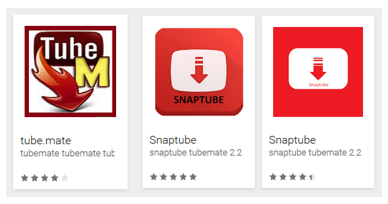
The program disguised itself as a tool for downloading content from YouTube - seven applications with names like Tube.Mate and Snaptube. They were installed by up to 5000 users.
Malicious software uses a number of methods to convince users to install an additional component that displays ads, and at the same time give the application high marks on Google Play.
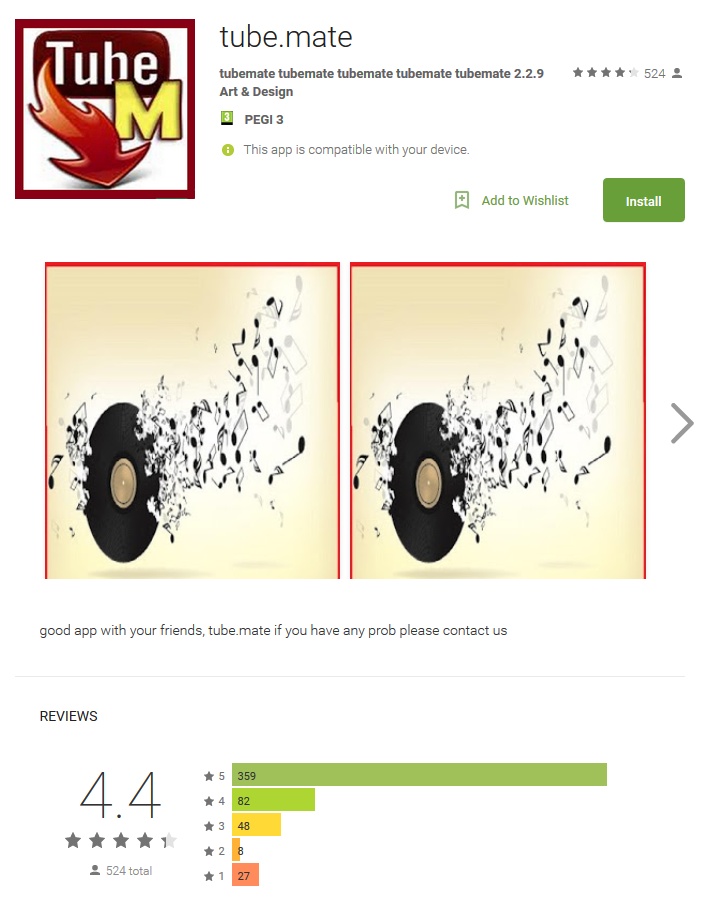
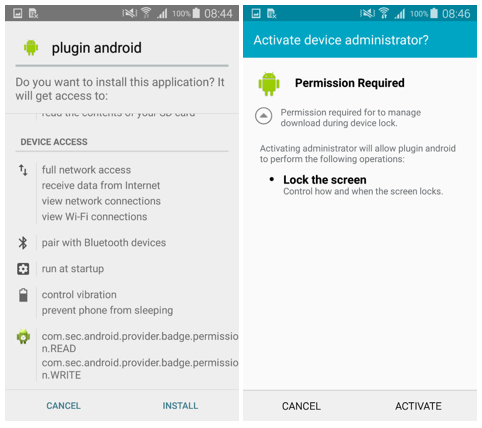
After installation, all seven applications were displayed on the device as Music Mania. By clicking on the corresponding icon, the user started downloading the component for displaying ads. To do this, the program displayed a message prompting the installation of the “plug-in for Android” and locked the screen until INSTALL was pressed. Next, the program requested the administrator rights of the device in the same way - displaying another message on the screen.
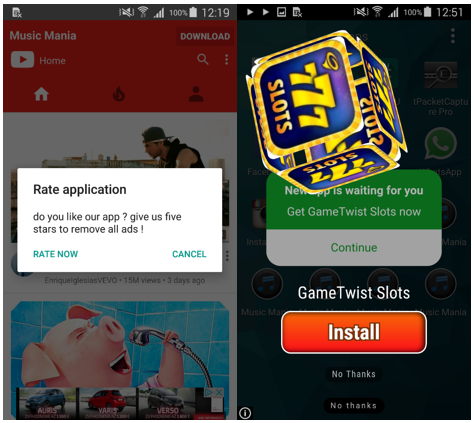
Having received administrator rights, the program showed the user advertising banners and offered to rate the application at 5 * in order to get rid of annoying content. It is useless to delete messages - there will be even more advertising banners, which in the future forces the user to evaluate the program when the offer appears again.
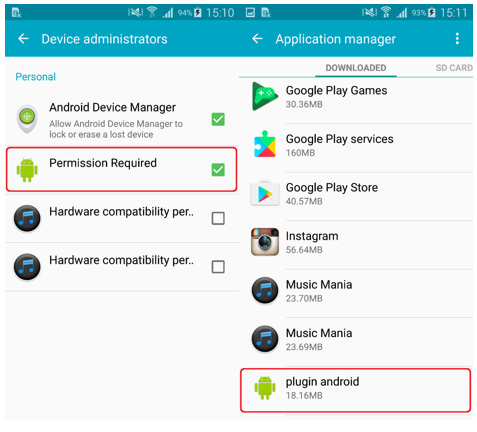
To clear the device from Android / Hiddad.BZ, you need to disable administrator rights for it, manually remove the additional plug-in, and then the application itself (Music Mania) through the Application Manager. If you have a mobile antivirus installed, it will also detect and remove this threat.
Android / TrojanDownloader.Agent.JL: Trojan downloader with ad module
The next category of malware on Google Play, detected by ESET specialists, is a downloader showing ads on an infected device. This content was revealed in 14 applications disguised as Minecraft mods. Malicious software has been downloaded up to 80 thousand times in total.
Like Android / Hiddad.BZ, the trojan uses additional components to display ads. The advertising module is not part of the original application - it must be downloaded from the network and manually installed by the user after launch.
The application has no real functions and shows annoying ads. As a result, it gives a low rating and negative reviews.

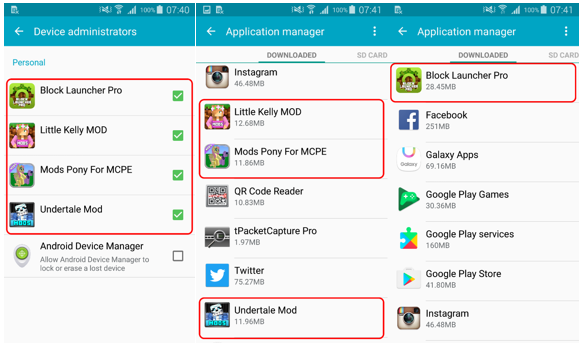
After starting, the application asks for administrator rights to the device. When the administrator mode is activated, a message with the INSTALL MOD button is displayed on the screen. At the same time, a push notification informs the user that an additional Block Launcher Pro module is required to continue the installation.
During the installation of the module, the user is invited to give him a series of permissions (including administrator rights). Additional components that are installed in the process are detected by ESET NOD32 products as Android / Hiddad.DA. The only function of such an application and an additional module is to display ads.

Interestingly, this downloader is an improved version of the application, which first appeared on Google Play in February. In that version, a similar interface was used, it also requested administrator rights, but did not have functionality for downloading and, unlike the current one, did contain Minecraft mods.
An updated version of the bootloader could theoretically download any software to the victim’s device. There is no reason to believe that the authors of the Trojan will limit themselves to showing ads. Having worked out a scheme to bypass the security system of the Google Play service and deceive users, sooner or later they will take the next step - the spread of more dangerous malware.
The chance to see and install one of the malicious applications when downloading Minecraft mods is quite large. To get rid of the bootloader, you can use a reliable mobile antivirus or eliminate the threat manually in the Application Manager, after having previously disabled administrator rights for the application and the bootloader module.
Android / FakeApp.FG: application for redirecting to scam sites
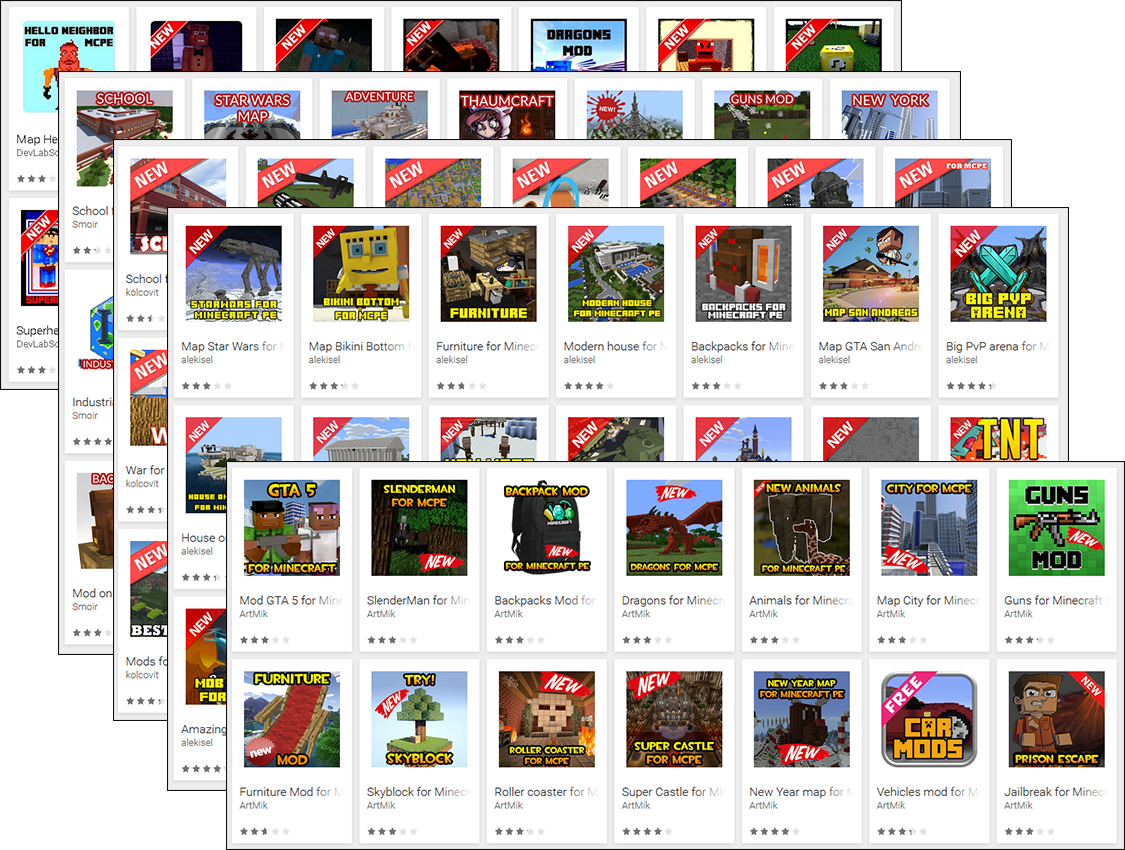
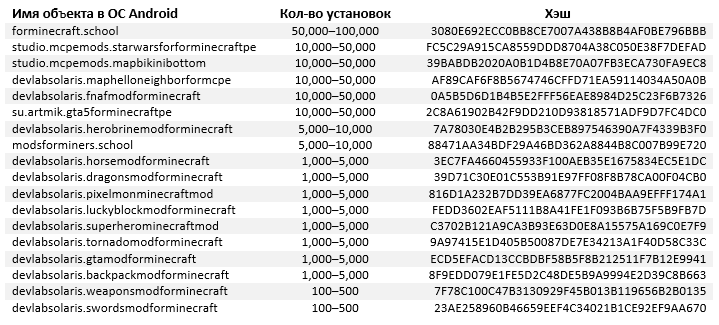
Another 73 fake Minecraft mods use the classic scheme, redirecting the user to scam sites. These applications are detected as Android / FakeApp.FG, they have been installed up to 910 thousand times.
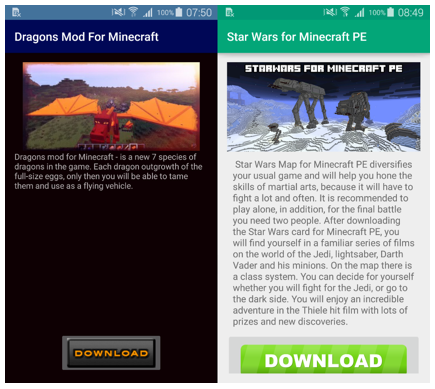
After starting, the application displays a message with the DOWNLOAD button. Pressing the button does not load any mods, but instead redirects the user to a site that opens in the default browser. All kinds of intrusive content is presented on the sites - advertisements, polls, rallies, coupons, fake software updates and virus messages. Messages are localized - depending on the user's IP address.
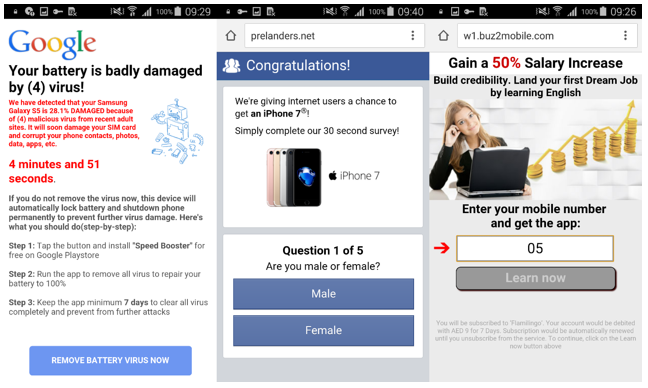
Android / FakeApp.FG can be removed manually in the Application Manager or use the mobile antivirus.
Prevention
Even if we find malware that winds up the rating on Google Play, we do not give up the main advice - check the application before downloading. In addition to the average rating, it is important to check user reviews. As the above episodes have proved, users write honest reviews, even (especially) if they have already been convinced to give an overestimated rating.
Samples of
Android / Hiddad.BZ:
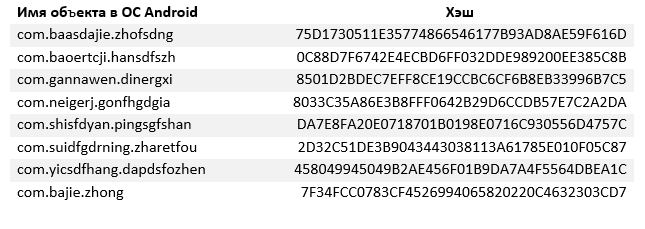
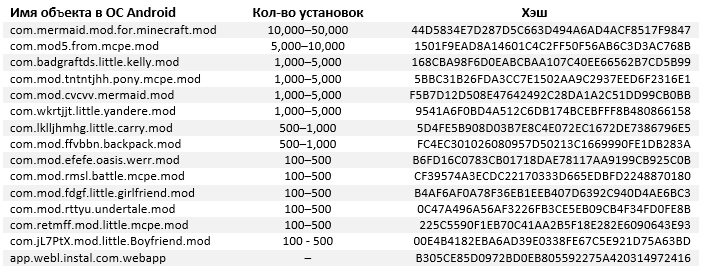
Android / FakeApp.FG: Special
thanks to virus expert Lukash Stefanko for malware reviews .
Just in case, we recall that ESET NOD32 mobile antivirus protects against such threats .
Fake promises as a business model The
vast category of these advertising applications on Google Play used social engineering methods, asking users for high marks - this increased the number of subsequent downloads.
As a rule, non-existent functions were listed in the application description. After installation, a pop-up message was displayed on the device’s screen, promising to continue the installation or unlock the full version for a high rating on Google Play. As a result, applications had an unbelievably high rating, they were issued only by reviews of disappointed users.
A classic example is the fake Subway Sonic Surf Jump game, which requested a 5 * rating, promising to open full access to functions, and in fact showed one banner ad after another. The application was installed by more than 500 thousand users, the average rating was 4.1 points, high ratings were accompanied by outraged comments.
Other popular (rated) applications acted in approximately the same way - Anime Wallpapers HD and Latest online movies. They "sold" the missing features for 5 *, attracting users who did not read reviews.
Another way to get high marks is with annoying ads. Some apps displayed pop-up advertisements and promised to remove them in exchange for a five-point rating.
It’s clear that these are empty promises, but the authors have no other way to improve the rating. They are not stopped even by the direct prohibition of markups provided by the Google Play Developer Policy .
Android / Hiddad.BZ: an advertising trojan that winds up a rating
Among applications that wind up a rating, a mobile trojan stands out to display Android / Hiddad.BZ ads.
The program disguised itself as a tool for downloading content from YouTube - seven applications with names like Tube.Mate and Snaptube. They were installed by up to 5000 users.
Malicious software uses a number of methods to convince users to install an additional component that displays ads, and at the same time give the application high marks on Google Play.
After installation, all seven applications were displayed on the device as Music Mania. By clicking on the corresponding icon, the user started downloading the component for displaying ads. To do this, the program displayed a message prompting the installation of the “plug-in for Android” and locked the screen until INSTALL was pressed. Next, the program requested the administrator rights of the device in the same way - displaying another message on the screen.
Having received administrator rights, the program showed the user advertising banners and offered to rate the application at 5 * in order to get rid of annoying content. It is useless to delete messages - there will be even more advertising banners, which in the future forces the user to evaluate the program when the offer appears again.
To clear the device from Android / Hiddad.BZ, you need to disable administrator rights for it, manually remove the additional plug-in, and then the application itself (Music Mania) through the Application Manager. If you have a mobile antivirus installed, it will also detect and remove this threat.
Android / TrojanDownloader.Agent.JL: Trojan downloader with ad module
The next category of malware on Google Play, detected by ESET specialists, is a downloader showing ads on an infected device. This content was revealed in 14 applications disguised as Minecraft mods. Malicious software has been downloaded up to 80 thousand times in total.
Like Android / Hiddad.BZ, the trojan uses additional components to display ads. The advertising module is not part of the original application - it must be downloaded from the network and manually installed by the user after launch.
The application has no real functions and shows annoying ads. As a result, it gives a low rating and negative reviews.
After starting, the application asks for administrator rights to the device. When the administrator mode is activated, a message with the INSTALL MOD button is displayed on the screen. At the same time, a push notification informs the user that an additional Block Launcher Pro module is required to continue the installation.
During the installation of the module, the user is invited to give him a series of permissions (including administrator rights). Additional components that are installed in the process are detected by ESET NOD32 products as Android / Hiddad.DA. The only function of such an application and an additional module is to display ads.
Interestingly, this downloader is an improved version of the application, which first appeared on Google Play in February. In that version, a similar interface was used, it also requested administrator rights, but did not have functionality for downloading and, unlike the current one, did contain Minecraft mods.
An updated version of the bootloader could theoretically download any software to the victim’s device. There is no reason to believe that the authors of the Trojan will limit themselves to showing ads. Having worked out a scheme to bypass the security system of the Google Play service and deceive users, sooner or later they will take the next step - the spread of more dangerous malware.
The chance to see and install one of the malicious applications when downloading Minecraft mods is quite large. To get rid of the bootloader, you can use a reliable mobile antivirus or eliminate the threat manually in the Application Manager, after having previously disabled administrator rights for the application and the bootloader module.
Android / FakeApp.FG: application for redirecting to scam sites
Another 73 fake Minecraft mods use the classic scheme, redirecting the user to scam sites. These applications are detected as Android / FakeApp.FG, they have been installed up to 910 thousand times.
After starting, the application displays a message with the DOWNLOAD button. Pressing the button does not load any mods, but instead redirects the user to a site that opens in the default browser. All kinds of intrusive content is presented on the sites - advertisements, polls, rallies, coupons, fake software updates and virus messages. Messages are localized - depending on the user's IP address.
Android / FakeApp.FG can be removed manually in the Application Manager or use the mobile antivirus.
Prevention
Even if we find malware that winds up the rating on Google Play, we do not give up the main advice - check the application before downloading. In addition to the average rating, it is important to check user reviews. As the above episodes have proved, users write honest reviews, even (especially) if they have already been convinced to give an overestimated rating.
Samples of
Android / Hiddad.BZ:
Android / FakeApp.FG: Special
thanks to virus expert Lukash Stefanko for malware reviews .
Just in case, we recall that ESET NOD32 mobile antivirus protects against such threats .