 April 3, 2017 at 15:11
An all-protocol bot in PHP in 10 minutes, or how the Microsoft Bot Framework and Azure Functions make our life easier
- Tutorial
It is absolutely impossible to deny that the development of natural patterns in interfaces has given a fantastic impetus to the development of the entire IT industry as a whole. And it’s not only and not so much about voice interfaces, but about the widespread introduction of gestures, a giant shift in the paradigm of mobile platforms and, of course, significant work in the field of UI and UX in general. While the industry is striving to become more and more friendly for an ever-growing mass of people, the usual and, to a certain extent, routine development turns into endless attempts to embrace the immensity. Whereas before we were mainly concerned with the levels of abstraction of languages and frameworks, now we are faced with much more global issues. How to find a balance between a complex and functional interface? Should I start a new project with microservices? I can’t answer these questions,
Chatbots have a long and not very successful history, but, like touch-interfaces or neural networks, we can say about them - everything has its time. In the last round of history, bots owe their popularity to Asian messengers and social networks. Having started in Asia, they went to conquer Western social services. Those, in turn, hastily concocting the API, began to compete in a variety of opportunities and the amount of potential earnings on their platforms. Which turned the lives of ordinary developers, who faced the same tasks of developing bots, but from the content and service providers, into a nightmare.
You can count the number of instant messengers that potentially reach your client with one way or another, and there are also classic SMS, Email and web chats. And all this requires a special approach, because everyone offers their own API or SDK. And it would be nice to manage to cover all with one more or less consistent code, so as not to develop and support a dozen different implementations of the same thing. Business requires not so much quality coverage of smaller sales channels as quantitative coverage of more channels. Even if some channels bring more money than others. Or, if some channels offer more features than others.
So how do you cover as many channels as possible without turning your work into endless rushing between different implementations of the same thing? One of the available solutions is to use the framework. This, of course, will not solve all the problems, but it will preserve at least the mental balance and, ideally, the money of the customer or employer.
The Microsoft Bot Framework was first introduced a year ago at Microsoft Build 2016 . However, it is still in the Preview stage, which can create certain difficulties of various kinds using it in large projects in its current form. At least, I definitely can’t recommend using it in production right now.
I will not talk about all the features and benefits of this framework, you can easily find out about it from its documentation or any other article about it. As part of this material, I want to do a little dive into the practical implementation of the bot for the Microsoft Bot Framework.
It may seem that the bot is basically difficult, and even more so with an unfamiliar framework, but it is not. As stated in the header, the implementation of the simplest bot with the Microsoft Bot Framework will take you no more than 10 minutes. It took me about so much to write and debug the code for this article, and it took twice as much to find the right template for it to run in Azure Functions.
I chose PHP for this material for a number of reasons. Firstly, because the main focus of my work is web development, and PHP, at least in Russia, remains the most popular language in this area. I was thinking about including Python code in the example, but decided not to complicate the already bloated material. If this is interesting, you can put it in a separate article. Secondly, Microsoft even claims that it is possible to work with the Bot Framework in PHP or Python, but in fact carefully ignores them, does not provide any documentation or examples, there is not even an SDK. All that is is the REST API and its documentation. Realization on the conscience of the developer, who is likely to ignore the technology poorly documented for his language, no matter how wonderful and simple it is. Examples in other languages are not always easy to read,
I chose Azure Functions because it’s the easiest and cheapest way for any reader to try and practice the code for this example. In fact, all that is required of you to launch a full-fledged bot from this material is to click the Deploy to Azure button and enter a couple of parameters for the application. Azure will create and configure the necessary resources, download the sample code from GitHub and set the billing so that you do not have to pay for the entire application. You will pay only for direct calls to the bot, in fact, the messages that it processes.
In addition, if you are interested in the topic of microservices with a serverless architecture and you are not familiar with Azure Functions, then this will be an excellent occasion for you to get to know them. However, microservices and the role of Azure Functions in them is another topic for another article.
Separately, I note that this example is unintentionally written in the simplest, linear, well-read and visual way. Of course, it cannot be used as a working code. Since there is currently no SDK for PHP, complicating this example with classes and separate functions would be completely redundant and only complicate its readability and perception.
So, the first thing you need to do is create the bot itself: https://dev.botframework.com/bots/new . Create a bot name (Name), description (Description) and alias for naming in URLs (Bot handle). Please note that unlike the name and description, alias cannot be changed after the bot is created. Leave the “Messaging endpoint” field blank for now, we will fill it after the application starts.
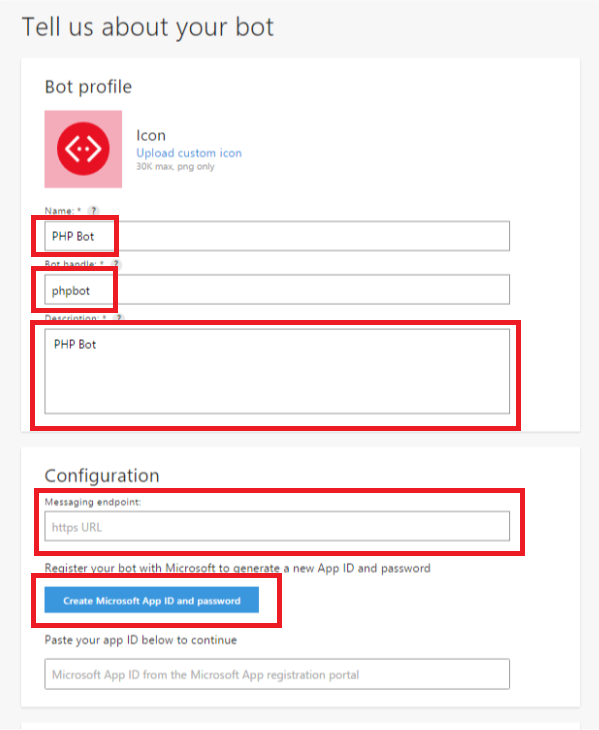
Click the "Manage Microsoft App ID and password" button to create an identifier and password for your application. ID and password are needed to authorize the application as a bot when sending messages to chat, so save them. Click the "Complete the operation and return to the Bot Framework" button.

On this preparatory part is almost finished. Review, confirm your agreement with all agreements and click "Register". If everything is correct, you will see the message “Bot created” very soon. Nominally, your bot is ready. It remains to teach him to communicate.
First of all, set the application ID and password for bot authentication. You got them in the last step. At the same time, we set the URL where we will contact them for a token authorizing the bot's answers.
In this example, I get the parameters from environment variables, but you can set them directly in the code.
Next, read the body of the POST request with a message from the user and deserialize it from the JSON format to the $ deserializedRequestActivity array .
In this example, I get the request body from the req environment variable , which is preconfigured in Azure Functions binders. You can get the request body from the php: // input stream if you are not using Azure Functions.
If $ deserializedRequestActivity contains an id field , we consider the incoming request to be correct and begin processing. First of all, you need to get a token to authorize the response to the message. The token can be obtained through a POST request to the Microsoft oAuth service. I use stream context for the request only because its implementation looks better, you can use CURL .
We create the stream context configured above and execute a request to the oAuth service from it.
We read the response to the request and deserialize it into the $ authData array .
If $ authData contains an access_token field , we consider authentication successful and continue processing. We determine what type of message we received and prepare the text of the response to the message in case the type of the incoming message is message. In this example, we will not process all other types of messages, so we simply say to all other types that we are not familiar with them.
Now that we know what to respond, we form an array of $ deserializedResponseActivity with the response data, which we will later transfer to the Microsoft Bot Framework.
Having formed the answer, we are preparing to send it, for which we form the URL, where we will transfer it. In fact, the URL is assembled from the parameters of the incoming POST request and looks like this: Where activity is the incoming POST request with the message, deserialized earlier into the $ deserializedRequestActivity array . Skip {activity.serviceUrl} through rtrim , to delete the last closing slash, because sometimes it is and sometimes it is not. Also {activity.id} must be passed through urlencode , because it contains special characters that break the URL and interfere with the request.
The URL is ready, now we are preparing a POST request to the Microsoft Bot Connector API, in which we will transmit the response to the incoming message. First of all, configure the stream context. I use stream context for the request only because its implementation looks better, you can use CURL .
And immediately we create it and execute the configured request to the Microsoft Bot Connector API from the stream context.
Done, the user in the chat reads our response, and we write a log to the STDOUT stream about receiving and processing the next message.
The above code is on GitHub , there is no need to copy it from here or write again. You can deploy the code in your own environment, or use the ready-made template for Azure Functions. If you intend to deploy code in your own environment, click here to skip the Azure Functions part.

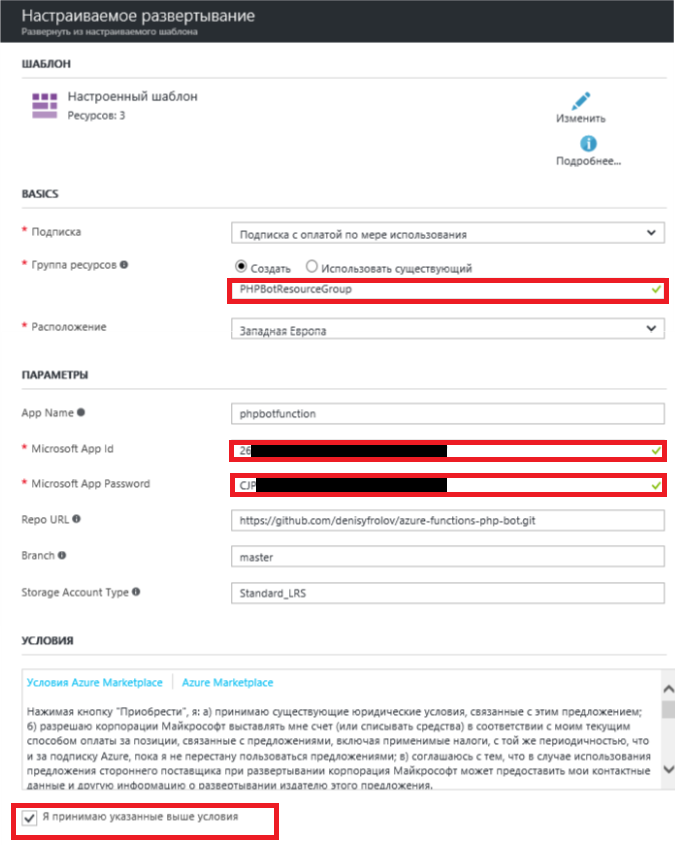
To automatically deploy code to Azure, simply click the Deploy to Azure button just above. The deployment wizard will ask you only for the “Microsoft App Id” and “Microsoft App Password”, feel free to enter those that you received at the preparation stage . Be sure to change the value of the “App Name” field, as the name specified in the template is already in use, and the deployment will fail if you leave it as it is. Just add a couple of random numbers there. Additionally, you can select an existing resource group or create a new one if you want. Otherwise, the parameters are best left as is. Do not forget to read and agree to the terms, then click "Purchase."
The final touch, you need to take a link to the deployed application and stick it in the “Messaging endpoint” field created at the bot preparation stage .
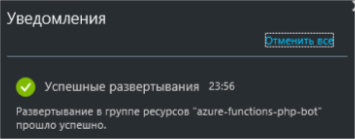
Wait until the application is deployed and go to the resource group where you deployed it.
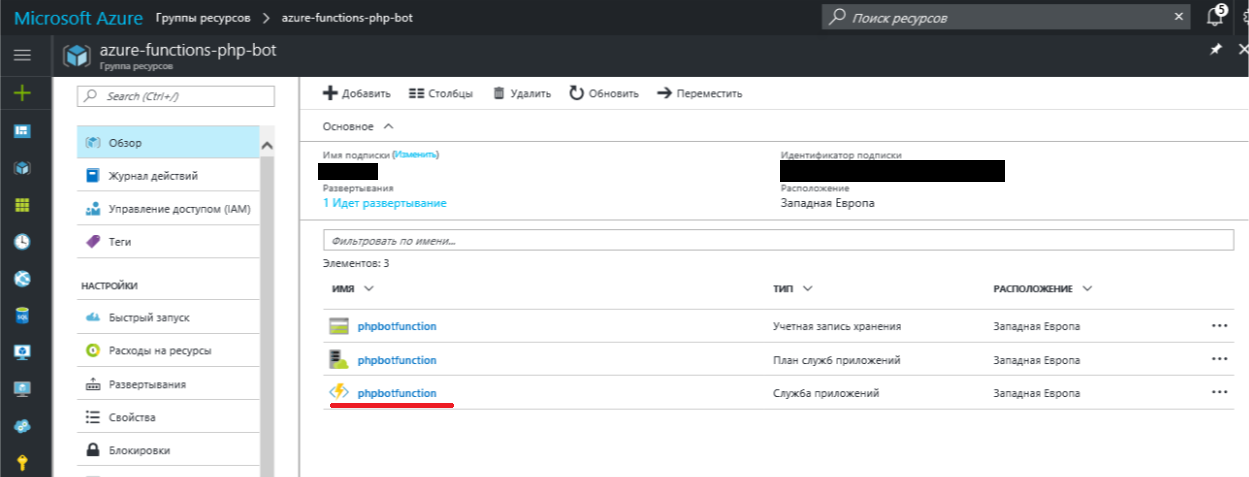
Go inside the Application Services instance with the name of the newly deployed application.
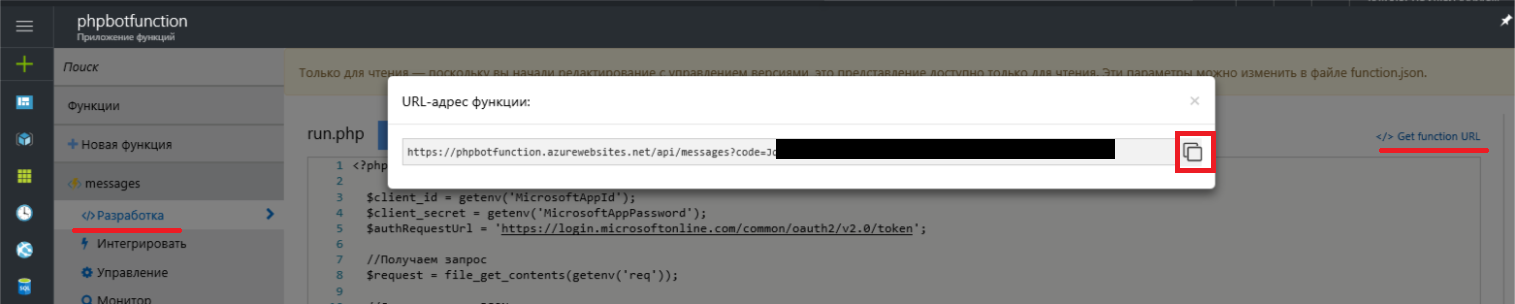
On the left under the name of the "messages" function, go to the "Development" menu and click on the "Get Function URL" link in the window that opens on the right. In the popup there will be a link of the following form. The code parameter protects your application from accidental and malicious operations. Without knowing this key, you cannot force the application to work, which means you cannot overload it with requests and drive you into debt to Azure. Therefore, try not to show this parameter to anyone.
Copy the link, return to the list of your bots on the framework portal, from there go into the bot editing and paste it (or a similar one to the messages / run.php script from the example, if you did not use Azure Functions) in the "Messaging endpoint" field.
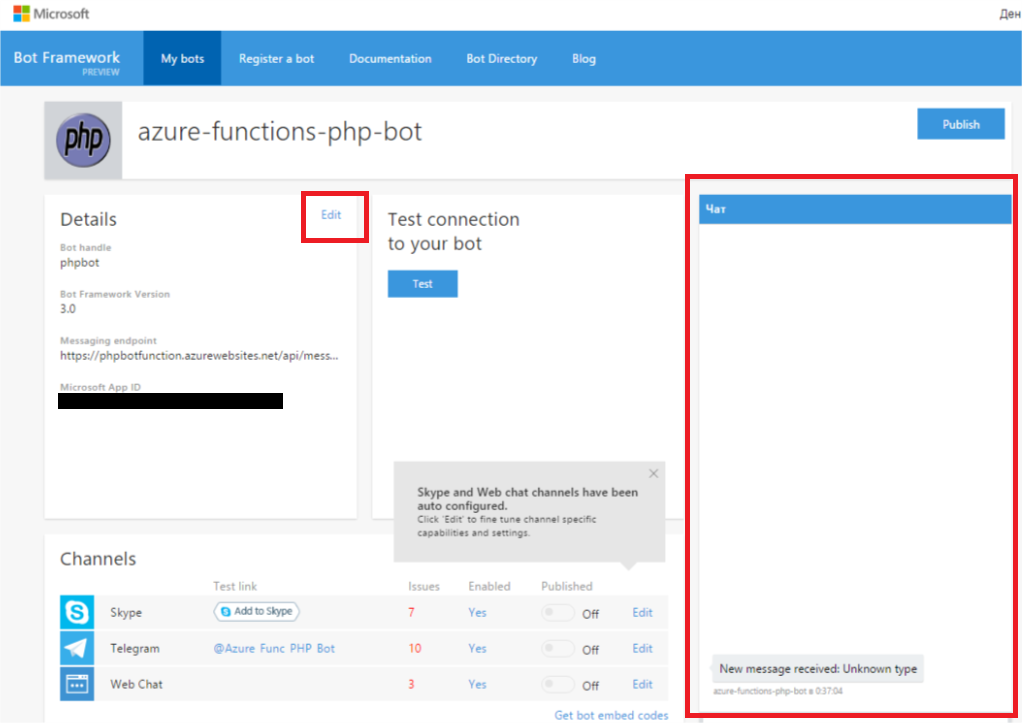
Do not rush to leave the bot management page. On the right you will find a web chat window where you can already try to write something to your new electronic pet.
If you deployed the code from the Azure Functions template , then do not be alarmed if the answers to your first messages come with some delay. This is due to the operating mode of the Application Services instance. To reduce your hosting costs for the example, the so-called “consumption plan” is included in the templatein which the service consumes resources as needed. Simply put, it starts and scales only when there is a real need for it. Even simpler, the service will be able to stand by until someone with the right to pull its web hook. If during the execution process it does not have enough available resources, it is automatically scaled. Thus, you will save hours of calculation, but note that this is not the only resource that you pay. After processing the call and after some time, the service will again “fall asleep”.
If you have already sent several messages to the bot and did not receive any reply from it, then first and foremost visitApplication Services instance. There are a service call log (including data from the STDOUT stream) and a code testing tool.
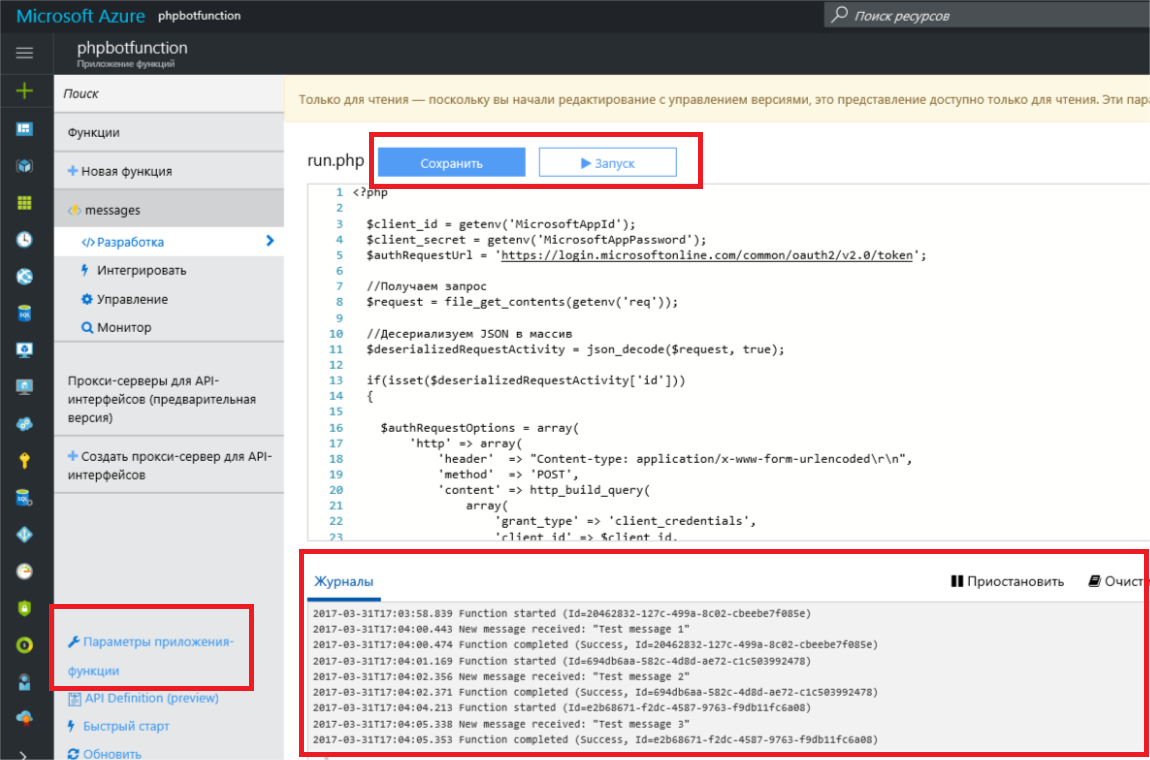
By default, the code will be linked to the sample repository on GitHub in continuous deployment mode . Therefore, in the console, you will see a warning about read-only code availability. To change the code, you need to either completely disable continuous deployment, or clone the repository and link the service to it. Both that, and another can be made if to pass from the console menu to the left in "Application Function Parameters" and there to click on the button "Configure Continuous Integration".
By default, Skype and web chat will be connected to the bot. Additionally, both instant messengers like Telegram and Slack, as well as Email or SMS channels are connected. There is also a REST API Direct Line interface that allows you to use your own chat applications or instant messengers. The settings of all additional channels are accompanied by detailed instructions and, as a rule, do not cause any difficulties, so I see no reason here to go into the details of these procedures.
"Addresses and appearances" of the bot from this example:
It is no secret that Microsoft has been working on natural interfaces for a very long time and at the moment has achieved, if not more, then certainly no less successes than its colleagues. In my opinion, this framework is a great example of this. It offers one of the widest channel coverings with relatively minimal labor. In addition, its capabilities are not limited to working with features common to all instant messengers and direct chat rooms. Microsoft Bot Framework allows you to work with features that are unique to a particular messenger, as well as work in group chats with their inherent logic. Of course, he is far from the only one, and someone may have a different opinion on this.
The purpose of this article: to illustrate how any web developer, with the right tools at hand, can now create his first bot without extra costs and efforts. And I hope that this will be enough for you to at least try.
But this is definitely not enough to entrust the bot to your customers. When we talk about natural interfaces, we mean not only the format of user interaction, but also how this interaction will be felt by them, the same UX. As practice shows, the user does not really like to communicate with bots that perceive only dry commands and are not able to answer a single question. And Microsoft has a pretty elegant Microsoft Cognitive Services solution for this problem .
Microsoft Cognitive Services and Natural Speech is a very large and important part that could continue the topic of this article. But first of all, I want to hear how interesting this is to you in the context of web development? Is it worth making a series of articles from this? Examples in what languages would you like to see in the future?
Introduction
Chatbots have a long and not very successful history, but, like touch-interfaces or neural networks, we can say about them - everything has its time. In the last round of history, bots owe their popularity to Asian messengers and social networks. Having started in Asia, they went to conquer Western social services. Those, in turn, hastily concocting the API, began to compete in a variety of opportunities and the amount of potential earnings on their platforms. Which turned the lives of ordinary developers, who faced the same tasks of developing bots, but from the content and service providers, into a nightmare.
You can count the number of instant messengers that potentially reach your client with one way or another, and there are also classic SMS, Email and web chats. And all this requires a special approach, because everyone offers their own API or SDK. And it would be nice to manage to cover all with one more or less consistent code, so as not to develop and support a dozen different implementations of the same thing. Business requires not so much quality coverage of smaller sales channels as quantitative coverage of more channels. Even if some channels bring more money than others. Or, if some channels offer more features than others.
So how do you cover as many channels as possible without turning your work into endless rushing between different implementations of the same thing? One of the available solutions is to use the framework. This, of course, will not solve all the problems, but it will preserve at least the mental balance and, ideally, the money of the customer or employer.
Microsoft Bot Framework
The Microsoft Bot Framework was first introduced a year ago at Microsoft Build 2016 . However, it is still in the Preview stage, which can create certain difficulties of various kinds using it in large projects in its current form. At least, I definitely can’t recommend using it in production right now.
I will not talk about all the features and benefits of this framework, you can easily find out about it from its documentation or any other article about it. As part of this material, I want to do a little dive into the practical implementation of the bot for the Microsoft Bot Framework.
It may seem that the bot is basically difficult, and even more so with an unfamiliar framework, but it is not. As stated in the header, the implementation of the simplest bot with the Microsoft Bot Framework will take you no more than 10 minutes. It took me about so much to write and debug the code for this article, and it took twice as much to find the right template for it to run in Azure Functions.
Why PHP?
I chose PHP for this material for a number of reasons. Firstly, because the main focus of my work is web development, and PHP, at least in Russia, remains the most popular language in this area. I was thinking about including Python code in the example, but decided not to complicate the already bloated material. If this is interesting, you can put it in a separate article. Secondly, Microsoft even claims that it is possible to work with the Bot Framework in PHP or Python, but in fact carefully ignores them, does not provide any documentation or examples, there is not even an SDK. All that is is the REST API and its documentation. Realization on the conscience of the developer, who is likely to ignore the technology poorly documented for his language, no matter how wonderful and simple it is. Examples in other languages are not always easy to read,
Why Azure Functions?
I chose Azure Functions because it’s the easiest and cheapest way for any reader to try and practice the code for this example. In fact, all that is required of you to launch a full-fledged bot from this material is to click the Deploy to Azure button and enter a couple of parameters for the application. Azure will create and configure the necessary resources, download the sample code from GitHub and set the billing so that you do not have to pay for the entire application. You will pay only for direct calls to the bot, in fact, the messages that it processes.
In addition, if you are interested in the topic of microservices with a serverless architecture and you are not familiar with Azure Functions, then this will be an excellent occasion for you to get to know them. However, microservices and the role of Azure Functions in them is another topic for another article.
Implementation
Separately, I note that this example is unintentionally written in the simplest, linear, well-read and visual way. Of course, it cannot be used as a working code. Since there is currently no SDK for PHP, complicating this example with classes and separate functions would be completely redundant and only complicate its readability and perception.
Training
So, the first thing you need to do is create the bot itself: https://dev.botframework.com/bots/new . Create a bot name (Name), description (Description) and alias for naming in URLs (Bot handle). Please note that unlike the name and description, alias cannot be changed after the bot is created. Leave the “Messaging endpoint” field blank for now, we will fill it after the application starts.
Click the "Manage Microsoft App ID and password" button to create an identifier and password for your application. ID and password are needed to authorize the application as a bot when sending messages to chat, so save them. Click the "Complete the operation and return to the Bot Framework" button.
On this preparatory part is almost finished. Review, confirm your agreement with all agreements and click "Register". If everything is correct, you will see the message “Bot created” very soon. Nominally, your bot is ready. It remains to teach him to communicate.
The code
First of all, set the application ID and password for bot authentication. You got them in the last step. At the same time, we set the URL where we will contact them for a token authorizing the bot's answers.
$client_id = getenv('MicrosoftAppId');
$client_secret = getenv('MicrosoftAppPassword');
$authRequestUrl = 'https://login.microsoftonline.com/common/oauth2/v2.0/token';
In this example, I get the parameters from environment variables, but you can set them directly in the code.
$client_id = ‘26XXXXXX-XXXX-XXXX-XXXX-XXXXXXXXXXXX’;
$client_secret = ‘CJPXXXXXXXXXXXXXXXXXXXXXXXXXXXX’;
$authRequestUrl = 'https://login.microsoftonline.com/common/oauth2/v2.0/token';
Next, read the body of the POST request with a message from the user and deserialize it from the JSON format to the $ deserializedRequestActivity array .
$request = file_get_contents(getenv('req'));
$deserializedRequestActivity = json_decode($request, true);
In this example, I get the request body from the req environment variable , which is preconfigured in Azure Functions binders. You can get the request body from the php: // input stream if you are not using Azure Functions.
$request = file_get_contents('php://input');
$deserializedRequestActivity = json_decode($request, true);
If $ deserializedRequestActivity contains an id field , we consider the incoming request to be correct and begin processing. First of all, you need to get a token to authorize the response to the message. The token can be obtained through a POST request to the Microsoft oAuth service. I use stream context for the request only because its implementation looks better, you can use CURL .
$authRequestOptions = array(
    'http' => array(
        'header'  => "Content-type: application/x-www-form-urlencoded\r\n",
        'method'  => 'POST',
        'content' => http_build_query(
            array(
                'grant_type' => 'client_credentials',
                'client_id' => $client_id, //ID приложения
                'client_secret' => $client_secret, //Пароль приложения
                'scope' => 'https://graph.microsoft.com/.default'
            )
        )
    )
);
We create the stream context configured above and execute a request to the oAuth service from it.
$authRequestContext  = stream_context_create($authRequestOptions);
$authResult = file_get_contents($authRequestUrl, false, $authRequestContext);
We read the response to the request and deserialize it into the $ authData array .
$authData = json_decode($authResult, true);If $ authData contains an access_token field , we consider authentication successful and continue processing. We determine what type of message we received and prepare the text of the response to the message in case the type of the incoming message is message. In this example, we will not process all other types of messages, so we simply say to all other types that we are not familiar with them.
switch ((string)$deserializedRequestActivity['type']) {
    case 'message':
        $message = 'New message is received: ' . (string)$deserializedRequestActivity['text'];
        break;
    default:
        $message = 'Unknown type';
        break;
}
Now that we know what to respond, we form an array of $ deserializedResponseActivity with the response data, which we will later transfer to the Microsoft Bot Framework.
$deserializedResponseActivity = array(
    //Мы отвечаем обычным сообщением
    'type' => 'message',
    //Текст ответа на сообщение
    'text' => $message,
    //Говорим, что ответ - это простой текст
    'textFormat' => 'plain',
    //Устанавливаем локаль ответа
    'locale' => 'ru-RU',
    //Устанавливаем внутренний ID активности, в контексте которого мы находимся (берем из поля id входящего POST-запроса с сообщением)
    'replyToId' => (string)$deserializedRequestActivity['id'],
    //Сообщаем id и имя участника чата (берем из полей recipient->id и recipient->name входящего POST-запроса с сообщением, то есть id и name, которым было адресовано входящее сообщение)
    'from' => array(
        'id' => (string)$deserializedRequestActivity['recipient']['id'],
        'name' => (string)$deserializedRequestActivity['recipient']['name']
),
    //Устанавливаем id и имя участника чата, к которому обращаемся, он отправил нам входящее сообщение (берем из полей from->id и from->name входящего POST-запроса с сообщением)
    'recipient' => array(
        'id' => (string)$deserializedRequestActivity['from']['id'],
        'name' => (string)$deserializedRequestActivity['from']['name']
    ),
    //Устанавливаем id беседы, в которую мы отвечаем (берем из поля conversation->id входящего POST-запроса с сообщением)
    'conversation' => array(
        'id' => (string)$deserializedRequestActivity['conversation']['id']
    )
);
Having formed the answer, we are preparing to send it, for which we form the URL, where we will transfer it. In fact, the URL is assembled from the parameters of the incoming POST request and looks like this: Where activity is the incoming POST request with the message, deserialized earlier into the $ deserializedRequestActivity array . Skip {activity.serviceUrl} through rtrim , to delete the last closing slash, because sometimes it is and sometimes it is not. Also {activity.id} must be passed through urlencode , because it contains special characters that break the URL and interfere with the request.
https://{activity.serviceUrl}/v3/conversations/{activity.conversation.id}/activities/{activity.id}$responseActivityRequestUrl = rtrim($deserializedRequestActivity['serviceUrl'], '/') . '/v3/conversations/' . $deserializedResponseActivity['conversation']['id'] . '/activities/' . urlencode($deserializedResponseActivity['replyToId']);
The URL is ready, now we are preparing a POST request to the Microsoft Bot Connector API, in which we will transmit the response to the incoming message. First of all, configure the stream context. I use stream context for the request only because its implementation looks better, you can use CURL .
$responseActivityRequestOptions = array(
    'http' => array(
        //Устанавливаем в заголовок POST-запроса данные для авторизации ответа, тип токена (token_type) и сам токен (access_token)
        'header'  => 'Authorization: ' . $authData['token_type'] . ' ' . $authData['access_token'] . "\r\nContent-type: application/json\r\n",
        'method'  => 'POST',
        //В тело запроса вставляем сериализованный в JSON-формат массив с данными ответа $deserializedResponseActivity
        'content' => json_encode($deserializedResponseActivity)
    )
);
And immediately we create it and execute the configured request to the Microsoft Bot Connector API from the stream context.
$responseActivityRequestContext  = stream_context_create($responseActivityRequestOptions);
$responseActivityResult = file_get_contents($responseActivityRequestUrl, false, $responseActivityRequestContext);
Done, the user in the chat reads our response, and we write a log to the STDOUT stream about receiving and processing the next message.
fwrite(STDOUT, 'New message is received: "' . (string)$deserializedRequestActivity['text'] . '"');Launch
The above code is on GitHub , there is no need to copy it from here or write again. You can deploy the code in your own environment, or use the ready-made template for Azure Functions. If you intend to deploy code in your own environment, click here to skip the Azure Functions part.
To automatically deploy code to Azure, simply click the Deploy to Azure button just above. The deployment wizard will ask you only for the “Microsoft App Id” and “Microsoft App Password”, feel free to enter those that you received at the preparation stage . Be sure to change the value of the “App Name” field, as the name specified in the template is already in use, and the deployment will fail if you leave it as it is. Just add a couple of random numbers there. Additionally, you can select an existing resource group or create a new one if you want. Otherwise, the parameters are best left as is. Do not forget to read and agree to the terms, then click "Purchase."
The final touch, you need to take a link to the deployed application and stick it in the “Messaging endpoint” field created at the bot preparation stage .
Wait until the application is deployed and go to the resource group where you deployed it.
Go inside the Application Services instance with the name of the newly deployed application.
On the left under the name of the "messages" function, go to the "Development" menu and click on the "Get Function URL" link in the window that opens on the right. In the popup there will be a link of the following form. The code parameter protects your application from accidental and malicious operations. Without knowing this key, you cannot force the application to work, which means you cannot overload it with requests and drive you into debt to Azure. Therefore, try not to show this parameter to anyone.
https://{имя_вашего_приложения}.azurewebsites.net/api/messages?code=JqXXXXXXXXXXXXXXX...Copy the link, return to the list of your bots on the framework portal, from there go into the bot editing and paste it (or a similar one to the messages / run.php script from the example, if you did not use Azure Functions) in the "Messaging endpoint" field.
Validation and Debugging
Do not rush to leave the bot management page. On the right you will find a web chat window where you can already try to write something to your new electronic pet.
If you deployed the code from the Azure Functions template , then do not be alarmed if the answers to your first messages come with some delay. This is due to the operating mode of the Application Services instance. To reduce your hosting costs for the example, the so-called “consumption plan” is included in the templatein which the service consumes resources as needed. Simply put, it starts and scales only when there is a real need for it. Even simpler, the service will be able to stand by until someone with the right to pull its web hook. If during the execution process it does not have enough available resources, it is automatically scaled. Thus, you will save hours of calculation, but note that this is not the only resource that you pay. After processing the call and after some time, the service will again “fall asleep”.
If you have already sent several messages to the bot and did not receive any reply from it, then first and foremost visitApplication Services instance. There are a service call log (including data from the STDOUT stream) and a code testing tool.
By default, the code will be linked to the sample repository on GitHub in continuous deployment mode . Therefore, in the console, you will see a warning about read-only code availability. To change the code, you need to either completely disable continuous deployment, or clone the repository and link the service to it. Both that, and another can be made if to pass from the console menu to the left in "Application Function Parameters" and there to click on the button "Configure Continuous Integration".
Channel connection
By default, Skype and web chat will be connected to the bot. Additionally, both instant messengers like Telegram and Slack, as well as Email or SMS channels are connected. There is also a REST API Direct Line interface that allows you to use your own chat applications or instant messengers. The settings of all additional channels are accompanied by detailed instructions and, as a rule, do not cause any difficulties, so I see no reason here to go into the details of these procedures.
"Addresses and appearances" of the bot from this example:

- Telegram @Azure_Func_PHP_Bot
- web chat
Conclusion
It is no secret that Microsoft has been working on natural interfaces for a very long time and at the moment has achieved, if not more, then certainly no less successes than its colleagues. In my opinion, this framework is a great example of this. It offers one of the widest channel coverings with relatively minimal labor. In addition, its capabilities are not limited to working with features common to all instant messengers and direct chat rooms. Microsoft Bot Framework allows you to work with features that are unique to a particular messenger, as well as work in group chats with their inherent logic. Of course, he is far from the only one, and someone may have a different opinion on this.
The purpose of this article: to illustrate how any web developer, with the right tools at hand, can now create his first bot without extra costs and efforts. And I hope that this will be enough for you to at least try.
But this is definitely not enough to entrust the bot to your customers. When we talk about natural interfaces, we mean not only the format of user interaction, but also how this interaction will be felt by them, the same UX. As practice shows, the user does not really like to communicate with bots that perceive only dry commands and are not able to answer a single question. And Microsoft has a pretty elegant Microsoft Cognitive Services solution for this problem .
Microsoft Cognitive Services and Natural Speech is a very large and important part that could continue the topic of this article. But first of all, I want to hear how interesting this is to you in the context of web development? Is it worth making a series of articles from this? Examples in what languages would you like to see in the future?
Related Links
- GitHub sample source code
- Microsoft Bot Framework Documentation
- Azure Functions Documentation
- Get 30 days of free use of Azure
Only registered users can participate in the survey. Please come in.
I am interested in this topic in the context of web development
- 80.5% Yes 83
- 15.5% have not yet understood 16
- 3.8% No 4
I would like to see a series of articles on this topic
- 76.5% Yes 75
- 18.3% have not yet understood 18
- 5.1% No 5
I want to see examples on
- 76.1% PHP 83
- 22.9% Python 25
- 17.4% Another language, I will write in the comments 19









