Windows undocumented features: hide registry changes from programs that work with the inactive registry
Is it possible to create such a registry key that will be visible in Windows as part of the active (connected) registry, but will not be visible to programs working with an inactive (disabled) registry? It turns out that if you have the ability to change only one kernel variable (for example, using the driver), then yes, there is a way.
Hiding the registry keys from programs that work with the inactive registry, while maintaining the ability to work normally with these keys using standard Windows operating system tools (as part of the active registry), can be used to achieve two goals:
The Windows registry consists of two parts: the volatile part (registry keys and values that will be lost after the bush is disconnected due to the fact that they are not saved to the file; example: the "CurrentControlSet" key of the "SYSTEM" bush), the non-volatile part (synchronized with registry hive file).
Since it is necessary to ensure the integrity of the stored data when writing a non-volatile part to the bush file (for example, in the event of a power failure interrupting data writing operations), the Windows kernel uses registry journaling - the recorded data is saved first to the log file (this file is located in the same directory as the main file and has the extension “.LOG”, “.LOG1” or “.LOG2”) and only then to the main file of the bush (if writing to the log file is not completed successfully, the main file will remain intact and untouched, and if the write to the main file is not completed successfully, then its integrity can be restored using the data from the log that were successfully written before the failure).
The proposed method of hiding keys (and their values, as well as other elements) is to save the corresponding data only in the log, but not in the main file of the registry bush. Third-party programs that work with the inactive registry, in the vast majority of cases, ignore the log file (s), and therefore registry keys stored in the log, but not in the main file, will be invisible to these programs. The Windows kernel, on the other hand, uses the log to restore the integrity of the bush when it is connected, and therefore the discussed keys will be visible to the kernel and, accordingly, other running programs.
To block writing to the main bush file, you can use the debugging mechanism that appeared in Windows Vista. To understand the essence of this mechanism, consider the logging scheme introduced in Windows Vista.
In Windows XP and earlier versions of Windows, each non-volatile registry hive corresponds to one main file and one log file. An exception to this rule is the SYSTEM hive in Windows 2000 and earlier versions of Windows, which is mirrored (to a file named “system.alt”) and is not logged to simplify the bootloader code (which should load the specified hive into memory) and not add it supports recovery from the log (mirroring refers to sequentially writing data to two main files, which as a result will have the same logical structure of keys, values, and other elements).
Logging occurs by compact (without alignment by offsets) saving to the log file the records to be written to the main data file together with a structure - a bitmap of sectors of the main file, which allows you to determine by which offsets the data blocks from the log file should be written to the main file. If, upon connecting the bush, it is established that data recording was not completed in its main file, then the blocks from the log file will be read, the offsets of these blocks in the main file will be determined (using a bitmap), and then these blocks will be written to the main file, thus terminating a previously interrupted recording due to a malfunction.
Such a scheme has a significant drawback - if an I / O error occurs during writing to the main file (for example, due to an attempt to write to the bad sector), then further operations of synchronizing the bush with the main file will be impossible until the computer restarts (even if if the bad sector is neutralized by reassigning sectors at the file system or storage driver level). This is due to the fact that logging clears the log file from old data every time, which means that a write error in the main file will violate the integrity of this file, and a new attempt to synchronize the bush will require erasing the data from the log, which remains the only way to restore the already violated main file integrity.
Therefore, if such deletion of the log is allowed, a situation may arise when, due to a new failure, the integrity of a single log file is violated, while the integrity of the main file was violated by the previous failure.
To solve the problem of synchronizing the bush with the main file in the conditions of repeated failures, a double logging scheme was implemented. In this scheme, two main log files (with extensions “.LOG1” and “.LOG2”) correspond to each main file. By default, the first log file (“.LOG1”) is used.
If an error occurred while writing to the main file, the log file is changed (from “.LOG1” to “.LOG2” and vice versa). This approach ensures the constant availability of a valid log file that contains data from a previous synchronization attempt. As a result, a failure while writing to the log file (after a failure while writing to the main file) does not lead to an unrecoverable violation of the integrity of the registry bush (by the way, if such a situation still arises, there are self-healing mechanisms in the Windows kernel that fix obvious errors in the logical bush structure).
But such a logging scheme needs to be debugged, and therefore a variable has been introduced into the Windows kernel that allows you to simulate repeated errors in writing to the main files of all registry bushes - CmpFailPrimarySave. For unknown reasons, this variable is also present in regular kernel versions (and not just in debug versions). If a variable other than zero is written to this variable, the function of writing data to the main file will simulate an error at different stages of such recording.
It should be noted that in the process of connecting the registry hive, the kernel must choose which of the two log files to use for recovery, for which a relatively complex algorithm is implemented that determines which of the log files has retained integrity, which of them contains a later version of the recorded data, etc. e. Prior to Windows 8, this algorithm contained a serious error, as a result of which, in almost all cases, regardless of specific details, the first log file (“.LOG1”) was selected. In particular, for Windows 7, the corresponding fixes to the algorithm were only released in March 2016 (therefore, all this time double logging in Windows 7 provided integrity protection no better than Windows XP). To overcome the described error, it is necessary not only to block writing to the main file of the bush, but also block the transition to the second log file (“.LOG2”) in the event of a failure (so that the first log file always contains the latest data, even to the detriment of integrity in the event of a failure; otherwise, during the next boot, the system registry bushes can be restored to a state unexpectedly earlier than when the regular shutdown of the computer was completed). Fortunately, the following value of the discussed variable allows us to achieve the desired effect without changing the log file - 3.
The same variable will also work in newer versions of Windows (8.1 and 10), where a different logging method is used (outside the scope of this article).
As an experiment, we will create an invisible key and its value in the Windows 7 operating system (Service Pack 1). To do this, in the running operating system, change (by editing the memory) the value of the CmpFailPrimarySave kernel variable from 0 to 3, and then create the registry key "HKEY_LOCAL_MACHINE \ SYSTEM \ invisible_key" with a value with the name "invisible_value" containing the string "123456". Then turn off the operating system in a regular way and export the SYSTEM registry hive files.
After turning on the operating system again, run the registry editor and note that the desired key and value are visible in it (Fig. 1).

Fig. 1: Windows Registry Editor
At the same time, the third-party programs (for example, Windows Registry Recovery and Registry Explorer) do not display the desired key and value in the exported registry files (Fig. 2 and 3).
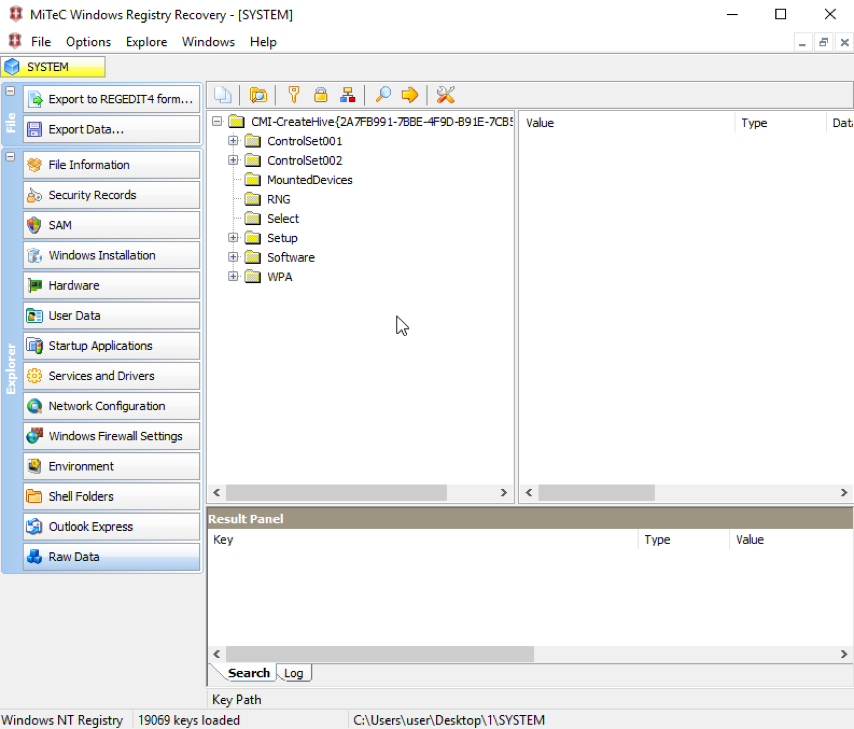
Fig. 2: Windows Registry Recovery
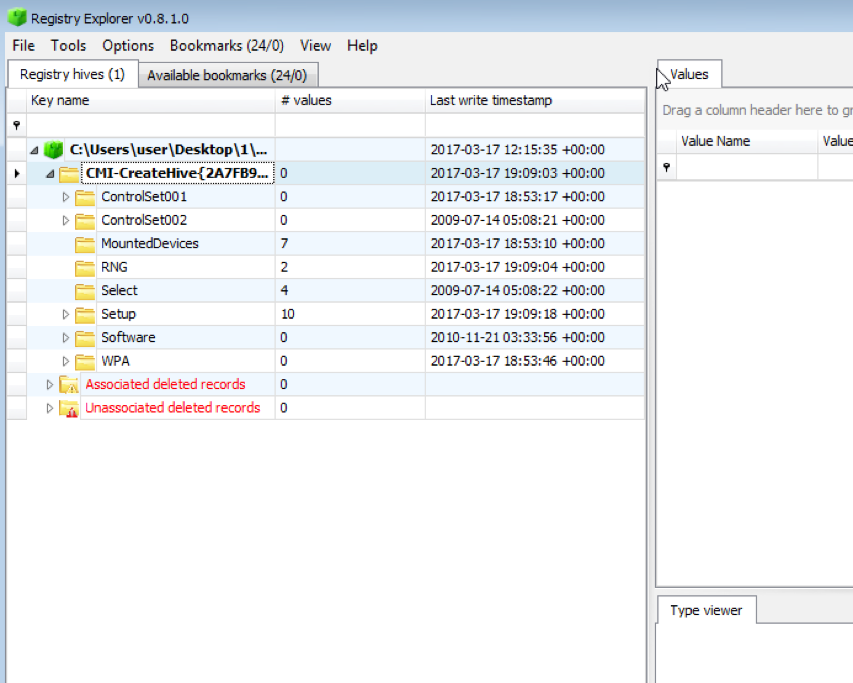
Figure 3: Registry Explorer
You should not rely excessively on programs that work with the inactive registry during the investigation of an information security incident, as well as during integrity control. This article demonstrated one of many ways to hide the registry key, its values and other elements from similar programs.
Why is this needed?
Hiding the registry keys from programs that work with the inactive registry, while maintaining the ability to work normally with these keys using standard Windows operating system tools (as part of the active registry), can be used to achieve two goals:
- hiding the changes made to the registry from forensic investigation (for example, hiding the keys of a certain service that will be correctly read and used by the Windows operating system during the boot process, but will not be visible to third-party programs working with the inactive registry during the drive research);
- hiding the registry changes from pre-boot integrity control (for example, making changes to registry keys that will not be visible to trusted boot modules during integrity monitoring, but will be visible to the Windows operating system itself).
How does this happen?
The Windows registry consists of two parts: the volatile part (registry keys and values that will be lost after the bush is disconnected due to the fact that they are not saved to the file; example: the "CurrentControlSet" key of the "SYSTEM" bush), the non-volatile part (synchronized with registry hive file).
Since it is necessary to ensure the integrity of the stored data when writing a non-volatile part to the bush file (for example, in the event of a power failure interrupting data writing operations), the Windows kernel uses registry journaling - the recorded data is saved first to the log file (this file is located in the same directory as the main file and has the extension “.LOG”, “.LOG1” or “.LOG2”) and only then to the main file of the bush (if writing to the log file is not completed successfully, the main file will remain intact and untouched, and if the write to the main file is not completed successfully, then its integrity can be restored using the data from the log that were successfully written before the failure).
The proposed method of hiding keys (and their values, as well as other elements) is to save the corresponding data only in the log, but not in the main file of the registry bush. Third-party programs that work with the inactive registry, in the vast majority of cases, ignore the log file (s), and therefore registry keys stored in the log, but not in the main file, will be invisible to these programs. The Windows kernel, on the other hand, uses the log to restore the integrity of the bush when it is connected, and therefore the discussed keys will be visible to the kernel and, accordingly, other running programs.
To block writing to the main bush file, you can use the debugging mechanism that appeared in Windows Vista. To understand the essence of this mechanism, consider the logging scheme introduced in Windows Vista.
Logging to Windows Vista
In Windows XP and earlier versions of Windows, each non-volatile registry hive corresponds to one main file and one log file. An exception to this rule is the SYSTEM hive in Windows 2000 and earlier versions of Windows, which is mirrored (to a file named “system.alt”) and is not logged to simplify the bootloader code (which should load the specified hive into memory) and not add it supports recovery from the log (mirroring refers to sequentially writing data to two main files, which as a result will have the same logical structure of keys, values, and other elements).
Logging occurs by compact (without alignment by offsets) saving to the log file the records to be written to the main data file together with a structure - a bitmap of sectors of the main file, which allows you to determine by which offsets the data blocks from the log file should be written to the main file. If, upon connecting the bush, it is established that data recording was not completed in its main file, then the blocks from the log file will be read, the offsets of these blocks in the main file will be determined (using a bitmap), and then these blocks will be written to the main file, thus terminating a previously interrupted recording due to a malfunction.
Such a scheme has a significant drawback - if an I / O error occurs during writing to the main file (for example, due to an attempt to write to the bad sector), then further operations of synchronizing the bush with the main file will be impossible until the computer restarts (even if if the bad sector is neutralized by reassigning sectors at the file system or storage driver level). This is due to the fact that logging clears the log file from old data every time, which means that a write error in the main file will violate the integrity of this file, and a new attempt to synchronize the bush will require erasing the data from the log, which remains the only way to restore the already violated main file integrity.
Therefore, if such deletion of the log is allowed, a situation may arise when, due to a new failure, the integrity of a single log file is violated, while the integrity of the main file was violated by the previous failure.
Logging from Windows Vista (up to Windows 8.1)
To solve the problem of synchronizing the bush with the main file in the conditions of repeated failures, a double logging scheme was implemented. In this scheme, two main log files (with extensions “.LOG1” and “.LOG2”) correspond to each main file. By default, the first log file (“.LOG1”) is used.
If an error occurred while writing to the main file, the log file is changed (from “.LOG1” to “.LOG2” and vice versa). This approach ensures the constant availability of a valid log file that contains data from a previous synchronization attempt. As a result, a failure while writing to the log file (after a failure while writing to the main file) does not lead to an unrecoverable violation of the integrity of the registry bush (by the way, if such a situation still arises, there are self-healing mechanisms in the Windows kernel that fix obvious errors in the logical bush structure).
But such a logging scheme needs to be debugged, and therefore a variable has been introduced into the Windows kernel that allows you to simulate repeated errors in writing to the main files of all registry bushes - CmpFailPrimarySave. For unknown reasons, this variable is also present in regular kernel versions (and not just in debug versions). If a variable other than zero is written to this variable, the function of writing data to the main file will simulate an error at different stages of such recording.
It should be noted that in the process of connecting the registry hive, the kernel must choose which of the two log files to use for recovery, for which a relatively complex algorithm is implemented that determines which of the log files has retained integrity, which of them contains a later version of the recorded data, etc. e. Prior to Windows 8, this algorithm contained a serious error, as a result of which, in almost all cases, regardless of specific details, the first log file (“.LOG1”) was selected. In particular, for Windows 7, the corresponding fixes to the algorithm were only released in March 2016 (therefore, all this time double logging in Windows 7 provided integrity protection no better than Windows XP). To overcome the described error, it is necessary not only to block writing to the main file of the bush, but also block the transition to the second log file (“.LOG2”) in the event of a failure (so that the first log file always contains the latest data, even to the detriment of integrity in the event of a failure; otherwise, during the next boot, the system registry bushes can be restored to a state unexpectedly earlier than when the regular shutdown of the computer was completed). Fortunately, the following value of the discussed variable allows us to achieve the desired effect without changing the log file - 3.
The same variable will also work in newer versions of Windows (8.1 and 10), where a different logging method is used (outside the scope of this article).
Experiment
As an experiment, we will create an invisible key and its value in the Windows 7 operating system (Service Pack 1). To do this, in the running operating system, change (by editing the memory) the value of the CmpFailPrimarySave kernel variable from 0 to 3, and then create the registry key "HKEY_LOCAL_MACHINE \ SYSTEM \ invisible_key" with a value with the name "invisible_value" containing the string "123456". Then turn off the operating system in a regular way and export the SYSTEM registry hive files.
After turning on the operating system again, run the registry editor and note that the desired key and value are visible in it (Fig. 1).
Fig. 1: Windows Registry Editor
At the same time, the third-party programs (for example, Windows Registry Recovery and Registry Explorer) do not display the desired key and value in the exported registry files (Fig. 2 and 3).
Fig. 2: Windows Registry Recovery
Figure 3: Registry Explorer
Conclusion
You should not rely excessively on programs that work with the inactive registry during the investigation of an information security incident, as well as during integrity control. This article demonstrated one of many ways to hide the registry key, its values and other elements from similar programs.









