Concurrency in Swift 3. GCD and Dispatch Queues
I must say that multithreading (concurrency) in iOS is always included in questions asked during interviews with iOS application developers , as well as among the top mistakes that programmers make when developing iOS applications. Therefore, it is so important to master this tool perfectly.
So, you have an application, it runs on
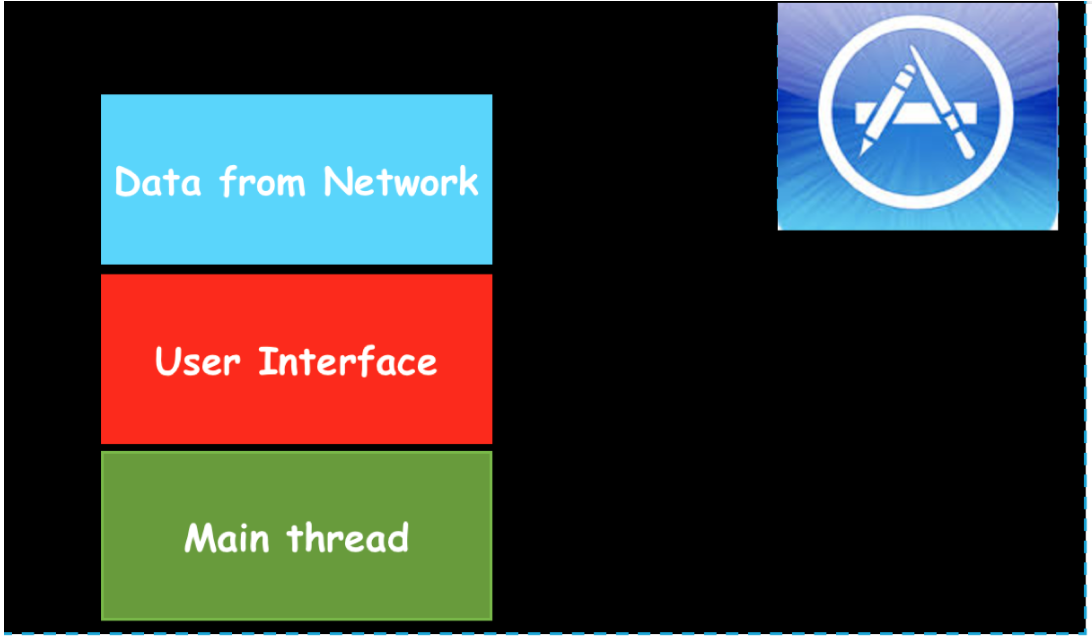
How can I change the architecture of the application so that such problems do not arise? In this case, multithreading comes to the rescue (
The processor at each given point in time can perform one of your tasks and the corresponding thread (
In the case of a single-core processor (iPhone and iPad), multithreading (
A kind of payment for introducing multithreading in your application is the difficulty of ensuring safe code execution on various threads (
In iOS programming, multithreading is provided to developers in the form of several tools: Thread , Grand Central Dispatch (GCD for short) and Operation - and is used to increase productivity and responsiveness of the user interface. We will not consider
I must say that before the advent of
In
Another good news is that since
For a better understanding of multithreading (
But this is just a general idea of how multithreading (
Sequential (
Queues (
We see that on the
Once the queue (
The synchronous function
An asynchronous function
In the case of asynchronous execution, it may turn out to be a “different queue as a sequential (
and parallel (
The developer’s task is only to select a queue and add a task (usually a closure) to this queue synchronously using a function
Returning to the task presented at the very beginning of this post, we will switch the execution of the task of receiving data from the “Data from Network” network to another queue:

After receiving data
When we receive data
To perform the data load on the URL URLs
After receiving the data,
You see how simple it is to carry out a chain of switches to another queue in order to “divert” the execution of “costly” tasks s
Note that switching costly jobs from
You need to be very careful with the method
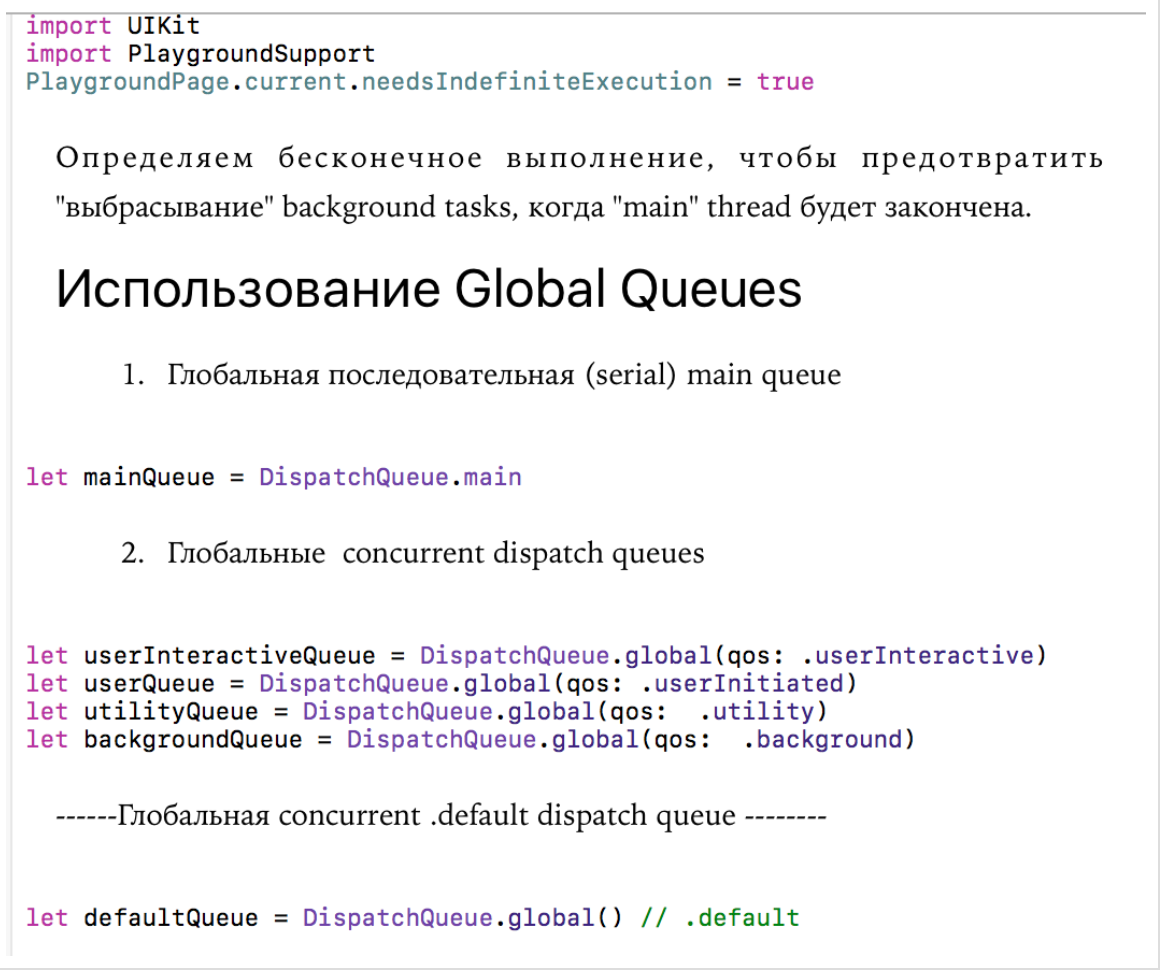
In addition to user queues that need to be specially created, the system
1.) a sequential queue
If you want to execute a function or closure that does something with the user interface (
2.) 4 background
Each of these lines has been
Below are various
There is also a
If it is possible to determine
It is important to understand that all these global queues are SYSTEM global queues and our tasks are not the only tasks in this queue! It is also important to know that all global queues, except for one, are
Apple provides us with the only GLOBAL
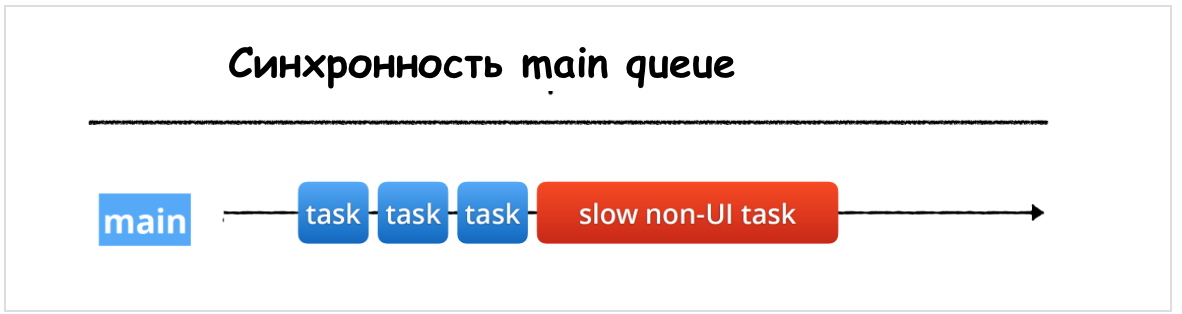
It is highly recommended that you “divert” such resource-intensive operations to other threads or queues:
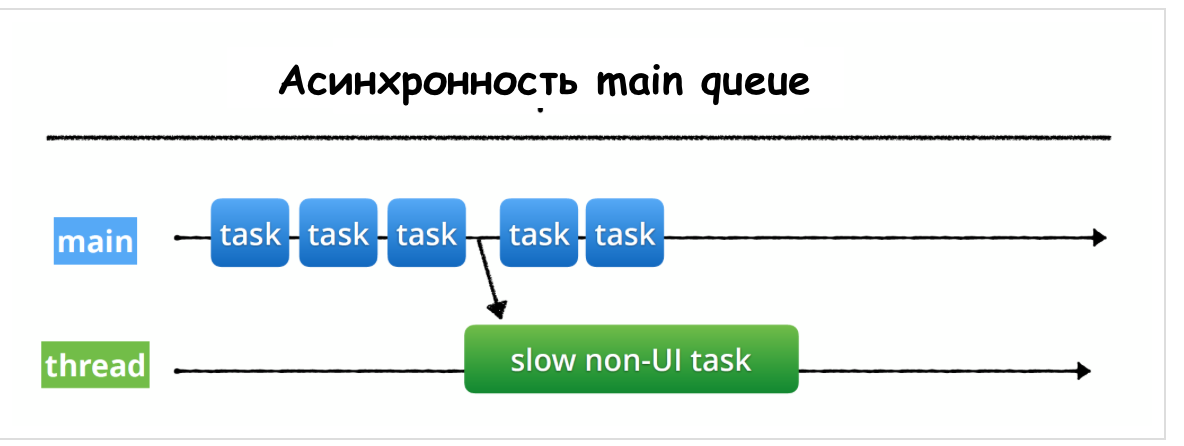
There is one more strict requirement - ONLY
This is because we want to
As soon as we allow tasks (
There are three main problems:
We can reproduce the simplest case
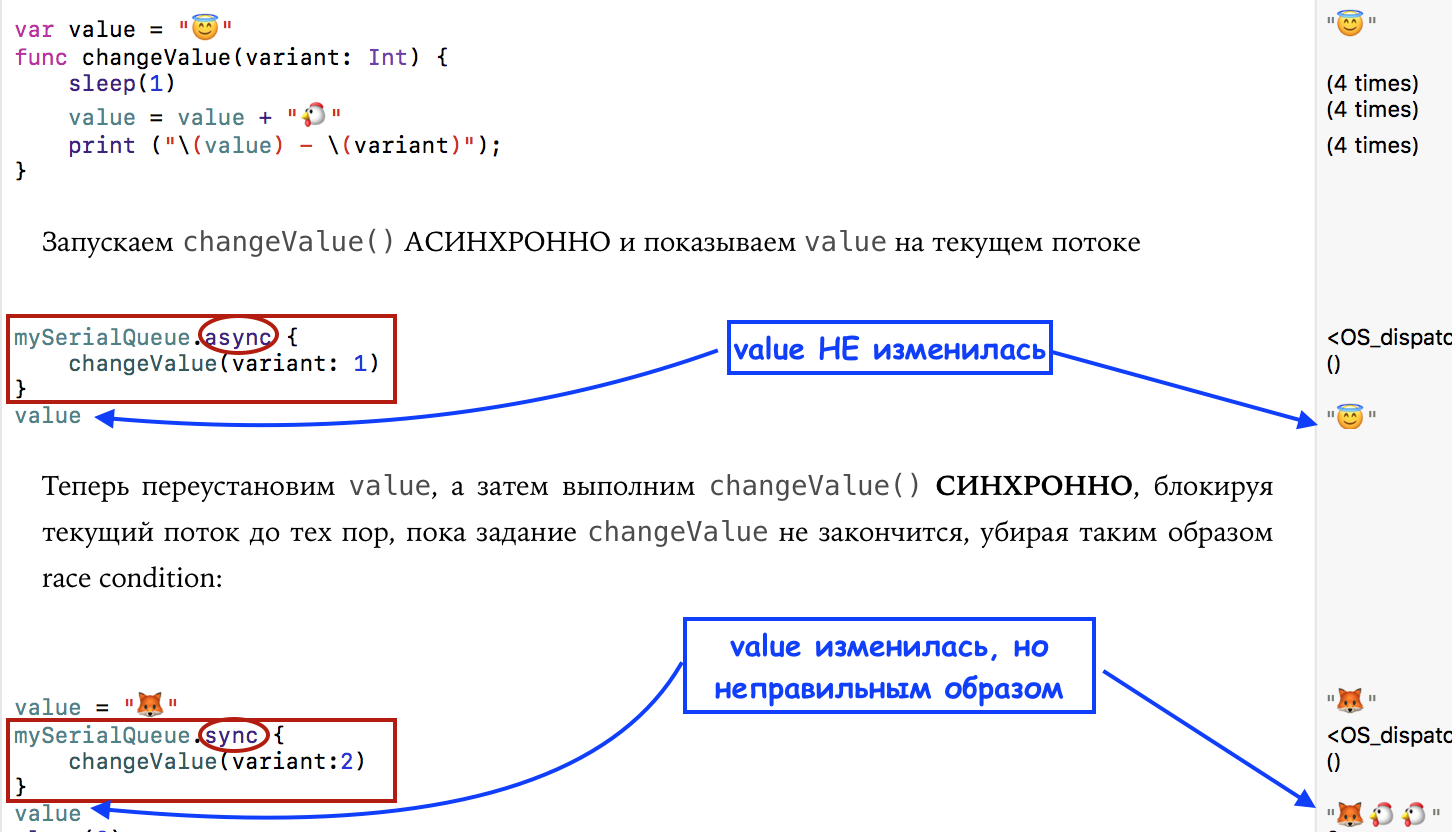
We have a regular variable

and a diagram in which a phenomenon called "
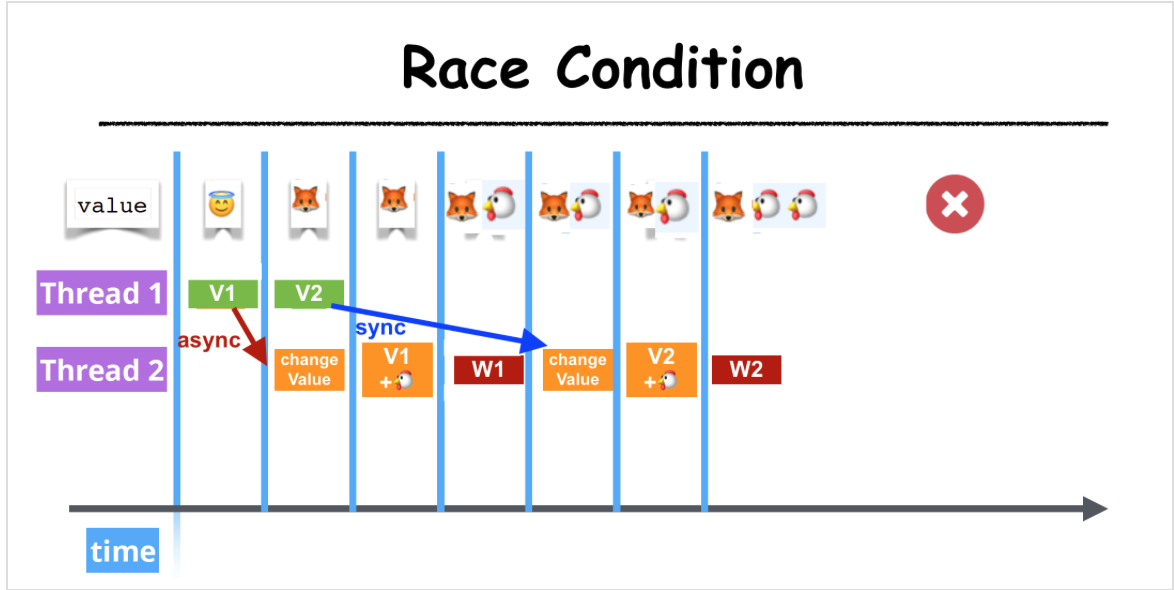
Let's replace the method
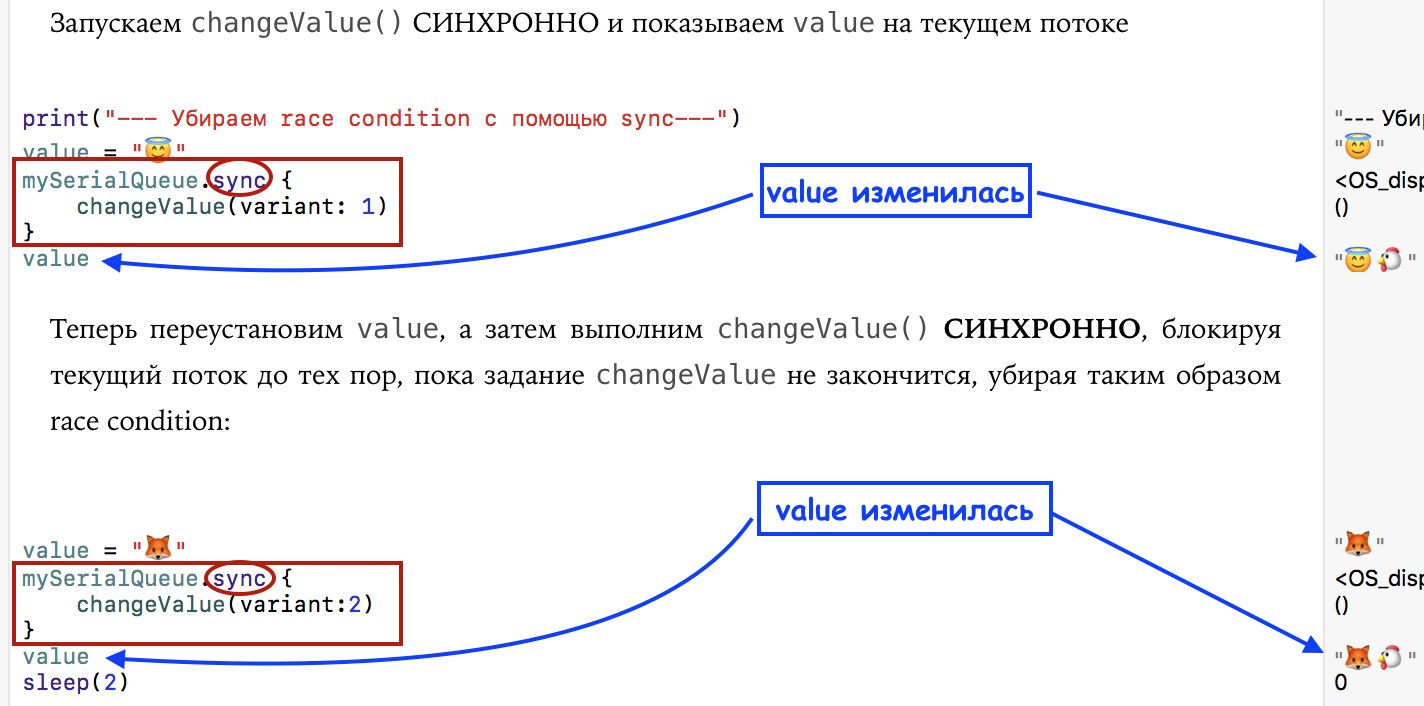
Both the print and the result have changed:

![]()
and a diagram that does not have a phenomenon called "
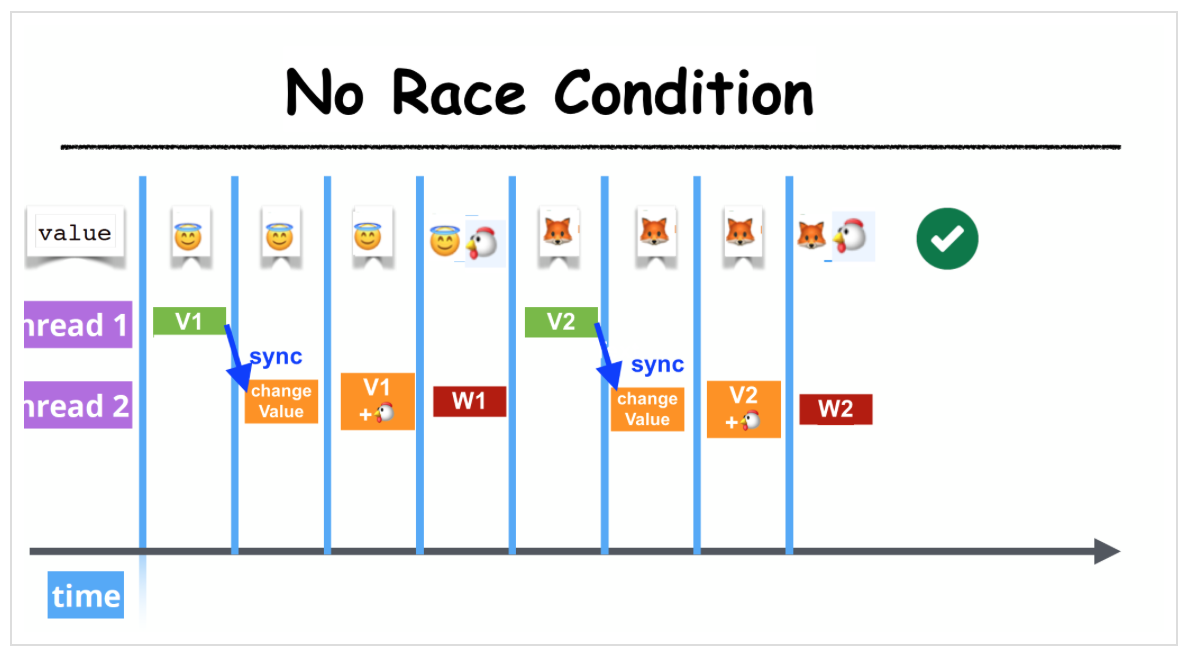
We see that although you need to be very careful with the method
The concept is closely related to resource locking
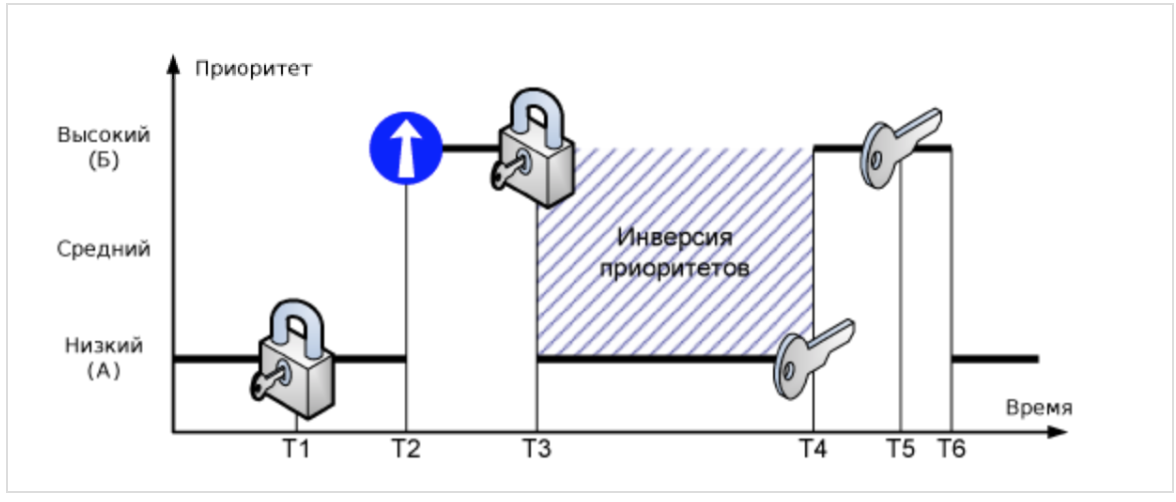
For example, suppose there are two tasks in the system with low (A) and high (B) priority. At time T1, task (A) blocks the resource and starts serving it. At time T2, task (B) crowds out the low-priority task (A) and tries to take over the resource at time T3. But since the resource is blocked, task (B) is put on hold, and task (A) continues execution. At time T4, task (A) completes the service of the resource and unlocks it. Since the task (B) expects the resource, it immediately begins execution.
The time span (T4-T3) is called the limited priority inversion. In this period, there is a logical discrepancy with the planning rules - a task with a higher priority is pending while a low priority task is being executed.
But this is not the worst. Let's say three tasks work in the system: low priority (A), with medium priority (B) and high priority (C):
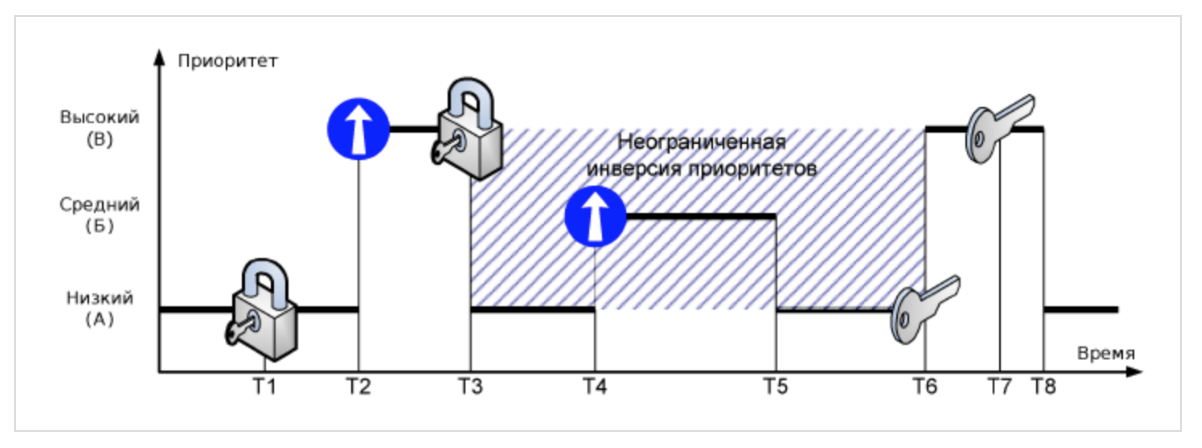
If the resource is blocked by task (A), and it is required by task (B), then the same situation is observed - the high-priority task is blocked. But suppose that task (B) supplanted (A) after (C) went to wait for a resource. Task (B) does not know anything about the conflict, so it can be performed as long as you like over a period of time (T5-T4). In addition, in addition to (B), the system may have other tasks, with priorities greater than (A), but less (B). Therefore, the duration of the period (T6-T3) is generally indefinite. This situation is called unlimited priority inversion.
In general, a limited priority inversion cannot be avoided, but it is not as dangerous for a multi-threaded application as an unlimited one. It is eliminated by forcibly raising the priorities of all “interfering” tasks with low priority.
Below we show how to use the
A deadlock is a system emergency condition that can occur when resource locks are nested. Suppose there are two tasks in the system with low (A) and high (B) priority that use two resources - X and Y:
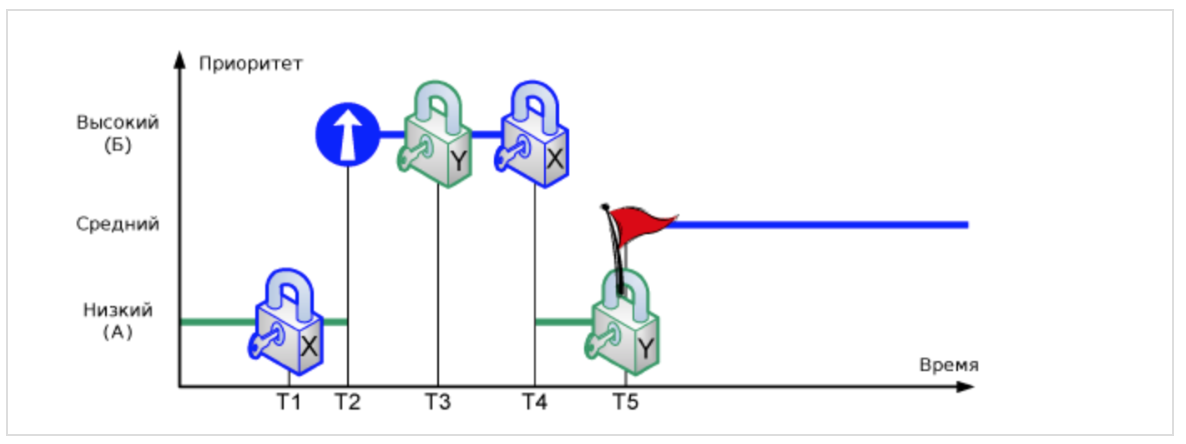
At time T1, task (A) blocks resource X. Then at time T2, task (A) is crowded out more priority task (B), which blocks resource Y at time moment T3. If task (B) tries to block resource X (T4) without releasing resource Y, it will be put on hold and task (A) will continue. If, at time T5, task (A) tries to lock resource Y without releasing X, a state of mutual locking occurs - none of tasks (A) and (B) can get control.
Mutual locking is possible only when the system uses dependent (nested) multi-threaded access to resources. Mutual blocking can be avoided if nesting is not used, or if the resource uses the priority increase protocol.
If we, in the task presented at the beginning of the post, after receiving data from the network in the background queue, try to use the sync method to return to the main queue, then we will get a deadlock (
NEVER call a method
For the experiments, we will use
There is another cool feature on
and Assistant Editor (
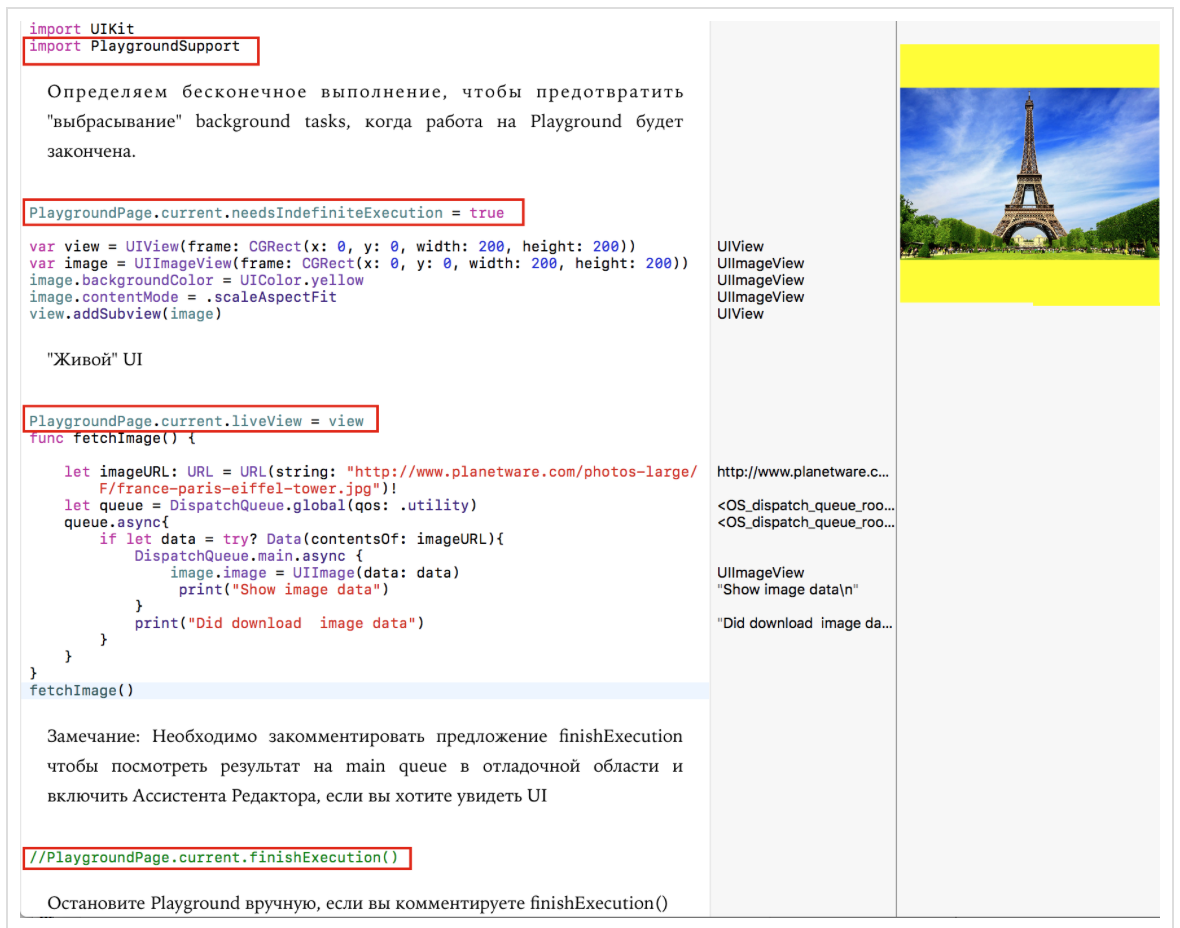
Let's start with simple experiments. We also define a number of global queues: one consistent
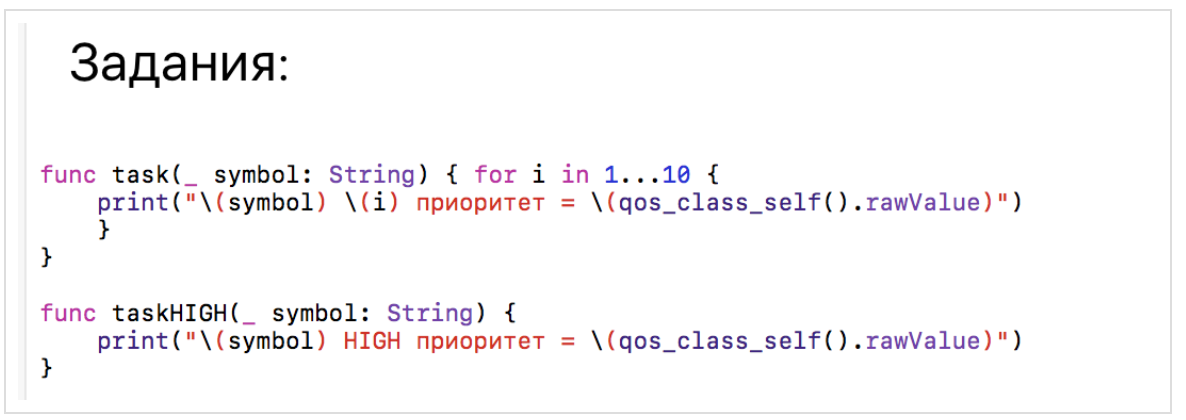
As a job,
Once you have received a global queue, for example,
In the case of synchronous
In the case of asynchronous

start without waiting for the completion of the tasks

, and the priority of the global queue
In addition to global queues, we can create custom

The only thing you need to specify when creating a custom queue is a unique label
Look how the user
In the case of synchronous
What happens if we use the
asynchronously with respect to the current queue? In this case, the program does not stop and does not wait until this task is completed in the queue
and will execute them at the same time as the tasks
Let's assign a qos service quality equal to .userInitiated to our
and then asynchronously on this queue. Then
this experiment will convince us that our new queue is
Thus, for multi-threaded code execution it is not enough to use the method
Let's use sequential
, and then tasks
queue
queue
This is where multi-threaded tasks are executed, and tasks are more often executed on a queue
You can delay the execution of tasks on any queue
In order to initialize a
Let's assign equal
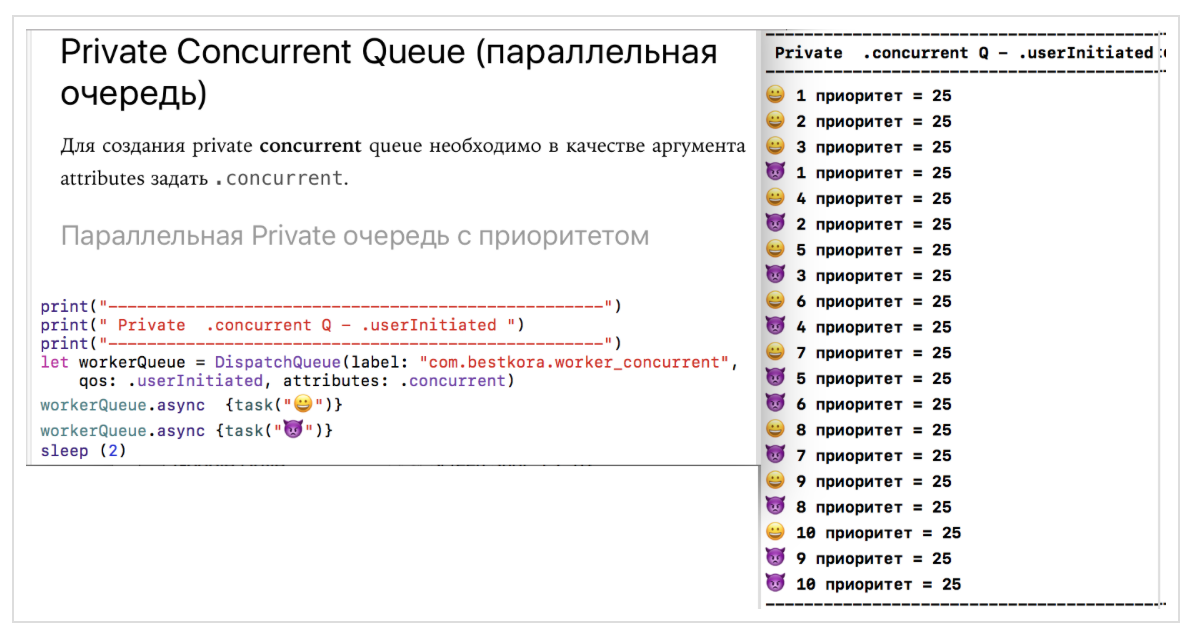
The picture is completely different compared to one sequential queue. If there all the tasks are carried out strictly in the order in which they are executed, then for our parallel (multi-threaded) queue

, later queued
Let's use parallel
queue
queue
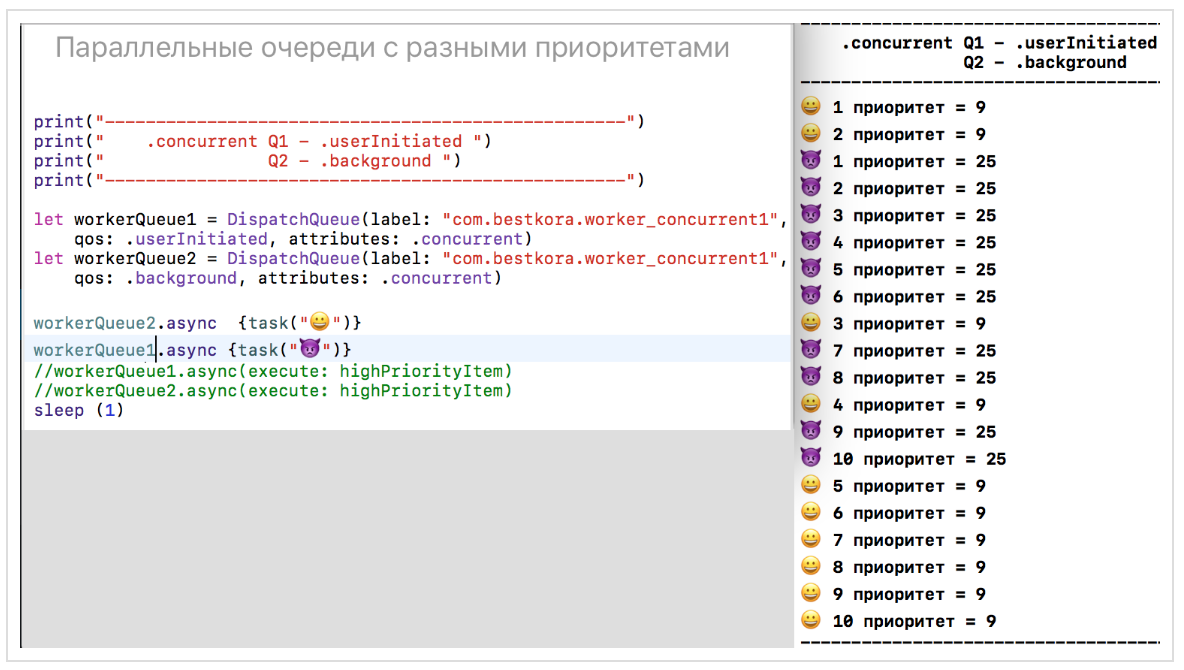
Here is the same picture as with different sequential
You can create queues with deferred execution using the argument

If you want to have additional capabilities for managing the execution of various tasks in the

By setting the flag

This allows you to forcibly increase the priority of a specific task for a
If we remove the flag

then the tasks

But still, they get to the very beginning of the corresponding queues. The code for all these experiments is on firstPlayground.playground on Github.
In the class

Despite the presence of a method
You can use the class
To solve the problem presented at the very beginning of the post - download the image from the network:

We form a synchronous task in the form of an instance of the
Using function
We are waiting for a notification about the end of the data loading at

The code is on LoadImage.playground on Github .
We have two synchronous tasks:
receiving data from the network
and updating based on
This is a typical pattern performed using multithreading mechanisms
This can be done either in the classical way:

either using the ready-made asynchronous API, using

or using

Finally, we can always “wrap” our synchronous task into an asynchronous “shell” and execute it:

The code for this pattern is on LoadImage.playground on github .
Consider, as an example, a very simple application, consisting of only one

Here is the class

and the class

Image is loaded in the usual classic way. The model for the class
If we launch the application and start scrolling down fast enough to see all 8 images, we will find that the Cassini Satellite will not boot until we leave the screen. Obviously, it takes significantly longer to load than all the rest.

But after scrolling to the end and seeing the “Arctic” in the very last cell, we suddenly find that after a very short time it will be replaced by the Cassini Satellite :

This is a malfunctioning of such a simple application. What is the matter? The fact is that cells in tables are reusable thanks to the method

How can we fix the situation? Within the framework of the mechanism,

Now everything will work correctly. Thus, multi-threaded programming requires non-standard imagination. The fact is that some things in multi-threaded programming are done in a different order than the code is written. The GCDTableViewController app is on Github .
If you have several tasks that you need to perform asynchronously, and wait for them to complete, then a group is applied
Suppose we need to download 4 different images "from the network":

The method

We create a group

The group contains a thread-safe internal counter, which automatically increases when a task is added to the group using the method
If your group has not only synchronous operations, but also asynchronous ones, then the thread-safe counter can be controlled manually: the method

For comparison, at the bottom of the screen we will place the same images obtained in the usual way, one after another, without packing them into groups. You will immediately feel the difference in the appearance of the same image at the top and at the bottom: in the beginning there will be one after another, the image at the bottom of the screen, and then once all the images top of the screen, although the method invocation

Placing in a group of mixed operations: synchronous and asynchronous:

The result will be the same.
Let's go back to our first experiment with bursts

I have to say that I used to store the results as a normal NEpotochno- safe to
The purpose of this section is to show how a thread-safe string should be arranged in
All experiments with a thread-safe string will occur on the Playground GCDPlayground.playground on Github .
I will change the tasks a bit in order to accumulate information in both lines

In
An ideal option for thread-safe would be the case when
Fortunately, it

Barriers
Let's see what the thread-safe class will look like

The function
The function
The results of experiments with
Let's see these results.
1. Function
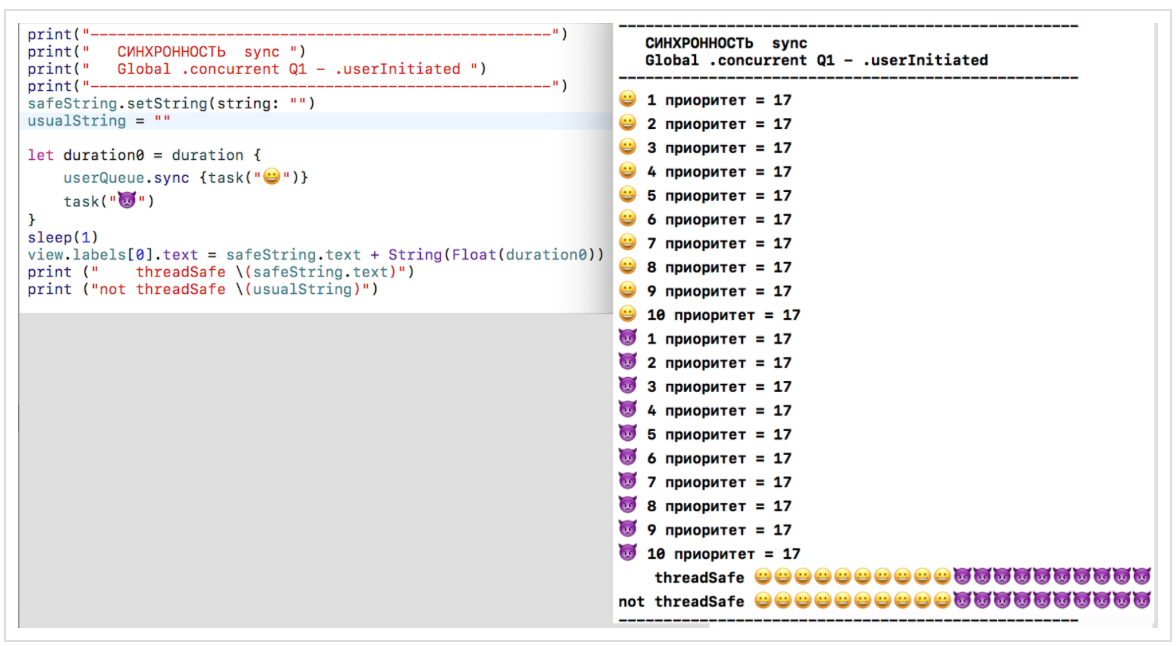
Results on a regular Thread-safe line
2. Function

Results on a regular Thread-safe line
3. The function
results on plain not thread-safe line
4. Function

Results on a regular thread-safe line
5. Function
and
on a

Results on a normal NOT thread-safe line
6. Function
and
in different

The results of a conventional non-stream-line safe
7. Function
and
on

The results of a conventional non-stream-line safe
8. Function
and
on different

results of a conventional non-stream-line safe
9. Function

Results on a regular thread-safe line
10. Function

Results on a normal NOT thread-safe line
also
spaced in time .
Everywhere where there is multi-threaded execution of tasks
and
occurs either on different queues, or on one, but parallel (
Using a thread-safe line,

If you use not

you see the detection of race condition for our example. Tsan app code is on Github.
CONCLUSION
We looked at some use cases
PS Currently
Fall of 2017 .. Chris Lutner at the Day of Programming Languages at IBM said that existing multi-threaded programming using

One of the possible areas for improved multi-threading - is the use of models of actors ( actor is models The .) each

But this is just one of many suggestions. It is assumed to consider
You
This article may be useful for those who study iOS programming on Swift using the Stanford CS193p Winter 17 courses (based on iOS 10 and Swift 3) , which are hosted on iTunes , because there is a significant amount of multithreaded programming.
WWDC 2016. Concurrent Programming With GCD in Swift 3 (session 720)
WWDC 2016. Improving Existing Apps with Modern Best Practices (session 213)
WWDC 2015. Building Responsive and Efficient Apps with GCD.
Grand Central Dispatch (GCD) and Dispatch Queues in Swift 3
iOS Concurrency with GCD and Operations
The GCD Handbook
Поваренная книга GCD
Modernize libdispatch for Swift 3 naming conventions
GCD
GCD – Beta
CONCURRENCY IN IOS
www.uraimo.com/2017/05/07/all-about-concurrency-in-swift-1-the-present
All about concurrency in Swift — Part 1: The Present
So, you have an application, it runs on
main thread(the main thread), which is responsible for executing the code that displays your user interface ( UI). As soon as you start adding “time-consuming” pieces of code to your application, such as downloading data from the network or processing images on the main thread(main stream), your work UIbegins to slow down significantly and can even lead to its complete “freezing”.How can I change the architecture of the application so that such problems do not arise? In this case, multithreading comes to the rescue (
сoncurrency), which allows you to simultaneously perform two or more independent tasks ( tasks): computing, downloading data from a network or from a disk, image processing, etc. The processor at each given point in time can perform one of your tasks and the corresponding thread (
thread) is allocated for it . In the case of a single-core processor (iPhone and iPad), multithreading (
сoncurrency) is achieved by multiple short-term switches between the "threads" ( threads) on which tasks are performed (tasks), creating a reliable idea of the simultaneous execution of tasks on a single-core processor. On a multi-core processor (Mac), multithreading is achieved by the fact that each “thread” associated with a task is provided with its own kernel for running tasks. Both of these technologies use the general concept of multithreading ( сoncurrency). A kind of payment for introducing multithreading in your application is the difficulty of ensuring safe code execution on various threads (
thread safety). As soon as we allow tasks ( tasks) to work in parallel, there are problems associated with the fact that different tasks (tasks) they want to access the same resources, for example, they want to change the same variable in different threads, or they want to access resources that are already blocked by other tasks. This can lead to the destruction of the resources themselves used by tasks on other threads. In iOS programming, multithreading is provided to developers in the form of several tools: Thread , Grand Central Dispatch (GCD for short) and Operation - and is used to increase productivity and responsiveness of the user interface. We will not consider
Thread, as this is a low-level mechanism, but focus on GCDin this article and Operation(object-orientedAPIbuilt over GCD) in a subsequent publication. I must say that before the advent of
Swift 3such a powerful framework as Grand Central Dispatch (GCD), it was APIbased on the C language, which at first glance seems to be just a spellbook, and it is not immediately clear how to mobilize its capabilities for performing useful user tasks. In
Swift 3all changed dramatically. GCDGot a new, fully-like Swiftsyntax that is very easy to use. If you are even a little familiar with the old API GCD, then the whole new syntax will seem to you just an easy walk; if not, then you just have to study another regular programming section on iOS. The new framework GCDworks in Swift 3 allAppledevices ranging from Apple Watch, including all iOSappliances, to Apple TVand Mac. Another good news is that since
Xcode 8you can use to explore GCDand Operationsuch a powerful and intuitive tool like Playgroud. A Xcode 8new helper class has appeared PlaygroudPage, which has a function that allows you Playgroudto live for unlimited time. In this case, the queue DispatchQueuecan work until the work is completed. This is especially important for network requests. In order to use the class PlaygroudPage, you need to import the module PlaygroudSupport. This module also allows you to access the execution loop ( run loop), display "live"UI, and also perform asynchronous operations on Playgroud. Below we will see what this setting looks like in work. This new feature Playgroundin Xcode 8makes the study of multithreading Swift 3very easy and intuitive. For a better understanding of multithreading (
concurrency), I Appleintroduced some abstract concepts that both tools operate with - GCDand Operation. The basic concept is queue ( queue). Therefore, when we talk about multithreading in iOSterms of the iOSapplication developer , we talk about queues ( queues). Queues ( queues) are ordinary queues in which people line up to buy, for example, a ticket to the cinema, but in our case closures line up (closure - anonymous blocks of code). The system simply executes them according to the queue, “pulling out” the next one in turn and starting it to execute in the thread corresponding to this queue. Queues ( queues) follow the FIFOpattern ( First In, First Out), which means that the one who was first placed in the queue will be the first to be executed. You can have many queues ( queues) and the system “pulls out” the closures one of each queue and starts them to execute in their own threads. This way you get multithreading. But this is just a general idea of how multithreading (
сoncurrency) works iniOS. The intrigue is what these queues are in the sense of completing tasks in relation to each other (sequential or parallel) and with what function (synchronous or asynchronous) these tasks are placed in the queue, thereby blocking or not blocking the current queue.Sequential ( serial) and parallel ( concurrent) queues
Queues (
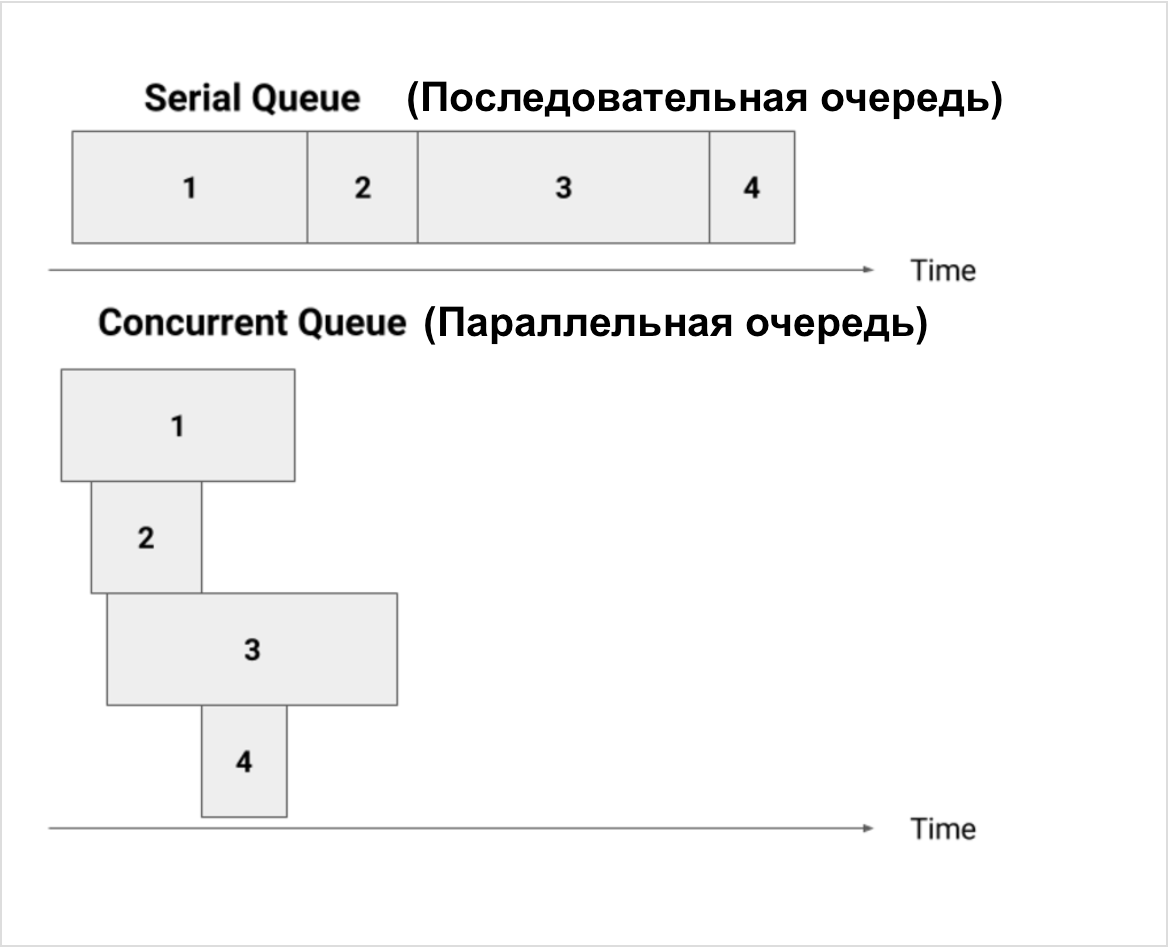
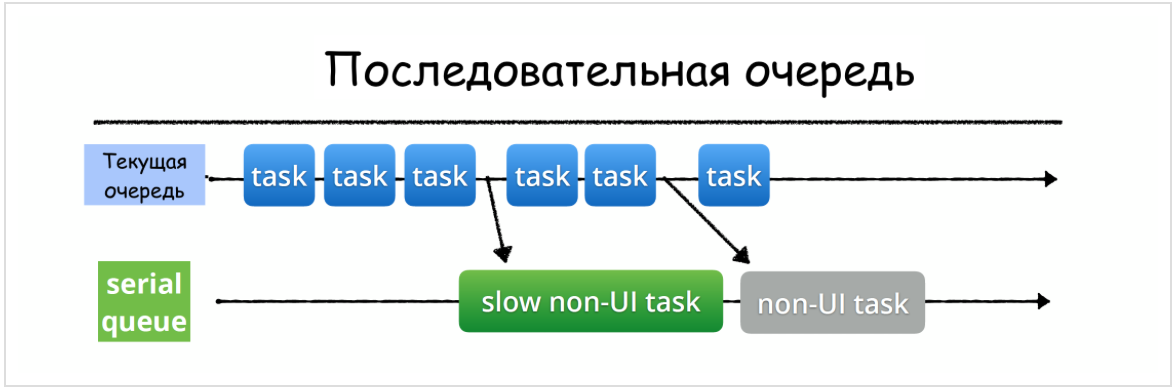
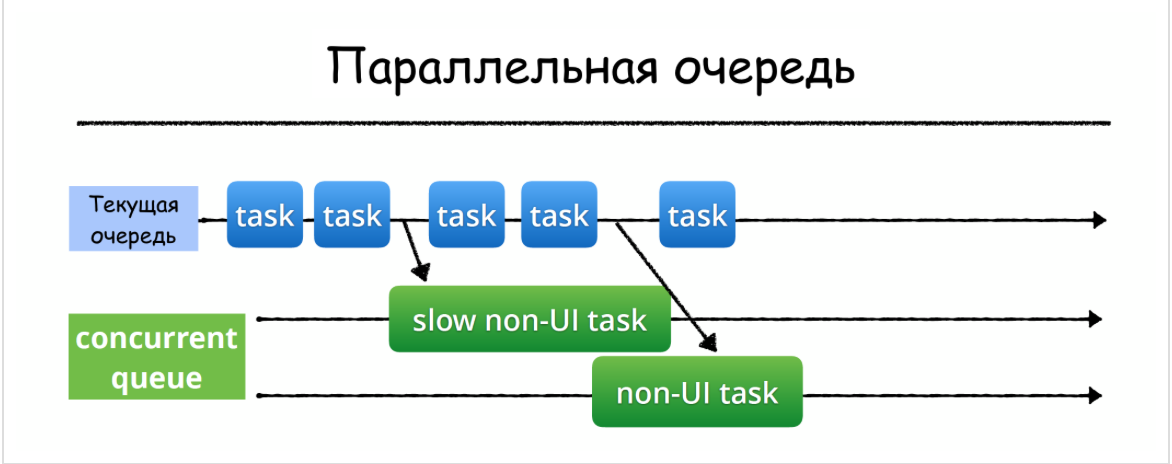
queues) can be “ serial” (sequential) when the task (closure) that is at the top of the queue is “pulled” by iOS and runs until it ends, then the next item is pulled from the queue, etc. This is a serial queue sequential queue. Queues ( queues) can be “c oncurrent” (multi-threaded) when the system “pulls” the closure at the top of the queue and starts it to execute in a specific thread. If the system still has resources, then it takes the next element from the queue and starts it to be executed in another thread while the first function is still working. And so the system can extend a number of functions. In order not to confuse the general concept of multithreading with "concurrent queues"(multithreaded queues), we will call"concurrent queue" parallel queue, referring to the order of tasks on it in relation to each other, without going into the technical implementation of this parallelism.We see that on the
serial(sequential) queue, closures are completed strictly in the order in which they were executed, while on the concurrent(parallel) queue, tasks end in an unpredictable way. In addition, you see that the total execution time of a certain group of tasks in a serialqueue significantly exceeds the time of execution of the same group of tasks in a concurrentqueue. On a serial(sequential) queue at any current time, only one task is performed, and on a concurrent(parallel) queue, the number of tasks at any current time can change.Synchronous and asynchronous task execution
Once the queue (
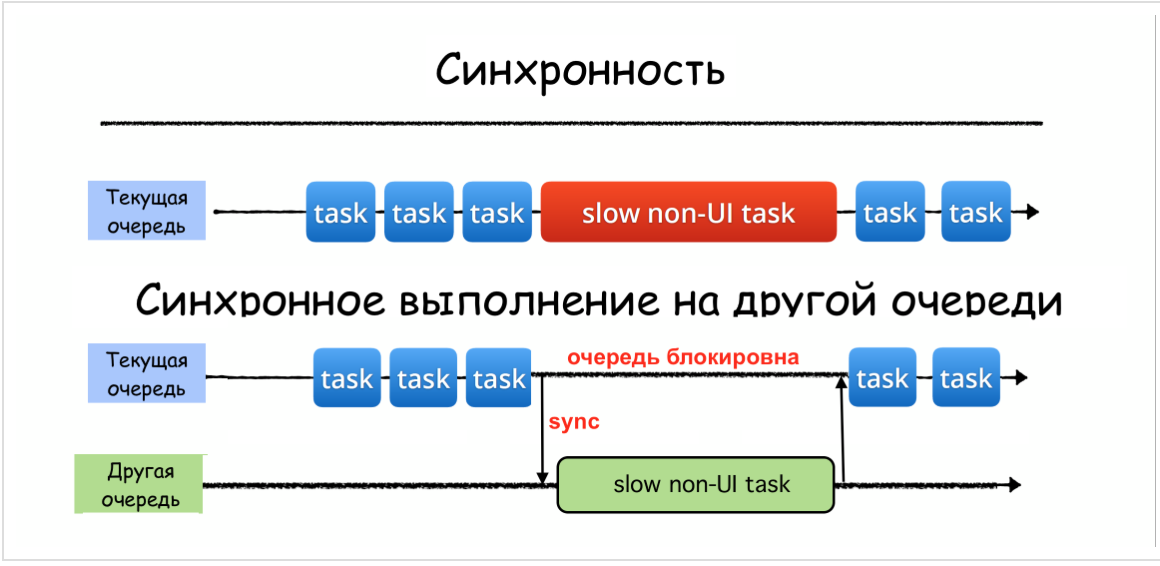
queue) has been created, the task can be placed on it using two functions: sync- synchronous execution in relation to the current queue and async- asynchronous execution in relation to the current queue. The synchronous function
syncreturns control to the current queue only after the task is completed, thereby blocking the current queue:An asynchronous function
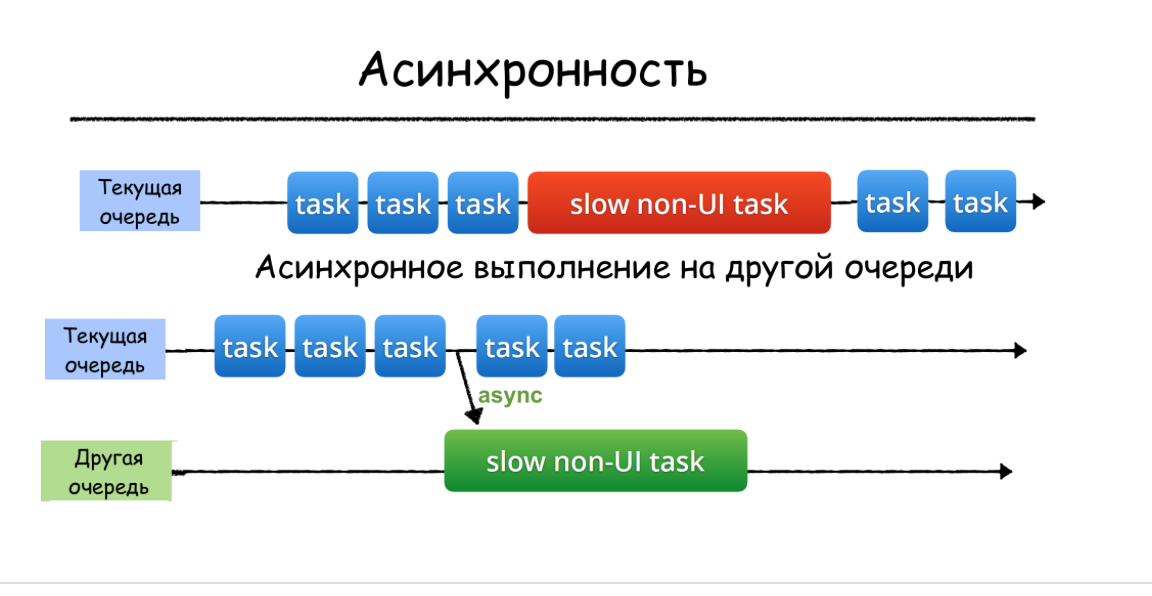
async, as opposed to a function sync, returns control to the current queue immediately after starting a job in another queue without waiting for it to complete. Thus, the asynchronous function asyncdoes not block the execution of tasks on the current queue:In the case of asynchronous execution, it may turn out to be a “different queue as a sequential (
serial) queue:and parallel (
concurrent) queue:The developer’s task is only to select a queue and add a task (usually a closure) to this queue synchronously using a function
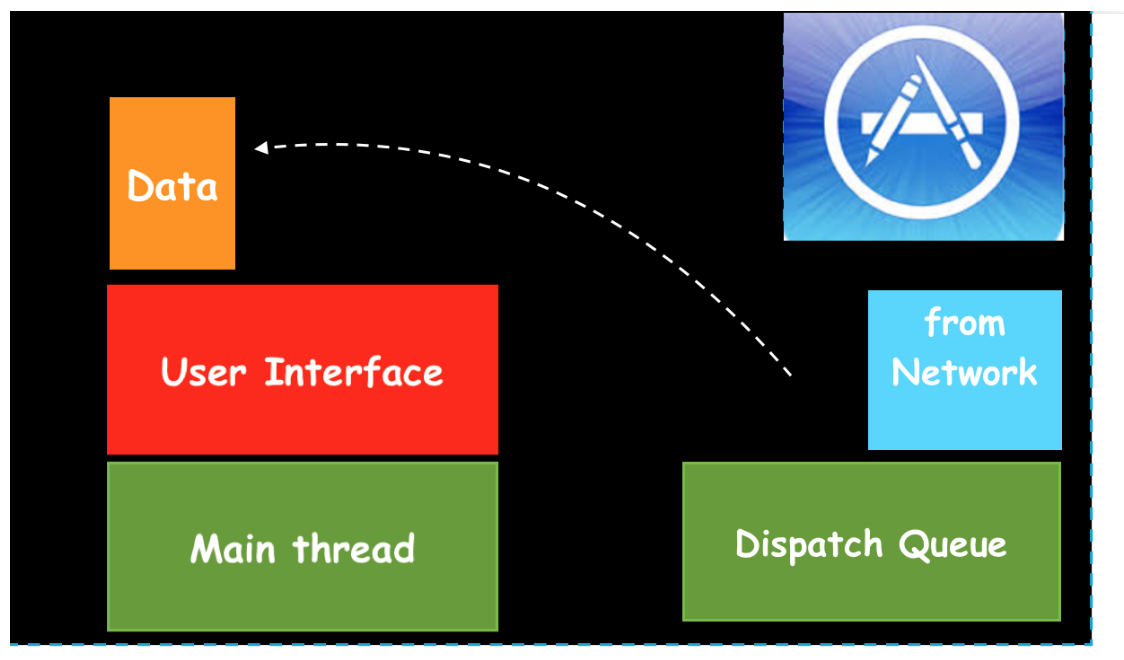
syncor asynchronously using a function async, then it works exclusively iOS. Returning to the task presented at the very beginning of this post, we will switch the execution of the task of receiving data from the “Data from Network” network to another queue:
After receiving data
Datafrom the network in another queue Dispatch Queue, we send them back to Main thread.When we receive data
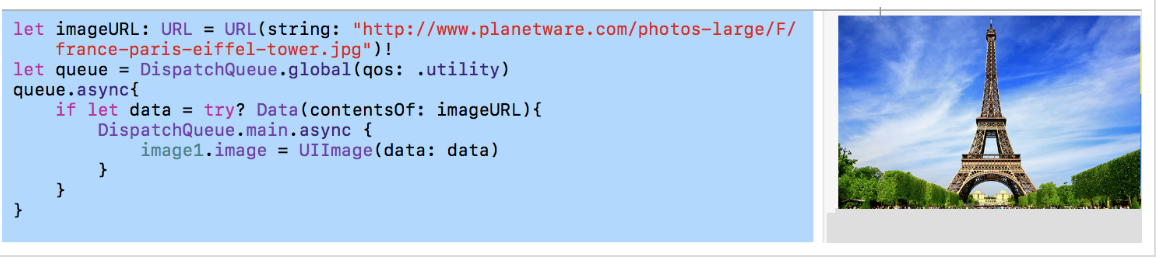
Datafrom the network in another queue DispatchQueue, it Main threadis free and serves all the events that occur on UI. Let's see what it looks like the actual code for this event: To perform the data load on the URL URLs
imageURL, which can take considerable time and block Main queue, we are switching Asynchronous execution of this resource-capacious job to turn the global parallel with the quality of service qosequal to .utility(more on this later): let imageURL: URL = URL(string: "http://www.planetware.com/photos-large/F/france-paris-eiffel-tower.jpg")!
let queue = DispatchQueue.global(qos: .utility)
queue.async{
if let data = try? Data(contentsOf: imageURL){
DispatchQueue.main.async {
image.image = UIImage(data: data)
print("Show image data")
}
print("Did download image data")
}
}
After receiving the data,
datawe again return to Main queueto update our UIitem image1.imageusing this data. You see how simple it is to carry out a chain of switches to another queue in order to “divert” the execution of “costly” tasks s
Main queue, and then return to it again. The code is on EnvironmentPlayground.playground on Github . Note that switching costly jobs from
Main queueto another thread is always ASYNCHRONOUS . You need to be very careful with the method
syncfor queues, because the "current thread" is forced to wait for the job to finish on another queue. NEVER call a method syncon Main queue, because this will result indeadlockyour application ! (more about this below)Global Queues
In addition to user queues that need to be specially created, the system
iOSprovides the developer with ready-made ( out-of-the-box) global queues ( queues). There are 5 of them: 1.) a sequential queue
Main queuein which all operations with the user interface ( UI) take place:let main = DispatchQueue.main
If you want to execute a function or closure that does something with the user interface (
UI), c UIButtonor c UI-чем-нибудь, you must put that function or closure on Main queue. This queue has the highest priority among global queues. 2.) 4 background
concurrent(parallel) global queues with different quality of service qosand, of course, different priorities:// наивысший приоритет
let userInteractiveQueue = DispatchQueue.global(qos: .userInteractive)
let userInitiatedQueue = DispatchQueue.global(qos: .userInitiated)
let utilityQueue = DispatchQueue.global(qos: .utility)
// самый низкий приоритет
let backgroundQueue = DispatchQueue.global(.background)
// по умолчанию
let defaultQueue = DispatchQueue.global()
Each of these lines has been
Appleawarded an abstract “quality of service” qos(short for Quality of Service), and we must decide what it should be for our assignments. Below are various
qosand explained what they are intended for:.userInteractive- for tasks that are currently interacting with the user and take very little time: animations are performed instantly; the user does not want to do this onMain queue, however, this should be done as quickly as possible, since the user is interacting with me right now. You can imagine a situation when a user swipes a finger across the screen, and you need to calculate something related to intensive image processing, and you place the calculation in this queue. The user continues to slide his finger across the screen, he does not immediately see the result, the result is slightly behind the position of the finger on the screen, since the calculations take some time, but at least heMain queuestill “listens” to our fingers and reacts to them. This queue has a very high priority, but lower than yMain queue..userInitiated- for tasks that are initiated by the user and require feedback, but this is not inside an interactive event, the user is waiting for feedback to continue interaction; may take several seconds; has a high priority, but lower than the previous queue,.utulity- for tasks that require some time to complete and do not require immediate feedback, for example, downloading data or cleaning some database. Something is being done that the user is not asking for, but it is necessary for this application. The task may take from several seconds to several minutes; priority is lower than the previous queue,.background- for tasks not related to visualization and not critical to the time of execution; for example,backupsor synchronization withweb- service. This is what usually runs in the background, only happens when no one wants any maintenance. Just a background task that takes a considerable time from minutes to hours; has the lowest priority among all global queues.
There is also a
concurrencydefault Global Parallel ( ) queue .defaultthat reports a lack of “quality of service” information qos. It is created using the operator:DispatchQueue.global()
If it is possible to determine
qosinformation from other sources, then it is used; if not, it is used qosbetween .userInitiatedand .utility. It is important to understand that all these global queues are SYSTEM global queues and our tasks are not the only tasks in this queue! It is also important to know that all global queues, except for one, are
concurrent(parallel) queues.Special Global Serial Queue for User Interface - Main queue
Apple provides us with the only GLOBAL
serial(SEQUENTIAL) queue - this is the one mentioned above Main queue. At this queue, it is undesirable to perform resource-intensive operations (for example, downloading data from the network) that are not related to the change UI, so as not to “freeze” UIfor the duration of this operation and to keep the user interface responsive to user actions at any time, for example, gestures .It is highly recommended that you “divert” such resource-intensive operations to other threads or queues:
There is one more strict requirement - ONLY
Main queuewe can change the UIelements. This is because we want to
Main queuenot only be “responsive” to actions with UI(yes, this is the main reason), but we also want the user interface to be protected from “messing up” in a multi-threaded environment, that is, a response to user actions would be strictly consistent in an ordered manner. If we allow our elements UIto perform their actions in different queues, it may happen that the drawing will occur at different speeds, and the actions will intersect, which will lead to complete unpredictability on the screen. We use Main queueas a kind of “synchronization point”, to which everyone who wants to “draw” on the screen returns.Multithreading issues
As soon as we allow tasks (
tasks) to work in parallel, there are problems associated with the fact that different tasks will want to access the same resources. There are three main problems:
- race condition (
race condition) - an error in the design of a multi-threaded system or application in which the operation of the system or application depends on the order in which parts of the code are executed - priority inversion (
priority inversion) - deadlock (
deadlock) - a situation in a multi-threaded system in which several threads are in an infinite state of waiting for resources occupied by these threads themselves
Race condition
We can reproduce the simplest case
race conditionif we change the variable valueasynchronously in the privatequeue and show it valueon the current thread: We have a regular variable
valueand a regular function changeValueto change it, and we intentionally made it sleep(1)so that using the operator so that changing the value variable takes a considerable amount of time. If we run the function changeValueASYNCHRONOUSLY with async, then before it comes to placing the changed value in a variable value, on the current thread the variable valuecan be reset to another value, that is race condition. This code corresponds to a print in the form: and a diagram in which a phenomenon called "
race condition" is clearly visible :Let's replace the method
asyncwith sync: Both the print and the result have changed:
and a diagram that does not have a phenomenon called "
race condition": We see that although you need to be very careful with the method
syncfor queues, because the "current thread" is forced to wait for the job to finish of another line, the method syncis very useful in order to avoid race conditions. The code to simulate the " race condition" phenomenon can be viewed on firstPlayground.playground on Github . Later we will show the real " race condition" when forming a string of characters received on different streams. There will also be an elegant way of forming a string using "barriers" that will avoid "race conditions"and make the generated string thread safe.Priority inversion
The concept is closely related to resource locking
инверсии приоритетов: For example, suppose there are two tasks in the system with low (A) and high (B) priority. At time T1, task (A) blocks the resource and starts serving it. At time T2, task (B) crowds out the low-priority task (A) and tries to take over the resource at time T3. But since the resource is blocked, task (B) is put on hold, and task (A) continues execution. At time T4, task (A) completes the service of the resource and unlocks it. Since the task (B) expects the resource, it immediately begins execution.
The time span (T4-T3) is called the limited priority inversion. In this period, there is a logical discrepancy with the planning rules - a task with a higher priority is pending while a low priority task is being executed.
But this is not the worst. Let's say three tasks work in the system: low priority (A), with medium priority (B) and high priority (C):
If the resource is blocked by task (A), and it is required by task (B), then the same situation is observed - the high-priority task is blocked. But suppose that task (B) supplanted (A) after (C) went to wait for a resource. Task (B) does not know anything about the conflict, so it can be performed as long as you like over a period of time (T5-T4). In addition, in addition to (B), the system may have other tasks, with priorities greater than (A), but less (B). Therefore, the duration of the period (T6-T3) is generally indefinite. This situation is called unlimited priority inversion.
In general, a limited priority inversion cannot be avoided, but it is not as dangerous for a multi-threaded application as an unlimited one. It is eliminated by forcibly raising the priorities of all “interfering” tasks with low priority.
Below we show how to use the
DispatchWorkItemobjects to increase the priority of individual tasks in the current queue.Deadlock
A deadlock is a system emergency condition that can occur when resource locks are nested. Suppose there are two tasks in the system with low (A) and high (B) priority that use two resources - X and Y:
At time T1, task (A) blocks resource X. Then at time T2, task (A) is crowded out more priority task (B), which blocks resource Y at time moment T3. If task (B) tries to block resource X (T4) without releasing resource Y, it will be put on hold and task (A) will continue. If, at time T5, task (A) tries to lock resource Y without releasing X, a state of mutual locking occurs - none of tasks (A) and (B) can get control.
Mutual locking is possible only when the system uses dependent (nested) multi-threaded access to resources. Mutual blocking can be avoided if nesting is not used, or if the resource uses the priority increase protocol.
If we, in the task presented at the beginning of the post, after receiving data from the network in the background queue, try to use the sync method to return to the main queue, then we will get a deadlock (
deadock). NEVER call a method
syncon main queue, because this will cause deadlockyour application to lock ( )!Experimental environment
For the experiments, we will use
Playgroundtuned to the endless hours c modules PlaygroundSupportand class PlaygroudPagethat we were able to complete all the tasks placed in the queue and get access to main queue. We can stop waiting for some event on the Playgroundc command PlaygroundPage.current.finishExecution(). There is another cool feature on
Playground- the ability to interact with the “living” UIwith the help of a teamPlaygroundPage.liveView = viewController
and Assistant Editor (
Assistant Editor). If, for example, you create viewController, in order to see yours viewController, you just need to configure Playgroundthe code to run unlimited and enable the Assistant Editor ( Assistant Editor). You will have to comment out the command PlaygroundPage.current.finishExecution()and stop it Playgroundmanually. Playgroundc code for the experimental environment template is named EnvironmentPlayground.playground and is located on Github .1. The first experiment. Global Queues and Jobs
Let's start with simple experiments. We also define a number of global queues: one consistent
mainQueue- it is main queue, and four parallel ( concurrent) queues- userInteractiveQueue, userQueue, utilityQueueand backgroundQueue. You can set concurrent queuethe default - defautQueue: As a job,
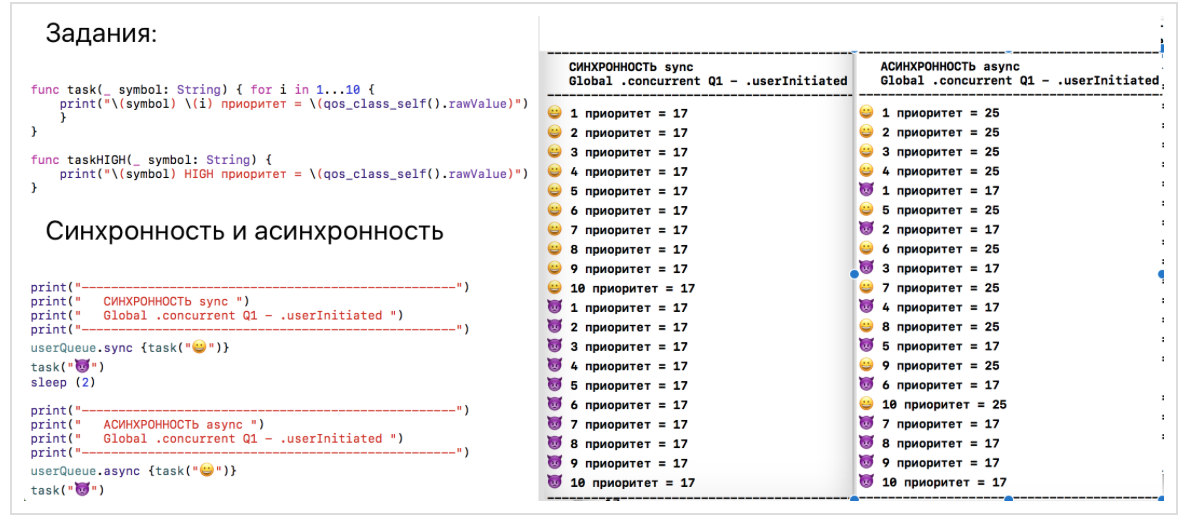
taskwe choose to print any ten identical characters and the priority of the current queue. Another task taskHIGHthat will print one character, we will run with high priority:2. The second experiment will apply to synchronously and asynchronously in the global queue
Once you have received a global queue, for example,
userQueueyou can perform tasks on it either SYNCHRONOUSLY using the method sync, or ASYNCHRONOUSly using the method async. In the case of synchronous
syncexecution, we see that all tasks start sequentially, one after another, and the next clearly awaits the completion of the previous one. Moreover, as an optimization, the sync function can trigger a closure on the current thread, if possible, and the priority of the global queue will not matter. That is what we see. In the case of asynchronous
asyncexecution, we see that the tasks start without waiting for the completion of the tasks
, and the priority of the global queue
userQueuehigher priority code execution on Playground. Consequently, tasks userQueueare not performed more often.3. The third experiment. Private serial queues
In addition to global queues, we can create custom
Privatequeues using the class initializer DispatchQueue: The only thing you need to specify when creating a custom queue is a unique label
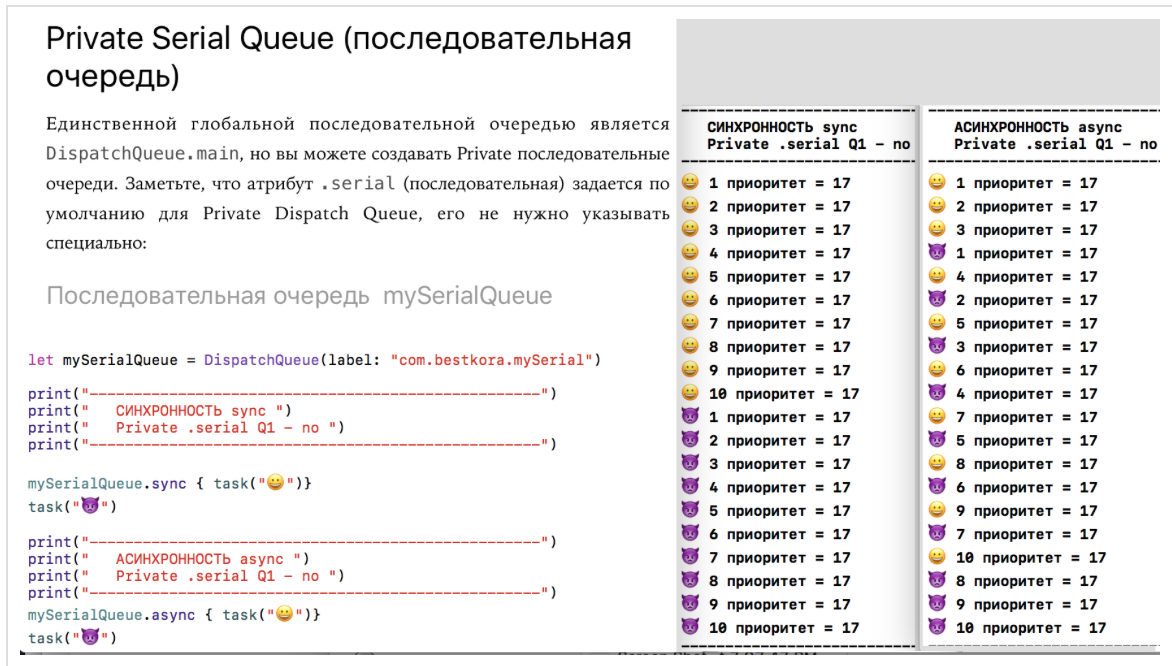
label, which is Applerecommended to be specified as inverse DNSnotation ( “com.bestkora.mySerial”), this queue will be visible under this name in the debugger. However, this is optional, and you can use any string as long as it remains unique. If you do not specify any other arguments except labelwhen initializing the Privatequeue, then a sequential ( .serial) queue is created by default . There are other arguments that can be set when initializing the queue, and we will talk about them a little later.Look how the user
Privatea consistent place mySerialQueuewhen using syncand asyncmethods: In the case of synchronous
sync , we see the same situation as in experiment 3 -type queue does not matter, because as the optimization function synccan trigger the closure of the current flow. That is what we see. What happens if we use the
asyncmethod and let the sequential queue mySerialQueueexecute tasks asynchronously with respect to the current queue? In this case, the program does not stop and does not wait until this task is completed in the queue
mySerialQueue; management will immediately proceed to complete tasksand will execute them at the same time as the tasks
4. The fourth experiment will address the priorities of QoS sequential queues
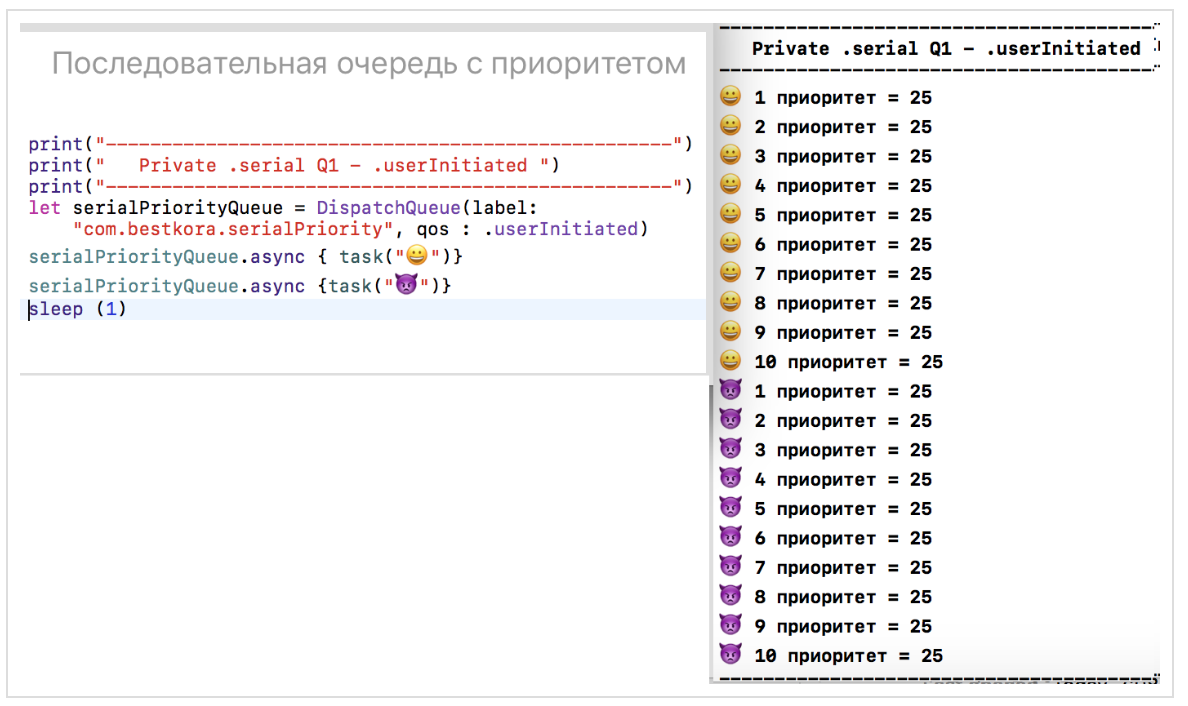
Let's assign a qos service quality equal to .userInitiated to our
Privatesequential queue serialPriorityQueueand put tasks first and then asynchronously on this queue. Then
this experiment will convince us that our new queue is
serialPriorityQueueindeed sequential, and despite using the asyncmethod, the tasks are executed sequentially one after another in order of receipt: Thus, for multi-threaded code execution it is not enough to use the method
async, you need to have many threads either due to different queues, or due to the fact that the queue itself is I am parallel ( .concurrent). Below in experiment 5 with parallel ( .concurrent) queues we will see a similar experiment with Private parallel ( .concurrent) queuesworkerQueue, but there will be a completely different picture when we put the same tasks in this queue. Let's use sequential
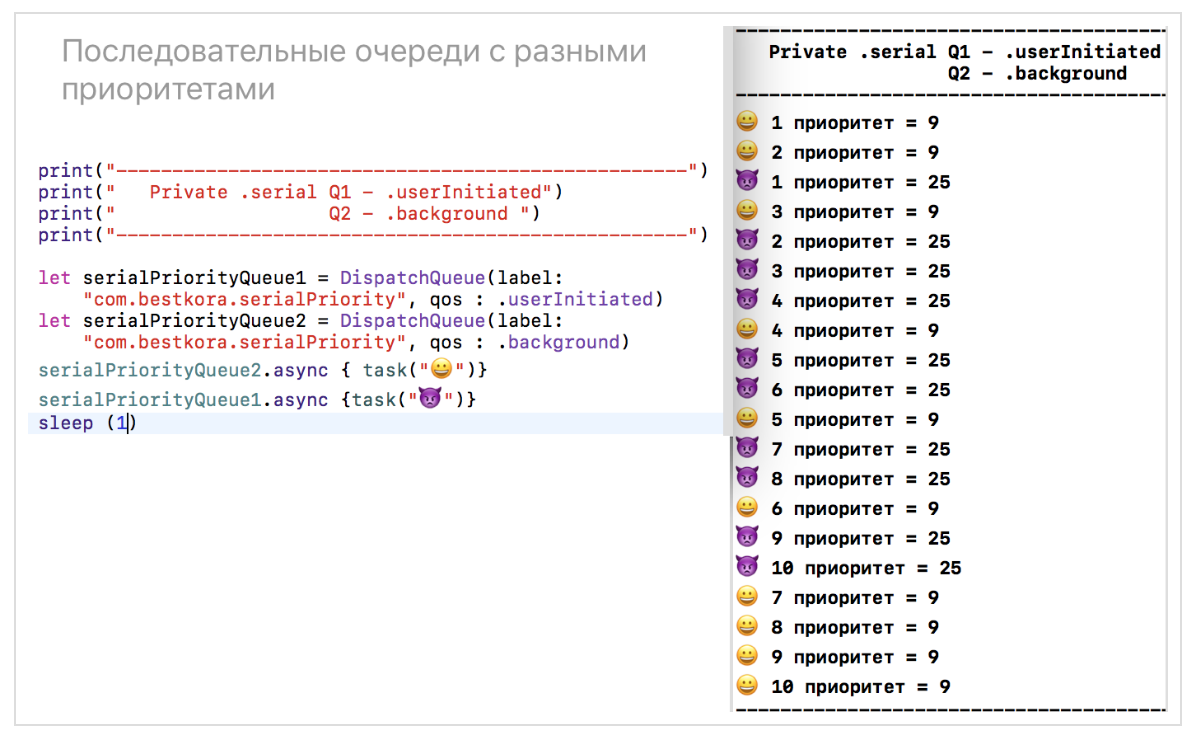
Privatequeues with different priorities to asynchronously put tasks into this queue first , and then tasks
queue
serialPriorityQueue1c qos .userInitiatedqueue
serialPriorityQueue2c qos .backgroundThis is where multi-threaded tasks are executed, and tasks are more often executed on a queue
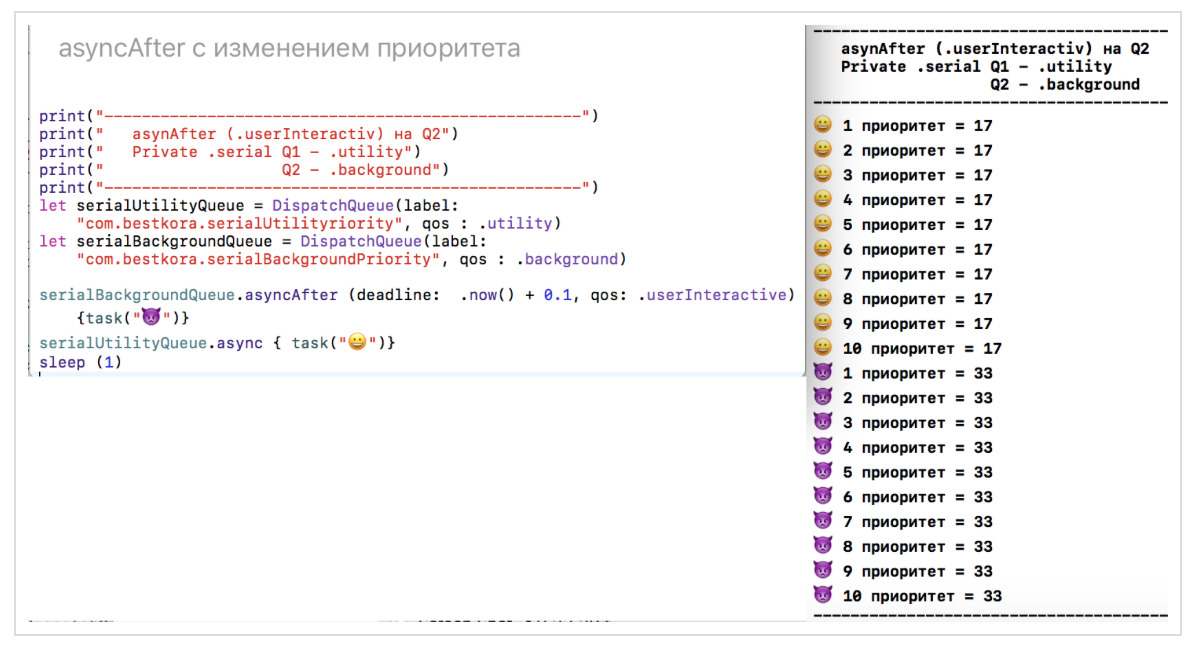
serialPriorityQueue1that has a higher quality of service qos: .userIniatated. You can delay the execution of tasks on any queue
DispatchQueuefor a given time, for example, by now() + 0.1using a function asyncAfterand also change the quality of service qos:5. The fifth experiment will concern Private parallel (concurrent) queues
In order to initialize a
Privateparallel ( .concurrent) queue, it is enough to indicate the value of the argument attributesequal to when initializing the Private queue .concurrent. If you do not specify this argument, the Privatequeue will be sequential ( .serial). The argument is qosalso not required and can be skipped without any problems. Let's assign equal
workerQueuequality of service to our parallel queue , and put tasks asynchronously in this queue first
, and then
Our new parallel queue is really parallel, and the tasks in it are performed at the same time, although everything that we did in comparison with the fourth experiment (one sequential turnqos.userInitiatedworkerQueueserialPriorityQueue), they set the argument attributesequal .concurrent: The picture is completely different compared to one sequential queue. If there all the tasks are carried out strictly in the order in which they are executed, then for our parallel (multi-threaded) queue
workerQueue, which can be split into several threads, the tasks are really executed in parallel: some tasks with a symbol , later queued
workerQueuerun faster on parallel thread. Let's use parallel
Privatequeues with different priorities: queue
workerQueue1c qos .userInitiatedqueue
workerQueue2c qos .backgroundHere is the same picture as with different sequential
Privatebursts in the second experiment. We see that tasks are more often performed on the queue workerQueue1, which has a higher priority. You can create queues with deferred execution using the argument
attributes, and then activate the execution of tasks on it at any suitable time using the method activate():6. The sixth experiment involves using DispatchWorkItem objects
If you want to have additional capabilities for managing the execution of various tasks in the
Dispatchqueues, then you can create DispatchWorkItemone for which you can set the quality of service qos, and it will affect its performance: By setting the flag
[.enforceQoS]during preparation DispatchWorkItem, we get a higher priority for the task highPriorityItemover the other tasks on that the same queue: This allows you to forcibly increase the priority of a specific task for a
Dispatch Queuecertain quality of service qosand, thus, deal with the phenomenon of “priority inversion”. We see that despite the fact that the two tasks highPriorityItemstart the latest, they are performed at the very beginning thanks to the flag [.enforceQoS]and increasing the priority to.userInteractive. In addition, the task highPriorityItemcan be run multiple times on different queues. If we remove the flag
[.enforceQoS]: then the tasks
highPriorityItemwill take on the quality of service qosthat is set for the queue on which they are launched: But still, they get to the very beginning of the corresponding queues. The code for all these experiments is on firstPlayground.playground on Github.
In the class
DispatchWorkItemhas a property isCancelledand a number of methods: Despite the presence of a method
cancel()for DispatchWorkItemGCDstill not remove circuit, which has already started on a particular line. What we can currently do is mark DispatchWorkItemas “remote” using the method cancel(). If a method callcancel()occurs before it DispatchWorkItemis queued using the method async, it DispatchWorkItemwill not be executed. One of the reasons why it is sometimes necessary to use a mechanism Operationrather than just GCDconsists in the fact that it GCDdoes not know how to remove closures that started on a particular queue. You can use the class
DispatchWorkItemand its method notify (queue:, execute:), as well as the class instance methodDispatchQueueasync(execute workItem: DispatchWorkItem)
To solve the problem presented at the very beginning of the post - download the image from the network:
We form a synchronous task in the form of an instance of the
workItemclass DispatchWorlItem, consisting in obtaining data datafrom the "network" at the specified imageURLaddress. Perform an asynchronous job workItemon a parallel global queue queuewith quality of service qos: .utilityusing the functionqueue.async(execute: workItem)
Using function
workItem.notify(queue: DispatchQueue.main) {
                          if let imageData = data {
                                eiffelImage.image = UIImage(data: imageData)}
}
We are waiting for a notification about the end of the data loading at
data. As soon as this happens, we update the image of the element UIeiffelImage: The code is on LoadImage.playground on Github .
Pattern 1. Code options for downloading images from the network
We have two synchronous tasks:
receiving data from the network
let data = try? Data(contentsOf: imageURL)
and updating based on
datauser interface data ( UI)eiffelImage.image = UIImage(data: data)
This is a typical pattern performed using multithreading mechanisms
GCDwhen you need to do some work in the background thread and then return the result to the main thread for display, since the components UIKitcan work exclusively from the main thread. This can be done either in the classical way:
either using the ready-made asynchronous API, using
URLSession: or using
DispatchWorlItem: Finally, we can always “wrap” our synchronous task into an asynchronous “shell” and execute it:
The code for this pattern is on LoadImage.playground on github .
Pattern 2. Features download images from the network for Table View and Collection View using GCD
Consider, as an example, a very simple application, consisting of only one
Image Table View Controller, in which the table cells contain only images downloaded from the Internet and an activity indicator showing the loading process: Here is the class
ImageTableViewControllerserving the screen fragment Image Table View Controller: and the class
ImageTableViewCellfor the table cell into which it is loaded image: Image is loaded in the usual classic way. The model for the class
ImageTableViewControlleris an array of 8 URLs:- The Eiffel Tower
- Venice
- Scottish castle
- Cassini satellite - loading from the network much longer than others
- The Eiffel Tower
- Venice
- Scottish castle
- Arctic
If we launch the application and start scrolling down fast enough to see all 8 images, we will find that the Cassini Satellite will not boot until we leave the screen. Obviously, it takes significantly longer to load than all the rest.
But after scrolling to the end and seeing the “Arctic” in the very last cell, we suddenly find that after a very short time it will be replaced by the Cassini Satellite :
This is a malfunctioning of such a simple application. What is the matter? The fact is that cells in tables are reusable thanks to the method
dequeueReusableCell. Each time a cell (new or reused) hits the screen, the image is downloaded from the network asynchronously (the “wheel” is spinning at this time), as soon as the download is complete and the image is received, UIthis cell is updated . But we do not wait for the image to load, we continue to scroll through the table and the cell ( “Cassini” ) leaves the screen without updating its own UI. However, a new image should appear below and the same cell that has left the screen will be reused, but for another image ("Arctic"), which will quickly load and update UI. At this time, the Cassini download that was launched earlier in this cell will return and the screen will be updated, which is wrong. This is because we are launching different things that work with the network in different threads. They return at different times: How can we fix the situation? Within the framework of the mechanism,
GCDwe cannot cancel the loading of the image of a cell that has left the screen, but we can, when ours come imageDatafrom the network, check URLwhich caused the loading of this data urland compare it with the one that the user wants to have in this cell at the moment imageURL:Now everything will work correctly. Thus, multi-threaded programming requires non-standard imagination. The fact is that some things in multi-threaded programming are done in a different order than the code is written. The GCDTableViewController app is on Github .
Pattern 3. Using DispatchGroups
If you have several tasks that you need to perform asynchronously, and wait for them to complete, then a group is applied
DispatchGroupthat is very easy to create:let imageGroup = DispatchGroup()
Suppose we need to download 4 different images "from the network":
The method
queue.async(group: imageGroup)allows you to add any task (synchronous) to the group that is executed on any queue queue: We create a group
imageGroupand put async (group: imageGroup)two tasks into this group using the method for asynchronously loading images into a global parallel queue DispatchQueue.global()and two tasks of asynchronously loading images into a global parallel queue DispatchQueue.global(qos:.userInitiated)with quality of service .userInitiated. It is important that you can add tasks that operate on different queues to the same group. When all the tasks in the group are completed, the function notifyis called - this is a kind of callback block for the whole group, which places all the images on the screen at the same time:The group contains a thread-safe internal counter, which automatically increases when a task is added to the group using the method
async (group: imageGroup). When a task is executed, the counter is reduced by one and we are guaranteed that the callback block will be called after all long-term operations are completed. Experiments with the formation of a group of synchronous operations are presented on the Playground GroupSyncTasks.playground on Github . If your group has not only synchronous operations, but also asynchronous ones, then the thread-safe counter can be controlled manually: the method
enter()increases the counter, and the method leave()decreases. We will study the placement of asynchronous operations in a group using the Playground GroupAsyncTasks.playground on Github. We will place asynchronous tasks in a group and display at the top of the screen. For comparison, at the bottom of the screen we will place the same images obtained in the usual way, one after another, without packing them into groups. You will immediately feel the difference in the appearance of the same image at the top and at the bottom: in the beginning there will be one after another, the image at the bottom of the screen, and then once all the images top of the screen, although the method invocation
asyncGroup (), and asyncUsual ()in reverse order: Placing in a group of mixed operations: synchronous and asynchronous:
The result will be the same.
Pattern 4. Thread-safe variables. Isolation queues
Let's go back to our first experiment with bursts
GCD in Swift 3and try to maintain a chronological (vertical) sequence of tasks in a row, and thereby present the user with the result of the tasks on different lines in a horizontal way: I have to say that I used to store the results as a normal NEpotochno- safe to
Swift 3string usualString: String, and thread-safe string safeString: ThreadSafeString:var safeString = ThreadSafeString("")
var usualString = ""
The purpose of this section is to show how a thread-safe string should be arranged in
Swift 3, so more on that later. All experiments with a thread-safe string will occur on the Playground GCDPlayground.playground on Github .
I will change the tasks a bit in order to accumulate information in both lines
usualStringand safeString: In
Swiftany variable declared with a keyword letis a constant, and therefore, thread-safe ( thread-safe). Declaring a variable with a keyword varmakes the variable mutable ( mutable) and non-thread safe (thread-safe) until it is designed in a special way. If two threads start to change the same memory block at the same time, then this memory block may be damaged. In addition, if you read some variable on one thread at a time when its value is being updated on another thread, then you risk counting the “old value”, that is, there is a race condition ( race condition). An ideal option for thread-safe would be the case when
- reads happen synchronously and multithreading
- records should be asynchronous and should be the only task that is currently working with this variable
Fortunately, it
GCDprovides us with an elegant way to solve using barriers ( barrier) and isolation queues:Barriers
GCDdo one interesting thing - they wait for the moment when the queue will be completely empty before performing its closure. As soon as the barrier begins to complete its closure, it ensures that the queue does not perform any other closures during this time and essentially functions as a synchronous function. As soon as the closure with the barrier ends, the queue returns to its normal operation, providing a guarantee that no recording will be carried out simultaneously with reading or another recording. Let's see what the thread-safe class will look like
ThreadSafeString: The function
isolationQueue.syncwill send a “read” closure {result = self.internalString}to our isolation queue isolationQueueand wait for it to finish before returning the result of executionresult. After that we will have a reading result. If you do not make the call synchronous, then you need to introduce a callback block. Due to the fact that the queue is isolationQueueparallel ( .concurrent), such synchronous readings can be performed several times at a time. The function
isolationQueue.async (flags: .barrier)will send the closure of the “record”, “add” or “initialize” to the isolation queue isolationQueue. The function asyncmeans that control will be returned before the closure of the “record”, “add”, or “initialization” actually takes place. The barrier part (flags: .barrier)means that the closure will not be performed until each closure in the queue has completed its execution. Other faults will be placed after the barrier and performed after the barrier is completed. The results of experiments with
DispatchQueuesrepresented by a thread-safe ( thread-safe) string safeString: ThreadSafeStringand a regular string usualString: Stringare on from the Playground GCDPlayground.playground on Github . Let's see these results.
1. Function
syncon the Global parallel queue DispatchQueue.global(qos: .userInitiated)with respect to Playground: Results on a regular Thread-safe line
usualString, MATCH the results on a thread-safe line safeString. 2. Function
asyncon the Global parallel queue DispatchQueue.global(qos: .userInitiated)with respect to Playground: Results on a regular Thread-safe line
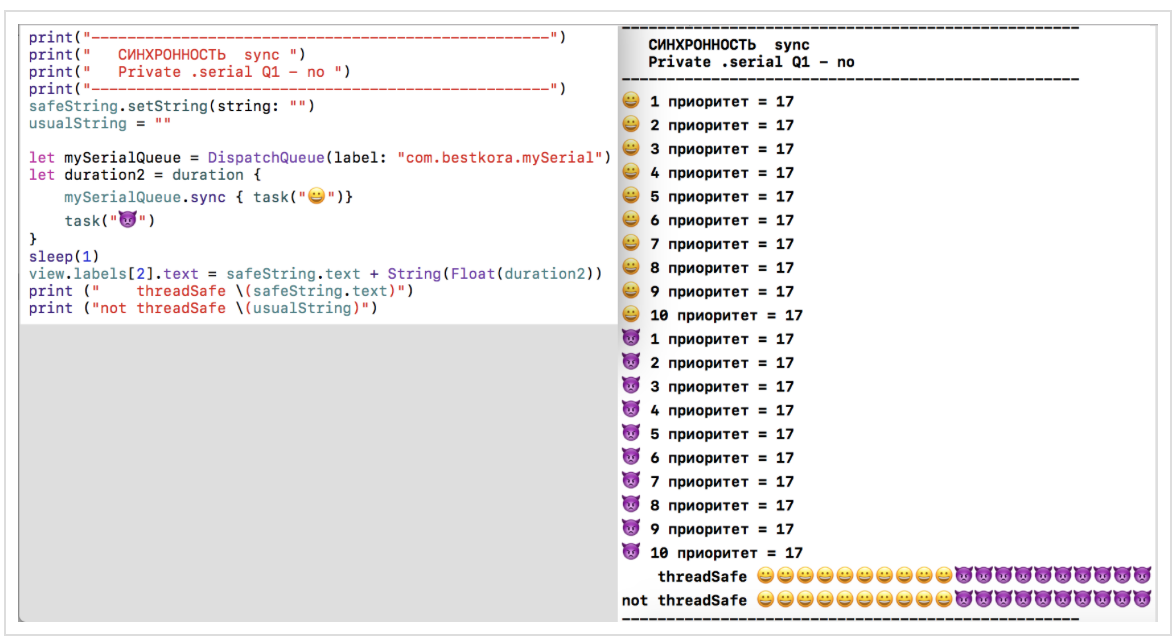
usualString, DO NOT match the results on a thread-safe line safeString.3. The function
syncon Privatethe serial line DispatchQueue (label: "com.bestkora.mySerial")in relation to the Playground: results on plain not thread-safe line
usualString, MATCH results on a thread-safe string safeString. 4. Function
asyncon a Privatesequential queue DispatchQueue (label: "com.bestkora.mySerial")with respect to Playground: Results on a regular thread-safe line
usualString, DO NOT match results on a thread-safe line safeString. 5. Function
asyncfor tasks and
on a
Privatesequential queue DispatchQueue (label: "com.bestkora.mySerial", qos : .userInitiated): Results on a normal NOT thread-safe line
usualString, MATCHwith results on a thread-safe string safeString. 6. Function
asyncfor jobs and
in different
Privatesuccessive lines DispatchQueue (label: "com.bestkora.mySerial", qos : .userInitiated), and DispatchQueue (label: "com.bestkora.mySerial", qos : .background): The results of a conventional non-stream-line safe
usualString, DO NOT MATCH with the results on a thread-safe string safeString. 7. Function
asyncfor jobs and
on
Privatea parallel line DispatchQueue (label: "com.bestkora.mySerial", qos : .userInitiated, attributes: .concurrent): The results of a conventional non-stream-line safe
usualString, DO NOT MATCH with the results on a thread-safe string safeString. 8. Function
asyncfor tasks and
on different
Privateparallel queues withqos : .userInitiatedand qos : .background: results of a conventional non-stream-line safe
usualString, DO NOT MATCH with the results on a thread-safe string safeString. 9. Function
asyncAfter (deadline: .now() + 0.0, qos: .userInteractive)with a change in priority: Results on a regular thread-safe line
usualString, DO NOT match results on a thread-safe line safeString. 10. Function
asyncAfter (deadline: .now() + 0.1, qos: .userInteractive)with a change in priority: Results on a normal NOT thread-safe line
usualString, MATCH the results on a thread-safe line safeString, since the tasks are also
spaced in time .
Everywhere where there is multi-threaded execution of tasks
and
occurs either on different queues, or on one, but parallel (
.concurrent) queue, we observe a mismatch between a regular line usualStringand a thread-safe line safeString. Using a thread-safe line,
safeStringwe can take a look at the properties of the queues and functions of sync and async, so to speak, “from a bird's eye view”, the right-hand time is given for the execution of the corresponding tasks: If you use not
Playground, but the application, then Xcode 8you can use it Thread Sanitizerfor determination race condition. Thread Sanitizerworks at the stage of application execution.
You can run it by editing Schema ( Scheme): you see the detection of race condition for our example. Tsan app code is on Github.
CONCLUSION
We looked at some use cases
GCDfor multithreaded programming Swift 3. The following article will be devoted to questions of the use of Operations multithreaded programming in practice Swift 3. PS Currently
GCD APIavailable on all platforms, it provides a great way to create multi-threaded applications. But the current version Swift 3does not have any syntactic constructs to describe multithreading. The development team Swiftplans to tackle multithreading more intensively and prepare real changes to the multithreading syntax in the version Swift 5(2018), starting the discussion in Spring / Summer 2017, releasing " manifesto"by the Fall of 2017 .. Chris Lutner at the Day of Programming Languages at IBM said that existing multi-threaded programming using
GCD APIand asyncfunctions leads to the pyramid of doom , which is very difficult to recognize without comment which data / states" own "what Dispatch Queueand relevant tasks performed on these lines: One of the possible areas for improved multi-threading - is the use of models of actors ( actor is models The .) each
actor- is, in fact, DispatchQueue+ Status , which this place operates, + Operations performed on that line:But this is just one of many suggestions. It is assumed to consider
actors, async/await, Atomicity , memory models The other related topics. Multithreading is very important, as it "opens the door" to new approaches both on the client and on the server. You
Swiftcan watch evolution here now . This article may be useful for those who study iOS programming on Swift using the Stanford CS193p Winter 17 courses (based on iOS 10 and Swift 3) , which are hosted on iTunes , because there is a significant amount of multithreaded programming.
References
WWDC 2016. Concurrent Programming With GCD in Swift 3 (session 720)
WWDC 2016. Improving Existing Apps with Modern Best Practices (session 213)
WWDC 2015. Building Responsive and Efficient Apps with GCD.
Grand Central Dispatch (GCD) and Dispatch Queues in Swift 3
iOS Concurrency with GCD and Operations
The GCD Handbook
Поваренная книга GCD
Modernize libdispatch for Swift 3 naming conventions
GCD
GCD – Beta
CONCURRENCY IN IOS
www.uraimo.com/2017/05/07/all-about-concurrency-in-swift-1-the-present
All about concurrency in Swift — Part 1: The Present