January 11, 2017 at 10:48
FloatingActionMode - contextual action bar for Android
Contextual actions with list items are widely used with Android applications. It is quite convenient to select several elements or all elements of the list and apply some action to all selected elements at once. Delete, for example.
In Android applications, this can be used ActionMode, which allows you to display the available actions on selected elements on top Toolbar. There you can show the user how many elements are currently selected or other useful information. This is convenient and looks good, but in some cases, the information displayed on the screen itself Toolbarmay be important and would not be desirable to hide it. For example, there may be a name and photo of the user, a list of messages with which is displayed in the list. When highlighting some messages, it would be useful to see the name of the user to whom these messages are addressed.
In this case, you can display the contextual actions panel with list items on top of the list itself without blocking it Toolbar. I will talk about creating such a contextual action panel in this article.
Developed CustomView - a panel of contextual actions I called FloatingActionModeor simply FAM.
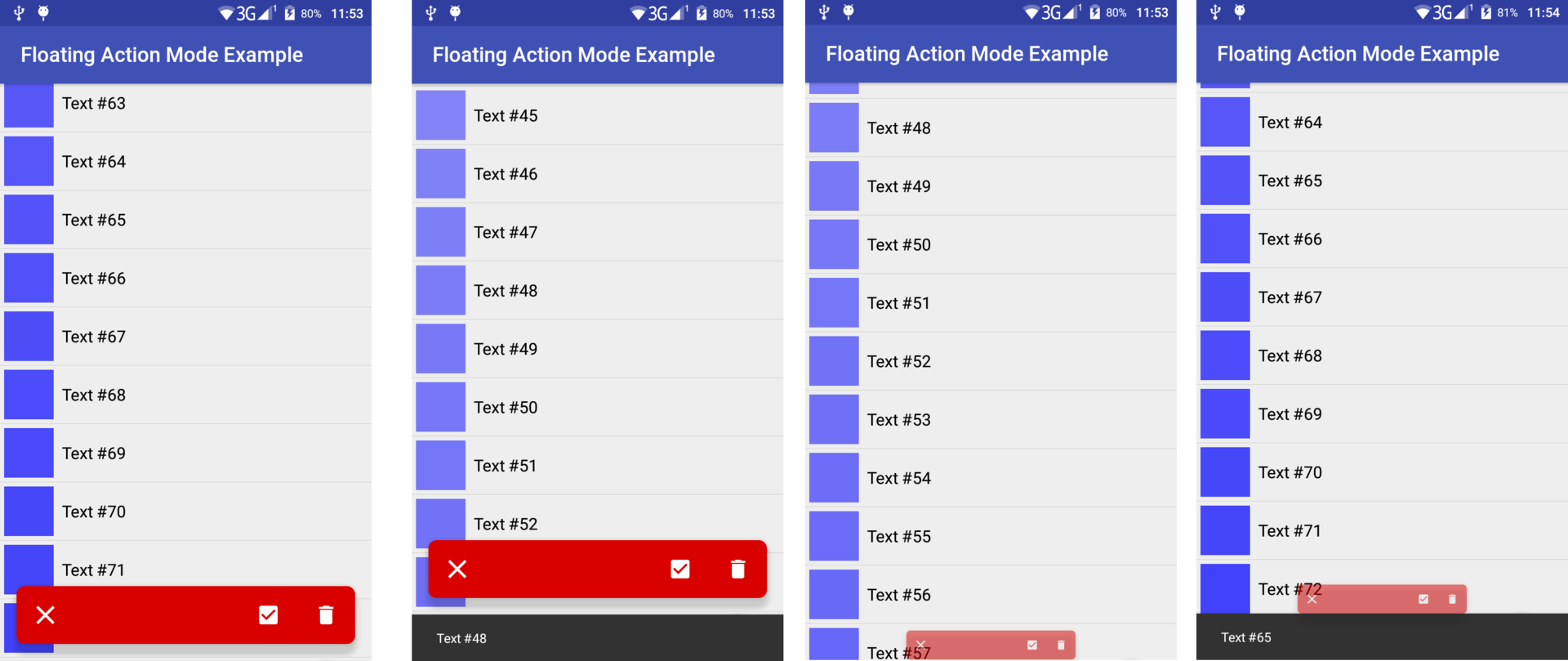
FloatingActionMode during operation (Locked from below)
Video - an example of working with FloatingActionMode (Fixed below)
In the comments, it was pointed out that it may not be very convenient for the user to drag the panel around the screen, so it can be fixed at the bottom of the screen, as shown in the screenshots and video above. (To do this, specify the attributes android:layout_gravity="bottom"and app:fam_can_drag="false").
At the same time, you can allow the user to move FAMaround the screen, as shown in the following screenshots and video.
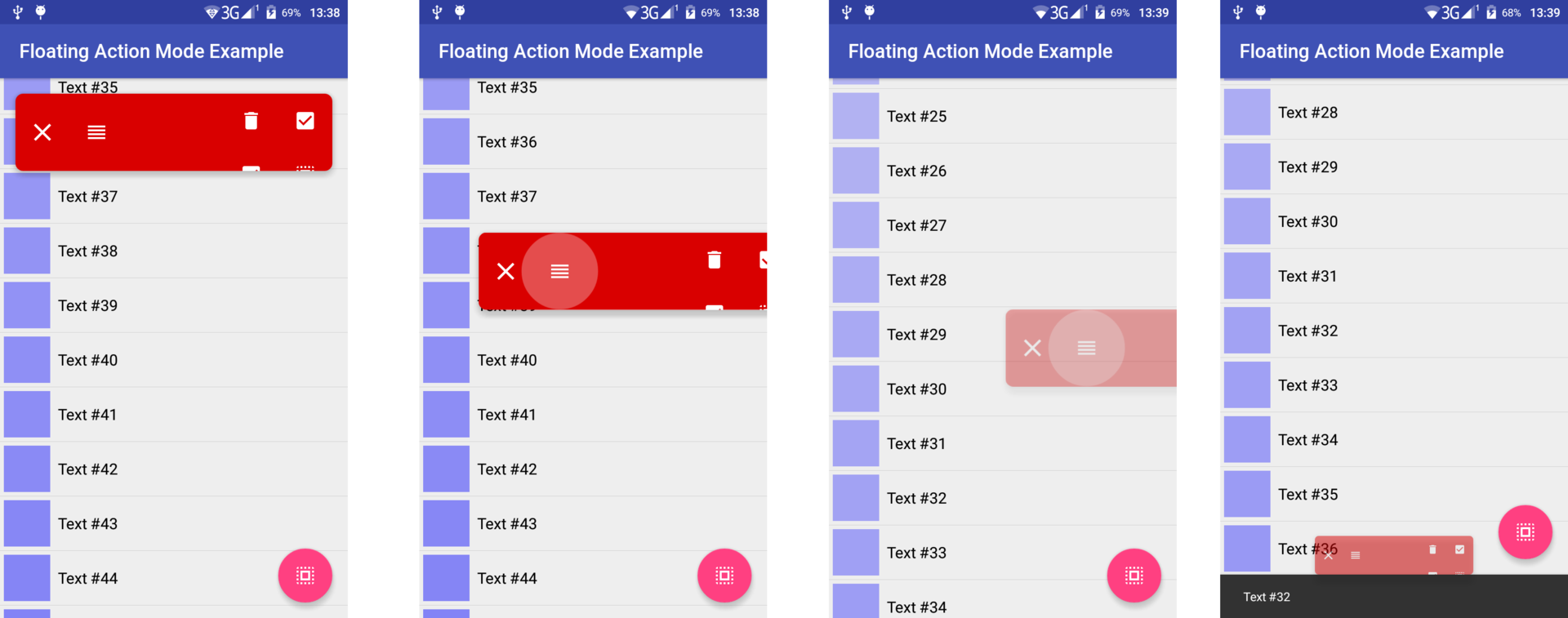
FloatingActionMode during work
Video - an example of working with FloatingActionMode (Drag and Drop)
It FAMdoesn’t have a default background, so you can use whatever you need. Also, the attribute can be used to create a shadow on devices with API> = 21android:translationZ="8dp"
XML attributes
To configure it FAMthrough a markup file, several special attributes are defined for it, which can also be changed programmatically:
fam_openeddetermines whether it will beFAMopen at creation. (falsedefault)fam_content_resthisLayoutResthat represents the contentFAM(a few buttons, for example).ViewThe created from isfam_content_resaddedFAMas a childView. Content can be changed programmatically while the application is running, soFAMan attribute can be specifiedandroid:animateLayoutChanges="true"for an animated change in content. (no content by default)fam_can_closedetermines whether toFAMhave a button to close. (truedefault)fam_close_iconthese are theDrawableResclose buttons. (the default value is a cross)fam_can_dragdetermines whether toFAMhave a button to drag and drop. (truedefault)fam_drag_iconthese areDrawableResdrag and drop buttons. (there is a default value)fam_can_dismissdetermines whetherFAMit closes if the user drags it horizontally far enough (trueby default)fam_dismiss_thresholdthis is the horizontal shift threshold starting from which itFAMwill be closed when the user releasesfam_drag_button. That is, if (getTranslationX/getWidth)>dismissThreshold, then itFAMwill be closed. (0.4fdefault)fam_minimize_directiondetermines the direction in which it will moveFAMduring folding. This attribute can have the following values (nearestdefault):top-FAMwill move to the upper border of the parent (excluding indentation) during foldingbottom-FAMwill move to the lower border of the parent (excluding indentation) during foldingnearest-FAMwill move to the nearest (upper or lower) border of the parent (excluding indentation) during folding
fam_animation_durationdetermines the duration of the minimize / expand animation. (400ms by default)
FAMalso has OnCloseListener, which allows you to perform a specific action when the FAMuser closes (deselect from list items, for example).
Main actions
The main actions with FAMare opening / closing and folding / unfolding. When it opens, it appears and unfolds, and when closed, it folds and disappears.
The deployment is FAMaccompanied by animation, during which it moves from the top or bottom edge of the parent ViewGroup(this edge is set by the attribute fam_minimize_direction) to its position specified by the markup file. Animation is defined as follows:
animate()
            .scaleY(1f)
            .scaleX(1f)
            .translationY(calculateArrangeTranslationY())
            .alpha(1f)
When minimized, the animation is performed "in the opposite direction":
animate()
            .scaleY(0.5f)
            .scaleX(0.5f)
            .translationY(calculateMinimizeTranslationY())
            .alpha(0.5f)
The methods calculateArrangeTranslationY()and calculateMinimizeTranslationY()allow us translationYto calculate for the expanded and collapsed states, respectively, taking into account where the FAMuser dragged , the attribute fam_minimize_directionand indentation from the bottom and top, which will be discussed later.
Close and drag
For correct and beautiful work, it FAMhas buttons ( ImageView) with which the user can close the context action mode or drag vertically to another part of the screen (if it blocks the desired list item). It FAMcan also be closed by dragging it horizontally (swipe to dismiss).
FAMrepresents LinearLayout, in which, when creating, buttons are added for closing ( fam_drag_button) and dragging ( fam_close_button). The ability to close / drag FAMcan be turned on / off while the application is running, therefore LinearLayout, the one containing these buttons has an attribute android:animateLayoutChanges="true".
The drag and drop mechanism is implemented with the help of OnTouchListenerwhich remembers the starting point of the touch and when moving sets translationXand translationYaccordingly touch. When the user releases the drag and drop button ( fam_drag_button), he FAMreturns to the initial horizontal position and, if the user dragged FAMfar enough horizontally, the method is called [email protected]().
fam_drag_button.setOnTouchListener(object : OnTouchListener {
            var prevTransitionY = 0f
            var startRawX = 0f
            var startRawY = 0f
            override fun onTouch(v: View, event: MotionEvent): Boolean {
                if ([email protected]) {
                    return false
                }
                val fractionX = Math.abs(event.rawX - startRawX) / [email protected]
                when (event.actionMasked) {
                    MotionEvent.ACTION_DOWN -> {
                        [email protected]_drag_button.isPressed = true
                        startRawX = event.rawX
                        startRawY = event.rawY
                        prevTransitionY = [email protected]
                    }
                    MotionEvent.ACTION_MOVE -> {
                       [email protected] =
                                prevTransitionY + event.rawY - startRawY
                        translationX = event.rawX - startRawX
                        if (canDismiss) {
                            val alpha =
                                    if (fractionX < dismissThreshold)
                                        1.0f
                                    else
                                        Math.pow(1.0 - (fractionX - dismissThreshold)
                                                / (1 - dismissThreshold), 4.0).toFloat()
                            [email protected] = alpha
                        }
                    }
                    MotionEvent.ACTION_UP -> {
                        fam_drag_button.isPressed = false
                        [email protected]().translationX(0f)
                                .duration = animationDuration
                        if (canDismiss && fractionX > dismissThreshold) {
                            [email protected]()
                        }
                    }
                }
                return true
            }
        })
Use in CoordinatorLayout
It mentioned earlier, that the methods calculateArrangeTranslationY()and calculateMinimizeTranslationY()take into account the margins at the top and bottom to determine the correct position FAM. These paddings are calculated using FloatingActionModeBehavior- an extension CoordinatorLayout.Behaviorthat defines the top padding as height AppBarLayoutand the bottom padding as the height of the visible part Snackbar.SnackbarLayout.
It also FloatingActionModeBehaviorallows you to FAMrespond to scrolling, folding when scrolling down and turning around when scrolling up (quick return pattern).
    open class FloatingActionModeBehavior
    @JvmOverloads constructor(context: Context? = null, attrs: AttributeSet? = null)
        : CoordinatorLayout.Behavior(context, attrs) {
        override fun layoutDependsOn(parent: CoordinatorLayout?,
                                     child: FloatingActionMode?, dependency: View?): Boolean {
            return dependency is AppBarLayout || dependency is Snackbar.SnackbarLayout
        }
        override fun onDependentViewChanged(parent: CoordinatorLayout,
                                            child: FloatingActionMode, dependency: View): Boolean {
            when (dependency) {
                is AppBarLayout -> child.topOffset = dependency.bottom
                is Snackbar.SnackbarLayout ->
                    child.bottomOffset = dependency.height - dependency.translationY.toInt()
            }
            return false
        }
        override fun onStartNestedScroll(coordinatorLayout: CoordinatorLayout?,
                                         child: FloatingActionMode?, directTargetChild: View?,
                                         target: View?, nestedScrollAxes: Int): Boolean {
            return nestedScrollAxes == ViewCompat.SCROLL_AXIS_VERTICAL
        }
        override fun onNestedScroll(coordinatorLayout: CoordinatorLayout,
                                    child: FloatingActionMode, target: View, dxConsumed: Int,
                                    dyConsumed: Int, dxUnconsumed: Int, dyUnconsumed: Int) {
            super.onNestedScroll(coordinatorLayout, child, target,
                    dxConsumed, dyConsumed, dxUnconsumed, dyUnconsumed)
            // FAM не должен реагировать на скроллинг своих дочерних View.
            var parent = target.parent
            while (parent != coordinatorLayout) {
                if (parent == child) {
                    return
                }
                parent = parent.parent
            }
            if (dyConsumed > 0) {
                child.minimize(true)
            } else if (dyConsumed < 0) {
                child.maximize(true)
            }
        }
    }
This FAMmay look like this in a markup file:
...
Source
Source code FloatingActionModeis available on GitHub ( library directory ). There is also a demo application using FAM( app directory ).
Itself FloatingActionMode, as well as FloatingActionModeBehaviordefined as openclasses, so you can upgrade them as you need. Key methods are FloatingActionModealso defined as open.
Thanks for attention. Happy coding!