 December 25, 2016 at 13:16
Creating a quest and dialogue editor for Unreal engine: Part 2 technical aspects
- Tutorial
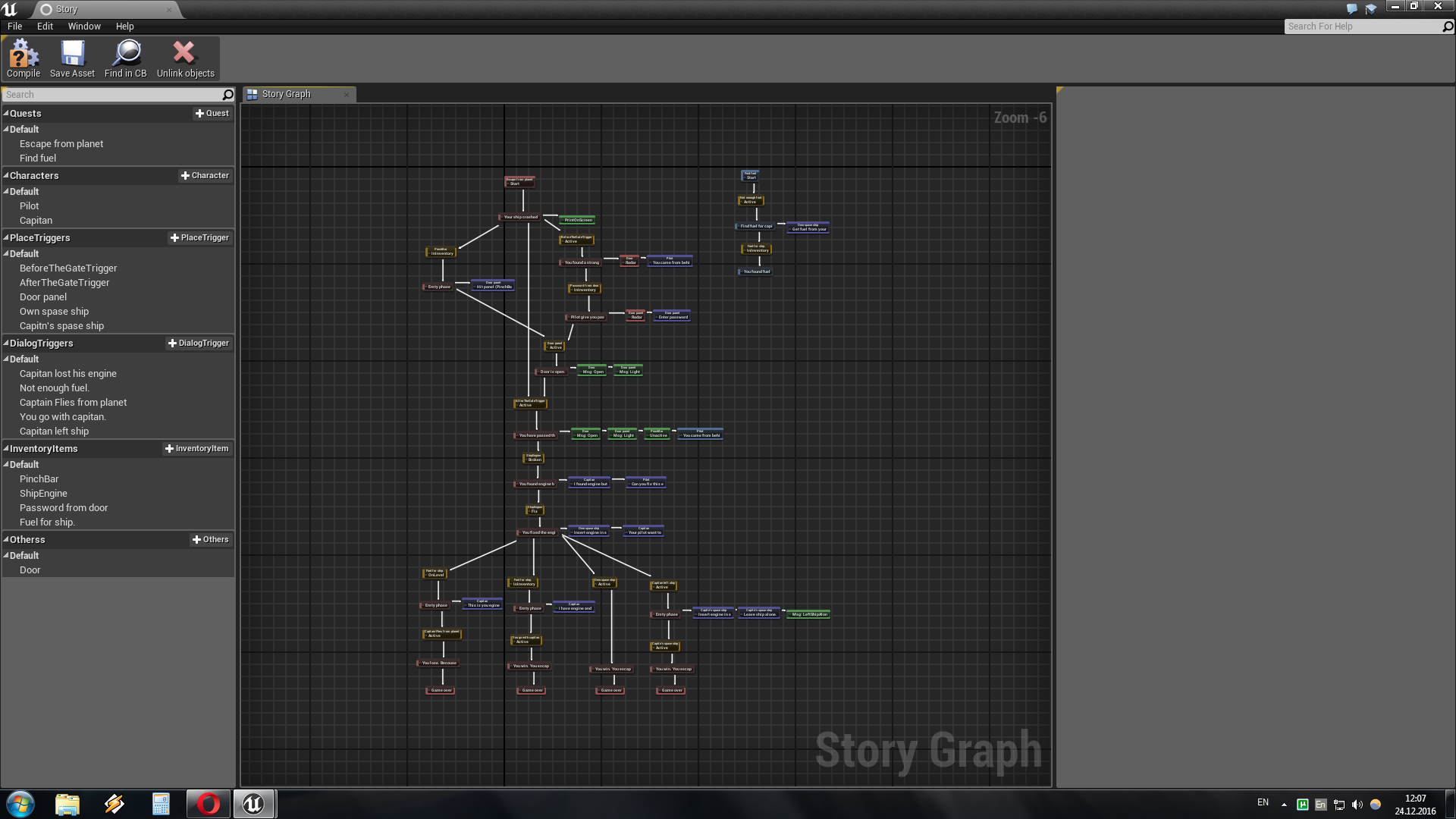
Hello my name is Dmitry. I make computer games on the Unreal Engine as a hobby. Today I will continue to talk about the plugin for editing quests and dialogs. In the previous article I told how to use the plugin, today I will tell you what you need to know so that the plugin can interact with the world of the game and its interface.
Firstly, in order to connect the plug-in to your project, you need to transfer the StoryGraphPlugin folder from the plugins folder to the folder "director of your project" \ plugins. You may need to recompile the game if the Unreal engine versions do not match.
But even after you create the StoryGraph asset, you will need to do some manipulation. All plot objects that you place on the map should be derived from certain objects, here is their list:
1) ACharecter_StoryGraph - the base class for the characters has blunt methods:
ChangeState - The method changes the state of the character in this case from live to dead, that is, in bluetooth you need create a function that when a character dies will switch his state, and then StoryGraph will understand that the character is dead.
OpenDialog () - Blueprint method that needs to be called to start a dialogue with this character.
GetObjectName () - A blunt method that returns the character name that is defined in StoryGraph, if you placed several StoryGraph objects at the level and each of them has a different character name, the function will return the name from the first StoryGraph.
GetMessegeFromStoryGraph () - A blunt event occurs when a Send Message node is activated in the StoryGraph, which sends a message to this character.
2) APlaceTrigger_StoryGraph - The base class for the trigger has blunt methods:
GetPlaceTriggerType () - This is needed to find out in which mode the trigger works.
ChangeState () - Similar to the method from ACharecter_StoryGraph, only the states are other (UnActive, Active). It must be used in the UnInteractive trigger mode.
Activate () - This method is not an analogy of the previous one, because it doesn’t work in UnInteractive mode but works in two others. In Interactive mode, it activates a trigger; in AdvanceInteractive mode, it opens a dialog box for interacting with a trigger.
Like the previous class, this one has the blunt methods GetObjectName () and GetMessegeFromStoryGraph ().
3) AInventoryItem_StoryGraph - The base class for the plot subject of the inventory. In addition to the above-mentioned GetObjectName () and GetMessegeFromStoryGraph (), this class has a
PickUp () method - which moves the item to the character’s inventory.
4) AOtherActor_StoryGraph - A class for objects that do not belong to the above categories. Only GetObjectName () and GetMessegeFromStoryGraph () have no methods of their own.
5) ALevelScriptActor_StoryGraph - The base class for LevelBluprint has one Blueprint event
GetMessegeFromStoryGraph () - Which is called when the node is activated Send message to level blueprint
Besides the objects on the map, StoryGraph interacts with the interface elements here is a list of them:
1) AHUD_StoryGraph - The base class for your . It has methods:
EndGame () - A blunt event that is called when the Game Over node is triggered.
PrintQuestPhaseOnScreen () - Blueprint event that is triggered when a node is triggered. Print quest phase on screen.
OpenDialogEvent () - A blunt event is triggered when one of the characters calls OpenDialog ().
OpenPlaceTriggerMessagesEvent () - Same thing for a trigger.
ChangeLocalization () - Changes the language in the game.
GetCurrentLocalization () - Returns the current language.
2) UGameScreen_StoryGraphWidget - The base class for the widget located on the game screen. This widget displays messages for the player as well as the so-called DefaultAnswer, the player sees this answer if the character has
3) UJurnal_StoryGraphWidget - The widget displays the currently active quests.
4) URadar_StoryGraphWidget - The radar must be placed in the GameScreen widget and it will display the targets
5) UDialog_StoryGraphWidget - Displays a dialog box or a window for interacting with a trigger.
6) UInventory_StoryGraphWidget - The widget displays the inventory in which the plot items are located.
After that, everything will work as it should.
Problems
Now I’ll talk about the problems that I had to solve to write this plugin.
The first problem was that the level in Unreal Engine is a closed system; all pointers of objects that are on the level should point to objects at the level and objects outside the level cannot have pointers pointing to objects at the level. And this is a problem since the StoryGraph object is outside the level, but its objects must somehow be brought to the level objects. Fortunately, the Unreal engine has so-called lazy pointers (TAssetPtr). They are lazy because they can refer to objects that are not currently loaded, and also using them you can refer to level objects from objects that are outside of it.
The second problem for me was the fact that the graph object (UEdGraph) cannot be used in the game. That is, the game with compiles and even packs, but when you try to run this game, it just crashes with an error. Therefore, I simply put the nodes into an array and on the graph I place the “adapter object” UProxyNodeBase which simply redirects my nodes to the method calls when editing in the editor. And this object itself is located in the editor module, so it is not taken into account when packing the game.
Well, when I already wrote the plugin, I tried to compile it in Development mode and get this:
Mistakes
UE4-StoryGraphPluginRuntime.lib(Module.StoryGraphPluginRuntime.cpp.obj) : error LNK2005: "void * __cdecl operator new(unsigned __int64)" (??2@YAPEAX_K@Z) already defined in StoryTestProgect.cpp.obj

1>UE4-StoryGraphPluginRuntime.lib(Module.StoryGraphPluginRuntime.cpp.obj) : error LNK2005: "void * __cdecl operator new(unsigned __int64,struct std::nothrow_t const &)" (??2@YAPEAX_KAEBUnothrow_t@std@@@Z) already defined in StoryTestProgect.cpp.obj

1>UE4-StoryGraphPluginRuntime.lib(Module.StoryGraphPluginRuntime.cpp.obj) : error LNK2005: "void __cdecl operator delete(void *)" (??3@YAXPEAX@Z) already defined in StoryTestProgect.cpp.obj

1>UE4-StoryGraphPluginRuntime.lib(Module.StoryGraphPluginRuntime.cpp.obj) : error LNK2005: "void __cdecl operator delete(void *,struct std::nothrow_t const &)" (??3@YAXPEAXAEBUnothrow_t@std@@@Z) already defined in StoryTestProgect.cpp.obj

1>UE4-StoryGraphPluginRuntime.lib(Module.StoryGraphPluginRuntime.cpp.obj) : error LNK2005: "void * __cdecl operator new[](unsigned __int64)" (??_U@YAPEAX_K@Z) already defined in StoryTestProgect.cpp.obj

1>UE4-StoryGraphPluginRuntime.lib(Module.StoryGraphPluginRuntime.cpp.obj) : error LNK2005: "void * __cdecl operator new[](unsigned __int64,struct std::nothrow_t const &)" (??_U@YAPEAX_KAEBUnothrow_t@std@@@Z) already defined in StoryTestProgect.cpp.obj

1>UE4-StoryGraphPluginRuntime.lib(Module.StoryGraphPluginRuntime.cpp.obj) : error LNK2005: "void __cdecl operator delete[](void *)" (??_V@YAXPEAX@Z) already defined in StoryTestProgect.cpp.obj

1>UE4-StoryGraphPluginRuntime.lib(Module.StoryGraphPluginRuntime.cpp.obj) : error LNK2005: "void __cdecl operator delete[](void *,struct std::nothrow_t const &)" (??_V@YAXPEAXAEBUnothrow_t@std@@@Z) already defined in StoryTestProgect.cpp.obj

1>UE4-StoryGraphPluginRuntime.lib(Module.StoryGraphPluginRuntime.cpp.obj) : error LNK2005: "void __cdecl UELinkerFixupCheat(void)" (?UELinkerFixupCheat@@YAXXZ) already defined in StoryTestProgect.cpp.obj

1>UE4-StoryGraphPluginRuntime.lib(Module.StoryGraphPluginRuntime.cpp.obj) : error LNK2005: "bool const GIsDebugGame" (?GIsDebugGame@@3_NB) already defined in StoryTestProgect.cpp.obj

1>UE4-StoryGraphPluginRuntime.lib(Module.StoryGraphPluginRuntime.cpp.obj) : error LNK2005: "class FFixedUObjectArray * & GObjectArrayForDebugVisualizers" (?GObjectArrayForDebugVisualizers@@3AEAPEAVFFixedUObjectArray@@EA) already defined in StoryTestProgect.cpp.obj

1>UE4-StoryGraphPluginRuntime.lib(Module.StoryGraphPluginRuntime.cpp.obj) : error LNK2005: "bool GIsGameAgnosticExe" (?GIsGameAgnosticExe@@3_NA) already defined in StoryTestProgect.cpp.obj

1>UE4-StoryGraphPluginRuntime.lib(Module.StoryGraphPluginRuntime.cpp.obj) : error LNK2005: "wchar_t * GInternalGameName" (?GInternalGameName@@3PA_WA) already defined in StoryTestProgect.cpp.obj

1>UE4-StoryGraphPluginRuntime.lib(Module.StoryGraphPluginRuntime.cpp.obj) : error LNK2005: "wchar_t const * const GForeignEngineDir" (?GForeignEngineDir@@3PEB_WEB) already defined in StoryTestProgect.cpp.obj

1>UE4-StoryGraphPluginRuntime.lib(Module.StoryGraphPluginRuntime.cpp.obj) : error LNK2005: "struct FNameEntry * * * GFNameTableForDebuggerVisualizers_MT" (?GFNameTableForDebuggerVisualizers_MT@@3PEAPEAPEAUFNameEntry@@EA) already defined in StoryTestProgect.cpp.obj
For a long time I did not understand where these errors came from, it turned out that everything just needed to be replaced in StoryGraphPluginRuntime.cpp
This:
IMPLEMENT_PRIMARY_GAME_MODULE(FStoryGraphPluginRuntime, StoryGraphPluginRuntime, "StoryGraphPluginRuntime");On this:
IMPLEMENT_MODULE(FStoryGraphPluginRuntime, StoryGraphPluginRuntime);And it worked. But after that I wanted to compile the plugin in Shipping mode and errors got into it again, unfortunately I didn’t save them, but their essence was that I didn’t put ";" moreover, the compiler pointed to the files of the engine itself. In general, everything turned out to be simple again. To display the log, you need to declare a new category, this is done like this:
DECLARE_LOG_CATEGORY_EXTERN(StoryGraphPluginRuntime, All, All)
DEFINE_LOG_CATEGORY(StoryGraphPluginRuntime)
But in Development and Development Editor, everything works without a semicolon, but in Shipping mode, you need to write like this:
DECLARE_LOG_CATEGORY_EXTERN(StoryGraphPluginRuntime, All, All);
DEFINE_LOG_CATEGORY(StoryGraphPluginRuntime);
And everything is aggravated by the fact that the compiler on error does not refer to these lines, but just to the engine library.
That's all
→ Here are the sources
→ Link to the demo
And also a link to the previous article: Creating an editor for quests and dialogs for Unreal engine: Part 1 plugin description









