 December 21, 2016 at 12:07
Go Assembler Architecture
- Transfer
 Hello, Habr! My name is Marko Kevac, I am a Badoo system programmer in the Platform team, and I really love Go. If you add these two things together, you will understand how much I love assembler in Go.
 Most recently, we talked on Habré about which conferences we visited. One of them was GopherCon 2016 , where almost all remember the report Rob "Commander" Pike about Go-shny assembler. I present to you a translation of his report, designed as an article. I tried to give as many links in the text as possible to relevant articles on Wikipedia.
Assembler? This is something ancient, like a mammoth!
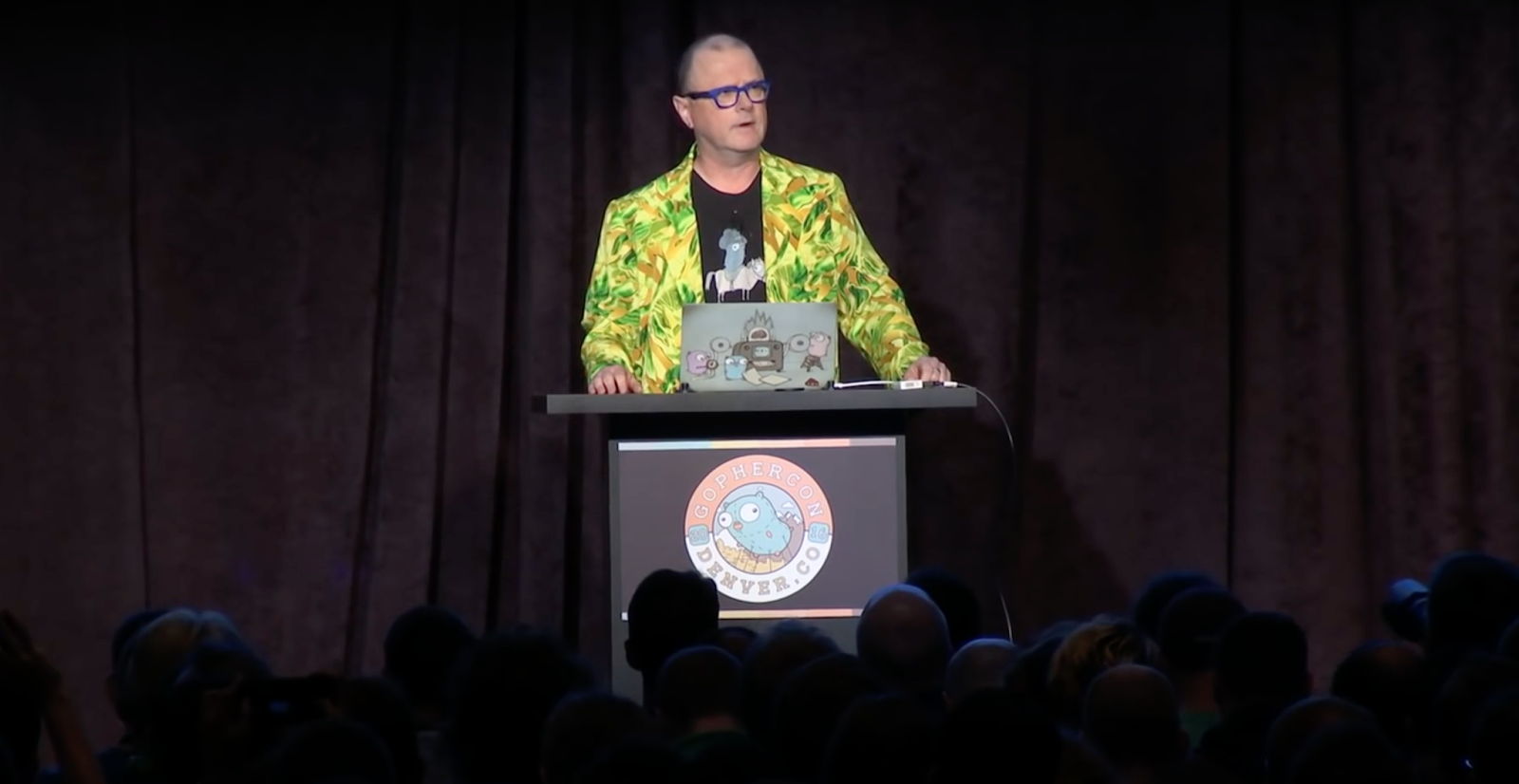
Rob Pike performs at GopherCon 2016
Thank you! This is the most enthusiastic response to the report on assembly language for many years. You may ask: why should we even talk about assembler? There is a reason, but about it later. You may also ask what interest assembly language might be. Let's go back to 1970 and take a look at the IBM manual: “The most important thing is to understand the following feature of the assembly language: it allows the programmer to use all the functions of a System / 360 computer as if it were programming at the System / 360 machine code level.”
In many ways, these words are outdated, but the basic idea is still true: assembler is a way to interact with a computer at the most basic level. In fact, assembly language is needed even today. There was a time when only the assembler was at the disposal of the programmer.
Then came the so-called high-level languages, for example, Fortran and Kobol , which slowly but surely replaced the assembler. For a while, even the C language was considered high-level compared to assembler. But the need for assembler remains today - because of the level of access to the computer that it provides.
Assembler is necessary for the initial loading of the environment, for the stacks to work , for context switching. In Go, by the way, switching between goroutines is also implemented in assembler. There is also a performance issue: sometimes you can manually write code that works more efficiently than the result of the compiler. For example, a substantial part of the math / big package of the Go standard library is written in assembler, because the basic procedures of this library are much more efficient if you bypass the compiler and implement something better than it would do. Sometimes assembler is needed to work with new and unusual device functions or with features not available for higher-level languages - for example, new cryptographic instructions of modern processors.
But for me, the most important thing in assembly language is that many people think about the computer in terms of it. The assembly language gives an idea of sets of instructions, the principles of computer operation. Even if you do not program in assembler - and I hope that there are none here - you should have an idea about assembler, just to understand how the computer works. However, I will not pay too much attention to the assembler language itself, and this is consistent with the idea of my report.
Many different and good assemblers
Many of you are not very familiar with assembly language. Therefore, I will give a number of examples, trying to adhere to the chronological order.
Ibm system / 360
1        PRINT NOGEN
2 STOCK1 START 0
3 BEGIN  BALR  11,0
4        USING *,11
5        MVC   NEWOH,OLDOH
6        AP    NEWOH,RECPT
7        AP    NEWOH,ISSUE
8        EOJ
11 OLDOH DC    PL4'9'
12 RECPT DC    PL4'4'
13 ISSUE DC    PL4'6'
14 NEWOH DS    PL4
15       END   BEGIN
This is the assembler IBM System / 360. It was about this computer that the quote was at the beginning. Do not pay attention to the meaning, just take a look.
And this is to show the big picture .
Apollo 11 Guidance Computer
# TO ENTER A JOB REQUEST REQUIRING NO VAC AREA:
          COUNT     02/EXEC
NOVAC     INHINT
          AD        FAKEPRET     # LOC(MPAC +6) - LOC(QPRET)
          TS        NEWPRIO      # PRIORITY OF NEW JOB + NOVAC C(FIXLOC)
          EXTEND
          INDEX     Q            # Q WILL BE UNDISTURBED THROUGHOUT.
          DCA       0            # 2CADR OF JOB ENTERED.
          DXCH      NEWLOC
          CAF       EXECBANK
          XCH       FBANK
          TS        EXECTEM1
          TCF       NOVAC2       # ENTER EXECUTIVE BANK.
This is the assembler code for the Apollo 11 spacecraft control computer. All of his programs were written entirely in assembler. Assembler helped us get to the moon.
PDP-10
TITLE   COUNT
A=1                             ;Define a name for an accumulator.
START:  MOVSI A,-100            ;initialize loop counter.
                                ;A contains -100,,0
LOOP:   HRRZM A,TABLE(A)        ;Use right half of A to index.
        AOBJN A,LOOP            ;Add 1 to both halves (-77,,1 -76,,2 etc.)
                                ;Jump if still negative.
        .VALUE                  ;Halt program.
TABLE:  BLOCK 100               ;Assemble space to fill up.
END START                       ;End the assembly.
This is an assembler for PDP-10, and it has been highly commented on when compared with other examples.
PDP-11
/ a3 -- pdp-11 assembler pass 1
assem:
        jsr     pc,readop
        jsr     pc,checkeos
        br      ealoop
        tst     ifflg
        beq     3f
        cmp     r4,$200
        blos    assem
        cmpb    (r4),$21   /if
        bne     2f
        inc     ifflg
2:
        cmpb    (r4),$22   /endif
        bne     assem
        dec     ifflg
        br      assem
This is a snippet for PDP-11. Moreover, this is a piece of code for assembler in Unix v6 - which, of course, is written in assembler. C language began to be used later.
Motorola 68000
strtolower      public
                link    a6,#0           ;Set up stack frame
                movea   8(a6),a0        ;A0 = src, from stack
                movea   12(a6),a1       ;A1 = dst, from stack
loop            move.b  (a0)+,d0        ;Load D0 from (src)
                cmpi    #'A',d0         ;If D0 < 'A',
                blo     copy            ;skip
                cmpi    #'Z',d0         ;If D0 > 'Z',
                bhi     copy            ;skip
                addi    #'a'-'A',d0     ;D0 = lowercase(D0)
copy            move.b  d0,(a1)+        ;Store D0 to (dst)
                bne     loop            ;Repeat while D0 <> NUL
                unlk    a6              ;Restore stack frame
                rts                     ;Return
                end
Cray-1
ident slice
         V6        0               ; initialize S
         A4        S0              ; initialize *x
         A5        S1              ; initialize *y
         A3        S2              ; initialize i
loop     S0        A3
         JSZ       exit            ; if S0 == 0 goto exit
         VL        A3              ; set vector length
         V11       ,A4,1           ; load slice of x[i], stride 1
         V12       ,A5,1           ; load slice of y[i], stride 1
         V13       V11 *F V12      ; slice of x[i] * y[i]
         V6        V6 +F V13       ; partial sum
         A14       VL              ; get vector length of this iteration
         A4        A4 + A14        ; *x = *x + VL
         A5        A5 + A14        ; *y = *y + VL
         A3        A3 - A14        ; i = i - VL
         J        loop
 exit
This is assembler for Motorola 68000, and this is for Cray-1. The example I like it from Robert Grisemeera thesis ( by Robert Griesemer ). Recalls how it all began.
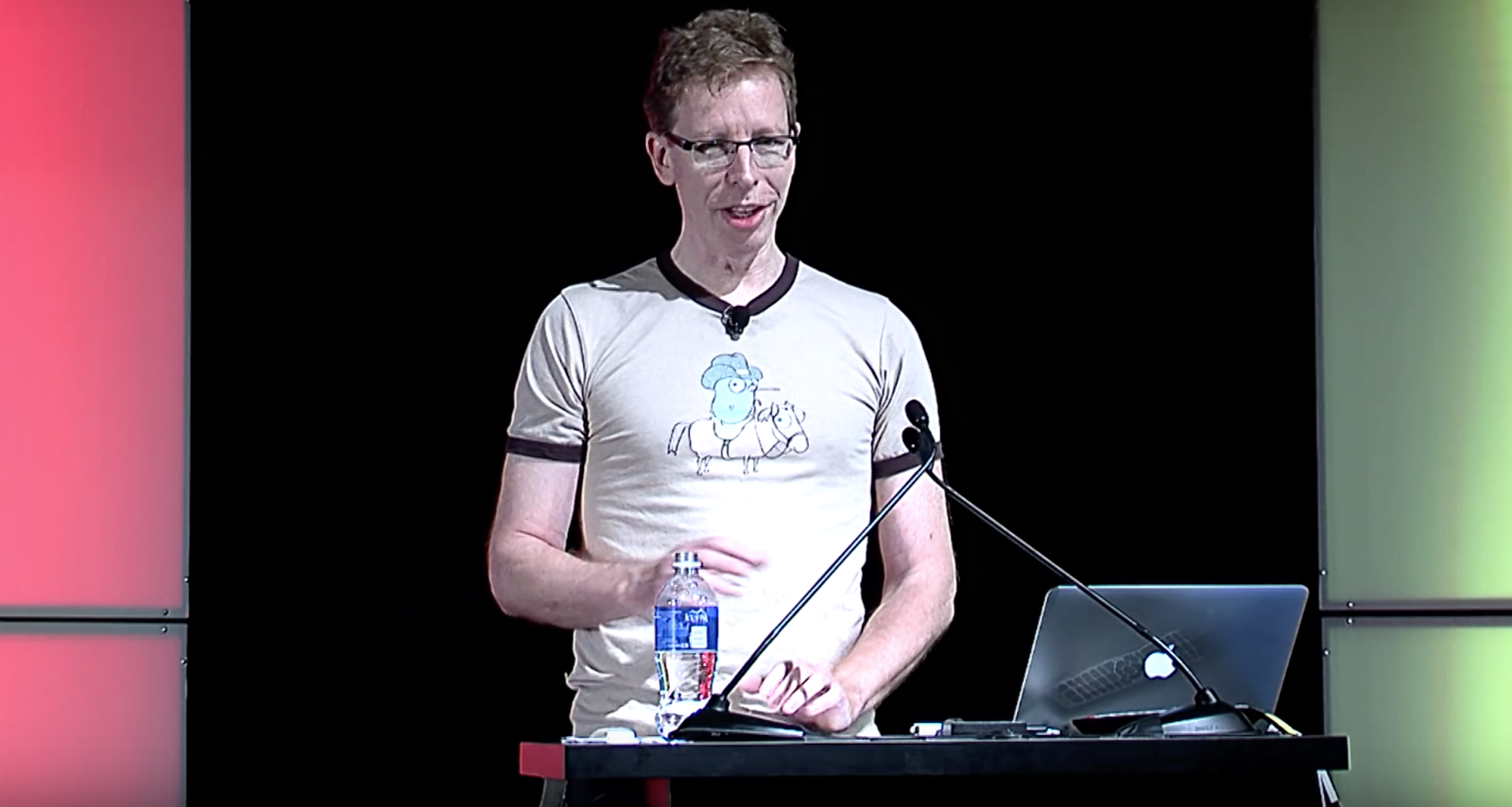
Robert Grisemeer speaks at GopherCon 2015
You may notice that these are all different languages, but in some ways they are similar: they have a common, very clear structure.
Instructions
subroutine header
label:
    instruction operand...    ; comment
    ...
Operands
register
literal constant
address
register indirection (register as address)
...
Assembler programs are usually written in a column: on the left are labels, then instructions, operands and, finally, on the right are comments. The operands are usually registers, constants, or memory addresses, but they are quite similar syntactically for different architectures. There are exceptions. The Cray example stands out against the background: the addition command is written as a + symbol, as in an arithmetic expression. But the meaning is the same everywhere: this is the addition command, and these are the registers. That is, all this is actually the same thing.
In other words, even a long time ago, even in my days, the processors were about the same as they are now. There are counterexamples, but most of the processors (and certainly all the processors that Go runs on), in fact, remain the same, if you do not pay attention to details. If you do not go into details, you can come to an interesting conclusion: for all these computers, you can make a common grammar. It took about 30 years to understand this fact.
Ken's brilliant idea

From left to right: Robert Grisemeer, Rob Pike, Ken Thompson
Around the middle of the 1980s, Ken Thompson ( Ken Thompson ) and I started to think about the design, which is then turned into Plan 9 . Ken wrote the new C compiler, which formed the basis of the C compiler in Go tools and was used until recently. It was on a Sequent symmetrical multiprocessor computer that used National 32000 processors . In my opinion, this was the first 32-bit microprocessor available commercially as an integrated circuit. But Ken did one interesting thing - some did not understand it then, but then it turned out to be very important. This is generally a characteristic feature of Ken.
The compiler did not generate machine instructions - it produced something like pseudocode. And then the second program (in fact, the linker ) took the result of the compiler and converted these pseudo instructions into real instructions.
Instruction like
MOVW $0, varcould just become
XORW    R1, R1
STORE   R1, var
I will give an abstract example. There is, for example, a MOVW instruction that puts zero in a variable. The code issued by the linker that will be executed on the computer can consist, for example, of XORW instructions for which the same register is specified as both operands (that is, it resets the register value), and STORE, which puts the value of this register into a variable . Don’t worry about the details: the point here is that the instructions that the computer executes may not exactly correspond to what we type in the assembler.
This process of compiling real instructions based on pseudo-instructions is what we call instruction selection. A great example of a pseudo-instruction is the return statement from a function that Ken called RET. It has been called for 30 years, but its implementation depends on which computer it runs on. In manuals for some computers it is called RET, but in others it can be a transition to the address contained in the register, or redirection to an address in a special register, or something else entirely.
Therefore, assembler can be considered a way of writing pseudo-instructions that the compiler generates. In the world of Plan 9, unlike most other architectures, the compiler does not run assembler - the data is transferred directly to the linker.
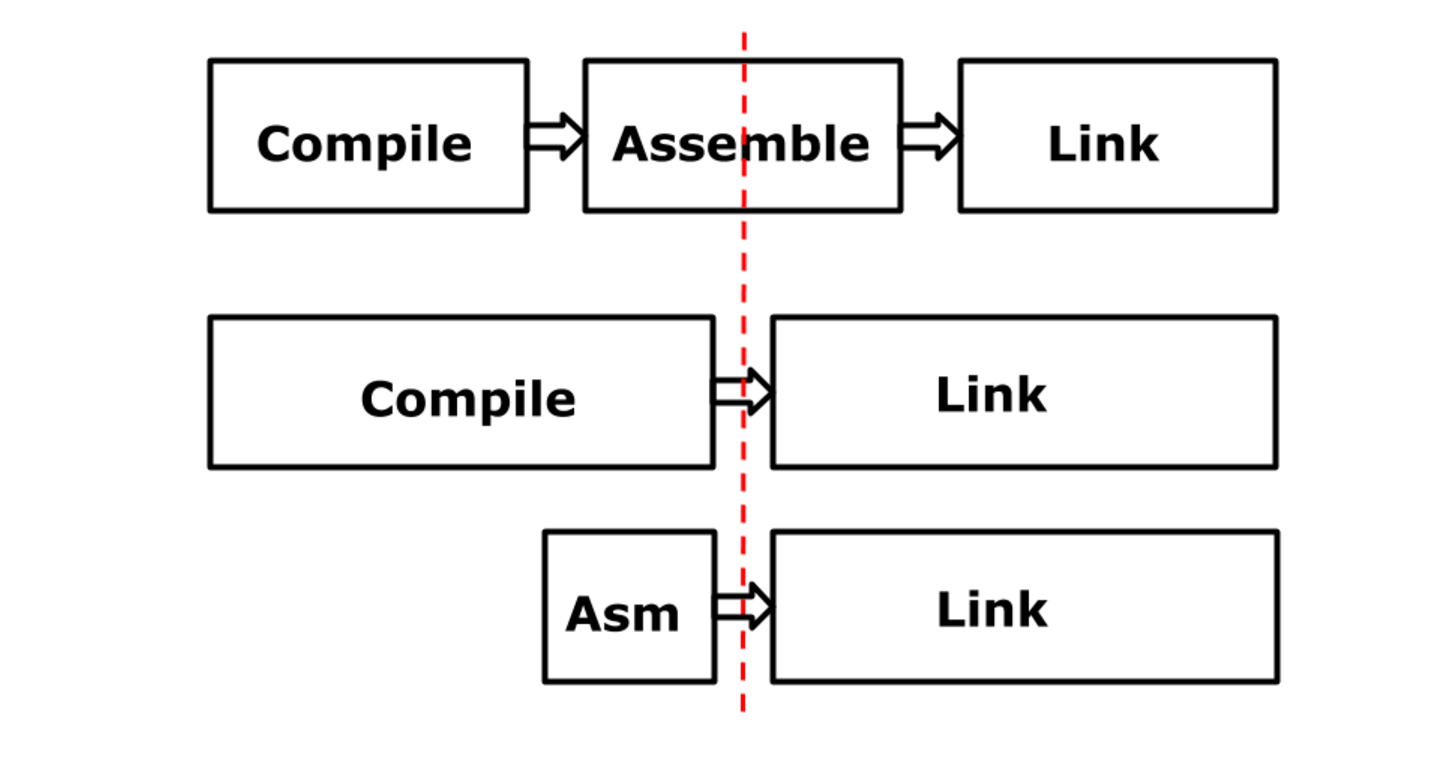
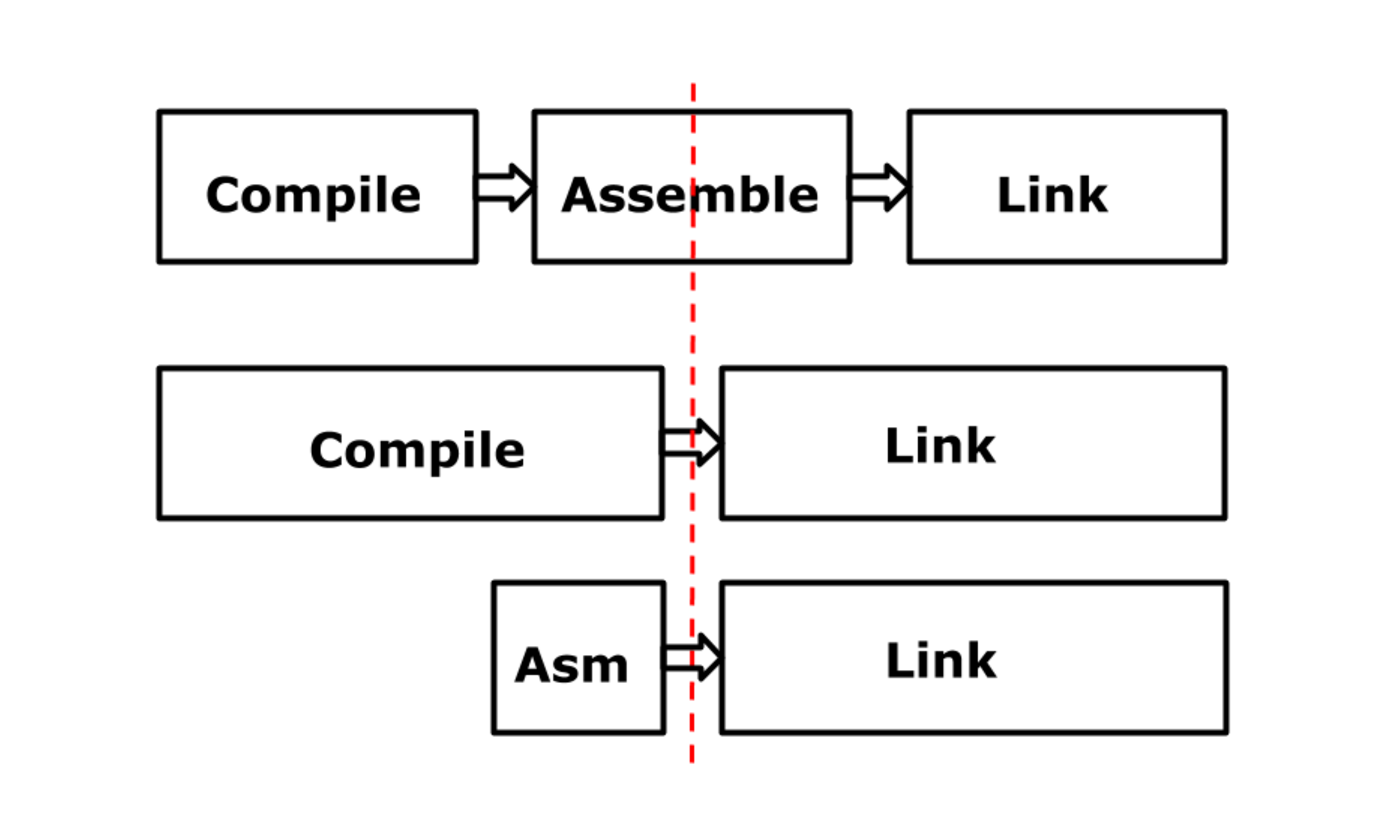
As a result, the process looks something like this. The top line roughly corresponds to traditional architectures. In my opinion, GCC works the same way today. This is a compiler, it takes high-level code and converts it into assembly language code. Assembler generates real instructions, and the linker links the individual parts, creating a binary. The bottom two lines show how the situation is in Plan 9. Here, the assembler, in fact, was divided in half: one half remained in the compiler, and the second became part of the linker. Arrows crossing a red line are streams of pseudo-instructions in binary representation. The assembler in Plan 9 serves one purpose: it provides you with the ability to write instructions in text form that translate into pseudo-instructions that the linker processes.
Assembler go
This situation persisted for many generations. And Plan 9 assemblers corresponded to it: they were separate C programs with Yacc grammar , their own for each architecture. They formed a peculiar set or package, but these were separate, independently written programs. They had a common code, but not quite ... In general, everything was complicated. And then Go began to appear ... when it was ... in 2007 we started ... Go compilers - 8g and 6g were added to this bunch of programs with funny names. And they used the same model. They correspond to the middle line in the diagram. And the way this separation was implemented gave many advantages for the internal Go device, but today I don’t have time to tell about it in detail.

Russ Cox performs at GopherCon 2015
In Go 1.3, we wanted to get rid of all the C code and implement everything exclusively on Go. It would take a while. But in the release of Go 1.3, we started this process. It all started with the fact that Russ ( Russ Cox ) took a large piece of the linker and separated it. This is how the liblink library appeared, and most of it was occupied by the so-called instruction selection algorithm. Now this library is called obj , but then it was called liblink. The compiler used this liblink library to convert pseudo-instructions into real instructions. There were several arguments in favor of this decision.
The most important of these is speeding up the assembly process. Even though the compiler is now doing more work - now it selects instructions, whereas the linker used to do this. Thanks to this device, he does this only once for each library. Previously, if you needed to build the fmt package, for example, the selection of instructions for Printf would be performed again each time. Obviously, this is stupid. Now we do it once, and the linker does not have to do this. As a result, the compiler is slower, but the assembly as a whole is faster. Assembler can be built in the same way and can use the obj library.
The most important feature of this stage was that for the user, nothing has changed: the input language has remained the same, the output has remained the same, it is still the same binary file, only the details are different. Here is a general outline of the old architecture, I already showed it: compiler, assembler, linker. In the world of Plan 9, the linker is controlled by a compiler or assembler.
Old architecture:
New architecture:
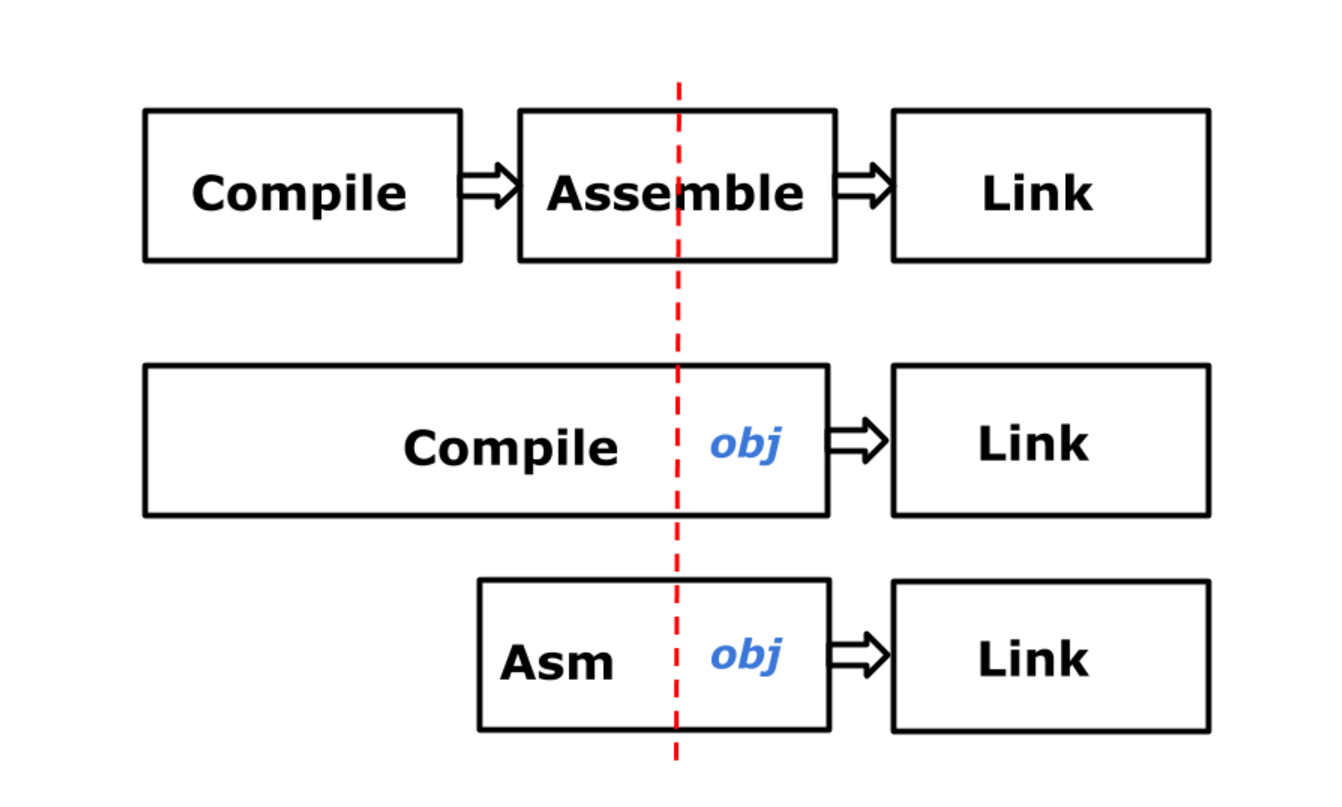
In version 1.3 we switched to such a device. As you can see, now we have a much more traditional linker: it receives real instructions, because the obj library, which performs the choice of instructions, has ceased to be part of the linker and has become the last stage of the compiler and assembler. That is, now the assembler and compiler are more consistent with the old scheme, if you include assembler in the process.
This new Go assembler is a weird thing. Nothing of the kind simply exists. What is he doing? It converts textual descriptions of pseudo-instructions into real instructions for the linker. In 1.5, we took a big step - we got rid of C. For this, we did a lot of preparatory work in 1.3 and 1.4, and now this problem is finally solved. Russ wrote a translator that converted the old source code for Go compilers (and, by the way, linkers) written in C to Go programs.
The old liblink library was built into the library set, which collectively we call obj here. As a result, there is a thing called obj, it is a portable part, and subdirectories with machine-dependent parts that store information about the features of each architecture. Several reports are devoted to this work: this in itself is an interesting story. Two years ago, Russ made a presentation at GopherCon , but he is already quite outdated. In fact, we didn’t do exactly what he said then. And then at GopherFest 2015 I presented a more general, but more accurate overview of the changes in version 1.5.
GOOS=darwin GOARCH=arm go tool compile prog.goSo here. Compilers used to be called 6g, 8g, and other weird names. Now this is one program called compile. You run the compile tool and tweak it by setting the values of the standard GOOS environment variables (pronounced “goose” as “goose”) and GOARCH (pronounced “gorch” as “drunk, lustful guy in a bar”) - this is how their names are pronounced officially. For the linker, we did the same. There is a link tool, you set GOOS and GOARCH values - and you can compile your program. You may wonder, “How can one compiler support all of these architectures?” We all know that cross-platform compilation is very, very difficult. ” Not really. You just need to prepare everything in advance. Pay attention to this: there is only one input language - Go. From the point of view of the compiler, the result is also the same - pseudo-instructions in binary form, which are transferred to the obj library. That is, we only need to configure the obj library by setting the values of the variables at the time the tool starts. You will soon learn how to do it.
As for assembler, we performed machine translation of assemblers from C to Go, but this is not an ideal solution, I did not like it. I suggested writing on Go from scratch the only program that would replace them all, asm. The setup would again be done exclusively through GOOS and GOARCH. You may notice that assembly language and Go are not the same thing. Each processor has its own set of instructions, its own set of registers, this is not a single output language. What to do about it? But in fact, they are essentially the same. Take a look.
package add
func add(a, b int) int {
    return a + b
}
Here is an example of a simple program that adds two integers and returns the sum. I will not show the pseudo-instructions that the compiler gives if you use the -S flag to view assembly code. I also removed a lot of superfluous - if you use this method, you will also see a lot of unnecessary, but at this stage the compiler produces exactly such pseudo instructions.
32-bit x86 (386)
TEXT add(SB), $0-12
    MOVL    a+4(FP), BX
    ADDL    b+8(FP), BX
    MOVL    BX, 12(FP)
    RET
64-bit x86 (amd64)
TEXT add(SB), $0-24
    MOVQ    b+16(FP), AX
    MOVQ    a+8(FP), CX
    ADDQ    CX, AX
    MOVQ    AX, 24(FP)
    RET
32-bit arm
TEXT add(SB), $-4-12
    MOVW    a(FP), R0
    MOVW    b+4(FP), R1
    ADD     R1, R0
    MOVW    R0, 8(FP)
    RET
64-bit arm (arm64)
TEXT add(SB), $-8-24
    MOVD    a(FP), R0
    MOVD    b+8(FP), R1
    ADD     R1, R0
    MOVD    R0, 16(FP)
    RET
S390 (s390x)
TEXT add(SB), $0-24
    MOVD    a(FP), R1
    MOVD    b+8(FP), R2
    ADD     R2, R1, R1
    MOVD    R1, 16(FP)
    RET
Here is an option for 32-bit architecture. Do not think about the details - just look at the big picture . Here is the result for the 64-bit x86 architecture, it is also called AMD64 , here it is for the 32-bit ARM architecture , for the 64-bit ARM architecture, and here it is for the IBM System / 390 architecture; for us they are new, but for all the others, obviously not.
64-bit MIPS (mips64)
TEXT add(SB), $-8-24
    MOVV    a(FP), R1
    MOVV    b+8(FP), R2
    ADDVU   R2, R1
    MOVV    R1, 16(FP)
    RET
64-bit Power (ppc64le)
TEXT add(SB), $0-24
    MOVD    a(FP), R2
    MOVD    b+8(FP), R3
    ADD     R3, R2
    MOVD    R2, 16(FP)
    RET
Here is the code for the 64-bit MIPS architecture , here is the 64-bit POWER architecture . You may notice that they are similar. The reason is that they are, in fact, the same language. Partly because they are so arranged: in fact, we have used the National 32000 assembler for 30 years, changing only the hardware on which it was used. But also because some of them are really identical. These are just instructions, registers, operands, constant values, labels - all the same. The only important difference is that instructions and registers have different names. Offsets also sometimes differ, but it depends on the size of the machine word.
It all boils down to the National 32000 assembler Ken wrote. This is the National 32000 assembly language, as Ken imagines it, adapted for modern PowerPC. Thus, we have everything we need - a common input language, the obj library in the backend - and we can write in assembler. With this approach, a problem arises: if you take the leadership of National or PowerPC and look at the assembler language, it turns out that it does not look like that. It has a different syntax, sometimes different instruction names, because at some level it is actually pseudo-instruction. In fact, it doesn’t matter.
To an uninitiated person, the appearance of the Go assembler - all these uppercase letters and strange things - can seriously confuse. But since we have a common assembly language for all these computers, we can get a wonderful result, which will be discussed below. Therefore, we believe that this is a justifiable compromise and it is not very difficult to achieve it. It is worth learning to program on 68000 and on assembler Ken - and you can automatically write programs for PowerPC. What's the difference?
How does this work? Assembler version 1.5, I consider the ideal assembler. Give him any computer - and he translates the assembler for him. This is a new program written entirely in Go. It has common lexical and syntactic analyzers that simply take your input code, everything you give it, and convert the instructions into data structures that describe the instructions in binary form, and then transfer the result to the new obj library, which contains information about specific platforms .
Most of the code that underlies the assembler is fully portable, it contains nothing, no interesting information about architectures, but there is a table with information about register names. There are still a few things that are related to the operation of operands, but there it is quite simple. And all this is configured when the program starts in accordance with the value of the GOARCH variable. GOOS is used in very, very rare cases in which we will not delve into - the main characteristics are determined by GOARCH. There is also an internal package for assembler called arch, it creates these tables on the fly, dynamically extracting them from the obj library. And here is a snippet of real code.
import (
    "cmd/internal/obj"
    "cmd/internal/obj/x86"
)
func archX86(linkArch *obj.LinkArch) *Arch {
    register := make(map[string]int16)
    // Create maps for easy lookup of instruction names etc.
    for i, s := range x86.Register {
        register[s] = int16(i + x86.REG_AL)
    }
    instructions := make(map[string]obj.As)
    for i, s := range obj.Anames {
        instructions[s] = x86.As(i)
    }
    return &Arch{
        Instructions:   instructions,
        Register:       register,
        ...
    }
}
It is a little simplified, but it conveys the essence. This is arch, an internal assembler package. This is the procedure that configures the entire assembler for the x86 architecture. This code is used in both 32- and 64-bit architectures; they are identical from this point of view. And then we just start the loop ... A loop iterating over the register names from the obj library defined in the x86 package for obj procedures. And we just set up a map that matches register names and binary according to data from obj. And then we do the same for instructions.
These codes are not really instruction codes; you will not find them in the manual. This is a literally alphabetical list of all things - I repeat that these are just pseudo-instructions, not real commands. But now we know all the names of all the registers and all the instructions. And the description of architecture that we will return contains only these two maps. Here are the names of the instructions that you know, here are the names of the registers that you know, and a few more things that I have not mentioned, but everything is pretty simple there. This is all the information you need to convert assembly language into instructions for these computers. In fact, the parser simply does string matching to find the right instructions. You are in column 1, it contains the word, this is an instruction, we are looking for it in the table of instructions. It is pretty simple.
ADDW AX, BX
&obj.Prog{
    As: arch.Instructions["ADDW"],
    From: obj.Addr{Reg: arch.Register["AX"]},
    To: obj.Addr{Reg: arch.Register["BX"]},
    ...
}
Here is an example. This is the Add Word (ADDW) instruction for the 386 processor, which you can use in real code or find it in the compiler output. It looks like this: ADDW AX, BX. The assembler knows that the first column contains an instruction. All that he does is search the list of instructions contained in the structure for the architecture, index the map by ADDW and get the code. He puts it in a size with the name A - a strange name, but it really is. Next are the source and receiver, two operands. The same thing - we are looking for the register AX, we are looking for the register BX. In fact, everything is a little more complicated, but the meaning is this: you just look for the words that are input, put them in the data structure and pass them to the obj library. The bottom line is that it's just word processing. All the assembler does is process the text.
He also has to perform checks, make sure that the result is lexically and syntactically correct. This is easily done using standard analysis methods. That is, the assembler analyzes, for example, operands, whether they are in their place ... There are several tricks and ugly special cases, because some computers use strange modes of operands, which are not found in others, but it’s quite simple to apply them. It's not a problem.
The most important thing here is that all semantic checks are performed by the obj library. The basic rule here is this: if the structure that describes the instruction is passed to the obj library and it processes it without errors, the reason is that the obj library knows how to convert it to an instruction for a physical computer. Therefore, if the code is parsed, and the obj library processes it, then everything is ready. This is the whole idea.
She is obviously insane, but works, and we can prove it in practice. We tested it like this. Remember, we had old assemblers, they were written in C, and we literally took programs ... I wrote the assembler and the obj library for it, we combined them, and then we took the program and assembled it using the old assembler and the new one. And we repeated it again and again, until the new assembler produced the same as the old, accurate to the smallest parts. And then we took the next program. By the time we processed the entire standard package, we had a working assembler. That, in general, is all. Such A / B testing is an excellent way to carry out such tests. It worked just fine.
First, I spent it for 386, then for AMD64. There were a number of special cases for each architecture, but the situation improved over time. By the time we got to PowerPC, adding assembly support for this new architecture took a couple of hours - it was so simple. The most amazing and, in my opinion, the most interesting feature of this work was that when writing assembler with support for these four architectures, I did not look at any manual on the hardware platform. This task comes down solely to text processing based on the fact that all the necessary information is stored in the obj library, so I just don’t need to know all this.
In my opinion, this is pretty cool. So, in the end, we now have one program on Go, which replaces a bunch of different programs on C and Yacc. Maintaining one program is much easier than several. Correcting errors in one program is also much easier. The program is written in Go, so it can be properly tested, which is good. It depends on the library, on which everything depends, that is, the correctness is ensured almost automatically, and this is excellent. I exaggerate, but overall it is. And we have a new assembler, which is almost perfectly compatible with all the old ones. The areas of incompatibility for the most part correspond to the differences between assemblers and small features of the work of different pieces. But now everything is completely unified. We have created a truly universal assembly language for all of these platforms.
I showed, it seems, all the architectures that he now supports when we looked at those examples of the addition function, and many of them were created by people from the open-source community. If you go into the Git repository and look at the commits that add these new architectures, you will see that the amount of information needed to support the new computer is actually very small. It's great. In my opinion, this speaks in favor of the chosen approach. I am pleased to see the ease with which the open-source community adds new architectures.
As I said, assembler is configured by loading, in fact, tables known to the obj library and representing the architecture of the computer. Can tables be generated? I do not like to write tables by hand. Actually, not quite like that, but ... disassemblers - I'm not talking about them, but the pprof tool uses them, and some other components - in my opinion, all of them, or at least a significant part of them, were created by Russ with one dreary in the afternoon. He then wrote a program that processes the description of instructions in PDF format and converts it into bit patterns that are needed to encode instructions. We have a description of a computer that a computer can read - why not read it by a computer? As a result, disassemblers were generated on a computer. In another direction, all this is not so simple, it has its own characteristics. First of all, such a transformation must be absolutely accurate. If the disassembler makes a mistake, it's not scary.
The absence of errors is nice, but special cases are not very important. But in the other direction, the result should be absolutely accurate. Therefore, such a task is much more complicated. But Russ is working on it. I was hoping that by today it will be resolved, but so far I have not succeeded. However, I hope that by the end of the year you will be able to give us a PDF with a description of the instructions for the new architecture, we will click on the button and we will return you the working assembler. The goal here is just that.
This means that we have assembler, mostly generated on a computer, at least after the completion of preliminary manual work.
Conclusion
In conclusion, I’ll say this. Assembly language is essentially the same everywhere, despite the fact that some argue the opposite. And in the field of portability, we have come to the point that it should be considered that way. Based on these ideas, we can create a genuinely common assembly language that will allow us to speak to a computer at the most basic level, but not to learn a new syntax for this every time and not to learn a new tool. If you have such a single environment with which the compiler and linker interact in a neat and transparent way, writing in assembler is much easier. This can be achieved by dynamically loading tables that are automatically compiled based on a pair of environment variables. They are necessary - sadly, but true. And one day - I hope, even this year - we will be able to create these tables for architectures automatically. As you can see, we took assembly language,
This is the Go way. Thanks.









