RecyclerView tree list (without third-party libraries and child arrays)
Good day, dear readers.
In my article, I want to share the implementation of the tree view using RecyclerView. Without using any additional libraries and without using a child array.
Who cares, I ask under the cat. I will try to describe as much as possible what yes how.
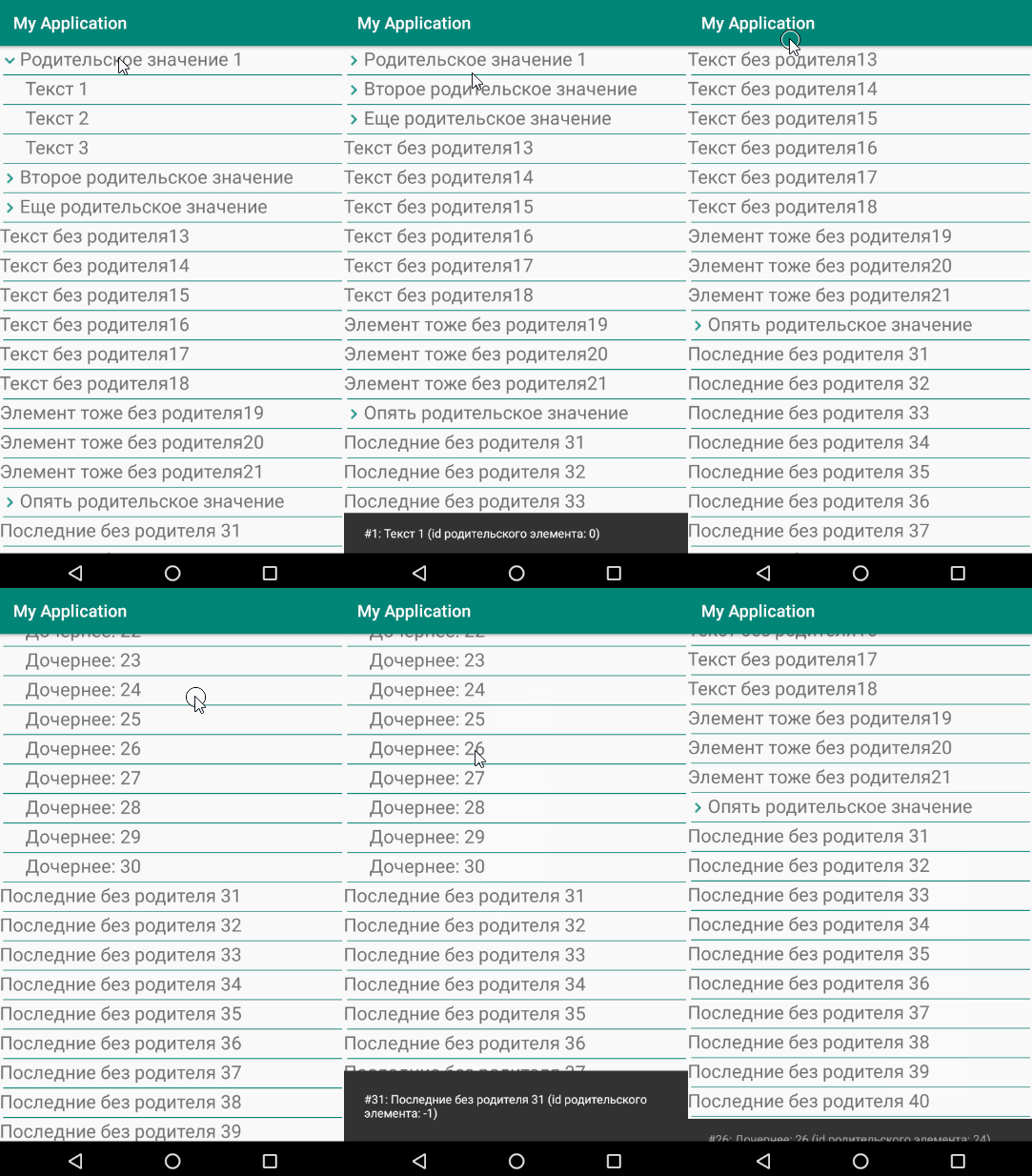
The principle of forming a list of elements is that the child elements will be shown or hidden.
Although I said that the implementation will be without additional libraries, but the standard libraries still need to connect.
The markup will be the most minimal - only the RecyclerView list.
Additionally, you will need a separate class with which we will store the values of the list.
The comments should be clear, but I will explain. For each element of the list, we will keep it a id ValueID , name valueText , the ID of the parent element parentId , a label that element is the parent itemParent and the visibility for children childVisibility .
The next preparatory stage is the creation of markup for the list item itself.
AppCompatImageView is needed to display the status of the parent element. TextView - to display the value of the item. View - just for sharing.
The final preparatory step is to create a class for handling the list adapter.
The main processing takes place in the onBindViewHolder procedure . For each element of the list, its identifier, value and parameters of the parent value are obtained. Child elements are shown or hidden, as well as the status icon for the parent element. Well, hangs up the processing of clicks on the list. Here everyone decides how he needs to process the list. The example simply displays a message with the id and value of the element.
In the procedure for showing or hiding the setVisibility child element, additional text is indented for a child element of 80 pixels.
It remains only to fill the list in the right place.
The result is such a simple list with support for children. This implementation allows you to fill in several nested elements. But you need quite a bit to refine the indents for the children, if the nesting level is more than 1.
Thank you all for your attention and successful projects.
In my article, I want to share the implementation of the tree view using RecyclerView. Without using any additional libraries and without using a child array.
Who cares, I ask under the cat. I will try to describe as much as possible what yes how.
The principle of forming a list of elements is that the child elements will be shown or hidden.
Although I said that the implementation will be without additional libraries, but the standard libraries still need to connect.
Connected Libraries
dependencies {
    implementation 'com.android.support:appcompat-v7:26.1.0'
    implementation 'com.android.support:design:26.1.0'
    implementation 'com.android.support:recyclerview-v7:26.1.0'
}
The markup will be the most minimal - only the RecyclerView list.
Markup
<RelativeLayoutxmlns:android="http://schemas.android.com/apk/res/android"android:layout_width="match_parent"android:layout_height="match_parent"><android.support.v7.widget.RecyclerViewandroid:layout_width="match_parent"android:layout_height="match_parent"android:id="@+id/recycler_list"></android.support.v7.widget.RecyclerView></RelativeLayout>Additionally, you will need a separate class with which we will store the values of the list.
Class for Data.java data
publicfinalclassData{
    private String valueText = ""; //название значенияprivateint valueId = 0; //идентификатор значенияprivateboolean itemParent = false; //родительский или нет элементprivateint parentId = -1; //id элемента, который является родительскимprivateboolean childVisibility = false; //видимость дочерних элементов//проверить родительский элемент или нетpublicbooleanisItemParent(){
        return itemParent;
    }
    //установить значение родительского элементаpublicvoidsetItemParent(boolean newItemParent){
        itemParent = newItemParent;
    }
    //проверить видимость дочерних элементовpublicbooleanisChildVisibility(){
        return childVisibility;
    }
    //установить видимость для дочерних элементовpublicvoidsetChildVisibility(boolean newChildVisibility){
        childVisibility = newChildVisibility;
    }
    //получить номер родительского элементаpublicintgetParentId(){
        return parentId;
    }
    //установить номер родительского элементаpublicvoidsetParentId(int newParentId){
        parentId = newParentId;
    }
    //получить название значенияpublic String getValueText(){
        return valueText;
    }
    //установить название значенияpublicvoidsetValueText(String newValueText){
        valueText = newValueText;
    }
    //получить идентификатор значенияpublicintgetValueId(){
        return valueId;
    }
    //установить идентификатор значенияpublicvoidsetValueId(int newValueId){
        valueId = newValueId;
    }
}
The comments should be clear, but I will explain. For each element of the list, we will keep it a id ValueID , name valueText , the ID of the parent element parentId , a label that element is the parent itemParent and the visibility for children childVisibility .
The next preparatory stage is the creation of markup for the list item itself.
Markup for item.xml
<LinearLayoutxmlns:android="http://schemas.android.com/apk/res/android"xmlns:app="http://schemas.android.com/apk/res-auto"android:id="@+id/item"android:layout_width="match_parent"android:layout_height="wrap_content"><RelativeLayoutandroid:layout_width="match_parent"android:layout_height="match_parent"><!-- иконка для родительского значения --><android.support.v7.widget.AppCompatImageViewandroid:id="@+id/icon_tree"android:layout_width="wrap_content"android:layout_height="wrap_content"android:background="@drawable/icon_hide"android:visibility="gone"app:backgroundTint="@color/colorPrimary"android:layout_centerVertical="true"/><LinearLayoutandroid:id="@+id/block_text"android:layout_width="match_parent"android:layout_height="wrap_content"android:layout_toRightOf="@+id/icon_tree"><!-- название --><TextViewandroid:id="@+id/value_name"android:layout_width="match_parent"android:layout_height="wrap_content"android:foreground="?android:attr/selectableItemBackground"android:text="sdfdsf"/></LinearLayout><!-- разделитель --><Viewandroid:layout_width="match_parent"android:layout_height="1dp"android:background="@color/colorPrimary"android:layout_below="@+id/block_text"android:layout_marginTop="4dp"android:layout_marginLeft="4dp"android:layout_marginRight="4dp"/></RelativeLayout></LinearLayout>AppCompatImageView is needed to display the status of the parent element. TextView - to display the value of the item. View - just for sharing.
The final preparatory step is to create a class for handling the list adapter.
Adapter for RecyclerViewAdapter.java list
publicclassRecyclerViewAdapterextendsRecyclerView.Adapter<RecyclerViewAdapter.ViewHolder> {
    private View vv;
    private List<Data> allRecords; //список всех данныхpublicRecyclerViewAdapter(List<Data> records){
        allRecords = records;
    }
    @Overridepublic RecyclerViewAdapter.ViewHolder onCreateViewHolder(ViewGroup viewGroup, int i){
        View v = LayoutInflater.from(viewGroup.getContext()).inflate(R.layout.item, viewGroup, false);
        returnnew RecyclerViewAdapter.ViewHolder(v);
    }
    @OverridepublicvoidonBindViewHolder(final RecyclerViewAdapter.ViewHolder viewHolder, int i){
        Data record = allRecords.get(i);
        String value = record.getValueText();
        int id = record.getValueId();
        int parentId = record.getParentId();
        finalint position = i;
        final String text = "#" + id + ": " + value + " (id родительского элемента: " + parentId + ")";
        //покажем или скроем элемент, если он дочернийif (parentId >= 0) {
            //видимость делаем по параметру родительского элемента
            setVisibility(viewHolder.item, allRecords.get(parentId).isChildVisibility(), parentId);
        }
        else { //элемент не дочерний, показываем его
            setVisibility(viewHolder.item, true, parentId);
        }
        //покажем или скроем иконку деревовидного спискаif (record.isItemParent()) {
            viewHolder.iconTree.setVisibility(View.VISIBLE);
            //показываем нужную иконкуif (record.isChildVisibility()) //показываются дочерние элементы
                viewHolder.iconTree.setBackgroundResource(R.drawable.icon_show);
            else//скрыты дочерние элементы
                viewHolder.iconTree.setBackgroundResource(R.drawable.icon_hide);
        }
        else//элемент не родительский
            viewHolder.iconTree.setVisibility(View.GONE);
        //устанавливаем текст элементаif (!TextUtils.isEmpty(value)) {
            viewHolder.valueText.setText(value);
        }
        //добавляем обработку нажатий по значению
        viewHolder.valueText.setOnClickListener(new View.OnClickListener() {
            @OverridepublicvoidonClick(View view){
                Data dataItem = allRecords.get(position);
                if (dataItem.isItemParent()) { //нажали по родительскому элементу, меняем видимость дочерних элементов
                    dataItem.setChildVisibility(!dataItem.isChildVisibility());
                    notifyDataSetChanged();
                }
                else { //нажали по обычному элементу, обрабатываем как нужно
                    Snackbar snackbar = Snackbar.make(vv, text, Snackbar.LENGTH_LONG);
                    snackbar.show();
                }
            }
        });
    }
    //установка видимости элементаprivatevoidsetVisibility(View curV,  boolean visible, int parentId){
        //найдем блок, благодаря которому будем сдвигать текст
        LinearLayout vPadding = curV.findViewById(R.id.block_text);
        LinearLayout.LayoutParams params;
        if (visible) {
            params = new LinearLayout.LayoutParams(ViewGroup.LayoutParams.MATCH_PARENT, ViewGroup.LayoutParams.WRAP_CONTENT);
            if (vPadding != null) {
                if (parentId >= 0) { //это дочерний элемент, делаем отступ
                    vPadding.setPadding(80, 0, 0, 0);
                }
                else {
                    vPadding.setPadding(0, 0, 0, 0);
                }
            }
        }
        else
            params = new LinearLayout.LayoutParams(ViewGroup.LayoutParams.MATCH_PARENT, 0);
        curV.setLayoutParams(params);
    }
    @OverridepublicintgetItemCount(){
        return allRecords.size();
    }
    classViewHolderextendsRecyclerView.ViewHolder{
        private LinearLayout item;
        private TextView valueText;
        private AppCompatImageView iconTree;
        publicViewHolder(View itemView){
            super(itemView);
            vv = itemView;
            item = vv.findViewById(R.id.id_item);
            valueText = vv.findViewById(R.id.value_name);
            iconTree = vv.findViewById(R.id.icon_tree);
        }
    }
}
The main processing takes place in the onBindViewHolder procedure . For each element of the list, its identifier, value and parameters of the parent value are obtained. Child elements are shown or hidden, as well as the status icon for the parent element. Well, hangs up the processing of clicks on the list. Here everyone decides how he needs to process the list. The example simply displays a message with the id and value of the element.
In the procedure for showing or hiding the setVisibility child element, additional text is indented for a child element of 80 pixels.
It remains only to fill the list in the right place.
List formation
List<Data> records = new ArrayList<Data>(); //список значений
Data record;
RecyclerViewAdapter adapter;
int parentId;
RecyclerView recyclerView = findViewById(R.id.recycler_list);
record = new Data();
record.setValueId(1);
record.setValueText("Родительское значение 1");
record.setItemParent(true); //родительское значение
records.add(record);
parentId = records.size() -1;
for (int ind = 1; ind <= 3; ind ++) {
    record = new Data();
    record.setValueId(ind);
    record.setValueText("Текст " + ind);
    record.setParentId(parentId);
    records.add(record);
}
record = new Data();
record.setValueId(1);
record.setValueText("Второе родительское значение");
record.setItemParent(true); //родительское значение
records.add(record);
parentId = records.size() -1;
for (int ind = 4; ind <= 7; ind ++) {
    record = new Data();
    record.setValueId(ind);
    record.setValueText("Дочерний текст " + ind);
    record.setParentId(parentId);
    records.add(record);
}
record = new Data();
record.setValueId(1);
record.setValueText("Еще родительское значение");
record.setItemParent(true); //родительское значение
records.add(record);
parentId = records.size() -1;
for (int ind = 8; ind <= 12; ind ++) {
    record = new Data();
    record.setValueId(ind);
    record.setValueText("Значение " + ind);
    record.setParentId(parentId);
    records.add(record);
}
for (int ind = 13; ind <= 18; ind ++) {
    record = new Data();
    record.setValueId(ind);
    record.setValueText("Текст без родителя" + ind);
    records.add(record);
}
for (int ind = 19; ind <= 21; ind ++) {
    record = new Data();
    record.setValueId(ind);
    record.setValueText("Элемент тоже без родителя" + ind);
    records.add(record);
}
record = new Data();
record.setValueId(1);
record.setValueText("Опять родительское значение");
record.setItemParent(true); //родительское значение
records.add(record);
parentId = records.size() -1;
for (int ind = 22; ind <= 30; ind ++) {
    record = new Data();
    record.setValueId(ind);
    record.setValueText("Дочернее: " + ind);
    record.setParentId(parentId);
    records.add(record);
}
for (int ind = 31; ind <= 45; ind ++) {
    record = new Data();
    record.setValueId(ind);
    record.setValueText("Последние без родителя " + ind);
    records.add(record);
}
adapter = new RecyclerViewAdapter(records);
RecyclerView.ItemAnimator itemAnimator = new DefaultItemAnimator();
LinearLayoutManager layoutManager = new LinearLayoutManager(this);
recyclerView.setAdapter(adapter);
recyclerView.setLayoutManager(layoutManager);
recyclerView.setItemAnimator(itemAnimator);
The result is such a simple list with support for children. This implementation allows you to fill in several nested elements. But you need quite a bit to refine the indents for the children, if the nesting level is more than 1.
Thank you all for your attention and successful projects.