 November 27, 2016 at 01:25
Combining Code Coverage from PHPUnit and phpspec
- Tutorial
Today, this or that library on Github, which has no tests, is no longer taken seriously. Tests help us boldly do refactoring and make sure that a module, class or function works as it was intended. They allow us to test our code on different versions of PHP and detect errors in advance. This is a guarantee of the quality and stability of your code.

There is no point in striving for 100% coverage of the code, however, understanding on average what percentage of the code is covered by your tests is a good metric with continuous integration.
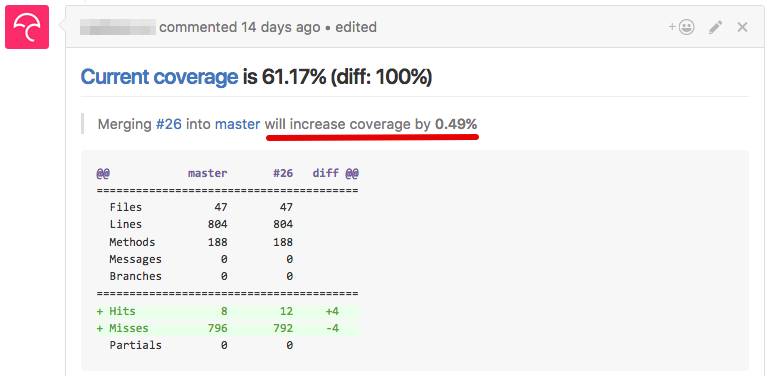
We can set up alerts when the percentage of coverage drops, for example, below 50, we can add automatic comments from bots to the pool of requests, show the trend of Code Coverage in graphs over time, etc.
But what if you use several libraries for testing? How to get general code coverage?
Here the phpcov library comes to the rescue.
So what will we do with each build (using the example of Travis-CI):
For an example, we will take the project on Symfony3 where PHPUnit together with phpspec are used.
The configuration of PHPUnit tests may look like this:
This is a standard config, with the exception of a few lines:
Here we say that the PHP format of the coverage report will be used and put the file in the desired folder.
Next, we do similar actions with phpspec:
It remains to run this whole thing with each build and keep the results:
phpcov collects all the data from your folder, combines it and saves the result in Clover format, which can be used to display code coverage, including such a badge.
That's all. Write tests, refactor with pleasure.
UPD: badges, comments in the request pool and much more is done using the codecov.io service (or alternatively coveralls.io )
After setting up the repository, integration with Travis-CI is done in one line:
Codecov will automatically take the generated report in Clover format and analyze it.
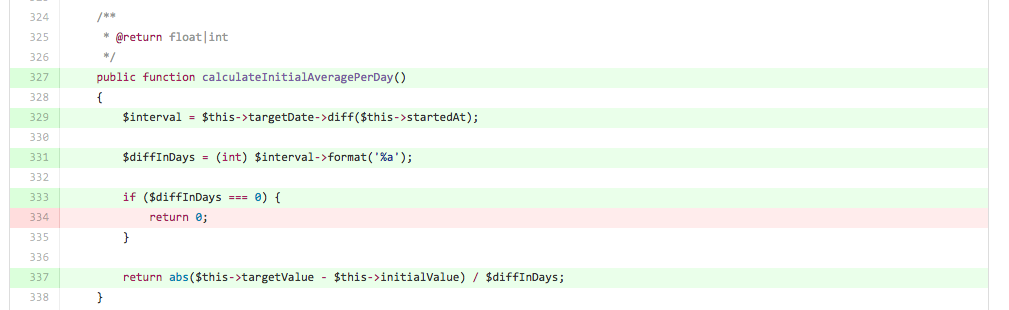
Also, when installing the add-on in the browser, you can see directly on Github which lines are covered by tests and which are not:

There is no point in striving for 100% coverage of the code, however, understanding on average what percentage of the code is covered by your tests is a good metric with continuous integration.
We can set up alerts when the percentage of coverage drops, for example, below 50, we can add automatic comments from bots to the pool of requests, show the trend of Code Coverage in graphs over time, etc.
But what if you use several libraries for testing? How to get general code coverage?
Here the phpcov library comes to the rescue.
So what will we do with each build (using the example of Travis-CI):
- Run PHPUnit tests, generate Code Coverage
- Run phpspec tests, generate Code Coverage
- Merge the results in a single coverage
- Save the results for later analysis and display
For an example, we will take the project on Symfony3 where PHPUnit together with phpspec are used.
The configuration of PHPUnit tests may look like this:
phpunit.xml
tests src src/*Bundle/Resources src/*/*Bundle/Resources src/*/Bundle/*Bundle/Resources This is a standard config, with the exception of a few lines:
Here we say that the PHP format of the coverage report will be used and put the file in the desired folder.
Next, we do similar actions with phpspec:
# phpspec.yml
...
extensions:
    PhpSpecCodeCoverage\CodeCoverageExtension:
        format:
            - php
        output:
            php: /tmp/coverage_phpspec.cov
It remains to run this whole thing with each build and keep the results:
# .travis.yml
...
script:
  - bin/phpspec run --format=pretty
  - bin/phpunit
  - wget https://phar.phpunit.de/phpcov.phar && php phpcov.phar merge /tmp --clover coverage.xml
phpcov collects all the data from your folder, combines it and saves the result in Clover format, which can be used to display code coverage, including such a badge.
That's all. Write tests, refactor with pleasure.
UPD: badges, comments in the request pool and much more is done using the codecov.io service (or alternatively coveralls.io )
After setting up the repository, integration with Travis-CI is done in one line:
# .travis.yml
...
after_success:
  - bash <(curl -s https://codecov.io/bash)
Codecov will automatically take the generated report in Clover format and analyze it.
Also, when installing the add-on in the browser, you can see directly on Github which lines are covered by tests and which are not:









