 November 23, 2016 at 19:29
As I wrote a visualization system for the stand
Firstly, first it must be said about what is the visualization system of the outside space of an airplane. This is a program that shows what the pilot sees when he flies on an airplane. At the same time, I do not mean instruments and, in general, everything that is inside the cabin - the term “outside the cabin” has been used above for nothing. Of course, it is also necessary to make instruments in part, but this is a separate, much simpler task, and we can not talk about it. In the narrow sense, “visualization” refers to the image of the outside space, so I’ll talk about that.
Below is an example of what the pilot sees in my program when taking off:
 (All the examples in the future are just taken from the real visualization frames of my program.)
Secondly, I did my visualization for a very real working aerobatic stand at TsAGI, where it was registered, moreover, twice already. An aerobatic stand is, roughly speaking, an airplane cabin, taken separately from everything else (the fuselage, wings, etc.), and placed inside a four-meter sphere, white inside. All this internal white surface of the sphere is my screen, it eats the screen of the visualization system - projectors, in our case 9 of them, project images from 9 different computers onto it, each of which is my visualization system (hereinafter I I will say simply - visualization, without quotes). Naturally, the visualization on all 9 computers is the same, but it is configured differently, roughly speaking, one field of view is forward, one left, one right, one more down, up, etc., but that also understandably, all of them are calculated so that their projections come from one and the same point, from the one where the operator sits and from which he looks, as if from his eyes, although the projectors themselves are, of course, not there, but in different angles where engineering managed to install them. In total, they illuminate the entire white spherical surface from the inside and show the operator sitting in the cockpit everything that a pilot can see in real flight - land, sky, sea, cities, rivers, mountains, railways and highways, houses, trees, poles, stones, cars, streets, people, grass, finally, other planes (enemies, for example), rockets flying in them, clouds in the sky, fog, sun, moon, night lights on the earth, stars in the sky, and much, much more. Everything that, in principle, is possible for the pilot to see, visualization should depict. This is its meaning. so that their projections come from one and the same point, from the one where the operator sits and from which they look, as if from his eyes, although the projectors themselves are, of course, not there, but in different angles, where the engineering managed to install them. In total, they illuminate the entire white spherical surface from the inside and show the operator sitting in the cockpit everything that a pilot can see in real flight - land, sky, sea, cities, rivers, mountains, railways and highways, houses, trees, poles, stones, cars, streets, people, grass, finally, other planes (enemies, for example), rockets flying in them, clouds in the sky, fog, sun, moon, night lights on the earth, stars in the sky, and much, much more. Everything that, in principle, is possible for the pilot to see, visualization should depict. This is its meaning. so that their projections come from one and the same point, from the one where the operator sits and from which they look, as if from his eyes, although the projectors themselves are, of course, not there, but in different angles, where the engineering managed to install them. In total, they illuminate the entire white spherical surface from the inside and show the operator sitting in the cockpit everything that a pilot can see in real flight - land, sky, sea, cities, rivers, mountains, railways and highways, houses, trees, poles, stones, cars, streets, people, grass, finally, other planes (enemies, for example), rockets flying in them, clouds in the sky, fog, sun, moon, night lights on the earth, stars in the sky, and much, much more. Everything that, in principle, is possible for the pilot to see, visualization should depict. This is its meaning. as if from his eyes, although the projectors themselves are, of course, not there, but in different angles, where the engineers managed to install them. In total, they illuminate the entire white spherical surface from the inside and show the operator sitting in the cockpit everything that a pilot can see in real flight - land, sky, sea, cities, rivers, mountains, railways and highways, houses, trees, poles, stones, cars, streets, people, grass, finally, other planes (enemies, for example), rockets flying in them, clouds in the sky, fog, sun, moon, night lights on the earth, stars in the sky, and much, much more. Everything that, in principle, is possible for the pilot to see, visualization should depict. This is its meaning. as if from his eyes, although the projectors themselves are, of course, not there, but in different angles, where the engineers managed to install them. In total, they illuminate the entire white spherical surface from the inside and show the operator sitting in the cockpit everything that a pilot can see in real flight - land, sky, sea, cities, rivers, mountains, railways and highways, houses, trees, poles, stones, cars, streets, people, grass, finally, other planes (enemies, for example), rockets flying in them, clouds in the sky, fog, sun, moon, night lights on the earth, stars in the sky, and much, much more. Everything that, in principle, is possible for the pilot to see, visualization should depict. This is its meaning. In total, they illuminate the entire white spherical surface from the inside and show the operator sitting in the cockpit everything that a pilot can see in real flight - land, sky, sea, cities, rivers, mountains, railways and highways, houses, trees, poles, stones, cars, streets, people, grass, finally, other planes (enemies, for example), rockets flying in them, clouds in the sky, fog, sun, moon, night lights on the earth, stars in the sky, and much, much more. Everything that, in principle, is possible for the pilot to see, visualization should depict. This is its meaning. In total, they illuminate the entire white spherical surface from the inside and show the operator sitting in the cockpit everything that a pilot can see in real flight - land, sky, sea, cities, rivers, mountains, railways and highways, houses, trees, poles, stones, cars, streets, people, grass, finally, other planes (enemies, for example), rockets flying in them, clouds in the sky, fog, sun, moon, night lights on the earth, stars in the sky, and much, much more. Everything that, in principle, is possible for the pilot to see, visualization should depict. This is its meaning. fog, sun, moon, night lights on the earth, stars in the sky, and much, much more. Everything that, in principle, is possible for the pilot to see, visualization should depict. This is its meaning. fog, sun, moon, night lights on the earth, stars in the sky, and much, much more. Everything that, in principle, is possible for the pilot to see, visualization should depict. This is its meaning.
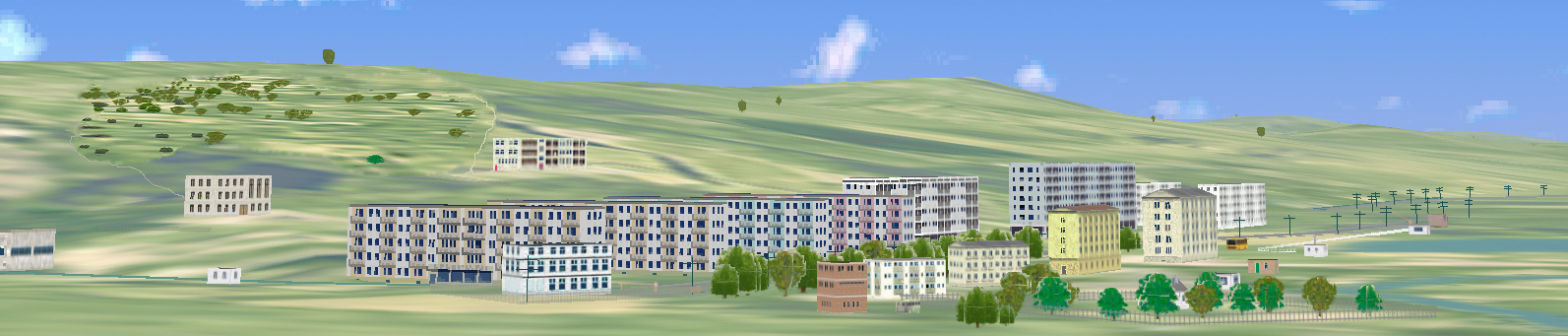
Here, for example, is a small piece of a military camp in my program:
I must add that the flight itself is not my concern, that is, not the concern of the visualization system. There is a host computer in every booth: it is the host computer that controls the entire booth, sets the synchronization, supplies visualization and other computers with all the basic current information - the coordinates of the plane (where we fly), the angles of its orientation (where we fly, where we look), parameters of everything control, and much more (for example, it contains the aerodynamics of the aircraft, weight and inertia, engine characteristics, suspended or already flying missiles (ours or others), the coordinates of enemies and friends, time of day, conditions of visibility (fog, cloudiness, clear oh, and so on), as well as the overall control of the stand (stop the experiment, continue, end, turn it off, or, conversely, turn it on). And from it, all this information on the network is distributed to all computers serving the stand, who needs what. But this is done by the “main movement model”, and the visualization only synchronizes with it, receives the network packet and processes it - that is, ultimately, it shows what the pilot (in the case of a stand, the operator) should see under all these conditions and parameters.
So my visualization is a working affiliation of our stand. And, as such, it should work, first of all, steadily. In this sense, the most important thing for such a visualization system is reliability.. It’s not good when pilots come to us, and the program does not start, or freezes, or crashes in the process, or shows errors (after all, this is visualization, so many errors are simply visible): this is a failure of the bench experiment (or even all the planned work), loss of time (especially pilots - pilots, they are busy people; we, of course, also fly as operators (except for me now, I’m disabled and I can’t climb the ladder into our cabin), but we don’t have that qualification and, accordingly, wrong results and estimates, so for me the most important thing is reliability: the program must work absolutely stable.The
second important requirement for visualization is speed, that is, the effectiveness of the real-time process. Roughly speaking, this is understood as how many frames per second a visualization program can provide with the content that is in it (by filling, I mean everything depicted). Here the criteria are harsh: as everyone in the aviation world knows, the most rapidly changing movement of the modern fastest aircraft — that is, a fighter — is the so-called "isolated roll motion." This is what it is: everyone must have seen the fighter spin the “barrels” at the exhibition — and this is it. It spins very fast, it is parametrically believed that the speed of such rotation can reach 100 degrees per second in a modern fighter, that is, it makes one revolution in about 3 seconds. In this case, the operator will see everything rotating on the visualization, including the horizon itself, and this turn of visualization should present smoothly, as it would actually happen for a pilot sitting in the cockpit of a flying airplane. This can only be done at the expense of the speed of the visualization — it just needs to give out the next frame so fast that the operator in the stand would not see this flipping of frames, the jump, which should be so small that it would seem to the operator that everything is actually happening smooth and clean. (Well, what a storyboard is, probably, familiar to everyone from toys.) For example, a simple movie with a standard frequency of 25 frames per second is not suitable here - a person will see not a smooth gradual change, but a twitching of the whole image. These considerations determine the mandatory lower frequency limit that visualization should keep: she should be able to reproduce her shots no less than 100 times per second. If our department was only concerned with heavy vehicles (cargo, passenger planes, etc.), then these requirements would be easier - it is clear that trucks and liners do not spin like that. But I have to focus on light aircraft (these are primarily fighters, as well as training, sports, etc.), and therefore, together with our boss, it was decided that the visualization frequency should be at least 100 Hz. It is clear that this requirement is not constant: no one will spin the “barrels” on landing, etc., but in difficult maneuverable flights (for example, in an air battle), such a frame rate is required. Therefore, we decided that the visualization on the stand should have time to update its full images with a frequency of about 100 Hz.real time condition .
It is clear that such a requirement imposes very severe restrictions on the detail of the image. (I do not say quality here , because this means either the resolution and color of the screen, or not what is required of a really functioning visualization system: no one (that is, in the end, the pilot) needs me to, for example, on the enemy’s performance, F-16 depicted cracks, rivets, scratches on metal, holes in the wings, a nice coloring of emblems and signs on the fuselage, the mustache of the enemy ace, visible under the helmet, etc., because this is not important for our brave pilot in battle - he does not look at something like that, but at what his victory, assignment and life itself).
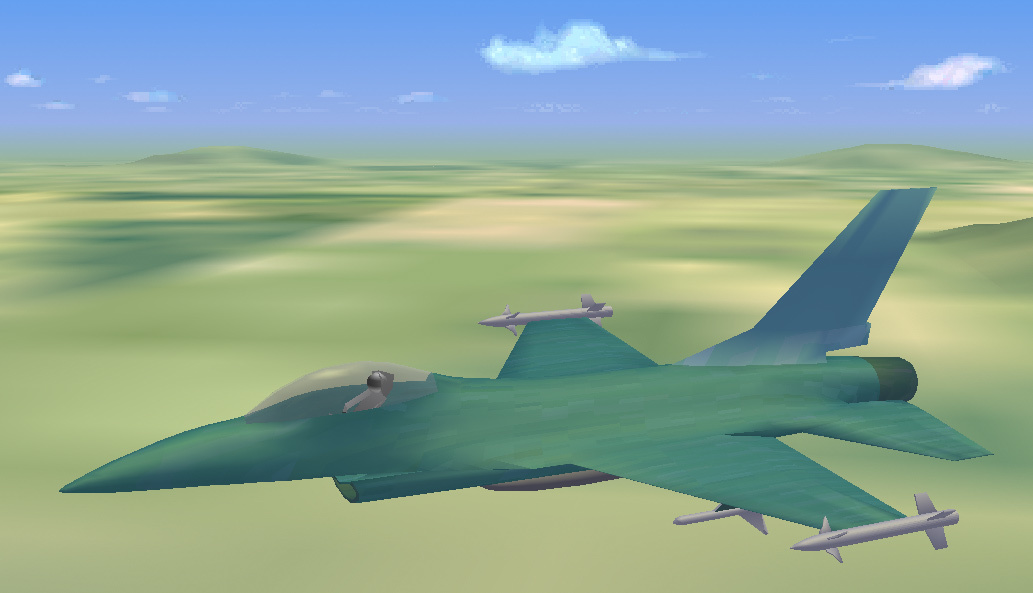
Here's how (and quite enough) to portray an enemy F-16 - without unnecessary details that our pilot will never see, since he will never be so close:
By detail, saturation, or even by image quality in visualizations, we mean the degree of detail of the entire outside the cabin space: that is, with what measure of detail is the sky (with clouds) drawn, and especially the surface of the earth (with the sea, obviously, lighter), how much is on it all mountains, forests, fields and rivers, cities, streets, villages, roads and individual houses, trees and all bushes, grass and soil are depicted, and, finally, the most important thing is the airfield. The fact is that our department is more concerned with take-off and landing modes for fighters (but not only, air combat, for example, also happens), and therefore special attention and special work had to be applied precisely to the detailed and correct image of airfields in all respects, the land beneath them, the runway (concrete), everything that surrounds them (taxiing, hangars, tanks, other aircraft, etc.), and the requirements for these things are actually the most stringent. For example, on a strip, I really depict traces of previous landings, individual pebbles and spots and other trifles, but this is also a strip.
And here this limitation on the minimum processing and playback speed of frames comes into a completely understandable conflict with the requirement for image detail. I can draw my own or someone else's fighter (one) in a very detailed, beautiful and high-quality way, it’s just a sight for sore eyes, but what's the point? Moreover, we mainly have a takeoff and landing department. It’s much more important to draw the runway itself, the earth around it (this is important because the pilot, when taking off and landing, must be able to extremely accurately assess his height above the concrete (he needs centimeters here) and speed - this is vital for him to land or take off: take-off and landing are still the most difficult maneuvers for any aircraft (which, in general, is clear: it’s easy to roll on concrete, it’s also able to fly, it’s also easy to fly,
Here is an example of an image of a short / frontal / runway:

Therefore, great detail and accuracy are needed here, and besides, there is nothing empty around an airfield: there are always taxiways, auxiliary routes, aircraft parking, hangars, gearboxes, all kinds of antennas and radars, there are fires at any airfield, there must be access roads, railways or highways, and people must live somewhere - therefore, at least a small military town, barracks, houses, shops, schools, a hospital, and off we go. But it’s easy to notice that the farther from the airfield, the less detail we need - the pilot will never see what color the curtains are in the windows, and whether there are cacti on the windowsills.
But, take-off is followed by the completion of a task, for example, a simple flight along a route. Here, it’s understandable, it’s not pebbles and grass that are important, but mountains, forests, rivers, cities, houses, and all of this should be great - so that everything is as for real. This is where the time for programming comes: for example, how to draw a tree so effectively that the forest depicted from such trees does not contain a thousand trees, but, say, two thousand, besides that the image containing it would fit into a given frequency. Or, at least, let one and a half thousand, also a plus. Or, at least, at the worst, a thousand and a hundred. This is where very cruel optimization is required .
It is clear that the video card does a lot, even the videogenic path as a whole. But, as this should be even more clear, by no means fundamentally everything. For example, it is very simple to draw a house with details. But at some distance from it, some of the details will disappear, will not be visible. And at a great distance all the details will disappear (they will not be visible), all that remains is a bare house of planes. And at an even greater distance, the house itself will almost not be visible - it will turn into a point. It is clear that the video path (starting with OpenGL in my case of drivers, and ending with VPU itself) will provide this projection - but at what cost! It’s clear that there is no need to count, transfer to the video processor and draw a lot of small details (for example, cacti on the windows, or open windows), when in fact the whole image due to range turns into just a point of some kind of dark color. And, it should be noted, this is just the simplest example.
But you can talk about optimization for a long time and boring, but it is only necessary for programmers who are involved in real-time programs, like me. It is important that there is visualization, it works well and steadily at the TsAGI stand, conducting various and numerous studies on it. I can add that I did it practically on my own, no one helped me (except, I must say, my dearly beloved boss), and I can’t mention those who interfered because it would take up too much space. And the example, the demo version of the visualization, though quite old, I am happy to attach. If I have enough strength, I will try to make a new version of demo, then I can show it too - nevertheless, visualization has grown a lot since then. But it should be remembered that, in fact, the visualization system is a very large, really huge project, especially for one person, so you should not expect breathtaking beauties from my demo, for this there are toy companies where thousands of people work. And for my part, a lot of work has been simply invested in this project (I have been dealing with visual problems for more than 30 years, since the time of 286 processors, when there were no video tools and everything had to be written in assembler manually). For example, I remember that when my first boss and I went to the booth for the first time to try visualization, I considered that before that I had been preparing it for 11 years, already then! But in general, my visualization (which, by the way, is called Petite for modesty) has its own advantages: it really works on a stand with pilots, it works stably, and works efficiently. for this there are toy companies where thousands of people work. And for my part, a lot of work has been simply invested in this project (I have been dealing with visual problems for more than 30 years, since the time of 286 processors, when there were no video tools and everything had to be written in assembler manually). For example, I remember that when my first boss and I went to the booth for the first time to try visualization, I considered that before that I had been preparing it for 11 years, already then! But in general, my visualization (which, by the way, is called Petite for modesty) has its own advantages: it really works on a stand with pilots, it works stably, and works efficiently. for this there are toy companies where thousands of people work. And for my part, a lot of work has been simply invested in this project (I have been dealing with visual problems for more than 30 years, since the time of 286 processors, when there were no video tools and everything had to be written in assembler manually). For example, I remember that when my first boss and I went to the booth for the first time to try visualization, I considered that before that I had been preparing it for 11 years, already then! But in general, my visualization (which, by the way, is called Petite for modesty) has its own advantages: it really works on a stand with pilots, it works stably, and works efficiently. since the time of 286 processors, when there were no video tools and everything had to be written in assembler manually). For example, I remember that when my first boss and I went to the booth for the first time to try visualization, I considered that before that I had been preparing it for 11 years, already then! But in general, my visualization (which, by the way, is called Petite for modesty) has its own advantages: it really works on a stand with pilots, it works stably, and works efficiently. since the time of 286 processors, when there were no video tools and everything had to be written in assembler manually). For example, I remember that when my first boss and I went to the booth for the first time to try visualization, I considered that before that I had been preparing it for 11 years, already then! But in general, my visualization (which, by the way, is called Petite for modesty) has its own advantages: it really works on a stand with pilots, it works stably, and works efficiently.
I am not telling all of this (and I didn’t draw pictures myself either), and here in support of this I attach a link to the archive with the demo version, in which everyone can see how the visualization described above briefly works. It, demo, depicts something like a flight along a route: the plane, as it were, starts, rises, and then flies along approximately (but not quite) the same route, flying around obstacles (this is also not a simple problem), rising and lowering, accelerating and braking. It should be remembered that there is no and should not be a mathematical model of airplane dynamics in the visualization, so the movement itself in the demo is not very smooth and beautiful, I just whipped up what I could. There is no special control in this demo, except that you can stop the flight by space, and by Escape ' u complete and exit. Actually, this demo is old, it is already over 15 years old, I’ll make a new one when I can and if I can, but still it gives an idea of what one person can do, however, for quite a few years. So this onethe link . Just in case (because some servers are very suspicious and do not allow reception / transfer of EXE files), the following link contains the same archive, but you just need to rename the VISUAL.E file to VISUAL.EXE. Here is this link :
Well, that seems to be all.
Below is an example of what the pilot sees in my program when taking off:
Secondly, I did my visualization for a very real working aerobatic stand at TsAGI, where it was registered, moreover, twice already. An aerobatic stand is, roughly speaking, an airplane cabin, taken separately from everything else (the fuselage, wings, etc.), and placed inside a four-meter sphere, white inside. All this internal white surface of the sphere is my screen, it eats the screen of the visualization system - projectors, in our case 9 of them, project images from 9 different computers onto it, each of which is my visualization system (hereinafter I I will say simply - visualization, without quotes). Naturally, the visualization on all 9 computers is the same, but it is configured differently, roughly speaking, one field of view is forward, one left, one right, one more down, up, etc., but that also understandably, all of them are calculated so that their projections come from one and the same point, from the one where the operator sits and from which he looks, as if from his eyes, although the projectors themselves are, of course, not there, but in different angles where engineering managed to install them. In total, they illuminate the entire white spherical surface from the inside and show the operator sitting in the cockpit everything that a pilot can see in real flight - land, sky, sea, cities, rivers, mountains, railways and highways, houses, trees, poles, stones, cars, streets, people, grass, finally, other planes (enemies, for example), rockets flying in them, clouds in the sky, fog, sun, moon, night lights on the earth, stars in the sky, and much, much more. Everything that, in principle, is possible for the pilot to see, visualization should depict. This is its meaning. so that their projections come from one and the same point, from the one where the operator sits and from which they look, as if from his eyes, although the projectors themselves are, of course, not there, but in different angles, where the engineering managed to install them. In total, they illuminate the entire white spherical surface from the inside and show the operator sitting in the cockpit everything that a pilot can see in real flight - land, sky, sea, cities, rivers, mountains, railways and highways, houses, trees, poles, stones, cars, streets, people, grass, finally, other planes (enemies, for example), rockets flying in them, clouds in the sky, fog, sun, moon, night lights on the earth, stars in the sky, and much, much more. Everything that, in principle, is possible for the pilot to see, visualization should depict. This is its meaning. so that their projections come from one and the same point, from the one where the operator sits and from which they look, as if from his eyes, although the projectors themselves are, of course, not there, but in different angles, where the engineering managed to install them. In total, they illuminate the entire white spherical surface from the inside and show the operator sitting in the cockpit everything that a pilot can see in real flight - land, sky, sea, cities, rivers, mountains, railways and highways, houses, trees, poles, stones, cars, streets, people, grass, finally, other planes (enemies, for example), rockets flying in them, clouds in the sky, fog, sun, moon, night lights on the earth, stars in the sky, and much, much more. Everything that, in principle, is possible for the pilot to see, visualization should depict. This is its meaning. as if from his eyes, although the projectors themselves are, of course, not there, but in different angles, where the engineers managed to install them. In total, they illuminate the entire white spherical surface from the inside and show the operator sitting in the cockpit everything that a pilot can see in real flight - land, sky, sea, cities, rivers, mountains, railways and highways, houses, trees, poles, stones, cars, streets, people, grass, finally, other planes (enemies, for example), rockets flying in them, clouds in the sky, fog, sun, moon, night lights on the earth, stars in the sky, and much, much more. Everything that, in principle, is possible for the pilot to see, visualization should depict. This is its meaning. as if from his eyes, although the projectors themselves are, of course, not there, but in different angles, where the engineers managed to install them. In total, they illuminate the entire white spherical surface from the inside and show the operator sitting in the cockpit everything that a pilot can see in real flight - land, sky, sea, cities, rivers, mountains, railways and highways, houses, trees, poles, stones, cars, streets, people, grass, finally, other planes (enemies, for example), rockets flying in them, clouds in the sky, fog, sun, moon, night lights on the earth, stars in the sky, and much, much more. Everything that, in principle, is possible for the pilot to see, visualization should depict. This is its meaning. In total, they illuminate the entire white spherical surface from the inside and show the operator sitting in the cockpit everything that a pilot can see in real flight - land, sky, sea, cities, rivers, mountains, railways and highways, houses, trees, poles, stones, cars, streets, people, grass, finally, other planes (enemies, for example), rockets flying in them, clouds in the sky, fog, sun, moon, night lights on the earth, stars in the sky, and much, much more. Everything that, in principle, is possible for the pilot to see, visualization should depict. This is its meaning. In total, they illuminate the entire white spherical surface from the inside and show the operator sitting in the cockpit everything that a pilot can see in real flight - land, sky, sea, cities, rivers, mountains, railways and highways, houses, trees, poles, stones, cars, streets, people, grass, finally, other planes (enemies, for example), rockets flying in them, clouds in the sky, fog, sun, moon, night lights on the earth, stars in the sky, and much, much more. Everything that, in principle, is possible for the pilot to see, visualization should depict. This is its meaning. fog, sun, moon, night lights on the earth, stars in the sky, and much, much more. Everything that, in principle, is possible for the pilot to see, visualization should depict. This is its meaning. fog, sun, moon, night lights on the earth, stars in the sky, and much, much more. Everything that, in principle, is possible for the pilot to see, visualization should depict. This is its meaning.
Here, for example, is a small piece of a military camp in my program:
I must add that the flight itself is not my concern, that is, not the concern of the visualization system. There is a host computer in every booth: it is the host computer that controls the entire booth, sets the synchronization, supplies visualization and other computers with all the basic current information - the coordinates of the plane (where we fly), the angles of its orientation (where we fly, where we look), parameters of everything control, and much more (for example, it contains the aerodynamics of the aircraft, weight and inertia, engine characteristics, suspended or already flying missiles (ours or others), the coordinates of enemies and friends, time of day, conditions of visibility (fog, cloudiness, clear oh, and so on), as well as the overall control of the stand (stop the experiment, continue, end, turn it off, or, conversely, turn it on). And from it, all this information on the network is distributed to all computers serving the stand, who needs what. But this is done by the “main movement model”, and the visualization only synchronizes with it, receives the network packet and processes it - that is, ultimately, it shows what the pilot (in the case of a stand, the operator) should see under all these conditions and parameters.
So my visualization is a working affiliation of our stand. And, as such, it should work, first of all, steadily. In this sense, the most important thing for such a visualization system is reliability.. It’s not good when pilots come to us, and the program does not start, or freezes, or crashes in the process, or shows errors (after all, this is visualization, so many errors are simply visible): this is a failure of the bench experiment (or even all the planned work), loss of time (especially pilots - pilots, they are busy people; we, of course, also fly as operators (except for me now, I’m disabled and I can’t climb the ladder into our cabin), but we don’t have that qualification and, accordingly, wrong results and estimates, so for me the most important thing is reliability: the program must work absolutely stable.The
second important requirement for visualization is speed, that is, the effectiveness of the real-time process. Roughly speaking, this is understood as how many frames per second a visualization program can provide with the content that is in it (by filling, I mean everything depicted). Here the criteria are harsh: as everyone in the aviation world knows, the most rapidly changing movement of the modern fastest aircraft — that is, a fighter — is the so-called "isolated roll motion." This is what it is: everyone must have seen the fighter spin the “barrels” at the exhibition — and this is it. It spins very fast, it is parametrically believed that the speed of such rotation can reach 100 degrees per second in a modern fighter, that is, it makes one revolution in about 3 seconds. In this case, the operator will see everything rotating on the visualization, including the horizon itself, and this turn of visualization should present smoothly, as it would actually happen for a pilot sitting in the cockpit of a flying airplane. This can only be done at the expense of the speed of the visualization — it just needs to give out the next frame so fast that the operator in the stand would not see this flipping of frames, the jump, which should be so small that it would seem to the operator that everything is actually happening smooth and clean. (Well, what a storyboard is, probably, familiar to everyone from toys.) For example, a simple movie with a standard frequency of 25 frames per second is not suitable here - a person will see not a smooth gradual change, but a twitching of the whole image. These considerations determine the mandatory lower frequency limit that visualization should keep: she should be able to reproduce her shots no less than 100 times per second. If our department was only concerned with heavy vehicles (cargo, passenger planes, etc.), then these requirements would be easier - it is clear that trucks and liners do not spin like that. But I have to focus on light aircraft (these are primarily fighters, as well as training, sports, etc.), and therefore, together with our boss, it was decided that the visualization frequency should be at least 100 Hz. It is clear that this requirement is not constant: no one will spin the “barrels” on landing, etc., but in difficult maneuverable flights (for example, in an air battle), such a frame rate is required. Therefore, we decided that the visualization on the stand should have time to update its full images with a frequency of about 100 Hz.real time condition .
It is clear that such a requirement imposes very severe restrictions on the detail of the image. (I do not say quality here , because this means either the resolution and color of the screen, or not what is required of a really functioning visualization system: no one (that is, in the end, the pilot) needs me to, for example, on the enemy’s performance, F-16 depicted cracks, rivets, scratches on metal, holes in the wings, a nice coloring of emblems and signs on the fuselage, the mustache of the enemy ace, visible under the helmet, etc., because this is not important for our brave pilot in battle - he does not look at something like that, but at what his victory, assignment and life itself).
Here's how (and quite enough) to portray an enemy F-16 - without unnecessary details that our pilot will never see, since he will never be so close:
By detail, saturation, or even by image quality in visualizations, we mean the degree of detail of the entire outside the cabin space: that is, with what measure of detail is the sky (with clouds) drawn, and especially the surface of the earth (with the sea, obviously, lighter), how much is on it all mountains, forests, fields and rivers, cities, streets, villages, roads and individual houses, trees and all bushes, grass and soil are depicted, and, finally, the most important thing is the airfield. The fact is that our department is more concerned with take-off and landing modes for fighters (but not only, air combat, for example, also happens), and therefore special attention and special work had to be applied precisely to the detailed and correct image of airfields in all respects, the land beneath them, the runway (concrete), everything that surrounds them (taxiing, hangars, tanks, other aircraft, etc.), and the requirements for these things are actually the most stringent. For example, on a strip, I really depict traces of previous landings, individual pebbles and spots and other trifles, but this is also a strip.
And here this limitation on the minimum processing and playback speed of frames comes into a completely understandable conflict with the requirement for image detail. I can draw my own or someone else's fighter (one) in a very detailed, beautiful and high-quality way, it’s just a sight for sore eyes, but what's the point? Moreover, we mainly have a takeoff and landing department. It’s much more important to draw the runway itself, the earth around it (this is important because the pilot, when taking off and landing, must be able to extremely accurately assess his height above the concrete (he needs centimeters here) and speed - this is vital for him to land or take off: take-off and landing are still the most difficult maneuvers for any aircraft (which, in general, is clear: it’s easy to roll on concrete, it’s also able to fly, it’s also easy to fly,
Here is an example of an image of a short / frontal / runway:
Therefore, great detail and accuracy are needed here, and besides, there is nothing empty around an airfield: there are always taxiways, auxiliary routes, aircraft parking, hangars, gearboxes, all kinds of antennas and radars, there are fires at any airfield, there must be access roads, railways or highways, and people must live somewhere - therefore, at least a small military town, barracks, houses, shops, schools, a hospital, and off we go. But it’s easy to notice that the farther from the airfield, the less detail we need - the pilot will never see what color the curtains are in the windows, and whether there are cacti on the windowsills.
But, take-off is followed by the completion of a task, for example, a simple flight along a route. Here, it’s understandable, it’s not pebbles and grass that are important, but mountains, forests, rivers, cities, houses, and all of this should be great - so that everything is as for real. This is where the time for programming comes: for example, how to draw a tree so effectively that the forest depicted from such trees does not contain a thousand trees, but, say, two thousand, besides that the image containing it would fit into a given frequency. Or, at least, let one and a half thousand, also a plus. Or, at least, at the worst, a thousand and a hundred. This is where very cruel optimization is required .
It is clear that the video card does a lot, even the videogenic path as a whole. But, as this should be even more clear, by no means fundamentally everything. For example, it is very simple to draw a house with details. But at some distance from it, some of the details will disappear, will not be visible. And at a great distance all the details will disappear (they will not be visible), all that remains is a bare house of planes. And at an even greater distance, the house itself will almost not be visible - it will turn into a point. It is clear that the video path (starting with OpenGL in my case of drivers, and ending with VPU itself) will provide this projection - but at what cost! It’s clear that there is no need to count, transfer to the video processor and draw a lot of small details (for example, cacti on the windows, or open windows), when in fact the whole image due to range turns into just a point of some kind of dark color. And, it should be noted, this is just the simplest example.
But you can talk about optimization for a long time and boring, but it is only necessary for programmers who are involved in real-time programs, like me. It is important that there is visualization, it works well and steadily at the TsAGI stand, conducting various and numerous studies on it. I can add that I did it practically on my own, no one helped me (except, I must say, my dearly beloved boss), and I can’t mention those who interfered because it would take up too much space. And the example, the demo version of the visualization, though quite old, I am happy to attach. If I have enough strength, I will try to make a new version of demo, then I can show it too - nevertheless, visualization has grown a lot since then. But it should be remembered that, in fact, the visualization system is a very large, really huge project, especially for one person, so you should not expect breathtaking beauties from my demo, for this there are toy companies where thousands of people work. And for my part, a lot of work has been simply invested in this project (I have been dealing with visual problems for more than 30 years, since the time of 286 processors, when there were no video tools and everything had to be written in assembler manually). For example, I remember that when my first boss and I went to the booth for the first time to try visualization, I considered that before that I had been preparing it for 11 years, already then! But in general, my visualization (which, by the way, is called Petite for modesty) has its own advantages: it really works on a stand with pilots, it works stably, and works efficiently. for this there are toy companies where thousands of people work. And for my part, a lot of work has been simply invested in this project (I have been dealing with visual problems for more than 30 years, since the time of 286 processors, when there were no video tools and everything had to be written in assembler manually). For example, I remember that when my first boss and I went to the booth for the first time to try visualization, I considered that before that I had been preparing it for 11 years, already then! But in general, my visualization (which, by the way, is called Petite for modesty) has its own advantages: it really works on a stand with pilots, it works stably, and works efficiently. for this there are toy companies where thousands of people work. And for my part, a lot of work has been simply invested in this project (I have been dealing with visual problems for more than 30 years, since the time of 286 processors, when there were no video tools and everything had to be written in assembler manually). For example, I remember that when my first boss and I went to the booth for the first time to try visualization, I considered that before that I had been preparing it for 11 years, already then! But in general, my visualization (which, by the way, is called Petite for modesty) has its own advantages: it really works on a stand with pilots, it works stably, and works efficiently. since the time of 286 processors, when there were no video tools and everything had to be written in assembler manually). For example, I remember that when my first boss and I went to the booth for the first time to try visualization, I considered that before that I had been preparing it for 11 years, already then! But in general, my visualization (which, by the way, is called Petite for modesty) has its own advantages: it really works on a stand with pilots, it works stably, and works efficiently. since the time of 286 processors, when there were no video tools and everything had to be written in assembler manually). For example, I remember that when my first boss and I went to the booth for the first time to try visualization, I considered that before that I had been preparing it for 11 years, already then! But in general, my visualization (which, by the way, is called Petite for modesty) has its own advantages: it really works on a stand with pilots, it works stably, and works efficiently.
I am not telling all of this (and I didn’t draw pictures myself either), and here in support of this I attach a link to the archive with the demo version, in which everyone can see how the visualization described above briefly works. It, demo, depicts something like a flight along a route: the plane, as it were, starts, rises, and then flies along approximately (but not quite) the same route, flying around obstacles (this is also not a simple problem), rising and lowering, accelerating and braking. It should be remembered that there is no and should not be a mathematical model of airplane dynamics in the visualization, so the movement itself in the demo is not very smooth and beautiful, I just whipped up what I could. There is no special control in this demo, except that you can stop the flight by space, and by Escape ' u complete and exit. Actually, this demo is old, it is already over 15 years old, I’ll make a new one when I can and if I can, but still it gives an idea of what one person can do, however, for quite a few years. So this onethe link . Just in case (because some servers are very suspicious and do not allow reception / transfer of EXE files), the following link contains the same archive, but you just need to rename the VISUAL.E file to VISUAL.EXE. Here is this link :
Well, that seems to be all.









