 October 7, 2016 at 18:36
Microsoft StorSimple - Automatic Disaster Recovery
Today on the blog, our IT expert, Henrik Motzkus, will present a series of detailed reviews of the core features of Microsoft StorSimple. We will dwell on several separate aspects. One of the most important is disaster recovery. After the basic installation of Microsoft StorSimple, you must select the settings that meet the reliability requirements. Using an example of a file server, Henrik talks about the technical details of this scenario.
StorSimple is Microsoft's hybrid storage solution, designed to provide simple, fast, cost-effective data storage from a Microsoft Azure data center for local users. To get acquainted with the basics and to acquire basic knowledge about the work of this software, we recommend reading the article"Microsoft Azure StorSimple: Easy Hybrid Cloud Entry . "
What does the architecture of this scenario look like? The file server runs on a virtual machine (VM) with Windows Server 2012 R2. It may have a failover cluster configuration. To store data, the server uses StorSimple as shared cluster volumes (OTC), which go as iSCSI volumes . StorSimple reflects volumes in Azure (CloudSnapshots), after which domain users access them. This architecture provides excellent availability. All components are duplicated. Workload and operating costs are limited to a minimum.

Source: Microsoft
What do I need to know to create an appropriate Enterprise Disaster Recovery environment? This section describes the following individual components needed to configure AB:
In previous blog posts, I described the features of Microsoft StorSimple. Cloud Snapshots should also be noted in this context. They are used to safely copy a whole set of data, as well as to encrypt copy from iSCSI volumes to blob storage. This is where the cloud device comes in handy for Microsoft StorSimple. The Microsoft StorSimple Cloud Appliance is a virtual appliance running on a Microsoft Azure VM. This cloud device provides the same functionality in a hardware device, and makes iSCSI volumes available to servers. However, the following condition is essential: the cloud device can process no more than 64 TB of data. Therefore, if the memory of the hardware device is more than 64 TB, the iSCI volumes must be divided between several cloud devices. This limitation is set because the cloud device is a standard VM in Azure. And, as we know, a VM supports no more than 64 hard drives with a memory capacity of 1023 GB each.
Now you need to find a way to authenticate users. The following options are presented below, depending on the complexity of the environment:
Then you need to make sure that the file servers through which users access shared resources (via DFS, FailoverCluster, etc.) are also available during a crash. In this case, Microsoft Azure Site Recovery is used to duplicate the corresponding VMs in the Azure data center as exact copies up to the last bit. The following diagram shows the basic principles of Microsoft Azure Site Recovery for a specific scenario.
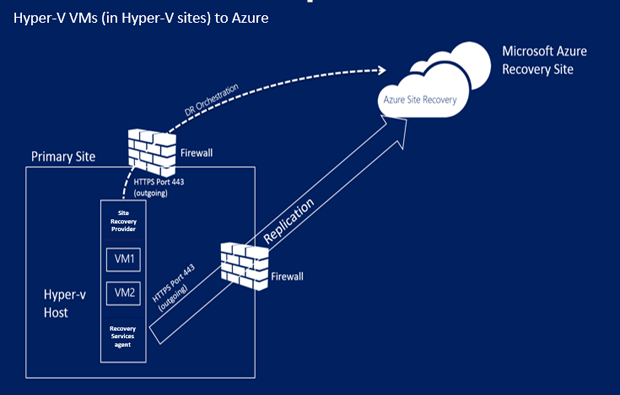
How Microsoft Azure Site Recovery works (source: Microsoft)
This requires the Azure Site Recovery provider , who will be responsible for coordinating operations on the Hyper-V host. To use the Microsoft Azure data center, it uses port 443. You also need a recovery service agent for each VM. If necessary, it runs scripts on current VMs to perform the corresponding operations during an accident.
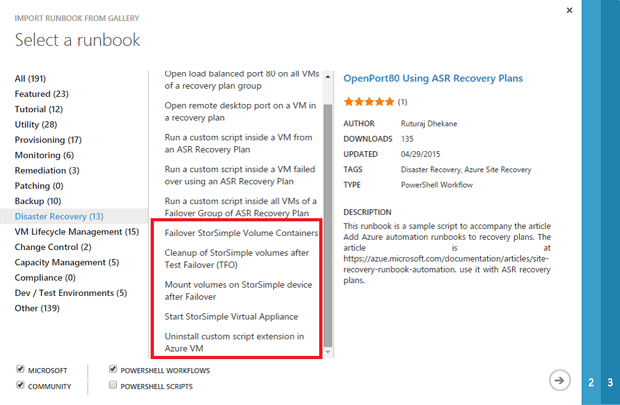
Last, but not least, provides the ability to automatically perform the process of switching to another resource. The Microsoft Azure Automation Service is just for this purpose. Users can set up an Azure Automation service account or select a predefined runbook from the pool. After adding runbook to your personal account, it will take just one click to start several operations.
Test transition to another resource in no way affects the servers. VMs simply boot into Azure, and volumes are mapped to VMs. But before that, StorSimple volumes are copied and attached to the virtual device, thus forming the perfect playing field.
The planned transition to another resource uses a "friendly approach" to terminate the VM in local data centers for its subsequent upload to Azure. To do this, existing Cloud Snapshots are mapped to a virtual device. Voila!
Then, during an unplanned transition to another resource, the VMs simply load into Azure and transfer the StorSimple volume container to another resource. After that, the volumes are in the VM, and the file server access to the data is restored.
source: Microsoft
In particular, the finished runbook makes the whole process very simple. Template scripts are already written, they can be modified to match individual scenarios.
The hybrid solution described here promises to provide superior availability for the provided file services, simplified administration, and good potential for cost savings. After all, the Microsoft Azure data center is used as the location of the accident. In addition, the highlighted location of the ongoing hardware and software transition is thus outdated.
In the future, Microsoft will focus on developing a solution for a hybrid data center. Azure Site Recovery, Azure StorSimple, or Azure Active Directory already provide off-the-shelf solutions for the perfect connection between your on-premises infrastructure and Azure.
StorSimple is Microsoft's hybrid storage solution, designed to provide simple, fast, cost-effective data storage from a Microsoft Azure data center for local users. To get acquainted with the basics and to acquire basic knowledge about the work of this software, we recommend reading the article"Microsoft Azure StorSimple: Easy Hybrid Cloud Entry . "
1. Architecture of automatic disaster recovery
What does the architecture of this scenario look like? The file server runs on a virtual machine (VM) with Windows Server 2012 R2. It may have a failover cluster configuration. To store data, the server uses StorSimple as shared cluster volumes (OTC), which go as iSCSI volumes . StorSimple reflects volumes in Azure (CloudSnapshots), after which domain users access them. This architecture provides excellent availability. All components are duplicated. Workload and operating costs are limited to a minimum.
Source: Microsoft
2. What is needed for automatic disaster recovery?
What do I need to know to create an appropriate Enterprise Disaster Recovery environment? This section describes the following individual components needed to configure AB:
- Cloud-based device for iSCSI volumes in Microsoft Azure
- ActiveDirectory in Azure or on the local network;
- Azure SiteRecovery Storage
- Azure Automation Service
In previous blog posts, I described the features of Microsoft StorSimple. Cloud Snapshots should also be noted in this context. They are used to safely copy a whole set of data, as well as to encrypt copy from iSCSI volumes to blob storage. This is where the cloud device comes in handy for Microsoft StorSimple. The Microsoft StorSimple Cloud Appliance is a virtual appliance running on a Microsoft Azure VM. This cloud device provides the same functionality in a hardware device, and makes iSCSI volumes available to servers. However, the following condition is essential: the cloud device can process no more than 64 TB of data. Therefore, if the memory of the hardware device is more than 64 TB, the iSCI volumes must be divided between several cloud devices. This limitation is set because the cloud device is a standard VM in Azure. And, as we know, a VM supports no more than 64 hard drives with a memory capacity of 1023 GB each.
3. Step-by-step guide for automatic disaster recovery
Now you need to find a way to authenticate users. The following options are presented below, depending on the complexity of the environment:
- A domain controller can use Azure Site Recovery to display an entire VM for less complex environments in which there is only one domain controller and few users are present. In the event of an accident, the reflection simply reboots. After that, all changes in the Azure structure must be repeated in the company's data center. I am not a supporter of this method, and in some cases it will not even work.
- It is recommended that you set up a different data center in Azure to configure large environments with a large number of data centers, users and a high rate of change in blood pressure. After that, this data center becomes part of the overall structure, automatically displaying all changes in the structure before Microsoft Azure, as part of the replication topology.
4. Microsoft Azure Site Recovery
Then you need to make sure that the file servers through which users access shared resources (via DFS, FailoverCluster, etc.) are also available during a crash. In this case, Microsoft Azure Site Recovery is used to duplicate the corresponding VMs in the Azure data center as exact copies up to the last bit. The following diagram shows the basic principles of Microsoft Azure Site Recovery for a specific scenario.
How Microsoft Azure Site Recovery works (source: Microsoft)
This requires the Azure Site Recovery provider , who will be responsible for coordinating operations on the Hyper-V host. To use the Microsoft Azure data center, it uses port 443. You also need a recovery service agent for each VM. If necessary, it runs scripts on current VMs to perform the corresponding operations during an accident.
5. Microsoft Azure Automation Service
Last, but not least, provides the ability to automatically perform the process of switching to another resource. The Microsoft Azure Automation Service is just for this purpose. Users can set up an Azure Automation service account or select a predefined runbook from the pool. After adding runbook to your personal account, it will take just one click to start several operations.
Test transition to another resource in no way affects the servers. VMs simply boot into Azure, and volumes are mapped to VMs. But before that, StorSimple volumes are copied and attached to the virtual device, thus forming the perfect playing field.
The planned transition to another resource uses a "friendly approach" to terminate the VM in local data centers for its subsequent upload to Azure. To do this, existing Cloud Snapshots are mapped to a virtual device. Voila!
Then, during an unplanned transition to another resource, the VMs simply load into Azure and transfer the StorSimple volume container to another resource. After that, the volumes are in the VM, and the file server access to the data is restored.
source: Microsoft
In particular, the finished runbook makes the whole process very simple. Template scripts are already written, they can be modified to match individual scenarios.
6. Conclusions and prospects
The hybrid solution described here promises to provide superior availability for the provided file services, simplified administration, and good potential for cost savings. After all, the Microsoft Azure data center is used as the location of the accident. In addition, the highlighted location of the ongoing hardware and software transition is thus outdated.
In the future, Microsoft will focus on developing a solution for a hybrid data center. Azure Site Recovery, Azure StorSimple, or Azure Active Directory already provide off-the-shelf solutions for the perfect connection between your on-premises infrastructure and Azure.









