 October 3, 2016 at 15:07
Power Query: how to stop being afraid of functional programming and start working in the advanced query editor
Not so long ago came across an article on Habré about how to use Power BI and how to carry out with it the Simple plan-fact analysis . The author has a huge respect for the work - the material is really useful. More than enough for a beginner. However, as I understand it, for many, work with PQ / PBI ends with a click on the buttons in the interface.
In principle, for most users this is enough to solve simple problems. Moreover, this is the majority of what is called, in everyday life - non-programming in general communication. And, as practice has shown, not everyone knows that PQ has an advanced query editing mode. Meanwhile, the fear (unwillingness / inability) to dig deeper makes it impossible to fully utilize all the embedded PQ / PBI functionality. I note at least the fact that not all buttons for which there are functions are present in the interface. I think I’m not very mistaken if I say that there are perhaps two times more functions than buttons.
If you feel that in order to solve the existing problems you don’t have enough functionality allocated in the interface and / or you have time to satisfy your academic interest, welcome to…
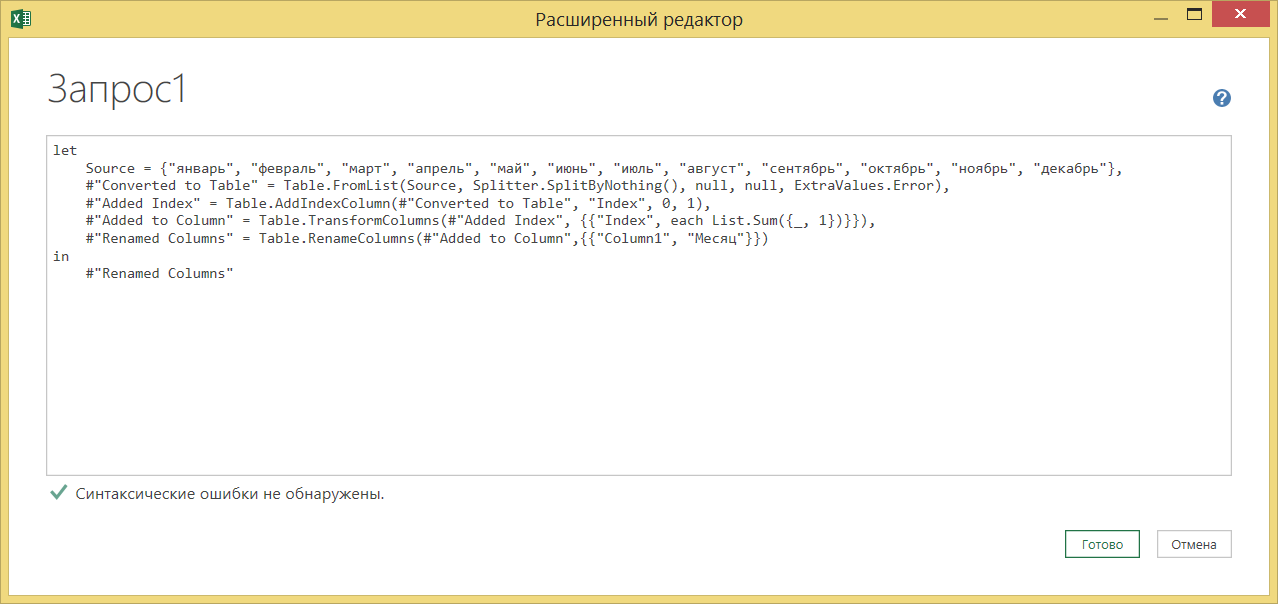
Leafing through the article, I came across a fragment where the author proposes to create a table of correspondence of the month of the year to its serial number, referring to the fact that "the language" M "does not currently allow converting the names of months into dates . "
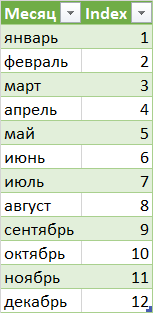
In principle, the task is elementary. But looking at what request it was implemented, I realized that I couldn’t just pass by.
What does the author do if you translate the code into Russian
It became interesting to me, and how else it would be possible to solve a similar problem by setting the following guidelines:
As a result, just interest turned into a whole selection of code fragments and a desire to share this with others.
Disclaimer . Immediately make a reservation, I have no complaints about the author and his approaches to compiling scripts (perhaps the scripts were written in haste). The purpose of this article is to show beginners different approaches to scripting.
Remark . If you want to delve deeper into how a particular function works at one of the stages, remove the brackets with the parameters - and you will see documentation for it with a description of what it receives and what gives

So, what I immediatelyWHO confused:
months List is dialed manually
Firstly, as already noted above, typing text, you can easily make a mistake, secondly, all those quotes / commas ... Well, they - only confusion. Therefore, instead of creating a list by listing the months, I would suggest using a plain text string with a natural separator. Those. comma.
Everything seems to be clear here - the Text.Split function converts the string into a list, breaking it with a separator "," You can
start the index from any number, including one (if you read the documentation)
Moreover, in the Table.AddIndexColumn function , the last argument can specify a step other than one. Accordingly, you can number the cells and so - 15,20,25,30 ...
With this, in fact, it all began ...
Next I will give code examples with comments with gradually increasing complexity. To begin with, how can I get the list of months.
The simplest is direct enumeration using the M language syntax:
A little more complicated - breaking the string into parts with a separator:
Using the date list generation function:
Here, at the first step, the List.Dates function generates a list of dates, taking the start date as the first argument, the number of elements as the second, and the incrementing step as the third. In this case, adding 32 days to a month, we are guaranteed to get to the next month with every step. Of course, if there had been a calendar of 13 months or more, such a reception would not have worked. But for educational purposes, it’s fine.

The second step is to convert the list of dates to a list of month names. After examining the documentation, we find that the Date.MonthName function is responsible for converting the date to a month . What she does is take the date as the first argument and return the month name as a string. And if we pass a third argument to the optional culture argument(“Ru-RU”, “en-US”, “uk-UA”, “ar-LY”), then we get the name of the month taking into account the locale. Ok, then, accordingly, we need to apply this function to each element of the list.
Those. get the list {Date.MonthName (Date1), Date.MonthName (Date2), ..., Date.MonthName (DateN)}. Well, or like this {Date.MonthName (Date1, "ru-RU"), Date.MonthName (Date2, "ru-RU"), ..., Date.MonthName (DateN, "ru-RU")}
Now we need a tool that converts lists. The list.Transform function is responsible for the conversion of lists . What she does is she takes the input list as the first argument and applies a function to each element that is passed in as the second argument.
Ok, we say, and send the second argument to Date.MonthName. Next, we need to explain what happens - the List.Transform function takes each element of the array and feeds it to the Date.MonthName function, passing it each Date as an argument in an implicit way .
Well, what if we want to get the names of the months based on the locale? Let's say uk-UA. How do we set this parameter? As we recall, List.Transform takes the second argument as _function_ (and only the function), and we cannot explicitly pass this function to the first argument, much less the second. Accordingly, we need a function that takes, as in the documentation, one parameter. And let's create it! We simply call it “fn”, do everything we need in it, and give it to List.Transform. In javascript, this is called a closure:
Then our code will look like this:
In general, specifying a function name is not necessary. You can enter an unnamed function directly in brackets:
And we also remember that in the original list the months were written with a small letter. Let's do it all in the same function:

And now let's try to create a list of months in a slightly different way - using the List.Generate function . The documentation says the following:
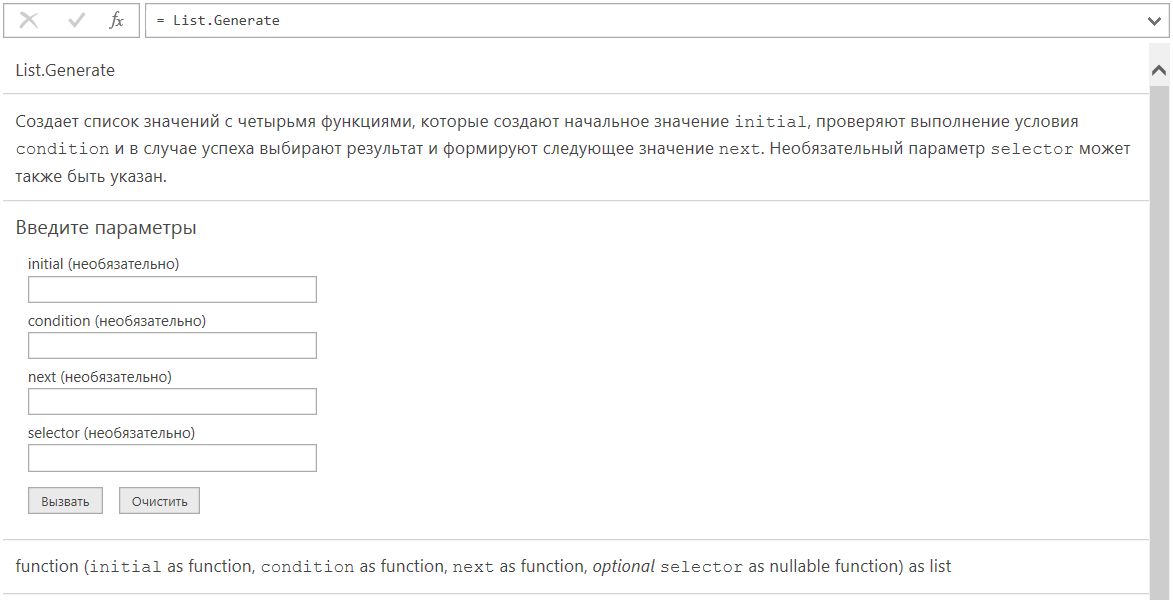
i.e. all three arguments are functions. Excellent! Then the task comes down to just one line:
Well, let it be a little, for clarity:
What's going on here. The start value initialization function specified by the first argument is calculated. This is the date January 1, 2016. Next, the function specified by the second argument is calculated, to which the value (x) calculated in the previous step is passed _ implicitly_. This second function performs a simple task - it returns true / false, which means whether it is possible to continue the calculations further. In our case, “January 1, 2016” <“January 1, 2017”, i.e. true, i.e. we can continue. In this case, the value of the previous step is sent to the third function, which simply adds a month to the calculated value. We get the "February 1, 2016". Then this value is sent to the second function, where “February 1, 2016” is compared with “January 1, 2017”, and the function still returns true, then another month is added, etc. This happens as long as until another month is added to December 1, 2016, and the calculated value becomes January 1, 2017. When this value is once again sent for verification, we get false, because “January 1, 2017” is equal to “January 1, 2017,” but not in any way less.
After calculating the intermediate values accumulated in this way, the last function, Date.MonthName, will be applied to each of the list items. In exactly the same way as it was described above for the List.Transform function.
And what if, like last time, we want the months to be generated taking into account the locale, and the text should start with a small letter? Then we create our own custom function and do everything we need in it:
What makes this generation method good is that we don’t really care how many months a year. Yes, even at least 2976, as on Pluto. We set the first day of the first month of one year and the first day of the first month of the next year. Plus the addition of a month to the date and severe inequality.
But what if we know exactly how many months a year. Then we can, having an array of numbers from 1 to 12, generate an array of months by their number:

This is already known to us List.Transform, in which the first argument is an array of numbers, and the second is a function for converting the number into a month. Everything is pretty primitive here, which should also be clear.
The List.TransformMany function is much more interesting . In principle, everything here is the same as in List.Transform, but, unlike List.Transform, List.TransformMany has one more argument added - this is a function to which two arguments are implicitly sent - the initial and the calculated value , which allows us to use the month number and its calculated name in one pass. We only need to concatenate them in one line:

A little later I will show how to use this to form a table.
Here, everything is simple so far - Text.Split, Table.AddIndexColumn is used with a start from one and Table.FromList with the same column name (no need to rename the default "Custom1").
Table.FromList + List.Positions
Here is an atypical application of the Table.FromList function. The second argument is a function that returns an array of cells in the construction. The sequence is as follows - an array of src strings is created, an array of pos indices is created to it, then the array of indices is converted to a table using a custom function. This custom function iterates over an array of indices and accesses an array of strings at the selected index.
I’ll explain it more simply - for example, we take, say, element # 0 from the “pos” list and pass it to a function, where the array {src {0}, 0 + 1} is formed from 0, that is, {"January", 1}. Next, the Table.FromList function decomposes them into two columns by “Month” and “Index”
If you use only the interface, then the table.FromList defaults to the fake function Splitter.SplitByNothing (), which, in fact, is a stub for working with Table.FromList.
We merge two parallel lists into one using the Table.FromColumns function . Here we form two parallel lists - a list of months and a list of its indices. If you try to visualize this process, then “looks” is about the same as fastening a zipper on clothes;) Before “fastening”, we transform the list of indices, adding a unit to each element:
I will describe the promised example with List.TransformMany in detail. Suppose we have a list of numbers from 1 to 12:

And also there is a function for converting a number into a month:
The only thing to take care of is that the function returns not just a value, but a value that is an element of the array:
We also create a final function, which at each stage, using the start and calculated values, creates a list from the start and calculated. Such type is {"march", "3"}:
Now we pass the List.TransformMany function the conversion function of each element and the final function as arguments, and set them on our array from 1 to 12:

After that, create a table from the resulting array of arrays
As a result, we get such a table:

Next, we can form the final table as we want. For example, multiply the month number by 100, add text to the name of the month and add a column with the name of the day of the week on the first day of this month:

And for those who prefer asceticism and zen to perversions, I propose solving the original problem with the same technique in one line:
Well, perhaps the last way to create the source plate is with the List.Accumulate method . Here is what help writes on this topic:
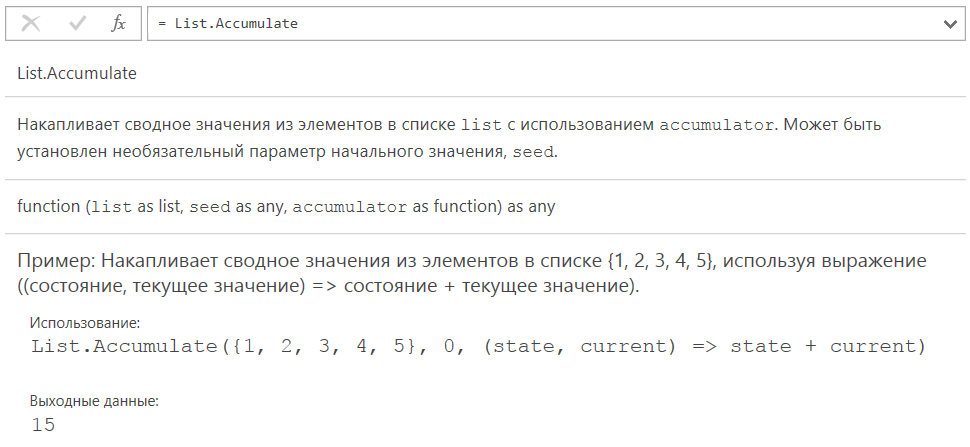
I will add a couple of examples from myself. You can accumulate a summary value from text values. For example, how to merge all the elements of a list into one line, separating them with a dot, simultaneously converting the lines to upper case:
JANUARY FEBRUARY MARCH APRIL.
Here, two parameters are implicitly passed to the fn_accum function - the result accumulated at this step and the current value from the list. In addition to numbers and text, you can also use lists and tables:
In this example, an empty array is taken and the month numbers converted to a text string are “glued” to it. By analogy - for tables:
Here we set the initially empty table and “glue” the lines calculated at each iteration to it.
I hope to clarify some of the subtleties of working with the code directly, I did better than confuse it. In fact, M is a very beautiful and concise language. And if you both have to and every way have to twirl the data in everyday work, it makes sense to study it a little deeper.
In principle, for most users this is enough to solve simple problems. Moreover, this is the majority of what is called, in everyday life - non-programming in general communication. And, as practice has shown, not everyone knows that PQ has an advanced query editing mode. Meanwhile, the fear (unwillingness / inability) to dig deeper makes it impossible to fully utilize all the embedded PQ / PBI functionality. I note at least the fact that not all buttons for which there are functions are present in the interface. I think I’m not very mistaken if I say that there are perhaps two times more functions than buttons.
If you feel that in order to solve the existing problems you don’t have enough functionality allocated in the interface and / or you have time to satisfy your academic interest, welcome to…
Preamble
Leafing through the article, I came across a fragment where the author proposes to create a table of correspondence of the month of the year to its serial number, referring to the fact that "the language" M "does not currently allow converting the names of months into dates . "
In principle, the task is elementary. But looking at what request it was implemented, I realized that I couldn’t just pass by.
let
    Source={"январь", "февраль", "март", "апрель", "май", "июнь", "июль", "август", "сентябрь", "октябрь", "ноябрь", "декабрь"},
    #"Converted to Table" = Table.FromList(Source, Splitter.SplitByNothing(), null, null, ExtraValues.Error),
    #"Added Index" = Table.AddIndexColumn(#"Converted to Table", "Index", 0, 1),
    #"Added to Column" = Table.TransformColumns(#"Added Index", {{"Index", each List.Sum({_, 1})}}),
    #"Renamed Columns" = Table.RenameColumns(#"Added to Column",{{"Column1", "Месяц"}})
in
    #"Renamed Columns"
What does the author do if you translate the code into Russian
- Manually creates a list of month names
- Converts a list to a table
- Adds a column with an index starting at zero, in increments of one.
- Transforms the Index column by adding a unit to each cell
- Renames the default column name “Column1” to “Month”
It became interesting to me, and how else it would be possible to solve a similar problem by setting the following guidelines:
- minimum lines of code due to the use of the embedded functionality (for example, do not rename the column, but set immediately, do not increment the column, but start from one, etc.)
- refusal of manual entry (it is easy to be sealed by typing manually)
- use locale-specific month names
As a result, just interest turned into a whole selection of code fragments and a desire to share this with others.
Criticism
Disclaimer . Immediately make a reservation, I have no complaints about the author and his approaches to compiling scripts (perhaps the scripts were written in haste). The purpose of this article is to show beginners different approaches to scripting.
Remark . If you want to delve deeper into how a particular function works at one of the stages, remove the brackets with the parameters - and you will see documentation for it with a description of what it receives and what gives
So, what I immediately
months List is dialed manually
Firstly, as already noted above, typing text, you can easily make a mistake, secondly, all those quotes / commas ... Well, they - only confusion. Therefore, instead of creating a list by listing the months, I would suggest using a plain text string with a natural separator. Those. comma.
Text.Split("январь, февраль, март, апрель, май, июнь, июль, август, сентябрь, октябрь, ноябрь, декабрь", ", ")
Everything seems to be clear here - the Text.Split function converts the string into a list, breaking it with a separator "," You can
start the index from any number, including one (if you read the documentation)
Table.AddIndexColumn(tbl, "Index", 1, 1)
Moreover, in the Table.AddIndexColumn function , the last argument can specify a step other than one. Accordingly, you can number the cells and so - 15,20,25,30 ...
Table.AddIndexColumn(tbl, "Index", 15, 5)
With this, in fact, it all began ...
What the criticism grew into
Next I will give code examples with comments with gradually increasing complexity. To begin with, how can I get the list of months.
The simplest is direct enumeration using the M language syntax:
months_list={"январь", "февраль", "март", "апрель", "май", "июнь", "июль", "август", "сентябрь", "октябрь", "ноябрь", "декабрь"}
A little more complicated - breaking the string into parts with a separator:
Text.Split("январь, февраль, март, апрель, май, июнь, июль, август, сентябрь, октябрь, ноябрь, декабрь", ", ")Using the date list generation function:
let
    gen = List.Dates(#date(2016,1,1), 12, #duration(32,0,0,0)),
    month_name = List.Transform(gen, Date.MonthName)
in
    month_name
Here, at the first step, the List.Dates function generates a list of dates, taking the start date as the first argument, the number of elements as the second, and the incrementing step as the third. In this case, adding 32 days to a month, we are guaranteed to get to the next month with every step. Of course, if there had been a calendar of 13 months or more, such a reception would not have worked. But for educational purposes, it’s fine.
The second step is to convert the list of dates to a list of month names. After examining the documentation, we find that the Date.MonthName function is responsible for converting the date to a month . What she does is take the date as the first argument and return the month name as a string. And if we pass a third argument to the optional culture argument(“Ru-RU”, “en-US”, “uk-UA”, “ar-LY”), then we get the name of the month taking into account the locale. Ok, then, accordingly, we need to apply this function to each element of the list.
Those. get the list {Date.MonthName (Date1), Date.MonthName (Date2), ..., Date.MonthName (DateN)}. Well, or like this {Date.MonthName (Date1, "ru-RU"), Date.MonthName (Date2, "ru-RU"), ..., Date.MonthName (DateN, "ru-RU")}
Now we need a tool that converts lists. The list.Transform function is responsible for the conversion of lists . What she does is she takes the input list as the first argument and applies a function to each element that is passed in as the second argument.
Ok, we say, and send the second argument to Date.MonthName. Next, we need to explain what happens - the List.Transform function takes each element of the array and feeds it to the Date.MonthName function, passing it each Date as an argument in an implicit way .
Well, what if we want to get the names of the months based on the locale? Let's say uk-UA. How do we set this parameter? As we recall, List.Transform takes the second argument as _function_ (and only the function), and we cannot explicitly pass this function to the first argument, much less the second. Accordingly, we need a function that takes, as in the documentation, one parameter. And let's create it! We simply call it “fn”, do everything we need in it, and give it to List.Transform. In javascript, this is called a closure:
fn = (x)=>Date.MonthName(x, "uk-UA"),
Then our code will look like this:
let
    gen = List.Dates(#date(2016,1,1), 12, #duration(32,0,0,0)),
    fn = (x)=>Date.MonthName(x, "uk-UA"),
    month_name = List.Transform(gen, fn)
in
    month_name
In general, specifying a function name is not necessary. You can enter an unnamed function directly in brackets:
let
    gen = List.Dates(#date(2016,1,1), 12, #duration(32,0,0,0)),
    month_name = List.Transform(gen, (x)=>Date.MonthName(x, "uk-UA"))
in
    month_name
And we also remember that in the original list the months were written with a small letter. Let's do it all in the same function:
let
    gen = List.Dates(#date(2016,1,1), 12, #duration(32,0,0,0)),
    month_name = List.Transform(gen, (x)=>Text.Lower(Date.MonthName(x, "uk-UA")))
in
    month_name
And now let's try to create a list of months in a slightly different way - using the List.Generate function . The documentation says the following:
i.e. all three arguments are functions. Excellent! Then the task comes down to just one line:
List.Generate(()=>#date(2016,1,1), (x)=>x<#date(2017,1,1), (x)=>Date.AddMonths(x,1), Date.MonthName)
Well, let it be a little, for clarity:
List.Generate(
    ()=>#date(2016,1,1),
    (x)=>x<#date(2017,1,1),
    (x)=>Date.AddMonths(x,1),
    Date.MonthName
)
What's going on here. The start value initialization function specified by the first argument is calculated. This is the date January 1, 2016. Next, the function specified by the second argument is calculated, to which the value (x) calculated in the previous step is passed _ implicitly_. This second function performs a simple task - it returns true / false, which means whether it is possible to continue the calculations further. In our case, “January 1, 2016” <“January 1, 2017”, i.e. true, i.e. we can continue. In this case, the value of the previous step is sent to the third function, which simply adds a month to the calculated value. We get the "February 1, 2016". Then this value is sent to the second function, where “February 1, 2016” is compared with “January 1, 2017”, and the function still returns true, then another month is added, etc. This happens as long as until another month is added to December 1, 2016, and the calculated value becomes January 1, 2017. When this value is once again sent for verification, we get false, because “January 1, 2017” is equal to “January 1, 2017,” but not in any way less.
After calculating the intermediate values accumulated in this way, the last function, Date.MonthName, will be applied to each of the list items. In exactly the same way as it was described above for the List.Transform function.
And what if, like last time, we want the months to be generated taking into account the locale, and the text should start with a small letter? Then we create our own custom function and do everything we need in it:
List.Generate(
    ()=>#date(2016,1,1),
    (x)=>x<#date(2017,1,1),
    (x)=>Date.AddMonths(x,1),
    (x)=>Text.Lower(Date.MonthName(x, "en-US"))
)
What makes this generation method good is that we don’t really care how many months a year. Yes, even at least 2976, as on Pluto. We set the first day of the first month of one year and the first day of the first month of the next year. Plus the addition of a month to the date and severe inequality.
But what if we know exactly how many months a year. Then we can, having an array of numbers from 1 to 12, generate an array of months by their number:
List.Transform({1..12}, (x)=>Text.Lower(Date.MonthName(#date(2016,x,1), "ar-LY")))
This is already known to us List.Transform, in which the first argument is an array of numbers, and the second is a function for converting the number into a month. Everything is pretty primitive here, which should also be clear.
The List.TransformMany function is much more interesting . In principle, everything here is the same as in List.Transform, but, unlike List.Transform, List.TransformMany has one more argument added - this is a function to which two arguments are implicitly sent - the initial and the calculated value , which allows us to use the month number and its calculated name in one pass. We only need to concatenate them in one line:
List.TransformMany({1..12}, (x)=>{#date(2016,x,1)}, (x,y)=>Number.ToText(x)&" - "&Text.Lower(Date.MonthName(y)))
A little later I will show how to use this to form a table.
Go to the tables
Here, everything is simple so far - Text.Split, Table.AddIndexColumn is used with a start from one and Table.FromList with the same column name (no need to rename the default "Custom1").
let
    src=Text.Split("январь|февраль|март|апрель|май|июнь|июль|август|сентябрь|октябрь|ноябрь|декабрь","|"),
    convert = Table.FromList(src, Splitter.SplitByNothing(), {"Месяц"}),
    add_index = Table.AddIndexColumn(convert, "Index", 1, 1)
in
    add_index
Table.FromList + List.Positions
Here is an atypical application of the Table.FromList function. The second argument is a function that returns an array of cells in the construction. The sequence is as follows - an array of src strings is created, an array of pos indices is created to it, then the array of indices is converted to a table using a custom function. This custom function iterates over an array of indices and accesses an array of strings at the selected index.
I’ll explain it more simply - for example, we take, say, element # 0 from the “pos” list and pass it to a function, where the array {src {0}, 0 + 1} is formed from 0, that is, {"January", 1}. Next, the Table.FromList function decomposes them into two columns by “Month” and “Index”
let
    src=Text.Split("январь|февраль|март|апрель|май|июнь|июль|август|сентябрь|октябрь|ноябрь|декабрь","|"),
    pos = List.Positions(src), // вычисляем массив индексов списка
    t = Table.FromList(pos, (x)=>{src{x},x+1}, {"Месяц","Index"})
in
    t
If you use only the interface, then the table.FromList defaults to the fake function Splitter.SplitByNothing (), which, in fact, is a stub for working with Table.FromList.
We merge two parallel lists into one using the Table.FromColumns function . Here we form two parallel lists - a list of months and a list of its indices. If you try to visualize this process, then “looks” is about the same as fastening a zipper on clothes;) Before “fastening”, we transform the list of indices, adding a unit to each element:
let
    src=Text.Split("январь|февраль|март|апрель|май|июнь|июль|август|сентябрь|октябрь|ноябрь|декабрь","|"),
    pos = List.Positions(src),
    transform = List.Transform(pos, (x)=>x+1),
    t = Table.FromColumns({src, transform},{"Месяц","Index"})
in
    t
I will describe the promised example with List.TransformMany in detail. Suppose we have a list of numbers from 1 to 12:
And also there is a function for converting a number into a month:
fn = (x)=>Text.Lower(Date.MonthName(#date(2016,x,1),"en-US"))}
The only thing to take care of is that the function returns not just a value, but a value that is an element of the array:
fn = (x)=>{Text.Lower(Date.MonthName(#date(2016,x,1),"en-US"))}
We also create a final function, which at each stage, using the start and calculated values, creates a list from the start and calculated. Such type is {"march", "3"}:
final = (start_element, calculated_element)=>{start_element, calculated_element},
Now we pass the List.TransformMany function the conversion function of each element and the final function as arguments, and set them on our array from 1 to 12:
After that, create a table from the resulting array of arrays
:
let
    start_list = {1..12},
    fn = (x)=>{Text.Lower(Date.MonthName(#date(2016,x,1),"en-US"))},
    final = (start_element, calculated_element)=>{start_element, calculated_element},
    transform = List.TransformMany(start_list, fn, final),
    t = #table({"Index", "Месяц"}, transform)
in
    t
As a result, we get such a table:
Next, we can form the final table as we want. For example, multiply the month number by 100, add text to the name of the month and add a column with the name of the day of the week on the first day of this month:
let
    start_list = {1..12},
    fn = (x)=>{Date.MonthName(#date(2016,x,1),"en-US")},
    final = (x,y)=>{
        x*100,
        y&" has "&Number.ToText(Date.DaysInMonth(#date(2016,x,1)))&" days",
        "First day of "&y&" is "&Date.DayOfWeekName(#date(2016,x,1), "en-US")
    },
    transform = List.TransformMany(start_list, fn, final),
    t = #table({"Index", "Month", "FirstDayOfWeek"}, transform)
in
    t
And for those who prefer asceticism and zen to perversions, I propose solving the original problem with the same technique in one line:
#table({"Месяц","Index"},List.TransformMany({1..12},(x)=>{Text.Lower(Date.MonthName(#date(2016,x,1)))},(x,y)=>{y,x}))
Well, perhaps the last way to create the source plate is with the List.Accumulate method . Here is what help writes on this topic:
I will add a couple of examples from myself. You can accumulate a summary value from text values. For example, how to merge all the elements of a list into one line, separating them with a dot, simultaneously converting the lines to upper case:
let
    fn_accum = (accum,x)=> accum & Text.Upper(x)&".",
    result = List.Accumulate({"январь", "февраль", "март", "апрель"}, "", fn_accum)
in
    result
JANUARY FEBRUARY MARCH APRIL.
Here, two parameters are implicitly passed to the fn_accum function - the result accumulated at this step and the current value from the list. In addition to numbers and text, you can also use lists and tables:
List.Accumulate({1..12}, {}, (accum,x)=> accum & {Date.MonthName(#date(2016,x,1))})
In this example, an empty array is taken and the month numbers converted to a text string are “glued” to it. By analogy - for tables:
let
    lst = {1..12},
    start_table = #table({},{}),
    fn= (accum,x)=>accum & #table({"Месяц","Index"},{{Text.Lower(Date.MonthName(#date(2016,x,1))),x}}),
    result=List.Accumulate(lst, start_table, fn)
in
    result
Here we set the initially empty table and “glue” the lines calculated at each iteration to it.
I hope to clarify some of the subtleties of working with the code directly, I did better than confuse it. In fact, M is a very beautiful and concise language. And if you both have to and every way have to twirl the data in everyday work, it makes sense to study it a little deeper.









