 September 24, 2016 at 00:41
Entertaining math command line
- Tutorial
If you are a user of Linux, Free / Open BSD or another free OS, there is a possibility that the command line interface is not alien to you. In this case, you can use the command shell for simple arithmetic operations. For this, you do not need to install additional programs, everything is already in the base set of the operating system. They allow you to qualitatively replace the usual calculator on the table of the accountant.
bash integer calculator
Arithmetic operations with integers in bashwill look like this:
$((expression))
$(( n1+n2 ))
$(( n1/n2 ))
$(( n1*n2 ))
$(( n1-n2 ))
For instance:
$ echo $((15+25))
$ 40
On the manpagebash , in the section, ARITHMETIC EVALUATIONyou can familiarize yourself with the priority of the actions of operators. And by the way, you can get the same result using the command expr целочисленное выражение, instead of substituting with double brackets in the output commands.
$ expr 15 + 25
$ 40
bc madskills
Integer expressions are certainly good, but somehow not enough even for a calculator. Fortunately, there is also a set in the set bc- a C-like interactive interpreter. We will not waste time adding and subtracting, we will proceed immediately to more interesting exercises.
$ echo 7^7 |bc
823543
This is already better than a calculator, since it allows you to get any number of numbers in the fractional part using a variable scale. Bewarefakeproprietary versions bc, as they only support 99 decimal places!
$ echo 'scale=30;sqrt(2)' | bc
1.414213562373095048801688724209
2 more important variables: ibaseand obaseindicate the basis of incoming and outgoing numbers.
$ echo 'ibase=16;obase=A;FF' | bc
255
Here, by the way, there is an ambush. Take a look at these two examples. It seems to be trying to do the same, but the result is different. The whole point is that in the first example ibase=2, but it obase=10takes on the value 2 due to the fact that it ibasedetermines from the base obaseand 10 becomes equal to 2. To break this circle, you need to use hex.
$ echo 'ibase=2;obase=10;10' | bc
10
$ echo 'ibase=2;obase=A;10' | bc
2
When raising a number to a power, it is important to place the brackets in the right way, because it is right-associative bcand the result may not be the one you were counting on.
$ echo '4^4^4' |bc
13407807929942597099574024998205846127479365820592393377723561443721\
76403007354697680187429816690342769003185818648605085375388281194656\
9946433649006084096
$ echo '(4^4)^4' |bc
4294967296
In addition to these arts, bcit also has an interactive mode in whichsqueaks and spoils everythingdoes all the same, but directly, without a conveyor. The key -qis to suppress an abominable greeting.
$ bc -q
4^4^4
13407807929942597099574024998205846127479365820592393377723561443721\
76403007354697680187429816690342769003185818648605085375388281194656\
9946433649006084096
quit
Measuring processor performance with bc
Many moons ago, at one popular English-language forum , now deceased, they offered a brilliantly simple way to heat a percent and calculate its speed in parrots.
time echo "scale=5000; 4*a(1)" | bc -l -qWe load into the bcmath library an option -land ask to give out the number π with an accuracy of 5000 decimal places. My calculation result is on Intel(R) Core(TM) i5-4300U CPU @ 1.90GHz:
real    0m24.507s
user    0m24.490s
sys 0m0.000ss (x) The sine of x, x is in radians.
c (x) The cosine of x, x is in radians.
a (x) The arctangent of x, arctangent returns radians.
l (x) The natural logarithm of x.
e (x) The exponential function of raising e to the value x.
j (n,x) The Bessel function of integer order n of x.Bc scripts
You bccan, if you really need to, define functions and run scripts. A function definition has the following syntax:
define name ( parameters ) { newline
    auto_list statement_list }
Conditional operators ifand are defined else, and the latter is not necessary to use, as well as the headers of forand while. On Wikipedia, you can view a list of mathematical operators and compare with those in C. And here is the calculation of the Fibonacci numbers in bc.
#!/usr/bin/bc -q
define fibo(n) {
    if (x <= 2) return n;
    a = 0;
    b = 1;
    for (i = 1; i < n; i++) {
        c = a+b; a = b; b = c;
    }
    return c;
}
fibo(1000)
quit
As the YaP bcdid not take off, however, as a desktop calculator it is more than good.
awk: arithmometer and fortune teller
I did not often use it awk, so every time I am surprised to discover new features of this program. If you need to count logarithms or sines, do not rush to panic, man awkit will help you. That's how we got the square root.
awk 'BEGIN{print sqrt(196)}'
14
But we already logarithm the number π, whose 5000 signs we have already calculated using bc.
awk 'BEGIN{print log(3.141592653589793238462643383279502884197169399375105820974944592307)}'
1.14473
I announce the full list of features
atan2(y, x)   Return the arctangent of y/x in radians.
cos(expr)     Return the cosine of expr, which is in radians.
exp(expr)     The exponential function.
int(expr)     Truncate to integer.
log(expr)     The natural logarithm function.
rand()        Return a random number N, between 0 and 1, such that 0 ≤ N < 1.
sin(expr)     Return the sine of expr, which is in radians.
sqrt(expr)    Return the square root of expr.
srand([expr]) Use expr as the new seed for the random number generator.  If no expr is provided, use the time of day. Return the previous seed for the random number generator.
Sometimes, you want to trust your fate and send everything in three letters - awk. Actually, this is an example from a book by O'Reilly , which simulates a coin toss, producing 2 different eventsdrink or not drink with the same probability.
#!/bin/bash
ans=`awk -vmin=0 -vmax=1 'BEGIN{srand(); print int(min+rand()*(max-min+1))}'`
if [ $ans -eq 0 ]; then
    echo "no"
else
    echo "yes"
fi
Finally
There are a lot of different programs in our math workshop. If the topic takes off, we’ll try to move to the first and highest league of mathematical software with open sources.
I. Replacing the calculator
- Built-in shell tools: arithmetic lookups
bash. - Program
GNU bc. - Unformat -
awk.
II. Tables
OpenOffice / LibreOffice Calc.- The KDE
KSpread. - The GNOME
Gnumeric. - Single, for example:
GNU Oleoand others.
III. Specialized math programs, student level +
- The GNU
Ocatve. Scilab.Maxima.R.Sage.
IV. Programming Languages, Math Libraries, and Environments
Ansi C, librariesmath.h, complex.h, GSLand other comrades.Java Scientific LibraryPython, librariesSciPy, NumPy, Sympyand other comrades.COBOL.Fortran.Intel Math Kernel Library (Intel MKL)AMD Accelerated Parallel Processing Math (APPLM)AMD Core Math Library (ACML)
The list, of course, is not complete, so I apologize in advance if I didn’t indicate someone’s favorite mathematical package or YP. The last group is a truly spilled sea of diverse and suitable software.
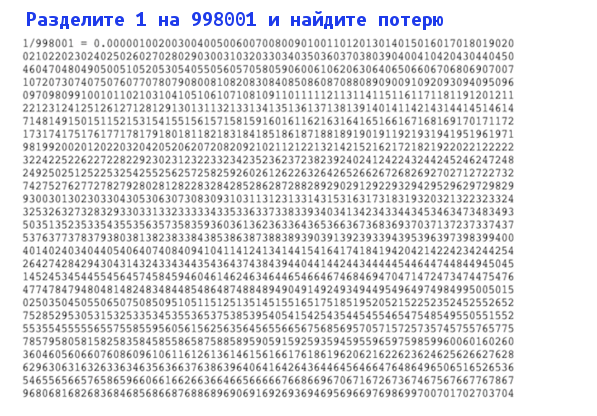
And here is the promised madskills along with the answer to the question from the picture. Source .
diff -u <(seq -f '%03.0f' 0 999) <((bc <<<'scale = 3009; 1 / 998001' | tr -d '\\\n'; echo) | sed s/.// | fold -3)








