Introducing Apache Ignite: First Steps
- Tutorial
 I would venture to suggest that the average reader of this article is not familiar with the Apache Ignite product . Although, perhaps, I heard or even read an article on Habré, which describes one of the possible scenarios for using this product. I recently wrote about the forced use of Ignite as an L2 cache for Activiti.. Perhaps, having learned that this is an open source product written in Java, positioning itself as a “high-performance, integrated and distributed in-memory platform for computing and processing large amounts of data in real time”, which has, among other things, the ability to automatically deploy your project to all nodes of complex topology, you will want to get to know him. Having experienced such a desire, you will find that Ignite is not documented quite badly, but not very well. There is a tutorial, some javadoc, but a complete and holistic impression of familiarization with these sources does not arise. In this article, I will try to fill this gap on the basis of my own knowledge of Ignite, obtained mainly by debugging. Perhaps in my conclusions and impressions I will not always be right, but these are the costs of the method. Not much is required from the reader and those who want to repeat my path, namely knowledge of Java 8 core, multithreading and Spring core.
 An example of the class “Hello World!” Using this technology will be considered and prepared in the article.
Installation and launch
The latest version of Ignite at the time of this writing was 1.7.0 and it was being investigated (although GitHub already has 1.8.0-SNAPSHOT). There are two ways to get Ignite. First, add Maven dependency to org.apache.ignite: ignite-core; LATEST and optionally to org.apache.ignite: ignite-spring: LATEST to the application. You can also download the release from the manufacturer’s website, which consists mainly of the same libraries that Maven connects, or a Docker image. Since I am doing my research on Windows 7, the docker option is not available to me, and I downloaded the binary distribution. You need to download and unzip it, the folder where you unpacked will be called IGNITE_HOME. Further, I will generally follow the order of presentation of the original tutorial, sometimes inevitably duplicating it in places, but solely for the purpose of reader convenience.
First of all, it should be noted that the Ignite topology consists of two types of nodes, clients and servers. Typically, the load is performed on servers, and clients running on weak machines connect to them and initiate tasks. Client and server nodes can be started inside the same JVM, however, most often the nodes belong to the JVM 1: 1. On one physical (or virtual machine), you can run any number of nodes. Next, we analyze this difference more deeply. In this terminology, our “Hello World!” Application will consist of a server and a client that sends its famous message to the server.
The Ignition utility class is used to get the Ignite node.. Of the many methods, we are still interested in five overloaded start methods. One of them is without parameters and launches a node with default parameters; it does not suit us. The second receives the generated configuration object of the IgniteConfiguration type as an input , and the other three want to receive a spring configuration file that describes the same IgniteConfiguration object, in the form of a path to a resource with an xml configuration, a URL to an xml configuration, or it is in the form of an InputStream. From personal experience, I do not recommend using the option with manual configuration through newIgniteConfiguration. The fact is that the IgniteConfiguration object is composite, it has a lot of any nested objects that also need to be initialized. And here the catch can be hidden, because some classes contain private fields, initialized exclusively by injection. For example, in the TcpDiscoveryJdbcIpFinder class , a logger is injected in this way. As you know, when creating objects through newInjection does not occur, and the logger remains uninitialized, which obviously leads to a NullPointerException at the most inopportune moment. So no matter what your preferences, it’s safer to write an xml configuration and use it. This option is also good because this config can be used to launch Ignite from the command line. Examples of kofig can be seen in the distribution, in the folder $ {IGNITE_HOME} \ examples \ config \. The simplest config is shown below:
Client config
<?xml version="1.0" encoding="UTF-8"?><beansxmlns="http://www.springframework.org/schema/beans"xmlns:xsi="http://www.w3.org/2001/XMLSchema-instance"xsi:schemaLocation="
        http://www.springframework.org/schema/beans
        http://www.springframework.org/schema/beans/spring-beans.xsd"><beanid="ignite.cfg"class="org.apache.ignite.configuration.IgniteConfiguration"><propertyname="gridName"value="testGrid-client"/><propertyname="clientMode"value="true"/><propertyname="discoverySpi"><beanclass="org.apache.ignite.spi.discovery.tcp.TcpDiscoverySpi"><propertyname="ipFinder"><beanclass="org.apache.ignite.spi.discovery.tcp.ipfinder.multicast.TcpDiscoveryMulticastIpFinder"><propertyname="addresses"><list><value>127.0.0.1:47500..47509</value></list></property></bean></property><propertyname="localAddress"value="localhost"/></bean></property><propertyname="communicationSpi"><beanclass="org.apache.ignite.spi.communication.tcp.TcpCommunicationSpi"><propertyname="localAddress"value="localhost"/></bean></property></bean></beans>
Here we say that we are creating a node with the name “testGrid-client”, that it is a client, and that it will look for a server in the address range 127.0.0.1:47500..47509, that is, locally. For the server we will prepare a similar config:
Server config
<beansxmlns="http://www.springframework.org/schema/beans"xmlns:xsi="http://www.w3.org/2001/XMLSchema-instance"xsi:schemaLocation="
        http://www.springframework.org/schema/beans
        http://www.springframework.org/schema/beans/spring-beans.xsd"><beanid="ignite.cfg"class="org.apache.ignite.configuration.IgniteConfiguration"><propertyname="gridName"value="testGrid-server"/><propertyname="clientMode"value="false"/><propertyname="discoverySpi"><beanclass="org.apache.ignite.spi.discovery.tcp.TcpDiscoverySpi"><propertyname="ipFinder"><beanclass="org.apache.ignite.spi.discovery.tcp.ipfinder.multicast.TcpDiscoveryMulticastIpFinder"><propertyname="addresses"><list><value>127.0.0.1:47500..47509</value></list></property></bean></property><propertyname="localAddress"value="localhost"/></bean></property><propertyname="communicationSpi"><beanclass="org.apache.ignite.spi.communication.tcp.TcpCommunicationSpi"><propertyname="localAddress"value="localhost"/></bean></property></bean></beans>
Save the server config to the test.xml file and place it in $ {IGNITE_HOME} \ examples \ config. To start the server, go to the $ {IGNITE_HOME} \ bin folder and run the ignite. (Bat | sh) examples \ config \ test.xml command. If it doesn’t happen, the config is good, and at the end something like this should appear:
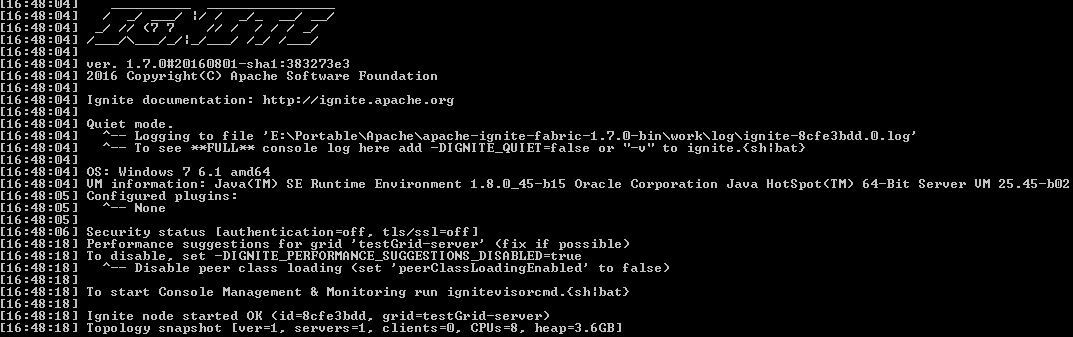
It’s useful to study the executed batch file. In addition to the standard capabilities for setting JVM variables, you can learn from it about the existence of the IGNITE_QUIET system variable that controls the logging details. A complete list of system variables is provided in the IgniteSystemProperties class with decryption; it makes sense to familiarize yourself (it turns out that Ignite even knows how to check the appearance of its new versions). Next, you can find out what class is responsible for starting from the command lineCommandLineStartup . He is also not without interest. You can see that if you work on OSX, then at the start a pop-up window will pop up for you. A trifle, but not pleasant - why is it only such happiness to them? From the interesting it is clear that if you get into this class without parameters, then the interactive mode will turn on and you will be offered a choice of available configs that GridConfigurationFinder will find; he can search in $ {IGNITE_HOME}. Since we cannot start without the parameters through the batch file, this option is not available to us here. But don’t worry, you can run the command $ {IGNITE_HOME} \ bin \ ignitevisorcmd.bat - this is Ignite’s interactive monitoring, run the open command in it and it will display something like this:
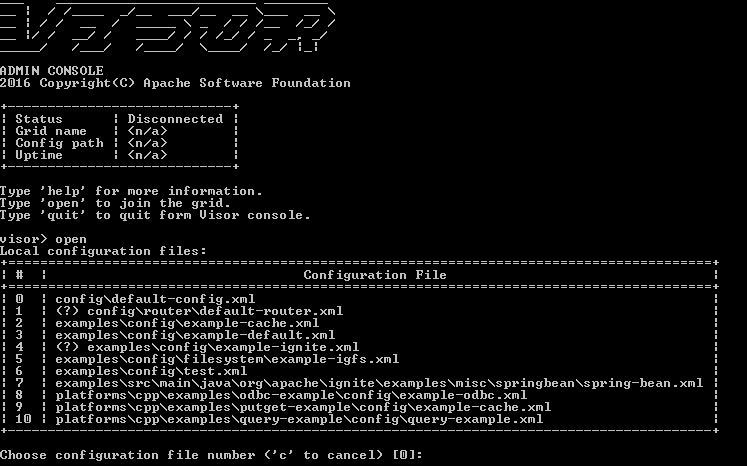
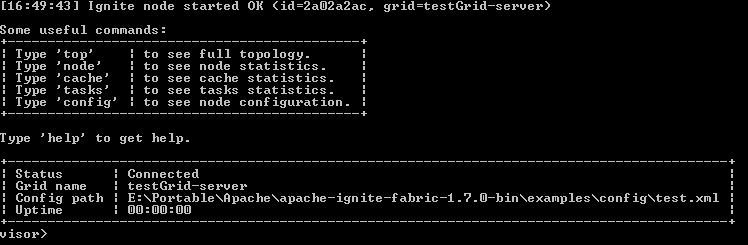
Here we can specify our config, in this list it is under the number 6. After entering 6, we will connect to our server and see
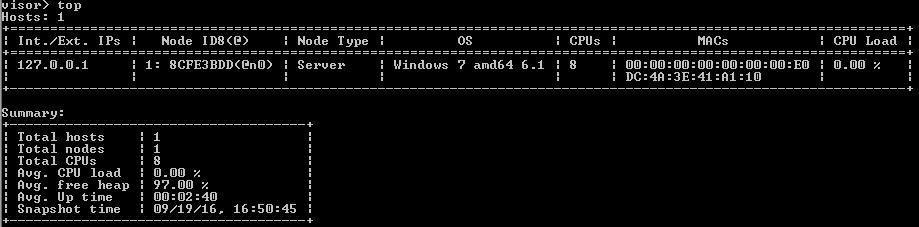
Next, we can enter the top command in the console and see our topology:
Look deeper
Returning to the CommandLineStartup class, you can find the developers yearning for aliases for the classes they like so much in Scala: for brevity, they created class G, an empty descendant of the Ignition class. Well ok, we started the server, what next? Next, run the client. Typical code to run the instance looks something like this:
Node Configuration
@ConfigurationpublicclassIgniteProvider{
    private Log log = LogFactory.getLog(IgniteCacheAdapter.class);
    privatefinal Ignite ignite;
    privateboolean started = false;
    publicIgniteProvider(){
        try {
            Ignition.ignite("testGrid-client");
            started = true;
        } catch (IgniteIllegalStateException e) {
            log.debug("Using the Ignite instance that has been already started.");
        }
        if (started)
            ignite = Ignition.ignite("testGrid-client");
        else {
            ignite = Ignition.start("ignite/example-hello.xml");
            ((TcpDiscoverySpi) ignite.configuration().getDiscoverySpi())
                    .getIpFinder()
                    .registerAddresses(Collections.singletonList(new InetSocketAddress("localhost", DFLT_PORT)));
        }
    }
    public Ignite getIgnite(){
        return ignite;
    }
}
Here we check if the node with the same name is already running in this JVM, if it is running, it is stored in nothing, not in java.util.concurrent.ConcurrentHashMap, as someone probably thought, but in org. jsr166.ConcurrentHashMap8. What is the difference between them? I’m even afraid to suppose, I hope that someone in the comments will enlighten. And if the node is not yet there, it is created on the basis of the config. Since we are connecting as a client, we need to find a server. TcpDiscoverySpi and TcpDiscoveryMulticastIpFinder are specified as a detection method in the config, these classes are initialized and perform their search manipulations. The main ones are as follows.
According to our guidelines, the choice between two implementations of the TcpDiscoveryImpl interface is made in favor of ClientImpl. Then, if the ssl configuration were specified, the ssl context would be raised - it would then come in handy for creating sockets. It is very important for the TcpDiscoverySpi object to identify itself, for this we set the localAddress property in the config. If we didn’t install it, we would get org.apache.ignite.spi.IgniteSpiException: Failed to resolve local host to addresses: 0.0.0.0/0.0.0.0 Next, for the internal self-diagnosis, MBeans are registered, that is, they can be used for product monitoring. Then, in the spiStart method, the selected implementation starts. Both the client and server must connect to the topology, however, the client is blocked until the connection is established. In the config, we specified the range of ports for the localhost, and each of them Ignite is trying to resolve. The client sends joinRequest to each of these port addresses. Here in this place I was personally disappointed, since interaction is only possible through sockets and, for example, it is impossible to build a topology based on JMS. It's a shame. But okay, on port 47500, which is the default port for Ignite, I checked the server. In response, we get the first hearthbeat server and based on it we update the corresponding diagnostic metrics. In the future, this process of finding the server and receiving hearthbeats will occur continuously. We return to our visor and ask about the state of the topology, and the answer meets our expectations: In response, we get the first hearthbeat server and based on it we update the corresponding diagnostic metrics. In the future, this process of finding the server and receiving hearthbeats will occur continuously. We return to our visor and ask about the state of the topology, and the answer meets our expectations: In response, we get the first hearthbeat server and based on it we update the corresponding diagnostic metrics. In the future, this process of finding the server and receiving hearthbeats will occur continuously. We return to our visor and ask about the state of the topology, and the answer meets our expectations:
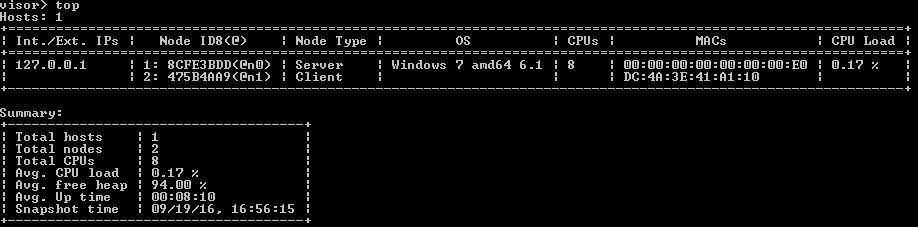
Pay attention to the server console output:
[15:36:11] Topology snapshot [ver = 7, servers = 1, clients = 1, CPUs = 8, heap = 7.1GB]
[15:37:11] Topology snapshot [ver = 8, servers = 1, clients = 0, CPUs = 8, heap = 3.6GB]
[15:42:15] Topology snapshot [ver = 9, servers = 1, clients = 1, CPUs = 8, heap = 7.1GB]
[15:42:24] Topology snapshot [ver = 10, servers = 1, clients = 0, CPUs = 8, heap = 3.6GB]
It can be seen that at some point the client connected, and then fell off - this is because I was in a debug, and he fell off in a timeout. Fine. Now you can say hello to the world. For this guide suggests using a view code
Junit test
@RunWith(SpringJUnit4ClassRunner.class)
@ContextConfiguration(classes = {IgniteProvider.class})
publicclassIgniteHelloWorld{
    @Autowiredprivate IgniteProvider igniteProvider;
    @TestpublicvoidsendHelloTest(){
        Ignite ignite = igniteProvider.getIgnite();
        while(true) {
            try {
                ignite.compute().broadcast(() -> System.out.println("Hello World!"));
                Thread.sleep(1000);
            }
            catch (Exception ex) {}
        }
    }
}
What is he doing? The ignite object represents our node. The compute () method for our client, in accordance with his knowledge of the topology, and taking into account its attachment, creates an object for distributed computing. The broadcast method asynchronously executes the job that it constructed from the System.out.println command ("Hello World!"). The result we get is quite unexpected:
Unexpected exception
Caused by: classorg.apache.ignite.binary.BinaryInvalidTypeException: ru.kmorozov.ignite.test.IgniteHelloWorldatorg.apache.ignite.internal.binary.BinaryContext.descriptorForTypeId(BinaryContext.java:671)
	atorg.apache.ignite.internal.binary.BinaryUtils.doReadClass(BinaryUtils.java:1454)
	atorg.apache.ignite.internal.binary.BinaryUtils.doReadClass(BinaryUtils.java:1392)
	atorg.apache.ignite.internal.binary.BinaryReaderExImpl.readClass(BinaryReaderExImpl.java:369)
	atorg.apache.ignite.internal.binary.BinaryFieldAccessor$DefaultFinalClassAccessor.readFixedType(BinaryFieldAccessor.java:828)
	atorg.apache.ignite.internal.binary.BinaryFieldAccessor$DefaultFinalClassAccessor.read(BinaryFieldAccessor.java:639)
	atorg.apache.ignite.internal.binary.BinaryClassDescriptor.read(BinaryClassDescriptor.java:776)
	atorg.apache.ignite.internal.binary.BinaryReaderExImpl.deserialize(BinaryReaderExImpl.java:1481)
	atorg.apache.ignite.internal.binary.BinaryUtils.doReadObject(BinaryUtils.java:1608)
	atorg.apache.ignite.internal.binary.BinaryReaderExImpl.readObject(BinaryReaderExImpl.java:1123)
	atorg.apache.ignite.internal.processors.closure.GridClosureProcessor$C2V2.readBinary(GridClosureProcessor.java:2023)
	atorg.apache.ignite.internal.binary.BinaryClassDescriptor.read(BinaryClassDescriptor.java:766)
	atorg.apache.ignite.internal.binary.BinaryReaderExImpl.deserialize(BinaryReaderExImpl.java:1481)
	atorg.apache.ignite.internal.binary.GridBinaryMarshaller.deserialize(GridBinaryMarshaller.java:298)
	atorg.apache.ignite.internal.binary.BinaryMarshaller.unmarshal(BinaryMarshaller.java:109)
	atorg.apache.ignite.internal.processors.job.GridJobWorker.initialize(GridJobWorker.java:409)
	... 9 moreCausedby: java.lang.ClassNotFoundException: ru.kmorozov.ignite.test.IgniteHelloWorldatjava.net.URLClassLoader.findClass(URLClassLoader.java:381)
	atjava.lang.ClassLoader.loadClass(ClassLoader.java:424)
	atsun.misc.Launcher$AppClassLoader.loadClass(Launcher.java:331)
	atjava.lang.ClassLoader.loadClass(ClassLoader.java:357)
	atjava.lang.Class.forName0(NativeMethod)
	atjava.lang.Class.forName(Class.java:348)
	atorg.apache.ignite.internal.util.IgniteUtils.forName(IgniteUtils.java:8350)
	atorg.apache.ignite.internal.MarshallerContextAdapter.getClass(MarshallerContextAdapter.java:185)
	atorg.apache.ignite.internal.binary.BinaryContext.descriptorForTypeId(BinaryContext.java:662)
	... 24 more
This same operation we will see on the server side. This is not quite what we would like. This happened because we did not include the amazing steepness of the feature, P2P class loading or Zero Deployment. This point is well explained in the authentic guide , so I will not repeat it. The point is that all our classes, and lambda closures, too, should be propagated to all nodes. An alternative is to attach the class jar to the $ {IGNITE_HOME} \ libs folder. But enable the feature by adding a line to the configs
<propertyname="peerClassLoadingEnabled"value="true"/>We make a change, restart the server. And cheers!
[16:21:11] Topology snapshot [ver = 6, servers = 1, clients = 0, CPUs = 8, heap = 3.6GB]
[16:21:48] Topology snapshot [ver = 7, servers = 1, clients = 1, CPUs = 8, heap = 7.1GB]
Hello World!
Hello World!
Hello World!
findings
In a predictable way, a simple example revealed not just the abysses, but interesting details. I think it will be possible to talk about them in the next series, as well as other features of Ignite that are still unaffected.
References
" The code of the test case on GitHub









