 September 20, 2016 at 10:14
How the heroes of the OverWatch game once went bald, and we returned the hair to them

One of the features of Parallels Desktop 12 for Mac is PC game support. There are many games available only for Windows and Xbox, and with Parallels Desktop you can play these games on a Mac without rebooting - inside a virtual machine. Can we assume that the problem of PC games on Mac is completely resolved? Not yet, but we are working on it. This article describes some examples of how we do this.
Why it is difficult to support DirectX in full
In fact, the PC virtual machine, which allows you to run Windows on a Mac, does not in itself guarantee that PC games will work in it. The fact is that most games require DirectX support for a certain version on the part of the video adapter, and the provision of this support lies entirely with the developers of video drivers. Naturally, video drivers designed for the “real” Nvidia, AMD and Intel video cards will not work in a virtual machine.
Currently, the latest version of DirectX is DirectX 12, but it has not yet become widespread. Another thing is the version of DirectX 11, already quite popular among game developers. True, starting with DirectX 10, there is - and is actively used in practice - the ability to work with DirectX version 11 and higher on a graphics card that supports, for example, DirectX 10 only, with limited functionality, so most new games written for DirectX 11 can run on DirectX 10 with no noticeable visual difference.

We have been providing DirectX support since the very first versions of Parallels Desktop for Mac. As Windows and DirectX evolved, Parallels Desktop also evolved. We supported DirectX 7, DirectX 8, DirectX 9, and for several years now - and DirectX 10, which is especially important in light of the above. But the part of DirectX 10 functionality that concerns the operation of a video driver - the rules by which it is necessary to interpret its commands and create an image - is described in the documentation rather concisely. The number of different combinations, states, calls is very large, and just reading the specification to create an unambiguous program code for it, which will allow any PC game to run and work, unfortunately, is unrealistic.
In addition, you should be aware that we provide DirectX 10 support through OpenGL, i.e. Convert DirectX commands to OpenGL commands. But the same design in OpenGL and DirectX can work in slightly different ways, and different pictures can be drawn under different conditions. What remains? It remains to work by trial and error, i.e. launch modern games that use DirectX 10 functionality and work on bugs.
Our fight with Overwatch
We decided to test our support for DirectX 10 using the example of the Overwatch game , a multi-player shooter released by Blizzard Entertainment for all major gaming platforms, i.e. for PC, PS4, and Xbox One - but not for Mac. Overwatch takes advantage of DirectX 10 very intensively, so it turned out to be a good strength test for our DX10 driver. And the game worked - but with a lot of problems. Many things were drawn incorrectly, slowly. Here's what the game looked like at first.

Below we describe only three of the problems that we had to face .
Controls and Menu Items
The first thing that caught our eye was that on the NVidia and Intel video cards, the Overwatch game did not draw part of the menu items, indicators, and icons. We found the problem quite quickly - it turned out to be related to the discrepancy in the interpretation of the values of the VertexID built-in variable in vertex shaders. In the case of index rendering in DirectX, this variable is equal to the “vertex index” value, and in the case of work through OpenGL, the value BaseVertex is still added to it. The texture-generating shaders, which are then used to display menus and other “flat” game elements, use VertexID versus predefined values in their code. Since the drivers for NVidia and Intel work according to the OpenGL specification, they give the wrong picture. Drivers for AMD, by contrast, do not add BaseVertex to VertexID,
It would be possible to easily fix the situation using the GL_ARB_shader_draw_parameters extension , but, unfortunately, the Mac does not support it - at least for now. We found another solution - when using NVidia and Intel video cards, we pass the BaseVertex value inside the shader, and then subtract it from gl_VertexId. The result is a variable value that is correct in terms of DirectX 10 numbers. On AMD video cards, of course, this does not happen.
Problem with shadows
In fact, the shadows of objects were drawn correctly in Overwatch. But in all the illuminated areas stripes were noticeable.
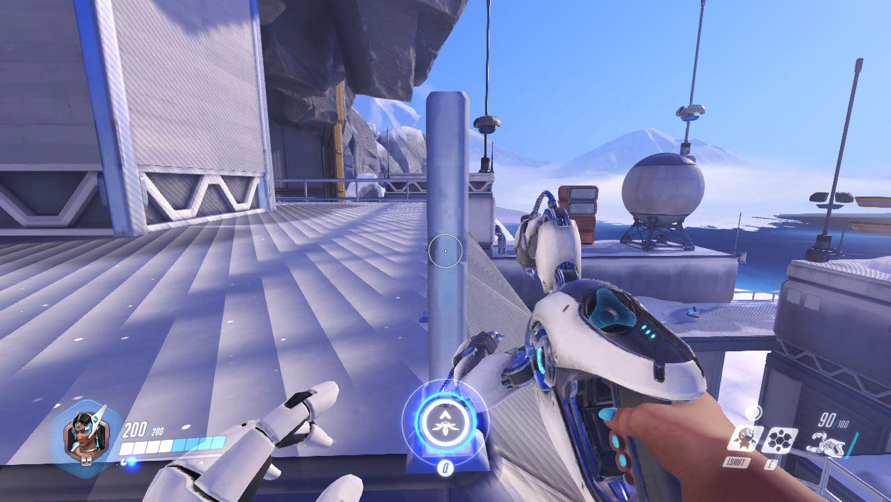
After we thoroughly dealt with the shaders, the reason was found in setting the state of OpenGL. The RasterizerState function of the Direct3D 10 Runtime component has three values that specify the adjustment of the depth of the polygons: DepthBias, DepthBiasClamp and SlopeScaledDepthBias. Their counterpart in OpenGL boils down to calling glPolygonOffset with the correct parameters, and our mistake was that when we set DepthBias to zero, we did not assume that SlopeScaledDepthBias might not be zero, because we thought that the correction of the depth of the polygons was turned off in this case.
Why hair falls out
The fact that all the characters of the Overwatch game under Parallels Desktop either completely lost their hair or cut their hair “like a hedgehog” caused a strong reaction on social networks and generated a lot of jokes .
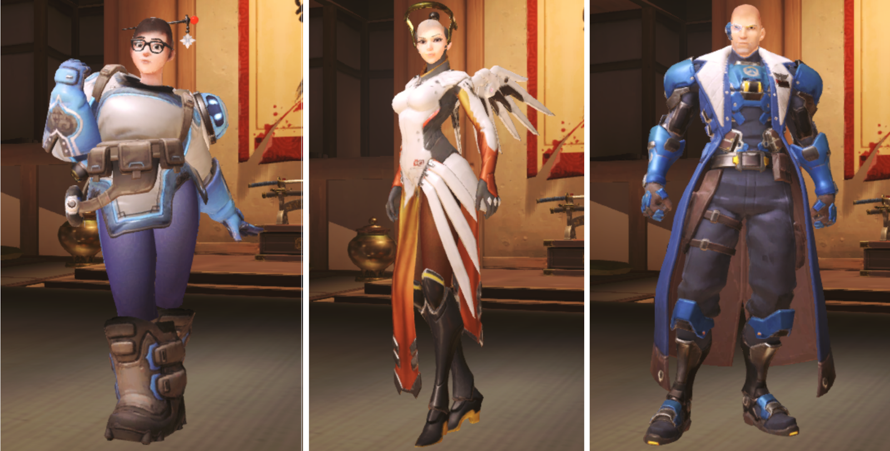
However, it is worth noting that, "pulling back" on bald heroes, good-natured users did not notice that the game lacks not only the hair of the characters, but also some other objects. Testing has shown that the cause of this exotic error is the lack of free texture channels. In OpenGL, there can be no more than 16 for each type of shader. This limitation was due to the fact that the use of texture channels with numbers 16 and higher on AMD video cards leads to damage to the OpenGL state in the driver and problems in subsequent rendering. As a result, instead of all other textures involved in rendering, the shader received a black color, which in some cases led to the complete disappearance of the drawn object from the scene. I must say that we, of course, did not get rid of the problem itself, but since in Overwatch the negative effect of removing this restriction was minimal, we decided to get rid of it in this case. It is worth noting that in the general case, the problem of a lack of texture channels in OpenGL in comparison with DirectX 10 is acute, because the latter theoretically allows up to 128 resources to be used in one rendering, and it saves only that there are very few applications using this feature.
Result
All the work took us less than a month, and after fixing the errors - both described and a number of others - we made sure that now our users can really play Overwatch under Parallels Desktop for Mac, and this game works in virtualization conditions quite quickly. This speed, of course, is not comparable with the speed of Overwatch on the PC, and in case of serious loads the game slows down. But the goal of “catching up and overtaking the PC” was not set by us. Using the Overwatch example, we found problems in the operation of our virtual driver and were able to fix them. The results obtained will help in supporting the work of other 3D applications. And, of course, nothing compares with the positive feedback from Mac users - because now, thanks to us, they can play their old favorite games on this platform, transferring them to the Mac no one would ever be puzzled.
When will DirectX 11 support appear?
The fact is that OpenGL on Macs is developing slowly and always noticeably lags behind the latest current versions. Even to support DirectX 10, we often lacked the existing OpenGL functionality on Mac, we had to resort to various tricks and emulate the missing features ourselves. Now the Mac supports OpenGL 4.1 and this is somehow enough for DirectX 10, but for the 11th version there are a number of key features, for example, compute shaders. So, a lot depends on whether Apple will further develop OpenGL on its machines.









