 August 22, 2016 at 16:01
Why do I need SSL security certificates in 3CX Phone System
- Tutorial
Despite its fantastic capabilities, the Internet is a rather unsafe place. This is due to the fact that without the use of special methods, we have a rather vague idea of who we still communicate with. In addition to the fact that some organization or person tells us about himself, we have no way to confirm the veracity of these words. And here SSL certificates help us.
SSL certificates for dummies
The SSL certificate is the “identity card” of the resource we are accessing. If the name of the resource (usually the domain name of the website) does not match the certificate issued for this name, there are serious reasons to suspect that “the king is not real”. Imagine that the attackers registered a domain name very similar to your bank’s FQDN and copied the original credit card information input interface. If you do not use a certificate (as was often the case before), you will very easily, quickly and quietly give your money to criminals.
A similar situation can happen with the 3CX system. Without a reliable “server identity”, attackers can trick administrator credentials or extension numbers and then say a huge amount. Therefore, starting with 3CX v15, the use of SSL security certificates becomes mandatory.
When you connect to the 3CX interface by entering the server URL (for example, company.3cx.eu), you can always make sure that you are really logged into your server. This shows the certificate in the Issued to: field . It indicates the FQDN of the server name. SSL certificate can be issued not only for a specific host name (company.3cx.eu), but also for the entire top-level domain (* .3cx.eu). Such a certificate covers all nodes in the 3cx.eu domain, but costs a bit more (called wildcard certificate).
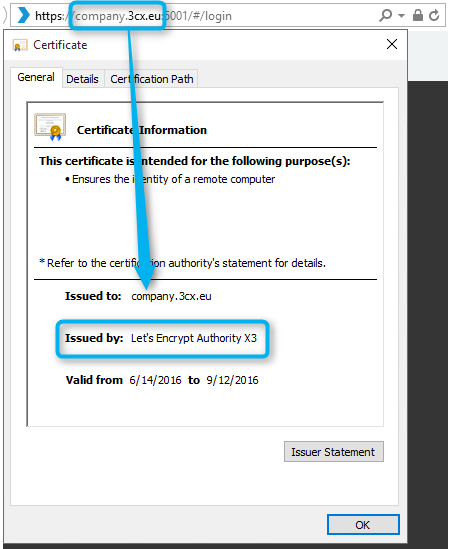
The whole essence of resource certification is contained in the Issued by line : The information in this line is the main difference between the so-called. a self-signed (“self-proclaimed”) certificate and a certificate issued by a public, trusted and respected certification authority. This can be Let's Encrypt, GoDaddy, VeriSign, GeoTrust, etc. Using a self-signed certificate, you show that you trust yourself, but this does not mean at all that someone else will be ready to trust you. For example, a self-signed certificate for the domain www.bank-of-igor.com will not cause any trust - who will vouch for the people behind this bank? In fact, distrust looks like such a browser warning.

We receive the SSL certificate
But what to do so that other people (or devices) begin to trust me? How do I confirm that 3CX administrators, 3CX software clients, and IP hardware phones actually connect to a trusted system? All you need to do is contact the certification body (the “Ministry of the Interior”), which is responsible for checking your system in various ways. After verification, he issues her a certificate. Since everyone trusts a serious certification body, there is no reason not to trust its certificates.
Where to start receiving a trusted certificate?
If you imagine a public certificate (extension .crt, but can have several extensions) as your home, visible to everyone, then the key to the certificate (extension .key) is the key to your house that allows you to enter it. In computer terms, the key allows you to encrypt and decrypt traffic between you and the server, while guaranteeing the authenticity of the server.
When preparing a request for a certificate, you first generate a secret key (which can be password protected) for your certificate. However, there is one problem. The key to the apartment should always be stored only with you - it can not be transferred to third parties. After all, nothing costs the employees of these organizations to use the key for criminal purposes. Therefore, the process of obtaining a certificate provides another link - a special temporary request for a certificate (certificate signing request, extension .csr), which is generated based on your secret key. It is this request, and not the key itself, that you pass to the certification body.
The certificate request contains information about your company and the domain name for which you need to issue a certificate. Then you send the CSR request to the certification authority. The certification body, as was said, certifies your “decency” and sends you the generated SSL certificate back. Also, the certification body guarantees that only you, the owner of the key to the certificate, have the right to this certificate and to the resource for which it is issued.
Both the private key and public certificate are stored on the 3CX web server.
I only want to test 3CX
But what if you only want to test 3CX without wasting time getting a certificate to the server? You can quickly generate a self-signed SSL certificate. It is enough to indicate your FQDN name and the certificate will be ready. However, note that this configuration is not supported by 3CX in the future. In addition, you cannot automatically configure supported IP phones remotely — they only support trusted certificates.
useful links
- Let's Trust Encrypt Company Provides Free Trusted SSL Certificates for 90 Days
- Utility for generating a secret key and certificate signing request from 3CX
- Resource for free generation of a self-signed key
- Using trusted certificates for your FQDN on a 3CX server









