 August 2, 2016 at 09:13
Taming the ardor of Plex on ARM devices
It all started in my question in Toster. And for half a year now I've been using Plex media server . For those who have not heard about it, I’ll explain: this is the software that analyzes and structures your media library, and provides access to it via the web and not only that kind of personal Netflix without registration and SMS. I use Plex to watch movies and TV shows through a browser on a laptop or Chromebook .
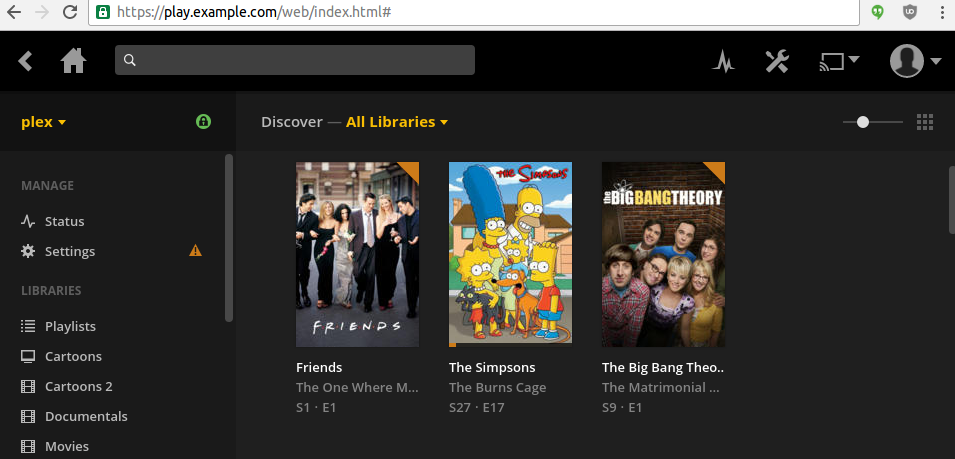
Previously, I had to configure NFS or Samba share, conjure with automount (8) , put up with share fall off after suspend-resume, or just copy files using sftp / scp, but now I useTidePlex. Unfortunately, not everything is easy with him either.
The role of my home server is played by Cubietruck with an ARM Cortex-A7 1GHz processor and Armbian distribution (Vanilla kernel to support Docker and namespaces (7) ). It is quite enough for everyday needs (storage backups, VPN server), but it is obviously not intended for more resource-intensive things.
Plex is freeware software. It is free, but not free, which imposes certain restrictions. For example, there are no source codes and official deb packages for any processor architecture. Well, of course, many moviegoers will not want to install a pig in a poke on their system.
There is an opensource Emby Media Server project , an analogue of Plex, written in Mono. Unfortunately, he has problems playing files in browsers. Emby transcodes many of the video formats completely, even if the h264 codec is originally used.
Today, Plex allows you to play more video formats without a complete transcoding than Emby Media Server. Perhaps one of you will help correct this situation. In the meantime, you can pokoldovat on the file browserdeviceprofile.js , which is responsible for the browser profiles.
The first problem we will solve with the help of officially distributed packages for NAS devices, and the second partially with Docker.
Let's take the package for NAS QNAP with the architecture ARMv7-X31 + as the basis (this build supports the Neon extension, which is supported by Cubietruck, you can check it with the command cat /proc/cpuinfo | grep neon):
$ curl -s https://plex.tv/api/downloads/1.json | python -mjson.tool | grep x31plus
                    "url": "https://downloads.plex.tv/plex-media-server/1.0.3.2461-35f0caa/PlexMediaServer_1.0.3.2461-35f0caa_arm-x31plus.qpkg
The qpkg file is a symbiosis of a shell script and several archives. plex_media_serverWe can unpack it into a directory using the command:
$ mkdir plex_media_server
$ wget https://downloads.plex.tv/plex-media-server/1.0.3.2461-35f0caa/PlexMediaServer_1.0.3.2461-35f0caa_arm-x31plus.qpkg
$ dd if=PlexMediaServer_1.0.3.2461-35f0caa_arm-x31plus.qpkg bs=22954 skip=1 status=none | tar -xzf - -C plex_media_server
The resulting files can be placed in the Docker container, but more on that later. Suppose we run Plex and are going to watch a movie in the browser that is already encoded in h264 with audio AC3 5.1. What will Plex do? It will begin to transcode the AC3 5.1 track to AAC 5.1. And to watch video on a laptop, we don’t need to listen to video with six channels, and a slow processor makes itself felt with periodic pauses when watching.
Fortunately, Plex has configuration profiles that can be edited. For example, a profile for browsers Resources/Profiles/Web.xml.
In it we see a parameter
To enable the so-called downmix , you need to replace parameter 6 with 2 and get
For most users, this option will be acceptable. But not for those who have files with a six-channel AAC track. In this case, the six-channel AAC will be converted to stereo AAC. And this again is a waste of processor resources and periodic freezes when watching a video. I thought that conjuring with profiles could solve the problem, but unfortunately, in the current version of Plex, such exceptions are not possible. The Plex forum has been unanswered for two weeks now with a request to add a similar option.
The only option for solving this problem I saw in replacing the binary Plex Transcoderwith a script that will generate the necessary parameters if there is an AAC track in the video file.
#!/bin/bash
# This script disables transcode for videos which already have aac audio
magic=0
i=0
input=false
for arg in "$@"; do
    ((i++))
    next=$((i+1))
    if [[ "$arg" == "-i" ]]; then
      input=true
    fi
    if [[ "$arg" =~ -codec:[0-9] && "${@:$next:1}" == "aac" && $magic == 0 && $input == false ]]; then
      ((magic++))
      continue
    fi
    if [[ "$arg" == "aac" && $magic == 1 ]]; then
      ((magic++))
      continue
    fi
    if [[ "$arg" == "-codec:1" && $magic == 2 ]]; then
      ((magic++))
    fi
    if [[ "$arg" == "aac" && $magic == 3 ]]; then
      args[$i]="copy"
      ((magic++))
      continue
    fi
    if [[ "$arg" == "-ar:1" && $magic == 4 ]]; then
      args[$i]="-copypriorss:1"
      ((magic++))
      continue
    fi
    if [[ "$arg" == "48000" && $magic == 5 ]]; then
      args[$i]="0"
      ((magic++))
      continue
    fi
    if [[ "$arg" == "-channel_layout:1" && $magic == 6 ]]; then
      ((magic++))
      continue
    fi
    if [[ "$arg" == "stereo" && $magic == 7 ]]; then
      ((magic++))
      continue
    fi
    if [[ "$arg" == "-b:1" && $magic == 8 ]]; then
      ((magic++))
      continue
    fi
    if [[ "$arg" == "256k" && $magic == 9 ]]; then
      ((magic++))
      continue
    fi
    args[$i]=$(printf "%q" "$arg")
done
set -- "${args[@]}"
eval "/opt/plex/Application/Resources/Plex\ Transcoder_ $@"
github link: https://github.com/kayrus/plex/blob/master/magic.sh
During testing, it turned out that this hack works well with video files from my library.
Docker
Now let's see how to wrap all this in a Docker image. At a minimum, the following conditions must be met:
- Access from the container is possible only to certain directories.
- Plex should not be run from root, even inside the container.
- Why not use systemd to run a container with Plex?
The following are excerpts from Dockefilewhich I use.
We copy and unpack the downloaded archive (it can be obtained directly through wget, but this is prohibited in the configuration I use). I use COPYinstead ADDto avoid unpacking the archive automatically, in this case this is not necessary. The expression || trueignores gzip's garbage message after the end of the archive.
COPY PlexMediaServer_1.0.3.2461-35f0caa_arm-x31plus.qpkg /tmp/plex_media_server.tar
RUN { dd if=/tmp/plex_media_server.tar bs=22954 skip=1 status=none | tar -xzf - -C /opt/plex/Application || true; } && rm -f /tmp/plex_media_server.tar
Add the unprivileged system user to the container plex.
RUN useradd -r -d /var/lib/plex -s /sbin/nologin plexActivate downmix:
RUN sed -i 's/name="audio.channels" value="6"/name="audio.channels" value="2"/' /opt/plex/Application/Resources/Profiles/Web.xmlAll further actions in the container will be performed by the user plex.
USER plexWe mark the paths /var/lib/plex(to save the state of the media file base) and /media(the path for media files) as external volumes:
VOLUME ["/var/lib/plex","/media"]Container launch
In the command below, we translate the standard port 32400 to the 80th http port, mount the path /home/plexin /var/lib/plexinside the container and /home/user/mediain /media.
$ docker run --name plex --hostname plex --rm -p 80:32400 -v /home/plex:/var/lib/plex -v /home/user/media:/media pleximagesystemd
Unit file that I use to start the plex container.
[Unit]
Description=Plex Media Server
After=docker.service
Requires=docker.service
[Service]
Environment=MEDIA_LIB=/home/user/media
Environment=CONFIG_DIR=/var/lib/plex
Environment=DOCKER_IMAGE=kayrus/plex
Environment=PLEX_INT_PORT=32400
Environment=PLEX_EXT_PORT=32400
# Remove old Plex container
ExecStarPre=-/usr/bin/docker rm plex
ExecStart=/usr/bin/docker run --name plex --hostname plex --rm -p ${PLEX_EXT_PORT}:${PLEX_INT_PORT} -v ${CONFIG_DIR}:/var/lib/plex -v ${MEDIA_LIB}:/media ${DOCKER_IMAGE}
# Fix foreign network which requires Plex login/signup
ExecStartPost=/sbin/iptables -t nat -I POSTROUTING -o docker0 -p tcp -m tcp --dport ${PLEX_INT_PORT} -j MASQUERADE
ExecStopPost=-/sbin/iptables -t nat -D POSTROUTING -o docker0 -p tcp -m tcp --dport ${PLEX_INT_PORT} -j MASQUERADE
ExecStop=/usr/bin/docker stop plex
# Remove pidfile after stop which prevents Plex server start
ExecStopPost=/bin/rm -f ${CONFIG_DIR}/Library/Application\x20Support/Plex\x20Media\x20Server/plexmediaserver.pid
[Install]
WantedBy=multi-user.target
https and nginx
To access Plex from the Internet, it is recommended to use an HTTPS connection. If you do not want to register and pay money for additional Plex features, you can configure the certificate yourself. You can use a self-signed certificate, you can use a certificate from Let's Encrypt . But in the end, the nginx configuration file will look something like this:
# Реализуем автоматический редирект на Plex dashboard, изначально в бесплатной версии это не предусмотрено.
map $request_method$request_uri$http_referer $do_redirect {
  "GET/" 1;
  default 0;
}
server {
  # Listen only HTTPS socket
  listen [::]:443;
  # Enter your domain here
  server_name plex.example.com;
  # Configure your SSL certificates here
  ssl on;
  include ssl.conf;
  ssl_trusted_certificate ssl/ca-certs.pem;
  ssl_certificate         ssl/plex.example.com.pem;
  ssl_certificate_key     ssl/plex.example.com-key.pem;
  # Protect Plex by basic auth
  auth_basic           "denied";
  auth_basic_user_file .htpasswd;
  # Redirect to the Plex dashboard
  if ($do_redirect = 1) {
    return 302 https://$host/web;
  }
  # Default location
  location / {
    # Не будем передавать в Plex наши пароли
    proxy_set_header Authorization  "";
    proxy_buffering off;
    proxy_pass http://localhost:32400;
  }
  # Websockets location
  location /:/websockets/ {
    # Не будем передавать в Plex наши пароли
    proxy_set_header Authorization  "";
    proxy_buffering off;
    proxy_pass http://localhost:32400;
    proxy_http_version 1.1;
    proxy_set_header Upgrade $http_upgrade;
    proxy_set_header Connection "upgrade";
  }
}
References:
- Repository with information on how to run Plex in a Docker container under the ARM architecture: https://github.com/kayrus/plex
- Repository with information on how to run Emby Media Server in a Docker container under the ARM architecture: https://github.com/kayrus/emby









